
VPN Proxy Master: Could It Be the Most Unsafe Free VPN?
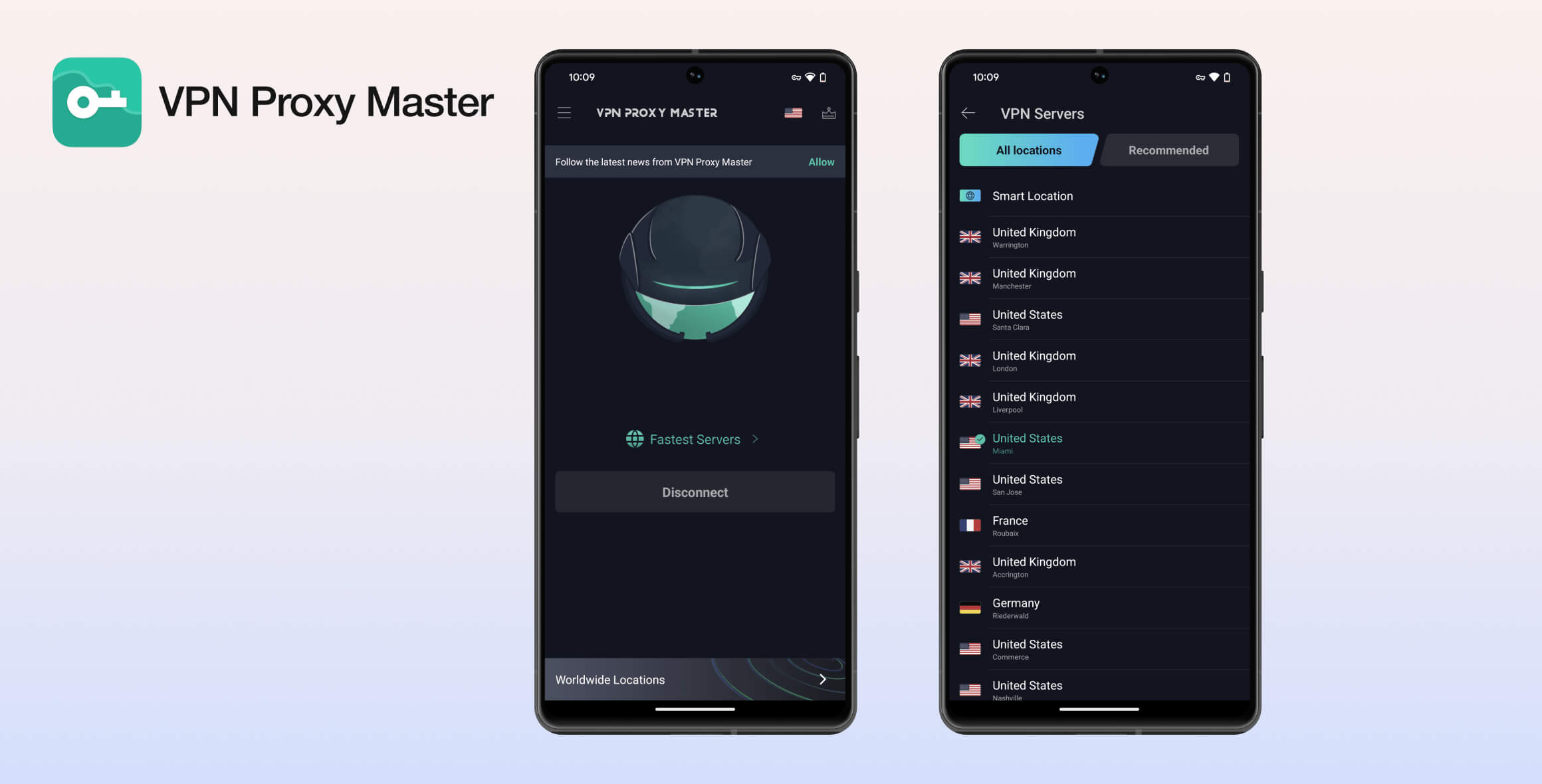
VPN Proxy Master is not a safe VPN. The software logs too much user data, it’s slow, and the company has disappointing customer support. The VPN fails to properly encrypt your traffic, and we detected dangerous functions and malware in its Android app.
- Pros
- Unlimited Free data on Android and iOS
- Cons
- Unsafe
- Slow speeds
- Doesn't unblock any streaming services
- No apps for streaming devices
- Lots of ads
- Shares data with advertisers
- Pros
- Uses OpenVPN protocol
- Cons
- Collects too much personal data
- Strong links to China
- History of malware
- Fails to encrypt traffic
- Not enough servers (one for iOS)
- Cannot access any streaming sites
Privacy
VPN Proxy Master is owned by a company with ties to the ruling Chinese Communist Party. It has recently improved its logging policy but still collects too much unnecessary data. This VPN will also sell your data to advertising partners. The service isn’t trustworthy or private enough for us to recommend.
| Originating IP Address | No |
|---|---|
| Browsing Activity | No |
| Individual Connection Timestamps | No |
| Date of Last Connection | No |
| VPN Server IP | No |
| Device Information | Yes |
| Individual Bandwidth Usage | Yes |
| Account Information | Yes |
You can read VPN Proxy Master’s full privacy policy on its website.
Since Lemon Clove acquired VPN Proxy Master, we’ve seen some improvements to its logging policy. The VPN used to log your IP address and connection timestamps without aggregating or anonymizing the data.
Now, VPN Proxy Master records your VPN server location, Internet Service Provider (ISP), and individual bandwidth usage, among other data points. It says it aggregates this data to “maintain its service” without compromising your privacy.
Some VPNs do need to save certain data points, like your username, password, and payment information, to operate their service.
However, we’ve seen many other VPNs function without requiring this much data. We’re still uncomfortable that it logs your ISP and the location of the VPN server you connect to.

VPN Proxy Master logs your country, VPN server location, and whether you connected successfully, amongst other data points.
VPN Proxy Master doesn’t keep the worst kinds of logs, such as your IP address or browsing history, but it still collects too much to be considered truly private.
Importantly, we’d like to see VPN Proxy Master undergo an independent audit of its logging policy and app security to ensure all data is properly aggregated and deleted.
Free Version Allows Advertiser Tracking
In its privacy policy, VPN Proxy Master openly states that anyone using its free service may be subject to third-party tracking. Some of its advertising partners include Facebook, AdMob, UnityAD, Vungle, and Smaato.
It adds that these companies can “set and access their own cookies, pixel tags, and similar technologies on our services.”
It also states that VPN Proxy Master shares aggregated data it collects with these advertising partners.
VPN Proxy Master profits by selling your data and giving advertisers permission to track you.
Who Owns VPN Proxy Master?
There is a complex corporate structure behind this VPN. It is now owned by Lemon Clove Pte. Limited, but it was previously owned by Innovative Connecting PTE. Limited. These entities are essentially the same.
The developer of VPN Proxy Master is also listed as All Connected Co., a subsidiary of Innovative Connecting (also based in Singapore). Our investigations found that both companies have links to mainland China.
Our VPN ownership research also revealed that the same company email address was registered for VPN Proxy Master and other VPNs like Turbo VPN, VPN Robot, VPN Monster, and VPN Snap.
In short, the same opaque company is likely behind several low-quality free VPN services found in app stores.
The director of Lemon Clove/Innovative Connecting is Danian Chen, a Chinese national described by Fortune China as “one of the most influential young leaders in China.”
This is concerning. Successful businesses in China often must fully cooperate with the Chinese Communist Party (CCP) and the Chinese military.
Singapore is also a member of an intelligence coalition called SIGINT Seniors Pacific, which includes the United States’ National Security Agency (NSA) and partners like India, South Korea, and Thailand.
Overall, we highly recommend choosing a different VPN service that’s headquartered in a privacy-friendly jurisdiction and doesn’t have links to China. There are plenty of better VPNs that don’t keep unnecessary logs of your personal information.
Streaming
VPN Proxy Master’s premium version is a poor choice for bypassing geo-blocked streaming content. It only works with a few UK streaming services and fails to unblock any major US platforms like US Netflix, HBO Max, or Hulu. The free version is even worse for streaming international content. The only service it could access was YouTube.
| Streaming Service | Works with VPN Proxy Master (Free) | Works with VPN Proxy Master |
|---|---|---|
| BBC iPlayer (UK) | No | Yes |
| DAZN (Canada) | No | No |
| Disney+ (UK) | No | No |
| Hulu (US) | No | No |
| ITVX (UK) | No | Yes |
| HBO Max (US) | No | No |
| Netflix (US) | No | No |
| Netflix (UK) | No | No |
| Prime Video (US) | No | No |
| Sky Go (UK) | No | No |
Premium Tier Unblocks a Few UK Streaming Services
VPN Proxy Master Premium can access only a few geo-restricted services. In our latest tests, it worked with All 4, BBC iPlayer, and ITVX. It did not work with UK Netflix.
The VPN has dedicated streaming servers for US Netflix, Hulu, and HBO Max, but all of them failed to unblock these services in our tests.
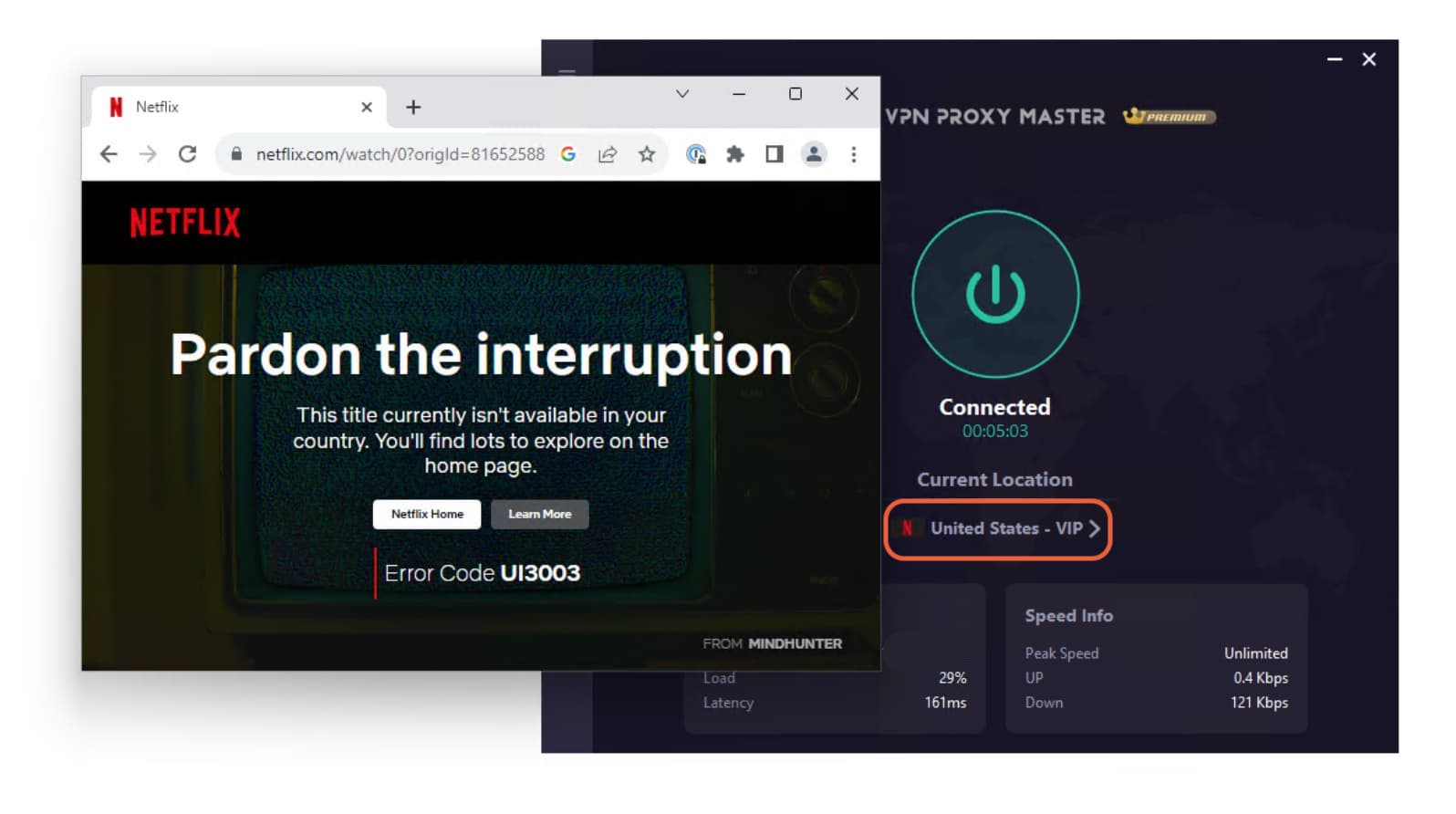
VPN Proxy Master’s premium US Netflix server failed to unblock US Netflix content.
This makes it a poor VPN for streaming. Many other VPNs can access these platforms, including US Netflix, Amazon Prime Video, Disney+, and Hulu.
Free Version Doesn’t Unblock Any Streaming Services
VPN Proxy Master Free is one of the worst free VPNs for streaming we’ve tested. You can’t choose a server — you’re automatically assigned a local one. This means you can’t use the free version to stream content from other regions.
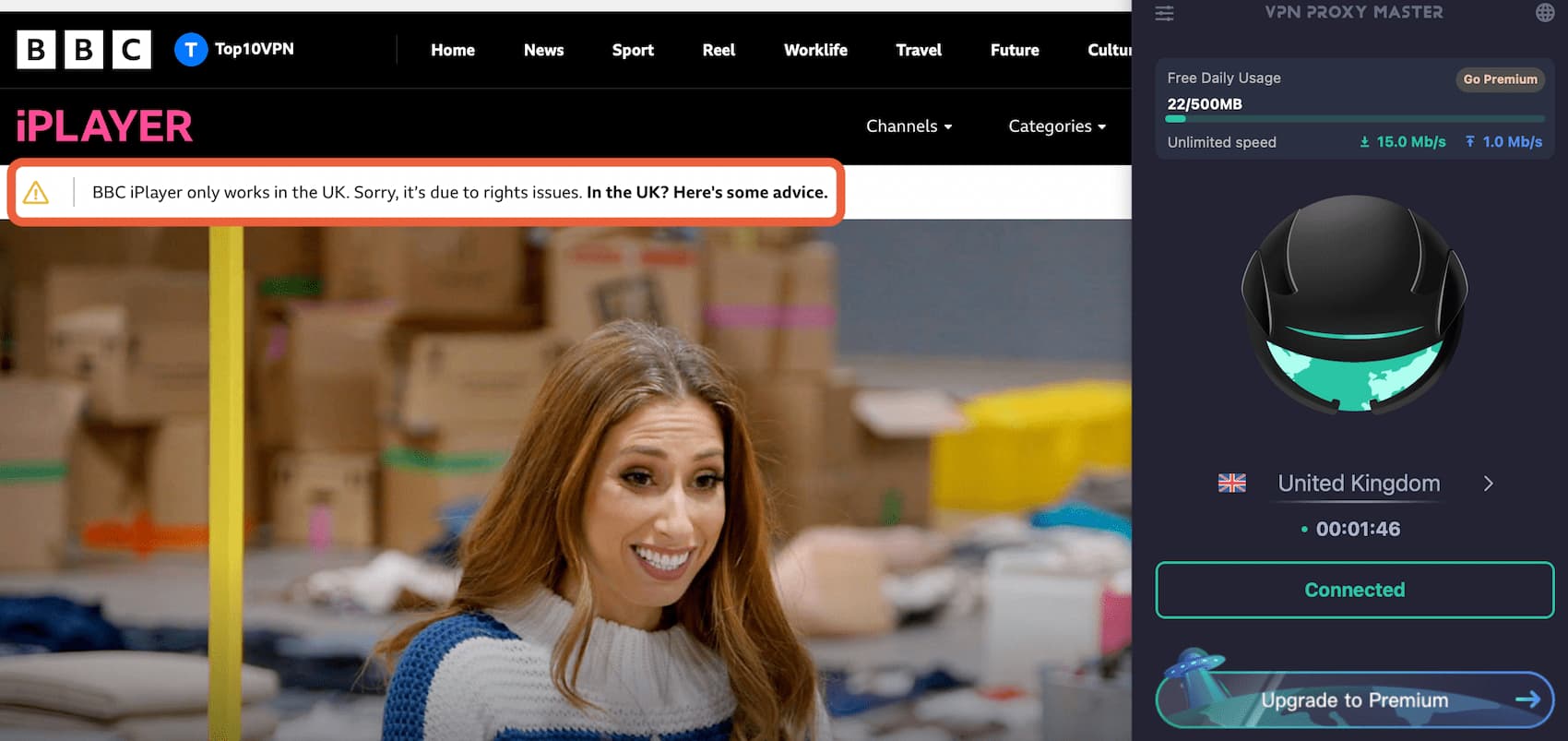
BBC iPlayer detected VPN Proxy Master Free on macOS and blocked us from watching.
The free service was detected by every streaming platform we tested. It didn’t unblock BBC iPlayer, ITVX, UK Netflix, or Amazon Prime Video.
If you want to unblock streaming content without paying, we recommend PrivadoVPN Free as the best free VPN for streaming. It offers servers in 11 countries and unblocks US Netflix, HBO Max, BBC iPlayer, Disney+, and more.
Speed
VPN Proxy Master’s paid version has fast download speeds on nearby connections but slows significantly on distant servers. The free version is much slower, with a 49% drop to 51 Mbps. Overall, there are much faster VPNs available — both free and paid.
We tested VPN Proxy Master’s average speeds when connecting to servers on six continents. Here are the results using the paid app:
| No VPN (New York) | US (New York) | Canada (Toronto) | US (Los Angeles) | Germany (Berlin) | Brazil (São Paulo) | Japan (Tokyo) | Australia (Sydney) | |
|---|---|---|---|---|---|---|---|---|
| Server Location |  |
|
 |
|
 |
 |
 |
 |
| Download Speed | 100Mbps | 94Mbps | 96Mbps | 87Mbps | 94Mbps | 45Mbps | 93Mbps | 86Mbps |
| Upload Speed | 100Mbps | 91Mbps | 96Mbps | 92Mbps | 90Mbps | 40Mbps | 40Mbps | 85Mbps |
| Ping | 1ms | 6ms | 55ms | 153ms | 92ms | 118ms | 142ms | 220ms |
| Distance | 0mi | 5mi | 300mi | 2,500mi | 4,000mi | 4,800mi | 6,700mi | 9,900mi |
Our manual tests show that VPN Proxy Master performs well on local connections. Testing from the US, we connected to a nearby East Coast server and saw only a 6% speed loss.
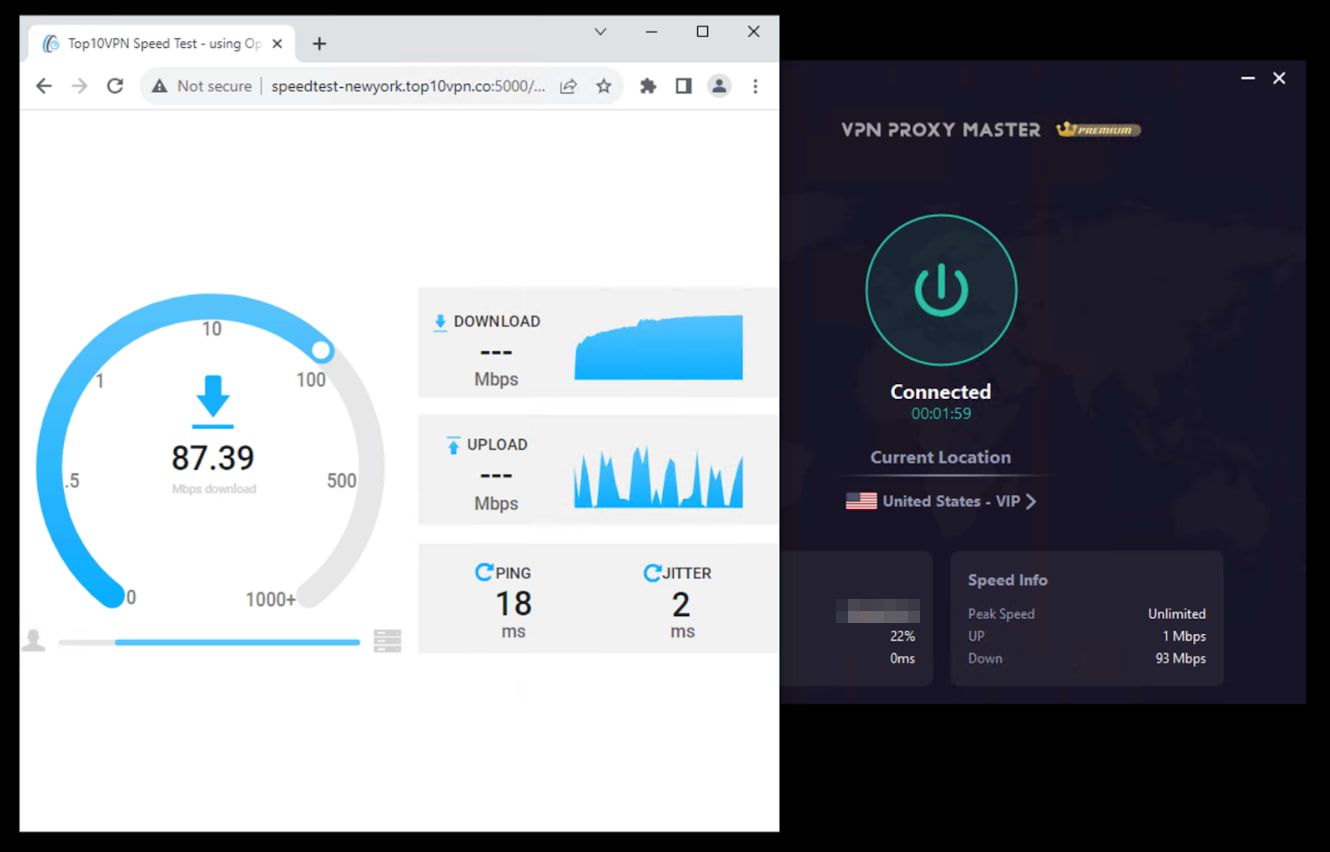
VPN Proxy Master Premium is a lot faster than the free version.
On long-distance international connections, speeds dropped much more — 16% on average. Performance was worst in Brazil, dropping from 100 Mbps to 45 Mbps.
VPN Proxy Master Free Is Much Slower than the Paid Version
Here are the results for our speed tests with VPN Proxy Master’s Free version:
| No VPN (New York) | US (New York) | Canada (Toronto) | Germany (Berlin) | |
|---|---|---|---|---|
| Server Location | |
|
|
|
| Download Speed | 100Mbps | 51Mbps | 28Mbps | 50Mbps |
| Upload Speed | 100Mbps | 70Mbps | 41Mbps | 70Mbps |
| Ping | 1ms | 12ms | 134ms | 391ms |
| Distance | 0mi | 5mi | 300mi | 4,000mi |
These results are extremely disappointing for a free VPN. Hotspot Shield Free and Proton VPN Free are much faster, more reliable, and far more secure. To put VPN Proxy Master Free’s results into context, here are the speeds of the fastest free VPNs:
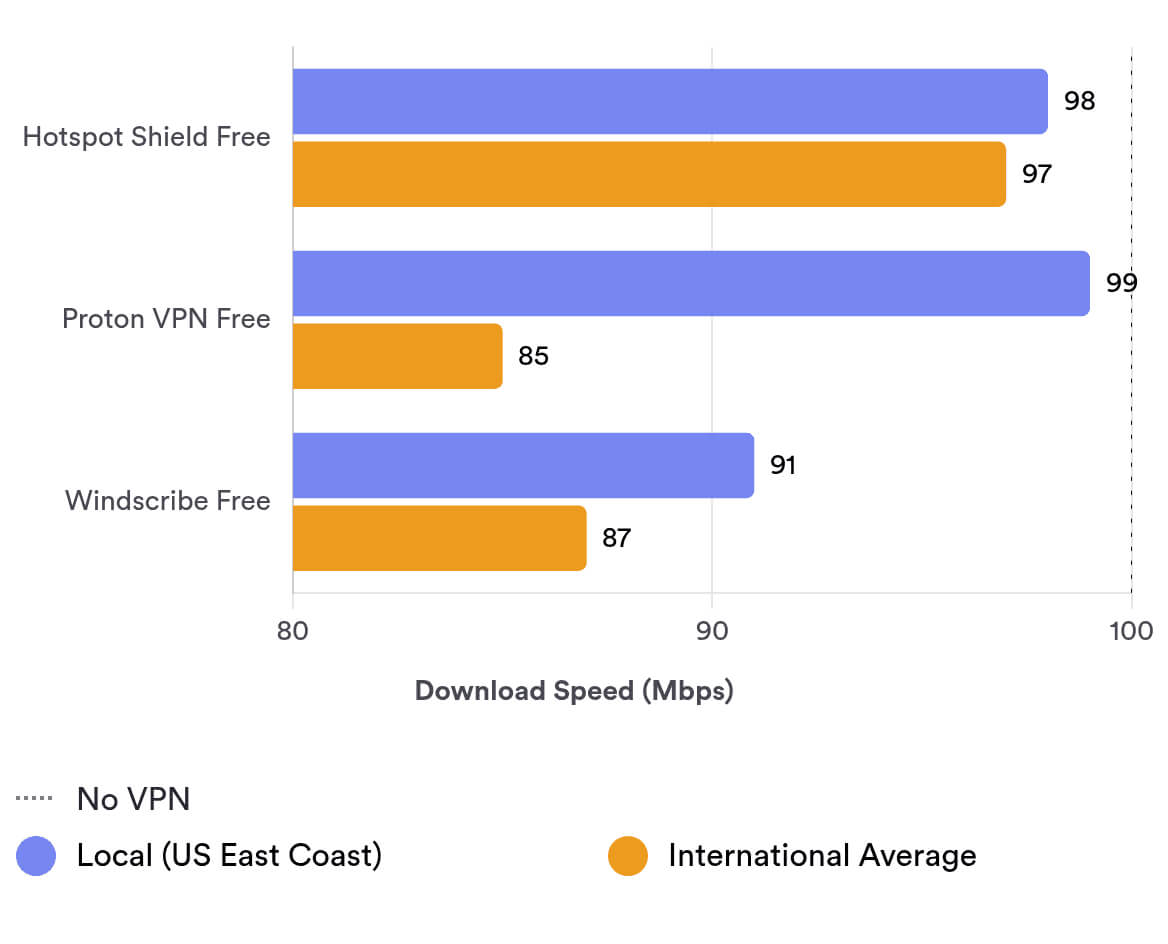
Security
VPN Proxy Master is not a safe VPN. It claims to use AES-256 encryption, but in our packet-inspection tests we found it failed to properly encrypt our internet traffic. We also detected malware when investigating the Android app. It has some basic essentials, like OpenVPN and a paywalled kill switch, but its flaws make it unusable from a safety perspective.
| Independent Audit | No |
|---|---|
| VPN Kill Switch | Yes |
| Leak Protection | No |
We’re disappointed that VPN Proxy Master’s software isn’t open-source, meaning its code isn’t available for scrutiny. It also doesn’t publish regular third-party security audits that could verify the stability and security of its infrastructure.
Failed Wireshark Encryption Tests on Windows
To test its encryption, we used a packet-inspection tool called Wireshark.
We found that VPN Proxy Master failed to encrypt HTTP requests, meaning information in the VPN tunnel remained readable to third parties.
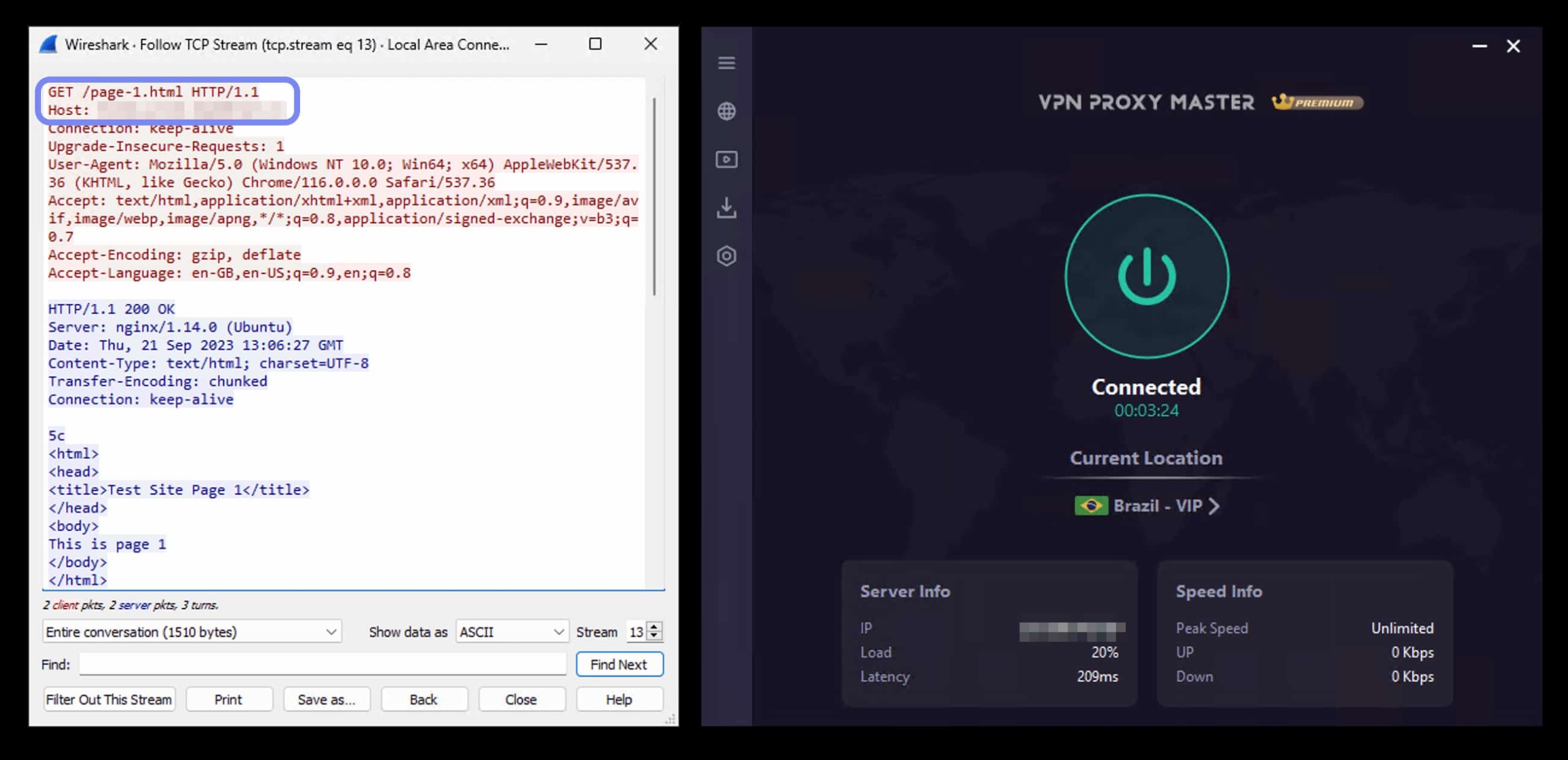
VPN Proxy Master failed to encrypt our internet traffic while connected to a server in Brazil.
Encrypting your online traffic is a crucial feature of any VPN, and VPN Proxy Master fails to do it reliably.
Malware Detected in Android App
In 2018, our investigation into free VPNs detected invasive functions and malware within VPN Proxy Master’s Android app.
It tested positive for a Potentially Unwanted Program (PUP.HighConfidence) and included three dangerous functions: getLastKnownLocation, getDeviceId, and execute system command.
These functions can be used to collect sensitive information like your location and device details. Executing a system command could be used to detect ping times, but VPN Proxy Master doesn’t clarify its purpose.
Since 2023, VPN Proxy Master’s security has improved, and it no longer includes these functions. However, a history of embedded malware and risky functions should deter security-conscious users.
Supports OpenVPN but Not WireGuard
VPN Proxy Master doesn’t disclose which tunneling protocol it uses by default. Most VPNs, like PIA and Windscribe, display the active protocol on the home screen.
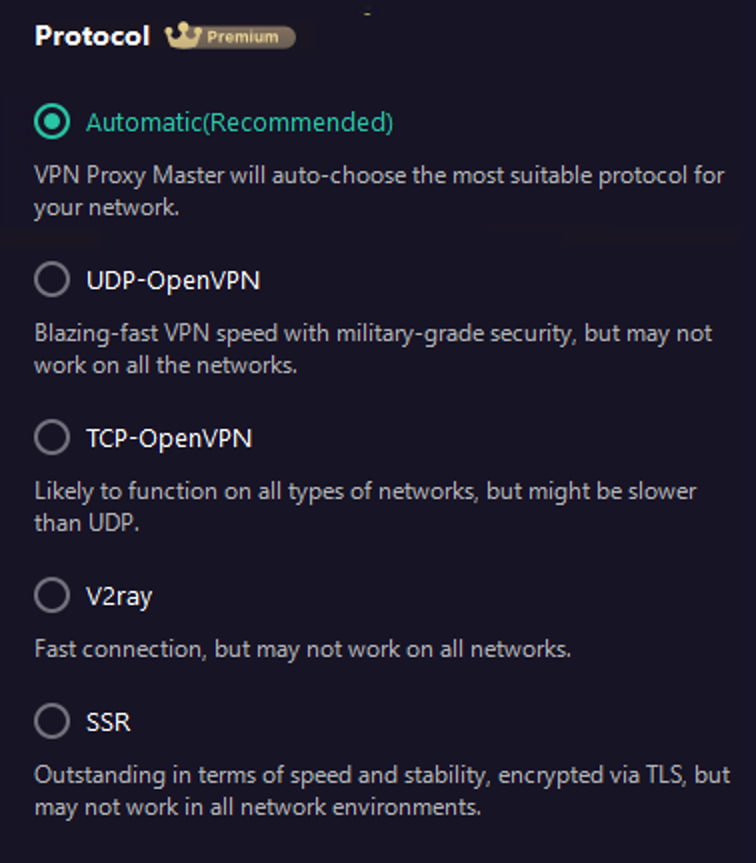
VPN Proxy Master’s protocol selection is wildly different on desktop and mobile.
This wouldn’t be a problem if VPN Proxy Master only used secure protocols. Instead, it offers IPSec and L2TP, which aren’t strong enough to rely on exclusively.
We suggest forcing OpenVPN if you must use it, though we don’t recommend VPN Proxy Master at all.
Paywalled Kill Switch
A VPN kill switch is essential. Without one, your real IP address can be exposed if the VPN connection drops.
VPN Proxy Master paywalls its kill switch, so users of the free version are more vulnerable to data leaks. This is frustrating, as the VPN is sacrificing user security and privacy for profit.
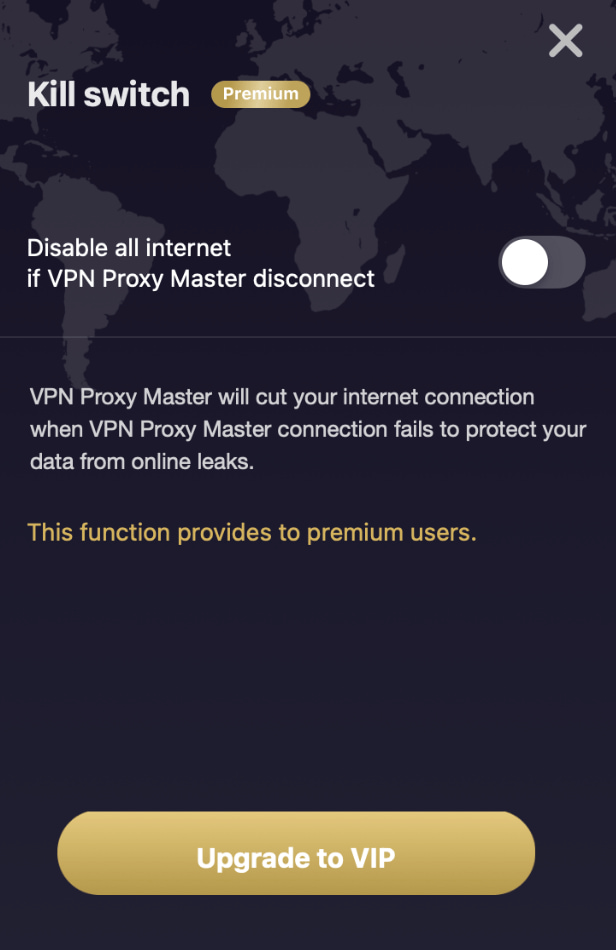
VPN Proxy Master paywalls its kill switch on all devices, including Android and iOS.
Security-focused free VPNs like Proton VPN Free and Windscribe Free let users protect themselves with a kill switch because it’s the right thing to do.
Server Locations
VPN Proxy Master claims to have “6,000 secure servers in over 50 countries.” However, we counted servers in just 37 countries. The number of countries varies on Windows and macOS, which is highly unusual for a VPN. We suggest waiting for the service to consolidate its server list before subscribing.
| Continent | VPN Proxy Master (Free) Countries with Servers | VPN Proxy Master Countries with Servers |
|---|---|---|
| Europe | 3 | 16 |
| North America | 2 | 3 |
| Asia | 0 | 12 |
| South America | 0 | 3 |
| Africa | 0 | 1 |
| Oceania | 0 | 2 |
As you can see above, VPN Proxy Master has different server lists on different platforms. We found macOS has the most locations, especially in Europe.
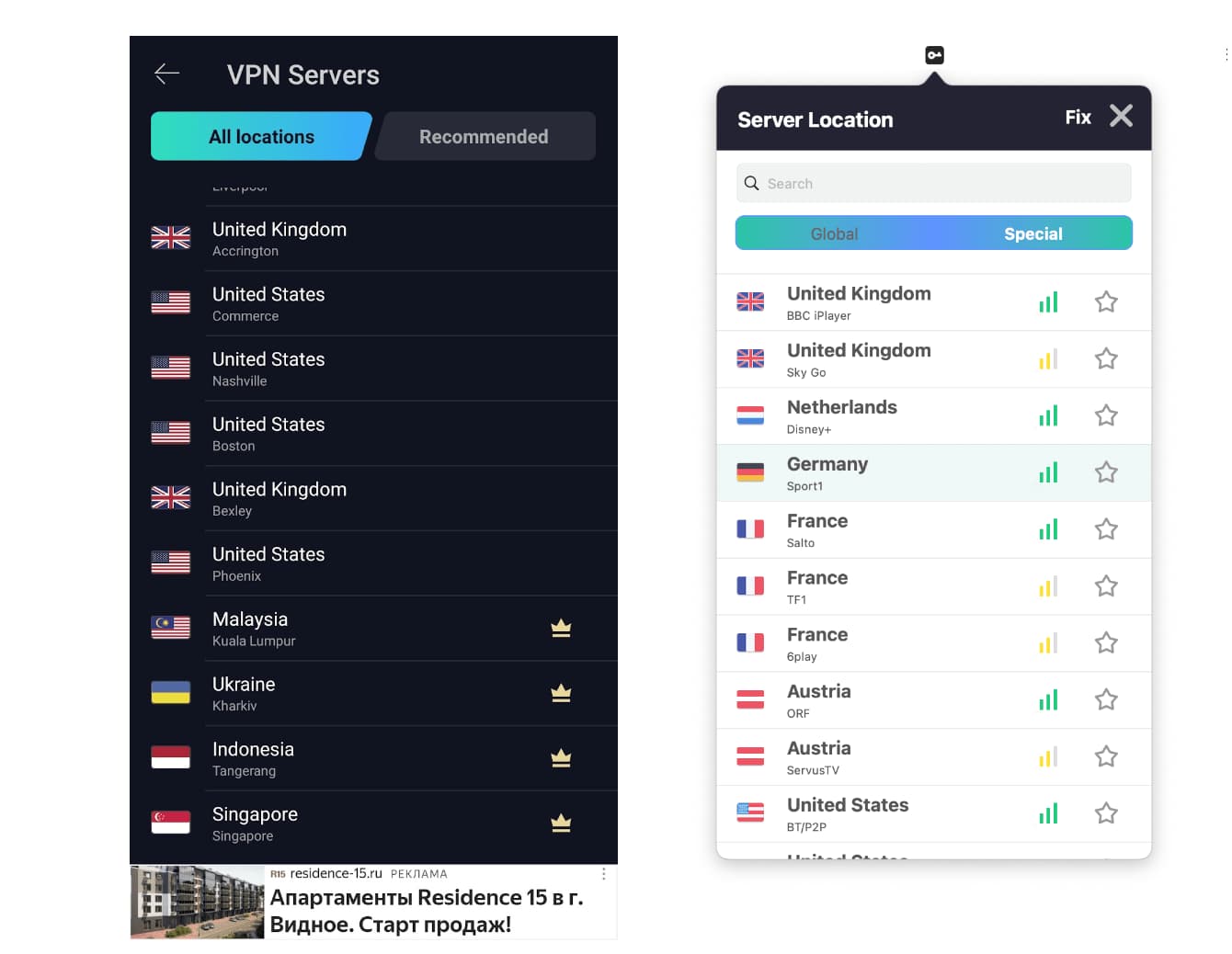
VPN Proxy Master Free (left) has fewer server options than the paid version (right).
On Android, VPN Proxy Master Free offers servers in five countries. On iOS, the app doesn’t let you choose a server at all. You’re assigned a nearby server, which could be in your country or a neighboring one.
Confusingly, the website claims servers “in over 50 countries,” but we counted just 37. This is a small network compared to mid-tier and top-tier VPNs.
User Experience
VPN Proxy Master’s apps are unpleasant to use. Its free mobile apps are full of long pop-up ads. On Windows, the app shows confusing error notifications. Some settings aren’t where you’d expect them, and features aren’t intuitively named. Overall, we had a frustrating experience on every device we tested.
VPN Proxy Master’s apps have improved in the last couple of years, but there are still serious usability issues on all platforms, whether you’re paying or using it for free.
Honestly, no amount of free data could convince us to use this VPN daily. There are plenty of other free VPNs, like Proton VPN Free and PrivadoVPN Free, that don’t bombard you with ads.
VPN Proxy Master is also unnecessarily complicated to set up on Windows. You have to download additional external files, which aren’t mentioned on the website.
Here’s an overview of our experience by device:
Desktop & Laptop (Windows & Mac)
The macOS app offers the best user experience, with more general and specialized servers. Installation was smooth. It’s better than the Windows version, but still not particularly user-friendly.
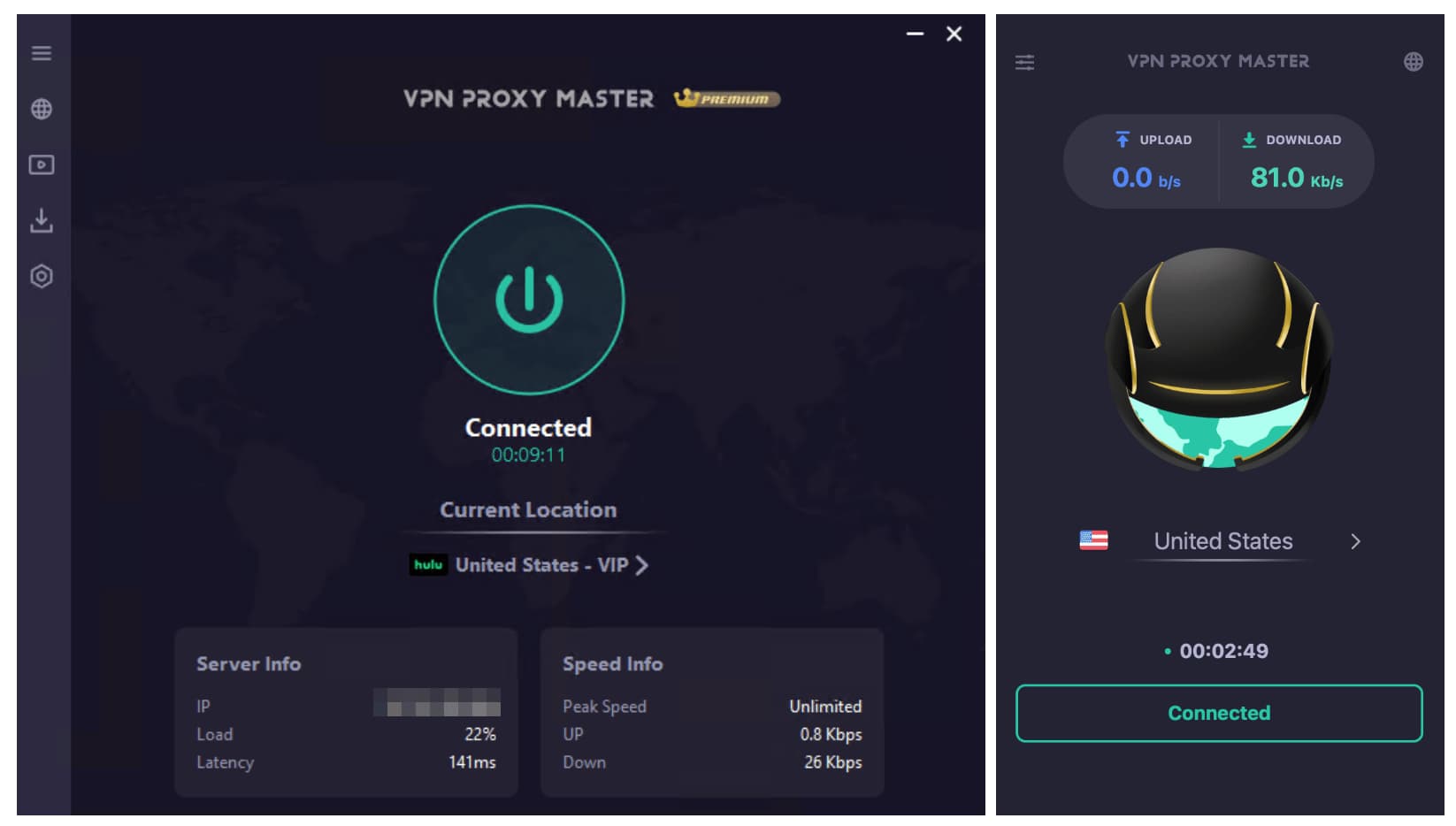
VPN Proxy Master on Windows (left) and macOS (right) have the same color scheme, but show different connection details.
The Windows setup process is the most difficult of all the platforms. Even worse, there’s no free version on Windows to test before subscribing.
After installing the Windows app, we repeatedly received error messages stating the software needed additional external files to run. This is extremely unusual for a VPN and quite suspicious.
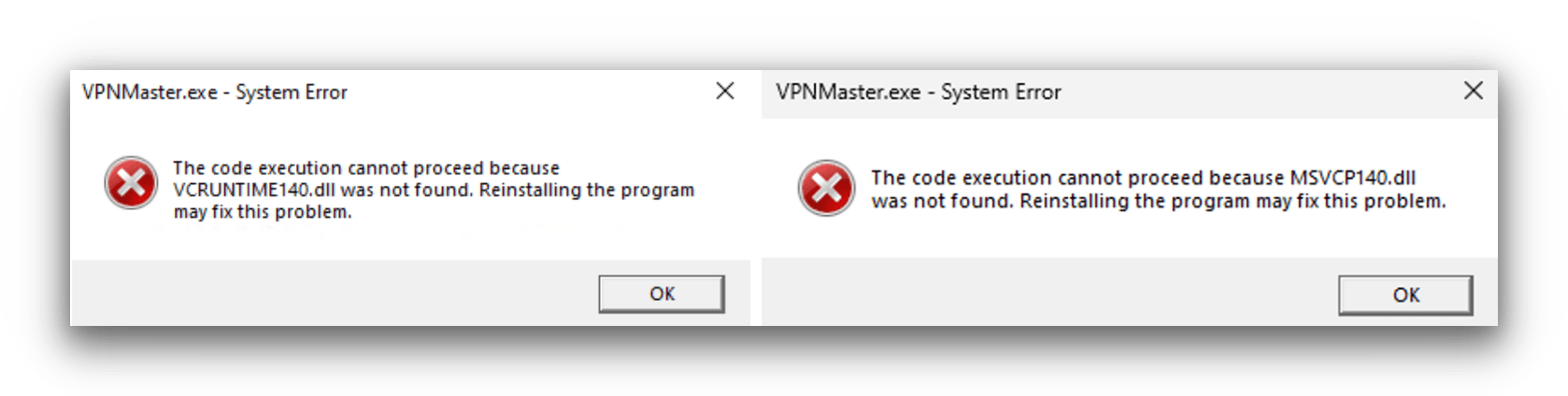
VPN Proxy Master on Windows requires VCRUNTIME140.dll and MSVCP10.dll.
We contacted customer service for help; they suggested reinstalling the app. After three reinstalls, the same errors appeared. Our follow-up emails went unanswered for a day and we received no solution.
We eventually found an external YouTube tutorial with the correct steps. There is no mention of this setup process on VPN Proxy Master’s website, and customer service was not helpful.
Overall, installation on Windows was extremely frustrating and took far longer than expected. We don’t recommend using the Windows app.
Once installed, the desktop apps are generally straightforward. There’s a simple homepage and a menu for advanced settings. Annoyingly, protocol options and advanced features vary depending on your device.
Mobile (Android & iOS)
Unlike on desktop, the free version is available on both Android and iOS. Both free mobile apps offer unlimited data, but you must endure 30-second pop-up ads each time you connect to a server or open/close the app.
On Android, the free version gives you access to servers in six countries. On iOS, you can’t choose a location and are assigned a nearby server. Changing protocol on iOS is also frustrating. You have to go into Server Locations to change the VPN protocol, which doesn’t make sense.
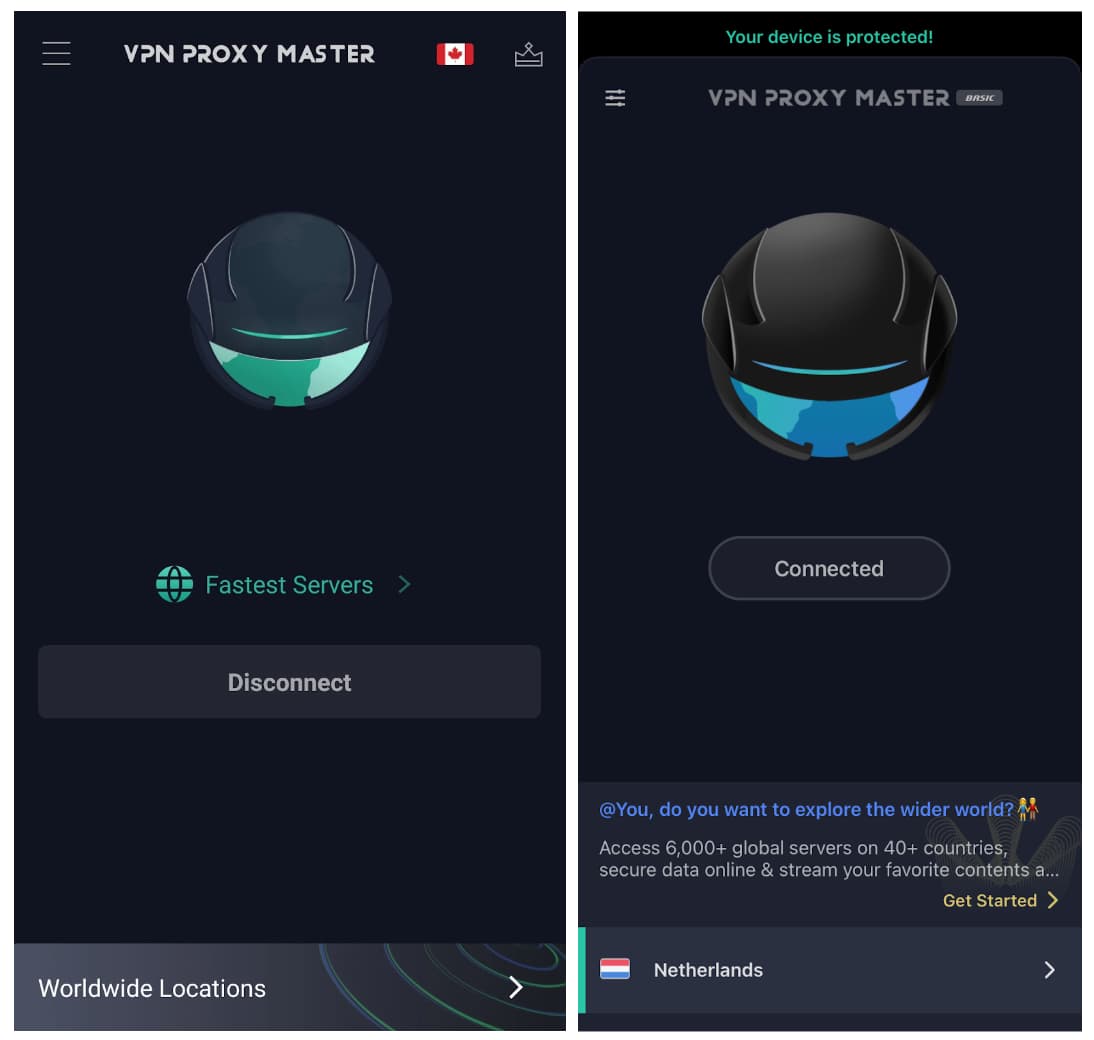
VPN Proxy Master on Android (left) and iOS (right) look very similar.
When you connect on Android, the location isn’t listed on the home screen. Instead, there’s a tiny flag in the top-right corner, which is easy to miss. Usually, VPNs display the chosen server in a prominent place.
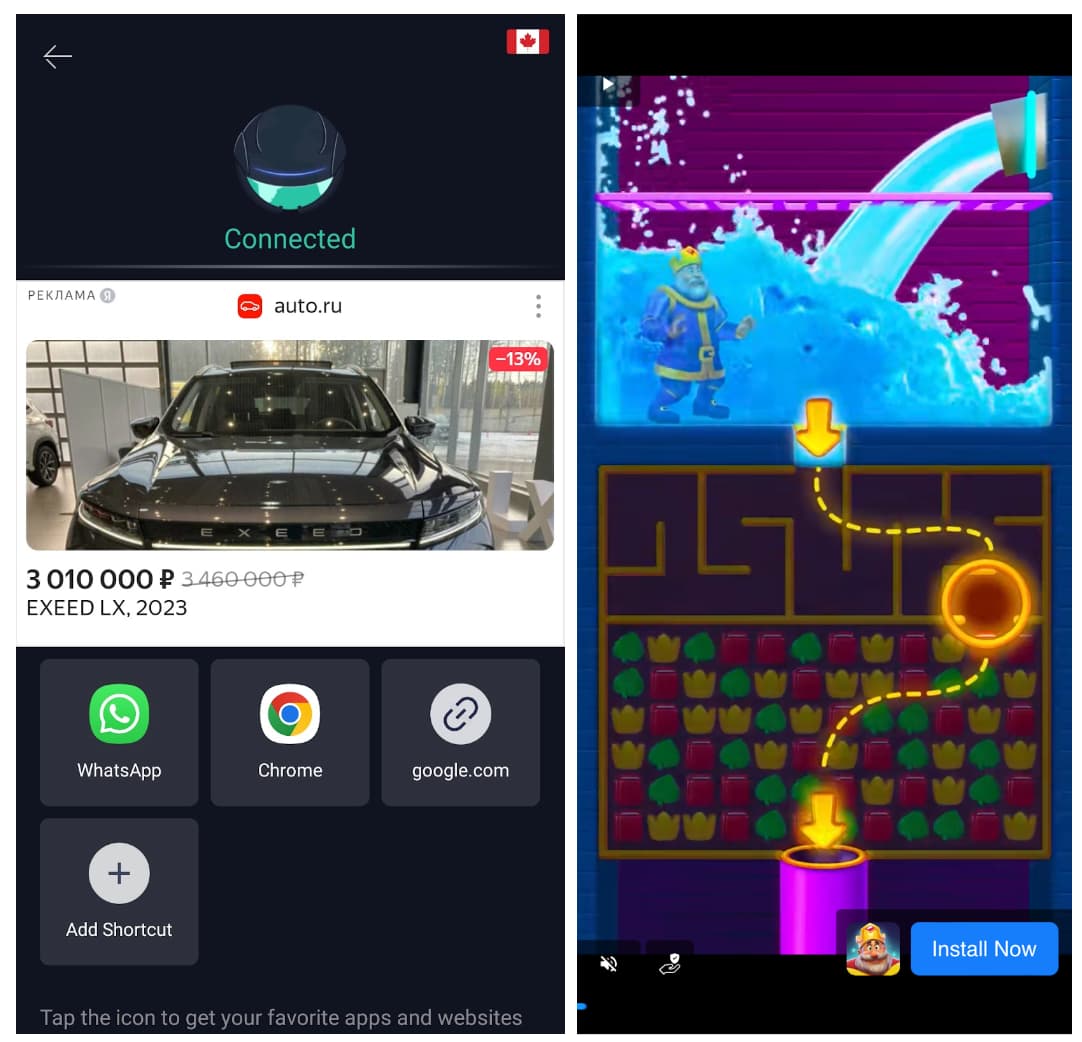
VPN Proxy Master Free on Android (left) and iOS (right) have a ton of ads.
The long pop-up ads make VPN Proxy Master Free difficult to use on mobile. It’s frustrating to wait 30 seconds to close a full-screen ad, and the banner ads are equally distracting.
The paid mobile apps don’t have ads, but they still aren’t pleasant to use.
Torrenting
VPN Proxy Master doesn’t permit torrenting on its servers. Even if it did, the VPN is too unsafe. Its kill switch is paywalled, and it logs too much user data, including your VPN server location, ISP, and individual bandwidth. We strongly suggest avoiding VPN Proxy Master if you want to torrent with a VPN.
| Torrenting Attribute | VPN Proxy Master (Free) | VPN Proxy Master |
|---|---|---|
| Permits P2P Traffic | No | No |
| Average Download Bitrate | 0 | 9.5MiB/s (5% loss) |
| Countries with P2P Servers | 0 | 3 |
| Port Forwarding | No | No |
| Kill Switch | Yes | Yes |
| Logging Policy | Identifiable Data | Identifiable Data |
Confusingly, VPN Proxy Master lists three fast torrenting servers on Windows, but it doesn’t actually want customers to use them.
Its stance on torrenting isn’t clear in its Terms of Service or FAQ, so we contacted customer support via email.
A support agent replied that the app doesn’t support P2P file sharing at all. We found this to be true on mobile, but not on desktop. It seems the service discourages users from torrenting.
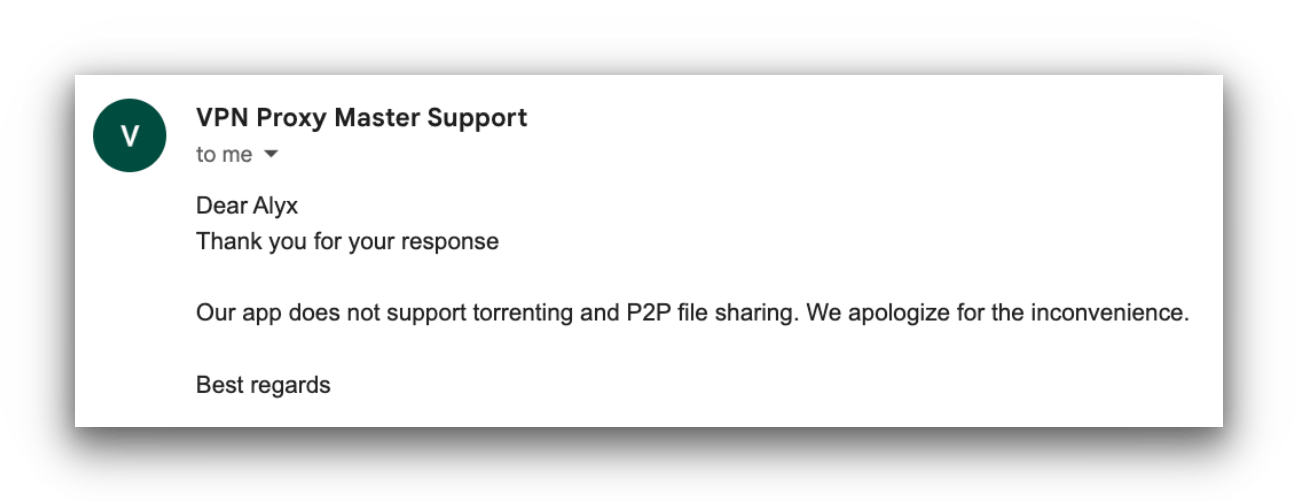
VPN Proxy Master’s customer support agent strongly discouraged torrenting with the VPN service.
Despite the decent download bitrate, the logging policy isn’t private enough to trust with personal data. The service logs your device information, bandwidth per session, ISP, and more.
We recommend skipping VPN Proxy Master and choosing a trustworthy anonymous VPN for torrenting instead. Private Internet Access is the best overall, with a verified no-logs policy, affordable plans, an effective kill switch, and port forwarding on all platforms.
Device Compatibility
VPN Proxy Master has apps for most devices, including Android, iPhone, Windows, and macOS. It allows up to six simultaneous connections, which is decent but lower than some top-rated VPNs. It also offers Smart DNS, which is rare among low-tier VPNs, and a Google Chrome extension. However, there’s no dedicated router app or Linux compatibility.
| Windows | Yes |
|---|---|
| Mac | Yes |
| iOS | Yes |
| Android | Yes |
| Linux | No |
| Amazon Fire TV | No |
| Android TV | No |
| Apple TV | No |
| Router | Manual Setup Only |
| Chrome | Yes |
Simultaneous Connections: 6
Here’s a quick summary of app differences:
| Feature | Windows | macoS | Android | iOS |
|---|---|---|---|---|
| Kill Switch | Yes | Yes | Yes | Yes |
| Split Tunneling | Yes | No | No | Yes |
Six Devices per Subscription on Basic Plan
VPN Proxy Master lets you install its apps on six devices at once. If you want to connect more, you’ll be asked to log out of another device or sign up for an extremely expensive 20-device plan.
Most VPNs limit only simultaneous connections, but VPN Proxy Master also limits the number of devices with the app installed.
It also suggests using a Windows 10 or 11 device to hotspot your VPN connection to game consoles.
Additional Features
Both the free and paid versions of VPN Proxy Master are poor choices if you want a range of useful features. It only offers split tunneling and slow email support. It’s missing many features like double VPN, obfuscation, multi-hop servers, and ad/tracker blockers.
| Additional Feature | VPN Proxy Master (Free) | VPN Proxy Master |
|---|---|---|
| Split Tunneling | No | Yes |
| VPN Obfuscation | No | No |
| Multi-Hop Servers | No | No |
| Dedicated IP | No | No |
| Ad Blocker | No | No |
Does Not Work in China
VPN Proxy Master offers V2Ray, an obfuscation technology designed to bypass online firewalls. However, you can’t use the VPN in countries with heavy censorship — especially not China.
In our tests using a remote computer in Shanghai, we couldn’t connect to a server at all. The app launched and immediately notified us that it can’t operate in China “due to policy.”
Given VPN Proxy Master’s strong links to China, it’s unsurprising that it doesn’t allow users to bypass web censorship.
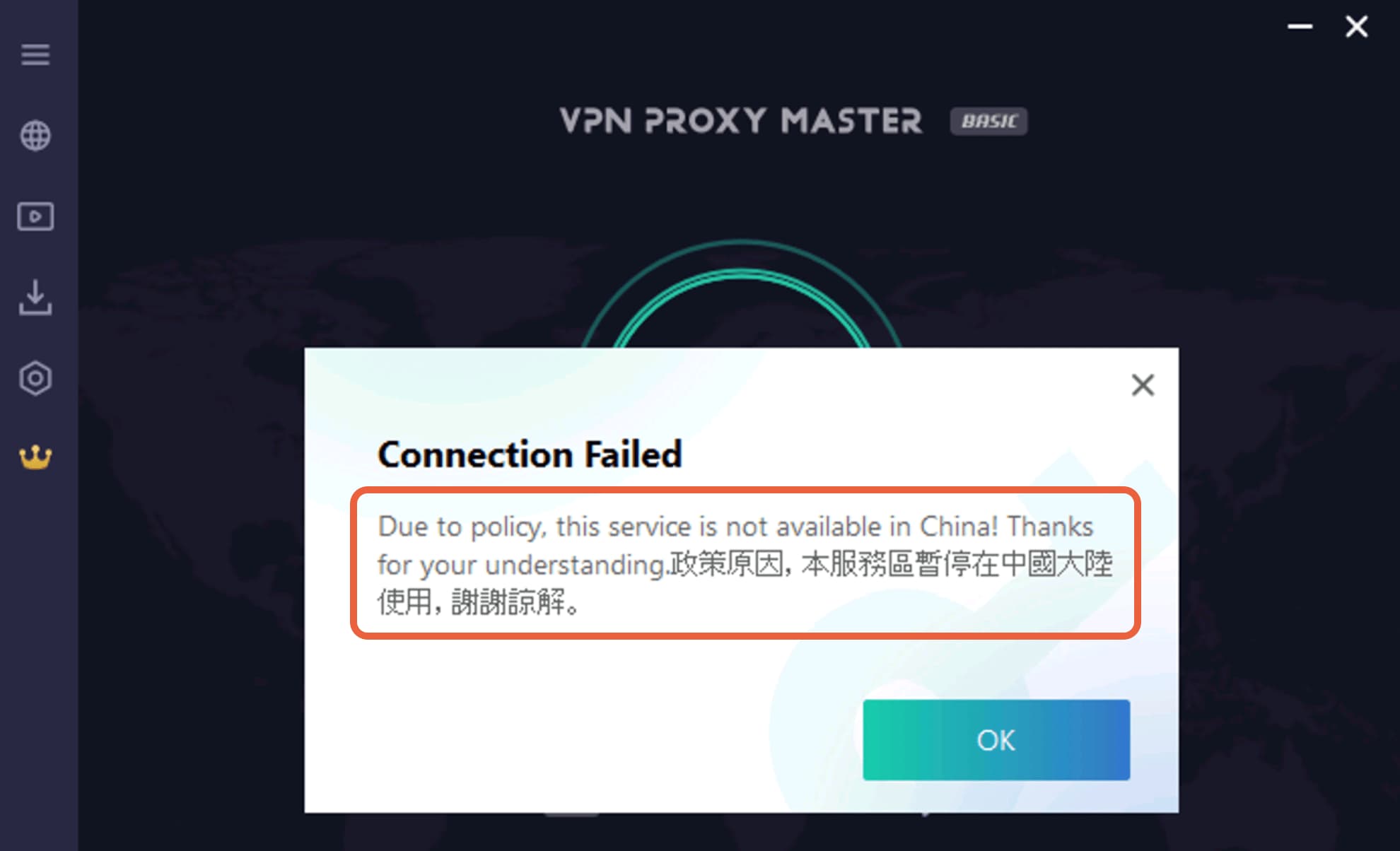
VPN Proxy Master is not available in countries with online censorship.
If you want a VPN that reliably works in China, we recommend Astrill. Although more expensive, it has a 100% success rate in our tests. As a free alternative, Windscribe Free is a great backup to have on your device.
Avoid VPN Proxy Master if you need a VPN to access blocked websites. It will not help in these regions. Save your time and money and opt for a VPN with effective obfuscation.
Technical Features We’d Like to See
VPN Proxy Master is missing several important advanced features. Here are some we’d like it to add:
- Split tunneling on all devices.
- An ad blocker to stop web ads and trackers.
- Multi-hop servers to enhance security and privacy.
Slow & Unreliable Customer Support
VPN Proxy Master has a reasonable online help center (its FAQ). Articles are organized into General Information, Billing & Account Information, and Troubleshooting.
We couldn’t find helpful video tutorials, but there are many image-based guides with step-by-step instructions to access streaming services, retrieve invoices, unsubscribe on different platforms, and more.
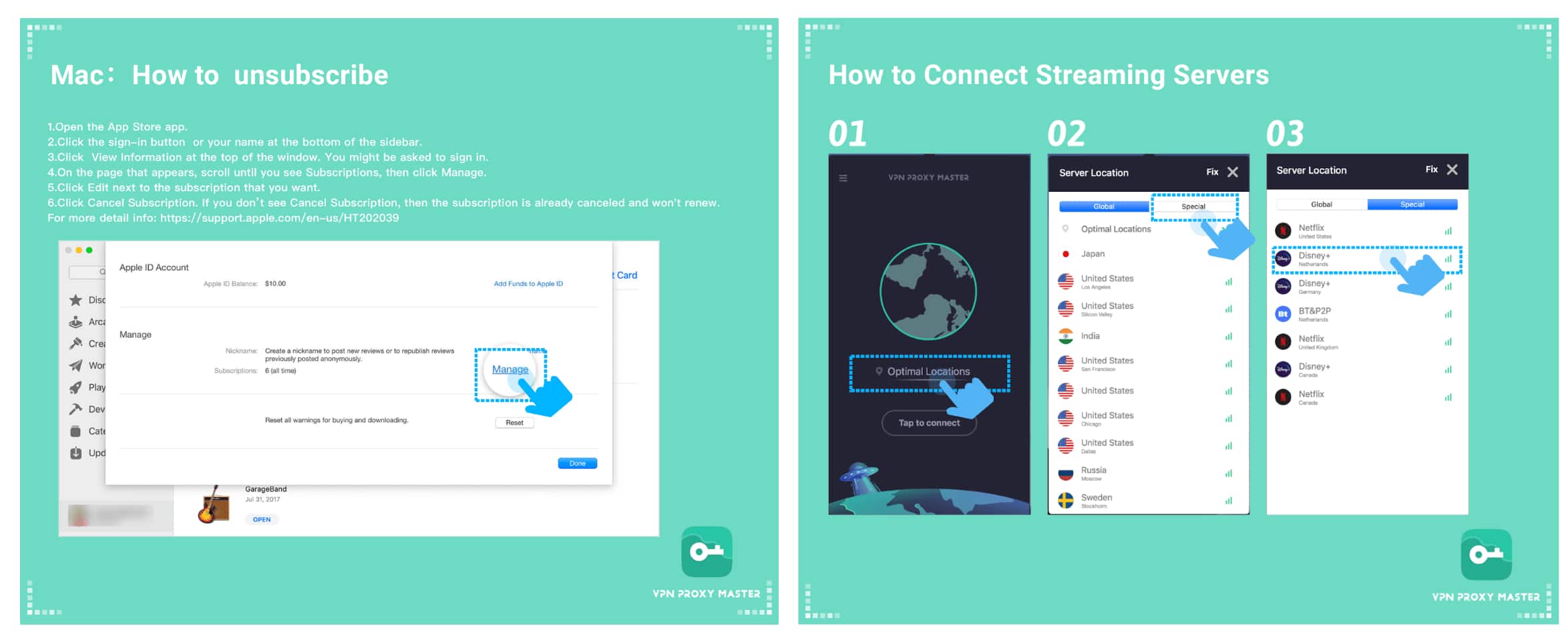
These instructions are clearly laid out and easy to follow.
What holds the service back is its support team and overreliance on these tutorials.
We contacted customer service multiple times during testing and were never fully satisfied with the support we received.
In one instance, we emailed because we couldn’t open the Windows app. The support team was unequipped to help. We were given generic instructions that didn’t solve the problem.
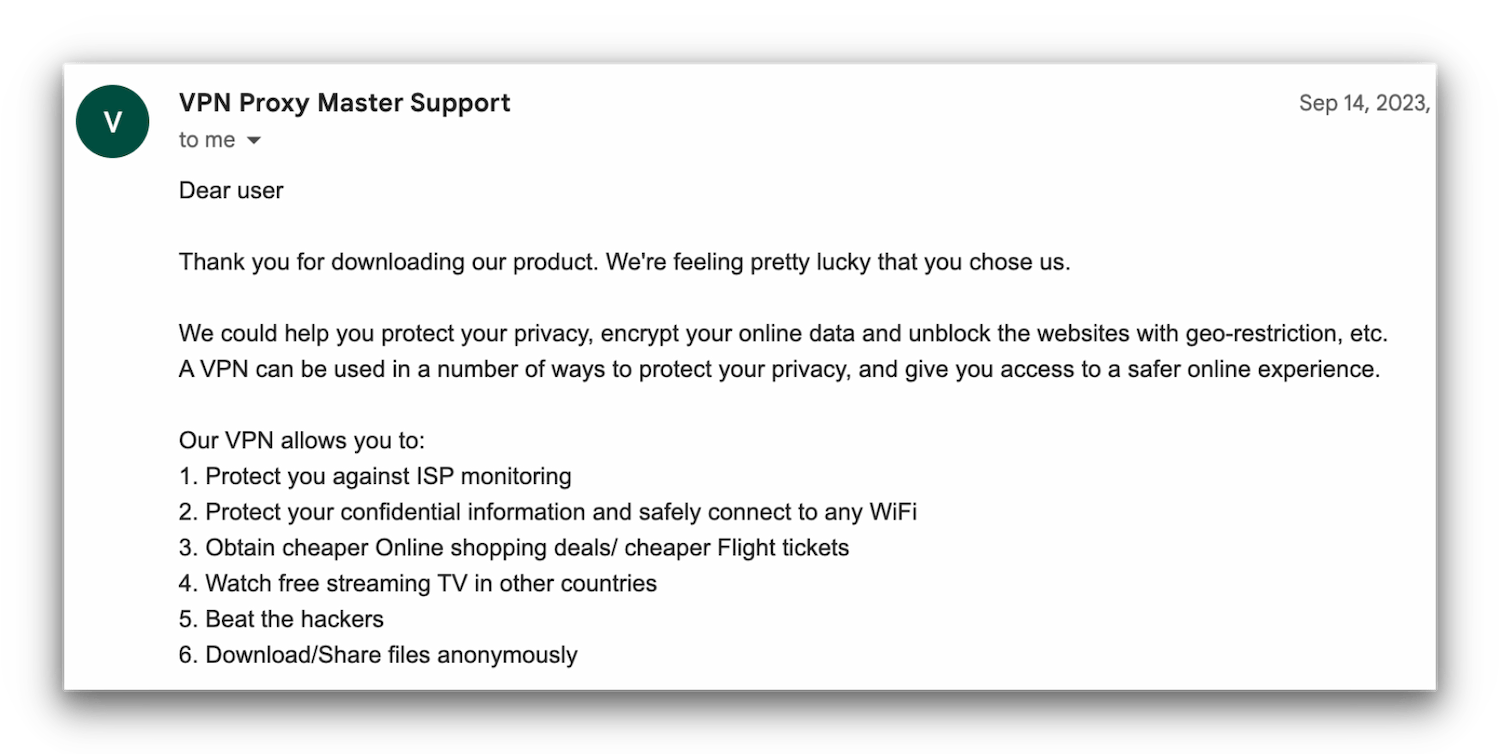
We contacted VPN Proxy Master via email to ask a question.
VPN Proxy Master offers live chat support, but the wait time for an agent often exceeds an hour. This simply isn’t good enough and is subpar compared to other paid VPN services, even free options.
VPN Proxy Master Key Data
| Attribute | VPN Proxy Master | Typical Free VPN |
|---|---|---|
| Owner | Lemon Clove Pte | Independent |
| Launch Date | 2018 | 2015 |
| Safe to Use | No | No |
| Data Cap | 500MB | 10GB per month |
| Payment Details Required | No | No |
| Account Required | No | Yes |
| Contains Ads | No | Yes |
| Local Download Speed | 51Mbps (49% loss) | 61Mbps (39% loss) |
| International Download Speed | 39Mbps (61% loss) | 55Mbps (45% loss) |
| Countries with Servers | 5 | 4 |
| Privacy Policy | Identifiable Data | Identifiable Data |
| Simultaneous Connections | 6 | 1 |
| Manually Select Server Location | Yes | Yes |
| Netflix Libraries | 0 | 0 |
| Torrenting | No | No |
| Works In China? | No | No |
| Customer Support | Live Chat | Online Resources |
| Apps & Extensions |
          |
|
VPN Proxy Master Key Data
| Attribute | VPN Proxy Master | Typical VPN |
|---|---|---|
| Local Download Speed | 94Mbps (6% loss) | 89Mbps (11% loss) |
| International Download Speed | 84Mbps (16% loss) | 80Mbps (20% loss) |
| Countries with Servers | 37 | 40 |
| Privacy Policy | Identifiable Data | Identifiable Data |
| Simultaneous Connections | 6 | 10 |
| Netflix Libraries | 0 | 3 |
| Torrenting | No | Yes |
| Works In China? | No | No |
| Cheapest Price | 3.75/mo over 12 months | $3.87/mo over 24 months |
| Customer Support | Live Chat | |
| Apps & Extensions |
|
|
Price
Price Plans
| 1 month | $12.99 |
|---|---|
| 15 months | $79.95 ($5.33/mo) |
| 1 year | $45.00 ($3.75/mo) |
Free Trial
| Money-Back Guarantee | 30 days |
|---|---|
| Free Trial | No |
| 100% Free Plan | Yes |
| Data Cap | 500MB |