
TorGuard VPN: Court-Proven Privacy & Torrenting Excellence, But Streaming Requires Extra Cost
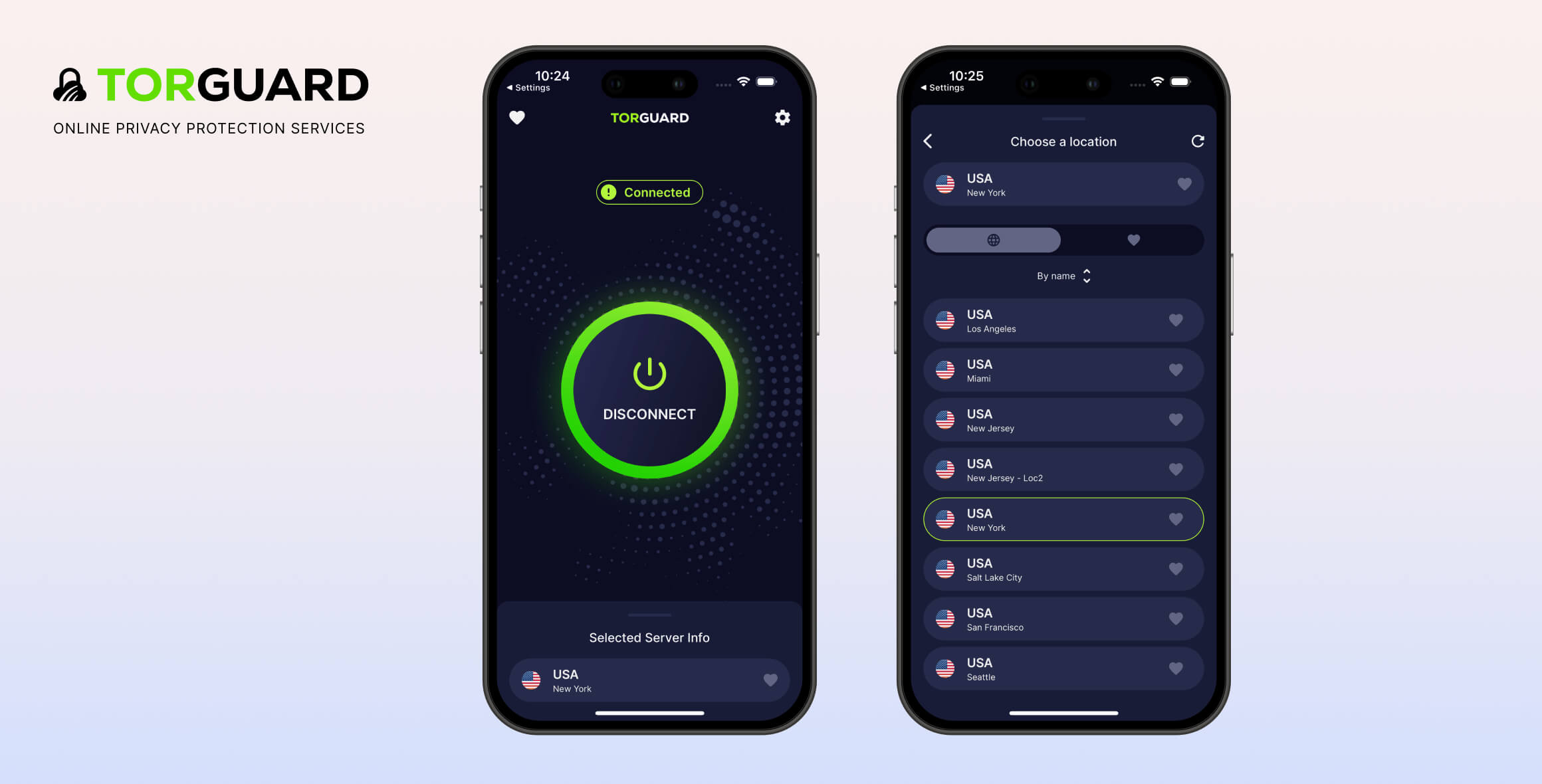
TorGuard is an excellent VPN choice for torrenting. It maintains a strict no-logs policy that’s been proven in court, features an automatic kill switch, supports port forwarding, and allows P2P traffic on nearly all servers. The service offers apps for Windows, macOS, Linux, iOS, Android, Fire TV, and router compatibility. However, its standard plan isn’t suitable for streaming, and users must pay extra for dedicated or residential IP addresses to access streaming content effectively.
- Pros
- Proven no logs policy
- Fast same-country speeds
- Works with BBC iPlayer
- Wide range of features
- Ad and malware blockers
- Free encrypted webmail service
- Cons
- Complicated desktop apps
- Doesn't work with Netflix
- Disappointing customer support
- High ping times
TorGuard is a well-established VPN service launched in 2012 that claims to provide “complete privacy.” We tested this promise to see how it holds up.
The service offers extensive customization options, though its interface might overwhelm new users. Notably, enabling the kill switch requires restarting the app each time for changes to take effect.
During security testing, TorGuard showed no IP or DNS leaks. It supports secure protocols like OpenVPN and WireGuard with AES-256 and Blowfish encryption. Subscribers also receive encrypted Chrome and Firefox browser extensions and a DNS-based ad blocker.
TorGuard struggles with streaming platform access. Recent tests revealed its standard servers couldn’t unblock international Netflix libraries, Disney+, Hulu, or HBO Max. However, its Manchester server successfully accessed UK platforms like BBC iPlayer, All 4, and ITV Player.
Upgrading to a dedicated or residential IP address improves streaming service access, but these premium options cost significantly more. Many cheaper VPNs include streaming capabilities in their basic plans.
Based in the United States—a Five Eyes alliance member—TorGuard operates in a jurisdiction known for data-sharing agreements. This theoretically allows government agencies to request user logs.
However, the company’s strict no-logs policy has been verified in court, offering protection against such scenarios.
Privacy
Ranked #1 out of 61 VPNs for Privacy
TorGuard is owned by VPNetworks LLC and operates from the United States, a country often criticized for privacy concerns. Despite this, its no-logs policy has been validated in court—the highest level of scrutiny a VPN service can face. This legal confirmation underscores TorGuard’s reliability in maintaining user safety and privacy.
| Originating IP Address | No |
|---|---|
| Browsing Activity | No |
| Individual Connection Timestamps | No |
| Date of Last Connection | No |
| VPN Server IP | No |
| Device Information | Yes |
| Individual Bandwidth Usage | Yes |
| Account Information | No |
TorGuard was founded in 2012 by VPNetworks LLC and has remained independent, with no mergers or acquisitions since its inception.
Its founder and CEO, Benjamin Van Pelt, is currently the only publicly listed employee on LinkedIn. Florida’s company registration records for VPNetworks LLC show only two associated entities: “Losey PLLC” and a role titled “Authorized Member,” leaving the corporate structure somewhat opaque.
While limited transparency about staff is common among VPN providers, TorGuard’s organizational details remain unusually vague.
The company explicitly states it “does not collect or log any data from its Virtual Private Network (VPN) or Proxy services.” Our analysis confirms TorGuard’s logging policy aligns with this claim, as it collects only anonymous server load statistics without tracking identifiable user activity.
Evidence from a Copyright Lawsuit
Though TorGuard’s no-logs policy hasn’t been independently audited, a 2022 copyright infringement lawsuit involving major Hollywood studios provided real-world validation. The studios accused TorGuard of helping users bypass torrent site blocks.
While TorGuard settled the case and now blocks torrent traffic on US servers, the trial revealed a critical detail: no user activity logs were produced as evidence.
This outcome strongly supports TorGuard’s claim of maintaining zero logs, offering concrete reassurance to subscribers.
US Jurisdiction Concerns
As a Florida-based company, TorGuard operates under US jurisdiction—a privacy concern due to America’s Five Eyes alliance membership. This allows intelligence agencies to secretly request user data from companies.
TorGuard’s support team clarified it would only comply with official court orders, but emphasized it could only provide “blank hard drives” due to its zero-logs policy.
Without stored activity records, authorities cannot identify individual users or their online behavior through TorGuard’s systems.
Streaming
Ranked #39 out of 61 VPNs for Streaming
TorGuard’s standard subscription is not ideal for streaming, as it doesn’t work with Netflix, Disney+, HBO Max, or Hulu. However, it can unblock BBC iPlayer and ITV Player. While you can pay extra for monthly add-ons to enable streaming, other VPNs include these capabilities in their standard subscriptions.
| Streaming Service | Works with TorGuard |
|---|---|
| BBC iPlayer (UK) | Yes |
| DAZN (Canada) | No |
| Disney+ (UK) | No |
| Hulu (US) | No |
| ITVX (UK) | Yes |
| HBO Max (US) | No |
| Netflix (US) | No |
| Netflix (UK) | No |
| Prime Video (US) | No |
| Sky Go (UK) | No |
TorGuard’s standard subscription isn’t ideal for streaming. While it reliably accesses UK platforms like BBC iPlayer and ITV Player, it struggles with most major services—it couldn’t unblock Netflix libraries and failed to access Disney+, HBO Max, or Hulu during testing. The service’s London servers proved particularly unreliable for streaming, though the Manchester server performed better.
TorGuard doesn’t stream Disney+, HBO Max or Hulu
Due to consistent detection issues, TorGuard’s standard plan should be avoided for streaming US platforms. Disney+, HBO Max, and Hulu all blocked TorGuard connections quickly during our trials.
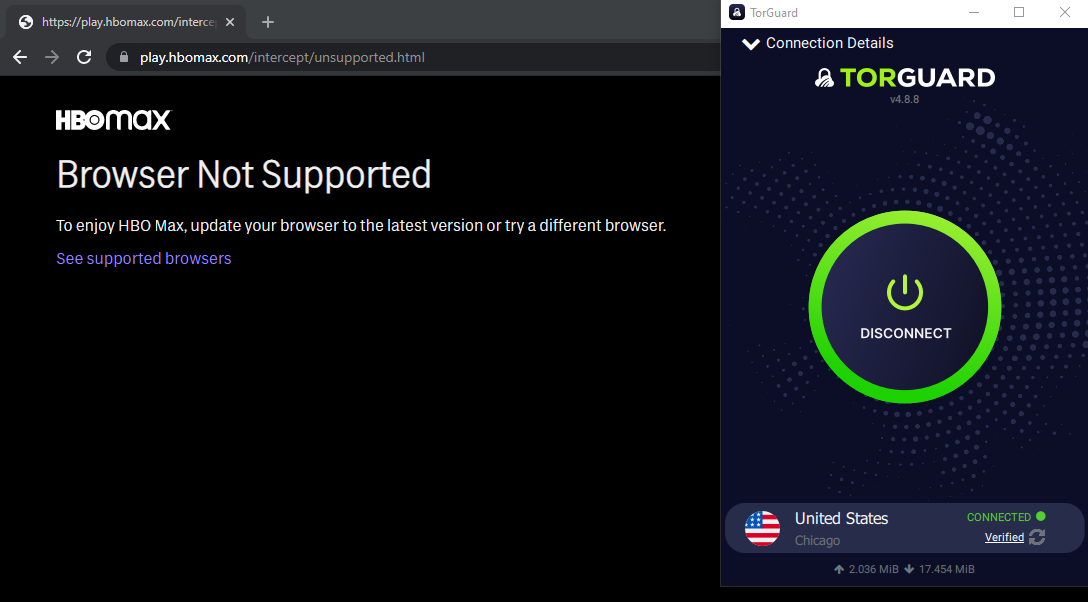
We weren’t able to stream HBO Max using TorGuard’s non-streaming IP addresses.
Hulu didn’t even let us login with the VPN service connected. Instead, we received this reminder:
“Error: Hulu is available in the U.S. only, and cannot be used with an anonymous proxy service.”
TorGuard Is Surprisingly Good at Unblocking UK Platforms
We were pleasantly surprised to see TorGuard did a great job at unblocking BBC iPlayer, ITV Hub, and All 4. We didn’t experience any buffering, either.
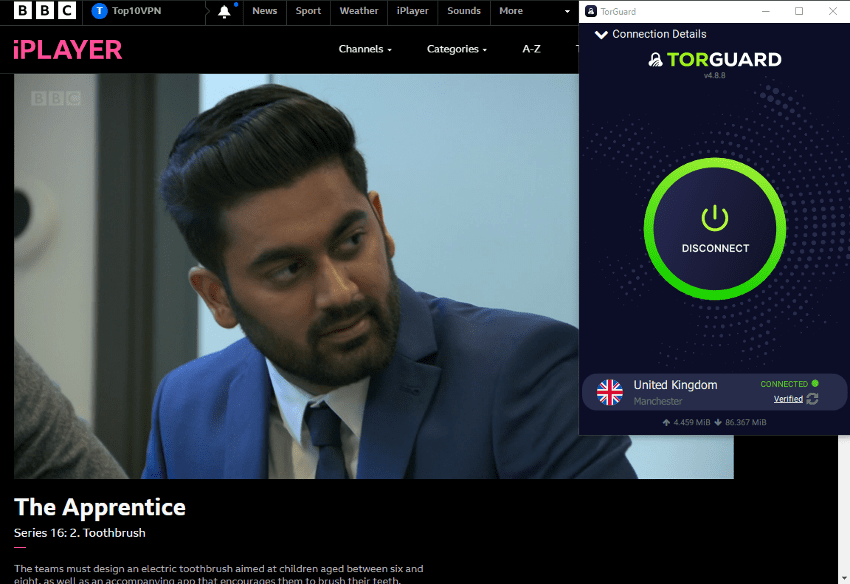
TorGuard’s generous speeds allowed us to watch BBC iPlayer.
But we don’t know how long it will be working for. Its standard servers are not the most reliable when it comes to streaming.
EXPERT ADVICE:
Make sure to use TorGuard’s Manchester server for streaming — its London server is much more unreliable.
Speed
Ranked #16 out of 61 VPNs for Speed
TorGuard’s speeds are very fast over short distances. However, its international speeds aren’t as impressive. As such, it still falls short of the fastest VPNs we’ve tested.
To evaluate TorGuard’s performance, we connected to servers across six continents and measured internet speeds before and after connecting. Using a 100Mbps connection—comparable to typical home internet speeds—we tested performance under realistic baseline conditions.
Here’s a table showing how TorGuard performed in our speed tests:
| No VPN (New York) | US (New York) | Canada (Toronto) | US (Los Angeles) | UK (London) | Germany (Berlin) | Brazil (São Paulo) | Japan (Tokyo) | South Africa (Johannesburg) | Australia (Sydney) | |
|---|---|---|---|---|---|---|---|---|---|---|
| Server Location |  |
|
 |
|
 |
 |
 |
 |
 |
 |
| Download Speed | 100Mbps | 95Mbps | 97Mbps | 91Mbps | 92Mbps | 89Mbps | 96Mbps | 86Mbps | 87Mbps | 75Mbps |
| Upload Speed | 100Mbps | 94Mbps | 96Mbps | 96Mbps | 35Mbps | 95Mbps | 65Mbps | 96Mbps | 86Mbps | 96Mbps |
| Ping | 1ms | 7ms | 19ms | 68ms | 73ms | 86ms | 135ms | 142ms | 238ms | 212ms |
| Distance | 0mi | 5mi | 300mi | 2,500mi | 3,500mi | 4,000mi | 4,800mi | 6,700mi | 8,000mi | 9,900mi |
TorGuard secures a position within the top 20 VPNs for speed, delivering performance capable of handling most online activities. However, its true strength lies in remarkably consistent speeds across nearly every global location tested.
The service stands out as an excellent option for users requiring connections across multiple continents. Below is how its international performance measures up against larger competitors:
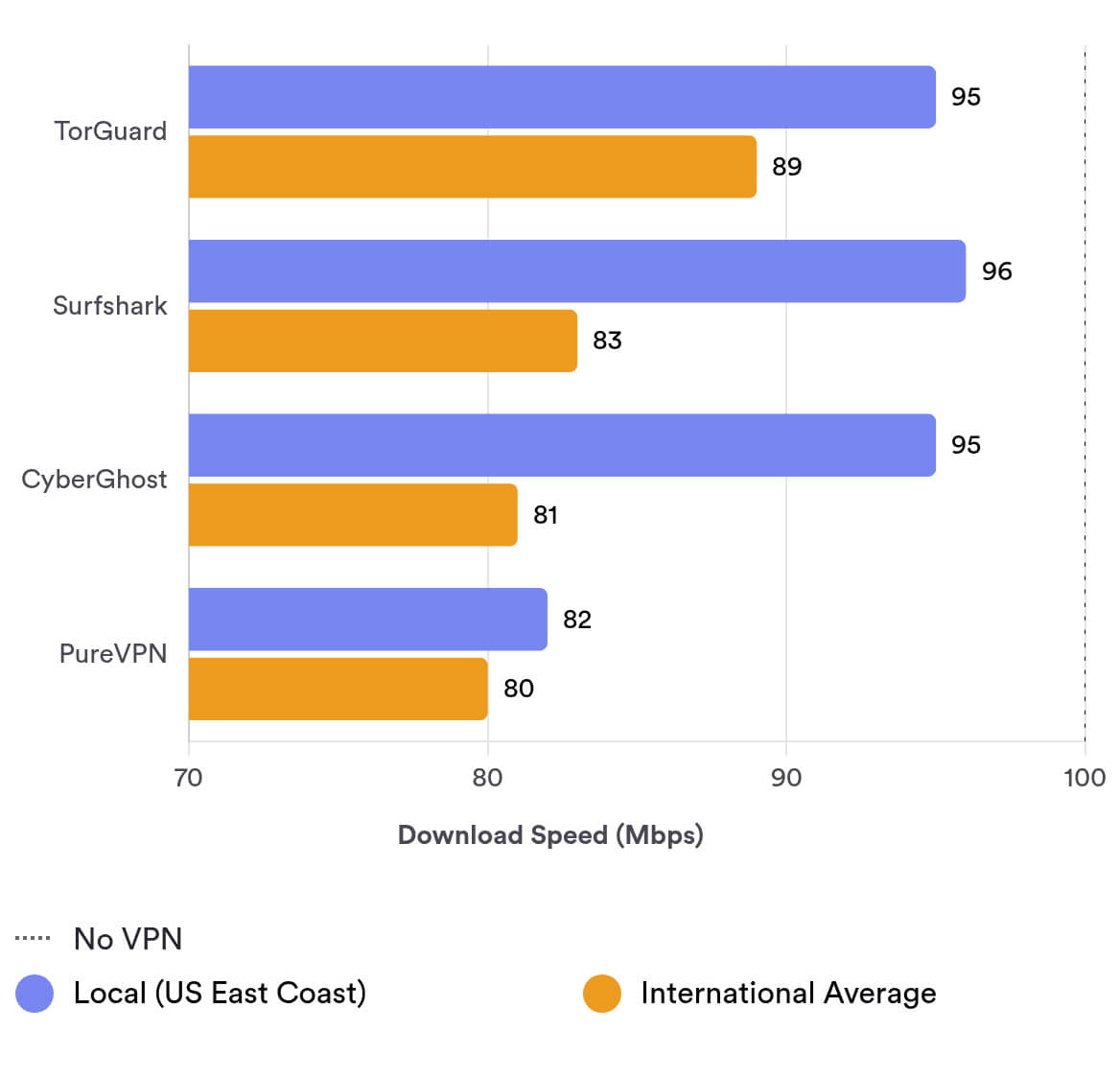
Of all the locations we test for, Australia (which is as far away as you can get from where we test in New York, US) is the only location that suffers a significant drop in download speeds.
Security
Ranked #30 out of 61 VPNs for Security
TorGuard is a dependable option for protecting online activities, standing out among competitors with features like diskless servers, proprietary DNS servers, and robust WebRTC/IPv6 leak prevention. It also operates a bug bounty program incentivizing vulnerability reports. While strong in security, its kill switch lacks convenience: deactivating it requires restarting the application to reactivate, and its technical name may be unclear to some users. To strengthen trustworthiness further, implementing third-party security audits and transitioning to open-source code would enhance transparency without compromising core functionality.
| Independent Audit | No |
|---|---|
| VPN Kill Switch | Yes |
| Leak Protection | Yes |
TorGuard’s settings offer extensive control but may overwhelm casual users.
While there are numerous advanced options, their practical utility for daily use remains questionable. The interface provides eleven distinct appearance customization choices alongside features for adding security layers, enabling ad blocking, using TorGuard’s proxy servers, or running custom scripts.
Following ExpressVPN’s lead, TorGuard upgraded its infrastructure to fully RAM-based (diskless) servers, ensuring no user data gets written to physical storage.
Powerful Encryption
The service employs AES-256-CBC encryption with industry-standard protocols. Alongside OpenVPN, TorGuard offer full cross-platform WireGuard support—a feature TorGuard helped pioneer among mainstream VPN providers.
TorGuard operates proprietary no-logs DNS servers that encrypt and route all DNS queries through the VPN tunnel. This premium protection level remains rare in the industry, with only services like VyprVPN and StrongVPN offering comparable functionality.
Complicated Kill Switch
While TorGuard includes essential IP/DNS leak protection and a kill switch mechanism, some configuration aspects might challenge less technical users despite these robust safeguards.
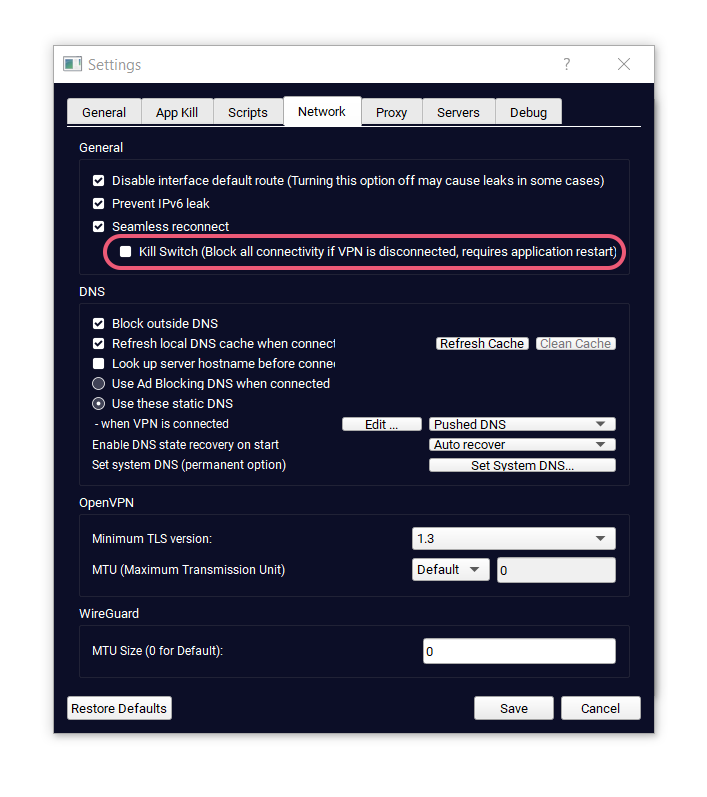
TorGuard’s kill switch can be found under Network in Settings — make sure you turn it on.
The kill switch stops your internet connection entirely in the unlikely event your VPN connection drops. In doing so, your true IP address is never exposed.
EXPERT ADVICE:
After enabling the kill switch, make sure to restart the TorGuard app. Otherwise, the kill switch won’t work.
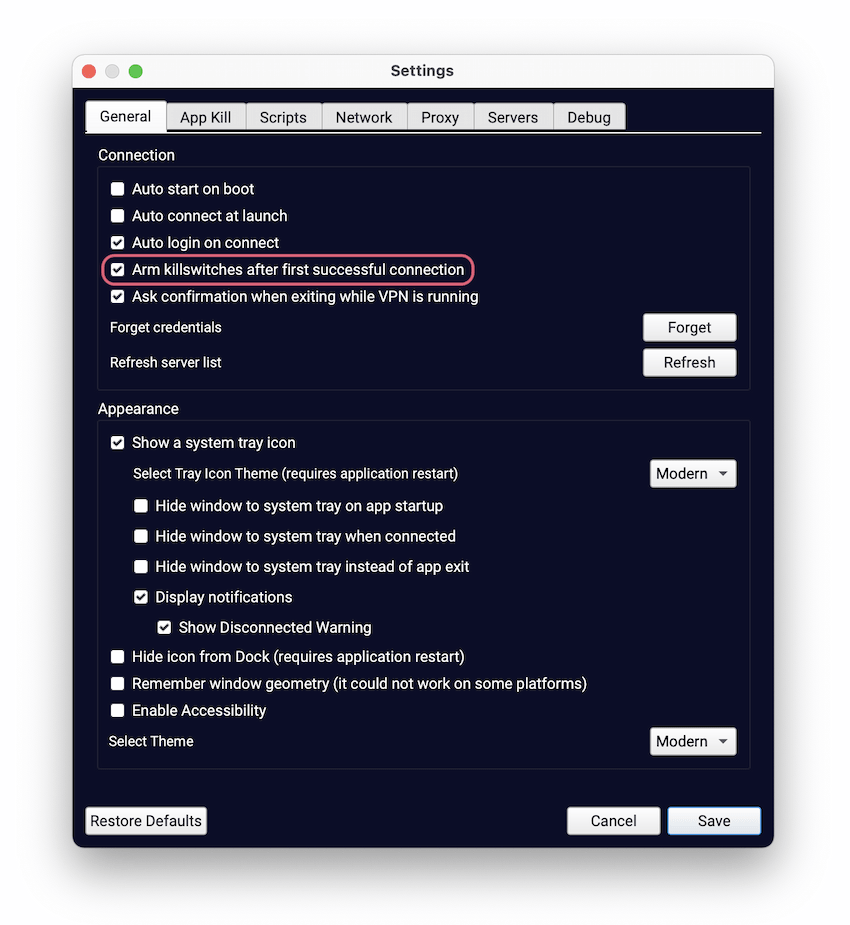
TorGuard has a defunct kill switch option under General.
During our tests of the “Arm killswitches after first successful connection” option, we observed that it failed to activate the kill switch or app-specific protections. Restarting the application didn’t resolve the issue, and TorGuard’s support team confirmed this feature is currently being phased out.
The service still offers numerous advanced settings for security-focused users, with these standout features:
- App Kill
- Custom proxy servers
- Dedicated IP addresses
- Ad blocking DNS servers
TorGuard Doesn’t Leak Your IP Address or DNS
We tested TorGuard across multiple IP, DNS, and WebRTC leak scenarios, and it consistently passed without showing leaks of sensitive data.
Before conducting the tests, we connected to a server in Germany. The results confirmed that our original UK network details remained undetected throughout the process, demonstrating reliable privacy protection.
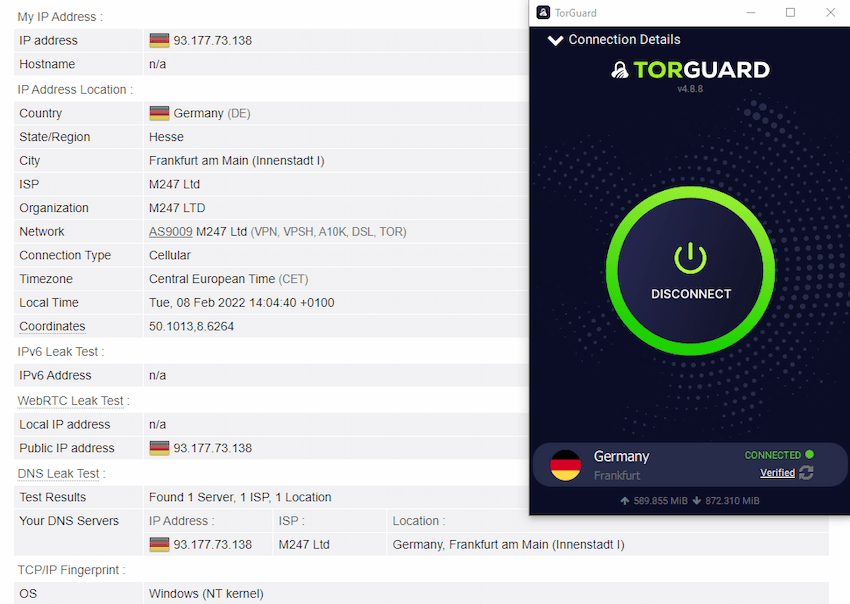
In our latest tests, TorGuard didn’t leak any data.
Virus & Malware Checks
We scanned TorGuard’s app installer for viruses and malware, and all tests confirmed the software was clean with no detected threats.
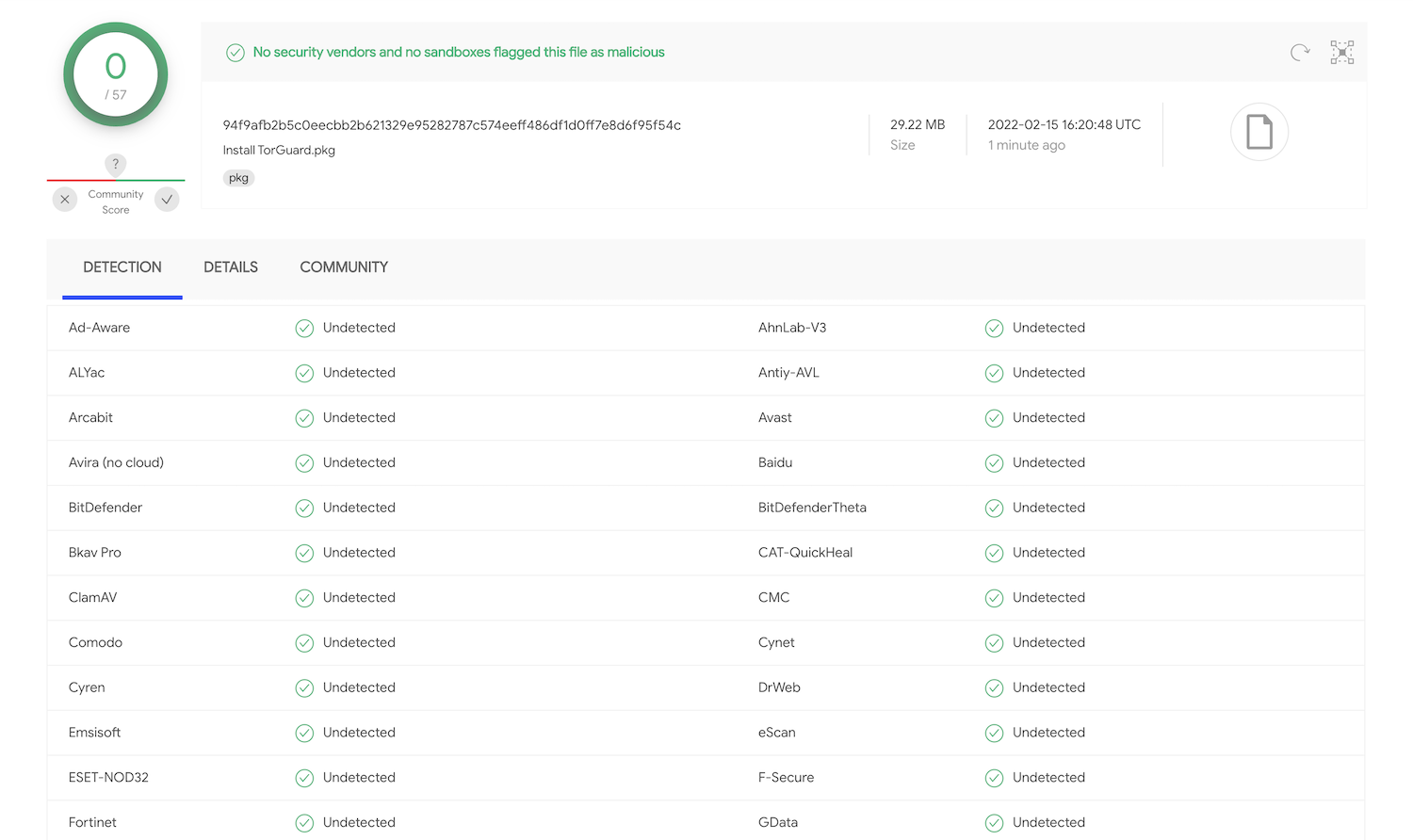
TorGuard’s installer contains no malware.
Single Server Breach
In May 2018, TorGuard experienced an isolated security breach involving a single server.
The company promptly disclosed the incident via a blog post, explaining attackers gained root access but couldn’t decrypt user data or initiate DDoS attacks, as encryption keys remain securely stored off-server.
TorGuard issued the following statement:
TorGuard VPN or proxy traffic was not compromised during this isolated breach of a single VPN server and no sensitive information was compromised during this incident.
While the server breach had minimal impact, TorGuard’s response to the incident raised some concerns. Following the attack, the company became involved in an unusual legal dispute with NordVPN, filing a lawsuit alleging hacking and blackmail attempts by its competitor.
Copycat Code
In July 2015, VPN.AC publicly accused TorGuard of replicating code from its browser extension, potentially compromising user security.
Specifically, TorGuard had integrated VPN.AC’s geo-location API server address into its service, creating a risk that user IP addresses might have been visible to VPN.AC.
The browser extension was later revised to eliminate this vulnerability.
TorGuard’s Security Initiatives
TorGuard has taken steps towards preventing security breaches:
- Bug bounty program
- Diskless RAM servers
However, there are a few missing initiatives that would further ensure security:
- Infrastructure security audit
- Vendor security assessment
- Warrant canary
Server Locations
Ranked #27 out of 61 VPNs for Server Locations
TorGuard has good server coverage for Europe, Asia, and North America, including multiple city level servers across the US. The options for South America and Africa are lacking, though.
| Continent | TorGuard Countries with Servers |
|---|---|
| Europe | 28 |
| Asia | 7 |
| North America | 3 |
| South America | 3 |
| Oceania | 2 |
| Africa | 1 |
TorGuard offers a solid number of servers, with 3,000+ across 50 countries and 60 cities, covering most popular locations.
By comparison, CyberGhost has a larger network, spanning 100 countries and 110 cities.
TorGuard hasn’t shared the exact number of IP addresses, but it’s likely over 3,000—at least one per server.
There are plenty of options in the US, including 11 city-level locations spread evenly across the country.
TorGuard has servers in the following US states:
- California (2 cities)
- Florida
- Georgia
- Illinois
- Nevada
- New Jersey
- New York
- Texas
- Utah
- Washington
We’ve recently seen a downsizing of TorGuard’s server network. There are now only four countries with SOCKS proxy support: Canada, Switzerland, the Netherlands, and Sweden.
TorGuard used to have multiple servers in Africa, but there is now just one in South Africa. There are also two servers in the Middle East, located in Dubai and Israel.
If you’re in South America or Africa, or need to connect to those regions, we recommend considering an alternative such as PIA. It has servers in four African countries and five South American countries.
User Experience
Ranked #38 out of 61 VPNs for User Experience
TorGuard’s custom VPN apps are best for those seeking to fine-tune every aspect of the app, right down to the level of handshake encryption being used. It’s geared towards experienced users.
TorGuard’s Windows and macOS apps look identical, which is rare for a VPN. However, they perform very differently on the two operating systems. The macOS client is much faster and didn’t produce the bugs we saw with the Windows client.
Both desktop apps offer a very long list of customizable settings and features. Some options are a bit redundant, and the sheer number can be overwhelming for VPN beginners.
To improve your experience, we recommend checking Remember Credentials in each app before logging in. This saves you from entering your details every time you connect to a server.
Windows & macOS
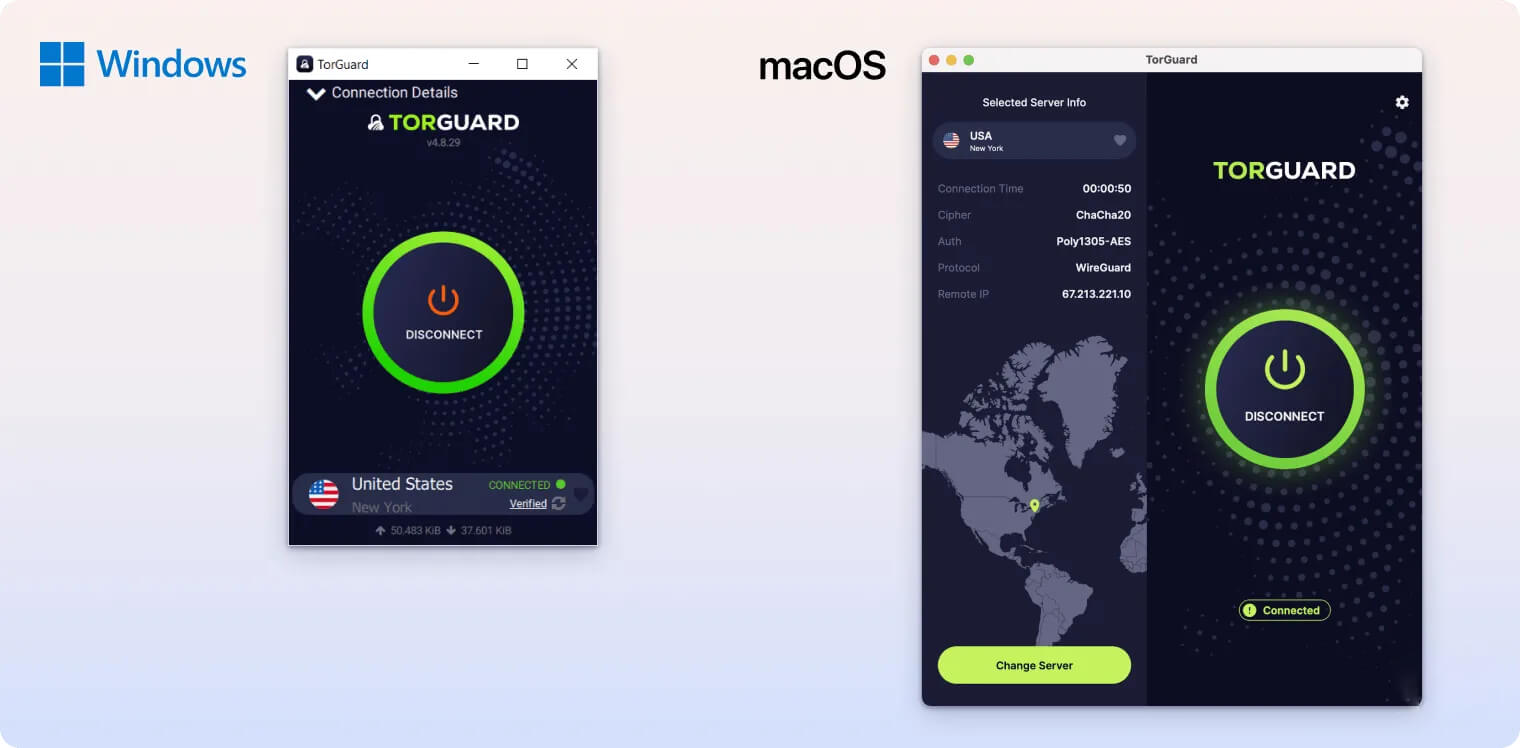
TorGuard’s Windows app isn’t the best on the market. Immediately after we installed it, our test device began to lag.
To switch protocols, click the hamburger icon. You can choose OpenVPN, WireGuard, or OpenConnect. There are many port options, including 443, 80, 9201, and 1198.
Click the cog icon for advanced settings. Options are neatly organized into tabs:
- General: set automatic connections and appearance settings.
- App Kill: choose apps to close if TorGuard disconnects.
- Scripts: add custom scripts before or after connections.
- Network: enable IPv6 leak protection, the kill switch, ad-blocking DNS, or adjust protocol settings.
- Proxy: add a custom proxy server.
- Server: add and configure a dedicated or residential IP address.
- Debug: identify and display software errors.
If you purchase a residential IP, dedicated IP, or streaming bundle, make sure to register your new IP in Settings under Server.
TorGuard works much better on macOS than on Windows. It doesn’t cause lag and connects very quickly.
We’re disappointed there’s no search bar, but you can filter servers alphabetically, by specialized type, or by region.
It’s also missing a few options found in the Windows client, including installing TUN/TAP adapters, blocking outside DNS, and some design features. However, unless you’re a power user, you likely won’t miss these.
TorGuard’s setup process is more complicated than many other VPNs. During installation, we had to enable an unusually large number of permissions.
We don’t often see this many permission requests on macOS VPN clients. Asking to view System Events and perform actions in the app is a bit concerning.
On the other hand, VPNs do need certain permissions to function properly, and TorGuard may use this access to detect bugs or software issues.
iOS & Android
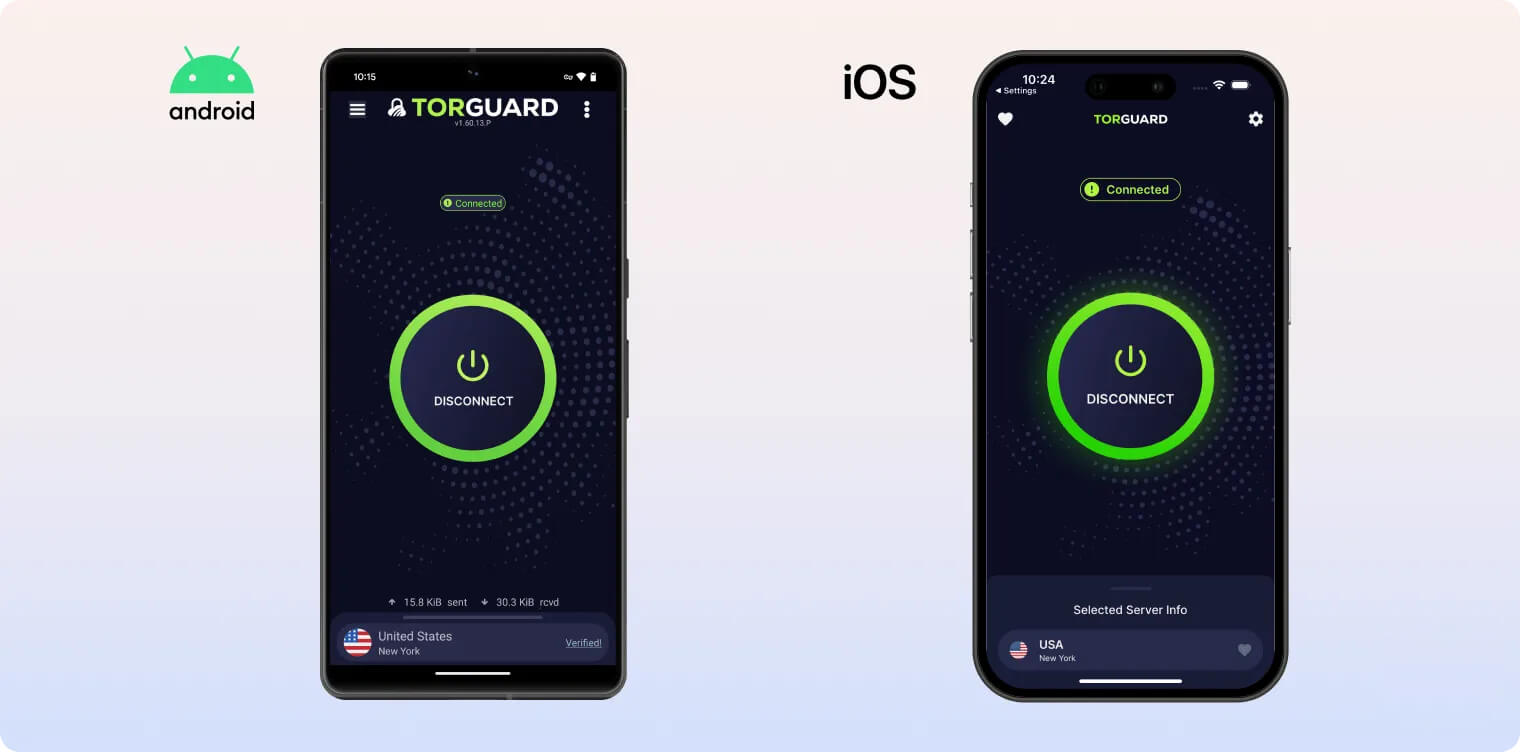
You can choose between OpenVPN (UDP and TCP) and WireGuard (UDP) protocols on Android. In Settings, you can also decide whether the VPN should try to reconnect if the connection drops and enable IPv6 leak protection. You can configure a dedicated IP address, set a static DNS, or use a proxy.
However, TorGuard doesn’t offer a kill switch on Android.
TorGuard’s split tunneling feature, called Restricted Apps, is available on Android. It lets you include or exclude specific apps from the VPN, so you can use your original IP address when needed.
As on the desktop apps, you can sort servers alphabetically, in reverse alphabetical order, or by proximity. You can also filter by specialized server type or by region.
The iOS app has fewer customization options and a different design from the other clients.
TorGuard’s iOS app offers more protocol choices than the Android app. You can choose between:
- IPSec
- IKEv2
- OpenVPN
- WireGuard
There are a couple of drawbacks. First, it doesn’t have a functioning kill switch. Whether we toggled it on or off, restarted the app, or kept it running, it never blocked the network when the VPN disconnected.
Second, servers can be listed alphabetically, by proximity, or by favorites, but you can’t filter by region or by specialized server type—such as stealth or dedicated IP—like you can on Android and desktop.
Amazon Fire TV App
TorGuard has a user-friendly Fire TV app with WireGuard and OpenVPN protocol options.
However, the standard subscription doesn’t unblock international Netflix libraries. With a standard plan, you’ll only access Netflix’s own library of content. We also don’t like that there’s no kill switch.
Torrenting
Ranked #11 out of 61 VPNs for Torrenting
TorGuard is a good VPN for torrenting. It has decent P2P speeds, a kill switch, port-forwarding and a strong zero-logs policy. However, P2P traffic on BitTorrent will be blocked on its US servers.
| Torrenting Attribute | TorGuard |
|---|---|
| Permits P2P Traffic | Yes |
| Average Download Bitrate | 7.0MiB/s (30% loss) |
| Countries with P2P Servers | 49 |
| Port Forwarding | Yes |
| Kill Switch | Yes |
| Logging Policy | No Logs |
While TorGuard isn’t good for streaming, it’s a strong choice for torrenting. The VPN allows P2P traffic on all servers except those in the US, and it doesn’t log user web activity.
In our P2P benchmark tests, TorGuard averaged download speeds of 7.0 MiB/s, compared to 10 MiB/s without a VPN.
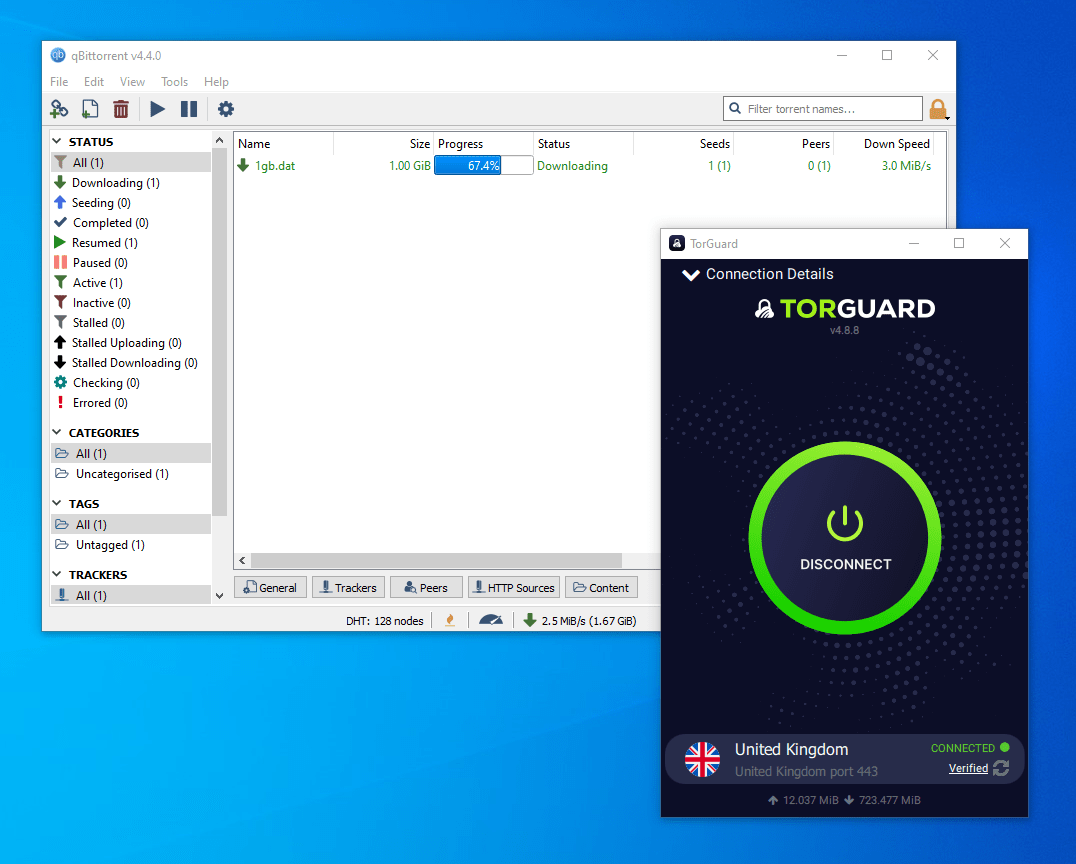
We downloaded our 1GB test file very quickly using TorGuard.
It also features a must-have VPN kill switch and a transparent no-logs policy—both essential for a torrenting VPN.
Seeders can use port forwarding with the VPN, though it’s limited to ports above 2048. It’s supported via OpenVPN, WireGuard, and OpenConnect.
US Servers Banned from BitTorrent
On March 13, 2022, TorGuard settled a court case with 27 film studios that accused it of not keeping user logs and promoting the torrenting of copyrighted material.
As part of the settlement, TorGuard agreed to use “commercially reasonable efforts” to block BitTorrent traffic on its U.S. servers using firewall technology.
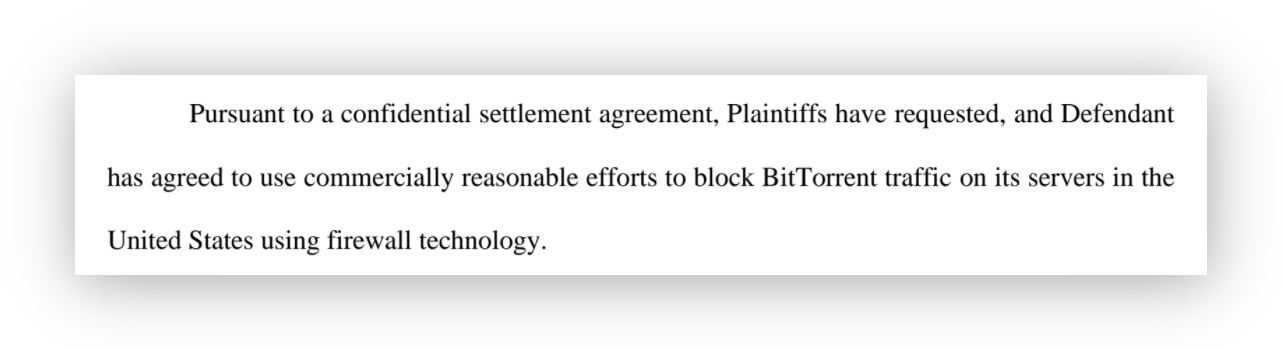
Excerpt from VPNetwork LLC’s Stipulation of Dismissal, stating TorGuard will block BitTorrent traffic on its US servers.
Despite the court case’s outcome, three key points reinforce TorGuard’s standing as one of the best VPNs for torrenting.
First, TorGuard did not expose any customer data during the legal proceedings, showing it adhered to its no-logs policy and protected user privacy. If a VPN has an intrusive logging policy, it isn’t safe for torrenting.
TorGuard has not been forced to log network usage data. Due to the nature of shared IPs and related hardware technicalities of how TorGuard’s network was built it is impossible for us to do so.
Second, TorGuard is only blocking BitTorrent traffic on its US servers. Users can continue P2P activity on servers in other countries. If you’re in the US, nearby options include Canada and Mexico.
Third, TorGuard is not alone in facing lawsuits from major film studios and agreeing to block traffic on US servers. In January 2022, VPN Unlimited similarly agreed to block BitTorrent and additional torrenting sites, including The Pirate Bay and Popcorn Time.
How Does TorGuard Compare to Other Top VPNs for Torrenting?
This table shows how TorGuard stacks up against other VPNs on key torrenting features like P2P speed, server count, and capabilities.
| VPN Service | P2P Speed | # of P2P Servers | Kill Switch | Port Forwarding | Jurisdiction |
|---|---|---|---|---|---|
| TorGuard | 9.3 MiB/s | >3,000 | Yes | Yes | US |
| ExpressVPN | 9.4 MiB/s | >3,000 | Yes | No | BVI |
| Astrill | 10 MiB/s | >110 | Yes | Yes | Seychelles |
| AirVPN | 9.7 MiB/s | >200 | Yes | Yes | Italy |
| IPVanish | 9.9 MiB/s | >1,300 | Yes | No | US |
Device Compatibility
TorGuard has apps for Windows, macOS, iOS and Android, as well as router compatibility. The VPN service lets you have eight simultaneous connections, which is just above the industry average.
| Windows | Yes |
|---|---|
| Mac | Yes |
| iOS | Yes |
| Android | Yes |
| Linux | Yes |
| Amazon Fire TV | Yes |
| Android TV | No |
| Apple TV | No |
| Router | Yes |
| Chrome | Yes |
Simultaneous Connections: 8
TorGuard has VPN applications for Windows, macOS, iOS, Android, and even Linux. Very few VPN services offer a native Linux client with a graphical user interface.
You can also set up TorGuard on your home router, or buy a pre-configured router from TorGuard’s website. This lets all devices in your home use the VPN connection.
Games Consoles & Streaming Devices
There’s also a custom TorGuard VPN app for Amazon’s Fire TV Stick. While it’s not very reliable for streaming popular content platforms, it’s well-suited for watching Kodi streams anonymously.
You can also use TorGuard with a wide range of game consoles and streaming devices by connecting them to a router that’s running the VPN.
However, some VPN services offer a Smart DNS tool, which TorGuard doesn’t. Smart DNS lets you change the DNS settings of devices such as Apple TV, Xbox, and PlayStation to match those of a VPN server.
Using Smart DNS is much easier than setting up a VPN on your router. We recommend using Surfshark VPN on devices that don’t support native VPN apps.
Browser Extensions
A TorGuard subscription also includes extensions for Chrome and Firefox. Both extensions have the same layout, settings, and number of server locations.
There’s a large selection of countries to choose from (43 in total) and even some city-level servers. We’re pleased to see it’s one of the few VPN browser extensions that fully encrypts your traffic (using SSL), making it much more secure than proxy-only extensions.
In settings, you can also enable TorGuard’s DNS filtering ad blocker and exclude certain websites from the proxy connection.
All these features worked well in our latest tests. Nevertheless, we still recommend connecting to TorGuard’s VPN client, as it provides greater flexibility in choosing protocols and adjusting settings.
Additional Features
TorGuard offers fewer extra features than many competitors. It includes Stealth VPN for bypassing censorship, dedicated IP addresses, custom proxy servers, and an ad blocker. However, it lacks key options like 24/7 live chat support, double VPN, a tracker blocker, and GPS spoofing.
| Additional Feature | TorGuard |
|---|---|
| Split Tunneling | Yes |
| VPN Obfuscation | Yes |
| Multi-Hop Servers | Yes |
| Dedicated IP | Yes |
| Ad Blocker | Yes |
| SOCKS5 Proxy | Yes |
Stunnel Obfuscation
TorGuard uses the open-source obfuscation tool Stunnel to help bypass heavy censorship in countries like China and Turkey. TorGuard can sometimes work in China and evade the country’s VPN restrictions thanks to its Stealth VPN protocol, Stunnel.
Stunnel wraps traffic in a layer of TLS encryption to make it harder to detect as VPN traffic. You can enable Stunnel by checking a box in the TorGuard app’s settings.
You can connect to its Hong Kong, Japan, Singapore, Taiwan, or US servers for better speeds from within China.
Note that TorGuard’s website is currently blocked in China, so you’ll need to download the app before you travel.
The Stunnel protocol also works in other highly censored countries like Iran, Turkey, Saudi Arabia, and the UAE.
Dedicated Streaming IP Address
You can pay an extra $7.99 per month for a dedicated streaming IP address, which is more likely to bypass streaming geo-restrictions.
You can purchase streaming IPs in:
- Canada
- France
- Germany
- Italy
However, this is poor value, as other VPNs, including CyberGhost, include multiple streaming servers in their standard plans.
Additionally, if you sign up for the Pro plan, you get a dedicated IP address included with your subscription.
Streaming Residential IP Address
If you want near-guaranteed access to geo-blocked streaming content, you can pay an extra $13.99 per month for a residential IP address in the US.
You can buy residential IP addresses in three locations:
- Los Angeles, California
- Tampa, Florido
- Dallas, Texas
A residential IP address is leased from an ISP in the country. It makes your connection look more authentic and harder for streaming platforms to detect.
It can also improve browsing by helping you bypass frequent CAPTCHAs.
However, it’s not the cheapest option for annual plans. Windscribe offers residential IP addresses to premium subscribers for a one-time annual fee of $96.00, which works out to $8.00 per month. You can also choose from more countries, such as Canada, Germany, Spain, and the UK.
TorGuard’s Streaming Bundle
TorGuard offers a streaming bundle that includes a standard subscription plus two dedicated IP addresses for streaming.

TorGuard’s streaming bundle is expensive for what you get.
Despite the claim that it lets you “Stream What You Want, Whenever You Want,” you’re limited to only two IP addresses in either the US, UK, or Japan.
We don’t recommend purchasing the bundle because it only provides access to two countries’ streaming platforms. By contrast, other VPNs offer multiple countries without requiring a paid add-on.
Additionally, you only get dedicated IP addresses, not residential IPs, so you could still run into geo-blocks.
Here’s a quick table comparing TorGuard’s streaming bundle with ExpressVPN’s standard subscription.
| Category | TorGuard Streaming Bundle | ExpressVPN |
|---|---|---|
| No of Netflix libraries | 3 | 14 |
| Countries | 3 | 94 |
| Fire TV App | ✓ | ✓ |
| Kodi | ✓ | ✓ |
| Download Speed | 94Mbps | 88Mbps |
| Logging Policy | No logs | Anonymous server data |
| Best Price | $10.17/mo over 12 months | $3.49/mo over 28 months |
TorGuard Key Data
| Attribute | TorGuard | Typical VPN |
|---|---|---|
| Owner | VPNetworks LLC | Independent |
| Launch Date | 2012 | 2015 |
| Local Download Speed | 95Mbps (5% loss) | 89Mbps (11% loss) |
| International Download Speed | 89Mbps (11% loss) | 80Mbps (20% loss) |
| Countries with Servers | 50 | 40 |
| Privacy Policy | No Logs | Identifiable Data |
| Simultaneous Connections | 8 | 10 |
| Netflix Libraries | 0 | 3 |
| Torrenting | Yes | Yes |
| Works In China? | Sometimes | No |
| Cheapest Price | 1.94/mo over 36 months | $3.87/mo over 24 months |
| Customer Support | ||
| Apps & Extensions |
          |
|
Price
Price Plans
| Length | Standard | Pro |
|---|---|---|
| 1 month | $9.99 | $12.99 |
| 3 years | $69.84 ($1.94/mo) | $124.92 ($3.47/mo) |
Free Trial
| Money-Back Guarantee | 7 days |
|---|---|
| Free Trial | 7 Days |
| 100% Free Plan | No |