
StrongVPN: Fast and Console‑Friendly, But Too Costly for What You Get
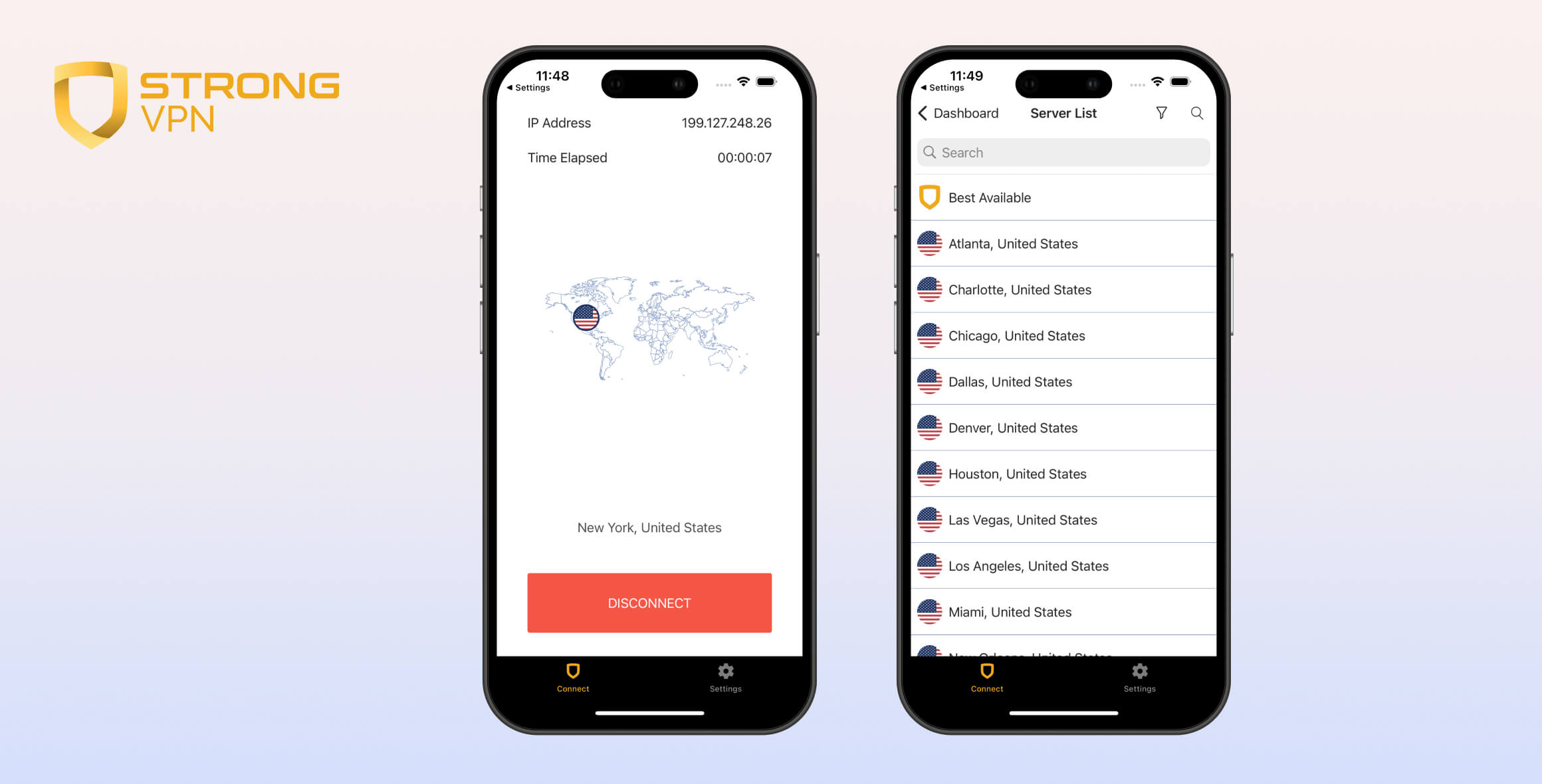
StrongVPN’s main selling points are its long-standing reputation, an excellent Smart DNS tool, and support for up to 12 simultaneous devices. However, these strengths don’t justify its high price. The VPN has never verified its no-logs policy, and its feature set has barely changed in five years. We recommend its sister product, IPVanish, instead—it’s audited, feature-rich, faster, and easier to use.
- Pros
- Fast & reliable download speeds
- Excellent Smart DNS tool
- Long-standing & trusted VPN service
- Torrenting & P2P allowed on all servers
- No-logs & no IP, DNS, or WebRTC leaks
- Up to 12 simultaneous connections
- Cons
- Multiple regions without servers
- Based in privacy-unfriendly US
- Renews at a much higher price after the initial year
- Unaudited logging policy
- Basic & outdated VPN apps
We’ve reviewed StrongVPN for several years and remain underwhelmed. Despite launching in 2005, it’s been surpassed by newer services that offer better usability and more features.
One standout is StrongVPN’s device compatibility via its Smart DNS feature, which lets you unblock services from 42 countries.
If you often stream on a game console, Smart TV, or any device that can’t install full VPN apps, StrongVPN is one of the best options available.
We were also impressed by its fast download speeds and torrenting performance, but not enough to justify its premium pricing. StrongVPN’s 30-day money-back guarantee only applies to the annual plan, and there’s no free trial, so you’ll have to spend at least $11.99 to test it.
With that in mind, here are two similarly priced VPNs that outperform StrongVPN in most areas.
Alternatives to StrongVPN
- IPVanish: Another Ziff Davis-owned VPN with an audited logging policy and regularly updated apps. It’s faster and better for torrenting than StrongVPN, and its annual plan is about 30% cheaper.
- PIA: PIA provides more additional features than StrongVPN, such as a multi-hop and dedicated IP, and its offers IP addresses from 49 more countries. It also operates an independently audited privacy policy with regularly published transparency reports.
Privacy
Ranked #26 out of 61 VPNs for Privacy
StrongVPN claims a strict no-logs policy that hides your browsing history and IP address. However, its policy hasn’t been audited or proven by real-world events. StrongVPN’s parent company, Ziff Davis—also owner of IPVanish and PCMag—is based in the US.
| Originating IP Address | No |
|---|---|
| Browsing Activity | No |
| Individual Connection Timestamps | No |
| Date of Last Connection | No |
| VPN Server IP | No |
| Device Information | No |
| Individual Bandwidth Usage | No |
| Account Information | Yes |
You can read StrongVPN’s full privacy policy on its website.
StrongVPN says it stores no user or identifiable data. However, we recently found that it tracks your IP address on iOS for the duration of your VPN session. While this likely won’t compromise anonymity, it’s unclear why this isn’t disclosed in the privacy policy.
We also can’t verify StrongVPN as truly “no-logs” because it hasn’t undergone an audit or faced a test in court. Compounding this, StrongVPN is based in the US, a Five Eyes country, where the government can compel access to user data.
StrongVPN states it will comply with valid subpoenas, but says it has never received one in its 19-year history. This suggests it may not retain data it could hand over. Based on its track record, our review of its policy, and correspondence with its developers, we believe StrongVPN is likely a private VPN service.
Owned by Ziff Davis
StrongVPN launched in 2005 under Strong Technology, LLC and has changed ownership several times. In 2019 it was acquired by J2 Global, a US tech company.
In October 2021, J2 Global split into Consensus Cloud Solutions, Inc. and Ziff Davis. StrongVPN and other VPN properties now belong to Ziff Davis, a digital media and technology company.
Despite these ownership changes, we see no evidence that the service itself has materially changed.
Streaming
Ranked #13 out of 61 VPNs for Streaming
StrongVPN is a decent streaming VPN, especially for US services, but it lacks consistency. Netflix and BBC iPlayer sometimes detected our VPN IP, while access to Max, Hulu, and Channel 4 was generally reliable. We’d like StrongVPN to unblock more platforms and add tvOS and Android TV apps.
| Streaming Service | Works with StrongVPN |
|---|---|
| BBC iPlayer (UK) | Yes |
| DAZN (Canada) | No |
| Disney+ (UK) | No |
| Hulu (US) | Yes |
| ITVX (UK) | No |
| HBO Max (US) | Yes |
| Netflix (US) | Yes |
| Netflix (UK) | No |
| Prime Video (US) | Yes |
| Sky Go (UK) | No |
After six years of testing, StrongVPN has proven unreliable for streaming. It can unblock major US services like Hulu, but we were sometimes blocked by Amazon Prime Video and US Netflix.
Read on for more detail on StrongVPN’s streaming performance.
Unblocks US Netflix, but No Other Regions
At the time of writing, StrongVPN works with US Netflix on several servers. However, our data shows it tends to alternate between working and not working every few months. For more consistent access, we recommend CyberGhost, which has never failed to unblock US Netflix in our tests.

StrongVPN’s Chicago server unblocked US Netflix.
Although US Netflix streamed in HD, we couldn’t access any other Netflix regions. We tested more than 10 libraries without success.
By comparison, NordVPN unblocks 17 Netflix regions, including Germany and the UK.
StrongVPN’s Inconsistent Access to BBC iPlayer
We found StrongVPN even less consistent with BBC iPlayer. At times we could load the service, only to be blocked later the same day.

StrongVPN’s London server unblocked BBC iPlayer.
To help, we regularly test StrongVPN with iPlayer and note which UK servers still work:
| Server Name | Able to connect | Works with iPlayer |
|---|---|---|
| Canterbury | ✓ | ✗ |
| Glasgow | ✓ | ✗ |
| London | ✓ | ✓ |
| Maidenhead | ✓ | ✗ |
| Manchester | ✓ | ✗ |
| Rugby | ✓ | ✗ |
Note: BBC iPlayer compatibility was last tested in November 2025.
If you still can’t access it, there are VPNs that are more reliable for BBC iPlayer.
Regularly Unblocks Hulu & Max
StrongVPN has consistently unblocked Hulu and Max in our tests, with all 15 US locations working across platforms and during peak hours.
For example, we streamed the live finale of “The Penguin” without buffering or quality drops. Some VPNs, like Windscribe, can buffer with live content or disconnect entirely.
Though not a UK VPN, StrongVPN is also one of the best for unblocking Channel 4 (All 4), either via its VPN servers or Smart DNS. It maintained a 100% success rate in our tests, outperforming IPVanish, PIA, and Surfshark.
Speed
Ranked #8 out of 61 VPNs for Speed
Our tests show StrongVPN is the ninth-fastest VPN we’ve reviewed. We measured an average 8% download speed loss across five continents. Uploads weren’t quite as strong, but latency was extremely low, making it well-suited for online gaming.
| No VPN (New York) | US (New York) | Canada (Toronto) | US (Los Angeles) | UK (London) | Germany (Berlin) | Brazil (São Paulo) | Japan (Tokyo) | Australia (Sydney) | |
|---|---|---|---|---|---|---|---|---|---|
| Server Location |  |
|
 |
|
 |
 |
 |
 |
 |
| Download Speed | 100Mbps | 96Mbps | 99Mbps | 88Mbps | 96Mbps | 93Mbps | 98Mbps | 87Mbps | 83Mbps |
| Upload Speed | 100Mbps | 92Mbps | 92Mbps | 85Mbps | 92Mbps | 92Mbps | 91Mbps | 90Mbps | 91Mbps |
| Ping | 1ms | 4ms | 14ms | 80ms | 72ms | 85ms | 114ms | 144ms | 69ms |
| Distance | 0mi | 5mi | 300mi | 2,500mi | 3,500mi | 4,000mi | 4,800mi | 6,700mi | 9,900mi |
StrongVPN is very fast over long distances. As one of the fastest VPNs we’ve tested, it delivers strong speeds across Europe and Asia.
We recorded only 1% loss to Canada and 4% to the UK.
Local speeds are also excellent, hitting 96Mbps on a 100Mbps line—enough for full HD streaming and smooth torrenting.
Here’s a chart comparing StrongVPN’s local and international download speeds to other high-quality VPNs:
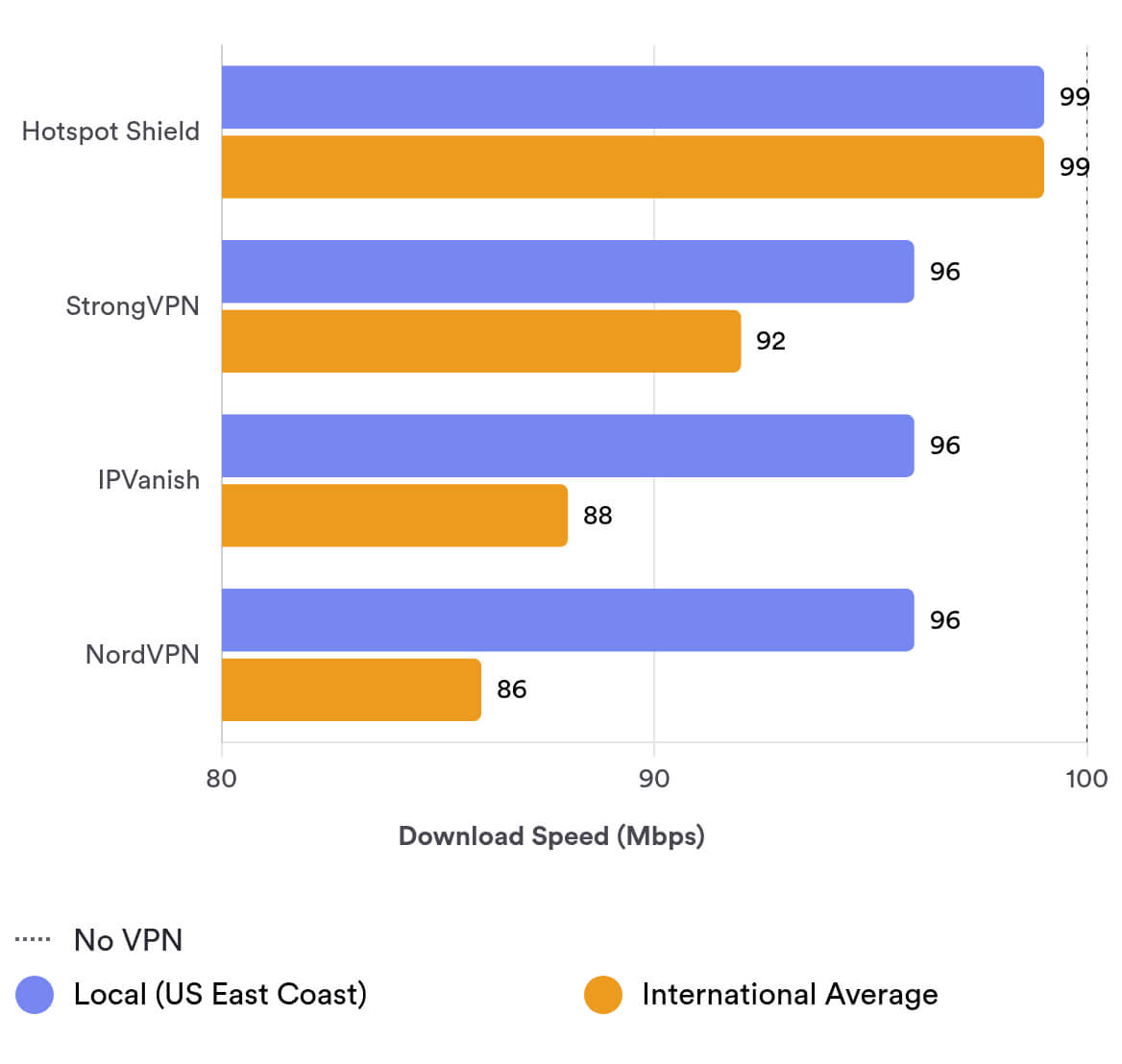
These results show StrongVPN nearly matches Hotspot Shield—the fastest in our tests—and it beats IPVanish and NordVPN for international speed stability. Its upload speeds, however, lag behind the very top performers.
Lowest Latency Recorded
In our 2025 testing, StrongVPN delivered the lowest local ping of all 61 VPNs we reviewed.
At just 4ms, it outperformed NordVPN and Hide.me. We played fast-paced games like CS:GO and PUBG without lag or drops.
Here’s a table comparing ping times between top VPNs:
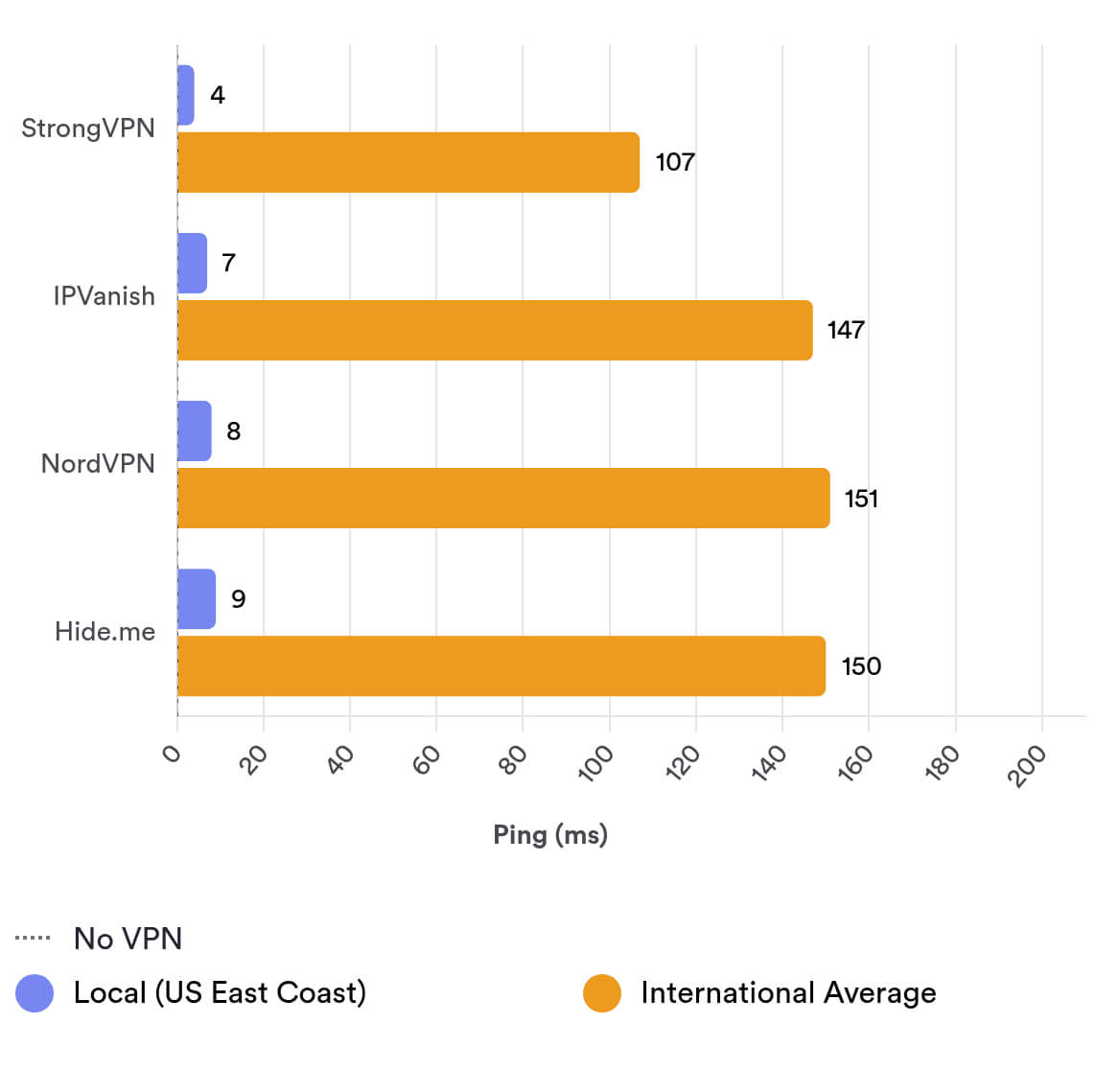
Ping measures how long it takes for data to travel to a server and back. Lower ping (latency) is critical for gaming, as it reduces lag.
Security
Ranked #20 out of 61 VPNs for Security
StrongVPN is secure, especially on Windows. It encrypts traffic with strong ciphers and uses open-source protocols like WireGuard and OpenVPN. To improve its score, StrongVPN should have its apps audited for vulnerabilities.
| Independent Audit | No |
|---|---|
| VPN Kill Switch | Yes |
| Leak Protection | Yes |
Encryption & Tunneling Protocols
We verified StrongVPN’s encryption by inspecting traffic with Wireshark. Our analysis showed full encryption of browsing activity.
By default, StrongVPN uses ChaCha20 with WireGuard. You can switch to AES-256 with OpenVPN, but we recommend WireGuard for better speed and modern security. There’s also SSTP on Windows, which can help bypass firewalls.
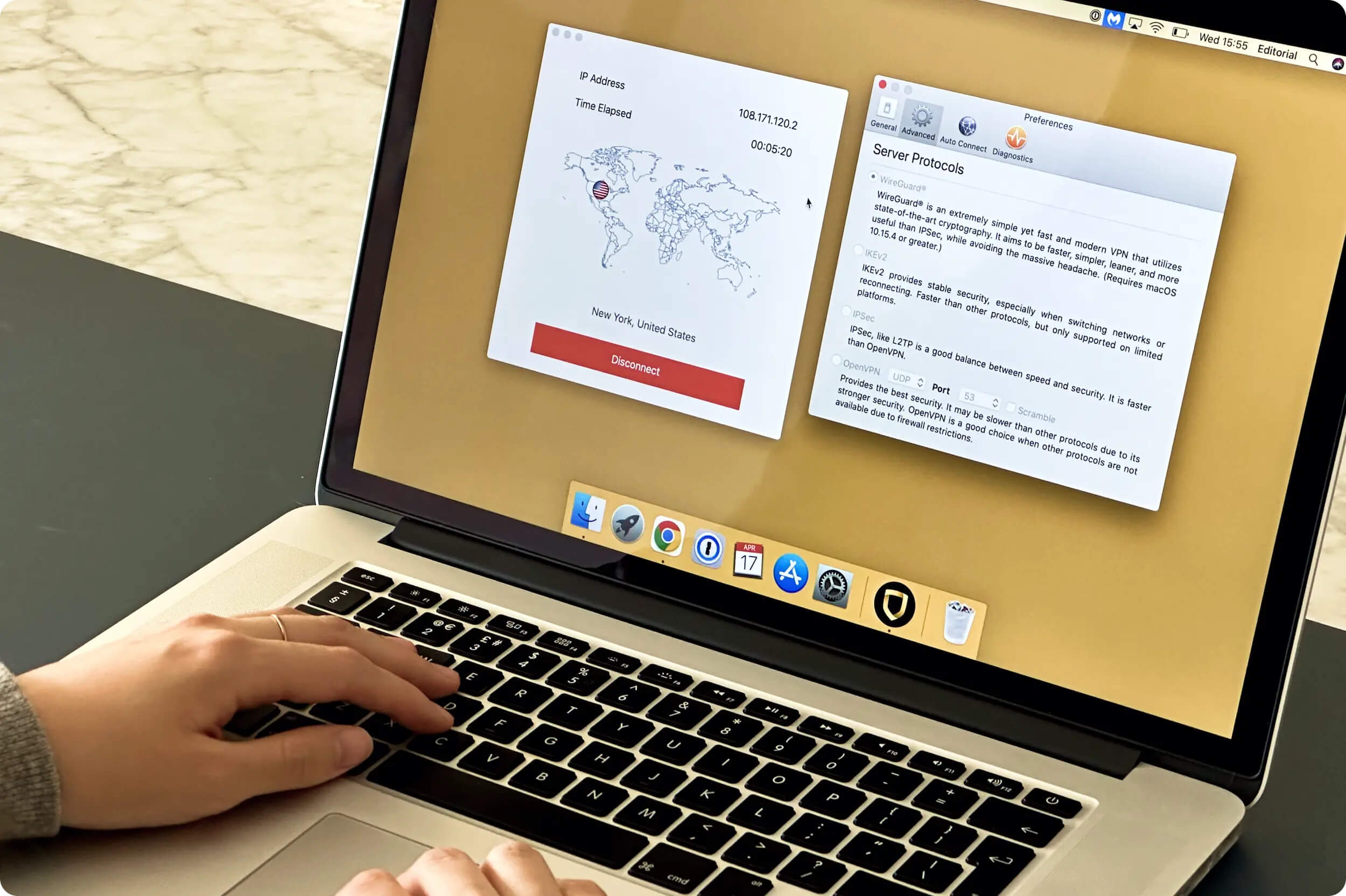
StrongVPN offers multiple secure protocols on desktop and mobile.
StrongVPN also uses its own DNS servers, so traffic isn’t routed through third parties.
Effective Data Leak Protection
We personally tested StrongVPN for IP, WebRTC, geolocation, and DNS leaks. Thankfully, we found no worrying data leaks with StrongVPN.
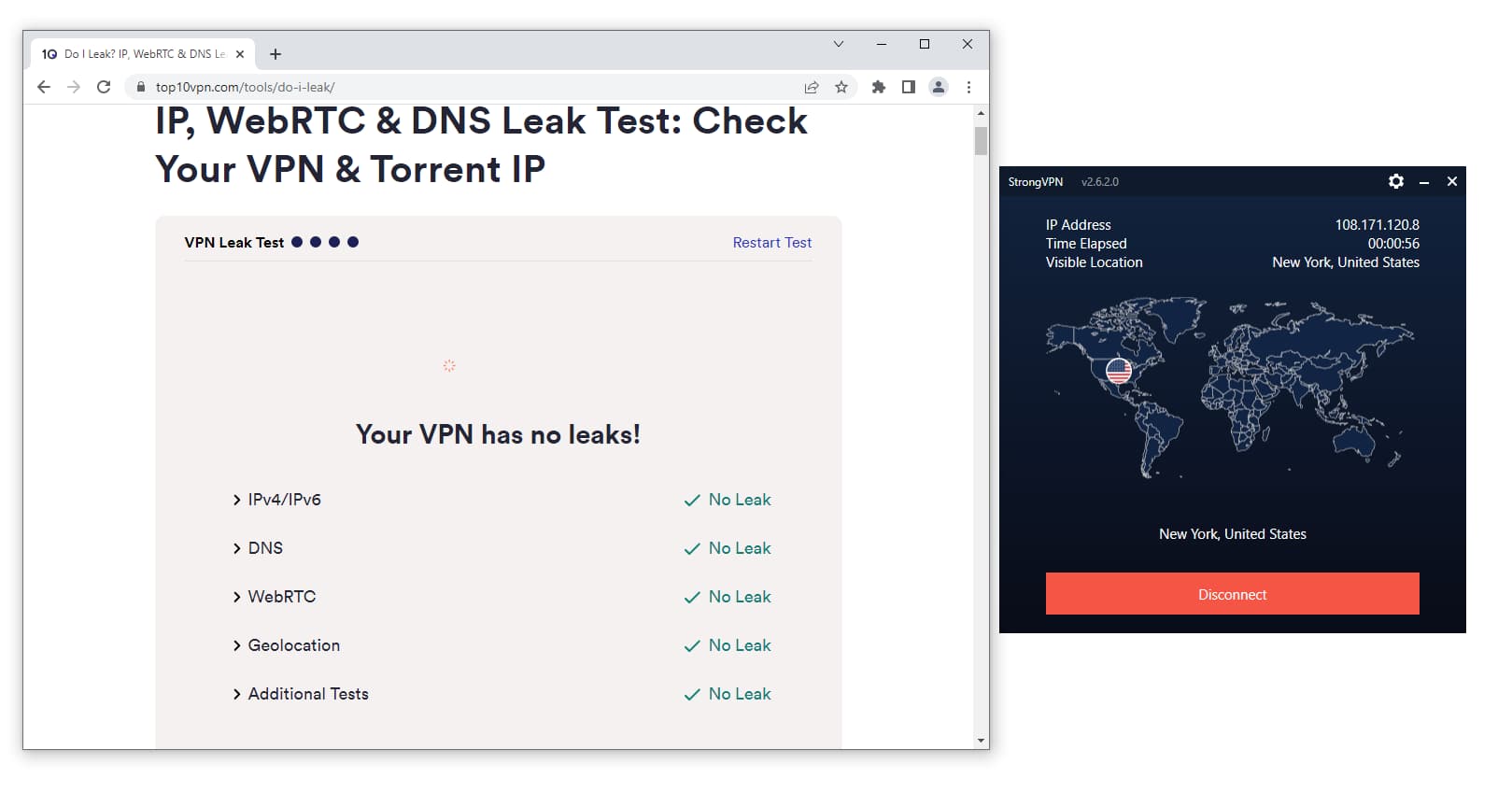
StrongVPN passed our leak tests.
The kill switch works well on Windows, but we saw IP leaks on macOS when switching servers. Many VPNs do not protect during server switches, including ExpressVPN and PrivateVPN.
Using our kill switch test tool, we confirmed StrongVPN includes a kill switch on Android and iOS. It isn’t visible in settings and can’t be toggled off, but it activates reliably.
Security Features
While we trust StrongVPN to secure your data, it lacks several features that would further strengthen safety. We’d like to see:
- Open-source apps so anyone can inspect the code for vulnerabilities.
- Post-quantum protection to mitigate future threats from quantum computing.
- A security audit to validate its encryption and server infrastructure.
Server Locations
Ranked #32 out of 61 VPNs for Server Locations
StrongVPN has servers in 42 countries, with some city-level options. While the total number is acceptable, coverage is too Europe-heavy. We’d like to see servers added in Japan, Egypt, and New Zealand.
| Continent | Countries with Servers |
|---|---|
| Europe | 22 |
| Asia | 10 |
| South America | 5 |
| North America | 4 |
| Oceania | 1 |
| Africa | 0 |
StrongVPN’s total locations exceed the industry average of 40, but global distribution is weak. About 52% of its servers are in Europe, compared to 41% with NordVPN.
Limited coverage restricts available IPs and the content you can access. For example, you can’t unblock Japan-based services with StrongVPN.
That said, StrongVPN offers city-level choices in five countries:
- Australia (4 cities)
- Canada (3)
- France (3)
- UK (5)
- US (15)
US coverage is strong across both coasts. However, the number of UK locations recently dropped to 5, with the Maidenhead server removed.
City-level options in Germany and Brazil were also removed, limiting your ability to choose nearby servers for speed or alternate IPs.
StrongVPN’s South Africa servers were removed, and India is now limited to Mumbai. By contrast, ExpressVPN offers servers in four African countries (South Africa, Egypt, Kenya, Algeria) and three in India (Mumbai and Chennai).
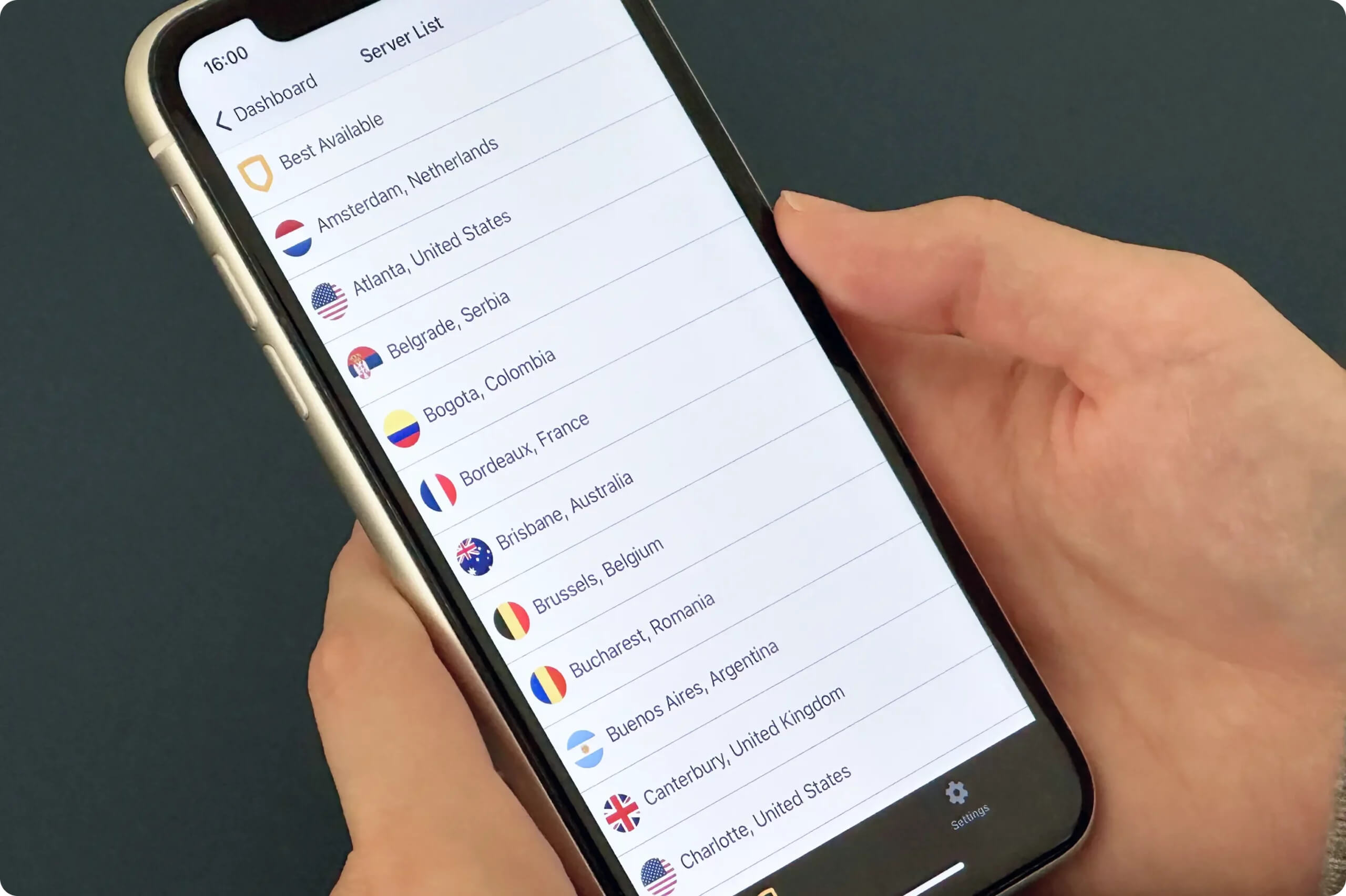
StrongVPN’s server list on iOS.
StrongVPN operates about 950 servers in total, averaging 22 per location. During peak times, this may cause congestion and slower speeds.
First-Party Server Ownership
StrongVPN owns and operates all of its servers, like IPVanish.
Owning its “global server infrastructure” is a major selling point because it avoids risks linked to rental servers. It reduces third-party access and limits who can physically handle servers.
India is an exception due to local data laws that allow government seizures. While we haven’t seen a speed impact, the India server may occasionally require an app refresh to appear.
User Experience
Ranked #24 out of 61 VPNs for User Experience
We’ve tested StrongVPN since 2019 and find it easy to use, though basic. Connecting and disconnecting is simple, but the app doesn’t clearly signal status changes. The design could also use a refresh; it looks bland and slightly blurry, especially on iOS.
Installation & Setup
Installation was straightforward on all platforms. Unlike NordVPN or IVPN, we could download the Mac app directly from the website using a single installer compatible with all versions of macOS.
Setup took under two minutes on average. If you run into issues, StrongVPN offers helpful guides.
Interface & Ease of Use
Thanks to its simplicity, StrongVPN is a good pick for beginners. The main screen shows only the most important connection details.
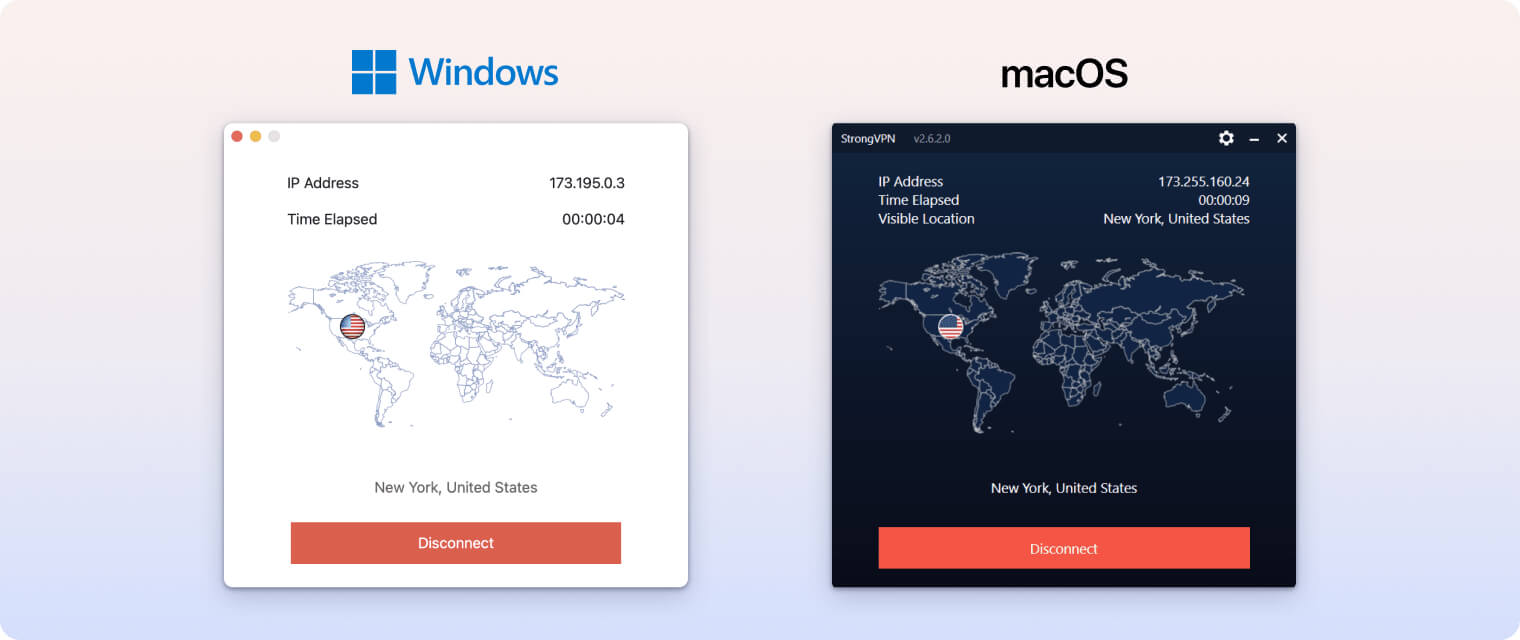
Tap the green Connect button to start. We didn’t like how little the app’s appearance changes after connecting. Better-designed apps, like ExpressVPN, use animations and a color shift so you can easily tell when you’re connected.
To avoid missing a disconnect, keep StrongVPN notifications enabled. They can be intrusive, but they help you notice connection changes.
All apps have a minimalist design with a world map and a solid background. Unlike IPVanish and NordVPN, the map isn’t interactive and serves no purpose. It looks fine on macOS and Android, but on Windows and iOS the map appears awkwardly overlaid.
Note: the macOS kill switch only works with OpenVPN or L2TP, which is an unnecessary limitation we’d like to see fixed.
For a quick overview of app differences, see below:
| Platform | Protocol | Kill switch | Split tunneling | Proxy | Port forwarding | Stealth protocol |
|---|---|---|---|---|---|---|
| Windows | OpenVPN, Wireguard, IKEv2, SSTP, L2TP | ✓ | ✗ | ✓ | ✗ | ✓ |
| macOS | OpenVPN, Wireguard, IKEv2, IPSec, L2TP | ✓ | ✗ | ✓ | ✗ | ✓ |
| iOS | Wireguard, IKEv2, IPSec | ✗ | ✗ | ✗ | ✗ | ✗ |
| Android | OpenVPN, Wireguard, IKEv2 | ✗ | ✓ | ✗ | ✗ | ✓ |
| Fire TV | OpenVPN, Wireguard, IKEv2 | ✗ | ✓ | ✗ | ✗ | ✓ |
Day-to-Day Experience
Overall, our experience was mixed. Across all apps, selecting a location doesn’t connect you automatically. You must pick a server first, then tap connect—an unnecessary extra step.
On Windows, the app doesn’t close normally; you have to exit it from the system tray. Notifications were also disruptive during streaming.
Mobile usage was smoother, and we liked experimenting with Siri Shortcuts. We browsed without issues, though the small, slightly blurry font on iPhone caused some eye strain.
Torrenting
Ranked #16 out of 61 VPNs for Torrenting
StrongVPN is safe for torrenting. It allows P2P on all servers with fast speeds, and its no-logs policy means your file-sharing can’t be tied to you. However, it doesn’t support port forwarding.
| Torrenting Attribute | StrongVPN |
|---|---|
| Permits P2P Traffic | Yes |
| Average Download Bitrate | 9.7MiB/s (3% loss) |
| Countries with P2P Servers | 42 |
| Port Forwarding | No |
| Kill Switch | Yes |
| Logging Policy | No Logs |
In our standardized P2P tests, speeds were nearly unchanged from our 10MiB/s baseline. Without the VPN, a 22GB file took 35 minutes to download; connected to StrongVPN’s New York server, it took 36 minutes.
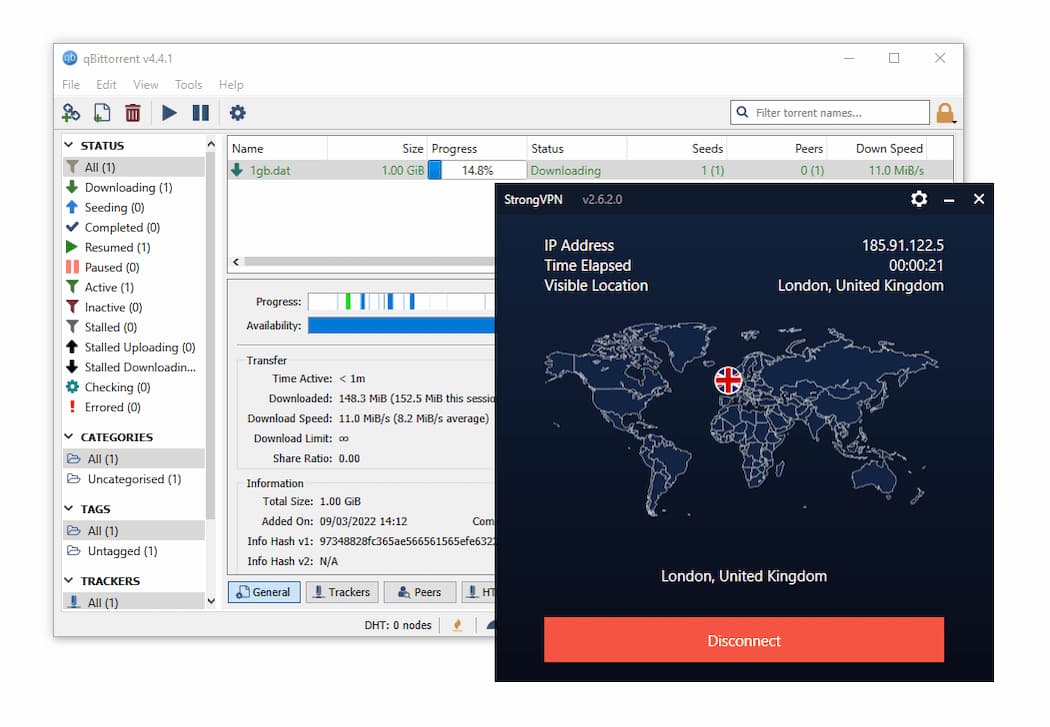
Torrenting with StrongVPN, connected to a UK server.
StrongVPN doesn’t label P2P servers, but all locations allow BitTorrent traffic. Since 2019, we’ve never had throttling or blocking while torrenting with StrongVPN.
We also like that StrongVPN owns its servers, which helps avoid DMCA issues from hosting providers. For example, TorGuard blocked torrenting on US servers after repeated copyright notices.
No Port Forwarding
Port forwarding can improve seeding speeds and is often sought by experienced torrenters.
StrongVPN no longer sells dedicated IP addresses, which previously enabled port forwarding. All StrongVPN servers now use shared IPs.
Device Compatibility
StrongVPN has apps for iOS, Android, Mac, Windows, and Fire TV, plus router support and Smart DNS for consoles. You can use StrongVPN on up to 12 devices at once, which is well above average.
| Windows | Yes |
|---|---|
| Mac | Yes |
| iOS | Yes |
| Android | Yes |
| Linux | Yes |
| Amazon Fire TV | Yes |
| Android TV | No |
| Apple TV | No |
| Router | Yes |
| Chrome | Yes |
Simultaneous Connections: 12
StrongVPN is one of the few in our top 25 without Apple TV or Android TV apps. You can use StrongDNS on both, but it doesn’t encrypt your traffic. You can also install StrongVPN on your router, though it’s less convenient than a native app.
There is an Amazon Fire TV app, but it’s not as polished as the best Fire TV VPNs.
While there’s no dedicated router app, you can buy a pre-flashed router or use an automatic installer script to simplify setup.
StrongVPN supports more than 125 router models—about 100 more than VyprVPN—making it a good option for devices without native VPN apps, like PlayStation 5 or many Smart TVs.
Smart DNS Supports 42 Countries
StrongVPN’s Smart DNS tool, StrongDNS, is the only one we’ve tested that unblocks content in over 10 regions. In fact, StrongVPN allows you to access content from any of its 42 server locations.
This is superior to ExpressVPN’s MediaStreamer which only works to access the US or PIA’s tool which is limited to 5 locations.
Additional Features
StrongVPN lacks many extras found in rival services. There’s no ad or tracker blocker, dedicated IP, double VPN, malware blocker, or GPS spoofing. It does offer split tunneling on Android, and its Scramble obfuscation works well in Russia, Turkey, and the UAE, though performance in China has declined recently.
| Additional Feature | StrongVPN |
|---|---|
| Split Tunneling | Yes (Android only) |
| VPN Obfuscation | Yes |
| Multi-Hop Servers | No |
| Dedicated IP | No |
| Ad Blocker | No |
Customer Support
Live chat is available 24/7, but we often reached sales agents who pasted answers from the FAQs.
While disappointing, when they couldn’t help they forwarded our cases to the tech team, who responded quickly.
The StrongVPN website offers a wide selection of setup guides for many devices, including videos and screenshots.
Split Tunneling
StrongVPN’s Android app supports split tunneling, letting you choose which apps bypass the VPN. This is useful if you want maps or weather apps to use your real location while the VPN is on.
We’d like this feature added to all platforms.
Additional Features We’d Like to See
StrongVPN trails competitors on extra features. Here’s what we’d like added:
- Ad, tracker, and malware blocking for safer browsing.
- Split tunneling on iOS, Windows, and macOS.
- Multi-hop servers for added security and privacy.
- GPS spoofing to improve access to geo-restricted apps and sites.
StrongVPN Key Data
| Attribute | StrongVPN | Typical VPN |
|---|---|---|
| Owner | Ziff Davis | Independent |
| Launch Date | 2005 | 2015 |
| Local Download Speed | 96Mbps (4% loss) | 89Mbps (11% loss) |
| International Download Speed | 92Mbps (8% loss) | 80Mbps (20% loss) |
| Countries with Servers | 42 | 40 |
| Privacy Policy | No Logs | Identifiable Data |
| Simultaneous Connections | 12 | 10 |
| Netflix Libraries | 1 | 3 |
| Torrenting | Yes | Yes |
| Works In China? | Sometimes | No |
| Cheapest Price | 3.97/mo over 12 months | $3.87/mo over 24 months |
| Customer Support | 24/7 Live Chat | |
| Apps & Extensions |
          |
|
Price
Price Plans
| 1 month | $11.99 |
|---|---|
| 12 months | $47.64 ($3.97/mo) |
Free Trial
| Money-Back Guarantee | 30 days |
|---|---|
| Free Trial | No |
| 100% Free Plan | No |