
SkyVPN: Not Private, Not Fast, Not Worth It
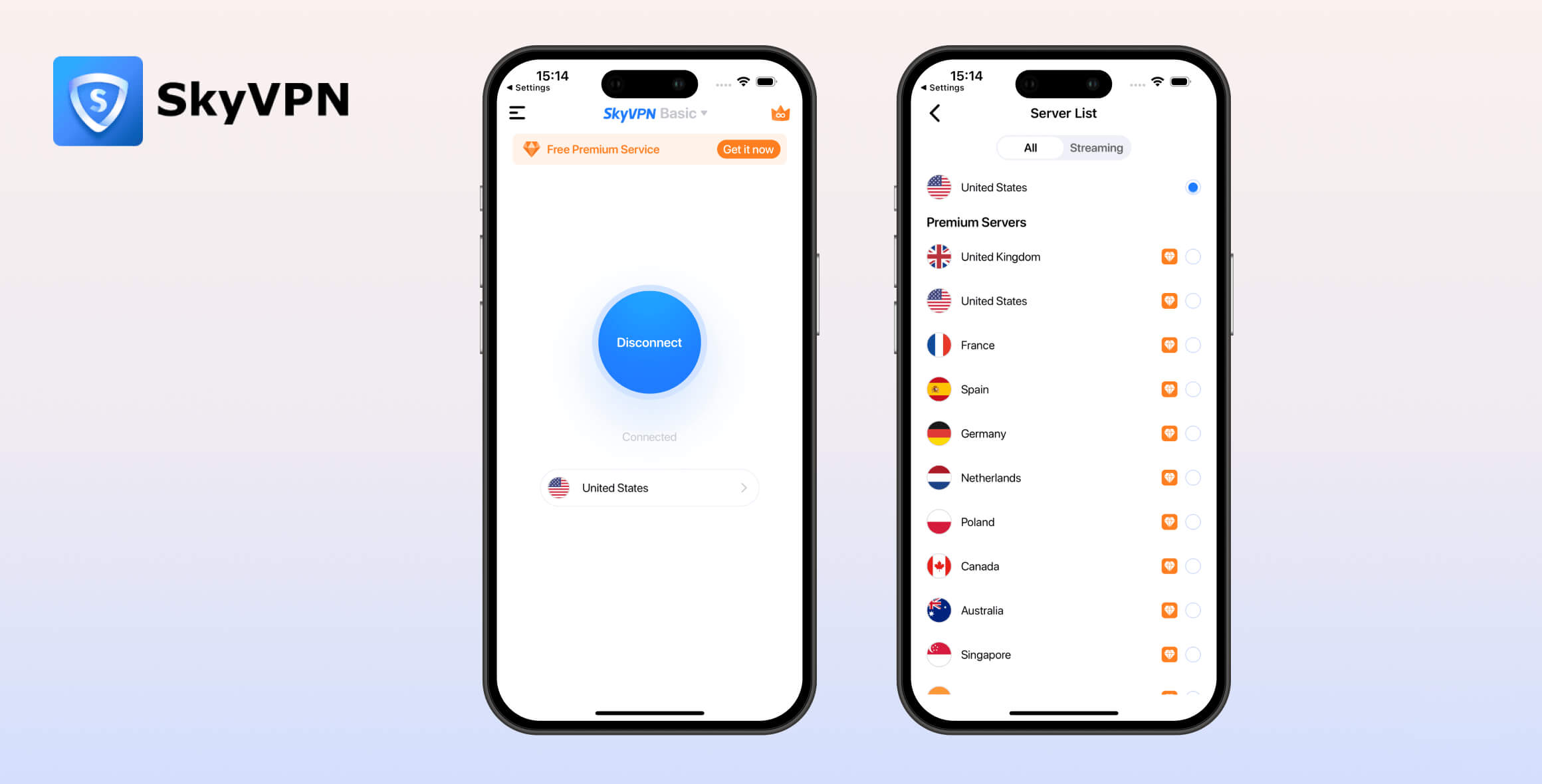
SkyVPN Free is one of the worst free VPNs we’ve tested, ranked #61 out of 61. It’s an untrustworthy VPN that logs your IP address, fails to encrypt web traffic, and cannot unblock any Netflix region. In recent speed tests, we recorded an atrocious 90% drop in local and international speeds. SkyVPN is not safe enough to use even temporarily and should be avoided at all costs.
- Pros
- Many server locations on desktop
- Cons
- Invasive logging policy
- Chinese ownership
- Fails to encrypt traffic on Windows
- Very slow speeds
- Does not work with Netflix
- Poor user experience
SkyVPN Free is the worst VPN we’ve tested and reviewed. Launched in 2017, it’s owned by Tengzhan Hongkong Limited, which has undisclosed links to Chinese companies that may threaten your privacy.
SkyVPN has both free and paid versions, but we’re focusing on the free one. In this SkyVPN Free review, we put the service through our rigorous VPN testing process to measure its speeds, check whether it unblocks Netflix, quiz its support team, and more.
Privacy
Ranked #52 out of 61 VPNs for Privacy
SkyVPN will not keep your internet activity private. The VPN logs personally identifiable information, including your IP address and location data. It also has links to China and has confirmed it will hand over user data to the government if requested.
| Originating IP Address | Yes |
|---|---|
| Browsing Activity | No |
| Individual Connection Timestamps | No |
| Date of Last Connection | No |
| VPN Server IP | Yes |
| Device Information | Yes |
| Individual Bandwidth Usage | Yes |
| Account Information | Yes |
You can read SkyVPN’s full privacy policy on its website.
As the table above shows, SkyVPN logs a lot of identifying user data, including your IP address and the VPN server IP address. The claim in its privacy policy that it’s a “no-log network” is completely false.
It also claims to be different from other free VPNs that track users, saying “SkyVPN never does like that [sic],” but it actually logs a lot of unnecessary information that can be used to track a user’s online activity.
We’re extremely disappointed by how vague SkyVPN’s privacy policy is. In its list of collected data, it also mentions “other technical data” and “certain information,” which could include almost anything.
SkyVPN is also open about how “ads appearing on SkyVPN Software or any of our websites may be delivered to users by advertising partners, who may set cookies.”
SkyVPN also states that it will hand over your data to any court that asks for it.
Worrying Ties to Chinese Companies
SkyVPN, Inc. is based in Hong Kong. Its corporate address is Rm 2103, Futura Plaza, 111 How Ming St, Kwun Tong, Hong Kong.
Our free VPN ownership research revealed that SkyVPN Inc. is owned by Tengzhan Hongkong Limited (騰展香港有限公司), which refers to itself as SkyVPN Inc., Secure Sentry Communications, and Dingtone, depending on the context.
The Tengzhan Group acquired Dingtone in 2015, according to a Chinese-language disclosure document. There is no corresponding reference in English-language media.
Tengzhan Hong Kong Ltd (騰展香港有限公司) incorporated in December of that year, with You Xiumie (游秀妹) as director and sole shareholder.
None of this information is easy to find. There is nothing on SkyVPN’s website that explains its ownership or corporate history.
You can’t trust SkyVPN. Under Chinese law, the government could demand logs and information on any of its users at any time, and SkyVPN would have to comply.
Streaming
Ranked #46 out of 61 VPNs for Streaming
SkyVPN is one of the worst free VPNs for streaming. In our recent tests, it failed to access US Netflix, BBC iPlayer, HBO Max, or Disney+. It can unblock All 4, Amazon Prime Video, and YouTube, but its speeds and data limit are far too restrictive to watch movies or TV shows comfortably. Put simply, there are far better free streaming VPNs available.
| Streaming Service | Works with SkyVPN (Free) |
|---|---|
| BBC iPlayer (UK) | No |
| DAZN (Canada) | No |
| Disney+ (UK) | No |
| Hulu (US) | No |
| ITVX (UK) | No |
| HBO Max (US) | No |
| Netflix (US) | No |
| Netflix (UK) | No |
| Prime Video (US) | Yes |
| Sky Go (UK) | No |
SkyVPN Free fails to unblock any of Netflix’s global libraries. This means you can’t access the US, UK, or Japanese Netflix collections from overseas.
You might be able to access Netflix’s library of originals, but the VPN will disconnect after a couple of hours due to its 600MB daily data allowance.
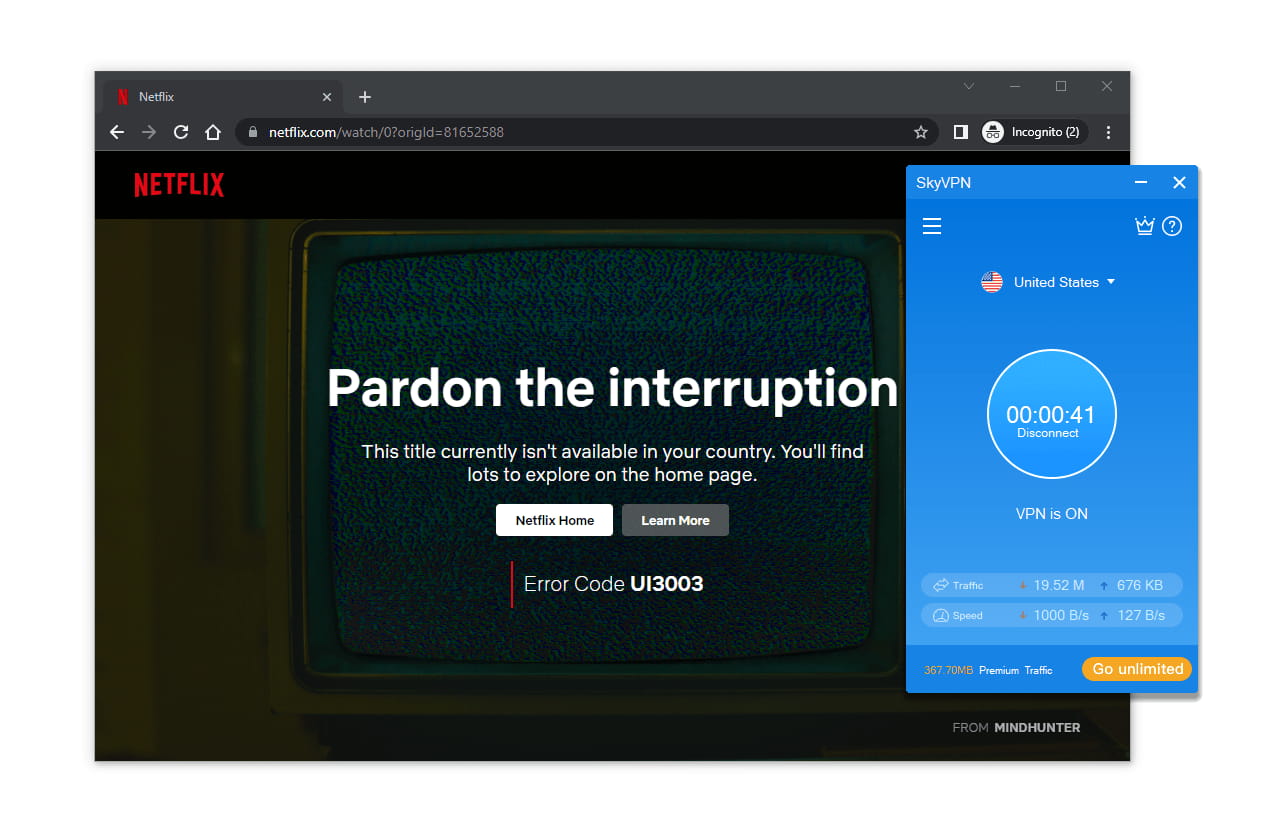
In our streaming tests, SkyVPN failed to unblock US Netflix or any other Netflix library.
We also tested SkyVPN’s single UK server to see if it could bypass BBC iPlayer’s geo-restrictions. It doesn’t unblock the service at all.
If you want a VPN for Netflix or BBC iPlayer, don’t waste your time with SkyVPN. This is especially true for SkyVPN’s one-server mobile app, which has no UK server and whose single US server doesn’t unblock Netflix.
Great alternatives to SkyVPN for streaming include PrivadoVPN Free, which can access US Netflix, and Windscribe Free, which can unblock five global Netflix libraries.
SkyVPN’s Streaming Performance Compared to Other Free VPNs
| VPN Service | Streaming Rating | Number of Netflix Libraries | US Netflix | BBC iPlayer | HBO Max |
|---|---|---|---|---|---|
| PrivadoVPN Free | 4.3 | 2 | Yes | No | Yes |
| Windscribe Free | 5.7 | 5 | No | Yes | Yes |
| SkyVPN Free | 0.8 | 0 | No | No | No |
Speed
Ranked #57 out of 61 VPNs for Speed
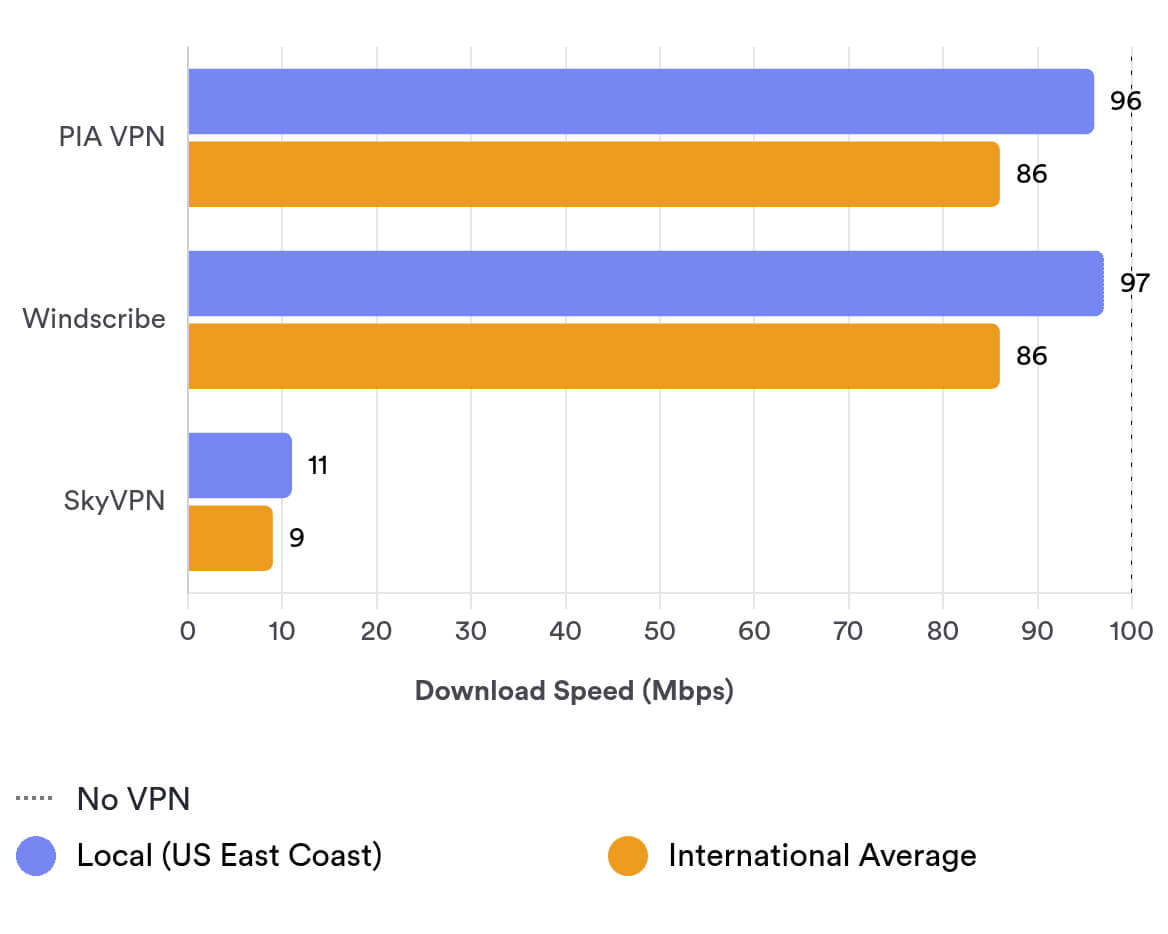
SkyVPN is one of the slowest VPNs we’ve tested. Whether you connect to a nearby or international server, you can expect your internet speed to drop by around 89%.
Here’s a table showing SkyVPN’s speed test results on a 100Mbps baseline internet connection:
| No VPN (New York) | US (New York) | Germany (Berlin) | Australia (Sydney) | |
|---|---|---|---|---|
| Server Location |  |
|
 |
 |
| Download Speed | 100Mbps | 11Mbps | 10Mbps | 9Mbps |
| Upload Speed | 100Mbps | 9Mbps | 9Mbps | 3Mbps |
| Ping | 1ms | 5ms | 90ms | 212ms |
| Distance | 0mi | 5mi | 4,000mi | 9,900mi |
As the data above shows, SkyVPN couldn’t reach 15Mbps on local or international connections in our tests.
These speeds are awful and don’t come close to reputable free VPNs like Windscribe Free. A 90% drop in download speeds is simply unacceptable.
The fact that the VPN performs similarly across many servers suggests SkyVPN may be throttling its download speeds.
Overall, we don’t recommend SkyVPN to anyone who wants to browse the web, stream video, or play online games. Its speeds are not fit for purpose.
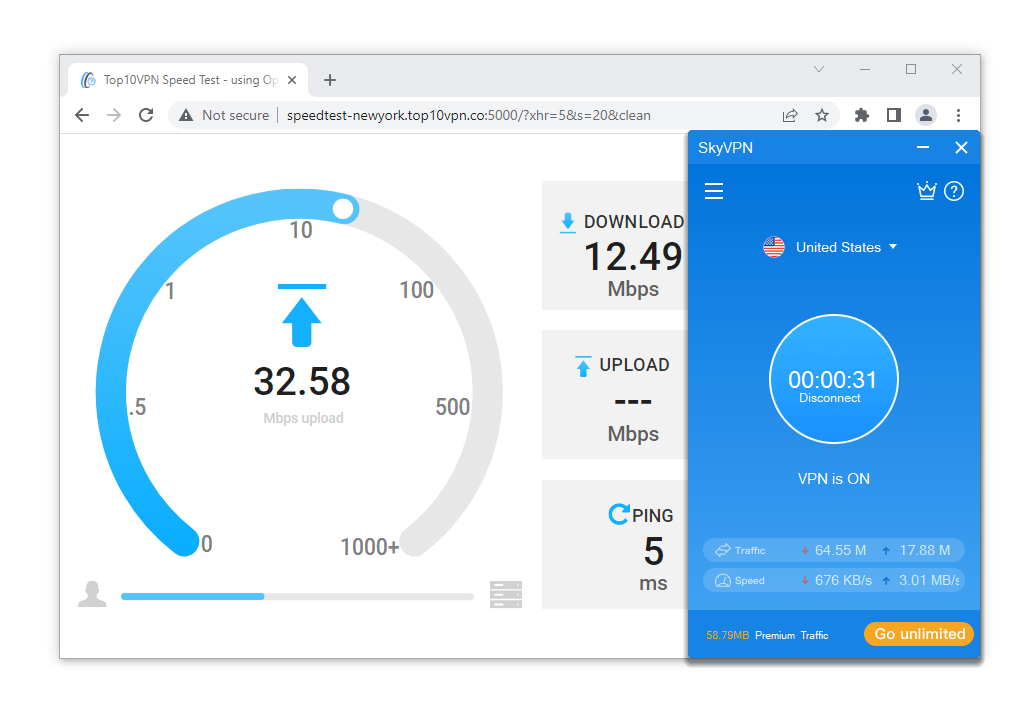
SkyVPN’s download speeds are consistently below 15Mbps on our 100Mbps baseline internet connection.
The only upside is the decent local ping times (5ms), but the service is still too slow for online games (or even downloading them).
To put these awful speeds in context, you can see how SkyVPN compares to other VPNs in the chart below:
Security
Ranked #55 out of 61 VPNs for Security
SkyVPN is unsafe to use and lacks most of the security features a VPN should have. In our packet inspection tests, we found it wasn’t even encrypting traffic, which means anyone intercepting your connection can see the websites you visit or the files you download. It does have a working kill switch on Windows, but it’s not available on Android or iPhone.
| Independent Audit | No |
|---|---|
| VPN Kill Switch | Yes |
| Leak Protection | Yes |
Like other low-tier free VPNs such as SuperVPN, SkyVPN reveals almost nothing about its security on its website or in the app. We are extremely concerned by this lack of information.
SkyVPN’s website claims the VPN uses AES-256 encryption. However, when we used Wireshark to test whether SkyVPN encrypted our traffic, we found our traffic remained unencrypted while connected.
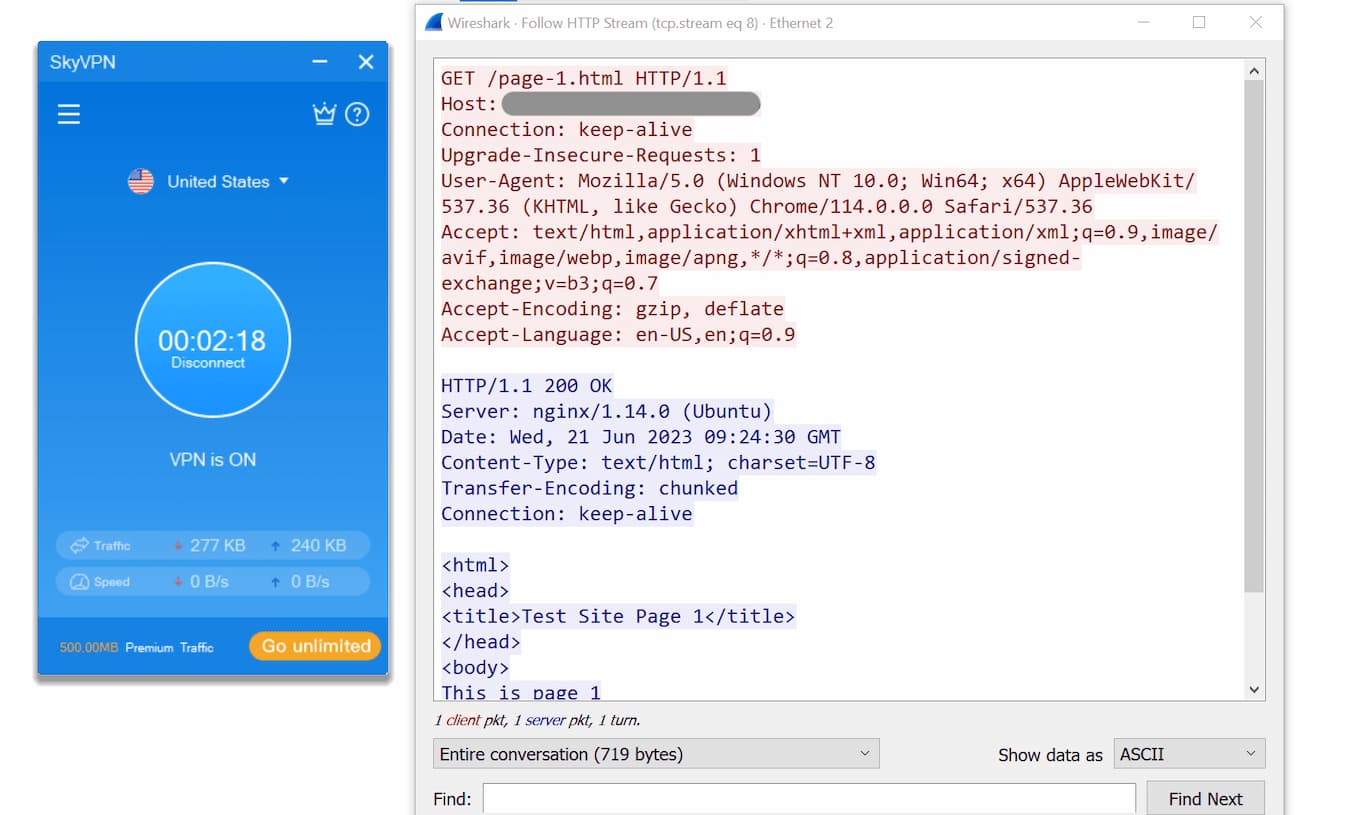
SkyVPN failed to encrypt our browsing activity.
As the screenshot of our test shows, Wireshark detected our visit to a test website even with SkyVPN active.
Essentially, SkyVPN fails at the most basic VPN function. Anyone intercepting your connection—including your ISP—can see the web pages you visit and any other information you transmit online.
There’s also no public information about SkyVPN’s VPN protocol, so we don’t know whether it uses OpenVPN, IKEv2, or something far less secure, like PPTP.
Together, this lack of transparency and the absence of functional encryption make SkyVPN one of the most unsafe VPNs we’ve tested. For these reasons, we strongly suggest avoiding this service.
Kill Switch Stops IP Address Leaks on Windows
In our tests, SkyVPN successfully prevented IP address leaks when our connection dropped and when we switched between server locations.
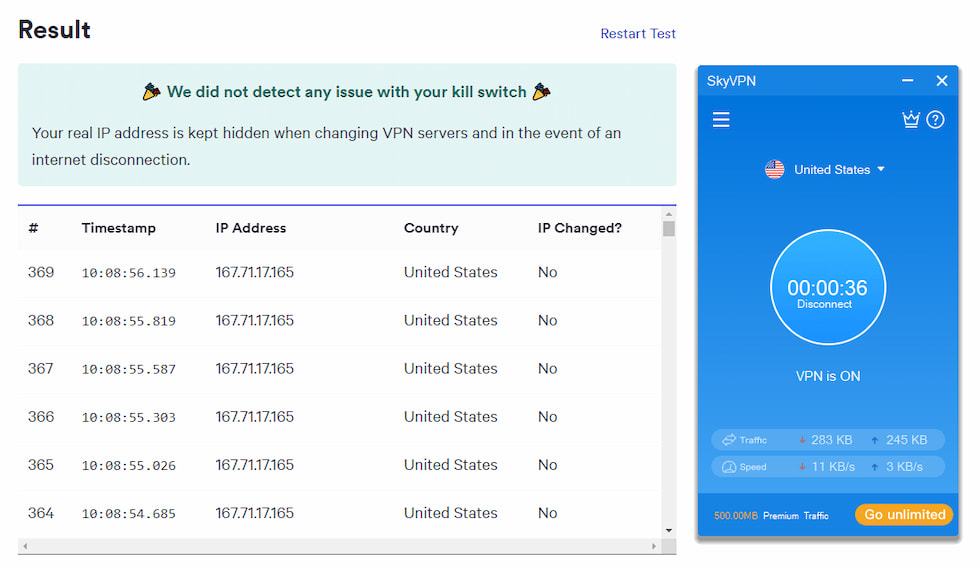
Our kill switch test tool didn’t detect any issues with SkyVPN’s kill switch on Windows.
We’re glad SkyVPN’s kill switch works on Windows, but it isn’t available on other platforms. By comparison, Proton VPN Free offers a functioning kill switch on both desktop and mobile, so your IP address is protected on all your devices.
No IPv4, IPv6, or WebRTC Leaks
In our VPN leak tests, we found no major red flags. We are slightly concerned that SkyVPN uses Google DNS servers, but this isn’t unusual for lower-tier or mid-tier VPNs.
Most VPNs that own first-party DNS servers are top-tier services like ExpressVPN.
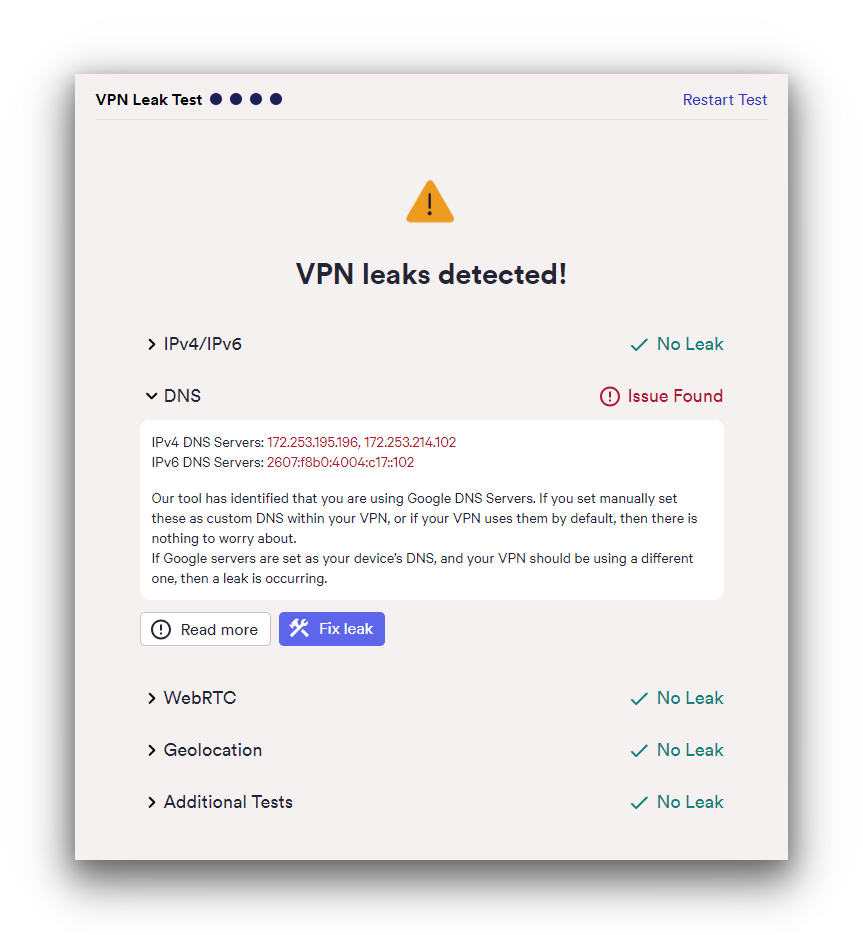
SkyVPN didn’t completely pass our VPN leaks test.
SkyVPN didn’t leak our IP address, geolocation, or WebRTC details, but we still don’t recommend it. While it might hide your IP address temporarily, it doesn’t encrypt your data and logs a lot of personally identifiable information.
Server Locations
Ranked #44 out of 61 VPNs for Server Locations
SkyVPN’s server list depends on your device. On the desktop app, you can connect to 13 server locations, which is impressive for a free VPN. On the mobile app, you can only connect to a US server, which is disappointing.
| Continent | SkyVPN (Free) Countries with Servers |
|---|---|
| Europe | 6 |
| Asia | 3 |
| North America | 2 |
| South America | 1 |
| Oceania | 1 |
| Africa | 0 |
SkyVPN has one US server for the ‘Basic’ version on mobile, including both iOS and Android.
Its desktop app is much better, with a reasonable spread of 13 server locations, two of which are in the US.
For a free VPN, this is a surprisingly diverse list, with choices in South America, Asia, North America, and Europe. We’re disappointed SkyVPN removed its single Middle East server in Turkey.
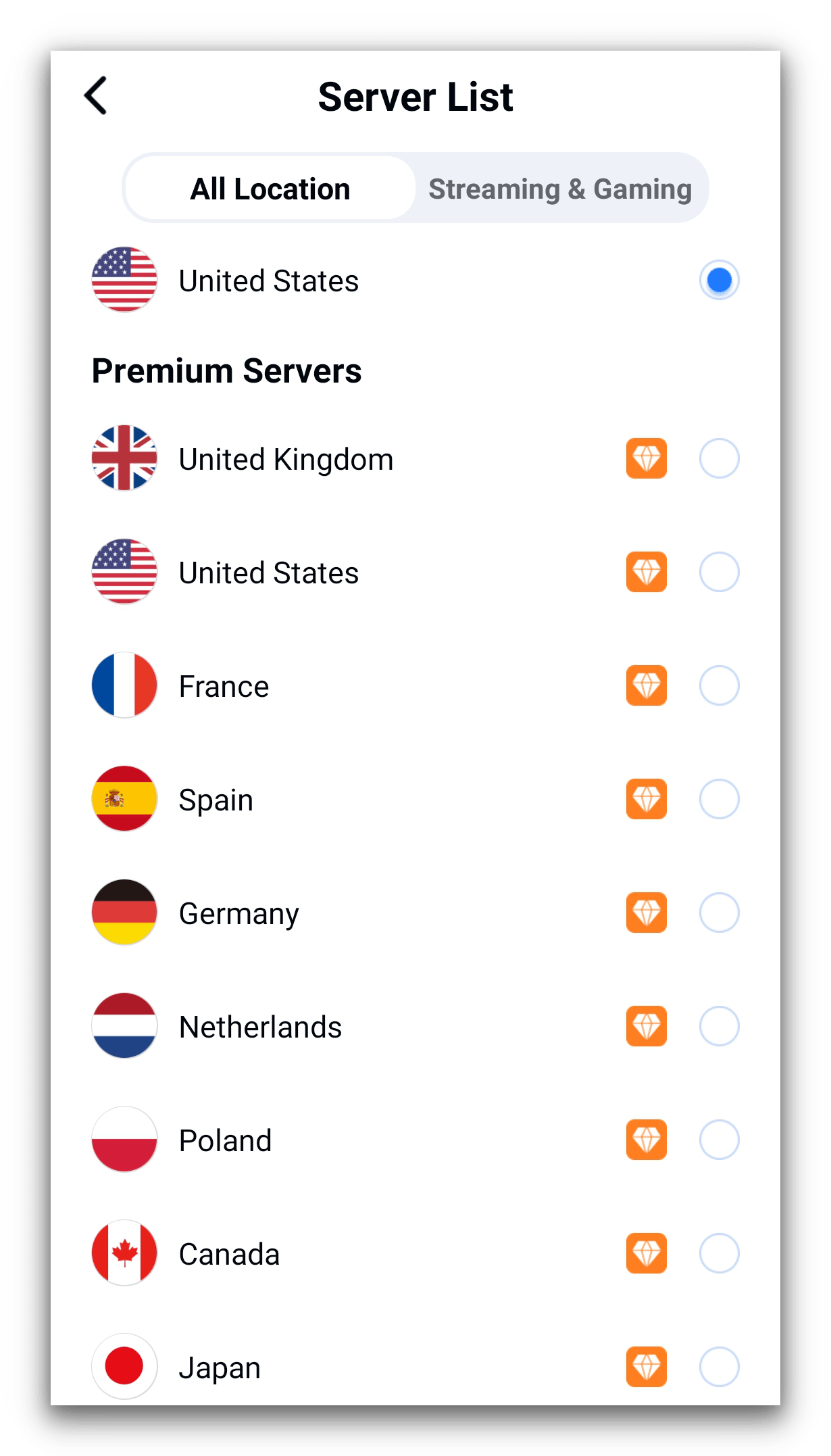
SkyVPN’s premium servers on Android are available for free if you agree to watch ads.
Without city-level server choices, you’re stuck with a single server to cover large countries like Canada, Australia, and the US. The app doesn’t tell you exactly where the servers are located, either.
We checked and found SkyVPN’s Canada server is in Toronto, its US server is in New Jersey, and its Australia server is in Brisbane. If you’re not near these locations and want a local connection, your speeds will likely be even worse than ours.
User Experience
Ranked #60 out of 61 VPNs for User Experience
SkyVPN left us frustrated during testing. We experienced severe software issues with the desktop versions. On Windows, we struggled to refresh the 600MB daily data, and other times we only received 500MB. On macOS, SkyVPN wasn’t compatible with our devices at all. The mobile versions were slightly easier to use but were riddled with pop-up ads.
SkyVPN’s mobile apps are simple, with a standard Connect button in the middle of the screen and the server list above it. This is standard, but it’s so basic that it lacks anything useful.
In our tests, we couldn’t download SkyVPN onto our MacBook Pro or iMac from the App Store. It didn’t work using the official website’s macOS download link either.
Windows & macOS
While using SkyVPN on Windows, we ran into numerous bugs and software issues. First, the app doesn’t always give you 600MB of data per day (as specified in the Terms of Service). Instead, we often only got 500MB.
Windscribe Free gives you 10GB per month, while Proton VPN Free is completely unlimited.
Other times, the data limit didn’t decrease while we were connected and testing the service. This made it hard to judge how long we could use the VPN.
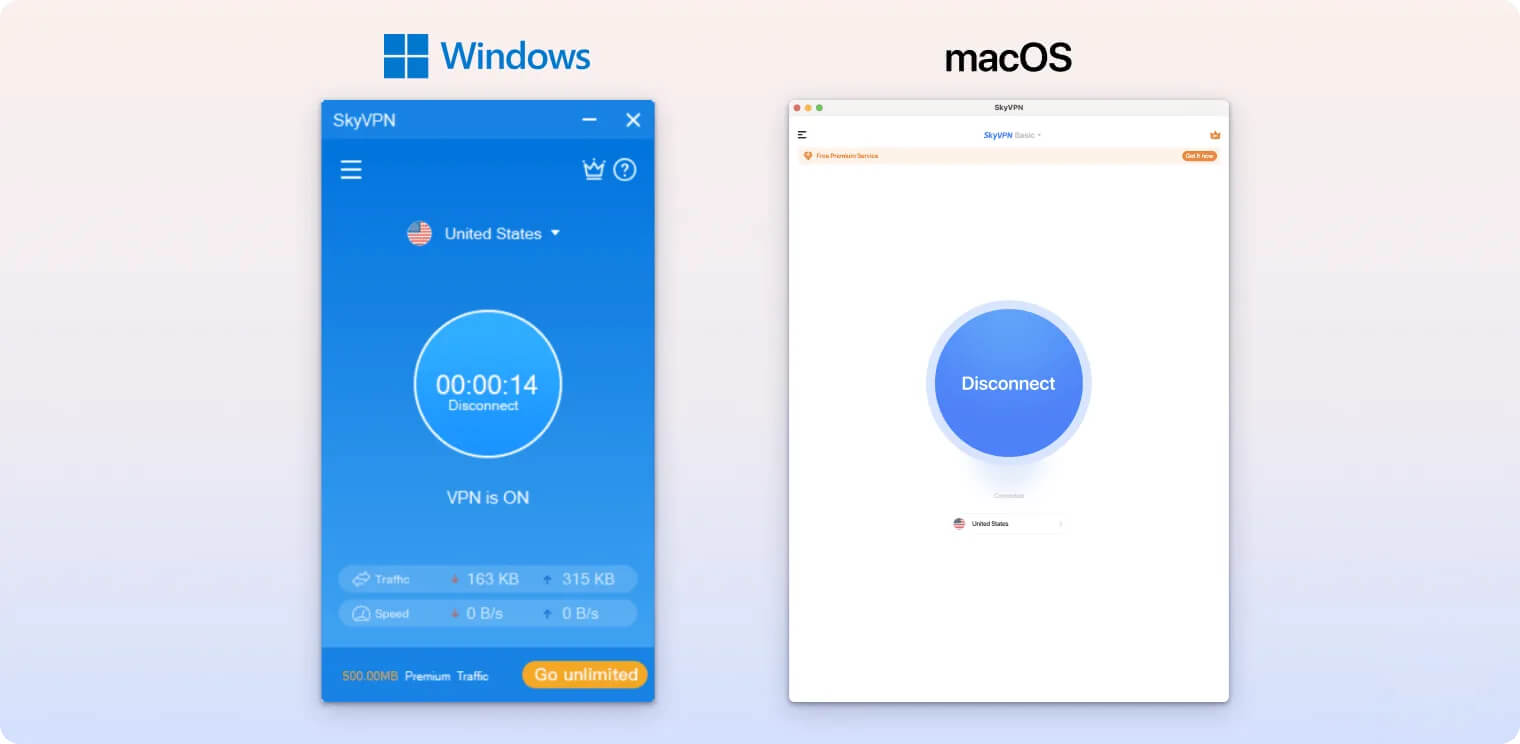
Unfortunately, we weren’t able to test SkyVPN on macOS. The latest version requires a Mac with Apple Silicon, which we currently don’t have in our testing suite.
It’s extremely unusual for a free VPN to require the latest devices to run.
None of the top-tier VPNs we use reduce their macOS user base with an Apple Silicon requirement.
Android & iOS
SkyVPN’s mobile apps are simple, but we encountered many pop-up ads and notifications. SkyVPN offers more “premium traffic” to users who agree to watch video ads, which makes for an annoying experience.
SkyVPN’s premium traffic is supposedly faster and increases the daily data cap, but in reality it’s just as slow as the basic option.
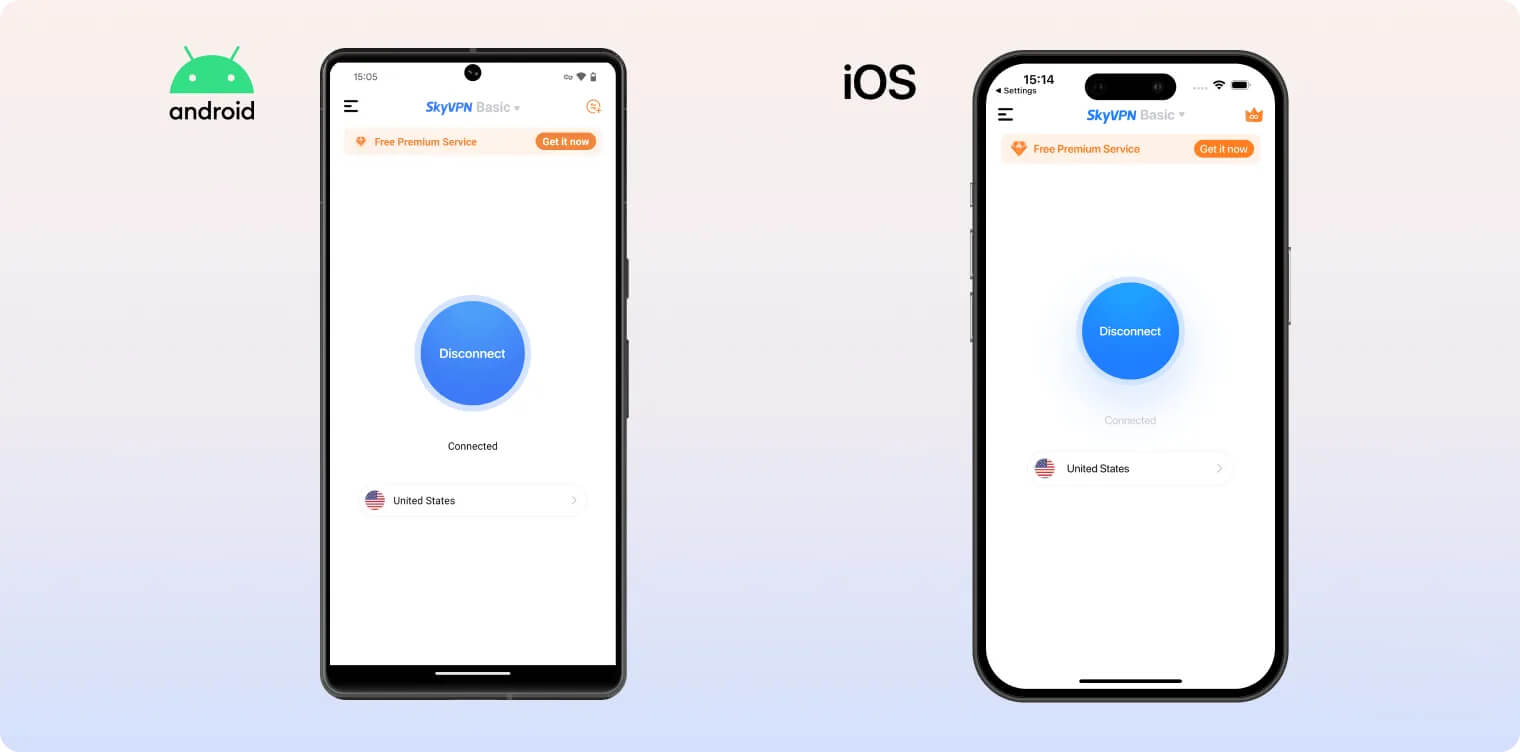
We’re disappointed that SkyVPN doesn’t offer any technical features on mobile. There’s no kill switch, data leak prevention, or split tunneling on either iOS or Android.
As on Windows, you can’t switch between protocols or encryption on mobile.
Torrenting
Ranked #51 out of 61 VPNs for Torrenting
Although SkyVPN allows torrenting, we strongly recommend you avoid it. Its 600MB daily data allowance limits the size of files you can download before the VPN disconnects. It also logs a lot of data, making it easy to identify you from your P2P activity. Lastly, its download speeds are extremely slow, barely reaching 0.8MiB/s.
| Torrenting Attribute | SkyVPN (Free) |
|---|---|
| Permits P2P Traffic | Yes |
| Average Download Bitrate | 0.8MiB/s (92% loss) |
| Countries with P2P Servers | 12 |
| Port Forwarding | No |
| Kill Switch | Yes |
| Logging Policy | Excessive Logs |
P2P file sharing is permitted on some SkyVPN servers. However, its Terms of Service explicitly forbid P2P activity on certain servers, including those in Canada, France, the UK, and the US.
We tried torrenting on a UK SkyVPN server and our traffic was completely blocked. SkyVPN’s 600MB daily data cap means the VPN will likely disconnect before you finish downloading a file anyway, risking exposure of your true IP address.
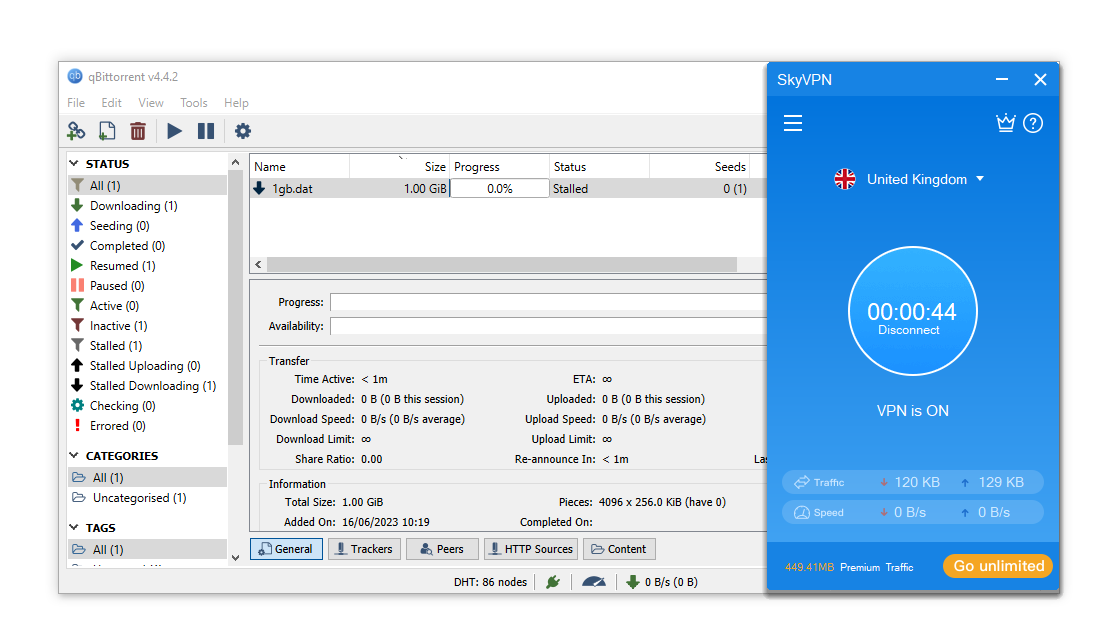
In our torrenting tests, our download was completely stalled while connected to a UK SkyVPN server.
We strongly suggest avoiding SkyVPN for torrenting because it logs your original IP address and the server IP address, which could expose your torrenting activity.
Overall, SkyVPN is virtually unusable for torrenting. Its restrictive data cap, slow speeds, and intrusive logging policy make it a poor choice and one of the worst VPNs for P2P.
Device Compatibility
SkyVPN is available on Windows, macOS, iOS, and Android. All versions lack customizable options or advanced features. To use SkyVPN on macOS, you need a device with the newer M1 chip, which rules out many devices. Even worse, SkyVPN isn’t compatible with any game consoles or streaming devices.
| Windows | Yes |
|---|---|
| Mac | Yes |
| iOS | Yes |
| Android | Yes |
| Linux | No |
| Amazon Fire TV | No |
| Android TV | No |
| Apple TV | No |
| Router | No |
| Chrome | No |
Simultaneous Connections: 1
To download SkyVPN on Windows, we used a link on the VPN’s website. However, when we tried to download SkyVPN on our test MacBook and iMac, the software was incompatible because neither device has the latest M1 chip.
SkyVPN can’t be used on any game consoles, like PlayStation or Xbox, or on streaming devices like Android TV or Amazon Fire TV. The service doesn’t even offer browser extensions for Chrome or Firefox.
On the free plan, you can only use the VPN on one device at a time. If you want to protect multiple devices simultaneously, look elsewhere.
Additional Features
SkyVPN offers hardly any additional features, missing obfuscation technology, multi-hop servers, and an ad blocker. This falls well below the standard set by modern VPN services.
| Additional Feature | SkyVPN (Free) |
|---|---|
| Split Tunneling | Yes |
| VPN Obfuscation | No |
| Multi-Hop Servers | No |
| Dedicated IP | No |
| Ad Blocker | No |
IP Leak Protection & Split Tunneling Available
SkyVPN offers a few basic features on Windows, like IP leak protection and split tunneling (called Smart VPN). However, its 600MB data cap usually makes the app so limited that these features aren’t worth much.
These are the bare minimum when it comes to advanced VPN features. There are simply much better free VPNs with fully featured apps.
Security Features We’d Like to See
SkyVPN is unsafe and needs to add many features to its security suite. Here are some missing features we’d like to see added:
- Functional kill switch on iOS and Android to prevent accidental data leaks.
- OpenVPN or WireGuard protocols.
- Data leak protection on iOS and Android.
- Functional AES-256 encryption on all apps.
- Open-source software code to improve transparency and allow users to analyze SkyVPN’s security.
SkyVPN Key Data
| Attribute | SkyVPN | Typical Free VPN |
|---|---|---|
| Owner | Tengzhan Hongkong Limited | Independent |
| Launch Date | 2017 | 2015 |
| Safe to Use | No | No |
| Data Cap | 600MB | 10GB per month |
| Payment Details Required | No | No |
| Account Required | Yes | Yes |
| Contains Ads | Yes | Yes |
| Local Download Speed | 11Mbps (89% loss) | 61Mbps (39% loss) |
| International Download Speed | 9Mbps (91%) | 55Mbps (45% loss) |
| Countries with Servers | 13 | 4 |
| Privacy Policy | Excessive Logs | Identifiable Data |
| Simultaneous Connections | 1 | 1 |
| Manually Select Server Location | Yes | Yes |
| Netflix Libraries | 0 | 0 |
| Torrenting | Yes | No |
| Works In China? | No | No |
| Customer Support | Online Resources | Online Resources |
| Apps & Extensions |
          |
|
Price
Price Plans
| Safe to Use | No |
|---|---|
| Data Cap | 600MB |
| Payment Details Required | No |
| Manually Select Server Location | Yes |
| Account Required | Yes |
| Contains Ads | Yes |