
Mozilla VPN: Fast, Private, and Easy to Use—but Weak for Streaming and Limited on Devices
Ranked #16 out of 61 VPNs
Mozilla VPN is an excellent service from a trusted name in tech, using the same server network and technology as Mullvad VPN. In our tests, it delivered fast, secure connections across its entire network. Its main drawbacks are limited success unblocking streaming services and modest device support, but it’s a strong choice for torrenting thanks to its strict no-logs policy.
- Pros
- No personal data logged
- Private and secure
- Extremely fast
- Easy to use
- Good for torrenting
- Cons
- Not available in all countries
- Regional gaps in server network
- Bad for streaming
- Won’t work in China
Mozilla is best known for the Firefox web browser—one of the most popular browsers for nearly 20 years. As an open and vocal advocate for privacy, it has now released Mozilla VPN.
Right away, you should know that Mozilla VPN is not available in every country. You can currently download Mozilla VPN only in selected regions.
- Austria
- Belgium
- Bulgaria
- Canada
- Croatia
- Cyprus
- Czechia
- Denmark
- Estonia
- Finland
- France
- Germany
- Hungary
- Ireland
- Italy
- Latvia
- Lithuania
- Luxembourg
- Malaysia
- Malta
- Netherlands
- New Zealand
- Portugal
- Romania
- Singapore
- Slovenia
- Slovakia
- Spain
- Sweden
- Switzerland
- UK
- US
It’s available on a basic range of platforms: Windows, macOS, Linux, Android, and iOS. Even so, it’s one of the best-designed and easiest-to-use VPNs we’ve tested.
Another feature that sets it apart is that it uses only the WireGuard protocol on every platform. There’s no room for customization here, which you might not like if you’re a VPN expert, but we think it’s a solid choice because WireGuard is both secure and fast.
Mozilla VPN is certainly fast, even compared to other WireGuard-based services. It recorded an impressive average download speed of 97Mbps (3% loss) on short-distance connections, and it also held up well on overseas links.
These speeds are largely thanks to Mullvad’s server network and infrastructure, which Mozilla VPN uses entirely. This also means it shares Mullvad’s excellent logging policy, which is minimal, private, and trustworthy.
Mozilla VPN’s biggest weakness is streaming. It struggles to unblock major streaming libraries around the world. In our tests, it could only access HBO Max, All 4, and YouTube.
Combine that with notable gaps in its server coverage and a price that remains fairly high even on long-term plans, and you should consider whether Mozilla VPN is the right choice for you. While it’s very good, there may be a better VPN for your specific needs.
Privacy
Ranked #8 out of 61 VPNs for Privacy
Mozilla VPN is owned by Mozilla, creator of the popular Firefox web browser. However, it runs on Mullvad VPN’s servers. As a result, its logging policy can seem confusing because it draws from both companies’ privacy policies. After investigating and speaking with Mozilla, we can confirm that Mozilla VPN’s logging policy is minimal, private, and trustworthy.
| Originating IP Address | No |
|---|---|
| Browsing Activity | No |
| Individual Connection Timestamps | No |
| Date of Last Connection | No |
| VPN Server IP | No |
| Device Information | Yes |
| Individual Bandwidth Usage | No |
| Account Information | Yes |
You can read Mozilla VPN’s full privacy policy on its website.
It’s common for large tech brands to rent servers from, or rely on, dedicated VPN providers. In most cases, their logging policies are straightforward. Mozilla VPN’s approach is a bit more nuanced.
Because Mozilla operates independently but uses Mullvad’s server network and technology, its logging policy blends elements from both companies.
We asked Mozilla to clarify how data collection and logging work for Mozilla VPN users, and it provided clear guidance. We’ve summarized that information in the table below:
| Data Collected | Mozilla Policy | Mullvad Policy | Connected to Your VPN Usage? |
|---|---|---|---|
| IP Address | ✓ | ✗ | ✗ |
| DNS Requests | ✗ | ✗ | ✗ |
| Browser Timestamps | ✗ | ✗ | ✗ |
| Bandwidth Used | ✗ | ✗ | ✗ |
| ISP | ✗ | ✗ | ✗ |
| Approximate Geolocation | ✓ | ✗ | ✗ |
| Simultaneous Connections | ✗ | ✓ | ✓ |
| Payment Information | ✗ | ✗ | ✗ |
| Device Information | ✓ | ✗ | ✓ |
Our main concern was that Mozilla’s standard privacy policy would apply to VPN users. However, while that data is collected when you create a Mozilla account (which is required to use the VPN), it is not linked to your Mozilla VPN usage.
The only personal data Mozilla VPN ties to your usage is basic device information, such as model and operating system.
All Mozilla VPN usage data is handled and processed by Mullvad. As we noted in our review of Mullvad VPN, it follows an exceptional no-logs policy.
You can trust Mullvad to respect your privacy, with virtually no data logged across its global server network.
US & Swedish jurisdictions are poor choices
Our main concern with the two logging policies is the jurisdictions of the companies involved.
Mozilla is incorporated in the US, while Mullvad is based in Sweden. The US is one of the worst countries for online privacy and is part of the intrusive Five Eyes Alliance.
Sweden isn’t as problematic as the US, but it is an EU member and participates in various international data-sharing agreements.
The good news is that, with so little data logged, these jurisdictions are unlikely to pose a real risk. They’re still worth noting, but they’re a minor factor.
Streaming
Ranked #45 out of 61 VPNs for Streaming
Mozilla VPN is a poor choice for unblocking streaming services. It struggles with almost everything: it can’t access any Netflix libraries, it doesn’t work with Amazon Prime Video US, and other US services like Hulu and Disney+ block it. In our tests, it only worked inconsistently with HBO Max and could access All 4 and YouTube.
| Streaming Service | Works with Mozilla VPN |
|---|---|
| BBC iPlayer (UK) | No |
| DAZN (Canada) | No |
| Disney+ (UK) | No |
| Hulu (US) | No |
| ITVX (UK) | No |
| HBO Max (US) | Yes |
| Netflix (US) | No |
| Netflix (UK) | No |
| Prime Video (US) | No |
| Sky Go (UK) | No |
Mozilla VPN’s ability to unblock streaming libraries is tied to Mullvad’s infrastructure, which it relies on. While Mullvad is a solid VPN in many ways, it performs poorly for streaming—and Mozilla VPN does too as a result.
The good news is that we were able to unblock HBO Max, a top US streaming service with lots of exclusive content. We connected to Mozilla VPN’s US – Raleigh server, and it streamed right away.
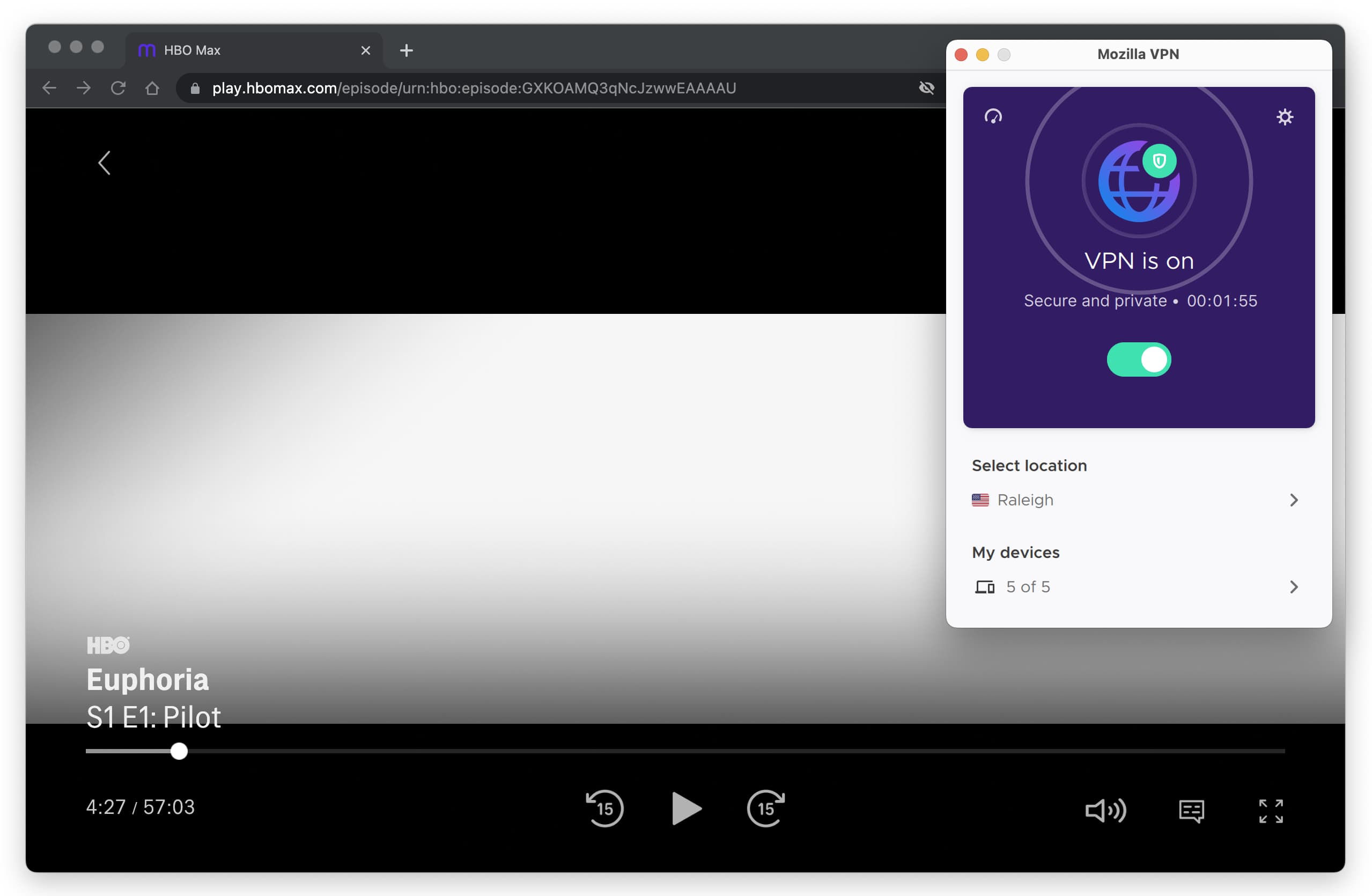
HBO Max is one of the few services Mozilla VPN works to unblock.
We also managed to watch the UK streaming service All 4 by using the United Kingdom – Manchester server.
Beyond those two, Mozilla VPN’s streaming support is very limited. Every other major service we tried either blocked access immediately or wouldn’t even allow us to log in.
A good streaming VPN should unblock many platforms and multiple Netflix libraries worldwide to maximize content access. ExpressVPN is the best option for streaming—it unblocks 10 Netflix libraries, BBC iPlayer, and more.
Speed
Ranked #11 out of 61 VPNs for Speed
Wherever you are, Mozilla VPN is likely to deliver excellent download speeds. It barely affected our 100 Mbps downloads when connecting to servers in Canada and nearby New York. Even when we connected to more distant locations like the US West Coast and Germany, the results were still impressive.
We connected to Mozilla VPN servers in nine cities across six continents. We ran our tests on a 100Mbps internet connection, which is a typical home internet speed.
Here’s a table showing the results of our Mozilla VPN speed tests:
| No VPN (New York) | US (New York) | Canada (Toronto) | US (Los Angeles) | UK (London) | Germany (Berlin) | Brazil (São Paulo) | Japan (Tokyo) | South Africa (Johannesburg) | Australia (Sydney) | |
|---|---|---|---|---|---|---|---|---|---|---|
| Server Location |  |
|
 |
|
 |
 |
 |
 |
 |
 |
| Download Speed | 100Mbps | 97Mbps | 99Mbps | 90Mbps | 93Mbps | 92Mbps | 87Mbps | 86Mbps | 81Mbps | 81Mbps |
| Upload Speed | 100Mbps | 93Mbps | 85Mbps | 77Mbps | 94Mbps | 95Mbps | 67Mbps | 96Mbps | 77Mbps | 94Mbps |
| Ping | 1ms | 19ms | 15ms | 77ms | 74ms | 87ms | 126ms | 145ms | 595ms | 212ms |
| Distance | 0mi | 5mi | 300mi | 2,500mi | 3,500mi | 4,000mi | 4,800mi | 6,700mi | 8,000mi | 9,900mi |
When connected to a nearby server in New York, US, Mozilla VPN loses just 3% of download speed — this is very good. You’ll barely notice any change to your internet speeds when connected to a nearby server.
It also performed very well in distant locations like the US West Coast and Germany, and when connected to a server in neighboring Canada, downloads slowed by an indistinguishable 1%.
When Mozilla VPN is running at its peak, it comes close to the fastest VPNs on the market. During multiple tests over an extended period, we noticed some fluctuations, but nothing serious.
Mozilla VPN delivers impressive upload and download speeds worldwide. This is partly due to its exclusive use of WireGuard, one of the fastest VPN protocols available.
We also want to credit Mozilla VPN for its quick connection times. Establishing a connection takes no longer than a split second after you click the Connect button — it’s one of the most consistently fast we’ve tested.
Security
Ranked #4 out of 61 VPNs for Security
Despite a limited set of security features, Mozilla VPN is perfectly safe. It passed all of our IP and DNS leak tests. Its kill switch is automatically enabled on all platforms and works well. There’s no protocol selection — every app uses WireGuard only — but it’s a quick and secure protocol, so we don’t mind.
| Independent Audit | Yes |
|---|---|
| VPN Kill Switch | Yes |
| Leak Protection | Yes |
We can’t fault Mozilla VPN for its security. It passed every leak test we ran, using the excellent WireGuard protocol by default.
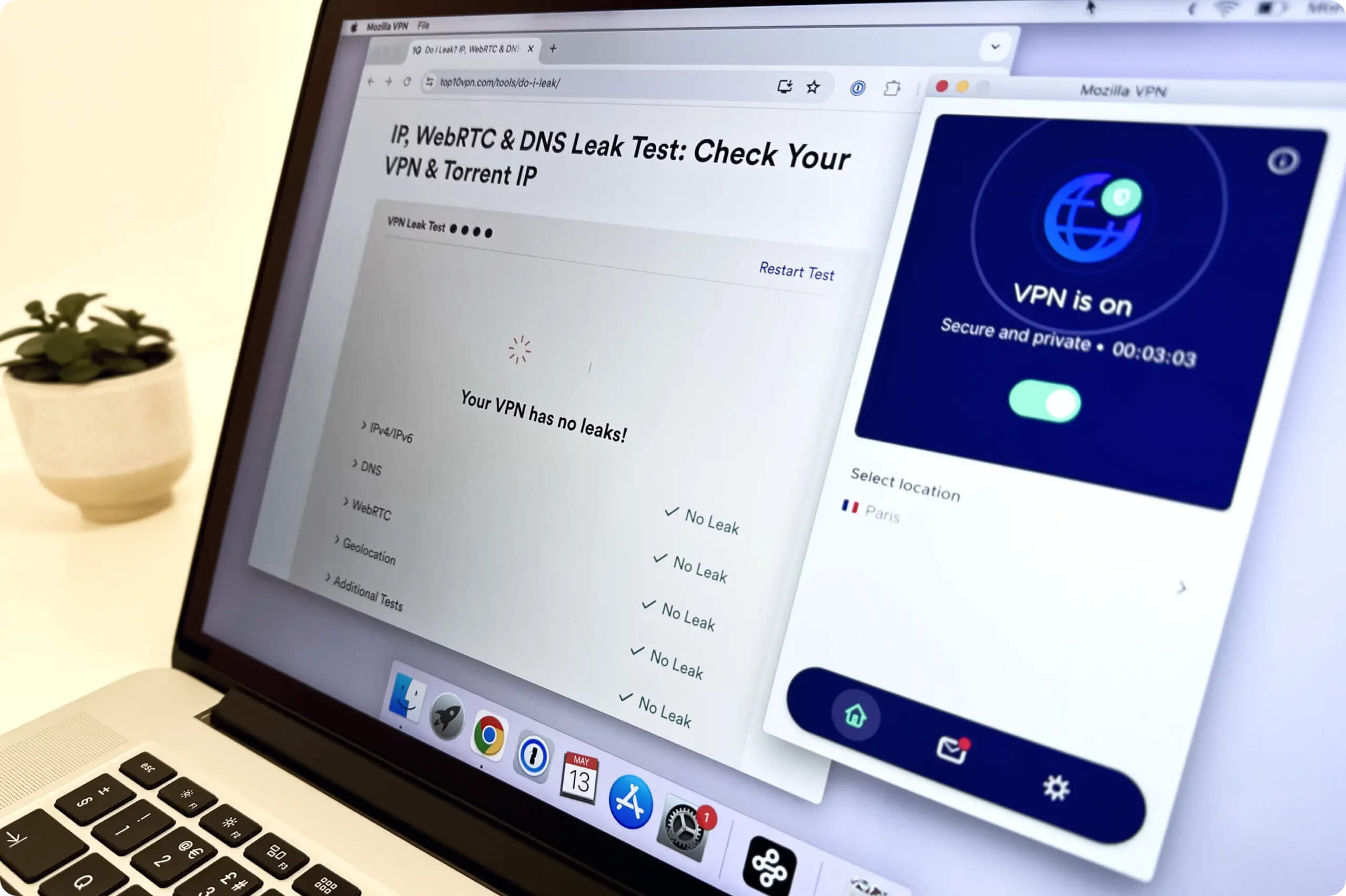
We used our leak test tool to assess Mozilla VPN’s leak protection.
What’s less typical is that WireGuard is the only protocol available across all of its apps. Most VPNs offer multiple options, but not Mozilla VPN. While unusual, it’s not a major concern because WireGuard is one of the best VPN protocols available—fast and secure.
Neither the Mozilla VPN app nor the website clearly states which encryption cipher is used. We contacted Mozilla support, which confirmed that all apps use ChaCha20 encryption. This is standard for WireGuard and, while different from the more common AES-256, it’s equally secure.
We also used Wireshark to confirm that Mozilla VPN properly encrypts web traffic—and it does.
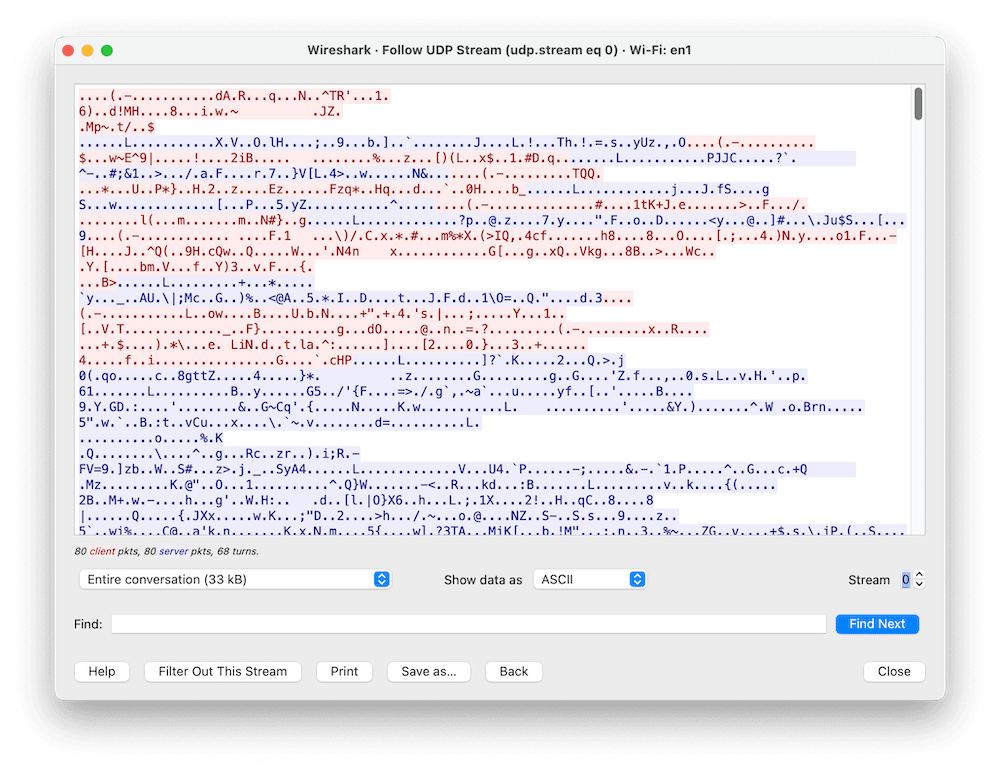
If someone were to intercept your data while using Mozilla VPN, this is all that they would see. Mozilla VPN properly encrypts all your traffic.
Server Locations
Ranked #24 out of 61 VPNs for Server Locations
Because Mozilla VPN runs on Mullvad VPN’s technology and infrastructure, it uses the same server network: 674 servers across 44 countries and 68 cities. About 20% of those servers are owned outright by Mullvad.
| Continent | Countries with Servers |
|---|---|
| Europe | 31 |
| Asia | 5 |
| North America | 2 |
| South America | 2 |
| Oceania | 2 |
| Africa | 1 |
Sharing Mullvad’s server network means Mozilla VPN enjoys the same strengths and suffers the same weaknesses as Mullvad.
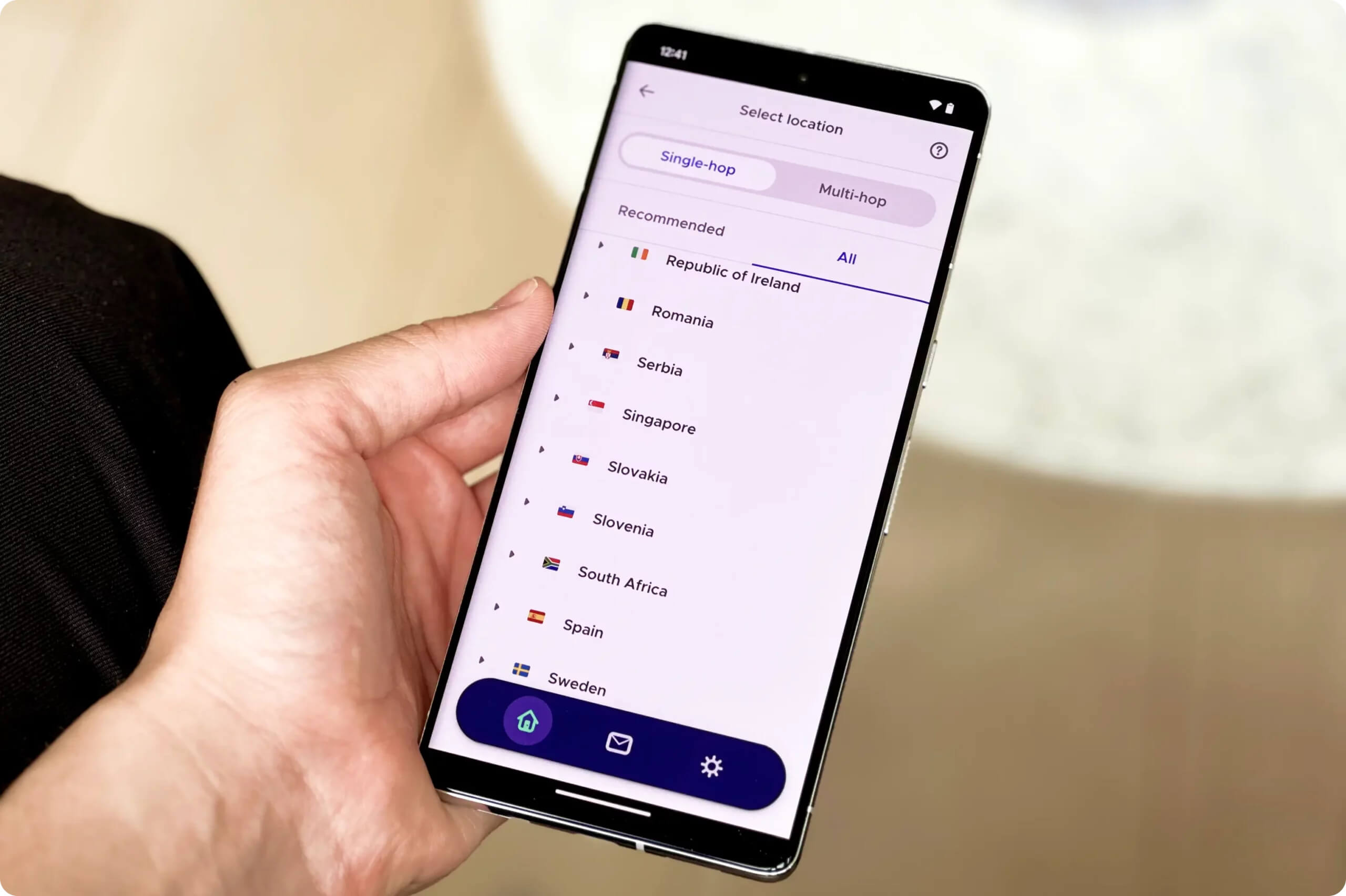
The main drawback is that Mozilla VPN’s server network completely overlooks Central America, the Middle East, and large parts of South Asia and Africa. Leaving billions of potential users with no option but to connect to servers thousands of miles away is extremely disappointing.
The rest of the world sees good coverage, though. Mozilla VPN offers city-level server options in several countries:
You can choose city-level servers in nine countries:
- Australia (six cities)
- Canada (three cities)
- France (two cities)
- Germany (two cities)
- Japan (two cities)
- Serbia (two cities)
- Sweden (four cities)
- UK (two cities)
- US (13 cities)
There are also servers in 13 different US cities from coast to coast, so if you’re based in the US you should get optimal speeds no matter where you are.
One Fifth of Mozilla VPN’s Servers Are Owned by Mullvad
Most VPNs rent their server networks from third-party providers. Mullvad is different in that it owns almost 20% of its servers. All of these privately owned servers are in Western Europe and Scandinavia.
While there’s nothing wrong with renting servers, knowing that your VPN provider owns some hardware adds an extra layer of security. Although these servers are owned by Mullvad and not Mozilla, the principle still applies—Mullvad is an extremely secure and trustworthy VPN.
EXPERT TIP: You can view a full technical breakdown of all Mozilla VPN/Mullvad servers on Mullvad’s official website.
User Experience
Ranked #9 out of 61 VPNs for User Experience
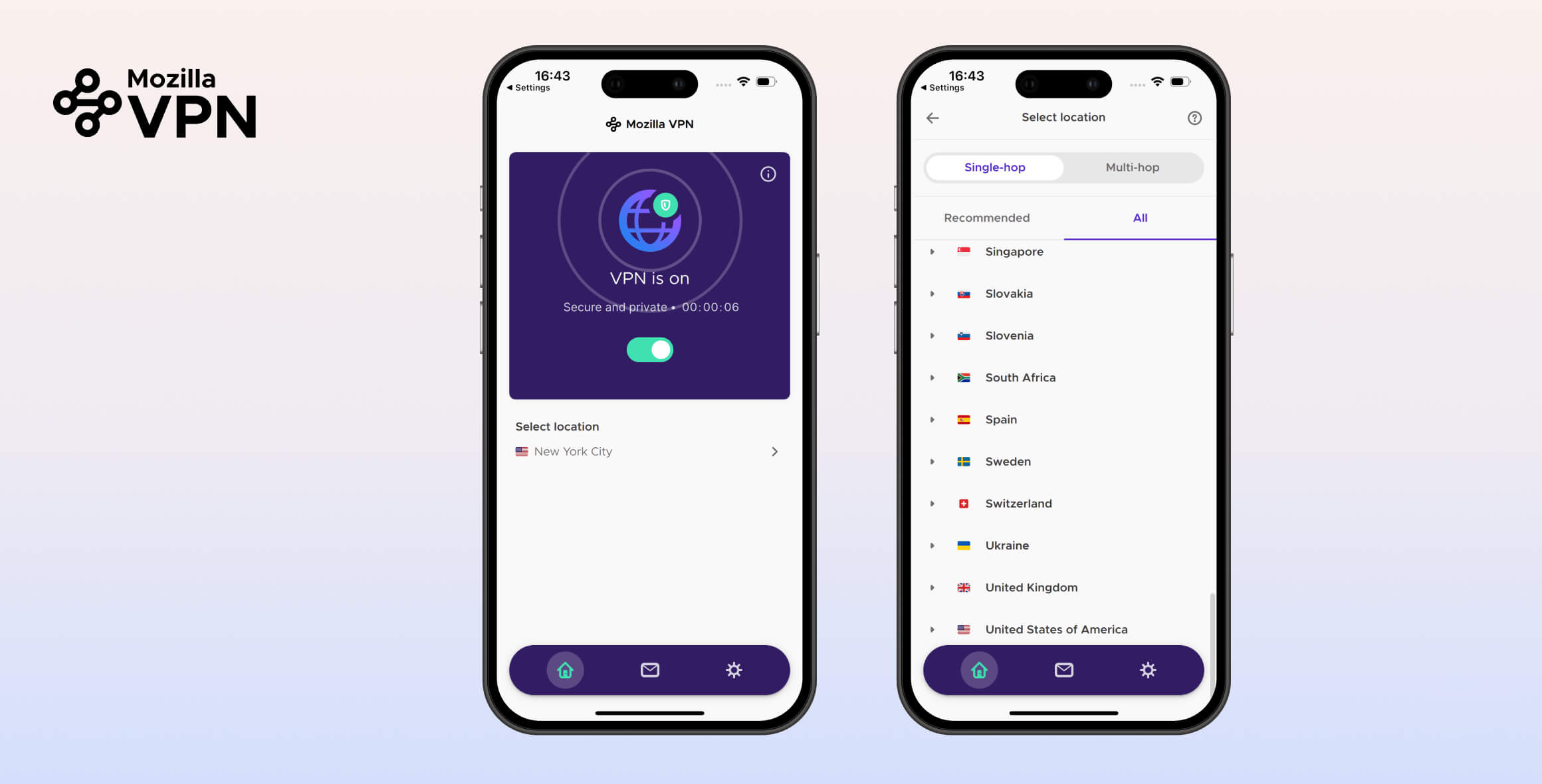
We love that Mozilla VPN’s apps are as straightforward as possible. Smartly laid out and clearly labeled, they’re great for anyone new to VPNs. The apps also look almost identical across every platform.
When it comes to VPN apps, simpler is better—even for experienced users. Mozilla VPN is as simple as can be, and that makes it a pleasure to use.
Mozilla VPN looks nearly the same on every platform, with only a feature or two changing between them.
Below, you can see what Mozilla VPN looks like on each platform and what differs across them.
Windows & macOS Apps
While Windows is usually the main focus for VPN developers, Mozilla VPN is unusual in that its Windows app is the only one missing a major feature.
“Tunnel VPN through port 53/DNS,” which can help bypass web censorship, isn’t available on Windows.
Everything else is present. The simple home screen lets you connect or disconnect, choose a server, and see how many devices are currently signed in to your Mozilla VPN account.
You can access a few advanced options—such as custom DNS and LAN access—through the settings cog. Split tunneling is here too, but Mozilla VPN calls it “App permissions.” Turn off the toggle labeled “Protect all apps with VPN” to select which apps bypass the VPN.
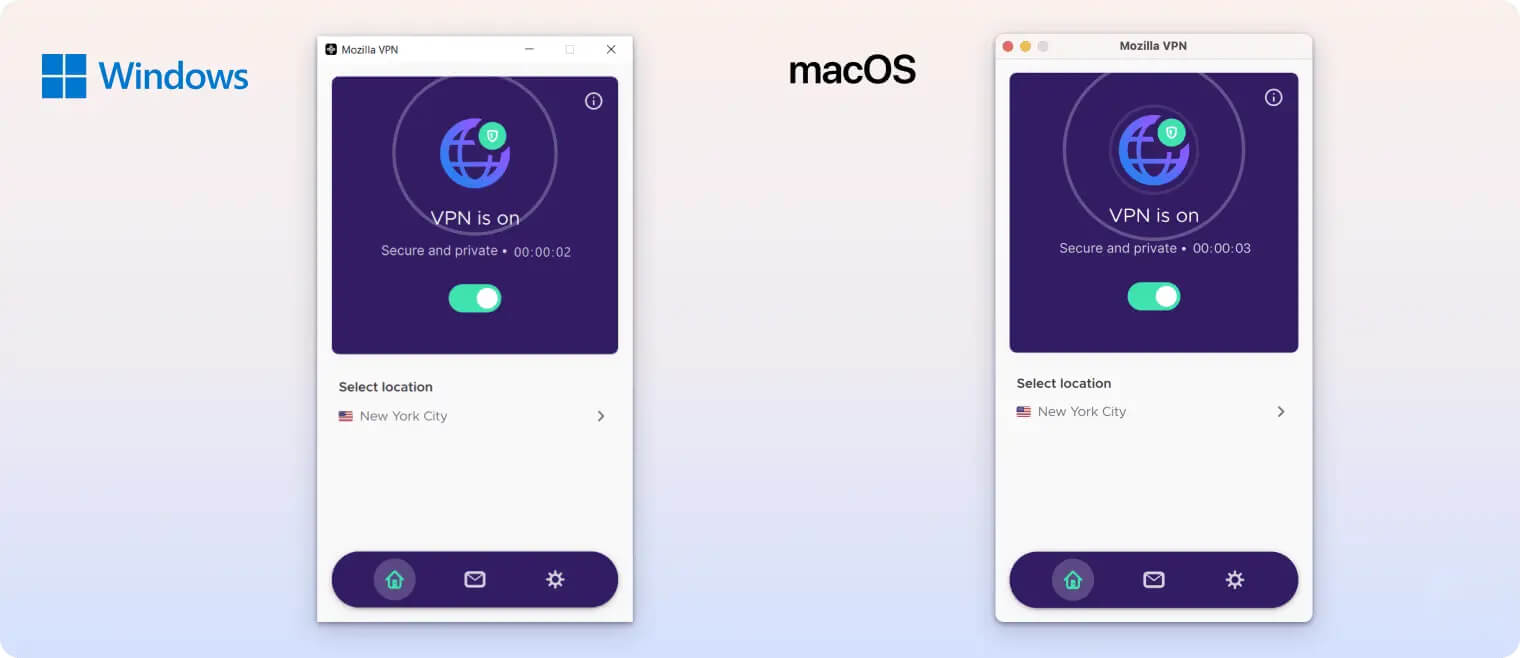
The macOS app is the same as the Windows app, with a couple of differences.
It includes the port 53 feature that’s missing on Windows, but it lacks split tunneling. This isn’t ideal, but it’s common among VPNs due to Apple’s operating system restrictions.
Linux Client
Mozilla VPN has an excellent Linux app.
It offers a full GUI—something most VPNs still neglect—and includes the complete feature set.
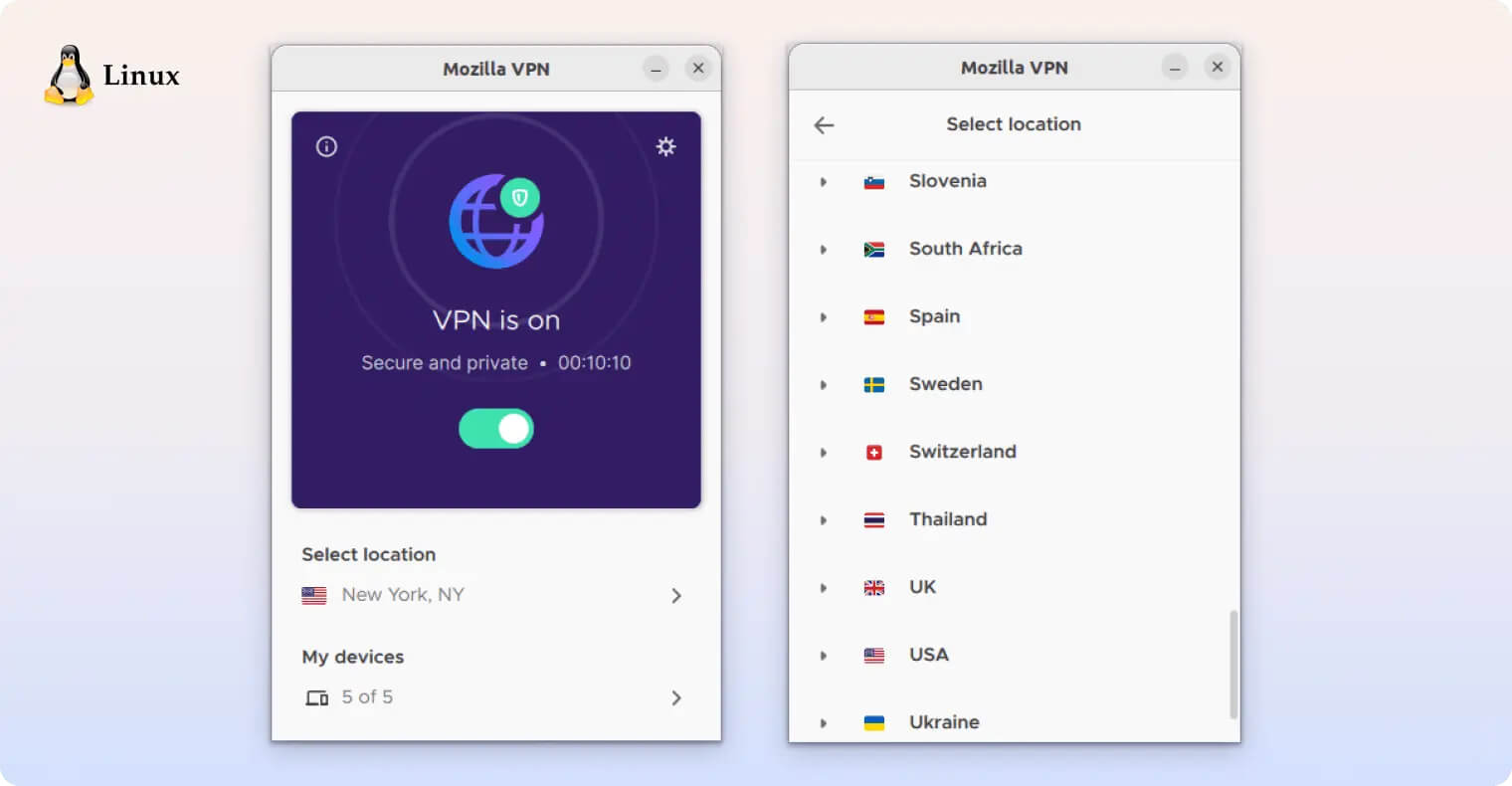
You get split tunneling, port 53, double VPN, and custom DNS. It’s the only desktop platform with no compromises.
Android & iOS Apps
The iOS app is identical to the macOS app, which is great to see. It has the same clean, bright design and the same features as its Apple desktop counterpart (including no port 53 mode and no split tunneling—again, due to iOS limitations).
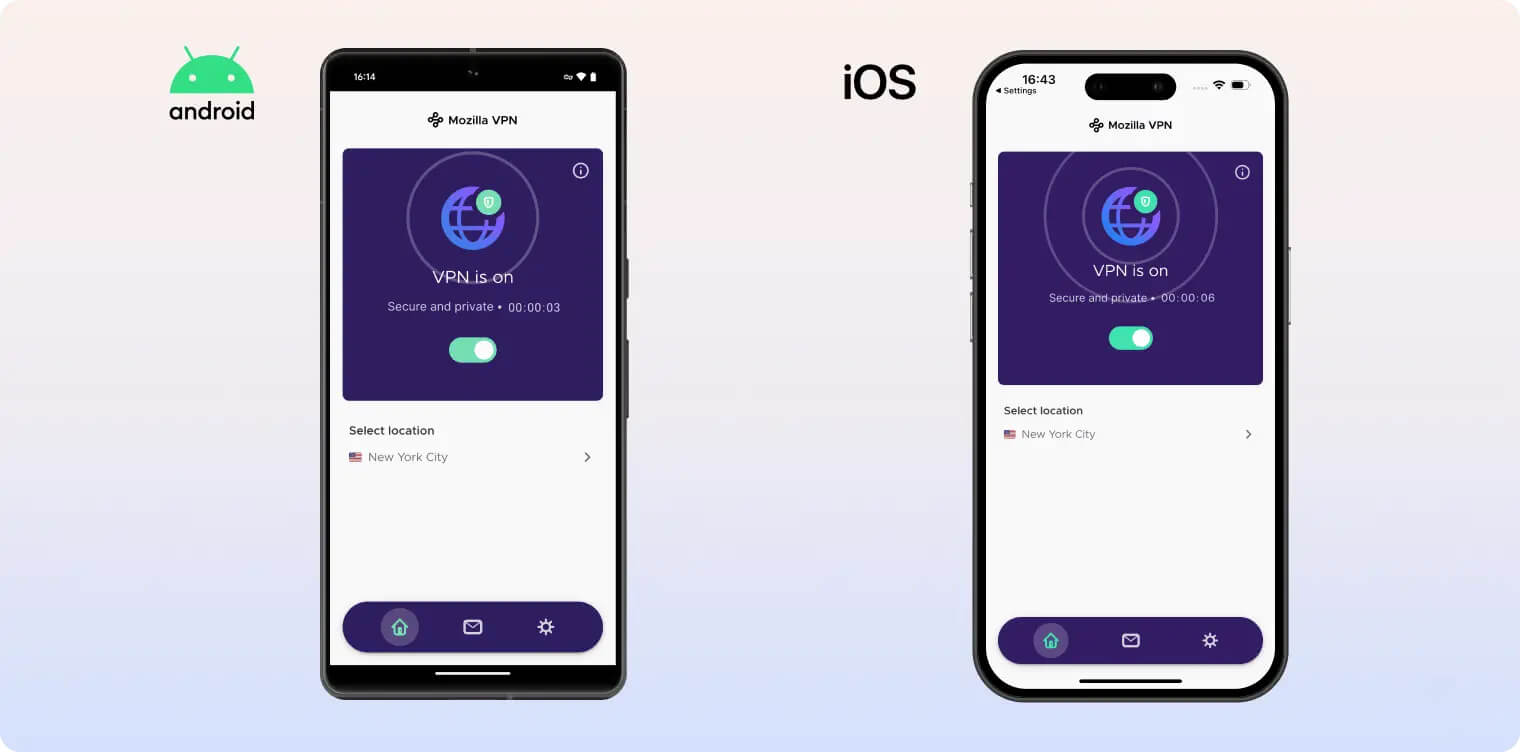
The only drawback for iPhone users is the lack of a night mode, as Mozilla VPN uses white backgrounds throughout.
Like Linux, Android gets Mozilla VPN’s most complete app. All features are available, wrapped in a design that matches the desktop apps.
Torrenting
Ranked #21 out of 61 VPNs for Torrenting
Mozilla VPN is a solid choice for torrenting, but download speeds can be inconsistent. It will keep your IP address private, includes a working kill switch, and supports P2P traffic on every server.
| Torrenting Attribute | Mozilla VPN |
|---|---|
| Permits P2P Traffic | Yes |
| Average Download Bitrate | 4.6MiB/s (54% loss) |
| Countries with P2P Servers | 43 |
| Port Forwarding | No |
| Kill Switch | Yes |
| Logging Policy | No Logs |
You can torrent on all 674 Mozilla VPN servers without data limits or throttling. We verified in testing that the kill switch works properly (even though you can’t toggle it on or off in the app), so you don’t need to worry about your IP address being exposed if the connection drops.
The main issue when torrenting with Mozilla VPN is highly inconsistent speeds. Our test file downloads at 10.0 MiB/s without a VPN. One set of four tests with Mozilla VPN enabled averaged almost 9.5 MiB/s—fast enough to rank among the quickest VPNs we’ve tried.
However, a later set of tests averaged a much slower 5.1 MiB/s. We tried multiple tweaks to regain the initial high speeds, but nothing worked.
You might get lucky and consistently see the faster results, but we view them as an exception rather than the norm.
Mozilla VPN’s other drawback for torrenting is the lack of port forwarding, which isn’t available on any platform. If you want a more technical VPN with broader features and excellent speeds, our AirVPN review found it to be an excellent choice.
Device Compatibility
You can install Mozilla VPN on the major desktop and mobile operating systems: Windows, macOS, Linux, iOS, and Android. There are no browser extensions, no apps for streaming devices, and no router support to cover consoles or smart devices. You can install the app and stay signed in on up to five devices at a time.
| Windows | Yes |
|---|---|
| Mac | Yes |
| iOS | Yes |
| Android | Yes |
| Linux | Yes |
| Amazon Fire TV | No |
| Android TV | No |
| Apple TV | No |
| Router | No |
| Chrome | No |
Simultaneous Connections: 5
You can only install Mozilla VPN on the five most popular mobile and desktop platforms.
This is disappointing, and it would be less of an issue if Mozilla VPN supported Linux—but it doesn’t. That means there’s no easy way to protect devices that can’t run a Mozilla VPN app directly, such as game consoles.
There are also no apps for streaming devices like Amazon Fire TV. Even if there were, Mozilla VPN struggles to unblock streaming services, so it likely wouldn’t be a great option anyway.
There’s no Smart DNS feature to help bypass streaming blocks, and there are no browser extensions either—not even one for Firefox, which is made by Mozilla.
Mozilla VPN is still relatively new, so its limited app range is somewhat understandable for now. We hope to see wider platform support in the near future, though.
Mozilla VPN Can Only Be Installed on Five Devices at Once
Perhaps the most frustrating drawback is Mozilla VPN’s five-device limit. Most VPNs cap simultaneous connections but still let you install the app on as many devices as you want. With Mozilla VPN, you can only be signed in on five devices at a time, regardless of how many are actually in use.
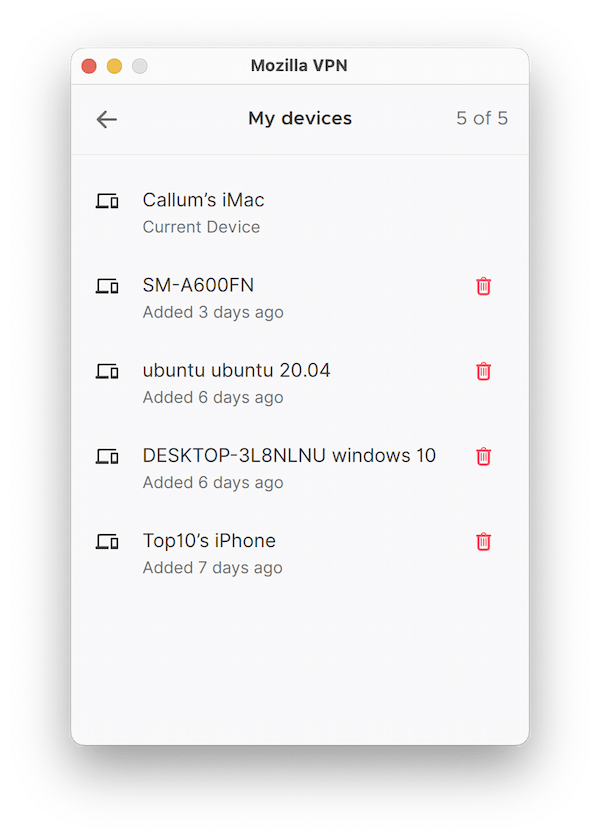
Mozilla VPN at least shows you the devices currently linked to your account within the app, so you can quickly remove the ones you don’t need.
Additional Features
Mozilla VPN includes a basic set of extra features, which may leave some users wanting more. It offers an ad and tracker blocker, split tunneling (on Windows and Android), and email customer support. Its standout feature is a fully customizable multi-hop, a rarity among VPNs. However, some competitors pair multi-hop with additional tools like malware blocking, GPS spoofing, and dedicated IPs.
| Additional Feature | Mozilla VPN |
|---|---|
| Split Tunneling | Yes |
| VPN Obfuscation | Yes |
| Multi-Hop Servers | Yes |
| Dedicated IP | No |
| Ad Blocker | Yes |
Multi-Hop Is Available on Almost Every Server
Double VPN (called multi-hop in the Mozilla VPN app) routes your device’s web traffic through two servers instead of one.
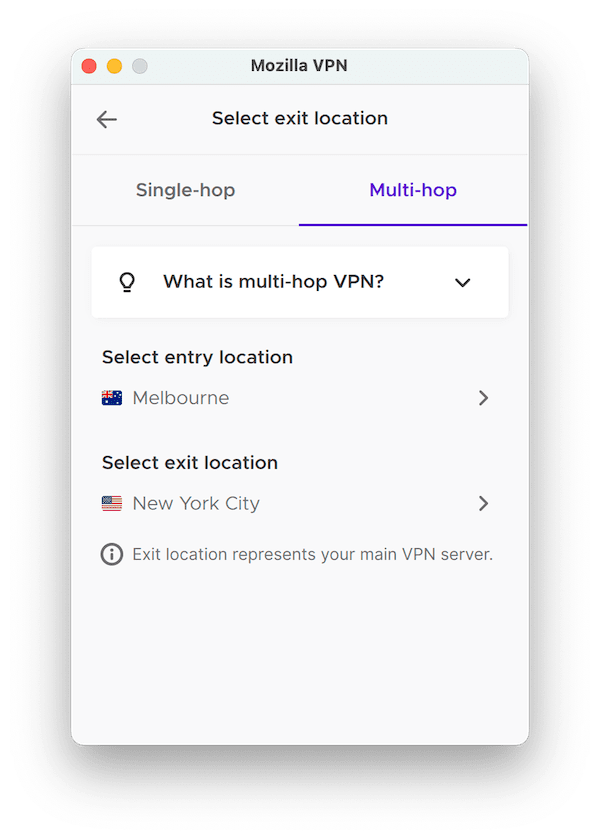
The multi-hop exit location you choose will decide the IP address you’re assigned.
This setup makes your traffic harder to track and can increase your privacy. It may reduce speed, though, because your data passes through an extra location before reaching its destination.
Mozilla VPN’s multi-hop is impressive because it doesn’t restrict you to a few entry or exit nodes—almost the entire server network is available at both stages.
If you’re curious how it works and why you might use it, we have a complete guide that explains Double VPN (multi-hop) and how routing traffic through two servers enhances privacy.
Ad Blocker & Split Tunneling Available
One of Mozilla’s useful extras is custom DNS, which lets you choose ad-blocking servers, tracker-blocking servers, both at once, or a custom DNS of your choice (such as Google or Cloudflare).
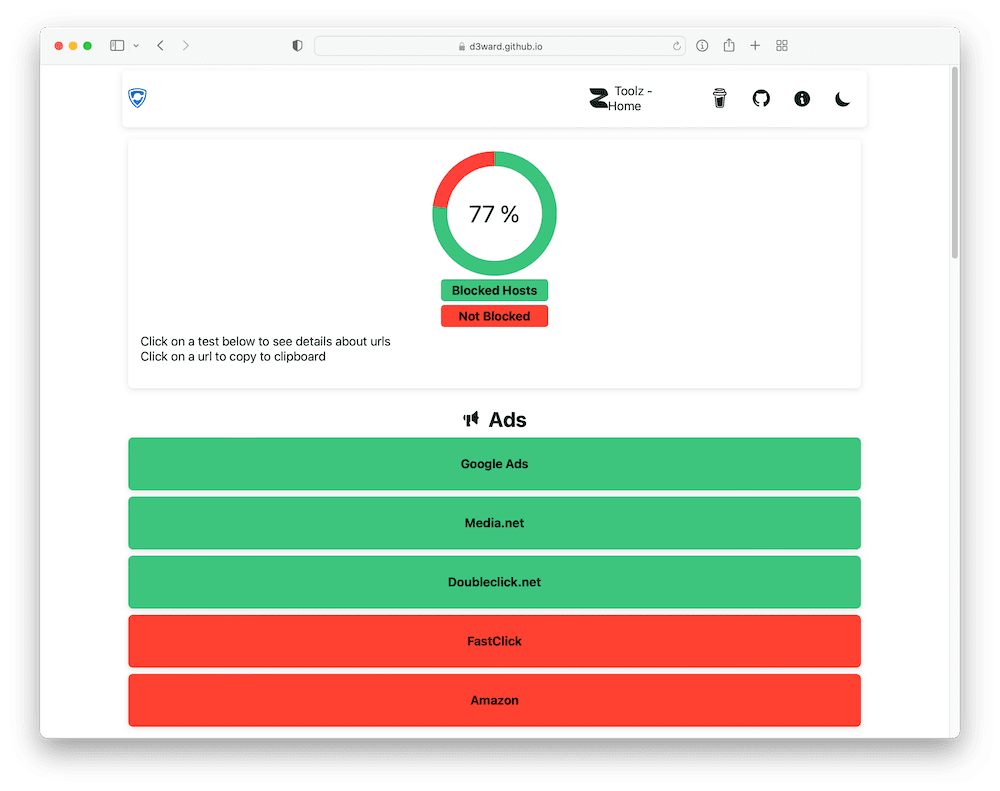
Mozilla VPN puts up a very respectable ad blocking score. It mostly struggled with social media trackers.
The ad and tracker blockers work well overall, but they won’t catch everything. That’s common among VPN-based ad blockers, as our in-depth testing on whether VPNs actually block ads shows.
Mozilla VPN also offers split tunneling, but only on Windows and Android. It’s not labeled that way in the app. To find it, go to Settings > App permissions and toggle Protect all apps with VPN to Off.
You can then choose which apps will travel outside the encrypted VPN tunnel.
Mozilla VPN Key Data
| Attribute | Mozilla VPN | Typical VPN |
|---|---|---|
| Owner | Mozilla | Independent |
| Launch Date | 2020 | 2015 |
| Local Download Speed | 97Mbps (3% loss) | 89Mbps (11% loss) |
| International Download Speed | 88Mbps (12% loss) | 80Mbps (20% loss) |
| Countries with Servers | 43 | 40 |
| Privacy Policy | No Logs | Identifiable Data |
| Simultaneous Connections | 5 | 10 |
| Netflix Libraries | 0 | 3 |
| Torrenting | Yes | Yes |
| Works In China? | No | No |
| Cheapest Price | 4.99/mo over 12 months | $3.87/mo over 24 months |
| Customer Support | Email & Online Resources Only | |
| Apps & Extensions |
          |
|
Price
Price Plans
| 1 month | $9.99 |
|---|---|
| 12 months | $59.88 ($4.99/mo) |
Free Trial
| Money-Back Guarantee | 30 days |
|---|---|
| Free Trial | No |
| 100% Free Plan | No |