
IVPN: Excellent Privacy and Speed, But Poor for Streaming and Extras
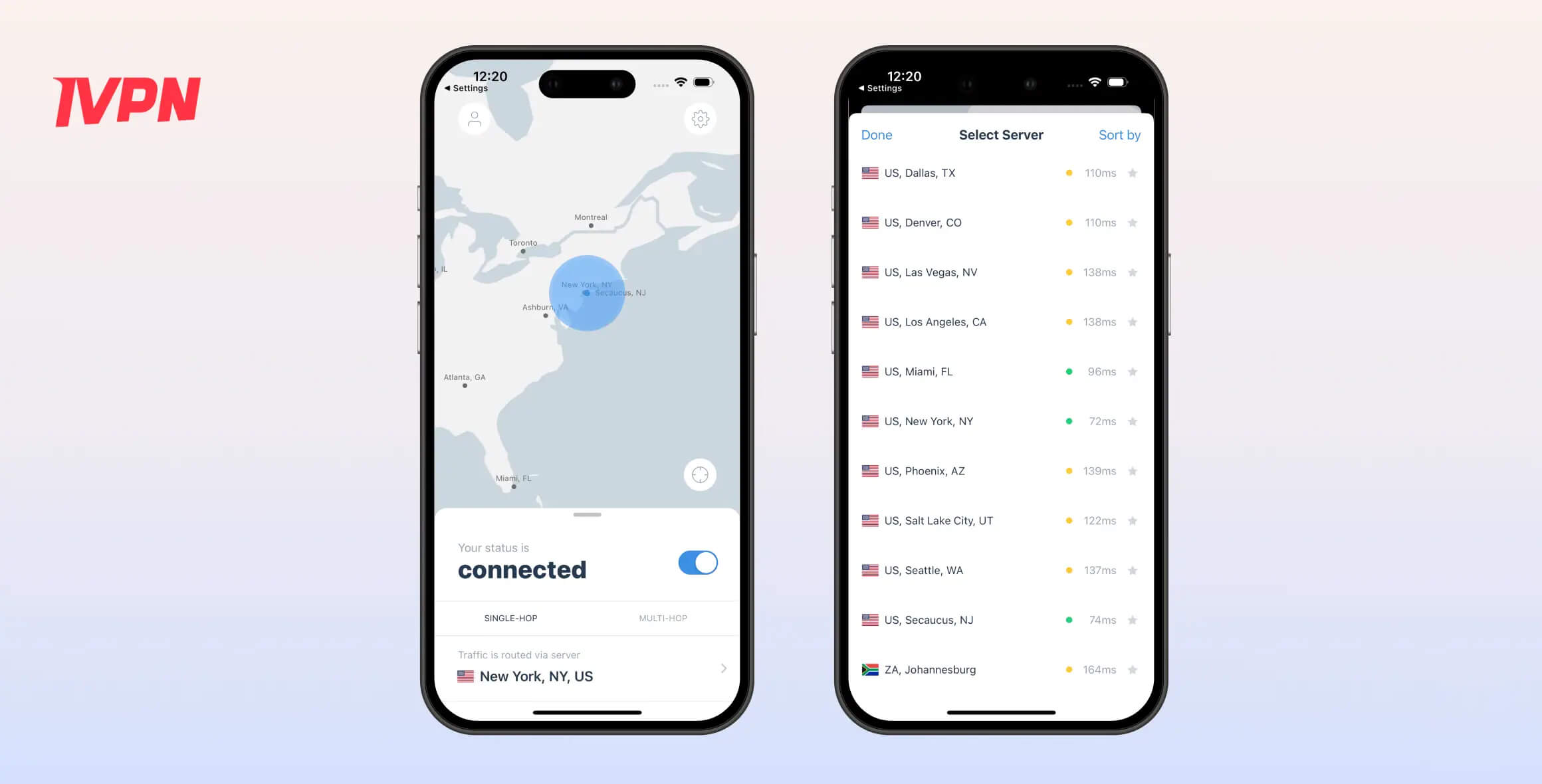
IVPN is a safe choice if you want an affordable VPN that protects and anonymizes your web traffic, but it’s not recommended if you’re interested in streaming or extra features.
- Pros
- No-logs policy
- Fast local speeds
- Open-sourced apps
- Easy-to-use apps
- Helpful live chat
- Cons
- Few countries with servers
- Doesn’t unblock many streaming services
- No app for Fire TV or other streaming devices
- No longer offers port forwarding
- Multi-hop costs extra
We won’t be using IVPN for daily use, as it lacks several features we consider essential for a top VPN. We recommend it primarily if anonymity is your main priority.
While using IVPN, it felt invisible: we didn’t experience slowdowns and could browse normally, all while keeping our activities hidden from third parties.
However, unlike many leading VPNs, IVPN didn’t enable tasks we couldn’t already do without a VPN. It failed to unblock most geo-restricted streaming sites, and the lack of port forwarding makes it less suitable for gaming.
Alternatives to IVPN
If IVPN’s limitations are a dealbreaker, the following VPNs may be a better fit:
- Private Internet Access: Verified no-logs VPN with servers in 51 more countries than IVPN. It also works with US Netflix, BBC iPlayer, Max, Prime Video, and more.
- Mullvad: Another independently owned VPN with an excellent track record for protecting user privacy. Mullvad offers diskless servers and includes multi-hop in its base subscription.
Privacy
Ranked #9 out of 61 VPNs for Privacy
IVPN is one of the most private VPNs on the market. Its no-logs policy has been audited by third parties. It goes the extra mile to protect your privacy by accepting cash payments and even letting you sign up without an email address.
| Originating IP Address | No |
|---|---|
| Browsing Activity | No |
| Individual Connection Timestamps | No |
| Date of Last Connection | No |
| VPN Server IP | No |
| Device Information | No |
| Individual Bandwidth Usage | No |
| Account Information | No |
You can read IVPN’s full privacy policy on its website.
After reviewing its privacy policy, we’re confident IVPN is a true no-logs VPN. This means your activity while connected to IVPN remains private, as it doesn’t store data that could link your online behavior to you.
IVPN is one of only a handful of VPNs with a genuine no-logs policy, and one of the few to have it verified by an independent auditor. By contrast, many well-known VPNs, including NordVPN and ExpressVPN, collect some user logs.
IVPN also supports its no-logging claims with a transparency report. It details how often the company receives requests for user data from law enforcement and other third parties. Because IVPN does not store this information, it reports that it has not complied with such requests.
Anonymous Sign-Up
We appreciate that IVPN goes further by accepting cash payments and allowing sign-ups without an email address. This way, not only can your online activity not be linked to you, but there’s also no record tying your identity to an IVPN account.
When we signed up using this method, we received an anonymous account ID instead of the usual email address and password.
Doesn’t Use Diskless VPN Servers
Somewhat surprisingly for a privacy-focused provider, IVPN does not use diskless VPN servers. These servers, used by PIA, Windscribe, and many leading VPNs, have no storage drives, so their data is wiped whenever they’re powered down.
IVPN declined to say whether it plans to roll out diskless servers in the future.
Streaming
Ranked #34 out of 61 VPNs for Streaming
Using IVPN for streaming is largely pointless. In our tests, its servers were detected and blocked by most major streaming services, and it doesn’t offer apps for common streaming devices. We did access US Netflix once, but past results suggest that was a fluke.
| Streaming Service | Works with IVPN |
|---|---|
| BBC iPlayer (UK) | No |
| DAZN (Canada) | No |
| Disney+ (UK) | No |
| Hulu (US) | No |
| ITVX (UK) | No |
| HBO Max (US) | No |
| Netflix (US) | Yes |
| Netflix (UK) | No |
| Prime Video (US) | No |
| Sky Go (UK) | No |
IVPN has stated that its service is not focused on streaming, so we weren’t surprised to find we couldn’t access geo-blocked content while connected to the VPN.
The VPN has failed to access major streaming sites, including BBC iPlayer and Disney+, over years of testing, even after trying multiple servers. Some free VPNs, like Windscribe, manage to access these platforms more consistently.
In a recent test, IVPN did unblock US Netflix, but only after several attempts and by connecting to specific servers (Ashburn and Chicago). This inconsistency shows that IVPN is unreliable for regular streaming.

Using IVPN, we successfully streamed Ordinary World on US Netflix.
To access local streaming sites while keeping our other traffic encrypted, we used split tunneling to exclude the streaming site or app from the VPN tunnel. However, this feature isn’t available on Mac or iOS, so we had to disconnect from the VPN entirely.
Adding to the frustration, IVPN also lacks apps for streaming devices like Fire TV, Android TV, and Apple TV.
Speed
Ranked #26 out of 61 VPNs for Speed
IVPN is fast across its server network, letting us browse without any noticeable slowdown. Using WireGuard, we saw only a 6% drop in download speed on a local server and an average 14% decrease on international servers. Unfortunately, this didn’t help with high-resolution streaming due to the VPN’s poor unblocking performance.
| No VPN (New York) | US (New York) | Canada (Toronto) | US (Los Angeles) | UK (London) | Germany (Berlin) | Brazil (São Paulo) | Japan (Tokyo) | South Africa (Johannesburg) | Australia (Sydney) | |
|---|---|---|---|---|---|---|---|---|---|---|
| Server Location |  |
|
 |
|
 |
 |
 |
 |
 |
 |
| Download Speed | 100Mbps | 95Mbps | 89Mbps | 92Mbps | 89Mbps | 89Mbps | 92Mbps | 83Mbps | 83Mbps | 78Mbps |
| Upload Speed | 100Mbps | 96Mbps | 86Mbps | 82Mbps | 96Mbps | 97Mbps | 65Mbps | 82Mbps | 92Mbps | 67Mbps |
| Ping | 1ms | 5ms | 15ms | 70ms | 74ms | 91ms | 114ms | 152ms | 386ms | 213ms |
| Distance | 0mi | 5mi | 300mi | 2,500mi | 3,500mi | 4,000mi | 4,800mi | 6,700mi | 8,000mi | 9,900mi |
As our data shows, IVPN is consistently fast across locations without any major outliers. The slowest server was Australia, with a 22% speed drop, which is expected given the distance from our US test location.
For context, IVPN ranked 25th fastest on local connections and 21st on international connections—slightly above average.
It was faster than PIA, CyberGhost, and many other popular VPNs, but it didn’t match the very fastest, like Hotspot Shield. That service recorded a maximum download speed loss of 0% across all tested servers.
While fast download speeds are ideal for streaming geo-blocked HD or 4K video, IVPN is blocked by most major streaming services. As a result, its impressive speed feels underutilized for everyday web browsing.
Low Latency Is Ideal For Online Gaming
We found IVPN has the third-fastest local ping times of any VPN. At just 5ms on a local connection, it offers lower latency than other high-quality VPNs like NordVPN and PIA.
This low latency meant that while protecting our IP address from DoS attacks in fast-paced games like CS:GO, we noticed no meaningful impact on FPS or on the precision of enemy hitboxes.
Added latency was only an issue when connecting to regions like Brazil for easier lobbies. Even then, IVPN’s 114ms ping in Brazil was comparable to other VPNs on servers in that area.
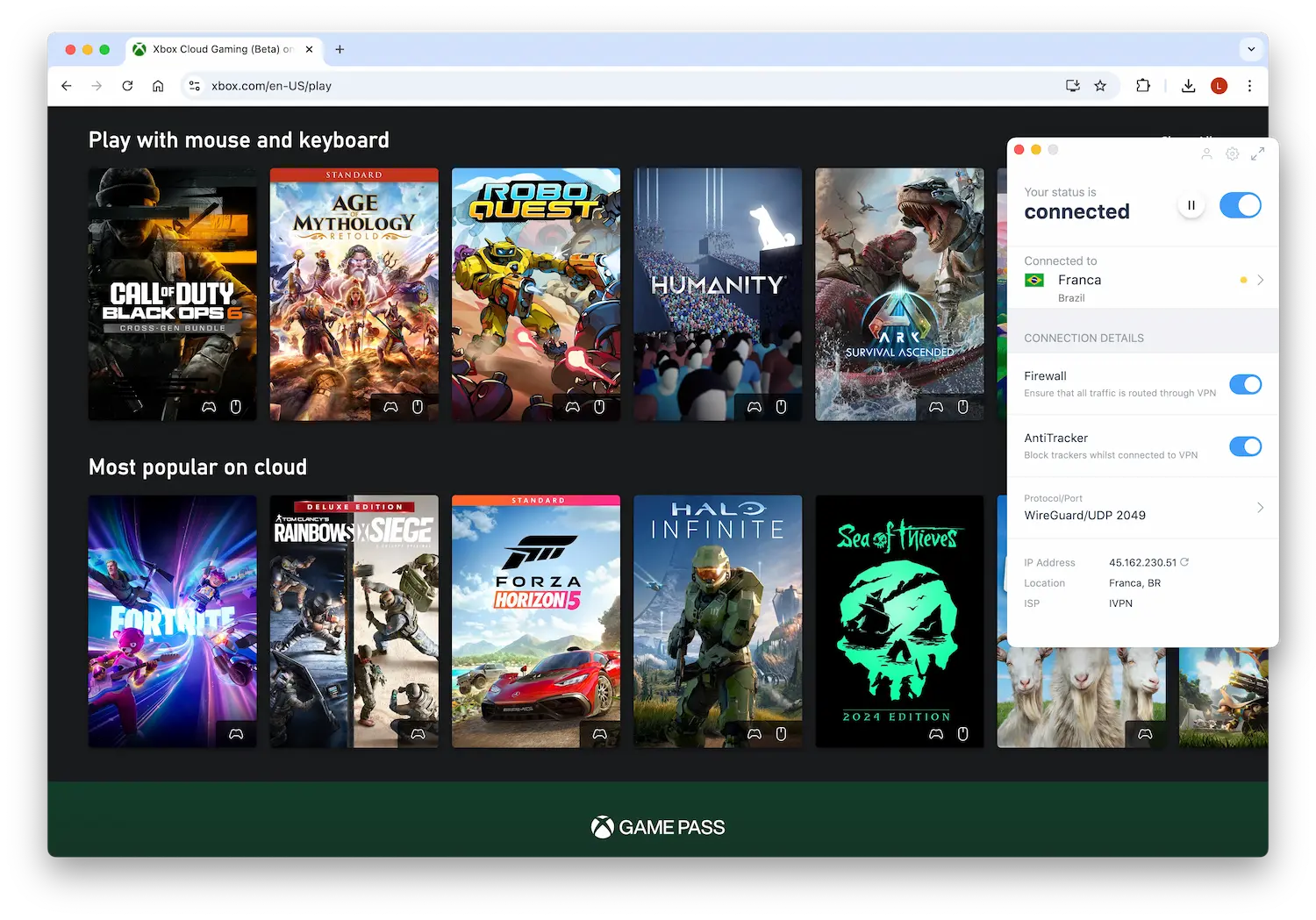
IVPN has servers in countries with easier gaming lobbies, like Brazil.
Security
Ranked #4 out of 61 VPNs for Security
Security is one area where IVPN truly excels. Its apps are open-source, and it uses secure encryption and protocols like WireGuard and ChaCha20. Together, these features make IVPN a trustworthy choice for protecting your sensitive web traffic.
| Independent Audit | Yes |
|---|---|
| VPN Kill Switch | Yes |
| Leak Protection | Yes |
Encryption & Tunneling Protocols
Using Wireshark while connected to IVPN, we analyzed our network traffic to evaluate the strength of its encryption. We were impressed with the results.
By default, the VPN uses WireGuard with ChaCha20. You can switch to OpenVPN with AES-256 in the app’s settings, but we recommend staying with the default since it’s more modern and equally secure.
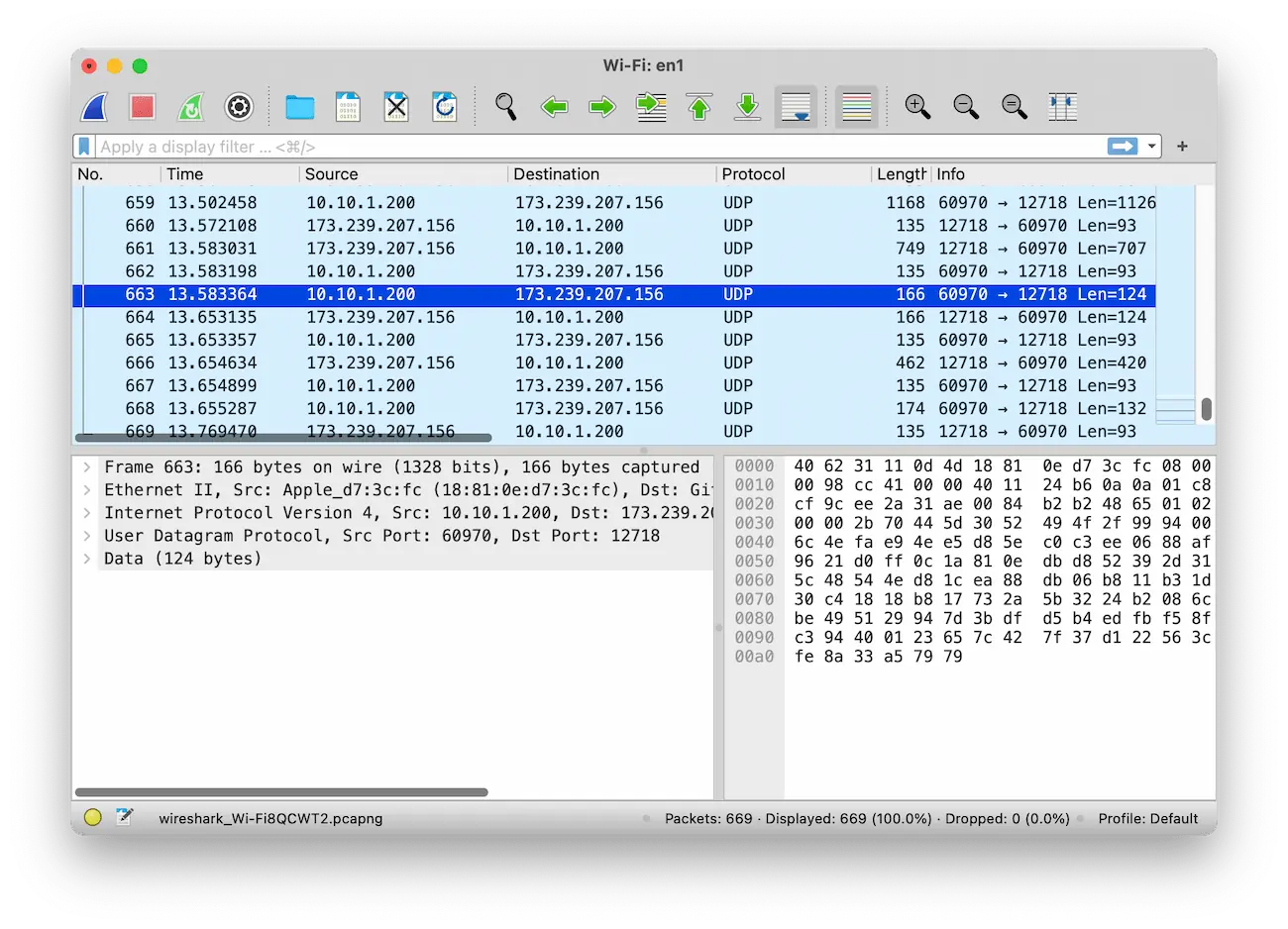
IVPN successfully encrypted our network connection.
Regardless of the option you choose, your online activity will remain private and secure.
Data Leak Protection
In our tests, IVPN did not leak our IP or DNS addresses, both when the connection dropped (thanks to its kill switch) and during normal browsing (thanks to its built-in IP and DNS leak protection).
As a result, our true IP address was never exposed to the websites we visited, and our browsing activity was not visible to our ISP.
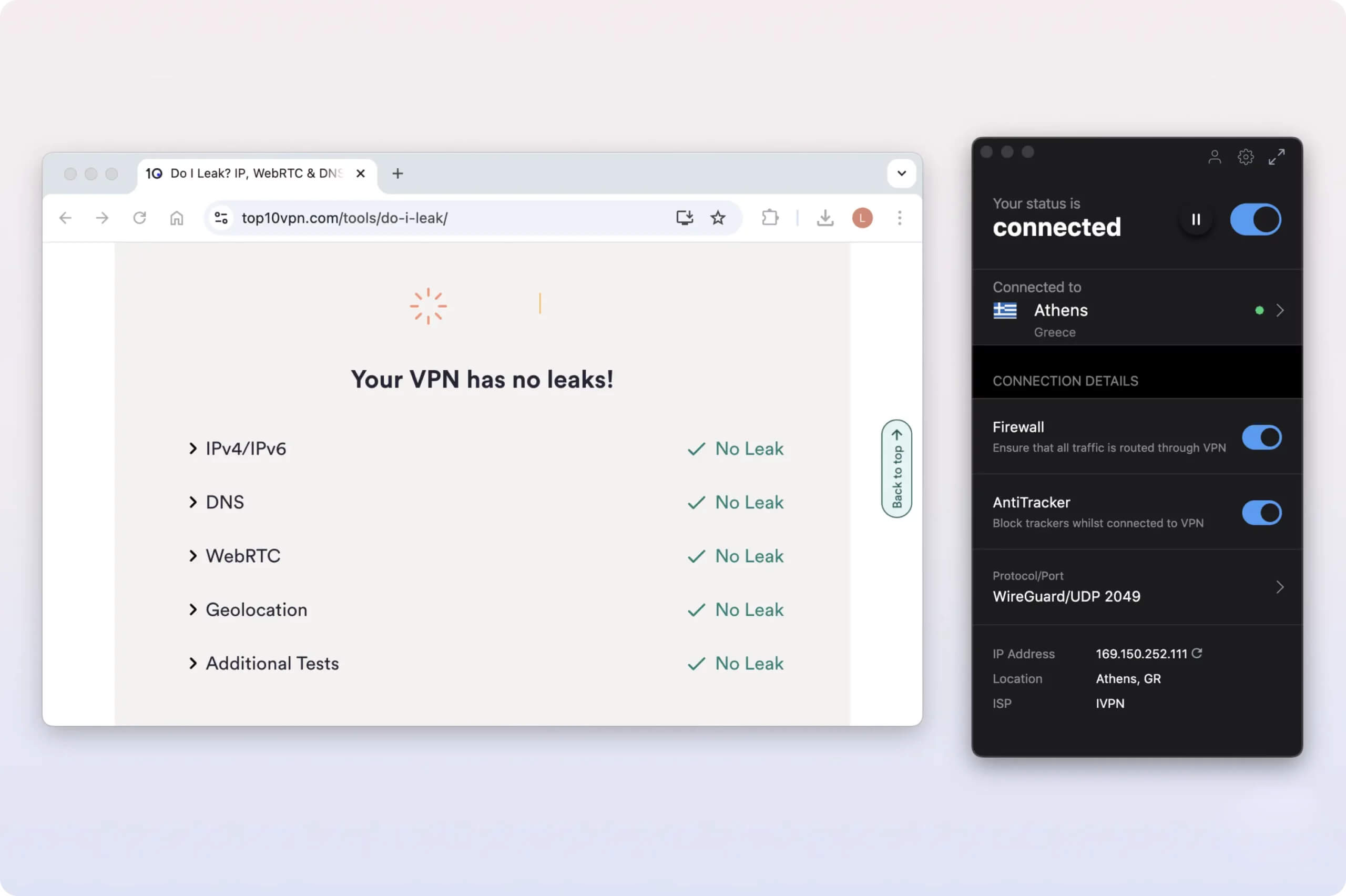
IVPN’s leak protection worked perfectly in our tests.
Disappointingly, IVPN’s kill switch is only available on Windows, macOS, and Android. After discovering that iOS’s built-in kill switch leaks some traffic to Apple’s servers, IVPN removed the feature entirely in August 2023.
Still, it would have been helpful if the app clearly labeled this limitation on iOS and let users decide whether they were comfortable trusting Apple.
Thankfully, all of IVPN’s apps include IP and DNS leak protection.
Open-Sourced Apps
Rarely for a VPN service, we were able to inspect IVPN’s codebase because all of its apps are open-source. You can visit GitHub to review the code and documentation yourself.
By providing access to its code, IVPN is transparent about how its clients work and how they protect privacy and security. This is a strong move, and we hope more VPN services follow its lead.
Server Locations
Ranked #36 out of 61 VPNs for Server Locations
IVPN’s server network spans only 29 countries, which is significantly fewer than many competitors. For example, it covers 86 fewer countries than Proton VPN and 4 fewer than Mullvad. In our tests, we couldn’t get an IP address from several popular locations, including South Korea and India, which limited its overall versatility.
| Continent | Countries with Servers |
|---|---|
| Europe | 27 |
| Asia | 6 |
| North America | 3 |
| South America | 2 |
| Africa | 1 |
| Oceania | 1 |
During our initial review of IVPN in 2019, we criticized the VPN’s limited server network. Disappointingly, it has made minimal progress since then, adding access to only one additional country.
In the same period, Proton VPN has expanded to 58 more countries, while Surfshark has added 33.
We’re pleasantly surprised to see 12 server locations spread across the US.
On the other hand, there’s only one server location in Australia. We expect coverage on both coasts and hope to see Perth added soon. For this reason, Australian readers should consider using NordVPN instead.
IVPN also offers just one server in South America (Brazil) and three in East Asia (Japan, Singapore, and Hong Kong).
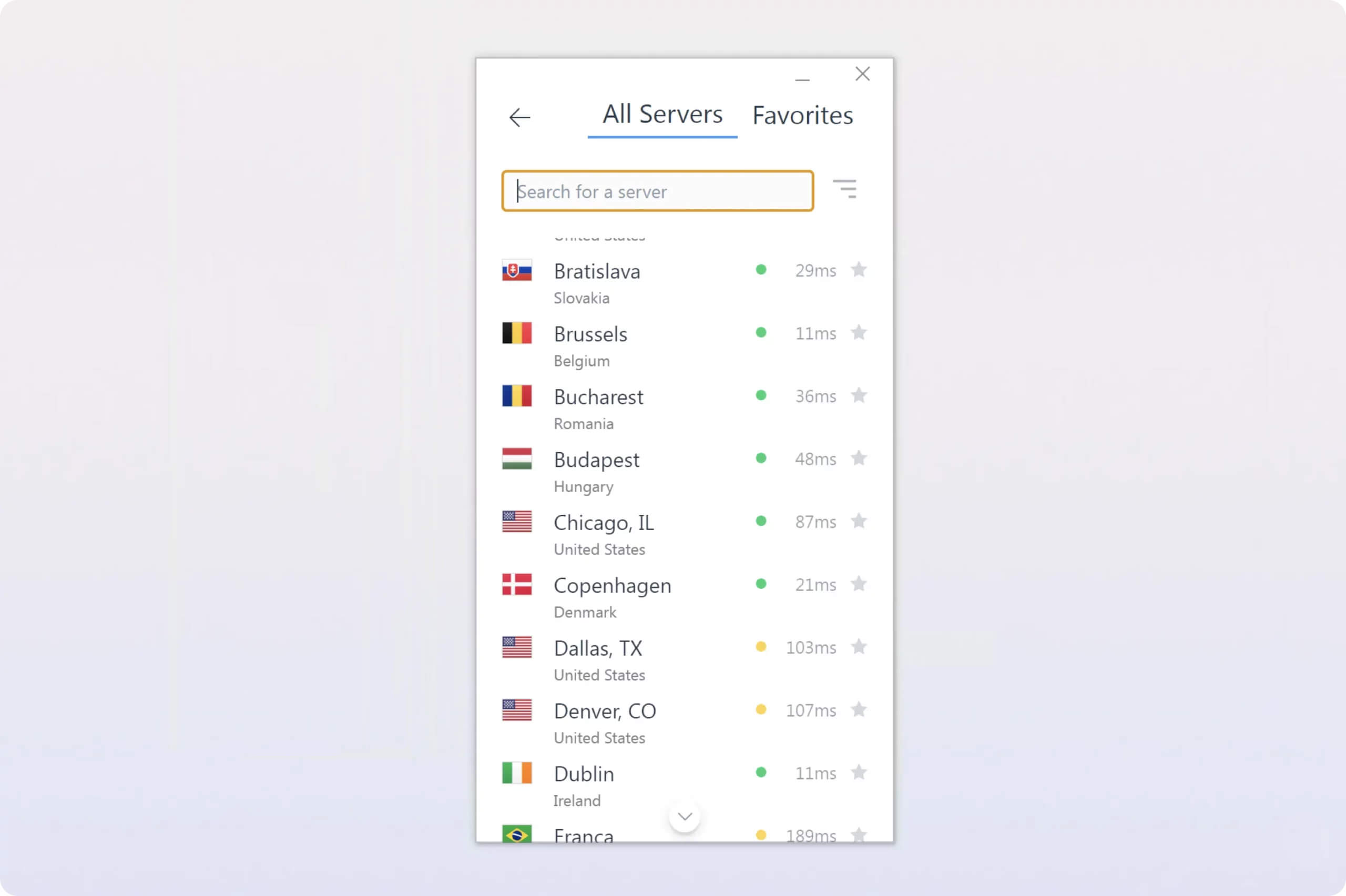
You can connect to a country either by searching for it directly or finding it in the alphabetical list.
The VPN service offers three to five IP addresses per server. This equals a range of IP addresses between 228 and 380.
User Experience
Ranked #4 out of 61 VPNs for User Experience
Using IVPN since 2019, we’ve found it consistently intuitive and visually appealing. Its apps make connecting to a nearby server easy. However, changing server locations or accessing advanced features directly in the app can be frustrating due to its limitations.
Installation & Setup
When installing IVPN on macOS, we had to select the correct app version: Intel or Apple Silicon. Unlike most VPNs that offer a universal app that works for both, IVPN keeps these versions separate, which is slightly less convenient.
The download and installation took longer than expected, as the IVPN app is about twice the size of many other VPNs we’ve used, such as ExpressVPN and PIA.
Logging in required entering a random 12-digit account ID instead of an email address or password. This is manageable at first, but it became cumbersome when setting it up on multiple devices.
Interface & Ease of Use
Despite its strong reputation in the cybersecurity community, we think IVPN is well-suited for beginners.
Its apps are easy to use and visually appealing. To connect to a server, you simply toggle the On button, which consistently connected us to a nearby server in under a second.
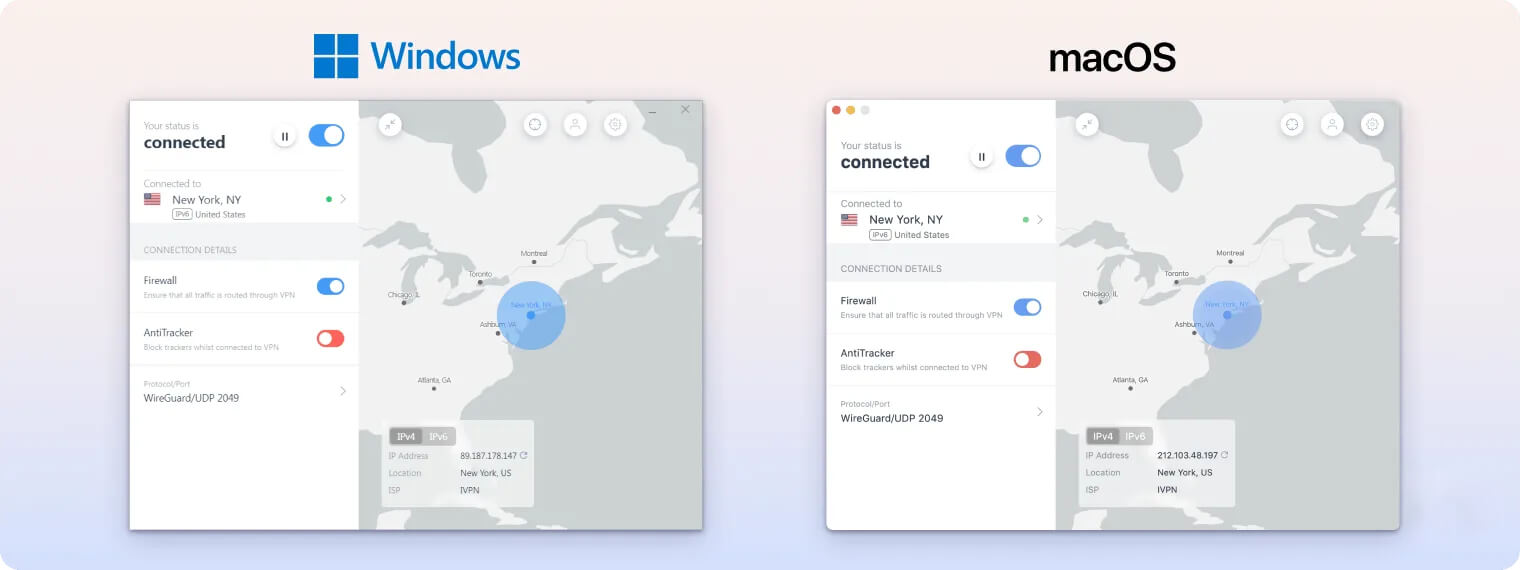
The app seems designed to run quietly in the background rather than being used frequently. It highlights the Network Protection feature, which automatically connects to a VPN server when you join an untrusted Wi-Fi network.
When using the app directly, we immediately noticed how limited the home screen is. It only shows the Connect button and the Multi-hop feature, which isn’t available on the Standard IVPN plan. We’d prefer if this space offered more practical options, such as quick access to a favorite server.
The apps have a consistent design across desktop and mobile, making it easy to remember how to complete common tasks. Despite the similar layout, the interface is well-designed and easy to use on everything from a small phone screen to a large PC monitor.
Day-to-Day Experience
For the most part, IVPN provides a seamless experience, running quietly in the background with minimal impact on browsing.
However, when interaction is required, it can be frustrating. A recurring issue is the need to manually toggle the VPN connection on, even after selecting a server location. This extra step feels redundant and inconvenient, especially when you’re in a hurry.
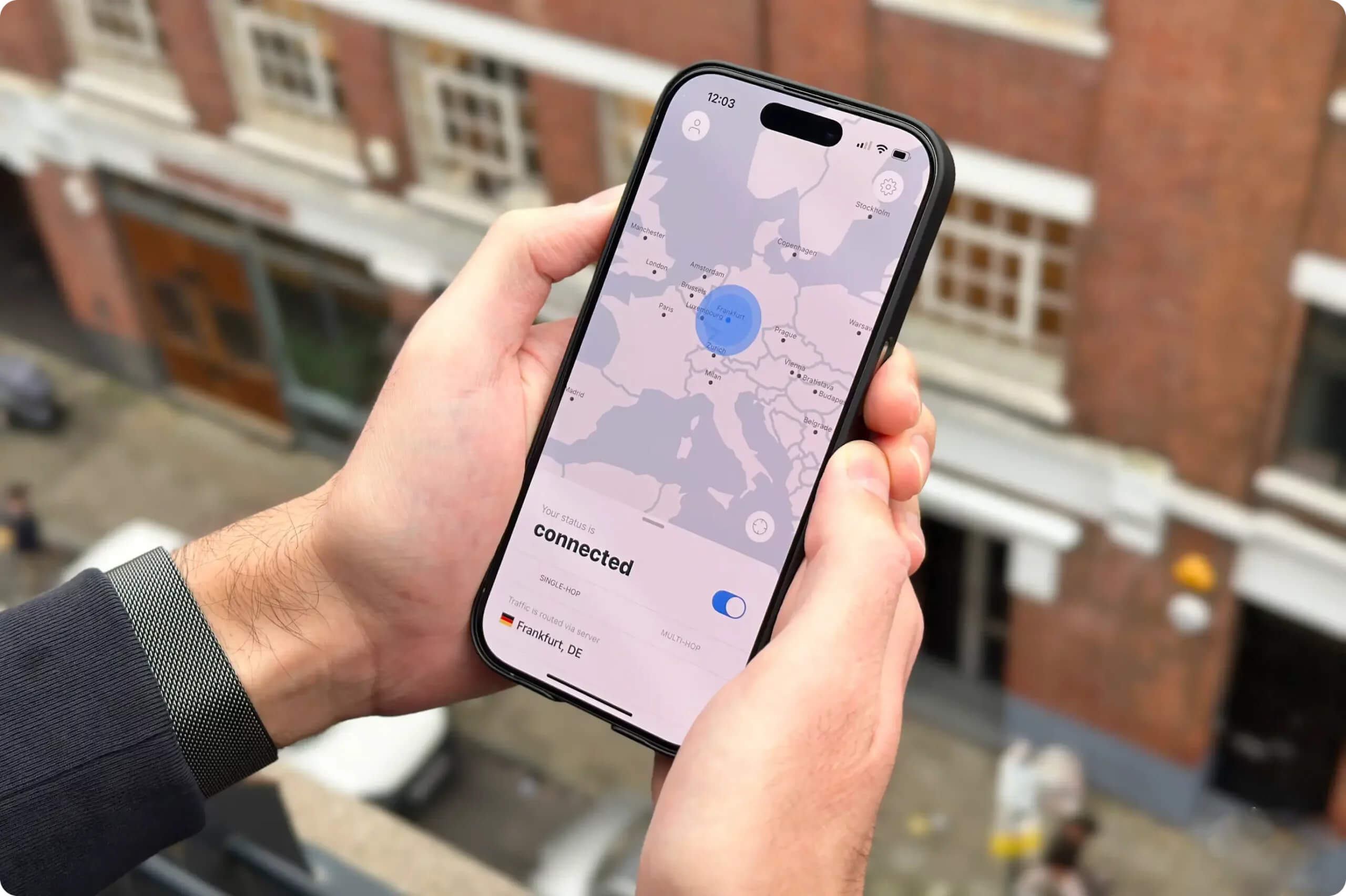
IVPN was a pleasure to use all day, every day.
Another issue was the app’s habit of logging us out frequently. This is especially frustrating because it requires an account ID, not an email address, to log back in.
Torrenting
Ranked #15 out of 61 VPNs for Torrenting
Another issue was the app’s habit of logging us out frequently. This is especially frustrating because it requires an account ID, not an email address, to log back in.
| Torrenting Attribute | IVPN |
|---|---|
| Permits P2P Traffic | Yes |
| Average Download Bitrate | 9.2MiB/s (8% loss) |
| Countries with P2P Servers | 40 |
| Port Forwarding | No |
| Kill Switch | Yes |
| Logging Policy | No Logs |
In our P2P tests, we saw only a small drop in speed when torrenting on a local server. Without the VPN, we downloaded a 20GB movie in 32 minutes. Connected to an IVPN US server, the same file took 35 minutes.
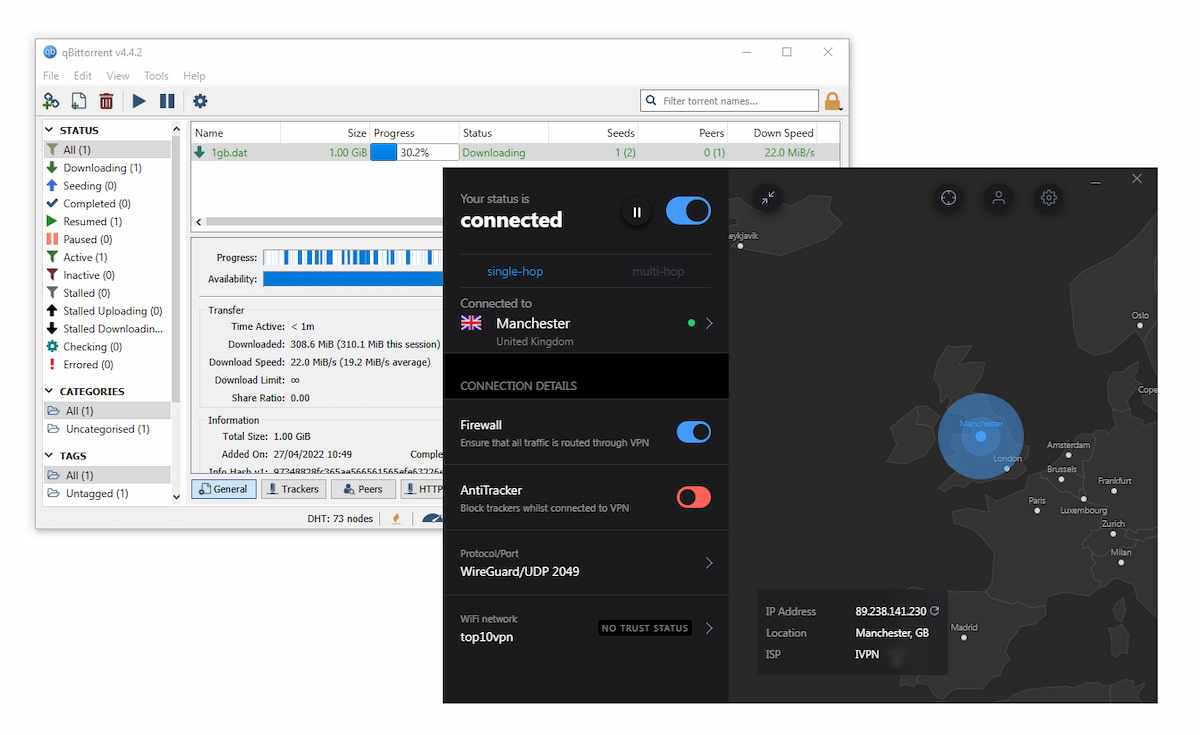
We were able to download a torrent file very quickly using IVPN on a UK server.
Strangely, the VPN asks users not to connect to its US servers for torrenting because its server providers have threatened to disconnect them over DMCA notices. However, we were still able to download as usual while connected to all of its US server locations.
Rather than asking users to avoid certain servers, we wish IVPN would address this limitation by owning its entire US server network, as IPVanish does.
Port Forward Removal
Similar to Mullvad, IVPN recently removed its port forwarding feature, citing “large-scale abuse” after an influx of new customers began using the service.
Since the removal, we’ve noticed a slight drop in the number of peers we can connect to, resulting in somewhat slower and less reliable torrent download speeds.
If you’re looking for a VPN that still offers port forwarding, Proton VPN, PIA, and AirVPN are good options.
Device Compatibility
IVPN is available for most popular platforms and devices. There are apps for Windows, macOS, iOS, Android, and Linux. It can also be set up on compatible routers. However, there are no browser extensions for Chrome or Firefox, and there’s no dedicated app for streaming devices like Fire TV or Android TV. Instructions are provided for indirect setup on Fire TV using the OpenVPN app, but the process can be complex.
| Windows | Yes |
|---|---|
| Mac | Yes |
| iOS | Yes |
| Android | Yes |
| Linux | Yes |
| Amazon Fire TV | No |
| Android TV | No |
| Apple TV | No |
| Router | Manual Setup Only |
| Chrome | No |
Simultaneous Connections: 7
IVPN is one of only four VPNs in our top 25 that doesn’t offer a dedicated app for streaming devices like Fire TV or Android TV. Instead, it provides instructions for setting it up indirectly on Fire TV using the OpenVPN app and configuration files.
After trying this method, we found it too complex for most users, especially compared to VPNs with dedicated apps.
To use the VPN on devices that don’t support VPN apps, you can install it on compatible routers such as DD-WRT, pfSense, and Tomato. However, this process is also complicated, and we don’t recommend it for beginners.
Additional Features
IVPN doesn’t offer a wide range of features, lacking 24/7 live chat support and dedicated IP addresses. However, it still includes many of the most important features, and they work impressively well. Its ad blocker, especially in Hardcore Mode, was outstanding, blocking 100% of ads in our tests.
| Additional Feature | IVPN |
|---|---|
| Split Tunneling | Yes |
| VPN Obfuscation | Yes |
| Multi-Hop Servers | Yes |
| Dedicated IP | No |
| Ad Blocker | Yes |
Split Tunneling
IVPN’s Windows, Linux, and Android apps support split tunneling, a useful feature if you want to route only some of your traffic through a VPN server. We used it on our Android device to encrypt traffic from apps while still accessing our local Netflix library.
You can choose to include or exclude specific apps from the VPN connection. We recommend including all apps by default to reduce the risk of data leaks due to misconfiguration.
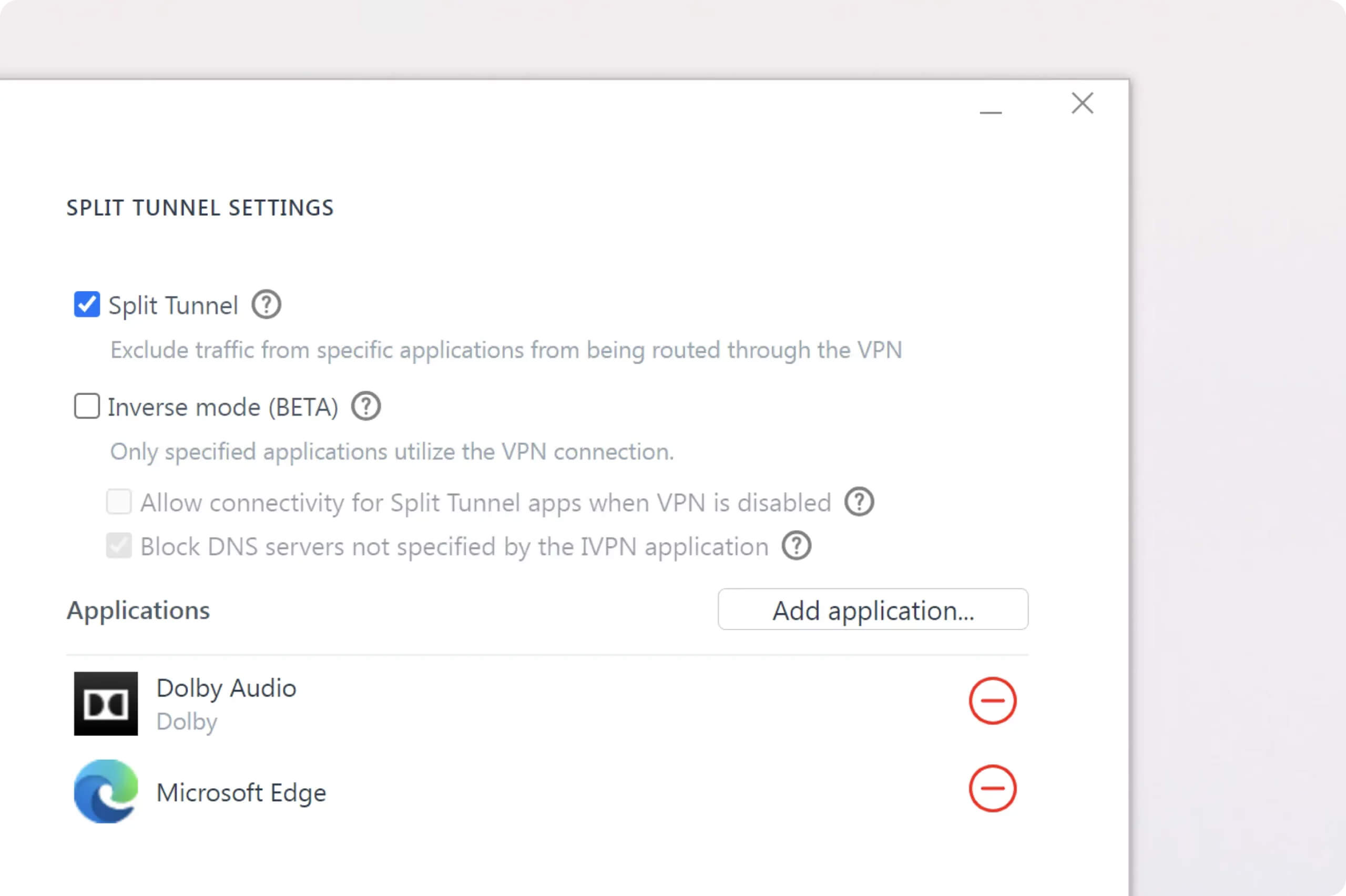
IVPN’s split tunneling can be easily configured to either exclude or include apps from the tunnel.
Ad, Tracker & Malware Blocker
Of the 16 VPNs that include an ad blocker, IVPN AntiTracker blocked the most ads, stopping 100% of intrusive ads in Hardcore Mode. It also outperformed PIA Mace against social trackers, though it was less effective against analytics trackers.
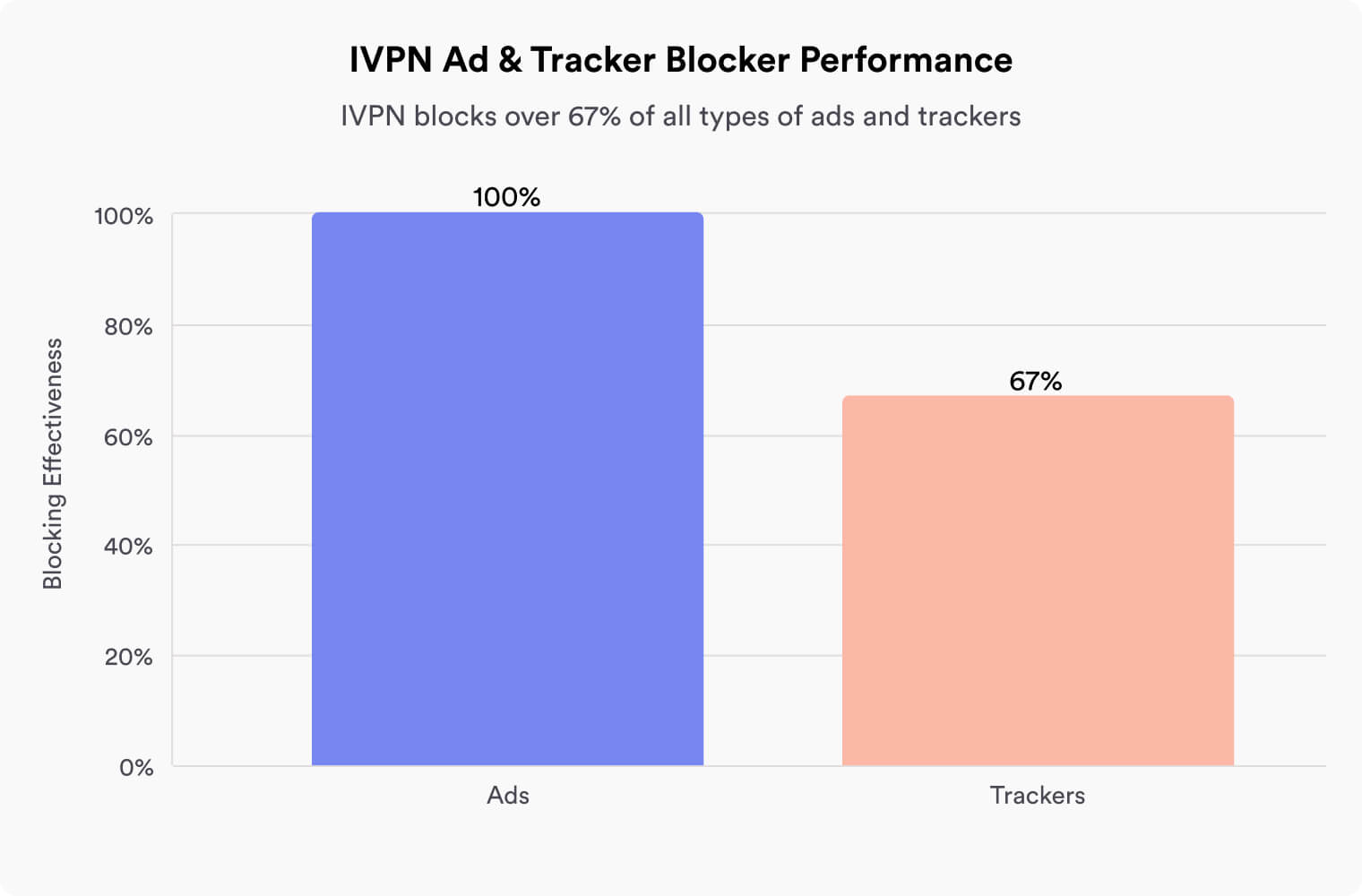
However, Hardcore Mode blocks some legitimate sites entirely, including Google and YouTube. In everyday use, we preferred an ad blocker that blocked slightly fewer ads but still let us use the web normally.
Obfuscated Servers
IVPN’s desktop apps include Obfsproxy, a type of obfuscation designed to help users in restrictive regions access the internet.
This is likely sufficient to bypass censorship in countries like Russia and Turkey, but our testing showed that IVPN cannot bypass China’s Great Firewall. It failed to connect to any servers there.
Obfsproxy also significantly slows speeds, reducing ours by 45%. It’s best for accessing blocked text-based apps like X and WhatsApp, rather than media-heavy apps like YouTube or Instagram.
Multi-hop Servers
IVPN’s Multi-hop feature adds an extra layer of security by routing your connection through multiple servers in different countries. This means that even if the exit server is compromised, your activity remains private. However, this feature is only available with the more expensive Pro plan.
Additional Features We’d Like to See
IVPN lacks several features we expect from a top VPN. Here are the two we missed most while using it:
Dedicated IP Address
IVPN does not offer a dedicated IP address that belongs only to you. As a result, we had issues with services sensitive to frequent IP changes, such as banking apps.
Live Chat Customer Support
Unusually for a popular VPN, we had to contact IVPN’s support via email whenever we had an issue. Although we often received a reply within an hour, this was more frustrating than the instant responses we get from most other VPNs.
IVPN Key Data
| Attribute | IVPN | Typical VPN |
|---|---|---|
| Owner | IVPN Limited (Independent) | Independent |
| Launch Date | 2009 | 2015 |
| Local Download Speed | 95Mbps (5% loss) | 89Mbps (11% loss) |
| International Download Speed | 86Mbps (14% loss) | 80Mbps (20% loss) |
| Countries with Servers | 40 | 40 |
| Privacy Policy | No Logs | Identifiable Data |
| Simultaneous Connections | 7 | 10 |
| Netflix Libraries | 1 | 3 |
| Torrenting | Yes | Yes |
| Works In China? | No | No |
| Cheapest Price | 3.89/mo over 36 months | $3.87/mo over 24 months |
| Customer Support | Live Chat | |
| Apps & Extensions |
          |
|
Price
Price Plans
| Length | Standard | Pro |
|---|---|---|
| 1 week | $2.00 | $4.00 |
| 1 month | $6.00 | $10.00 |
| 12 months | $60.00 ($5.00/mo) | $99.96 ($8.33/mo) |
| 2 years | $100.08 ($4.17/mo) | $160.08 ($6.67/mo) |
| 3 years | $140.04 ($3.89/mo) | $219.96 ($6.11/mo) |
Free Trial
| Money-Back Guarantee | 30 days |
|---|---|
| Free Trial | No |
| 100% Free Plan | No |