
HideMyAss: Fast, Easy, and Massive Global Coverage—but Weak for Streaming
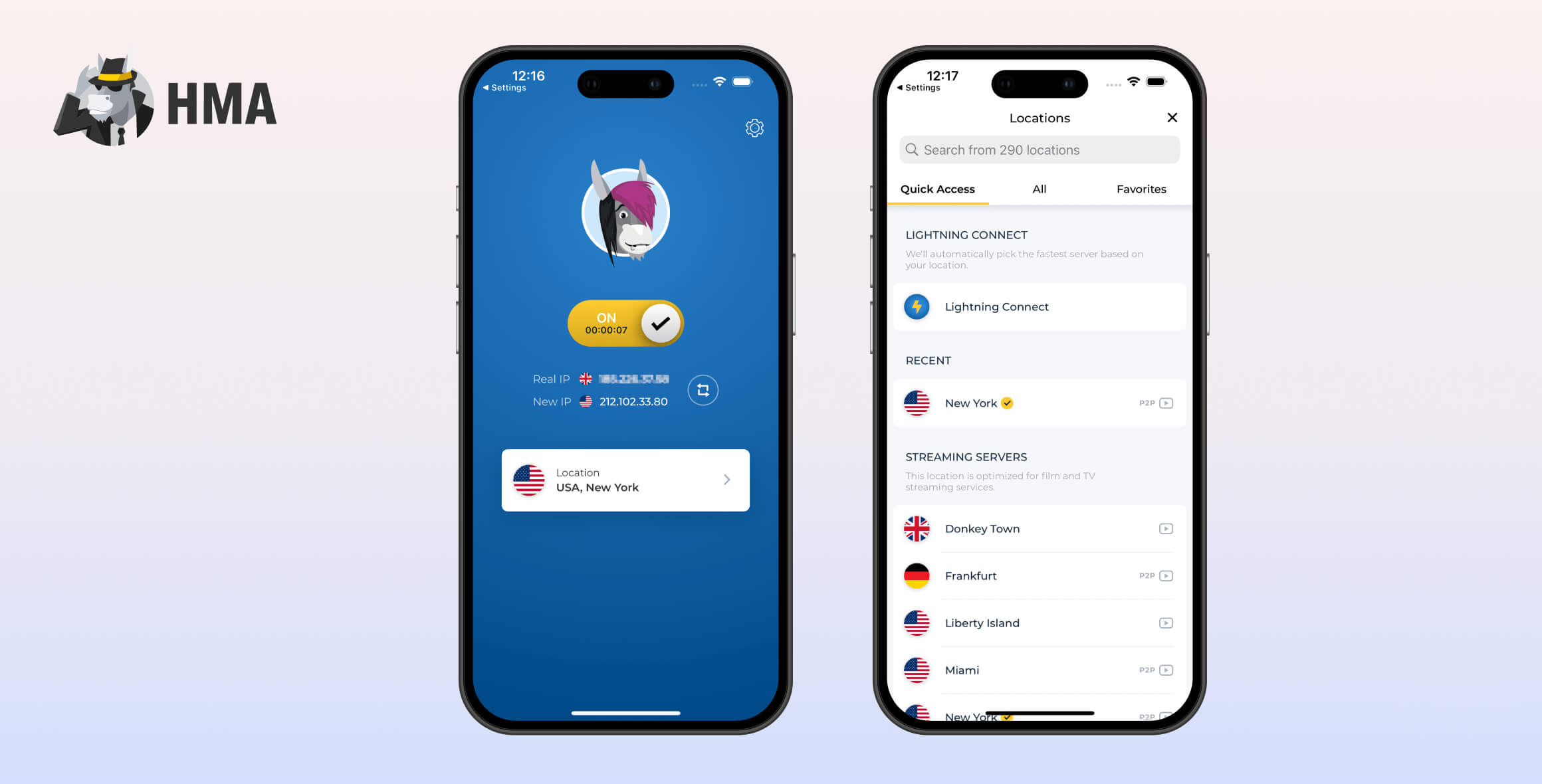
HideMyAss (HMA) is a safe, user-friendly VPN with servers in 195 countries. Its intuitive apps, seven-day free trial, and fast speeds make it a solid choice for most casual users. However, it struggles to unblock most streaming platforms, including Netflix, and it lacks some advanced features, device support, and customer service found in top-tier VPNs.
- Pros
- Has the largest number of VPN server locations
- Works with BBC iPlayer and Disney+
- Very fast download speeds
- Easy-to-use and well-designed apps
- 7-day free trial and 30-day refund policy
- 20Gbps bandwidth servers across its network
- Cons
- Fails to unblock Netflix, HBO Max, Amazon Prime & more
- Outdated protocols on Mac and iOS
- No Firestick app and no Smart DNS
- Based in the UK (FVEY jurisdiction)
- Inactive customer support
- No kill switch on iOS
Launched in 2009, HMA VPN is part of the Avast RSO range of cybersecurity products. Despite past controversies, HMA has since become a trustworthy service.
HMA’s standout feature is its extensive server network, covering every country worldwide. It provides IP addresses for every region using a mix of physical and virtual servers.
Privacy
Ranked #20 out of 61 VPNs for Privacy
HMA’s privacy policy has improved significantly in recent years after earlier criticism over data retention. Since 2019, it has not collected or logged any activity or connection data that could identify users, and this has been independently verified by a VerSprite audit, which rated it low-risk for user privacy impact. The only personal information it retains is your email address and username.
| Originating IP Address | No |
|---|---|
| Browsing Activity | No |
| Individual Connection Timestamps | Yes |
| Date of Last Connection | No |
| VPN Server IP | No |
| Device Information | No |
| Individual Bandwidth Usage | Yes |
| Account Information | Yes |
You can read HideMyAss’s full privacy policy on its website.
HMA only records a limited amount of aggregated data, and none of it is tied to specific users.
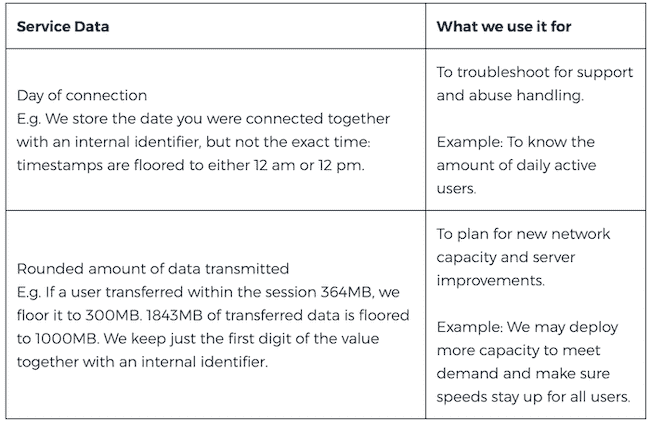
None of the data recorded by HMA can be used to identify you.
In September 2019, HMA updated its policy to a true “no-logs” approach, meaning it does not store any identifiable data that could de-anonymize your online activity.
This policy was verified by the cybersecurity firm VerSprite after an audit of HMA’s systems in August 2020.
VerSprite awarded HMA a “low-risk user privacy impact rating” — the highest classification. Independent security audits offer real evidence of a VPN’s practices, so you don’t have to rely solely on what the provider claims.
The only personal information HMA retains is your email address and username, which is standard among VPNs.
For even stronger privacy, we’d like HMA to add untraceable payment options, such as cash or cryptocurrency. We would also welcome the use of diskless RAM-only servers to prevent any data from being extracted.
You can compare HMA’s logging policy with those of other VPN services in the table below:
| VPN Service | Privacy Rating | Logging Policy | Jurisdiction | Independently Verified |
|---|---|---|---|---|
| HideMyAss | 8.0 | No Logs | UK | ✓ |
| PIA VPN | 9.7 | No Logs | United States | ✓ |
| Surfshark | 8.7 | Connection Logs | British Virgin Islands (BVI) | ✓ |
| ExpressVPN | 9.2 | Connection Logs | British Virgin Islands (BVI) | ✓ |
| NordVPN | 8.8 | No Logs | Panama | ✓ |
HMA Is Based in the United Kingdom
HMA is developed by Privax Ltd., which is currently owned by the Czech antivirus firm Avast.
Despite the parent company being based in the Czech Republic, Privax Ltd. remains located in the UK.
Normally, the UK would be an unfavorable base for a VPN due to its intrusive data retention laws. However, HMA’s verified no-logs policy addresses this concern.
Because HMA does not keep logs, there would be nothing to share with UK authorities in the event of a court order or server seizure.
Increased Trustworthiness in Recent Years
Despite past incidents of handing over users’ connection logs to law enforcement, HMA has taken the necessary steps to become a trusted VPN service.
All cited court orders occurred over 10 years ago, under different ownership and a more intrusive logging policy.
With its independently audited no-logs policy and strong recent track record, we can now recommend HMA as a private and trustworthy VPN.
Streaming
Ranked #39 out of 61 VPNs for Streaming
HMA VPN is a poor choice for unblocking geo-restricted streaming platforms. It works with BBC iPlayer and sometimes Disney+, but it no longer unblocks US Netflix. It also failed to unblock HBO Max, Hulu, or Amazon Prime Video in our testing.
| Streaming Service | Works with HideMyAss |
|---|---|
| BBC iPlayer (UK) | Yes |
| DAZN (Canada) | No |
| Disney+ (UK) | No |
| Hulu (US) | No |
| ITVX (UK) | Yes |
| HBO Max (US) | No |
| Netflix (US) | No |
| Netflix (UK) | No |
| Prime Video (US) | No |
| Sky Go (UK) | No |
HMA VPN’s streaming performance is subpar, only unblocking BBC iPlayer and Disney+.
While this isn’t awful, HMA can’t compete with the top streaming VPNs. For example, NordVPN reliably unblocks US Netflix, BBC iPlayer, HBO Max, Disney+, and more, without buffering.
Another drawback for streaming is HMA’s limited compatibility with TV-connected devices. There’s no app for Fire TV and no Smart DNS for Apple TV or game consoles.
However, there is an Android TV app, and you can install HMA on certain routers—though the setup can be complicated.
HMA Consistently Unblocks BBC iPlayer
We were able to unblock BBC iPlayer using HMA’s dedicated UK streaming server, “Donkey Town.” It appears in the default server list with a play icon next to its name.
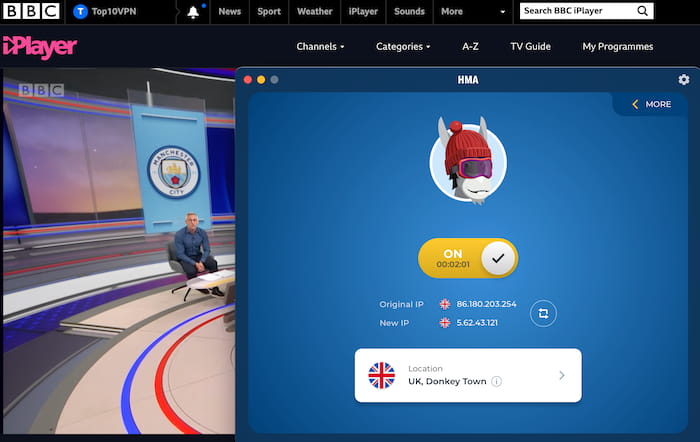
HMA’s dedicated streaming server for BBC iPlayer worked in our tests.
Using HMA, we streamed on-demand and live BBC iPlayer content in HD without buffering or drops in video quality.
We’re impressed by HMA’s consistency, but we’d like to see more dedicated UK streaming servers to reduce demand on Donkey Town. This would help prevent congestion and minimize downtime issues.
No Longer Works with Netflix
Despite past success, HMA hasn’t worked with US Netflix for over a year of testing. We tried all of HMA’s dedicated streaming servers across multiple devices, but none could unblock US Netflix. As a result, we reduced HMA’s streaming rating to 0.8 to reflect its decline in performance.
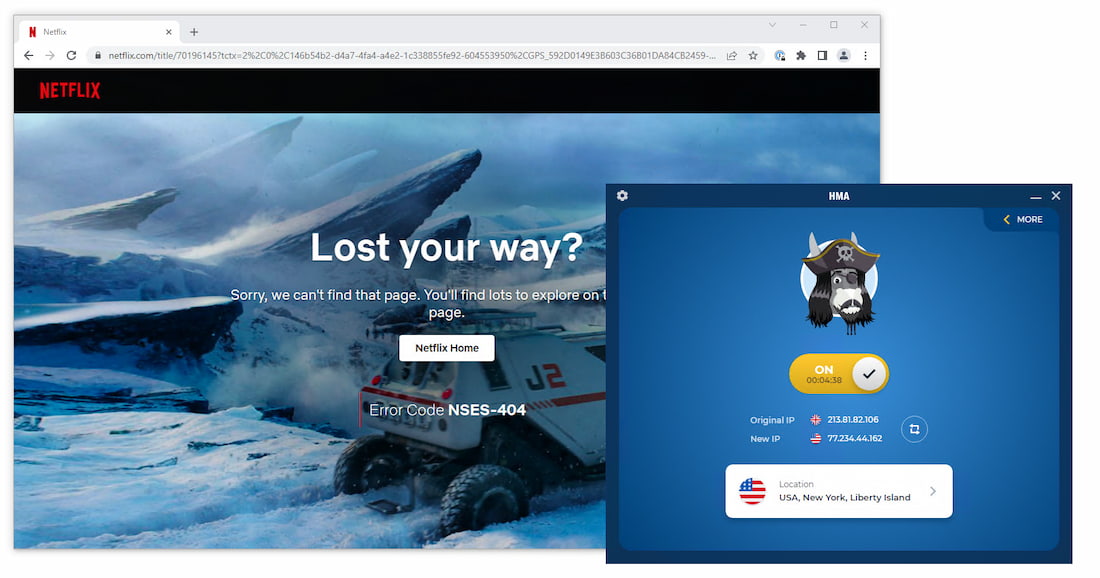
All four dedicated US streaming servers failed to unblock Netflix.
Although HMA has dedicated streaming servers for the UK and Germany, we couldn’t unblock those Netflix regions either. In fact, HMA VPN doesn’t work with Netflix in any location.
If streaming Netflix is a priority, we recommend a top Netflix VPN like ExpressVPN, which consistently unblocks 18 different libraries.
HMA Struggles to Unblock Disney+
HMA can unblock Disney+, but it often takes several attempts. In our latest tests, we had to switch between multiple HMA servers before finding one that worked.
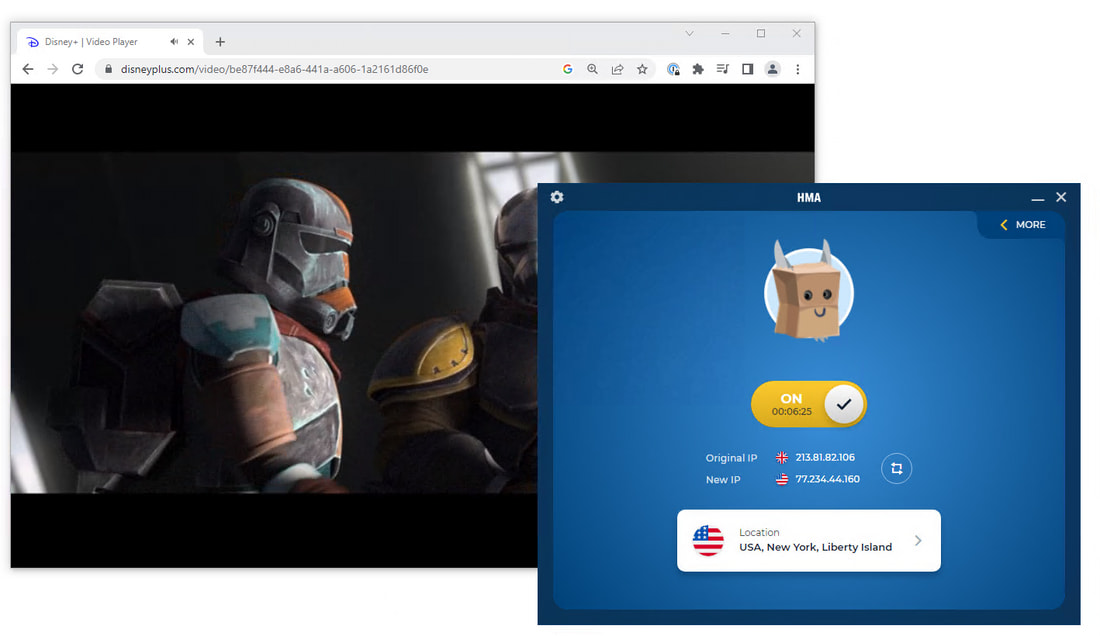
HMA’s ‘Liberty Island’ server had the highest success rate for unblocking Disney+.
For greater consistency, we recommend one of our top Disney+ VPNs. Surfshark performed best in our testing, unblocking Disney+ on every server in its network.
HMA Doesn’t Work with Hulu or HBO Max
HMA VPN can’t bypass geo-blocks on Hulu or HBO Max. This has been true for more than three years of our testing.
Using a VPN with HBO Max and Hulu is popular among VPN users. We tested NordVPN with both platforms, and it worked flawlessly.
Speed
Ranked #11 out of 61 VPNs for Speed
HMA delivered consistently fast speeds in our tests, placing it among the top-performing VPN services. Our download speeds dropped by only 4%—from 100Mbps to 96Mbps—when connected to a nearby server. We also recorded strong international speeds, with just an 8% loss when connecting to a far-away UK server.
To measure HMA’s speed, we connected to servers worldwide and recorded download speed, upload speed, and ping.
Here’s a summary of HMA’s speed test results:
| No VPN (New York) | US (New York) | Canada (Toronto) | US (Los Angeles) | UK (London) | Germany (Berlin) | Brazil (São Paulo) | Japan (Tokyo) | South Africa (Johannesburg) | Australia (Sydney) | |
|---|---|---|---|---|---|---|---|---|---|---|
| Server Location |  |
|
 |
|
 |
 |
 |
 |
 |
 |
| Download Speed | 100Mbps | 96Mbps | 92Mbps | 91Mbps | 92Mbps | 89Mbps | 86Mbps | 84Mbps | 80Mbps | 79Mbps |
| Upload Speed | 100Mbps | 93Mbps | 91Mbps | 95Mbps | 70Mbps | 94Mbps | 90Mbps | 91Mbps | 71Mbps | 24Mbps |
| Ping | 1ms | 9ms | 14ms | 74ms | 76ms | 83ms | 315ms | 143ms | 234ms | 221ms |
| Distance | 0mi | 5mi | 300mi | 2,500mi | 3,500mi | 4,000mi | 4,800mi | 6,700mi | 8,000mi | 9,900mi |
As shown above, our download speed dropped by just 4% on a same-city server.
HMA’s same-city speeds are excellent, with only seven VPNs delivering faster local download speeds.
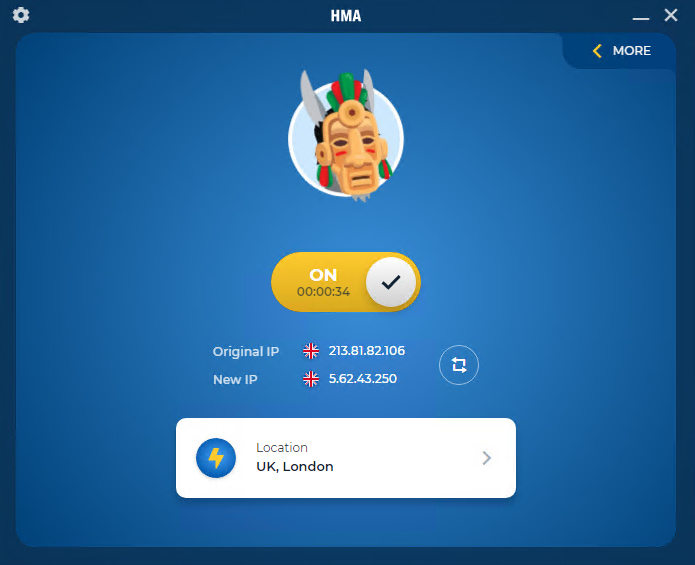
The lightning connect feature is available on all HMA apps.
HMA’s strong speed results are helped by its rollout of 20Gbps servers in 2019, which narrowed the gap with the fastest VPNs.
EXPERT TIP: For the best local speeds, use Lightning Connect. It automatically picks the fastest server based on distance and server load.
HMA’s international speeds are fast but not as strong as its local results. We saw an average download speed loss of 20% when connecting to South Africa and 21% to Australia.
Use the chart below to compare HMA’s local and international speeds with the fastest VPNs:
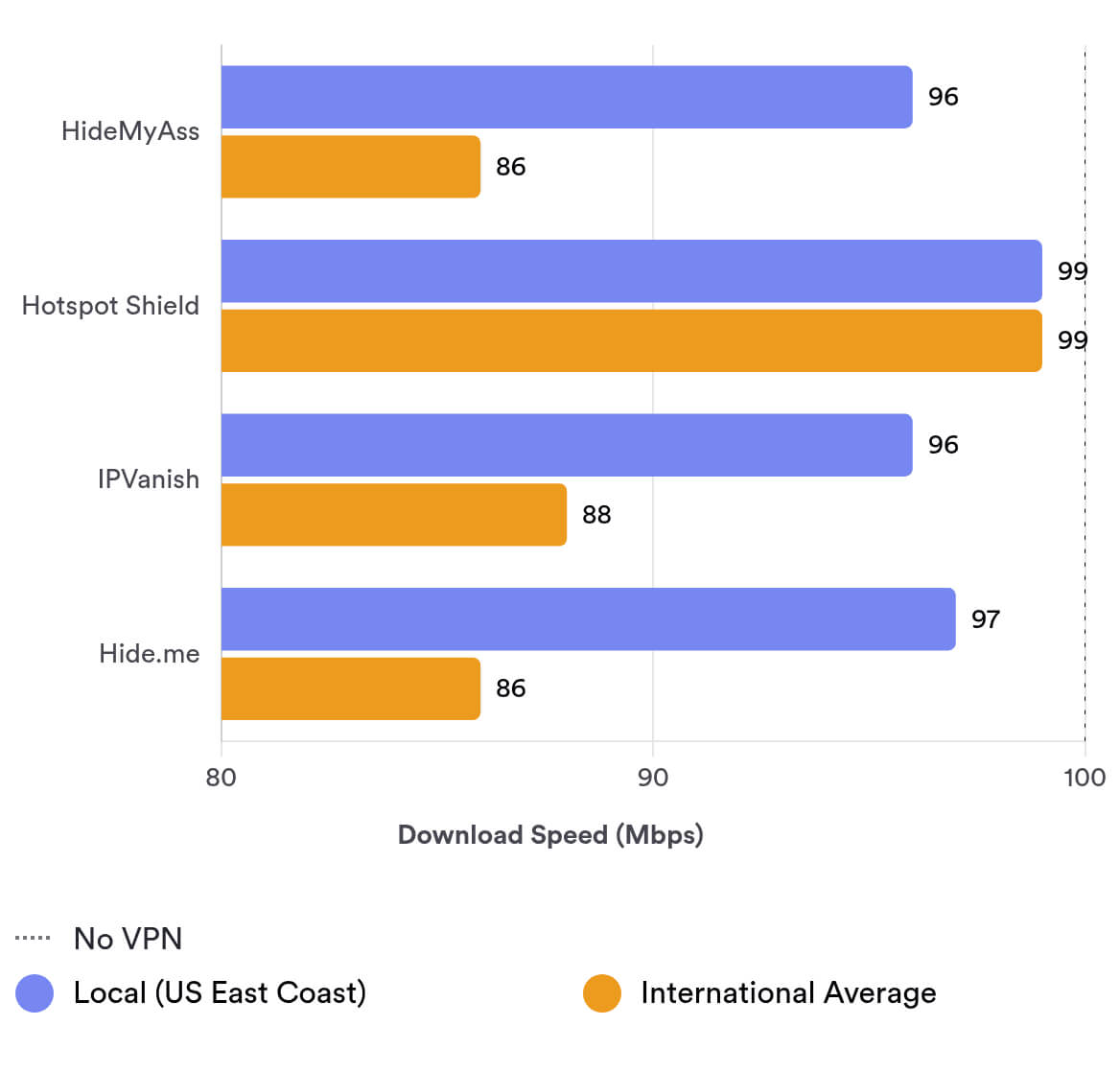
As you can see, HMA competes well on short-distance connections, but its long-distance speeds are a step behind.
Even so, these results are impressive and more than sufficient for data-heavy tasks like 4K streaming, gaming, and torrenting.
Security
Ranked #41 out of 61 VPNs for Security
HideMyAss is safe to use. It hides your IP address and DNS requests with AES-256 encryption and first-party DNS servers. It has also upgraded its Windows app to include the WireGuard protocol. However, we’d like to see better feature parity across its Apple apps—especially the addition of a VPN kill switch on iOS.
| Independent Audit | No |
|---|---|
| VPN Kill Switch | Yes |
| Leak Protection | Yes |
Uses Secure VPN Protocols & Encryption
HMA VPN encrypts internet traffic with AES-256. This cipher is virtually unbreakable and is used across all HMA apps to keep your personal data secure.
The HMA Windows app supports WireGuard, OpenVPN, and Mimic. WireGuard and OpenVPN are trustworthy, open-source VPN protocols that securely tunnel your traffic.
Mimic is a proprietary protocol developed by Avast RSO. It is closed source, and our Avast review found it too experimental to recommend. We suggest using OpenVPN or WireGuard instead.
Currently, HMA’s Android app only supports OpenVPN. While OpenVPN is secure, we’d like to see WireGuard added in a future update.
Both the iOS and Mac apps use the IKEv2/IPSec protocol. IPSec is older and is generally considered less secure and more vulnerable than OpenVPN and fully patched WireGuard implementations.
We’d like HMA to implement WireGuard and OpenVPN across all apps to strengthen the service’s overall security.
Using Wireshark, a packet-sniffing tool, we tested whether the VPN’s traffic is truly encrypted. We can confirm that HMA securely encrypted our data transfers.
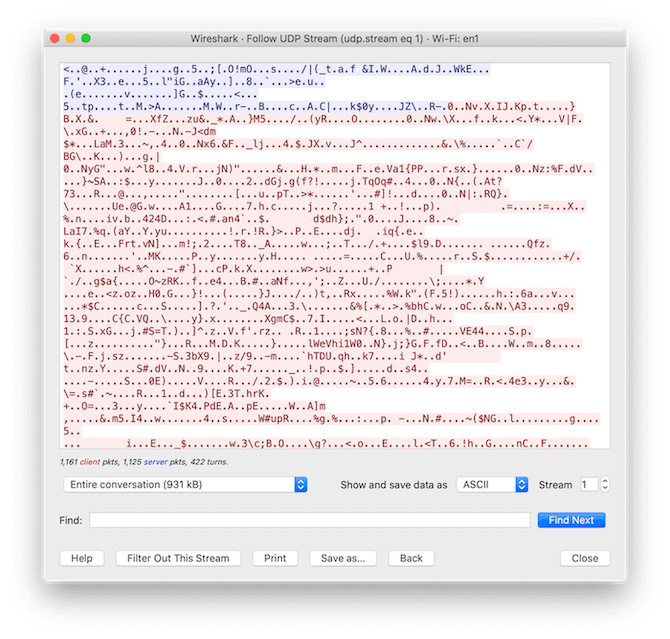
HideMyAss securely encrypted our network traffic.
HMA’s Kill Switch Prevents IP Leaks
A VPN kill switch is available on the Windows, Android, and Mac clients. It prevents data leaks if your VPN connection drops. The Windows client also offers an application-level kill switch that lets you select specific apps to disconnect from the internet.
Application-level kill switches are rare among VPNs, and even top-rated services like ExpressVPN do not provide one.
We tested HMA’s Windows kill switch using our in-house tool:
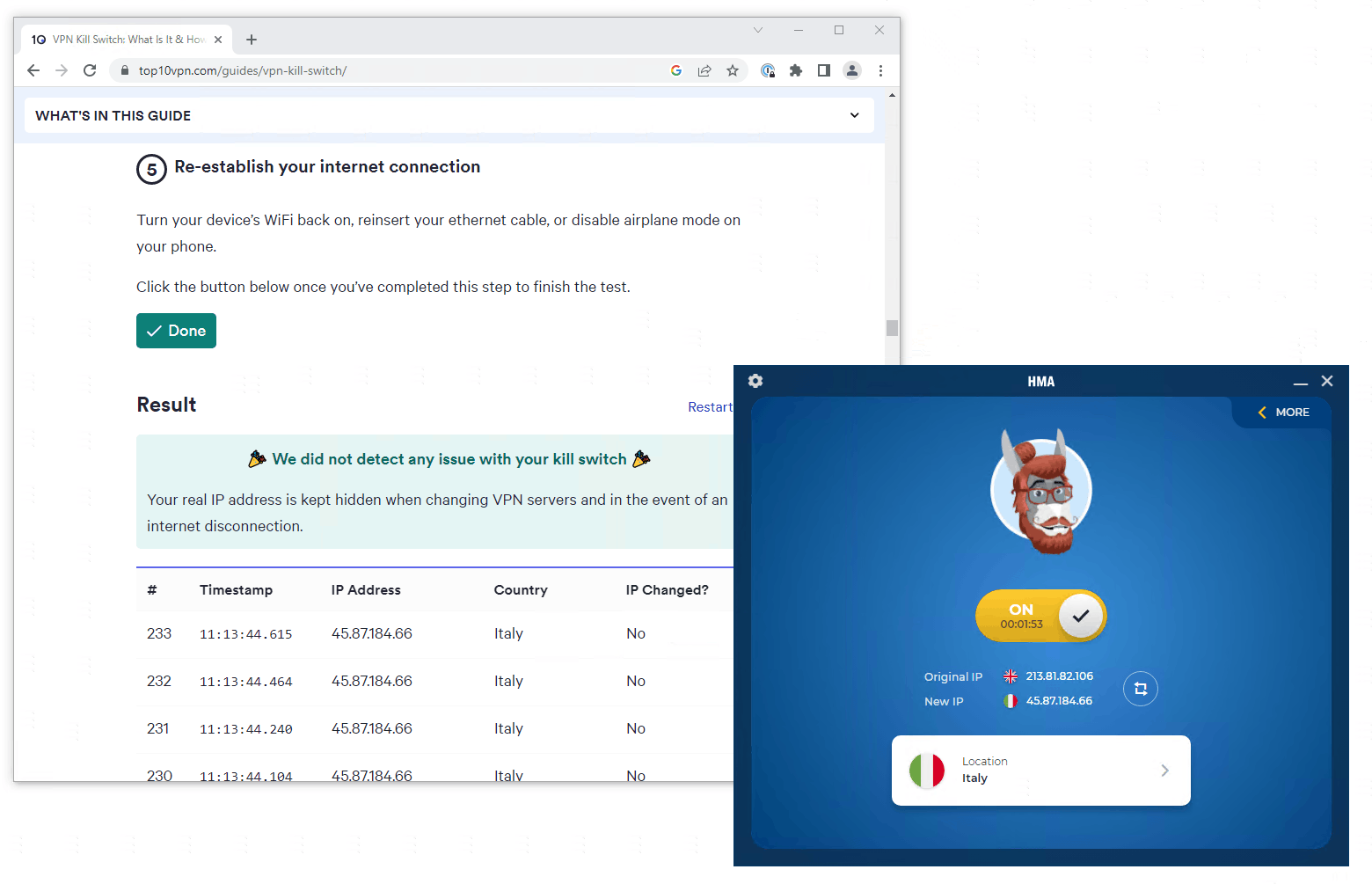
HMA’s kill switch passed all of our tests.
HMA’s kill switch is not available on iOS. This is disappointing and could put your data at risk. We’d like HMA to address this in the future.
HMA VPN Leak Test Results
We ran HideMyAss through a series of leak tests and found it leaked our IP address on iOS (due to a dropped VPN connection).
HMA’s other apps did not suffer IP or DNS leaks, thanks in part to built-in IPv4 and IPv6 leak protection.
HideMyAss also owns and operates its own private DNS servers, which helps keep your browsing activity hidden from third parties.
The screenshot below shows how the HMA app masked our real IP address, WebRTC, and DNS requests on Windows:
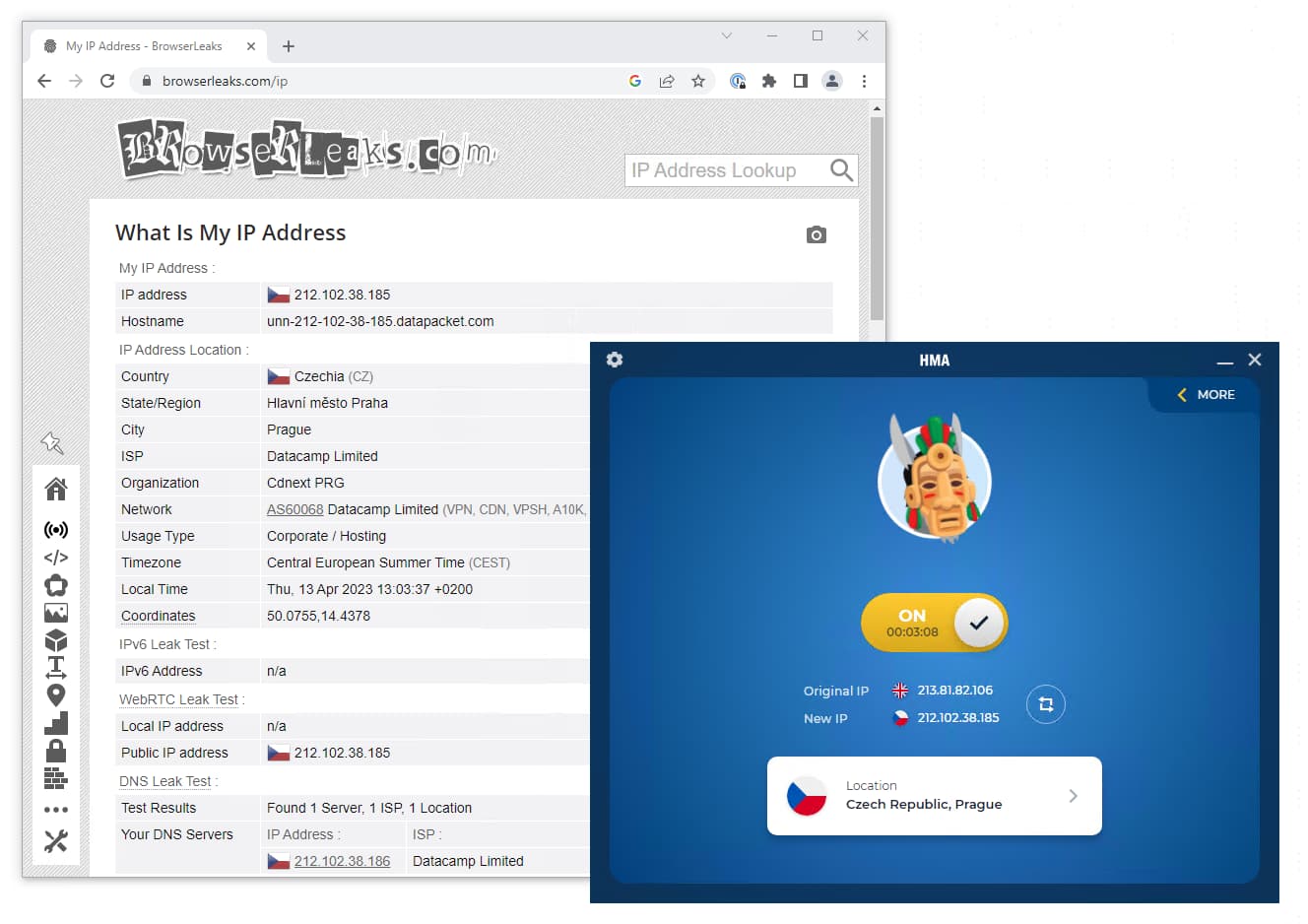
HMA VPN won’t leak any of your personal data on Windows.
Server Locations
Ranked #8 out of 61 VPNs for Server Locations
HideMyAss leads the industry for server locations, with servers in 195 countries—every country in the world. However, its total server count is relatively low at 1,080, which can cause congestion and slower speeds.
| Continent | Countries with Servers |
|---|---|
| Africa | 52 |
| Asia | 48 |
| Europe | 45 |
| South America | 19 |
| North America | 17 |
| Oceania | 14 |
This makes HMA the number one choice for VPN server locations, with servers available in 195 countries and 23 territories. Essentially, HMA has servers in every country. This is unique to HMA and isn’t matched by any other VPN service we’ve tested.
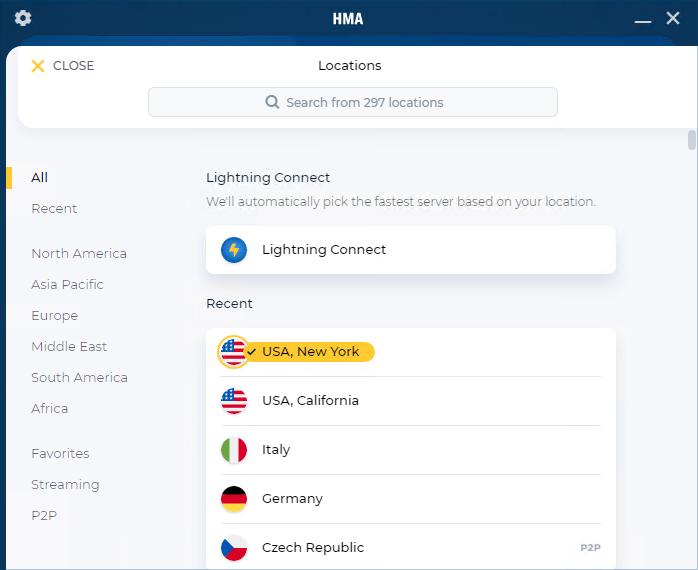
HMA’s server locations are separated into continents.
Though its geographic coverage is impressive, HMA has only 1,080 servers in total. This is far below top VPNs like PIA’s 18,651 servers and can lead to slower speeds due to congestion.
Other VPN services tend to cluster their servers in specific regions, usually the US and Western Europe. That’s not the case with HMA — every region is represented.
For example, 68% of NordVPN’s servers are in North America and Europe, compared to just 32% for HMA.
We were particularly impressed to see HMA cover regions in Africa and the Middle East better than any other VPN service we’ve tested.
That said, HMA’s city-level server options are almost entirely limited to North America and Europe:
- Australia (2)
- Canada (3)
- France (2)
- Germany (2)
- Russia (2)
- Spain (2)
- UK (2)
- US (65)
City-level servers help reduce congestion and improve speeds. HMA’s 65 US locations are especially useful for bypassing US sports blackouts.
Like most VPNs, HMA places its city-level servers in the usual countries. We’d like to see more city-level servers in Asia, Africa, and South America.
You can use the table below to compare HMA VPN’s server network with other VPN services:
| VPN Service | No. Of Servers | No. Of Countries | Average No. Of Servers Per Country |
|---|---|---|---|
| PIA | 18,651 | 91 | 205 |
| CyberGhost | 12,000 | 100 | 107 |
| NordVPN | 8,100 | 127 | 57 |
| IPVanish | 3,100 | 112 | 42 |
| ExpressVPN | 13,360 | 109 | 28 |
| HMA | 1080 | 195 | 6 |
HMA uses many virtual server locations
HideMyAss can offer servers in so many countries because it uses virtual server locations alongside physical ones.
Unlike a physically located server, a virtual or “fake” location provides an IP address in one country while the server is physically hosted in another.
The screenshot below shows that when we connected to a Kenyan HMA server, the actual physical server was in an Avast data center in Hallandale, Florida.
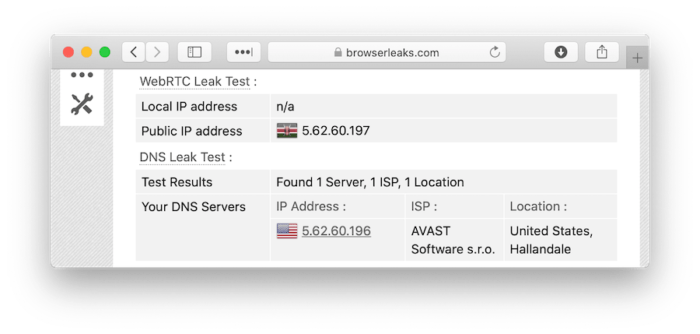
HMA’s ‘Kenyan’ VPN server is actually located in Hallandale, Florida.
Virtual locations allow HMA to assign IP addresses in places where hosting physical servers is difficult (e.g., China).
However, this can lead to slower speeds than expected. It happens when you connect to a server that seems close to you but is physically far away.
User Experience
Ranked #26 out of 61 VPNs for User Experience
HideMyAss’ VPN apps are among the most accessible and intuitive on the market. In our tests, all advanced settings were clearly labeled, and connecting to a server was easy. HMA’s apps vary in features by platform, but the straightforward design is consistent across all of them.
To install and start using HMA, create an account on the HMA website and choose a pricing plan. Then download the app on your device and log in.
For us, the entire process took about 10 minutes, and we didn’t encounter any issues.
On desktop, the HMA app launches a second installer after the initial download. It’s quick and only happens the first time you open the Windows or Mac app.
HMA hasn’t updated its app design since 2019. Despite that, the apps remain easy to use, with a streamlined, intuitive interface.
Below is an in-depth overview of our experience using HMA on every major operating system:
Desktop & Laptop (Windows & Mac)
HMA’s Windows and Mac apps use the same user-friendly interface but differ in their available features.
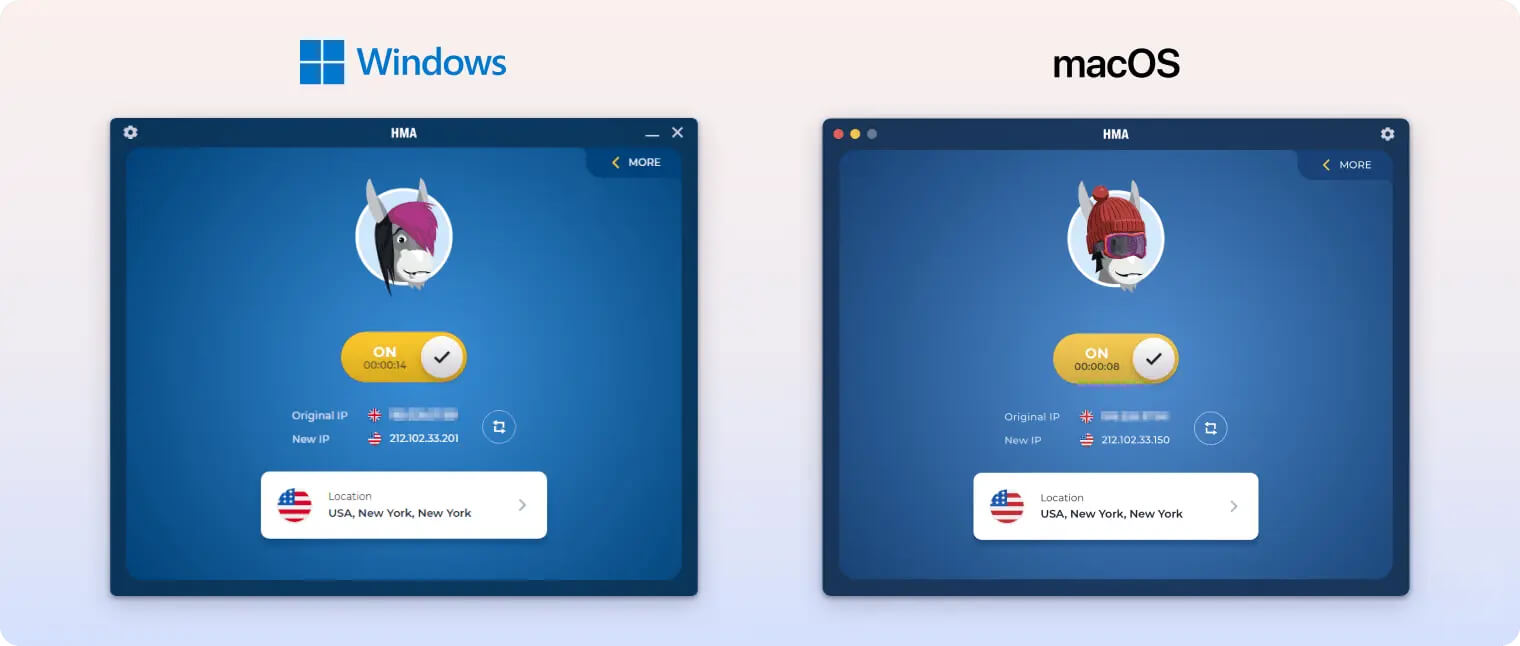
Upon launching HMA for the first time, you get a quick tutorial that explains how the app works and what each feature does. This is especially helpful for VPN beginners.
You can expand the side panel at any time to read clear explanations of HMA’s advanced settings.
Starting a VPN connection is as simple as toggling the central button to ON. You don’t need to dig into the settings or server list.
Once connected, you can click the shuffle button next to your VPN IP address to quickly get a new one. We like this feature, but we wish the protocol-switching option was located nearby. It’s inconvenient to open a separate window for this.
HMA’s desktop apps make it easy to browse all 195 server locations. Servers are grouped by continent, P2P-optimized, and streaming, and there’s a search bar to find a specific location.
However, we don’t like that the settings open in a separate window that blocks the home screen. It’s not obvious that you need to close this window to return to the main app.
In the settings, the VPN protocol option appears under Advanced rather than Connection. This feels unintuitive and may confuse both beginners and experts.
We also don’t like that you can’t resize the Windows or Mac app. This makes it harder to use alongside another window, like a torrent client.
Mobile (iPhone & Android)
HMA’s mobile apps are easy to use with a clean, uncluttered interface. You can connect to a server by tapping the connect button on the home screen.
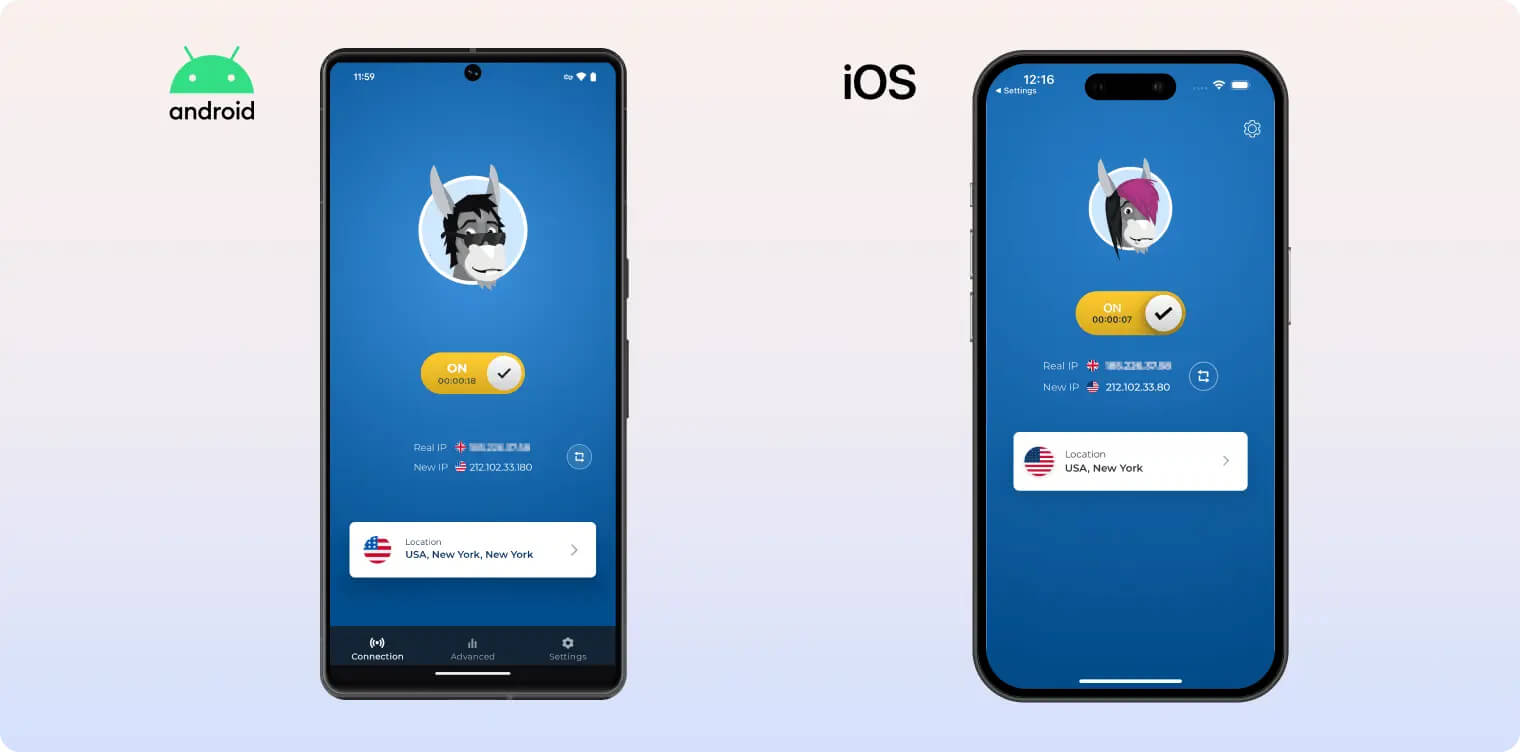
Both apps support Lightning Connect (Optimal Location on iOS) if you want to connect quickly without choosing a location.
The iOS app is the least capable of HMA’s apps, offering very few options.
In fact, Connection Rules is the only setting, limited to basic toggles for cellular data and trusted Wi-Fi networks.
There’s no kill switch, protocol selection, or split tunneling.
The Android app offers far more control than iOS. Features include IP Shuffle (from desktop), a kill switch, TCP-only mode, and split tunneling.
You can access these options quickly using the tabs at the bottom of the home screen.
We’re disappointed that HMA hasn’t added any mobile-specific features to either app. There’s no dark mode, and the apps don’t make use of iOS or Android integrations.
The result is mobile apps that don’t feel fully optimized. They’re essentially identical to the desktop apps in most ways.
Android TV App
HMA’s custom Android TV app carries over the same user-friendly design found on desktop and mobile.
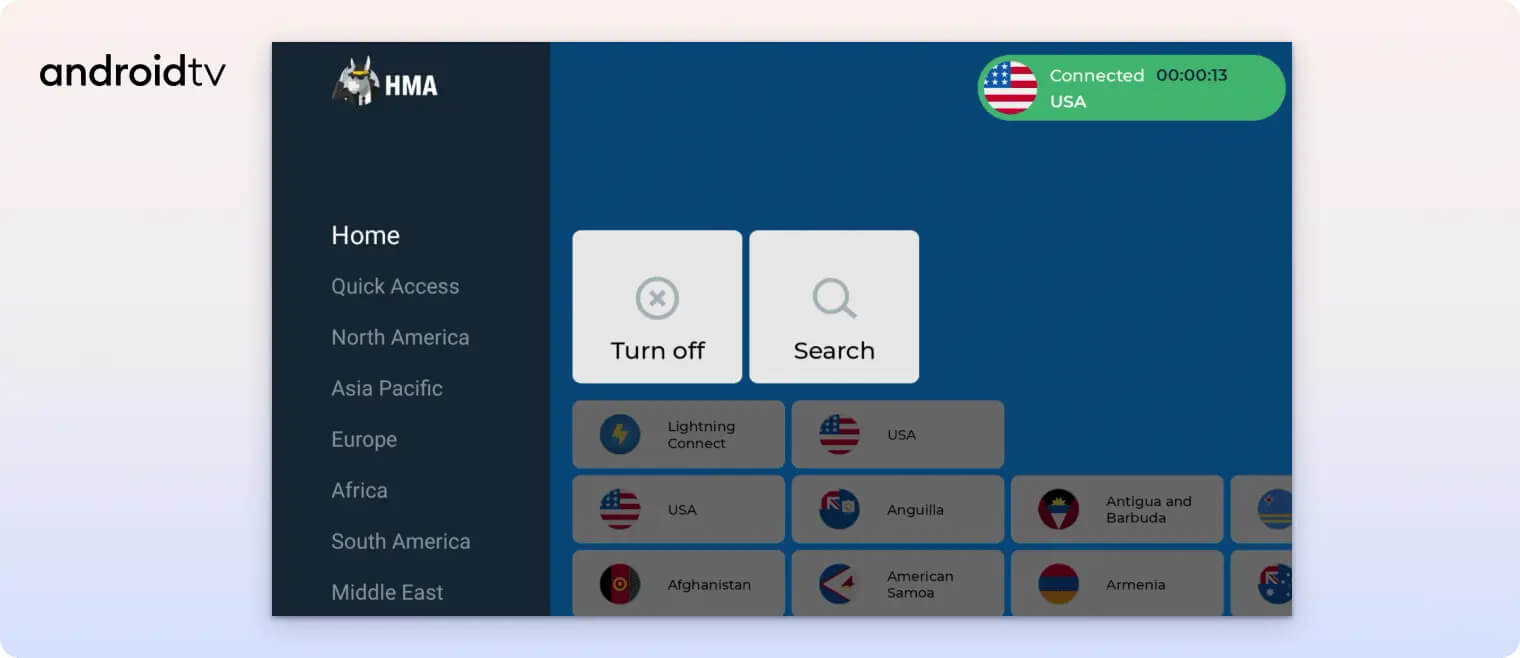
You can use Lightning Connect to connect to the nearest server or choose from HMA’s 195 locations.
There’s a search function to simplify navigation and continent tabs for quick browsing.
In our tests, we streamed US Netflix and BBC iPlayer directly on the TV without issues.
The Android TV app works on all Android-powered smart TVs and streaming devices, including Chromecast with Google TV.
It also includes useful settings such as split tunneling, a kill switch, and IP Shuffle.
Torrenting
Ranked #17 out of 61 VPNs for Torrenting
HMA VPN is great for torrenting thanks to its fast average bitrate of 9.6 MiB/s and P2P-optimized servers. Plus, its private logging policy and first-party DNS servers help ensure your torrenting activity cannot be tied back to you.
| Torrenting Attribute | HideMyAss |
|---|---|
| Permits P2P Traffic | Yes |
| Average Download Bitrate | 9.6MiB/s (4% loss) |
| Countries with P2P Servers | 195 |
| Port Forwarding | No |
| Kill Switch | Yes |
| Logging Policy | No Identifiable Data |
We tested HMA VPN using the qBittorrent client and downloaded a torrent file without any issues.
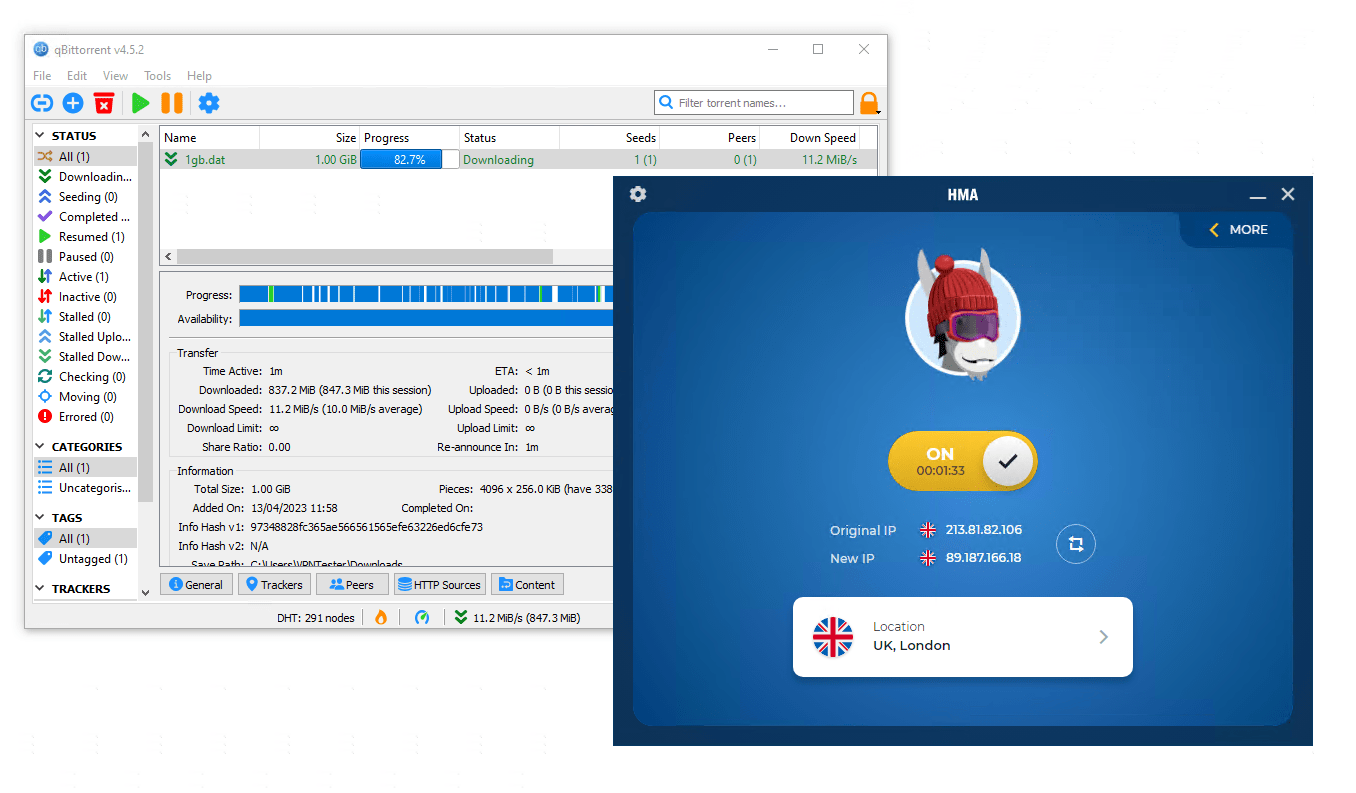
Our bitrate remained above 9MiB/s throughout the download.
We recorded an average bitrate of 9.6 MiB/s, making HideMyAss faster than most VPNs for torrenting.
HMA’s speeds are partly due to its dedicated P2P servers, which are available in eight locations, including both US coasts.
You can connect to P2P-optimized servers in the following locations:
- Czech Republic
- France
- Germany
- Netherlands
- UK
- US
HMA likely does not own all of its P2P servers, as it openly rents some from third parties. This can introduce privacy and security risks since another party is involved. However, HMA states that it maintains full management control over its rented servers.
Additionally, HMA’s first-party ownership of all its DNS servers ensures that any torrent sites you visit are only visible to the VPN service.
In the past, HMA suspended user accounts that received DMCA notices for torrenting copyrighted material. Since the launch of its improved logging policy, HMA VPN no longer has a way to track your torrenting activity.
This means you can safely use HMA VPN to torrent.
If HMA VPN wants to compete with the top torrenting VPNs, we’d like to see port forwarding added to maximize its already fast speeds. We’d also welcome more P2P-optimized servers to better serve users in different regions.
Device Compatibility
HideMyAss is available on all major platforms, including Windows, Mac, iOS, and Android. HMA’s device compatibility is more limited for streaming, as it doesn’t offer a Fire TV app or Smart DNS. You can connect up to 10 devices at once with one HMA subscription, which is more than most VPN services.
| Windows | Yes |
|---|---|
| Mac | Yes |
| iOS | Yes |
| Android | Yes |
| Linux | Yes |
| Amazon Fire TV | No |
| Android TV | Yes |
| Apple TV | No |
| Router | Yes |
| Chrome | No |
Simultaneous Connections: 10
Although all HMA VPN apps are easy to use, there are major differences between operating systems. The Windows and Android apps are polished and feature-rich, while the iOS and macOS apps are more basic.
Here’s a summary of the key differences between the HMA VPN apps:
| Platform | WireGuard | Mimic Protocol | OpenVPN (UDP & TCP) | Split Tunneling | Kill Switch | App-Specific Kill Switch | IP Shuffle |
|---|---|---|---|---|---|---|---|
| Windows | ✓ | ✓ | ✓ | ✗ | ✓ | ✓ | ✓ |
| macOS | ✗ | ✗ | ✗ | ✗ | ✓ | ✗ | ✓ |
| iOS | ✗ | ✗ | ✗ | ✗ | ✗ | ✗ | ✗ |
| Android | ✗ | ✗ | ✓ | ✓ | ✓ | ✗ | ✓ |
10 Simultaneous Connections
With a single HMA subscription, you can connect up to 10 devices at once. This exceeds the industry standard and is more than enough for one user.
However, this limit applies only to HMA’s more expensive plans; cheaper plans cap connections at five devices.
If you need an affordable VPN for multiple users, we recommend Surfshark. It supports unlimited simultaneous connections for as little as $1.99 per month.
Streaming Device Support
Unlike ExpressVPN, HMA does not offer a dedicated router app. You’ll need to install HMA on your router manually, which can be challenging, or buy an expensive pre-flashed router with HMA software.
HMA also doesn’t offer a Smart DNS tool, so the only way to use the VPN on Apple TV or game consoles is by installing the VPN on your router.
Similarly, HideMyAss lacks a native Fire TV app. There’s no Android .apk file either, so you can’t sideload it onto a Firestick. Again, the only option is to set up a VPN router.
HMA does, however, provide an app for Android TV. We tested the Android TV app and found it very easy to set up and use.
Additional Features
HideMyAss offers fewer features than most VPNs. It includes split tunneling but lacks an ad blocker, dedicated IP, and multi-hop servers. Additionally, its customer support can be very slow to respond.
| Additional Feature | HideMyAss |
|---|---|
| Split Tunneling | Yes |
| VPN Obfuscation | No |
| Multi-Hop Servers | No |
| Dedicated IP | No |
| Ad Blocker | No |
Inaccurate & Unreliable Customer Support
For a paid service, HMA VPN has one of the worst customer support teams we’ve encountered.
The lack of new content on its website since 2021, and the fact that the HMA copyright expired in 2022, leads us to suspect that HMA may have disbanded its support team.
Its live chat has also been discontinued—despite advertising the opposite—and several members of our testing team experienced wait times of up to six months for an email response.
Thankfully, HMA is backed by a large online knowledge base that includes detailed guides, FAQs, and video walkthroughs.
However, the written guides vary in quality; one article even incorrectly claims that HMA only supports OpenVPN.
We were also disappointed to find that HMA has shut down its community forum.
Supports Split Tunneling & Randomized IP Addresses
Split tunneling is available on HMA’s Android app. This lets you choose which apps use the VPN tunnel and which operate normally without protection.
We appreciate this feature, but its exclusivity to Android is disappointing.
There’s also the “IP Shuffle” feature, which assigns a new IP address in the same location if your current IP is blocked. This helps bypass IP bans and avoid potential trackers.
Unfortunately, this feature isn’t available on iOS.
Overall, this is a limited set of advanced features, and we’d like to see HMA add more in the future.
Technical Features We’d Like to See
Many of the technical features we expect from a premium VPN are missing from HMA’s apps.
We suspect no further features will be added, as the HMA development roadmap has been removed from the provider’s website.
That said, here are some features we’d like to see added to HMA VPN if its development team is reinstated:
- Multi-hop servers for increased anonymity and protection against traffic correlation attacks.
- Ad blocker for a better browsing and streaming experience.
- Dedicated IPs to reliably unblock streaming platforms in specific regions.
To compete with the best VPNs, HMA needs to add these features and maintain feature parity across its apps going forward.
HideMyAss Key Data
| Attribute | HideMyAss | Typical VPN |
|---|---|---|
| Owner | Avast | Independent |
| Launch Date | 2009 | 2015 |
| Local Download Speed | 96Mbps (4% loss) | 89Mbps (11% loss) |
| International Download Speed | 86Mbps (14% loss) | 80Mbps (20% loss) |
| Countries with Servers | 195 | 40 |
| Privacy Policy | No Identifiable Data | Identifiable Data |
| Simultaneous Connections | 10 | 10 |
| Netflix Libraries | 0 | 3 |
| Torrenting | Yes | Yes |
| Works In China? | No | No |
| Cheapest Price | 2.99/mo over 36 months | $3.87/mo over 24 months |
| Customer Support | Online Resources & Email Support | |
| Apps & Extensions |
          |
|
Price
Price Plans
| 1 month | $11.99 |
|---|---|
| 12 months | $59.88 ($4.99/mo) |
| 3 years | $107.64 ($2.99/mo) |
Free Trial
| Money-Back Guarantee | 30 days |
|---|---|
| Free Trial | 7 days |
| 100% Free Plan | No |