
AirVPN: Excellent Privacy and P2P Performance, but Clunky Apps and Poor Streaming Support
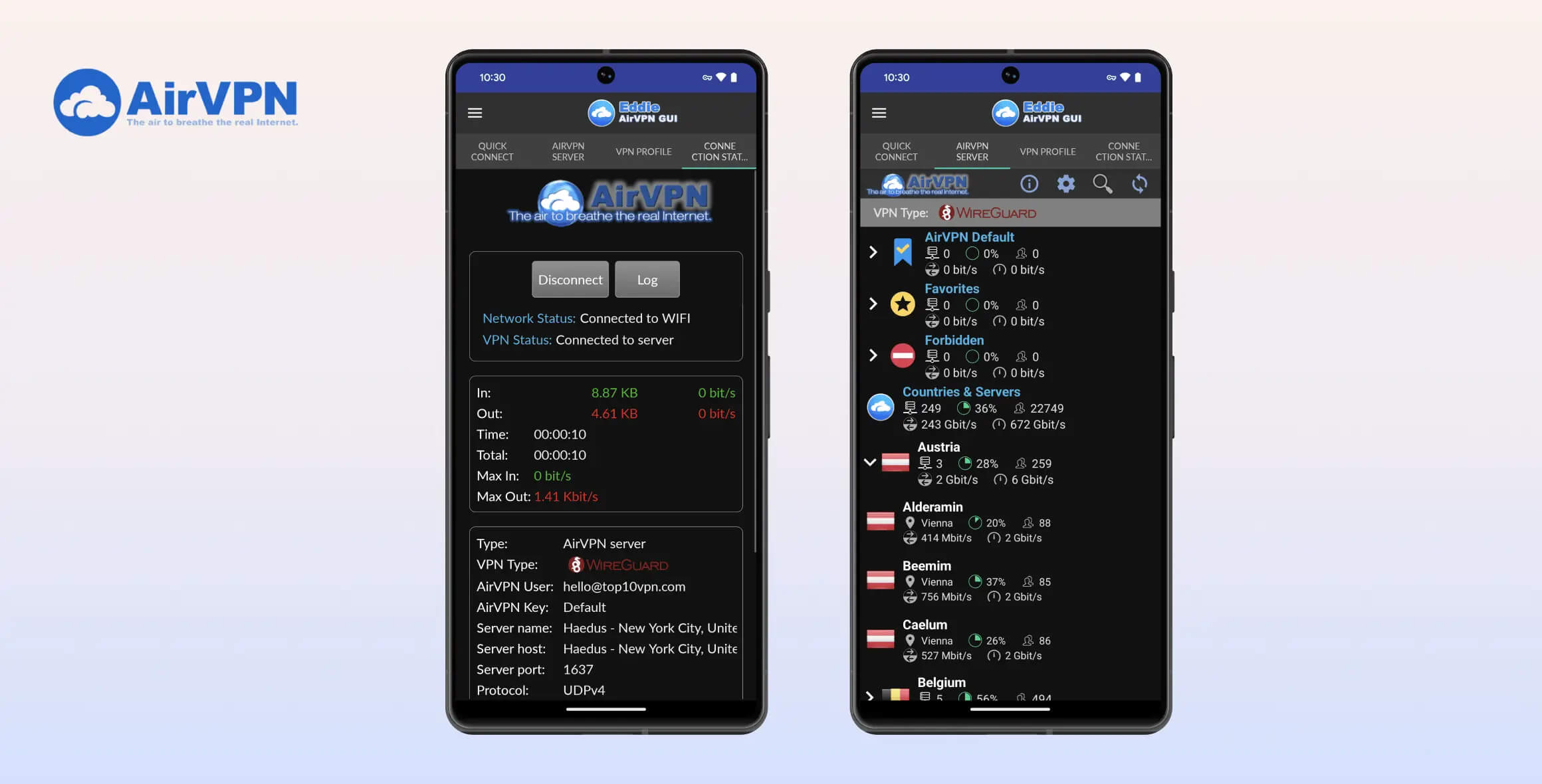
AirVPN is a great VPN if privacy and torrenting are your priorities. It uses robust encryption and runs exclusively on OpenVPN. The apps are fast and secure, but they’re visually outdated and can be hard to use — especially for beginners. AirVPN is a safe choice for advanced users, but it’s not recommended if you’re an iOS user or if you’re interested in streaming.
- Pros
- Fast same-country speeds
- Works well in China
- Torrenting permitted on all servers
- Connect securely to 22 countries
- Detailed manual setup guides
- Cons
- Very small number of VPN servers
- No access to streaming
- Based in privacy-unfriendly Italy
- Complicated desktop app
- Limited customer support
An independently operated VPN founded by activists, hacktivists, and hackers sounds almost too good to be true — or is it?
That’s the backstory of AirVPN, which promises its users “the air to breathe the real internet,” so we decided to put it to the test.
In our AirVPN review, we find out if it’s truly secure, if it works to unblock streaming services, and what it’s like to use, among other things.
Privacy
Ranked #31 out of 61 VPNs for Privacy
AirVPN has a minimal logging policy that doesn’t record any personally identifiable data. It’s also a trusted VPN service with a strong track record of over a decade without logging or security scandals. To improve its privacy rating, AirVPN needs to provide evidence of its zero-logs policy beyond written claims.
| Originating IP Address | No |
|---|---|
| Browsing Activity | No |
| Individual Connection Timestamps | No |
| Date of Last Connection | No |
| VPN Server IP | No |
| Device Information | No |
| Individual Bandwidth Usage | No |
| Account Information | No |
You can read AirVPN’s full privacy policy on its website.
As shown above, AirVPN does not collect any identifying user data. It only temporarily logs your VPN server location, which is deleted once the VPN session ends. This is far less intrusive than the logging policies of most VPN services.
Plus, AirVPN’s diskless server network makes it impossible for the VPN to log any activity data beyond the end of the session.
It also supports anonymous payment methods, including Bitcoin, when signing up.
AirVPN Needs Third-Party Verification
AirVPN’s logging policy is vague and lacks detail, so we contacted customer support for clarification.
We were told it only collects “technical data” for server maintenance, and that you can request deletion of this data at any time.
We currently can’t substantiate this claim, as AirVPN has not provided real-world evidence of its no-logs policy.
Going forward, we’d like to see AirVPN undergo an independent audit of its logging practices by a cybersecurity firm. This would provide third-party verification and substantially improve AirVPN’s privacy rating.
Implementing a regularly updated warrant canary and publishing any law enforcement requests would also improve AirVPN’s transparency.
Trustworthy Ownership, but Troubling EU Jurisdiction
AirVPN has been around for over eleven years. It was formed in Italy in 2010 by a small group of activists and hackers, with help from two lawyers. In that time it has never faced any security scandals or been bought by a larger company.
Originally it was operated by Iridium, a satellite communications company, but AirVPN took over in November 2012. Paolo Brini is listed as the current owner of AirVPN, which is operated from Perugia, Italy.
Even today, AirVPN is operated exclusively by activists and “security issues aware persons.” It’s still based in Italy, putting it within reach of EU data retention laws.
Its EU jurisdiction is particularly troubling and underscores the need for third-party verification of AirVPN’s logging practices.
Streaming
Ranked #39 out of 61 VPNs for Streaming
AirVPN is simply not a good VPN for streaming. It almost never works with services like BBC iPlayer or Netflix, and when it does, it requires lengthy trial and error to find the right server.
| Streaming Service | Works with AirVPN |
|---|---|
| BBC iPlayer (UK) | No |
| DAZN (Canada) | No |
| Disney+ (UK) | No |
| Hulu (US) | Yes |
| ITVX (UK) | Yes |
| HBO Max (US) | No |
| Netflix (US) | No |
| Netflix (UK) | No |
| Prime Video (US) | No |
| Sky Go (UK) | No |
While fast enough for buffer-free Full HD streaming, AirVPN doesn’t work with either Netflix or BBC iPlayer.
Because there are no AirVPN servers optimized for streaming sites, it’s a matter of trial and error. We haven’t been able to unblock US Netflix for several months.
It’s the same story with BBC iPlayer, which has always been inaccessible via AirVPN’s UK-based servers. These VPNs will stream BBC iPlayer, though.
Surprisingly, given the difficulty we’ve had with BBC iPlayer and Netflix, AirVPN was one of the few providers to work with Disney+ at launch, which is great to see.
Thankfully, AirVPN’s website includes a list of blocked websites that users can check to see if the situation with these streaming services changes.
Speed
Ranked #22 out of 61 VPNs for Speed
AirVPN performed well in our latest speed tests, especially compared to previous results. Using our dedicated 100Mbps connection, we recorded an average download of 95Mbps on a same-city server and 92Mbps on a distant UK server. These speeds are fast enough for every data-intensive activity, including torrenting, 4K streaming, and online gaming.
To determine AirVPN’s speed rating, we measured speeds between our location and AirVPN servers around the world. In each case, we calculated an average result from several weeks of testing.
Below is a table displaying AirVPN’s full speed test results:
| No VPN (New York) | US (New York) | Canada (Toronto) | US (Los Angeles) | UK (London) | Germany (Berlin) | Brazil (São Paulo) | Japan (Tokyo) | Australia (Sydney) | |
|---|---|---|---|---|---|---|---|---|---|
| Server Location |  |
|
 |
|
 |
 |
 |
 |
 |
| Download Speed | 100Mbps | 95Mbps | 98Mbps | 90Mbps | 92Mbps | 92Mbps | 90Mbps | 83Mbps | 69Mbps |
| Upload Speed | 100Mbps | 92Mbps | 93Mbps | 45Mbps | 19Mbps | 91Mbps | 83Mbps | 93Mbps | 19Mbps |
| Ping | 1ms | 5ms | 16ms | 74ms | 74ms | 84ms | 112ms | 145ms | 275ms |
| Distance | 0mi | 5mi | 300mi | 2,500mi | 3,500mi | 4,000mi | 4,800mi | 6,700mi | 9,900mi |
Previously, AirVPN was one of the slowest premium VPN services, especially over longer distances. We can confirm that AirVPN has substantially improved its connection speeds. In fact, its average local download speed increased by 30%, and its international connection to Germany improved by 67%.
While connected to a nearby New York server, our download speed decreased from 100Mbps to 95Mbps on average. This represents a speed loss of just 5% — an excellent result.
Despite this improvement, AirVPN is still not as fast as the leading VPN services. This is most evident over long distances: AirVPN recorded an average speed loss of 31% when connecting to Australia, compared to just 1% for Hotspot Shield.
To make this clearer, you can use the chart below to see how AirVPN’s average international download speeds compare to the best VPNs:
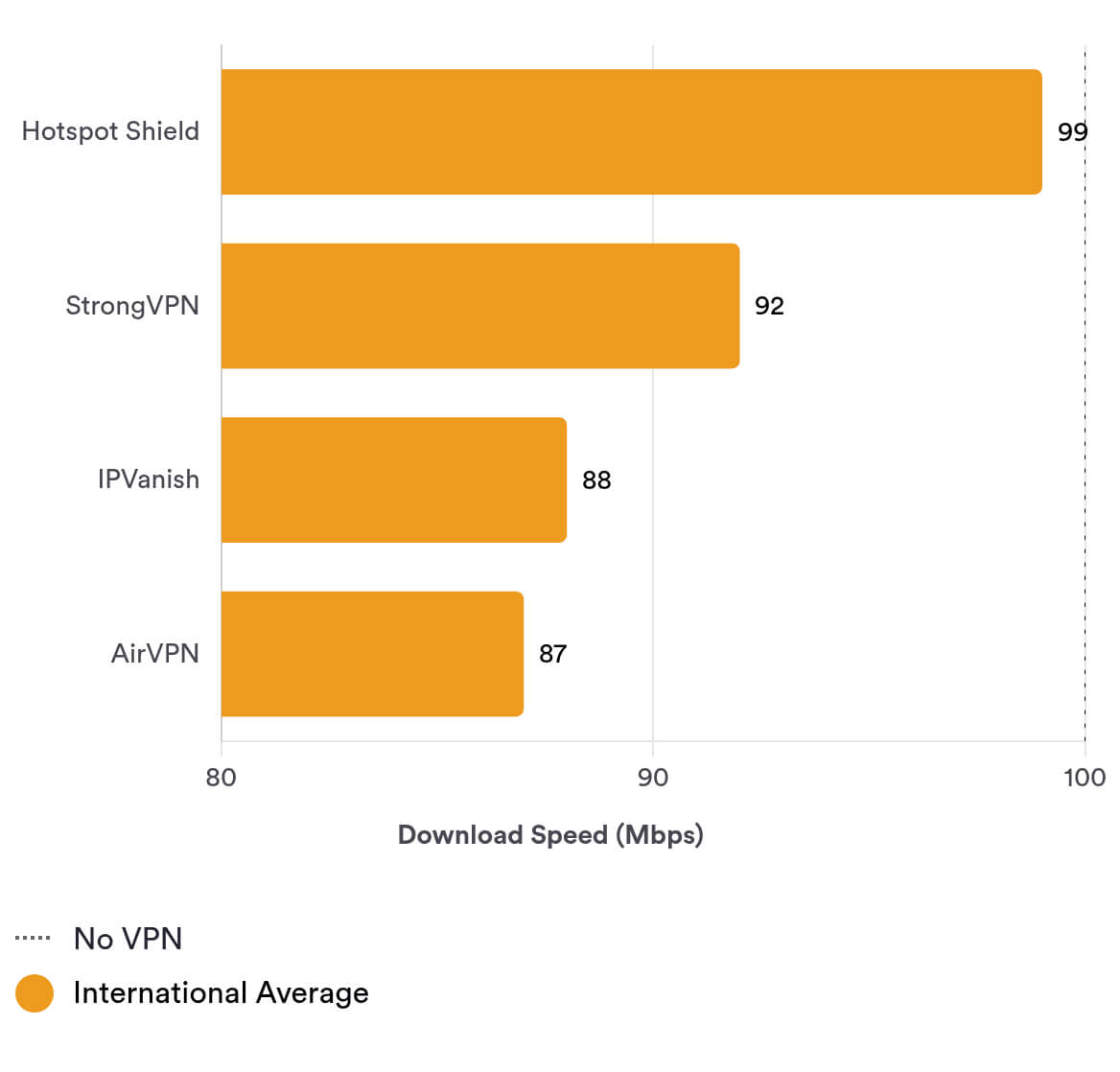
As you can see, AirVPN is almost as fast as the top VPNs, but there’s still a gap on international connections.
Security
Ranked #16 out of 61 VPNs for Security
With AES-256 encryption and the industry-standard OpenVPN protocol, AirVPN meets all our expectations for security.
| Independent Audit | No |
|---|---|
| VPN Kill Switch | Yes |
| Leak Protection | Yes |
AirVPN is a fantastic choice if pure privacy is your priority. Encryption uses the top cipher AES-256, and the software runs on OpenVPN or WireGuard, which offer the best balance between security and performance.
The VPN kill switch is essential to protect you in case of connection drops, and AirVPN also operates its own DNS servers, keeping your personal information confidential.
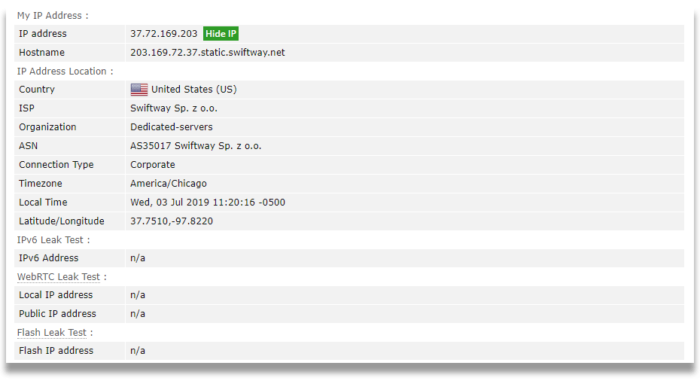
AirVPN’s protection against DNS, IPv6, and WebRTC leaks was also 100% effective in our latest tests.
Server Locations
Ranked #40 out of 61 VPNs for Server Locations
AirVPN has good server coverage for Europe and North America but falls short compared to other high-quality VPN services.
| Continent | Countries with Servers |
|---|---|
| Europe | 15 |
| Asia | 3 |
| North America | 2 |
| South America | 1 |
| Oceania | 1 |
| Africa | 0 |
AirVPN offers one of the smallest server networks we’ve seen from a premium VPN service.
AirVPN provides only 200 individual VPN servers, which could lead to congestion at busy times. Thankfully, the “server load” section in the app makes it easy to see which locations are approaching capacity.
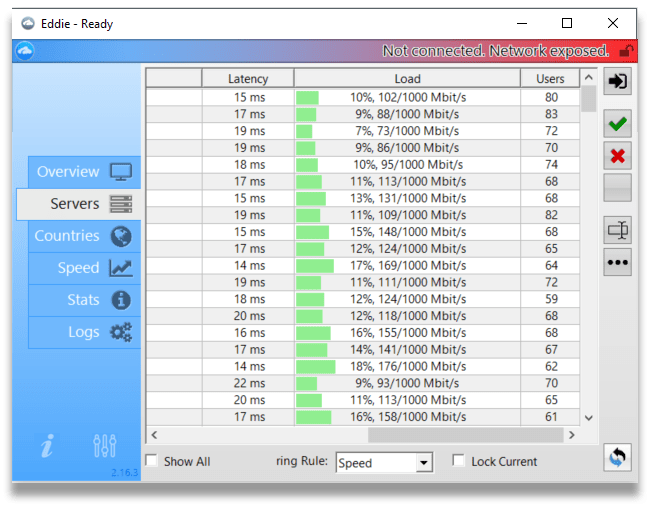
AirVPN has 37 US VPN servers across 10 cities. Users in the US can choose from servers in:
- Atlanta (5)
- Chicago (3)
- Dallas (10)
- Fremont (3)
- Jacksonville (1)
- Los Angeles (3)
- Miami (3)
- New York City (3)
- Pennsylvania (1)
- Phoenix (5)
AirVPN also has three city-level UK servers (London, Maidenhead, and Manchester) and three Canadian servers (Montreal, Toronto, and Vancouver). Other countries with city-specific choices include Germany, Spain, and Sweden.
Europe has the best coverage, with 153 servers across 15 countries, while Asia is limited to Japan and Singapore.
AirVPN used to maintain a Hong Kong server, but this was removed in July 2020 following the escalation of China’s digital surveillance in the region.
South America is covered only by Brazil, while Africa is not covered at all.
User Experience
Ranked #54 out of 61 VPNs for User Experience
AirVPN’s desktop client, playfully nicknamed “Eddie,” is outdated, cluttered, and at times confusing. More tech-savvy users will appreciate the advanced features, but even the tech-literate may struggle with its interface.
The Eddie client is one of the least accessible we’ve reviewed.
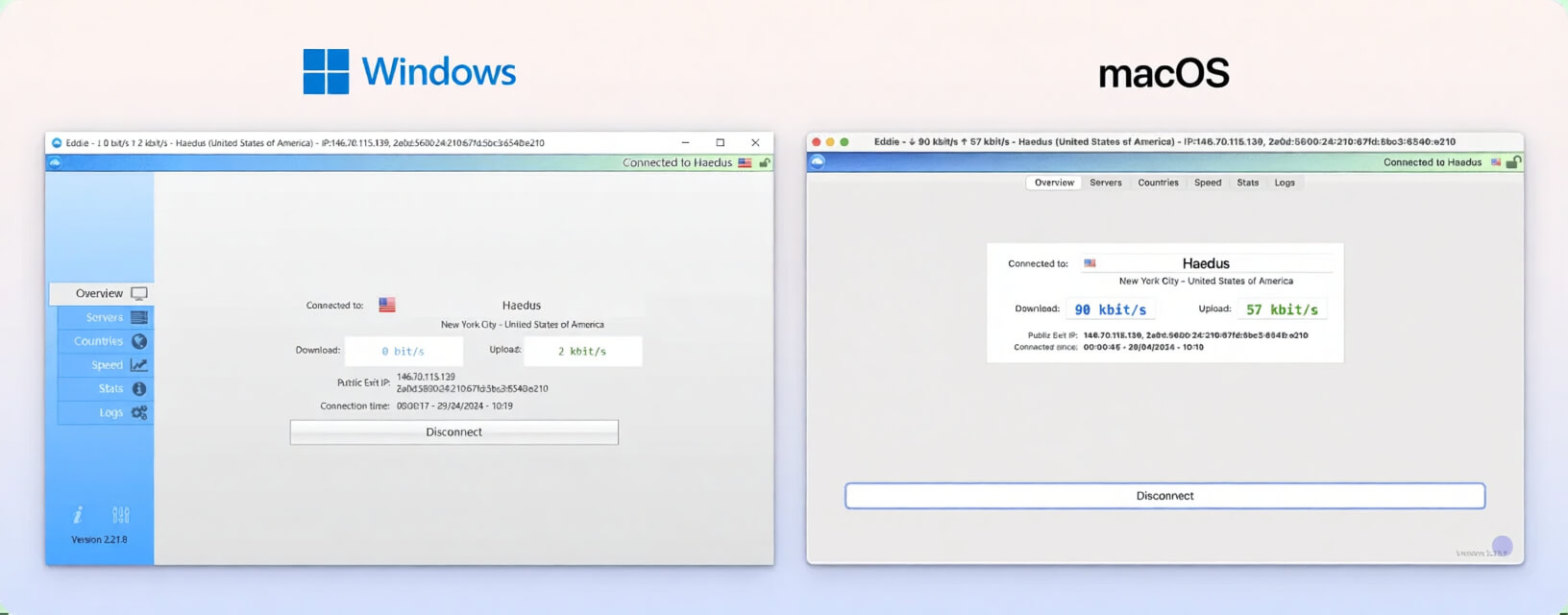
AirVPN’s settings are separated into tabs, each with many options. This can be confusing for less experienced users, so we appreciate the option to reset all settings to default.
VPN server selection is more difficult than it needs to be — the list is long and there’s no search feature. Even worse, each server is named after a star, which becomes frustrating when all you want to do is choose a city and connect.
Torrenting
Ranked #10 out of 61 VPNs for Torrenting
AirVPN has great P2P speeds and key advanced features like port forwarding and a kill switch. All this makes it a great choice for torrenting.
| Torrenting Attribute | AirVPN |
|---|---|
| Permits P2P Traffic | Yes |
| Average Download Bitrate | 9.7MiB/s (3% loss) |
| Countries with P2P Servers | 22 |
| Port Forwarding | Yes |
| Kill Switch | Yes |
| Logging Policy | No Logs |
AirVPN is a strong choice for anonymous torrenting and P2P activity.
Its solid download speeds and impressive upload speeds, minimal logging policy, and advanced privacy tools (including a kill switch) make it ideal for P2P.
Advanced torrenters will also like that AirVPN allows port forwarding on up to 20 ports simultaneously to speed up transfers even more.
You can configure this in the “Client Area” of the AirVPN website. Read more about AirVPN’s remote port forwarding there.
Device Compatibility
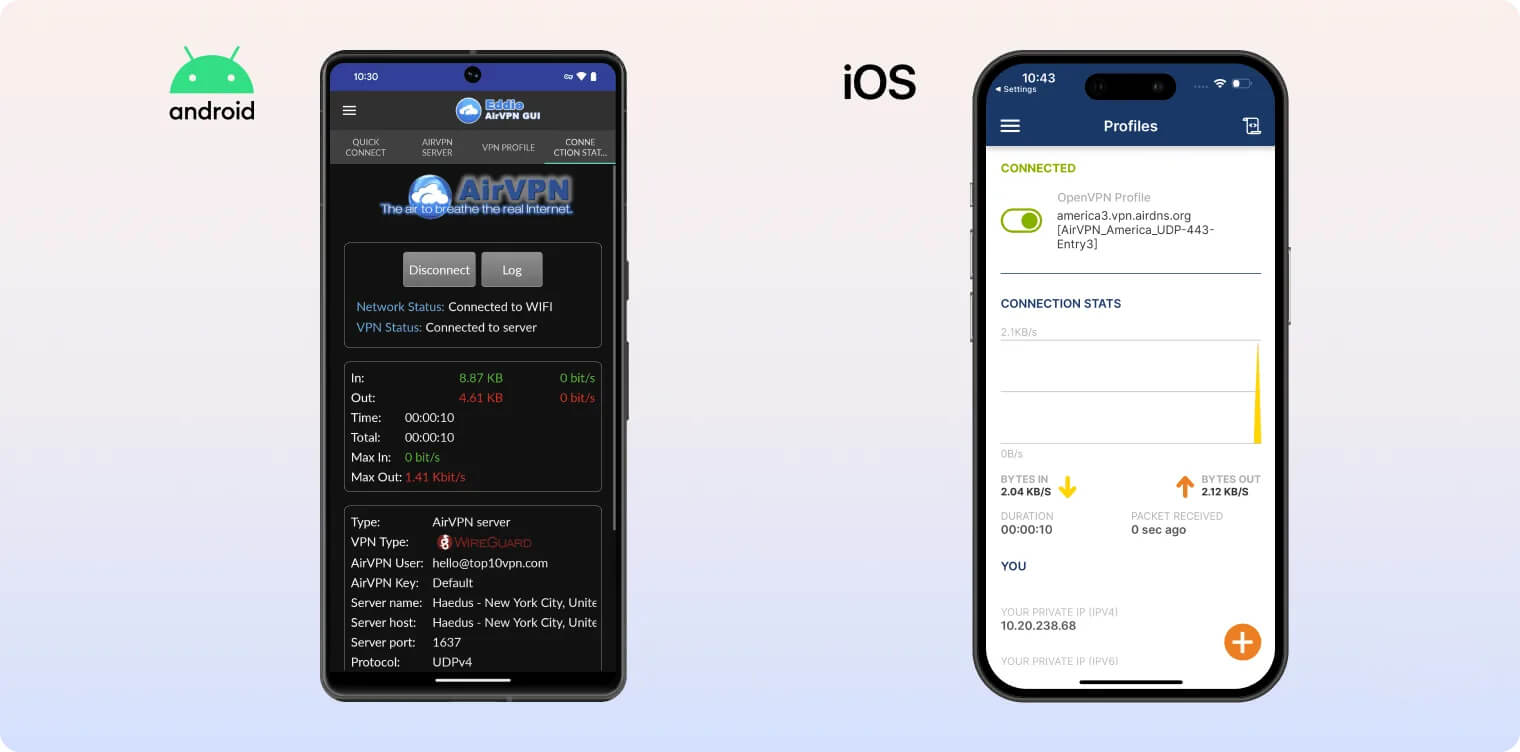
AirVPN has native apps for Windows, Mac, Android, and Linux. Unfortunately, using the VPN on iOS requires manual configuration through a third-party client.
| Windows | Yes |
|---|---|
| Mac | Yes |
| iOS | Manual Setup Only |
| Android | Yes |
| Linux | Yes |
| Amazon Fire TV | Yes |
| Android TV | No |
| Apple TV | No |
| Router | Manual Setup Only |
| Chrome | No |
Simultaneous Connections: 5
AirVPN offers a native app for Amazon Fire TV and Fire TV Stick. It can also be used with a range of consoles and streaming devices by connecting them to a configured router or sharing the VPN connection from another device running the software.
There are no manual setup or troubleshooting guides for many of these devices, but you can find useful tips in AirVPN’s online forums.
There is an AirVPN setup guide for iOS; however, it requires installing third-party OpenVPN software. We advise iOS users to choose VPNs with custom iPhone or iPad apps instead.
AirVPN is also supported on DD-WRT, pfSense, Tomato, and AsusWRT routers, but it must be manually installed and configured. This means AirVPN isn’t a great choice if you want a plug-and-play VPN service.
You can have up to five simultaneous connections. Other providers offer more, but this should cover most people’s devices.
Browser Extensions
AirVPN unfortunately doesn’t offer any browser extensions for Google Chrome or Mozilla Firefox, which isn’t surprising given its lack of native apps for a broader range of devices. Some rivals, such as ExpressVPN, offer full-featured extensions for popular browsers.
Additional Features
Though technical, AirVPN isn’t as fully featured as leading VPNs. It includes split tunneling and Tor over VPN, but we were unable to use multi-hop servers, an ad blocker, or a dedicated IP.
| Additional Feature | AirVPN |
|---|---|
| Split Tunneling | Yes |
| VPN Obfuscation | Yes |
| Multi-Hop Servers | No |
| Dedicated IP | No |
| Ad Blocker | No |
Split Tunnelling Works but Is Difficult to Set Up
AirVPN’s desktop and mobile apps support split tunneling, which lets you route specific traffic through the VPN tunnel.
That said, we found it harder to set up split tunneling on AirVPN than on other VPNs. We had to input specific IP addresses to tunnel, whereas most VPNs simply let you choose apps.
On Android, at least, AirVPN allows app-based split tunneling.
Tor Over VPN
You can use AirVPN with the Tor browser, giving you an extra layer of encryption if you need it.
Works in China but Needs Manual Configuration
Currently, the only way to connect to a VPN server in China is to use the OpenVPN protocol over SSL, which encrypts your OpenVPN fingerprint to make it undetectable. This is simple enough on desktop but more complex on mobile.
If you want to connect out from China on mobile devices using AirVPN, you’ll have to install OpenVPN files and do some manual configuration — step-by-step guides on the website walk you through the process.
AirVPN Key Data
| Attribute | AirVPN | Typical VPN |
|---|---|---|
| Owner | Paolo Brini | Independent |
| Launch Date | 2010 | 2015 |
| Local Download Speed | 95Mbps (5% loss) | 89Mbps (11% loss) |
| International Download Speed | 87Mbps (13% loss) | 80Mbps (20% loss) |
| Countries with Servers | 22 | 40 |
| Privacy Policy | No Logs | Identifiable Data |
| Simultaneous Connections | 5 | 10 |
| Netflix Libraries | 0 | 3 |
| Torrenting | Yes | Yes |
| Works In China? | Yes | No |
| Cheapest Price | 3.92/mo over 24 months | $3.87/mo over 24 months |
| Customer Support | Email Support via Online Form | |
| Apps & Extensions |
          |
|
Price
Price Plans
| 1 month | $8.33 |
|---|---|
| 6 months | $34.50 ($5.75/mo) |
| 12 months | $58.56 ($4.88/mo) |
| 2 years | $94.08 ($3.92/mo) |
Free Trial
| Money-Back Guarantee | 30 days |
|---|---|
| Free Trial | 3 Days |
| 100% Free Plan | No |