OpenVPN is one of the most popular virtual private network (VPN) protocols for creating VPN tunnels and establishing secure connections between networks. But what is OpenVPN, what advantages does it offer, and when should you use it?

What is OpenVPN?
OpenVPN, short for Open Virtual Private Network, is an open-source system that creates a private and secure tunnel between networks. The term “OpenVPN” can refer to several related things:
- The open-source OpenVPN protocol used to create encrypted tunnels between networks and establish a VPN connection.
- The OpenVPN software (VPN client) that uses the OpenVPN protocol.
- The OpenVPN company that supports the open-source code and offers its own commercial VPN products.
While the OpenVPN name applies to both the software and the company, the OpenVPN protocol is used in most modern VPN solutions, including NordVPN. Therefore, this article will focus on OpenVPN as a tunneling protocol.
Is OpenVPN safe?
Yes, OpenVPN is one of the safest VPN protocols. It uses secure sockets layer/transport layer security (SSL/TLS) to protect data and relies on the OpenSSL library for further customization, including additional security features.
The OpenVPN protocol supports perfect forward secrecy (PFS), which ensures that past sessions stay protected even if a key is compromised later. It also works with both TCP and UDP connections (more on that below), allowing you to switch to TCP when you want more reliability or to UDP when you need faster speeds.
Because OpenVPN is open-source, its code is transparent. Anyone in the OpenVPN community can look for bugs and suggest fixes. However, this transparency also makes it easier for hackers and security researchers to study the code and look for weaknesses.
OpenVPN supports different cryptographic algorithms and settings, so its security partly depends on the ciphers and key lengths you choose. That’s why proper configuration is crucial, and why choosing a trustworthy VPN service and client is just as important as choosing a secure VPN protocol.
How does OpenVPN work?
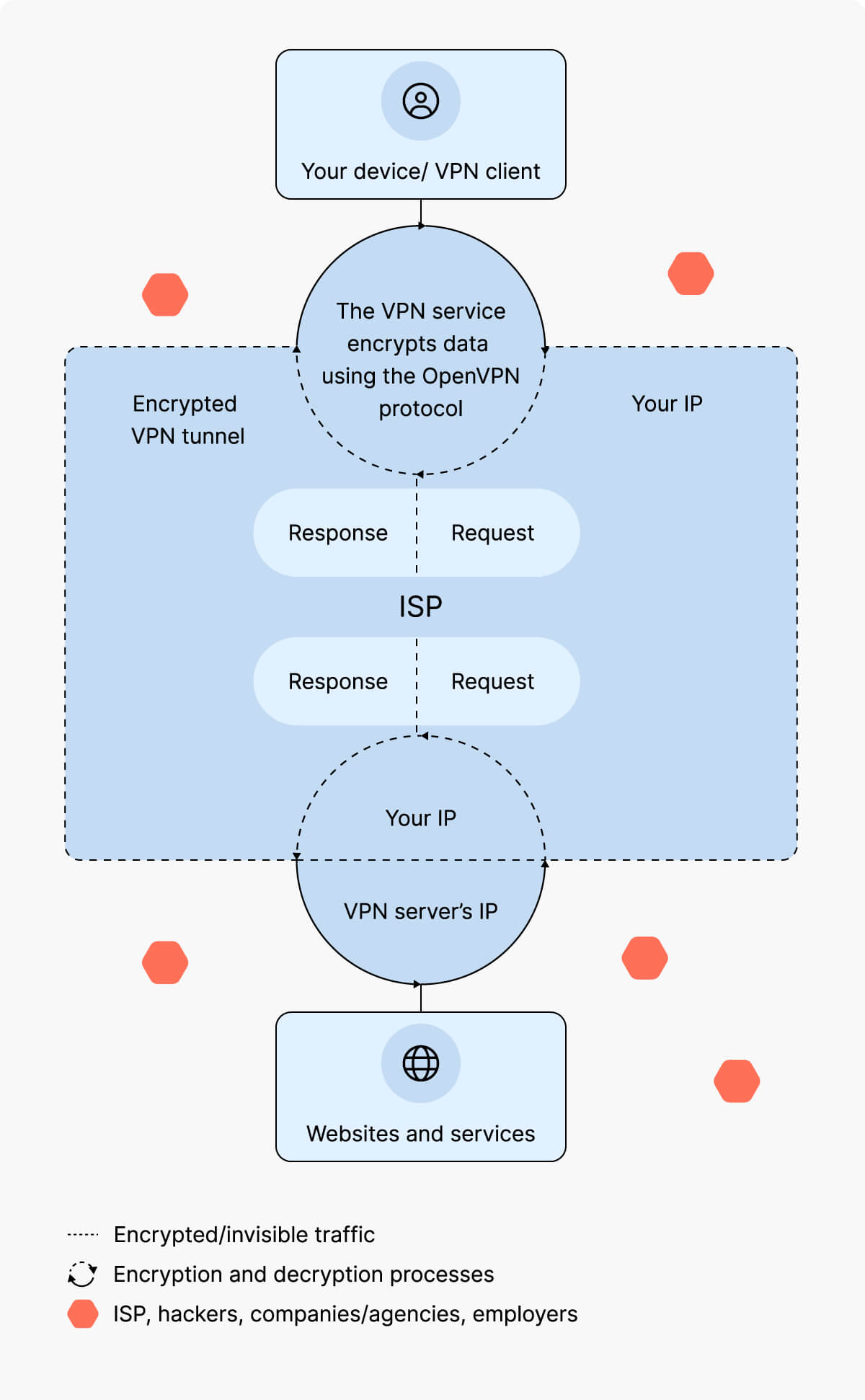
OpenVPN creates a secure tunnel for data traffic between the VPN client and the VPN server. This process includes authenticating the client and server, setting up the VPN tunnel, encapsulating and encrypting the data, and finally transmitting the traffic.
OpenVPN supports multiple authentication methods and encryption algorithms and can secure both TCP and UDP traffic. This flexibility makes it a preferred and secure choice for many VPN setups.
1. Authentication
OpenVPN uses various VPN authentication methods to verify the identity of the VPN client and server. These methods usually combine user credentials, digital certificates, and public key infrastructure (PKI) for key management. PKI controls how encryption keys are created, shared, and revoked so that connections stay properly authenticated.
2. Tunnel setup
Once the identities are verified, OpenVPN creates a VPN tunnel between the client and the server. To establish this tunnel, OpenVPN primarily uses SSL/TLS, though it can be configured to use other protocols as well.
3. Encapsulation and encryption
OpenVPN wraps data packets in additional layers to add routing information, identify the source and destination of the data, and apply security measures such as VPN encryption. Encryption ensures that the data passing through the VPN tunnel is hidden from third parties, including your employer, internet service provider (ISP), hackers, and advertising companies.
Another advantage of OpenVPN is its versatility. You can configure it to use different cryptographic algorithms and key lengths. Depending on the setup, it can also work with managed DNS to keep your domain name lookups inside the tunnel, helping prevent DNS leaks. In business environments, administrators can enable data audit logs to track connection activity for security and troubleshooting and apply access control rules to limit which users or devices can access specific resources.
4. Data transmission
Encrypted traffic passes through the VPN tunnel to the VPN server, where it is decrypted and routed to its final destination.
Because the traffic goes through an intermediate server, the destination does not see the original IP address. Instead, it sees the IP address of the VPN server.
Route and policy configuration
OpenVPN controls how traffic moves between the client and the server through VPN routing. When you connect to OpenVPN, the server assigns your device a virtual IP address and creates routing rules that tell your system which data should travel through the encrypted tunnel and which should stay outside it.
Administrators can define routing policies to control this flow. The two main types are full-tunnel and split-tunnel configurations. A full-tunnel policy sends all traffic through the VPN, while a split-tunnel policy only routes specific traffic through it, letting you send part of your online activity through the encrypted tunnel while keeping direct internet access for other apps or services. For example, you can work on VPN-protected files while still reaching your home printer or local websites directly.
What is OpenVPN used for?
OpenVPN is used to create encrypted tunnels for moving traffic between devices and networks over the internet. Individuals and organizations use it to protect data in transit, enable controlled remote access, and connect separate locations.
- Setting up a VPN connection. The main purpose of OpenVPN is to establish a VPN tunnel for secure data transmission. A VPN tunnel is what separates a VPN from a simple proxy, and protocols like OpenVPN make that tunnel possible. You can use OpenVPN any time a VPN connection is needed, such as when accessing a virtual server or creating a private network.
- Encrypting data in transit. In addition to creating an encrypted VPN tunnel, OpenVPN uses cryptographic algorithms to encrypt the data that travels through that tunnel. This makes OpenVPN an excellent choice for sending and receiving sensitive data over the internet, securing VoIP and video conferencing, browsing privately, using public Wi-Fi safely, and protecting the communication of IoT devices.
- Enabling and securing remote access. Because it creates a VPN tunnel and encrypts data in transit, OpenVPN is ideal for enabling and securing remote access to internal networks. Companies, universities, and other institutions can use OpenVPN to manage and control access to their networks from remote locations.
- Linking sites over the internet. OpenVPN can also connect entire networks (site-to-site). Organizations use it to link offices or data centers so teams can share resources and platforms across different locations.
What is the difference between a VPN and OpenVPN?
A VPN is a service that protects your internet connection, while OpenVPN is one of the tunneling protocols a VPN service can use to do that.
Anyone can use the open-source OpenVPN client to set up their own VPN connection. Most VPN providers also include the OpenVPN protocol in their apps. However, OpenVPN is just one tunneling protocol, and a VPN provider can offer several others, such as WireGuard® and IKEv2/IPsec.
What protocol does OpenVPN use?
The OpenVPN protocol is an open-source VPN protocol that uses the OpenSSL library to secure internet traffic by creating a virtual tunnel over UDP or TCP. It is highly configurable, supports both site-to-site and point-to-point connections, and offers strong encryption and authentication options. OpenVPN can tunnel any IP subnetwork and can be configured to use either pre-shared keys or a PKI for authentication. It can also coexist with other VPN protocols, such as IKEv2/IPSec and WireGuard, giving users and providers more flexibility in choosing the best setup for their network.
What are the differences between OpenVPN UDP and OpenVPN TCP?
OpenVPN can run over both TCP and UDP, and most VPN clients allow you to choose which transport protocol to use.
The transmission control protocol (TCP) establishes a connection between the sender and receiver and carefully checks that data packets in transit arrive intact and in order.
The user datagram protocol (UDP) sends data packets without first establishing a formal connection between the sender and receiver. It does not guarantee that packets will arrive or arrive in sequence. This makes UDP faster but less reliable than TCP.
| OpenVPN TCP | OpenVPN UDP |
|---|---|
| High reliability | Lower reliability |
| Lower speed | Higher speed |
| Packets are delivered in a sequence | Packets are delivered in a stream |
| Good for static uses (email, web browsing, file transfer) | Good for dynamic uses (streaming, gaming, VoIP) |
Is OpenVPN better than other VPN protocols?
The answer depends on what you need the VPN protocol for.
OpenVPN is better than outdated VPN protocols like PPTP. In terms of security, OpenVPN is stronger than most other VPN protocols. But security is not the only factor to consider when choosing a VPN protocol.
IKEv2/IPsec, for example, may be a better choice for mobile devices because it handles network changes (like switching from Wi-Fi to mobile data) very well. And if connection speed is your main priority, WireGuard® is much faster than most other VPN protocols. Over the last few years, it has also improved a lot in terms of security, reaching a level comparable to OpenVPN.
What are the pros and cons of OpenVPN?
OpenVPN is a reliable VPN protocol trusted by many, but like most tools, it has its drawbacks. Understanding both its strengths and weaknesses can help you decide whether it fits your needs.
| OpenVPN pros | OpenVPN cons |
|---|---|
| Stronger security than most alternatives | Generally slower than newer protocols like WireGuard® |
| Open-source code (allows transparency and community-driven improvements) | Manual configuration required |
| Compatible with different devices and encryption protocols | Resource-intensive, especially on older hardware |
| Compatible with both TCP and UDP traffic | |
| Built-in connection monitoring and failover to maintain stable links | |
| Options for logging and auditing for performance tracking and troubleshooting |
How secure is OpenVPN?
OpenVPN is one of the most secure VPN protocols you can use, as long as it is properly configured and maintained. It uses TLS for key exchange and authentication and supports modern cryptography with certificate-based authentication and PFS.
Because OpenVPN is open-source, the security community can review its code and contribute to keeping the protocol secure.
In practice, OpenVPN can provide strong protection against common network threats and remains a trusted option for both personal and enterprise use. However, how secure OpenVPN is in real-world use depends on how it is deployed and maintained. Server settings, client software, operating system patches, and good credential practices all play a crucial role and should not be ignored.
Is OpenVPN free?
Yes, the OpenVPN protocol is free in the sense that it is open-source and anyone with enough technical skills can modify and use it for their own needs. For example, you could use freely available VPN code to create a VPN server from an old computer.
There is also a free OpenVPN client that you can install and configure to connect to your chosen VPN server, whether it is your own server or VPN servers included with your VPN subscription.
Should you choose OpenVPN?
If you use a premium VPN provider, you can usually choose which VPN protocol to use. So, should you pick OpenVPN if you have that option?
It depends on what you use a VPN for. If you mainly use it for streaming, gaming, or other bandwidth-heavy activities, speed may matter more than maximum security, and no protocol can beat the NordLynx protocol for speed. But if you handle sensitive data and security is your top priority, OpenVPN is a great choice. For the same reason, choose OpenVPN TCP over OpenVPN UDP when reliability and protection are more important than raw speed.
Summary
This blog post offers a concise introduction to OpenVPN, explaining it as a widely used VPN protocol for building secure tunnels and encrypted connections between different networks. It outlines OpenVPN’s core advantages—such as strong security through SSL/TLS, flexibility in using either TCP or UDP transport, and suitability for a range of scenarios from remote access to site‑to‑site networking. The article is presented as a glossary entry and is tagged with key technical terms including “OpenVPN,” “SSL/TLS,” “TCP protocol,” and “UDP protocol,” helping readers quickly understand where and when OpenVPN is an appropriate choice for protecting their online communications.