
Hide.me: Fast, Secure, and Affordable, But Held Back by Outdated Apps
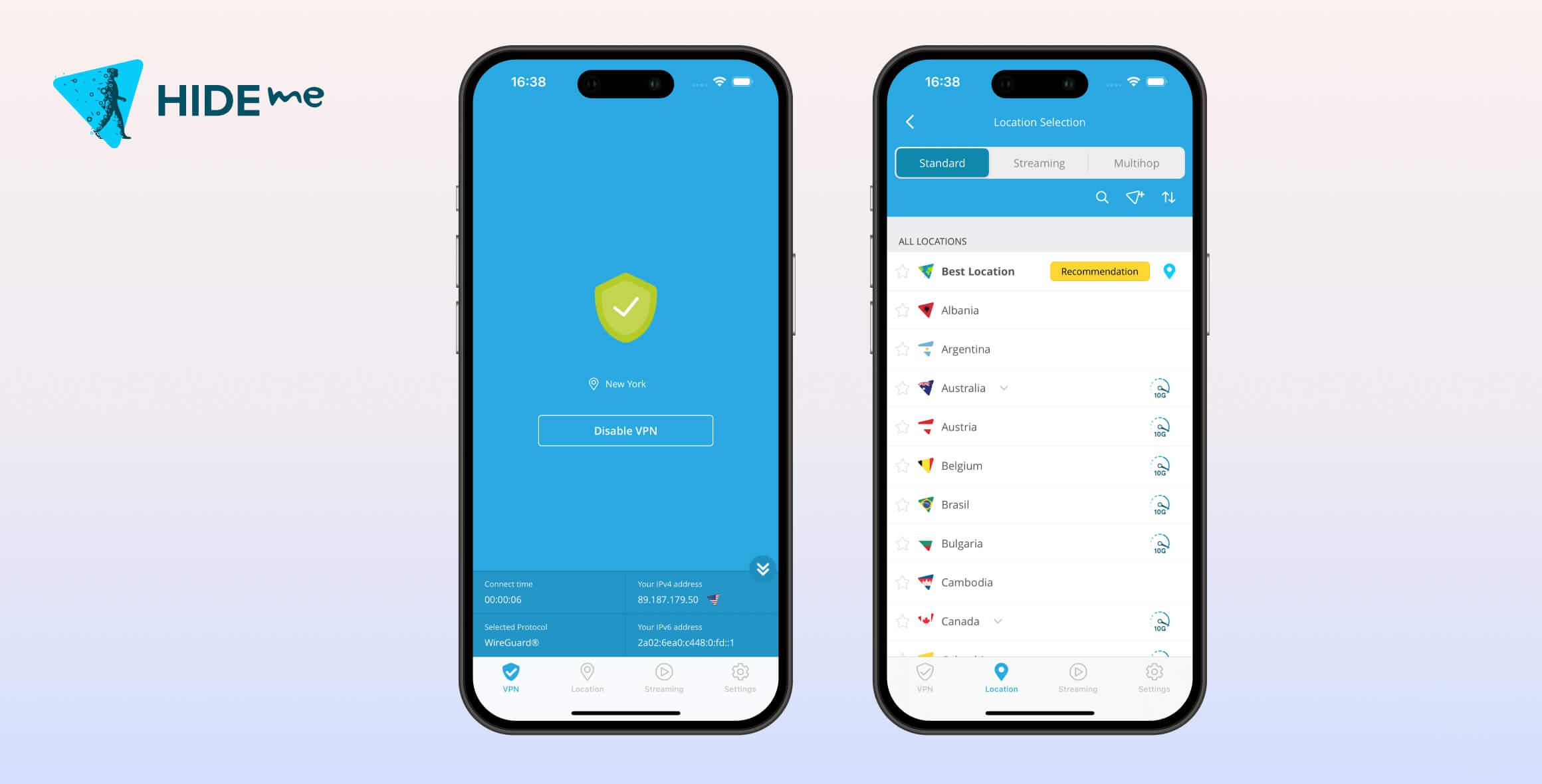
Hide.me is a long-standing independent VPN. It’s built a reputation as a fast, safe, and affordable service that can also unblock a range of streaming platforms. It’s well known for its free plan, Hide.me Free. The free version offers encryption and unlimited data, but its performance is deliberately reduced: speeds are slow and streaming sites are blocked.
- Pros
- Doesn’t keep identifiable data
- Same security as paid version
- Easy to use apps
- Cons
- Throttled speeds
- Only 7 countries
- Unable to access streaming sites
- Doesn’t support torrenting
- Pros
- Private logging policy
- Unblocks most streaming sites
- Powerful security technology
- Fast connection speeds
- Works against censorship
- Cons
- No diskless servers
- Kill switch isn’t on by default
- No Smart DNS
- UX issues
Hide.me is one of the oldest and most popular VPNs on the market. It’s owned by the Malaysia-based company eVenture Ltd and is available as both a paid and free service.
In this review of Hide.me and Hide.me Free, we test both versions across 10 categories to see if Hide.me is safe, whether it works with Netflix, and if the free version is worth using.
Privacy
Hide.me does not log sensitive or identifying data. It only records your email address and the amount of monthly data used while connected. It publishes an annual transparency report detailing law enforcement requests and DMCA complaints, but it consistently has no data to provide. However, it has not yet moved to diskless servers and rents hardware from unnamed third parties.
| Originating IP Address | No |
|---|---|
| Browsing Activity | No |
| Individual Connection Timestamps | No |
| Date of Last Connection | No |
| VPN Server IP | No |
| Device Information | No |
| Individual Bandwidth Usage | Yes |
| Account Information | Yes |
You can read Hide.me’s full privacy policy on its website.
Hide.me does not log or sell your sensitive data, and your online activity cannot be linked back to you when using it.
We examined Hide.me’s logging practices and can confirm it only stores the email address used to register — encrypted on secure servers — and the amount of monthly data you consume.
When you connect, Hide.me also maintains a “non-persistent log of connection data,” which uses a randomly generated username and an internally assigned IP address. For added transparency, we’d like Hide.me to specify exactly what connection data is stored and for how long.
This is a safe privacy policy. Crucially, Hide.me does not log identifiable data like your real IP address or the websites you visit. If you close your account, all associated data is deleted from Hide.me’s systems.
To further improve its privacy, we’d like Hide.me to invest in a fully diskless server network so no data is stored on physical hardware. This would reduce risks if servers were ever seized.
Additionally, Hide.me rents its servers from third-party hosts. While Hide.me says it carefully vets partners, owning its entire network would strengthen its privacy posture.
Few VPNs own their entire server network, but our privacy standards are high, and leading providers like IPVanish own 100% of their servers.
Independent Audit & Transparency Reports
In 2015, Hide.me was audited by Leon Juranic of DefenseCode Ltd, which verified its logging practices. This was the first independent assessment aimed at validating a VPN’s no-logs claims and trustworthiness.
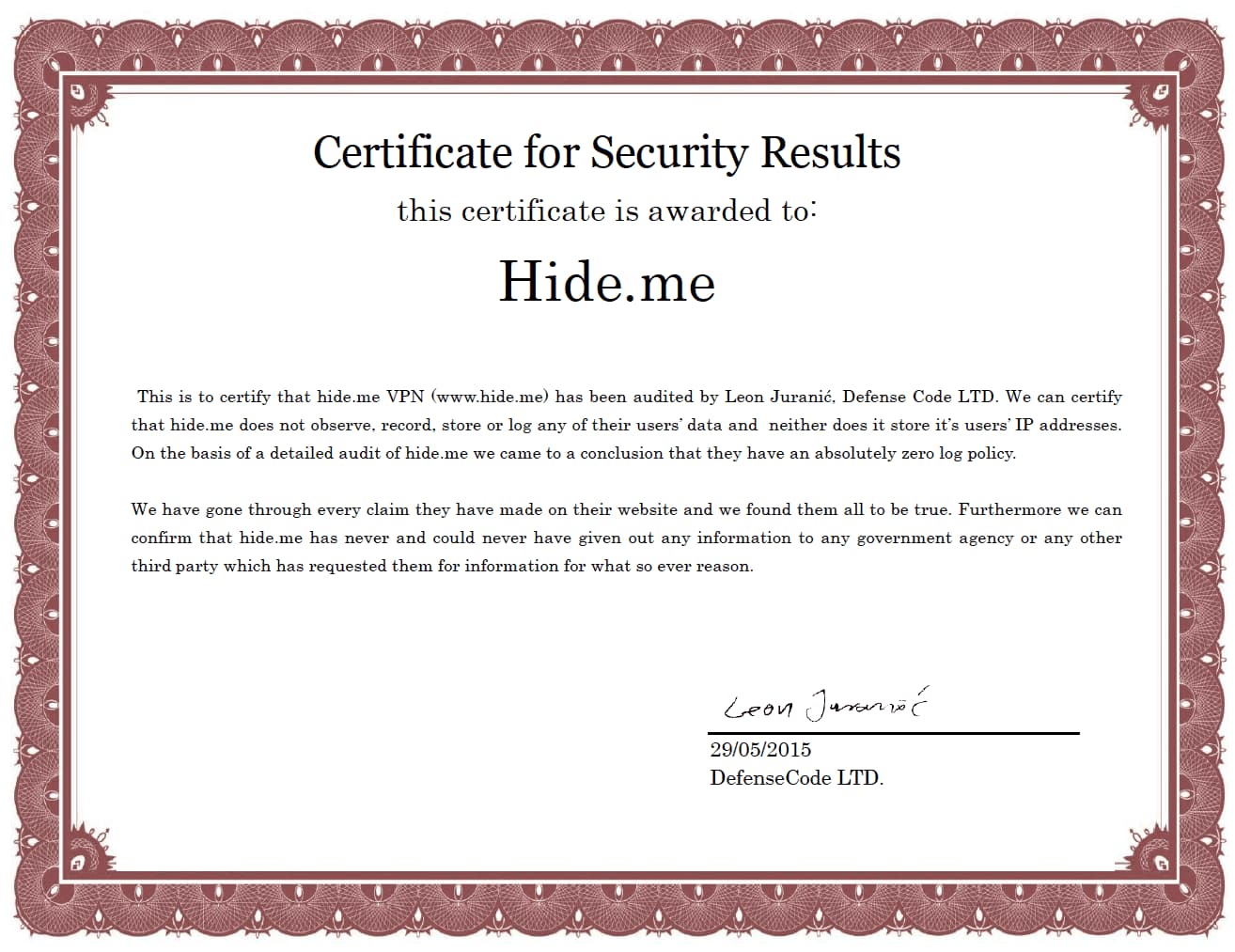
Certificate awarded to Hide.me from DefenseCode LTD.
The audit concluded Hide.me is “absolutely zero logs.” We don’t fully agree, as Hide.me collects aggregated monthly usage data and some account information. Still, we agree that Hide.me is very private and safe to use.
We would like to see a more recent logging audit, as the last one was many years ago.
Hide.me also pioneered transparency reporting, publishing annual records of legal requests since 2012.
In 2023, for example, Hide.me received 42,487 DMCA complaints and 14 law enforcement requests. Hide.me responds to all legal requests and follows the law, but it has no usable data to hand over, which supports its privacy claims.
Who Owns Hide.me?
Hide.me is owned by eVenture Ltd, an IT security company incorporated in Malaysia since 2011.
This benefits its privacy reputation: Malaysia has no data retention laws and is not part of surveillance alliances like the Five Eyes.
Hide.me has never experienced a scandal or data breach, and its reputation remains strong.
Streaming
Hide.me Premium unblocks 11 international Netflix regions, including the US. It also accesses Hulu, HBO Max, Prime Video US, and BBC iPlayer. There is no major streaming site it can’t unblock. However, it lacks Smart DNS for home devices, and Hide.me Free failed all our streaming tests.
| Streaming Service | Works with Hide.me (Free) | Works with Hide.me |
|---|---|---|
| BBC iPlayer (UK) | No | Yes |
| DAZN (Canada) | No | No |
| Disney+ (UK) | No | Yes |
| Hulu (US) | No | Yes |
| ITVX (UK) | No | Yes |
| HBO Max (US) | No | Yes |
| Netflix (US) | No | Yes |
| Netflix (UK) | No | Yes |
| Prime Video (US) | No | Yes |
| Sky Go (UK) | No | Yes |
Hide.me Works with Netflix
Hide.me Premium works very well with Netflix. It can access 11 Netflix libraries from abroad, including the US, without buffering.
Based on years of testing, Hide.me reliably unblocks these Netflix regions:
- Brazil
- Canada
- France
- Germany
- Italy
- Japan
- Spain
- Sweden
- Switzerland
- UK
- US
This is a solid selection, though the highest-rated Netflix VPNs can reach 30+ libraries.
Hide.me Streams HBO Max, Hulu & UK TV
Hide.me performs well on US services. It unblocks HBO Max and Hulu and includes streaming-optimized servers in 15 additional countries.
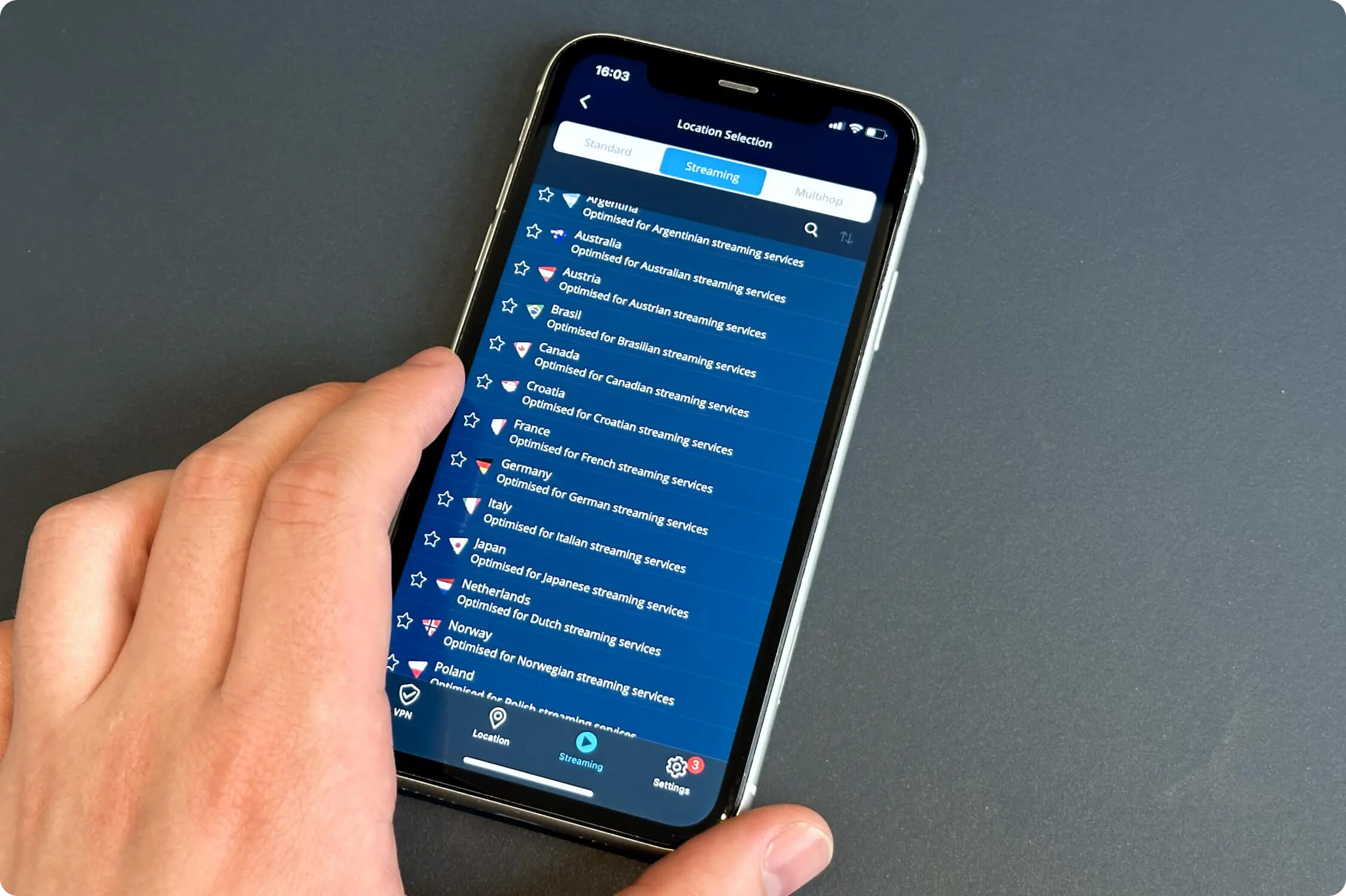
Hide.me has streaming servers available in 16 countries.
We tested all streaming servers and found they easily unblocked each region’s sites, such as CTV in Canada, ProSieben in Germany, and Japanese Netflix.
Hide.me also works reliably with BBC iPlayer via its optimized UK server.
There are UK streaming servers for BBC iPlayer, Disney+, and UK Netflix, and all worked well in testing.
Hide.me Free Doesn’t Unblock Any Streaming Sites
Hide.me Free is very different from the paid plan: it was detected by every major streaming platform we tested, making it one of the weakest free VPNs for streaming.
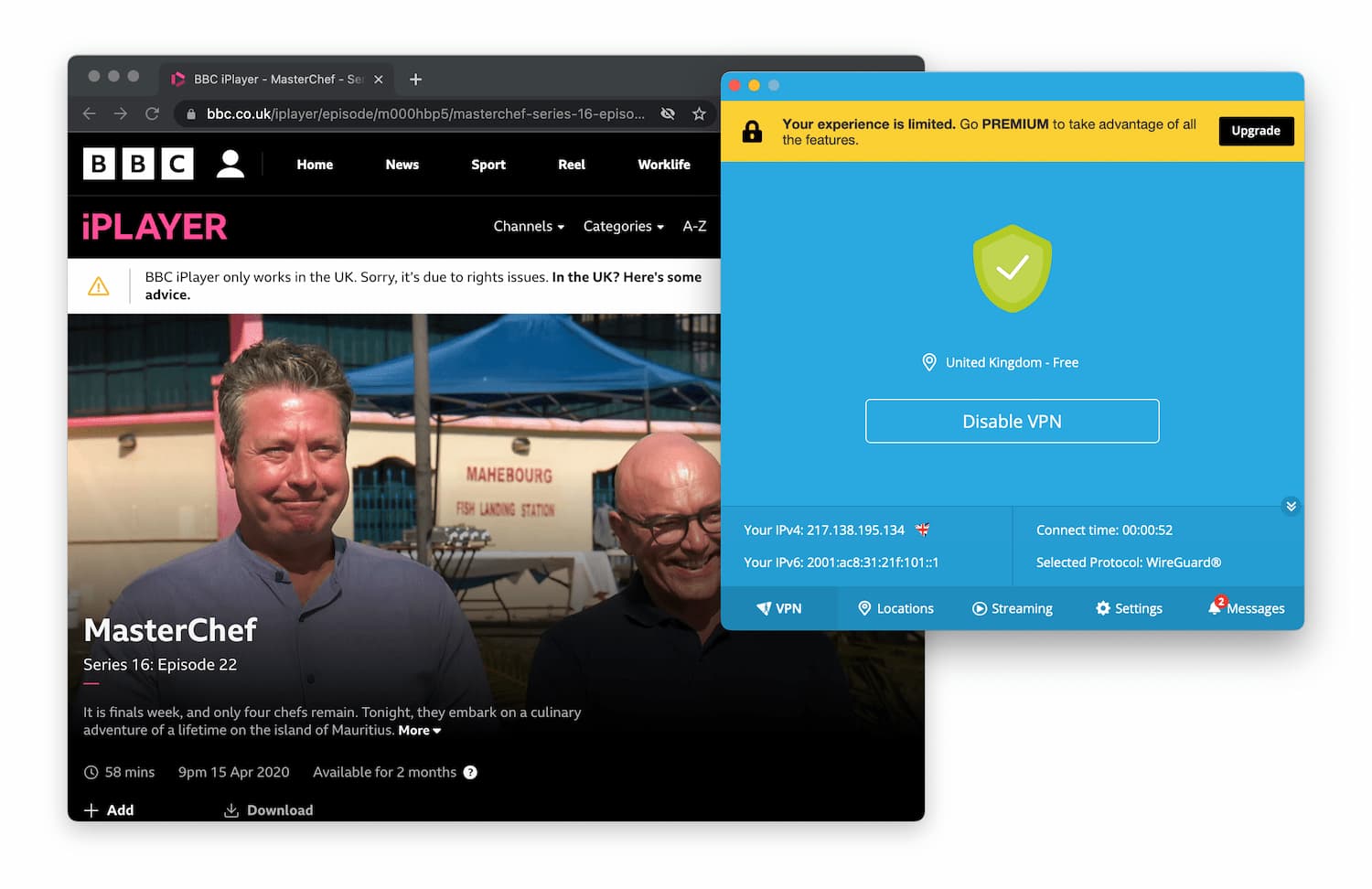
Hide.me Free fails to unblock all streaming sites.
It doesn’t work with US Netflix, HBO Max, Hulu, or BBC iPlayer. Despite unlimited data, we don’t recommend Hide.me Free for regular streaming. Windscribe Free is a better option.
Speed
In our latest tests, Hide.me is among the fastest VPNs, scoring 9.8 in our speed rankings. It delivers excellent local and long-distance performance, beating top VPNs like NordVPN, PIA, and Surfshark. Its ping has also improved significantly since we began testing, making it suitable for all online activities.
Using a 100Mbps connection, we measured the impact of Hide.me by connecting to servers on six continents. Here are the full results:
| No VPN (New York) | US (New York) | Canada (Toronto) | US (Los Angeles) | UK (London) | Germany (Berlin) | Brazil (São Paulo) | Japan (Tokyo) | South Africa (Johannesburg) | Australia (Sydney) | |
|---|---|---|---|---|---|---|---|---|---|---|
| Server Location |  |
|
 |
|
 |
 |
 |
 |
 |
 |
| Download Speed | 100Mbps | 97Mbps | 96Mbps | 91Mbps | 92Mbps | 90Mbps | 96Mbps | 83Mbps | 61Mbps | 81Mbps |
| Upload Speed | 100Mbps | 94Mbps | 94Mbps | 82Mbps | 95Mbps | 95Mbps | 91Mbps | 94Mbps | 71Mbps | 49Mbps |
| Ping | 1ms | 9ms | 23ms | 87ms | 73ms | 85ms | 129ms | 144ms | 381ms | 213ms |
| Distance | 0mi | 5mi | 300mi | 2,500mi | 3,500mi | 4,000mi | 4,800mi | 6,700mi | 8,000mi | 9,900mi |
As you can see, Hide.me is very fast both locally and internationally and ranks among the quickest VPNs available.
On nearby connections, speeds dropped by just 3%. From the US to the UK, we saw 92Mbps, only 8% below our baseline despite a distance of over 3,500 miles.
For context, you can compare Hide.me’s speeds with other fast VPNs like NordVPN and Surfshark in the bar chart below:
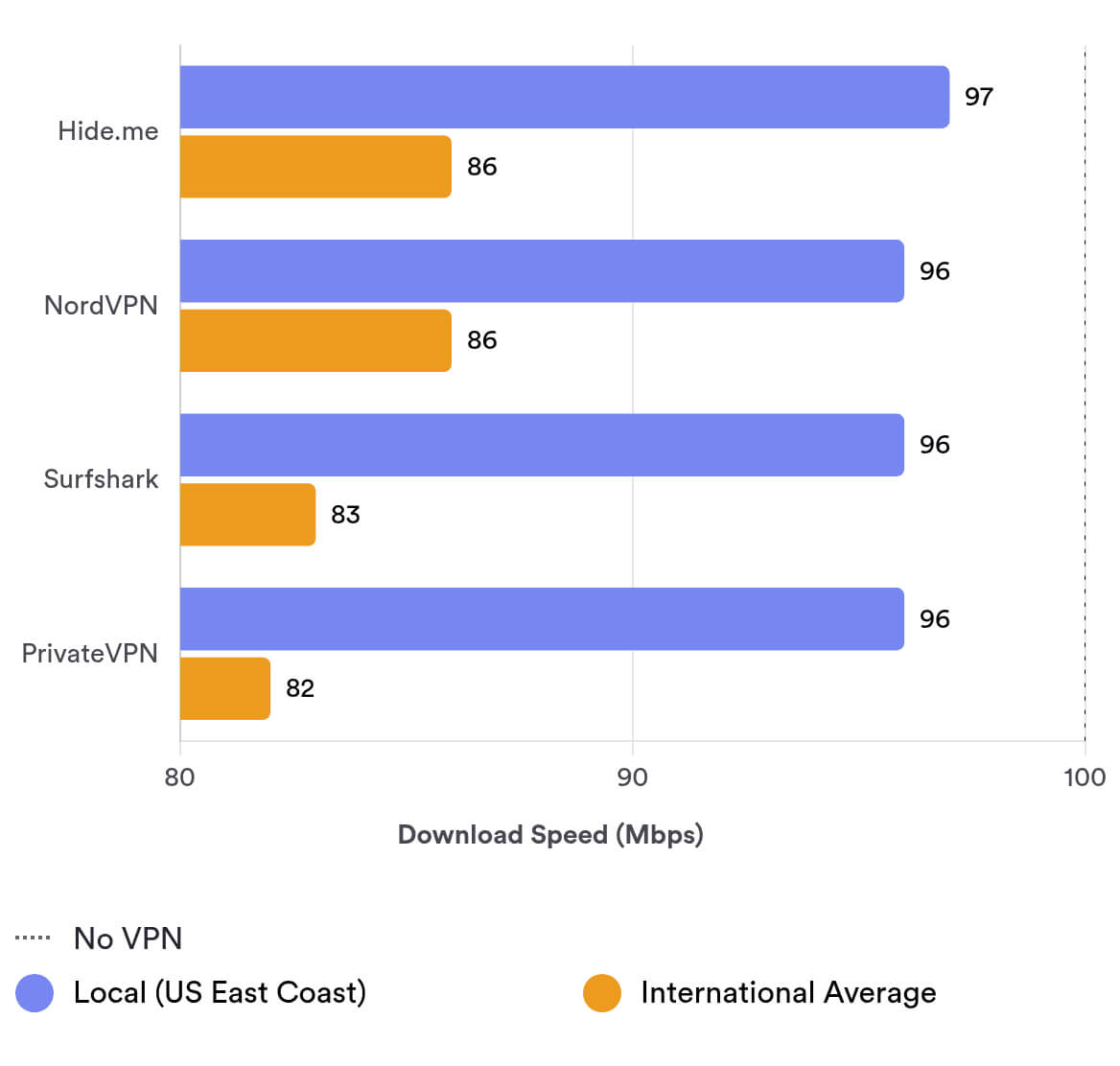
However, overall speed performance still trails IPVanish and Hotspot Shield, with Hide.me scoring 9.8 compared to IPVanish’s 9.8 and Hotspot Shield’s near-perfect 10.0.
Low Latency (Ping)
Hide.me’s ping times are very low. We measured a local latency of 9ms — one of the best in our dataset — making Hide.me a strong choice for lag-free gaming.
Latency increases with distance, as expected, so stick to nearby servers to keep ping low.
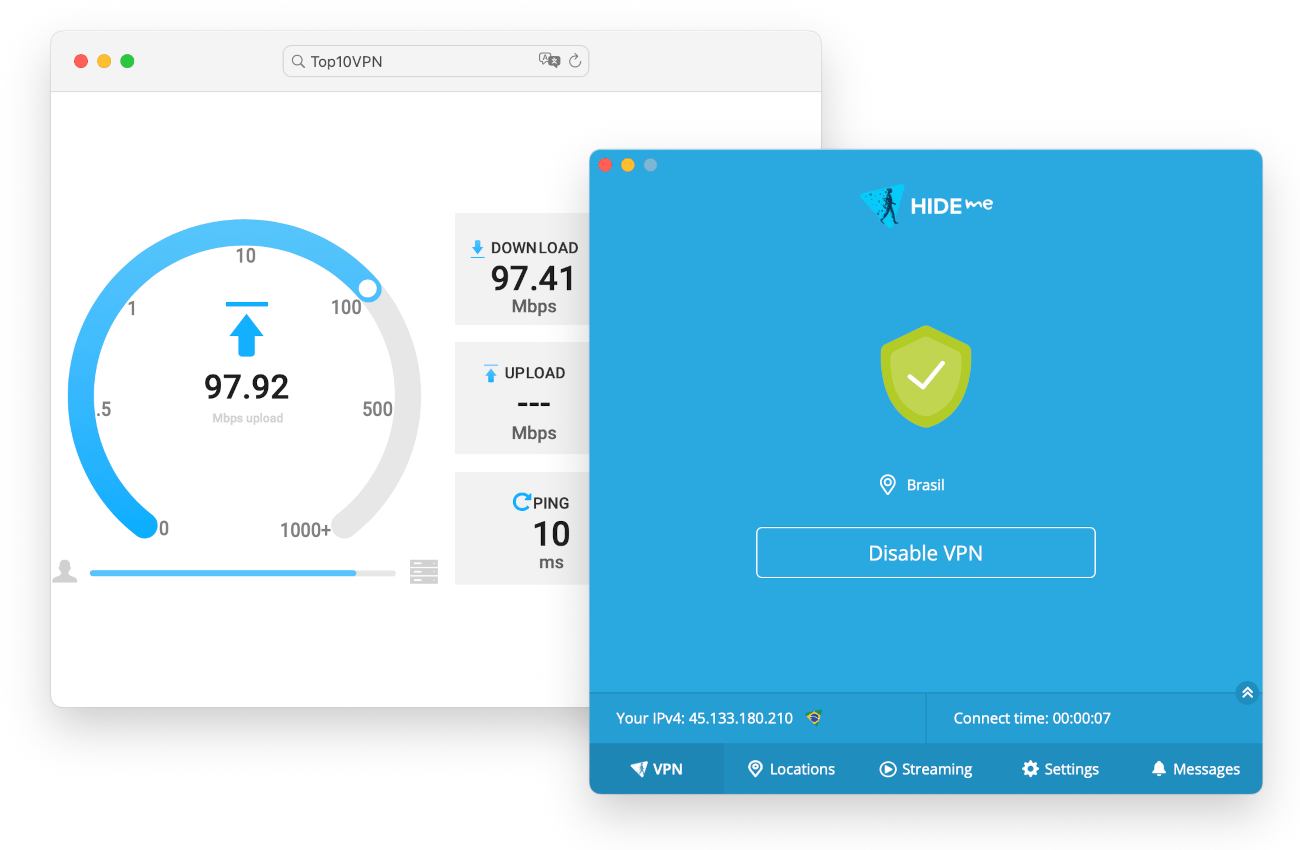
We tested Hide.me’s speed and ping performance using our own speed test tool.
Security
Both the paid and free versions of Hide.me are safe. Each supports WireGuard and OpenVPN, uses industry-standard AES-256 encryption, includes built-in leak protection, and relies on first-party DNS. We previously encountered kill switch issues, but these have been resolved.
| Independent Audit | Yes |
|---|---|
| VPN Kill Switch | Yes |
| Leak Protection | Yes |
Hide.me covers the essentials: AES-256 encryption, secure protocols like WireGuard, first-party DNS servers, and optional double VPN.
Secure Protocols & Working Kill Switch
Hide.me offers the best available VPN protocols. OpenVPN and WireGuard are included on all desktop and mobile apps. The SoftEther protocol is also available, but it’s less secure and limited to the Windows app.
Other protections include built-in leak prevention and a kill switch to safeguard your real IP address if the VPN disconnects.
Our tests showed no DNS or WebRTC leaks, and the kill switch worked correctly across all devices.
Previously, we saw frequent warnings that the kill switch couldn’t be enabled, but Hide.me addressed the issue and fixed it.
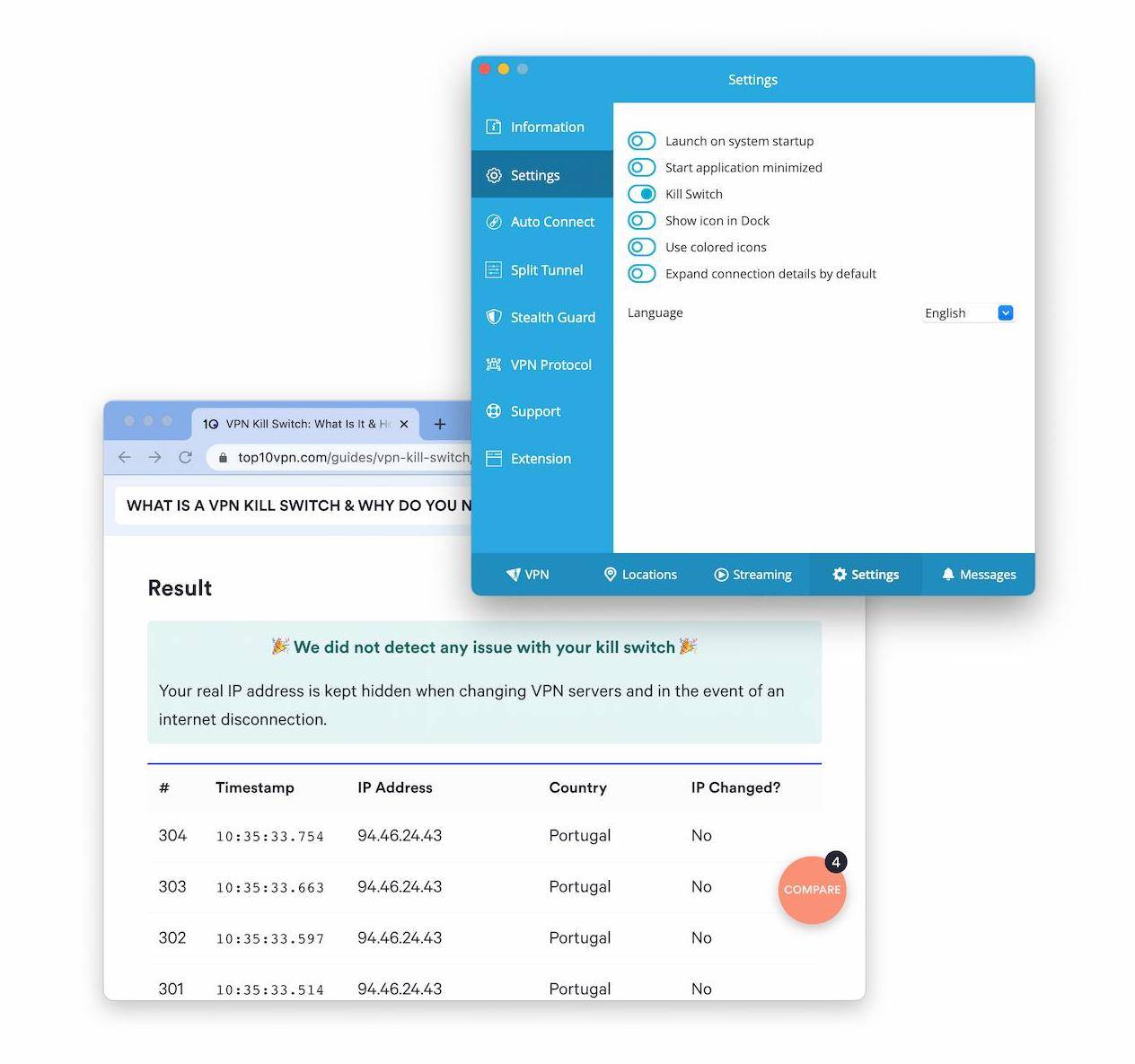
Hide.me’s kill switch works perfectly to prevent accidental IP leaks.
Note that the kill switch must be toggled on in settings; we think it should be enabled by default.
We also verified encryption using Wireshark to inspect traffic. The results confirmed Hide.me encrypts incoming and outgoing packets effectively:
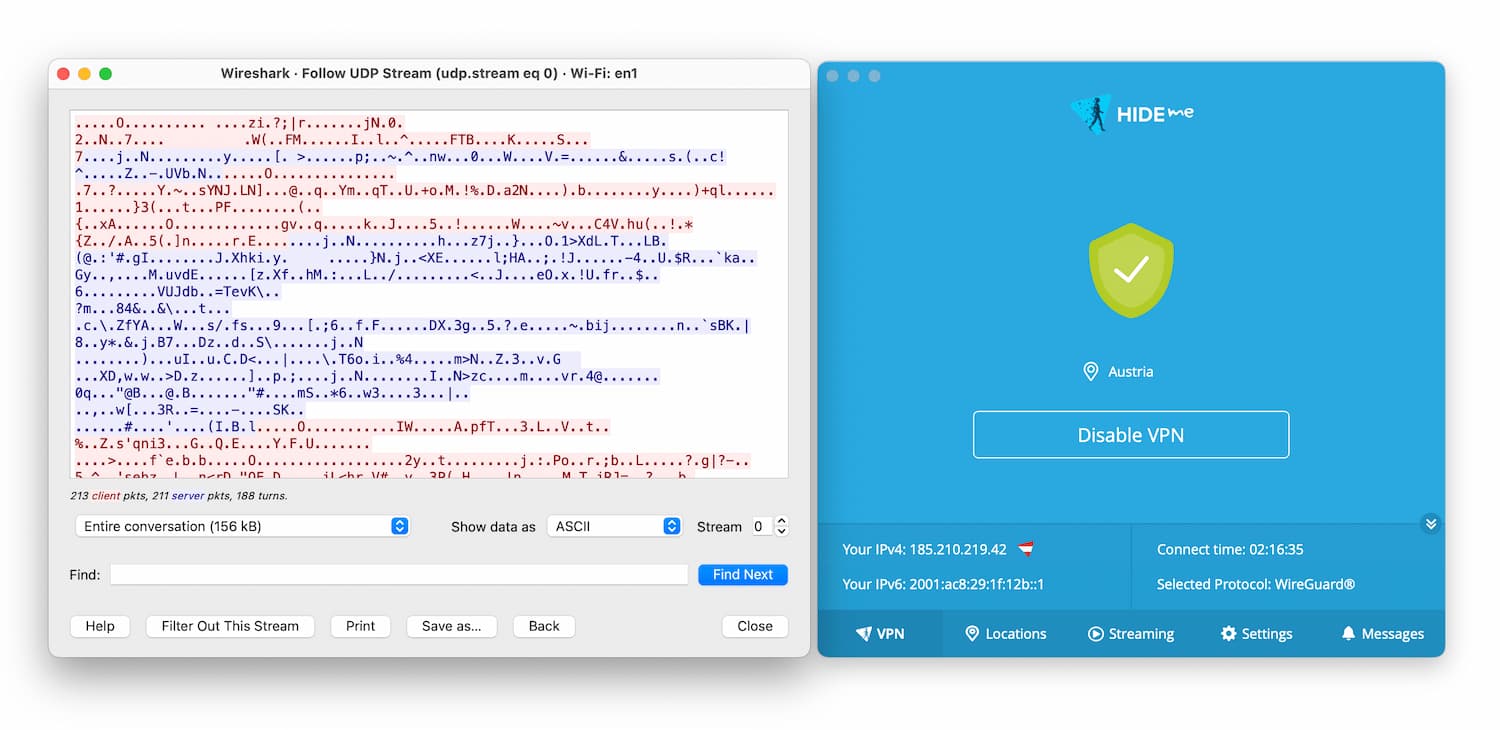
Hide.me encrypts your browsing data, making it indecipherable.
Self-Managed DNS Servers & Custom DNS
Hide.me operates its own DNS servers, designed to retain no information about you.
This enhances privacy by keeping DNS requests within Hide.me’s encrypted system, rather than routing them through your ISP’s less-private servers.
You can also configure custom DNS and choose a random port for each connection (dynamic or ephemeral ports), making it harder for ISPs to detect or block your VPN usage.
Server Locations
Hide.me has 2,600 physical servers in 57 countries. This is above average, but still smaller than the networks from PIA and ExpressVPN, and heavily concentrated in Europe and the US. Hide.me Free is limited to 7 countries, which is still fairly generous for a free VPN.
| Continent | Hide.me (Free) Countries with Servers |
Hide.me Countries with Servers |
|---|---|---|
| Europe | 6 | 30 |
| North America | 1 | 3 |
| Asia | 0 | 14 |
| South America | 0 | 5 |
| Africa | 0 | 3 |
| Oceania | 0 | 2 |
As shown above, the paid plan grants access to 2,600 servers in 57 countries.
This allows you to get an IP address from most regions, with a strong focus on Europe and North America and several city-level options.
There are city-level servers in Germany, Italy, Netherlands, Spain, Switzerland, the US, and the UK.
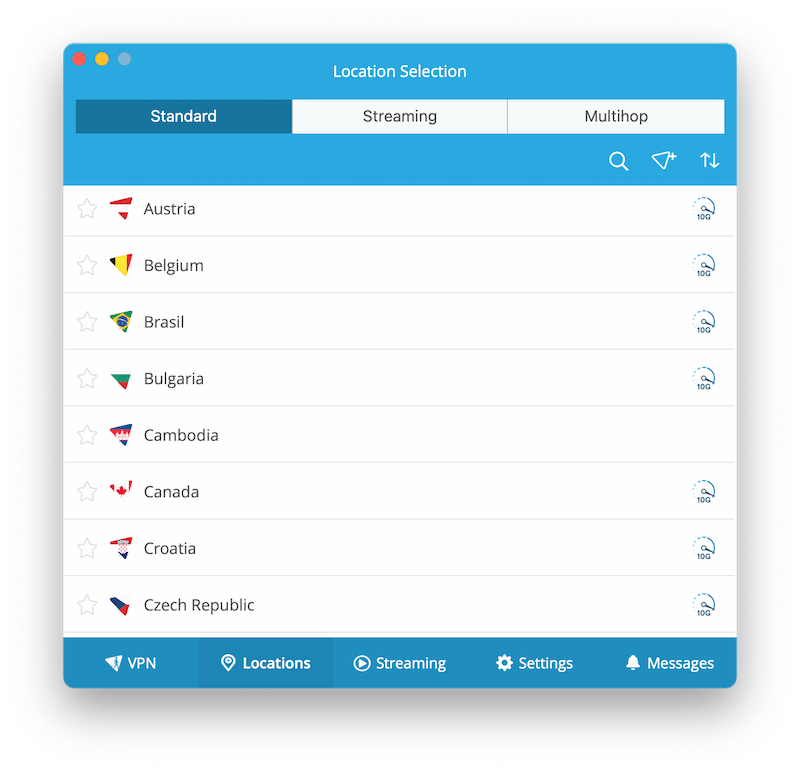
Hide.me has a large server network with city options in eight countries.
Australia is also well covered, with six city servers. Hide.me is a good option if you need an Australian IP address.
There are servers in parts of Asia, the Middle East, and South America, but coverage is limited to single cities and less comprehensive than in Western countries. Hide.me could expand here.
Physical Servers Only
Hide.me offers only physical servers, which are more expensive to deploy and maintain, partly explaining its smaller total count.
Physical servers are located in the advertised country, which can improve speeds for nearby users and provide more consistent unblocking.
Hide.me Offers 7 Free Server Locations
Hide.me includes seven free server locations.
While limiting, it’s more generous than many free VPNs, which often offer only a few locations, such as Hotspot Shield Basic and ZoogVPN.
If you want more, Windscribe Free provides 10 countries.
User Experience
Hide.me has come a long way from its buggy past, now delivering a polished and reliable experience. Its apps are well designed, offering enough customization for power users while remaining accessible to beginners. Streamlining the Windows app and improving cross-platform consistency would make it even better. For most users, Hide.me is a solid choice, especially on macOS and mobile.
Installation & Setup
Installing Hide.me on any device is quick and straightforward. The desktop and mobile apps are lightweight and easy to download. Hide.me offers a unified app experience, so you don’t need to pick different versions for each device.
Logging in is simple and only requires your credentials. It’s beginner-friendly and much improved from earlier, more error-prone versions.
Interface & Ease of Use
Hide.me has significantly refined its apps, delivering a clean, intuitive interface across platforms. The design is user-friendly, with clearly labeled tabs and helpful descriptions for advanced features like split tunneling and Stealth Guard. Explanations for each VPN protocol help both new and advanced users.
The Windows app includes customizable widgets and an interactive location map. While flexible, the sheer number of settings and protocols may overwhelm beginners.
By contrast, the macOS app is more streamlined. It retains essential features while simplifying the layout, making it less intimidating without removing advanced tools. For newcomers, macOS offers the better first-time experience.

The iOS and Android apps mirror the desktop design and are easy to navigate. The iOS app even includes Siri shortcuts, which is rare among VPNs.
Day-to-Day Experience
In daily use, Hide.me is stable and reliable — a big improvement over earlier versions that suffered from crashes and drops.
Switching servers is quick via the Locations tab, which also lists streaming-optimized servers, multi-hop options, and favorites.
We liked the cross-platform consistency: apps open quickly and follow similar design patterns. There’s still room to improve.
On Windows, the abundance of settings can feel complex. More consistency between Windows and macOS would enhance usability.
On mobile, dark and light modes are welcome. Adding Stealth Guard and server load data would improve the experience further.
Overall, Hide.me is smooth and user-friendly on both desktop and mobile.
Torrenting
Hide.me has everything needed for safe torrenting: a private logging policy, a working kill switch, and fast P2P speeds on a fully torrent-friendly server network. It also supports port forwarding. However, Hide.me Free no longer allows torrenting.
| Torrenting Attribute | Hide.me (Free) | Hide.me |
|---|---|---|
| Permits P2P Traffic | No | Yes |
| Average Download Bitrate | N/A | 9.6MiB/s (4% loss) |
| Countries with P2P Servers | 0 | 57 |
| Port Forwarding | No | Yes |
| Kill Switch | Yes | Yes |
| Logging Policy | No Identifiable Data | No Identifiable Data |
We tested Hide.me’s torrenting performance with clients like qBittorrent and Deluge.
All 2,600 Hide.me servers allow P2P. We recorded a very fast average download bitrate of 9.6MiB/s — among the best we’ve seen — so you can expect quick downloads.
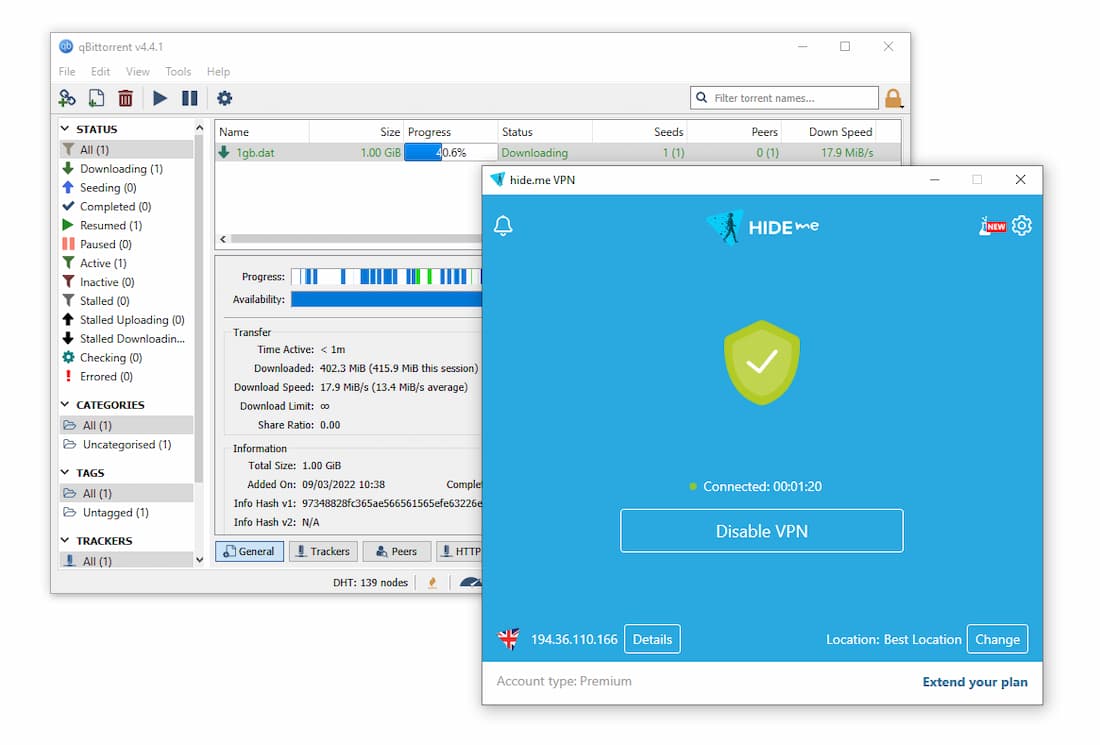
Our tests show that Hide.me Premium downloads files quickly on torrent clients.
From a privacy and security standpoint, Hide.me is one of the safest VPNs for torrenting. Its logging policy retains no sensitive data related to file sharing.
We were once concerned about an unreliable kill switch, but that issue has been fixed; it now prevents accidental IP leaks.
Hide.me does not offer static port forwarding for security reasons. Instead, it supports safer Dynamic Port Forwarding (UPnP), which you can enable from the Members Area.
Hide.me Free No Longer Permits P2P Activity
The free plan used to allow P2P, but not anymore.
Even if it did, Hide.me Free’s slow speeds would make downloading impractically slow. When it allowed P2P, our tests saw an average bitrate of 4.5MiB/s — below average.
Device Compatibility
Hide.me has native apps for all major desktop and mobile platforms, plus Linux and Apple TV. You can use it on 10 devices at once, which is above average. For devices that don’t support VPN apps, Hide.me provides router setup guides, though there’s no Smart DNS.
| Windows | Yes |
|---|---|
| Mac | Yes |
| iOS | Yes |
| Android | Yes |
| Linux | Yes |
| Amazon Fire TV | Yes |
| Android TV | Yes |
| Apple TV | Yes |
| Router | Manual Setup Only |
| Chrome | Yes |
Simultaneous Connections: 10
You can connect up to 10 devices simultaneously — generous compared to the typical five-device limit.
However, services like Surfshark and Private Internet Access allow unlimited connections.
Not all features are available on every app. The table below shows which platforms support which features:
| Platform | Configure DNS | Fullback Configuration | SoftEtherVPN | Split Tunnel | SSTP | Stealth Guard | VPN Tunnel Internet Protocol |
|---|---|---|---|---|---|---|---|
| Windows | ✓ | ✓ | ✓ | ✓ | ✓ | ✓ | ✓ |
| macOS | ✓ | ✗ | ✗ | ✓ | ✗ | ✓ | ✓ |
| Android | ✓ | ✗ | ✗ | ✓ | ✓ | ✗ | ✓ |
| iOS | ✓ | ✗ | ✗ | ✗ | ✗ | ✗ | ✓ |
Hide.me has an Apple TV app, but the lack of Smart DNS is disappointing.
Smart DNS would provide an easier way to unblock content on devices that don’t support VPN apps.
Competitors like ExpressVPN and Surfshark offer effective Smart DNS tools.
Browser Extensions
Available as “Hide.me Proxy,” the browser add-ons are encrypted proxies, not full VPNs.
They spoof your location and encrypt browser traffic only, not traffic from other apps. For that reason, Hide.me recommends using them alongside the VPN app.
Hide.me Proxy is free and offers servers in Canada, Germany, and the Netherlands, plus options to enable SOCKS, disable WebRTC, and “Always Enable Proxy.”
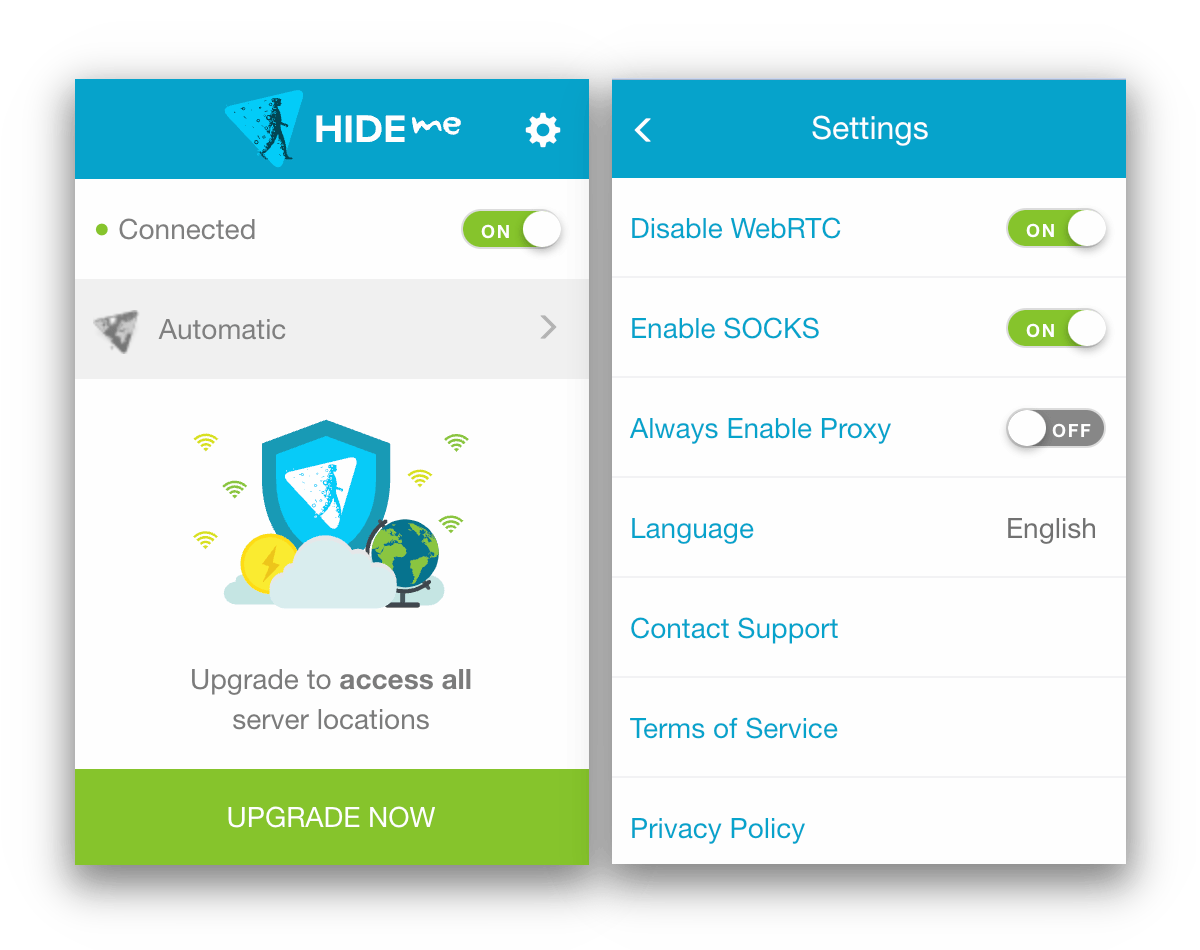
Hide.me has a free proxy for Chrome and Firefox.
These extensions are a simple, free way to change your IP and prevent WebRTC leaks. If you’re already using the Hide.me VPN app, there’s little reason to add the proxy.
Additional Features
Hide.me includes advanced tools to enhance security: multi-hop servers for added protection, split tunneling for custom routing, and an ad blocker to stop ads. Its obfuscation technology helps bypass strict censorship, including in China. These are part of the premium plan, but all users get 24/7 live chat support.
| Additional Feature | Hide.me (Free) | Hide.me |
|---|---|---|
| Split Tunneling | Yes | Yes |
| VPN Obfuscation | Yes | Yes |
| Multi-Hop Servers | Yes | Yes |
| Dedicated IP | No | No |
| Ad Blocker | No | Yes |
Stealth Guard & Split Tunneling
Stealth Guard prevents any internet connection until the VPN is active.
You can also restrict it to specific apps, ensuring you never forget to enable the VPN.
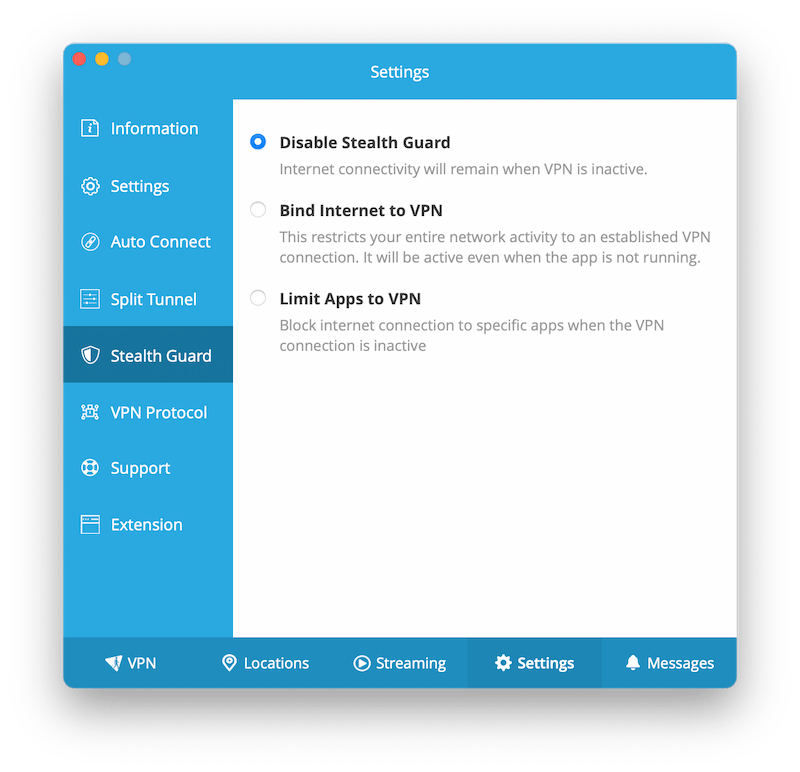
Stealth Guard guarantees you’re protected by a VPN when using the web or specific apps.
Split tunneling is available on every platform except iOS, letting you choose which apps use the VPN and which don’t.
Hide.me also supports both IPv4 and IPv6 traffic automatically. Many VPNs still block IPv6 (for example, Surfshark); we prefer Hide.me’s dual-stack approach.
Multi-Hop (Double VPN) Servers
Hide.me offers multi-hop servers that route your traffic through two different locations for extra protection. Other VPNs like Surfshark and Proton VPN provide similar features, though it’s still relatively uncommon.
Hide.me lets you manually choose entry and exit locations, which is great, but an automatic option would help users who prefer quick setup.
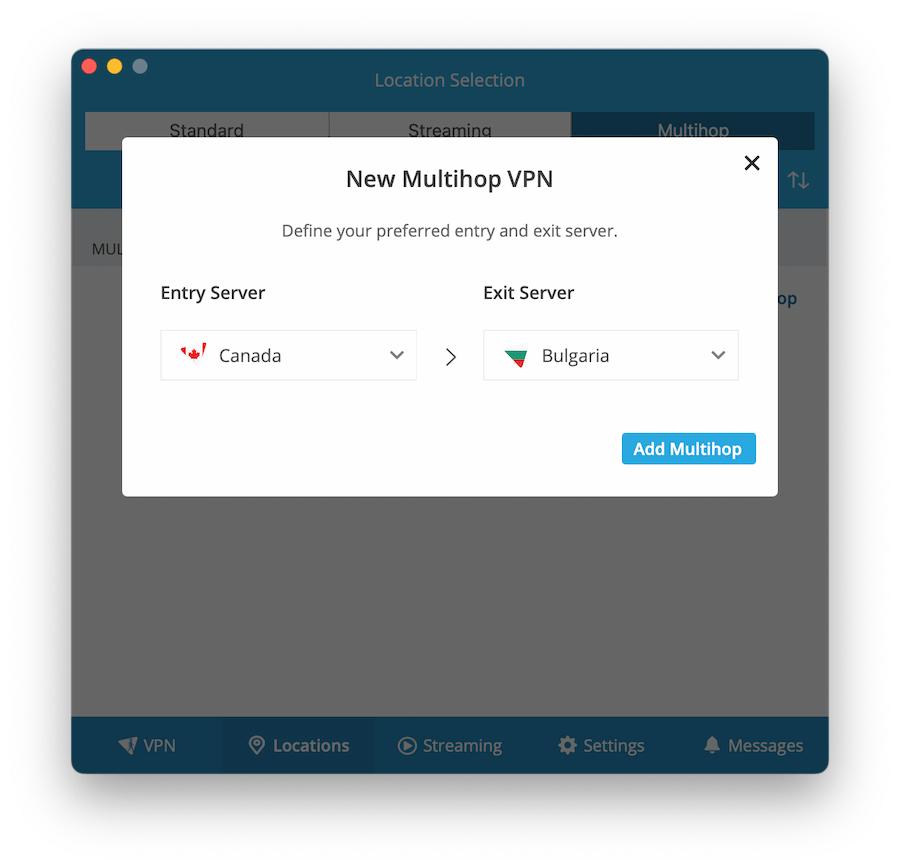
Hide.me has a multi-hop feature with manual entry and exit servers.
SmartGuard Ad & Tracker Blocker Does Not Work
Hide.me recently launched SmartGuard, an in-app ad and tracker blocker with whitelist/blacklist options and a parental filter.
It looks promising, but in our tests SmartGuard often broke our connection. We couldn’t access third-party ad-block tests and repeatedly saw this error:
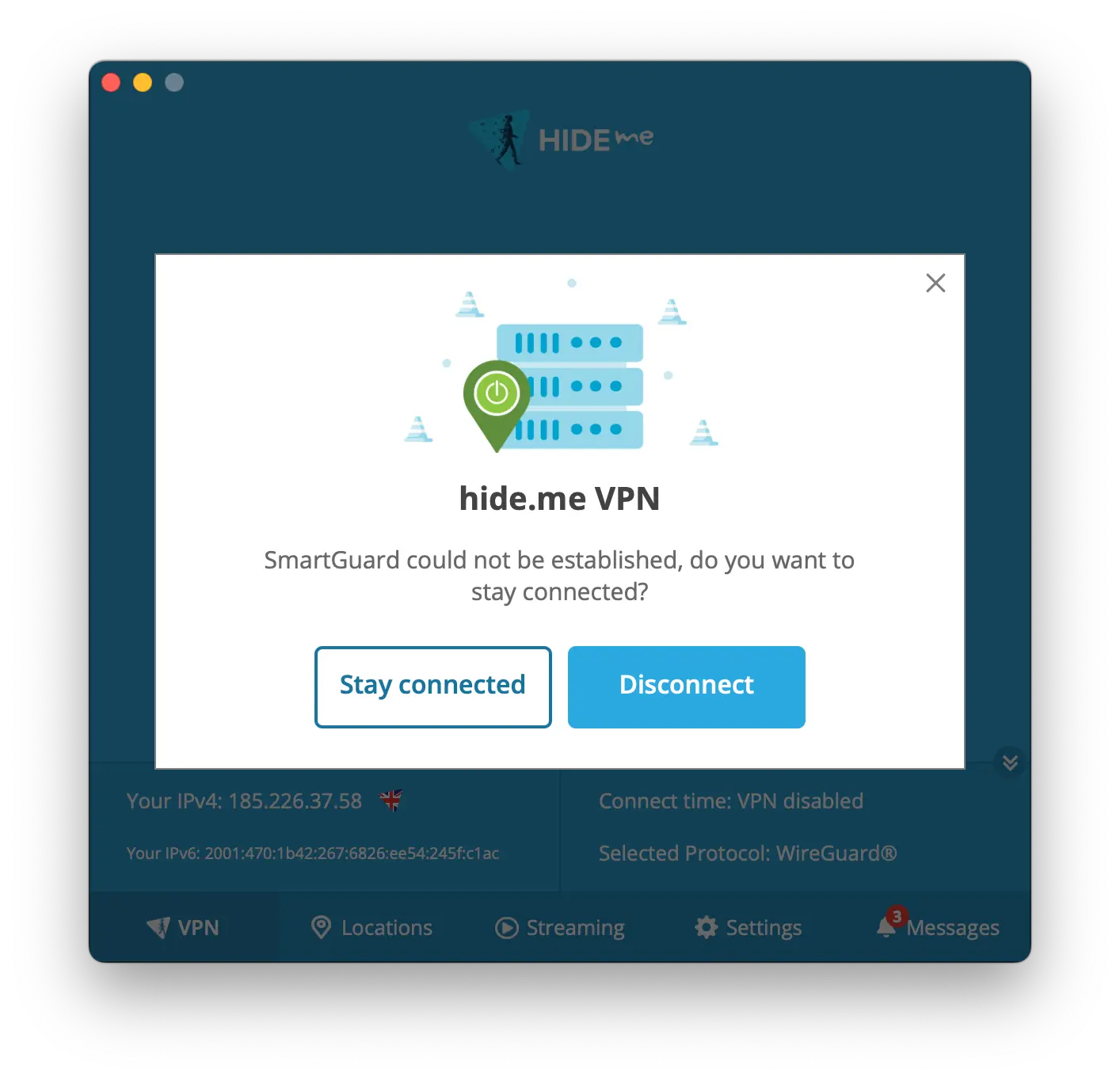
SmartGuard failed to connect and block ads in our tests.
As a result, we couldn’t block ads or trackers with SmartGuard, making it the weakest VPN ad blocker we’ve tested.
Fast Live Chat Support & Extensive Online Resources
Hide.me provides extensive support, including setup videos, a detailed knowledge base, a community forum, and 24/7 live chat. Free users get the same access.
We also like that you can submit a support ticket directly from within the app; many VPNs require you to visit the website.
The live chat is easy to find on the homepage, with no chatbot, and you don’t need a subscription to start a chat.
Responses were generally helpful and very fast — often within seconds. However, the agents (always named “Ian”) can be blunt, sometimes sending links instead of walking you through steps.
Hide.me Now Works to Bypass Strict Censorship
Every week, we test dozens of popular VPN services using a server in Shanghai. These tests show which VPNs can unblock restricted websites in China and other highly censored countries.
Hide.me used to work in China only 9% of the time, which wasn’t reliable enough for us to recommend.
However, our recent tests show it now works in China 84% of the time.
This is a major improvement and an above-average result, making it the 4th most effective VPN for bypassing censorship.
We found Hide.me particularly effective in China when using its multi-hop tool, but it requires setting up a “Custom Location” designed to get around China’s blocks, which the Hide.me team provides. You can follow instructions on how to do this in our VPN recommendations for China.
Hide.me bypasses censorship using an obfuscation technology called TLS-Crypt, which disguises VPN traffic as normal web traffic. This also helps it work well in other censoring countries like Russia, Turkey, and the UAE.
The SoftEther protocol is also available in Hide.me’s Windows app. It’s designed to penetrate censorship firewalls by using HTTPS to mask VPN traffic.
Despite these improvements, there are still better VPNs than Hide.me for getting around censorship. For example, Astrill VPN consistently unblocks websites in the most censored countries.
Hide.me Key Data
| Attribute | Hide.me | Typical Free VPN |
|---|---|---|
| Owner | eVenture Ltd | Independent |
| Launch Date | 2012 | 2015 |
| Safe to Use | Yes | No |
| Data Cap | Unlimited | 10GB per month |
| Payment Details Required | No | No |
| Account Required | No | Yes |
| Contains Ads | No | Yes |
| Local Download Speed | 2Mbps (98% loss) | 61Mbps (39% loss) |
| International Download Speed | 1Mbps (99% loss) | 55Mbps (45% loss) |
| Countries with Servers | 7 | 4 |
| Privacy Policy | No Identifiable Data | Identifiable Data |
| Simultaneous Connections | 1 | 1 |
| Manually Select Server Location | Yes | Yes |
| Netflix Libraries | 0 | 0 |
| Torrenting | No | No |
| Works In China? | No | No |
| Customer Support | Live Chat | Online Resources |
| Apps & Extensions |
          |
|
Hide.me Key Data
| Attribute | Hide.me | Typical VPN |
|---|---|---|
| Local Download Speed | 97Mbps (3% loss) | 89Mbps (11% loss) |
| International Download Speed | 86Mbps (14% loss) | 80Mbps (20% loss) |
| Countries with Servers | 57 | 40 |
| Privacy Policy | No Identifiable Data | Identifiable Data |
| Simultaneous Connections | 10 | 10 |
| Netflix Libraries | 11 | 3 |
| Torrenting | Yes | Yes |
| Works In China? | Yes | No |
| Cheapest Price | 2.69/mo over 26 months | $3.87/mo over 24 months |
| Customer Support | Live Chat | |
| Apps & Extensions |
|
|
Price
Price Plans
| 1 month | $9.95 |
|---|---|
| 12 months | $54.84 ($4.57/mo) |
| 26 months | $69.94 ($2.69/mo) |
Free Trial
| Money-Back Guarantee | 30 days |
|---|---|
| Free Trial | No |
| 100% Free Plan | Yes |
| Data Cap | Unlimited |