
Surfshark VPN: Affordable VPN Packed with Powerful Features
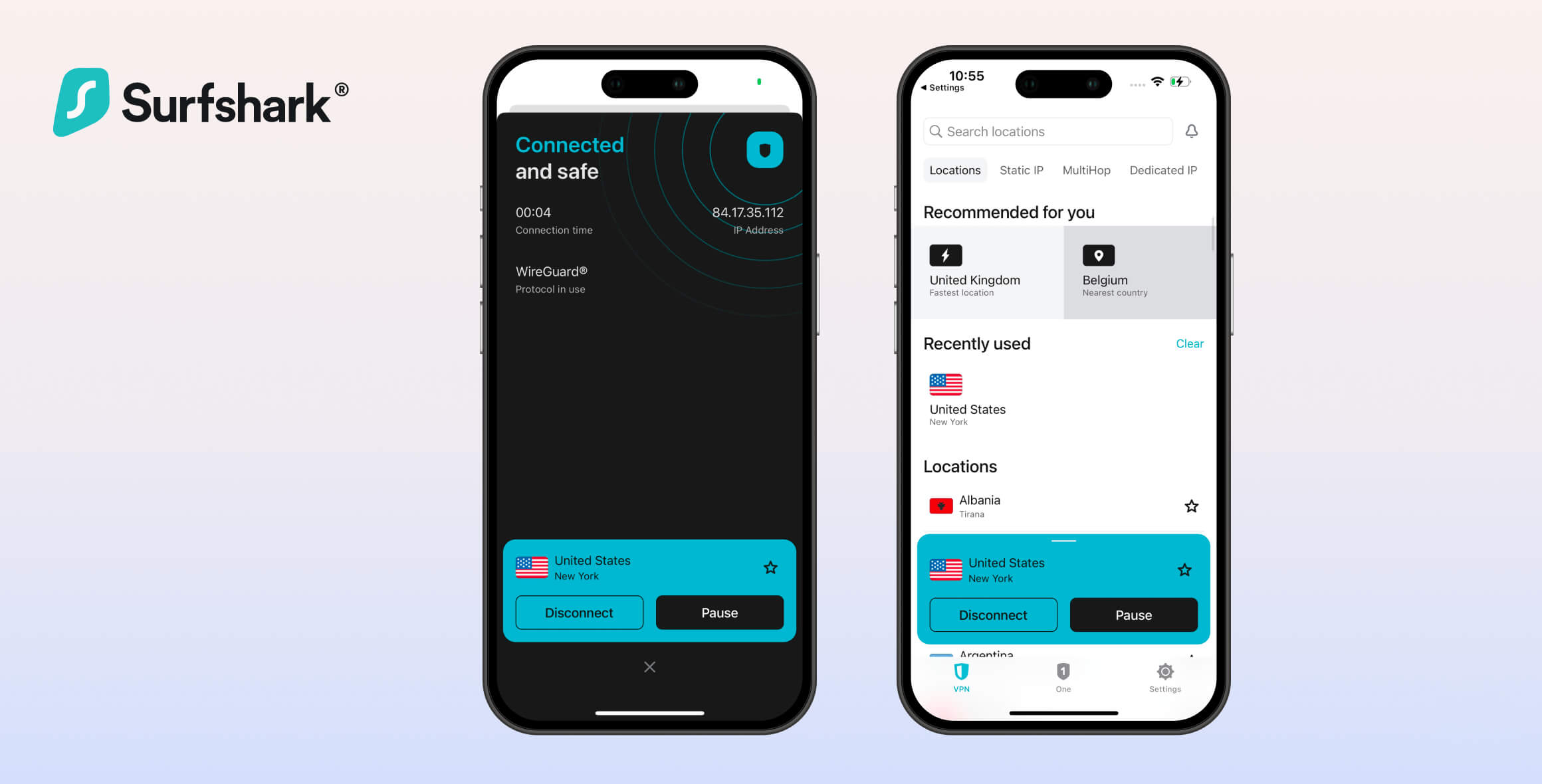
Overall, Surfshark is a great VPN that’s rated 8.8 based on our criteria. Its most notable strength is its value: despite its low price, the VPN has excellent security standards, an audited privacy policy, and many extra features. It even unblocks 9 Netflix regions. However, in our tests its speeds were slower than some similar VPNs, and it does not reliably bypass strict censorship.
- Pros
- Unblocks 9 Netflix libraries
- Budget price of $1.99
- Audited logging policy & diskless servers
- Lots of advanced security features
- Torrenting allowed
- User-friendly apps & unlimited simultaneous connections
- Cons
- Disappointing anti-censorship mode
- Based in the Netherlands (EU)
- No port forwarding
- Kill switch not enabled by default
- Kill switch leaks on macOS
- Occasional IPv6 leaks
Surfshark VPN has been around since 2018. Based in the Netherlands, it has quickly become one of the most popular VPNs on the market.
In 2022, Surfshark merged with Nord Security — the company behind NordVPN. Although they now operate under the same holding company, the two VPN services still function independently.
In this Surfshark review, we test its performance in 10 different categories to see how well it performs, whether it’s safe to use, and if it’s worth choosing over other top-rated VPN services.
Before reading our in-depth analysis of Surfshark VPN, you can watch our short 60-second review:
Privacy
Ranked #10 out of 45 VPNs for Privacy
Surfshark’s privacy standards are excellent. It logs almost nothing about its users, uses diskless servers, and is owned by a trustworthy company that has commissioned independent audits of its logging policy and server security. The one drawback is Surfshark’s EU jurisdiction, which is subject to strong data retention laws.
| Originating IP Address | No |
|---|---|
| Browsing Activity | No |
| Individual Connection Timestamps | Yes |
| Date of Last Connection | No |
| VPN Server IP | No |
| Device Information | No |
| Individual Bandwidth Usage | No |
| Account Information | Yes |
You can read Surfshark’s full privacy policy on its website.
Surfshark does not keep identifying logs. We’ve examined its logging policy in detail and can confirm that sensitive data — like your IP address — is not stored. This has also been confirmed by an independent audit from Deloitte.
Surfshark temporarily stores information about which VPN server you connect to, including your user ID and connection timestamps. However, this data is deleted within 15 minutes of disconnecting from the VPN and poses no meaningful privacy risk.
The only information Surfshark keeps is your account data, including:
- Email address
- Account registration date
- Encrypted password
- When you use the Smart DNS
- WiFi name if the Auto-connect feature is enabled
Although this means Surfshark is not technically a “no-logs” VPN, it only retains a small amount of non-sensitive information used to maintain the service. If you’re particularly concerned about privacy, you can sign up using cryptocurrency to avoid sharing any personal payment details.
Surfshark also operates diskless RAM-only servers that prevent your data from being written to a hard drive. This is an excellent privacy measure that ensures no identifying information is available in the event of a server seizure.
Based in The Netherlands (EU Jurisdiction)
Surfshark moved its company headquarters from the British Virgin Islands — a privacy-friendly jurisdiction with no data retention laws — to the Netherlands, which is in the EU and has stricter data retention rules.
Surfshark has reassured users that being based in the Netherlands still allows it to maintain its no-logs policy. However, the country is part of EU intelligence-sharing networks, and we would prefer to see Surfshark operate from a more privacy-focused jurisdiction.
Who Owns Surfshark?
Surfshark is owned by Cyberspace, a company incorporated in the Netherlands. The founder of Surfshark is a Lithuanian national called Vytautas Kaziukonis, and most of Cyberspace’s employees are based in Lithuania, where it also has an office.
Cyberspace was formed after a merger between Surfshark (Surfshark B.V.) and Nord Security, which runs NordVPN. Surfshark and NordVPN now collaborate to improve their separate services.
While the services are very similar, NordVPN performs better in most of our tests and still operates out of a privacy haven — Panama. However, NordVPN has experienced a data breach in the past, whereas Surfshark has never been involved in any major controversies.
Streaming
Ranked #1 out of 45 VPNs for Streaming
Surfshark is an excellent VPN for streaming. It consistently unblocks every major international streaming service, including 9 Netflix regions, UK TV channels, and geo-restricted platforms like HBO Max and Hulu. You can also use Surfshark’s Smart DNS to stream on devices that don’t support VPN apps.
| Streaming Service | Works with Surfshark |
|---|---|
| BBC iPlayer (UK) | Yes |
| DAZN (Canada) | Yes |
| Disney+ (UK) | Yes |
| Hulu (US) | Yes |
| ITVX (UK) | Yes |
| HBO Max (US) | Yes |
| Netflix (US) | Yes |
| Netflix (UK) | Yes |
| Prime Video (US) | Yes |
| Sky Go (UK) | Yes |
Access to 9 Netflix Libraries
Surfshark works very well with Netflix. Our tests show that it unblocks 9 Netflix regions easily and streams without buffering.
As well as US Netflix, Surfshark reliably bypasses geo-blocks for:
- Netflix Brazil
- Netflix Canada
- Netflix France
- Netflix India
- Netflix Italy
- Netflix Mexico
- Netflix Singapore
- Netflix UK
- Netflix US
In our tests, most of Surfshark’s city-level servers successfully unblocked the corresponding country’s Netflix library. On rare occasions you may need to switch to a different server in the same country to get Netflix working.

We’d like Surfshark to label servers that are optimized for streaming, as this would make it quicker and easier to find a working server.
Streams Every British & US Streaming Site
Surfshark unblocks HBO Max and Amazon Prime Video. It used to struggle with Hulu, but our recent tests show a big improvement, and we can now confidently recommend Surfshark for watching Hulu outside the US.
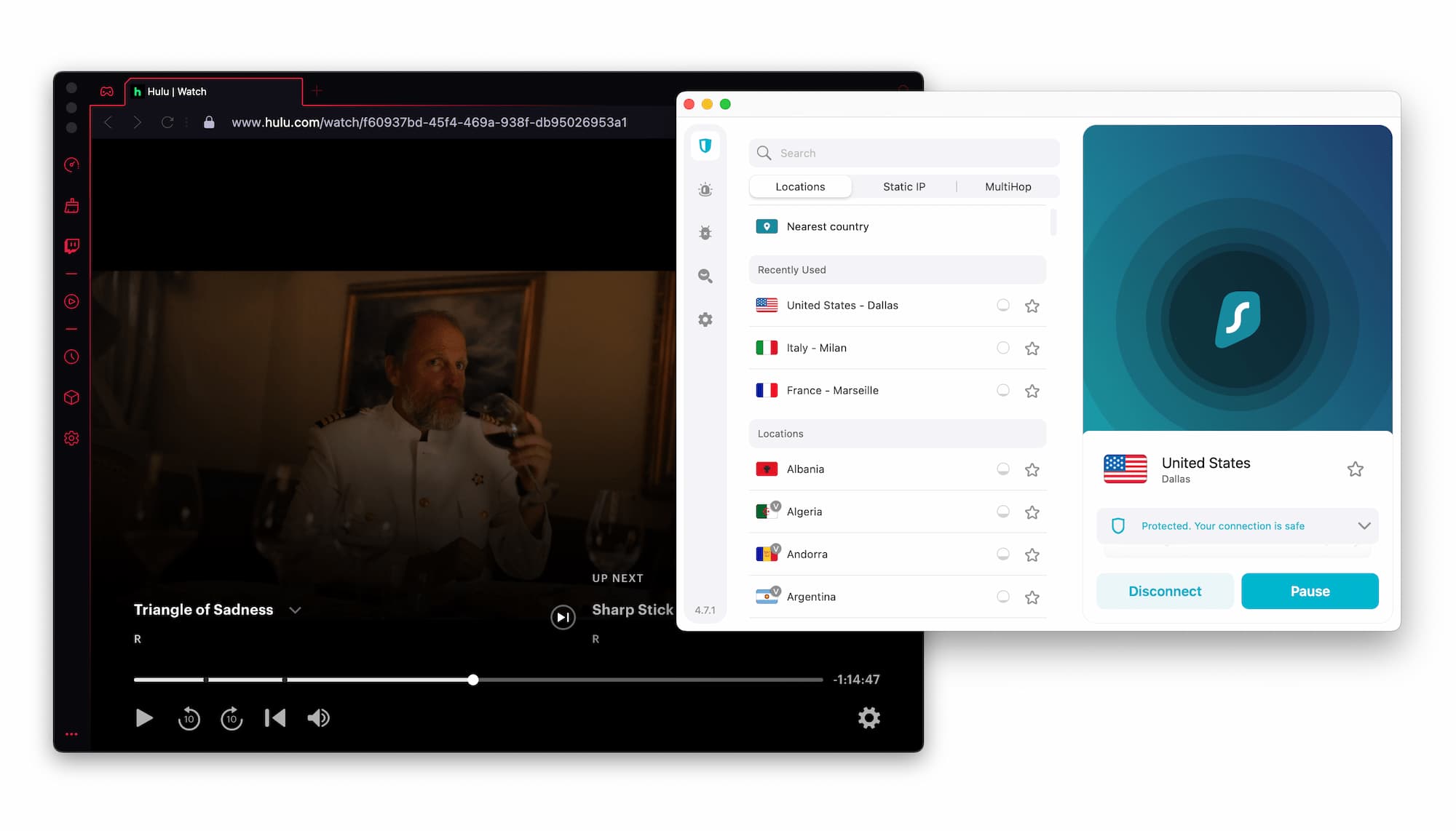
Surfshark unblocks Hulu outside the US.
The first UK Surfshark server we tested unblocked BBC iPlayer, Channel 4, ITVX, My5, Now, and Sky Go without issues, making it one of the best VPNs for connecting to the UK as well.
Surfshark remains one of the best VPNs for bypassing Disney+ blocks and lets you stream Europe-exclusive Star content from the US.
Surfshark is also a good choice for watching The Roku Channel and most other free streaming platforms, including Peacock and SBS On Demand.
In our testing, all of these platforms streamed at maximum video quality without buffering.
Overall, Surfshark is an excellent streaming VPN, especially given its price. However, it can’t quite match ExpressVPN for speed or reliability, particularly with Netflix. Windscribe VPN, meanwhile, unblocks significantly more Netflix regions overall.
Speed
Ranked #17 out of 45 VPNs for Speed
Our tests show that Surfshark is a consistently fast VPN. When connected to a nearby server, our download speeds dropped by just 4%, which is more than fast enough for streaming, gaming, and everyday browsing. Over long distances, Surfshark still performed well, with an average speed loss of 17% across all our test connections. That said, some rival VPNs like Hotspot Shield and IPVanish are still faster overall.
To test its performance, we connected to Surfshark servers on six different continents and measured our internet speeds before and after connecting. We used a 100Mbps internet connection, similar to a typical home broadband speed.
Here’s how Surfshark performed in our speed tests:
| No VPN (New York) | US (New York) | Canada (Toronto) | US (Los Angeles) | UK (London) | Germany (Berlin) | Brazil (São Paulo) | Japan (Tokyo) | South Africa (Johannesburg) | Australia (Sydney) | |
|---|---|---|---|---|---|---|---|---|---|---|
| Server Location |  |
|
 |
|
 |
 |
 |
 |
 |
 |
| Download Speed | 100Mbps | 96Mbps | 93Mbps | 89Mbps | 88Mbps | 88Mbps | 84Mbps | 84Mbps | 67Mbps | 79Mbps |
| Upload Speed | 100Mbps | 92Mbps | 80Mbps | 40Mbps | 27Mbps | 44Mbps | 67Mbps | 15Mbps | 49Mbps | 35Mbps |
| Ping | 1ms | 9ms | 14ms | 72ms | 73ms | 98ms | 288ms | 143ms | 407ms | 203ms |
| Distance | 0mi | 5mi | 300mi | 2,500mi | 3,500mi | 4,000mi | 4,800mi | 6,700mi | 8,000mi | 9,900mi |
Like any VPN, Surfshark will slow down your internet somewhat — but not by much. When we connected to a Surfshark server in the same country, our speeds dropped by only 4% compared to our baseline.
When connecting to distant countries, the speed loss remained modest. For example, connecting from the UK to the US resulted in a 42% reduction in speed despite the 3,000+ mile distance.
Overall, our independent speed tests show that Surfshark has strong short- and long-distance performance, with relatively little impact on your internet speed.
These fast speeds are helped by Surfshark capping its server load at 40% to prevent congestion and upgrading many of its servers to 10Gbps. This also improves day-to-day use, keeping speeds stable and reducing the likelihood of CAPTCHAs caused by too many users sharing the same IP address.
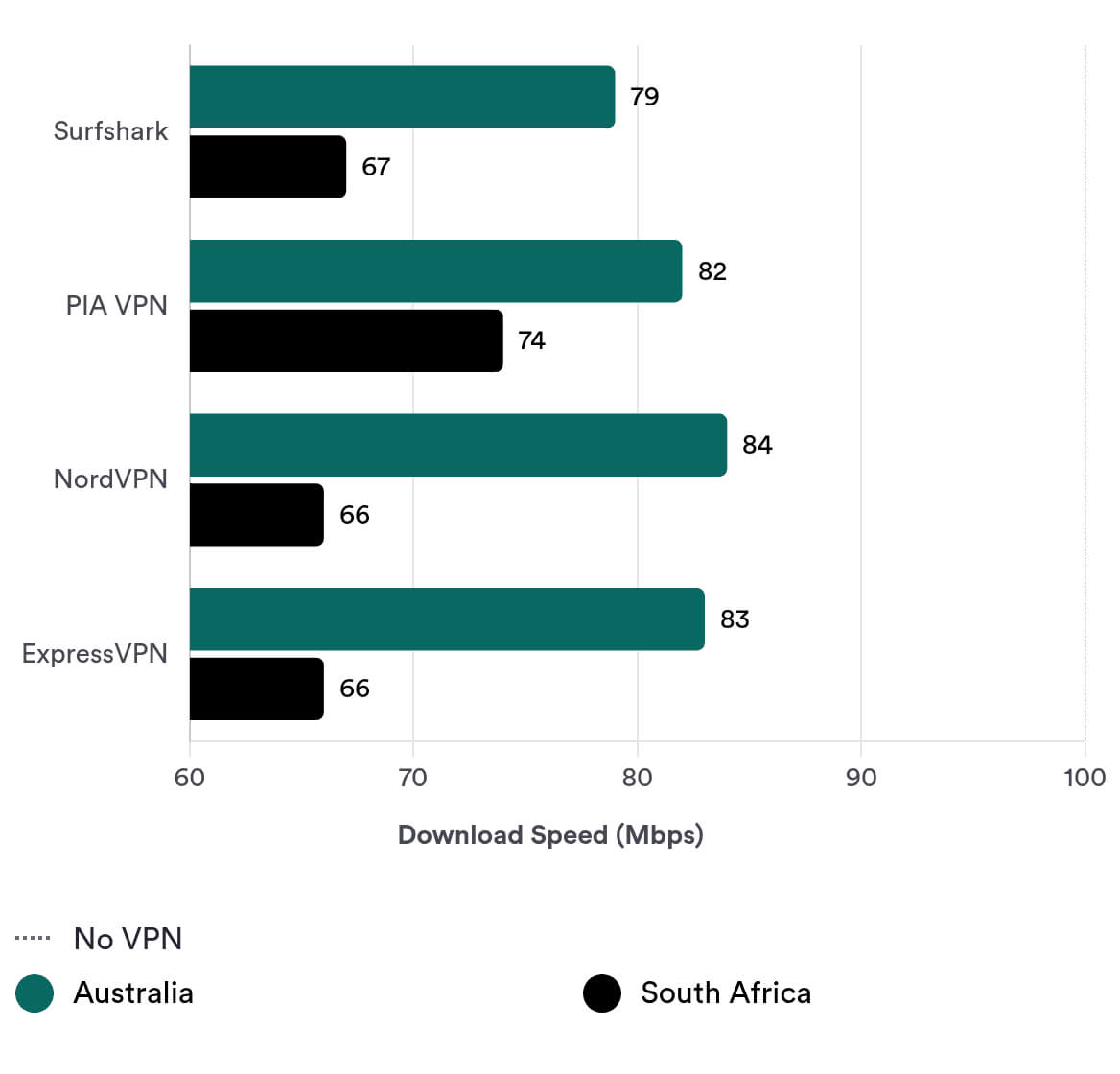
However, despite these improvements, Surfshark still lags slightly behind the very fastest VPNs — mainly due to weaker performance to very remote locations like South Africa and Australia. While most VPNs struggle with these regions to some degree, Surfshark could improve further by adding even more 10Gbps servers.
Security
Ranked #10 out of 45 VPNs for Security
Surfshark meets all the essential requirements for a secure VPN, including AES-256 encryption, multiple secure protocols, leak protection, and a kill switch on every app. It goes beyond the basics by offering diskless servers and first-party DNS for improved privacy. However, there is still room for improvement, such as open-sourcing its apps and adding quantum-resistant encryption to prepare for future threats.
| Independent Audit | Yes |
|---|---|
| VPN Kill Switch | Yes |
| Leak Protection | Yes |
Surfshark supports the security protocols WireGuard, OpenVPN, and IKEv2. These are among the best and most secure options currently available. Surfshark has rightly dropped outdated protocols like PPTP.
Surfshark also uses the industry-standard AES-256 encryption cipher to protect your data. AES-256 is considered effectively unbreakable with current technology.
We verified this by testing Surfshark’s encryption using the packet-sniffing tool Wireshark. Our analysis showed that all web traffic was fully encrypted and unreadable.
Does Surfshark’s Kill Switch Work?
Surfshark’s kill switch is not enabled by default, which we see as a drawback. We strongly recommend going into Surfshark’s settings and turning it on.
We tested Surfshark’s kill switch using our in-house test tool. If the kill switch works correctly, our real IP address should never appear — even when we change servers or when the internet connection drops unexpectedly.
Our results show that Surfshark’s kill switch successfully prevented IP leaks in every case except when changing servers on macOS devices. This is a common issue with many VPNs on Mac. However, VPNs like Mullvad and Private Internet Access have already solved this problem, so we expect Surfshark to catch up.
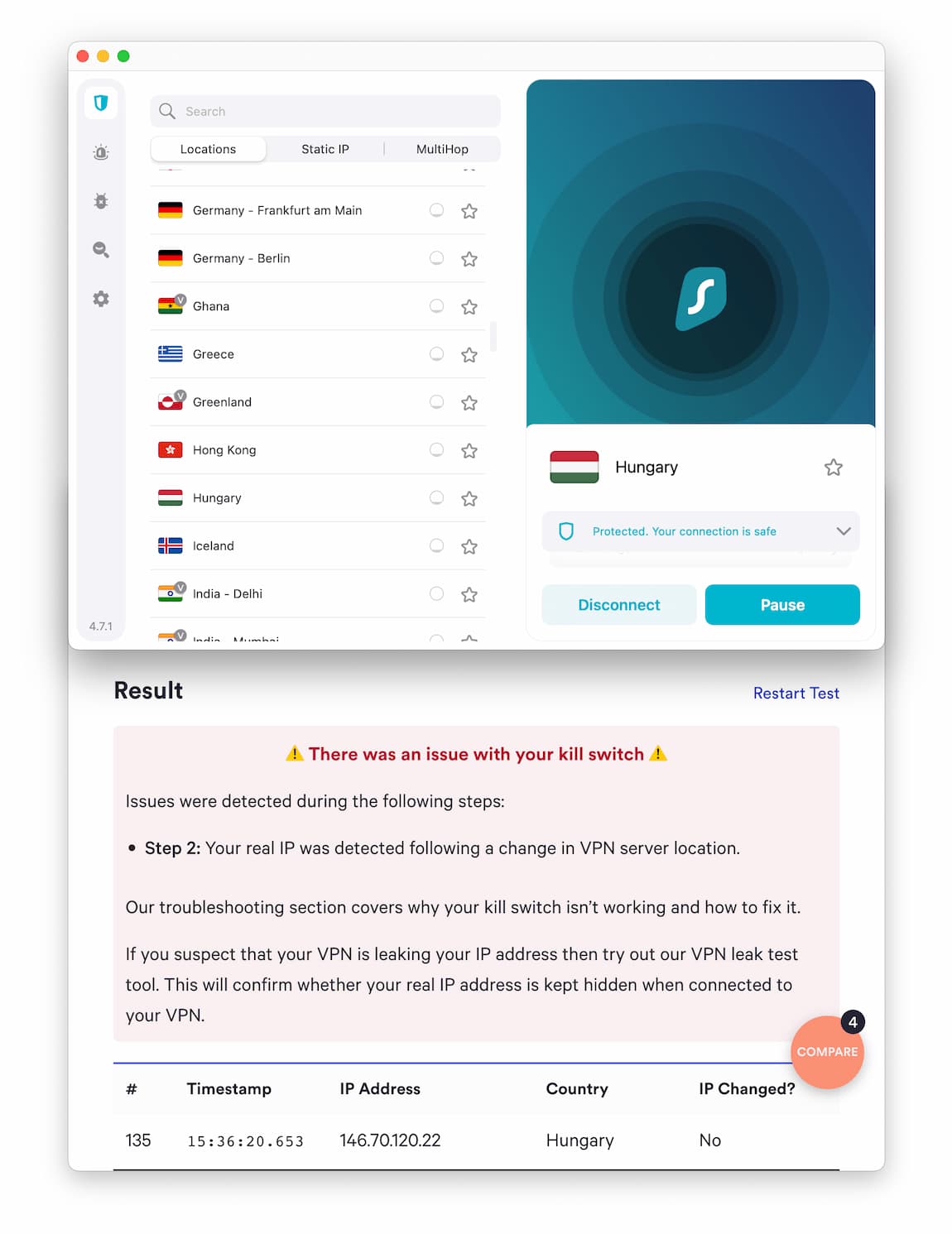
Surfshark’s kill switch does not stop IP address leaks when changing servers on macOS.
Impressively, Surfshark’s Android TV VPN app is the only one we’ve tested that includes a built-in kill switch. With other VPNs, including ExpressVPN and NordVPN, our IP address leaked whenever the connection dropped on Android TV.
First-Party DNS Servers to Prevent Leaks
We tested Surfshark for IP, DNS, and WebRTC leaks using our own leak test tool. It passed all tests and no sensitive data was exposed.
This is largely because Surfshark uses its own private DNS servers, meaning it handles your DNS requests internally instead of sending them to third-party DNS providers. This is a notable security advantage.
However, Surfshark does not support IPv6. Instead, it reroutes IPv6 traffic over IPv4. This approach prevents IPv6 leaks, which is good, but we would still like to see full IPv6 support in the future. If you own a router that only supports IPv6, Surfshark will not work on it at all.
Server Locations
Ranked #2 out of 45 VPNs for Server Locations
Surfshark has servers in 100 countries, which is far more than most other VPN services. Congestion is unlikely because Surfshark caps server load at 40% capacity, and the US is particularly well covered with 25 city-level locations. However, despite its wide country coverage, Surfshark has only about 3,200 individual servers — far fewer than VPNs like Private Internet Access (PIA) and CyberGhost.
| Continent | Countries with Servers |
|---|---|
| Europe | 46 |
| Asia | 25 |
| South America | 10 |
| North America | 7 |
| Africa | 6 |
| Oceania | 2 |
Surfshark’s servers are distributed across 100 countries, making it one of the largest and most diverse VPN networks available.
Most countries have just one server location, but 11 countries include multiple city options, which is above average. We’d like to see more city-level options outside of Europe, but the list currently includes:
- Australia
- Belgium
- France
- Germany
- India
- Italy
- Poland
- Portugal
- Spain
- UK
- US
The US has the most choices, with 25 city servers in total. This is especially useful if you want a US IP address in a specific location to watch out-of-market NFL games or avoid MLB blackouts.
Although Surfshark offers IP addresses in 100 countries, it has only 3,200 physical and virtual servers. This is significantly fewer than the 18,651 servers offered by Private Internet Access and the 12,000 available with CyberGhost.
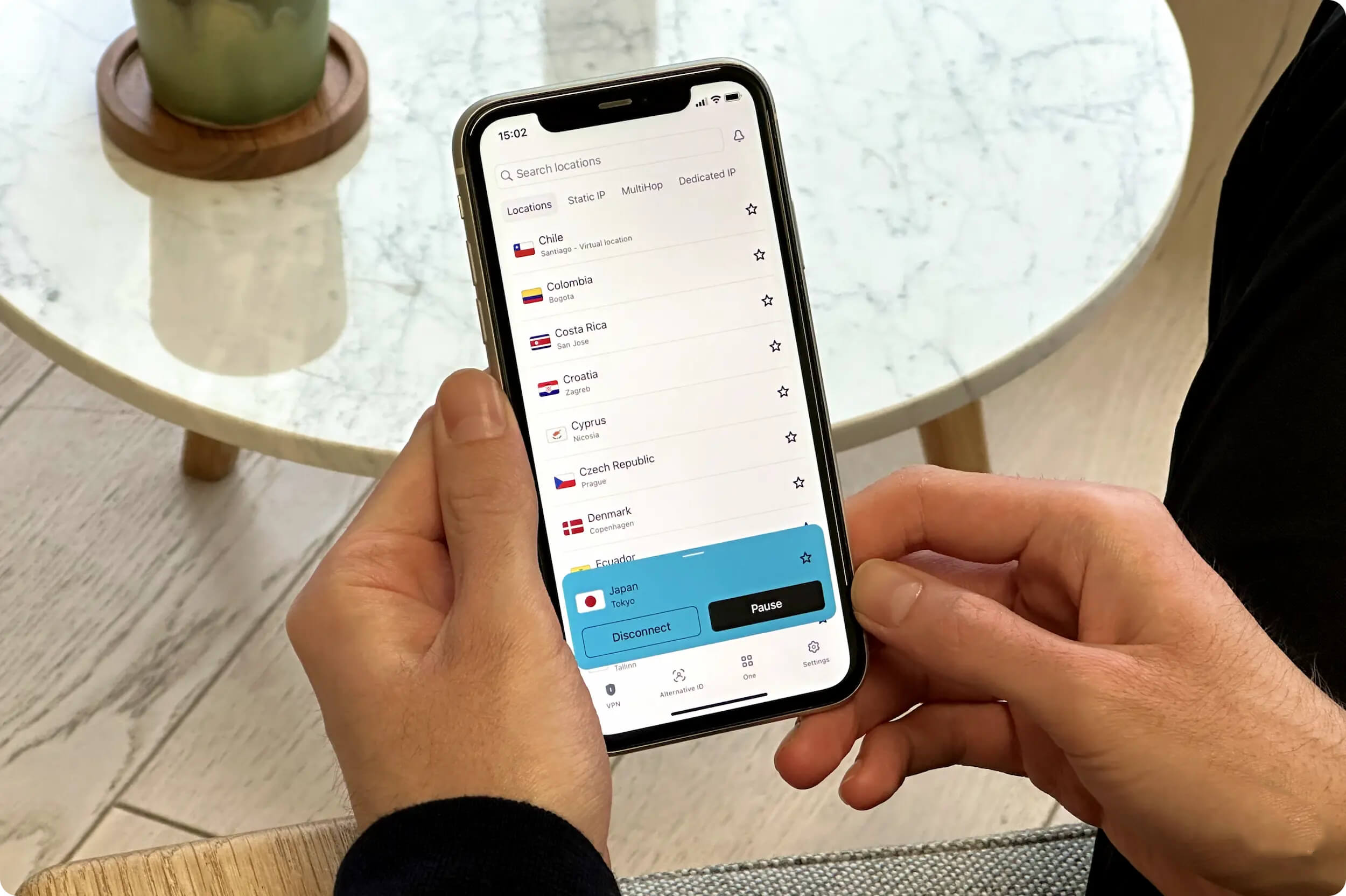
The server locations list in the Surfshark iOS client.
In March and June 2022, Surfshark shut down its servers in Russia and India after the authorities demanded that VPNs log user data. However, you can still obtain an Indian IP address using Surfshark’s virtual India servers.
Static IP Addresses & MultiHop Servers
Surfshark offers two additional types of servers:
Static IP: These servers assign you the same IP address every time you connect. This can result in more consistent speeds and easier access to geo-restricted services, but it slightly increases privacy risk, as your activity is always associated with the same IP.
Multi-Hop: Also known as Double VPN, MultiHop routes your traffic through two VPN servers before it reaches the internet. This adds another layer of privacy and security but usually reduces speeds.
A Mix of Virtual & Physical Servers
Surfshark uses both virtual and physical servers and clearly labels its virtual servers with a small ‘v’, which is a helpful touch that lets you choose between the two.
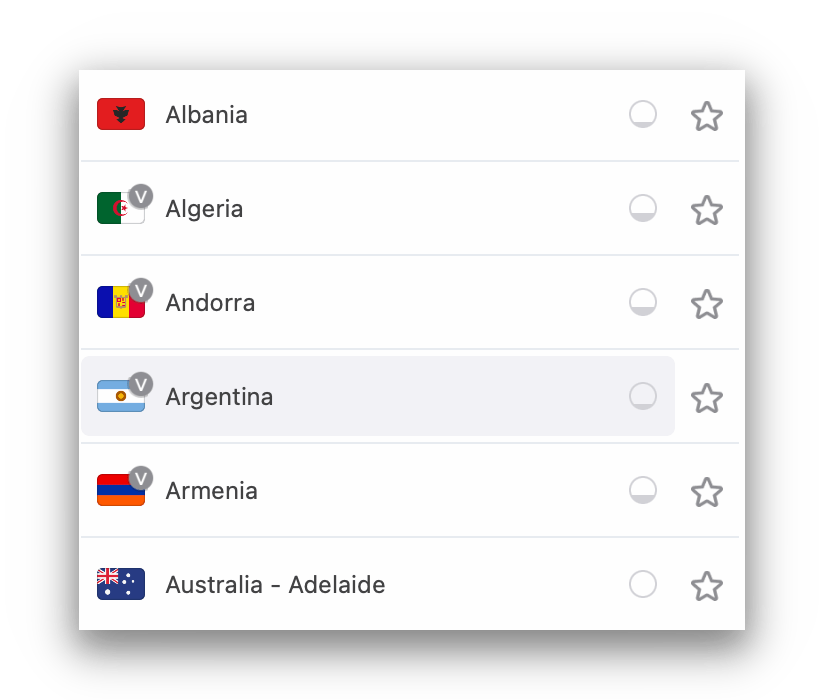
Surfshark distinguishes between physical and virtual servers with a ‘v’.
Virtual servers give you an IP address from your chosen country even when the physical hardware is located elsewhere. This allows Surfshark to offer more global locations.
The downside is that if the underlying server is much farther from you than the advertised location, your speeds and latency may suffer.
Overall, Surfshark has a large and flexible server network with a good mix of server types. Casual users can instantly connect using the ‘Quick Connect’ button, while advanced users can choose between virtual or physical servers, static or dynamic IPs, and single- or double-hop connections.
User Experience
Ranked #3 out of 45 VPNs for User Experience
Despite being packed with advanced features, Surfshark is very easy to use. Its apps are suitable for both beginners and experienced VPN users thanks to an intuitive interface, fast response times, and clearly labeled settings. Choosing a server, changing your protocol, and customizing your app settings are all straightforward.
Surfshark is easy to install, set up, and use. You just need to sign up and download the appropriate software, and then sign in with your account.
The experience of using its applications couldn’t be more user-friendly. The apps are well designed and self-explanatory, and there are useful descriptions next to every technical feature.
Here’s a more detailed overview of our experience using Surfshark on every device:
Desktop & Laptop (Windows & macOS)
Surfshark’s desktop apps are a pleasure to use, with easy navigation, a clean layout, and a simple interface.
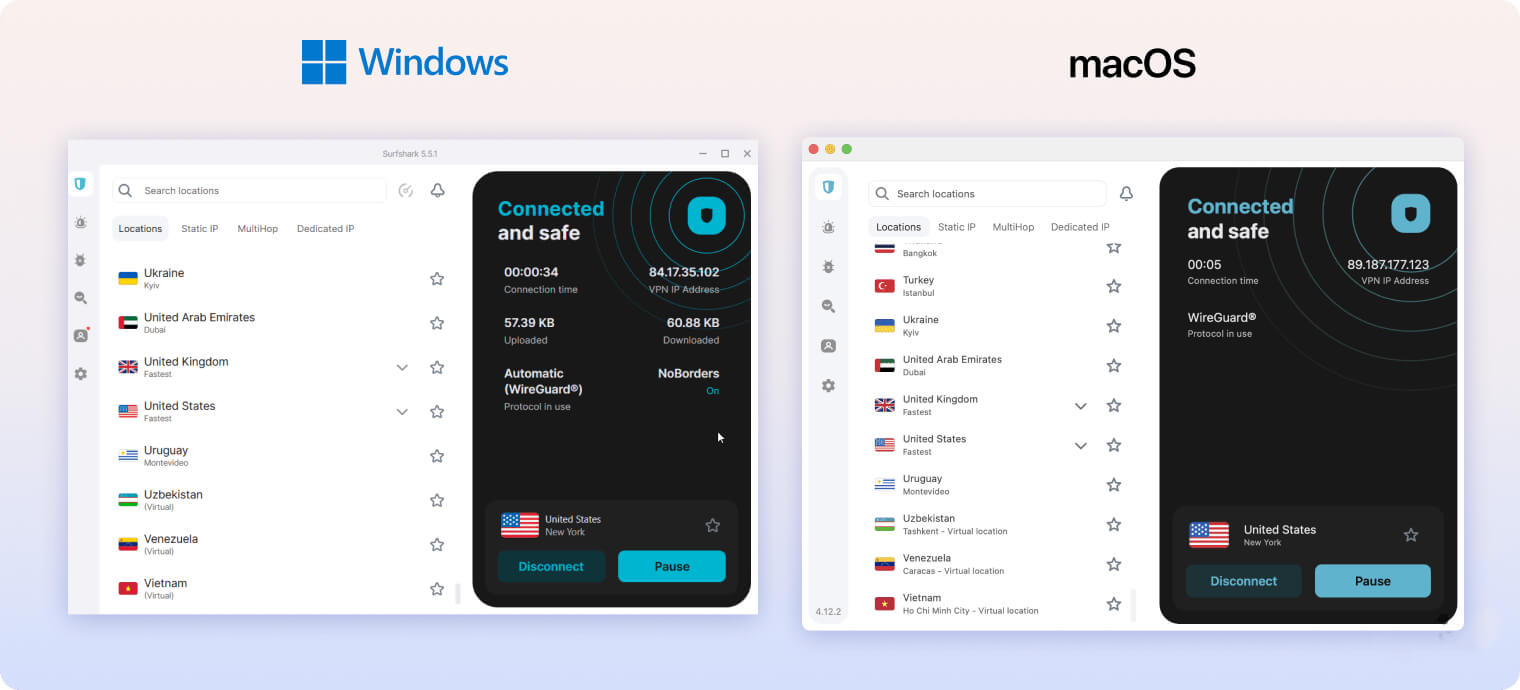
The server list appears as an alphabetical scroll-down list with a search bar at the top for quick access to specific servers. There are also buttons to connect instantly to the “Fastest Server” or “Nearest Country.”
The settings menu is straightforward. Both Connection Settings and Advanced Settings use on/off toggles with clear explanations, making all features easy to find and configure.
For customization, we like the dark mode option and the inclusion of 16 languages in addition to English. On macOS, you can also choose whether the Surfshark icon appears in the Dock or only in the menu bar.
However, we don’t like that the Surfshark Alert, Antivirus, and Search add-ons are integrated into the main menu as upsell prompts. They clutter the sidebar when, in most cases, you only need the “VPN” and “Settings” sections.
We also dislike that you cannot manually resize the macOS window, which takes up a lot of screen space. The Windows app is resizable, but only within certain limits.
Mobile (iPhone & Android)
Surfshark’s mobile apps are very similar to its desktop versions, which is great for consistency across devices.
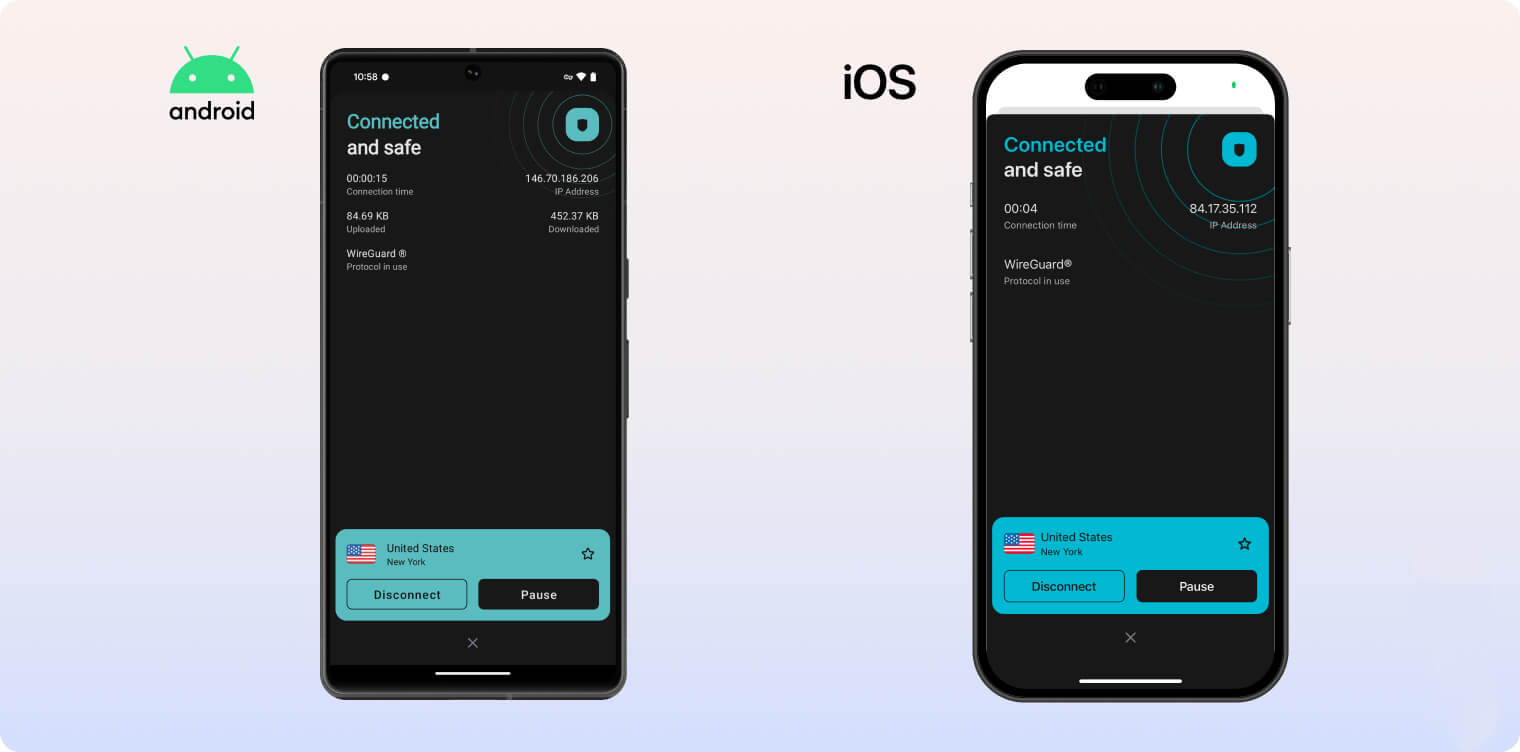
The interface and overall usability are nearly identical. You’ll find many of the same features, including CleanWeb, MultiHop servers, and a kill switch.
There are just a couple of differences between the mobile apps: the iOS app has a “Pause” button that temporarily suspends the VPN connection without fully disconnecting, while the Android app has a system-wide kill switch that cuts internet access for all apps on the device if the VPN drops.
Windows and Android also include a feature called Bypasser (split tunneling), which lets you choose which apps use the VPN tunnel and which don’t.
As with the desktop apps, we wish the Surfshark One upsell did not appear so prominently in the interface.
Linux
Surfshark supports Linux on Ubuntu, Debian, and Mint distributions.
Once installed, you can use Surfshark’s Linux graphical user interface (GUI), which lets you change servers and switch between protocols without the command line. It also includes a kill switch.
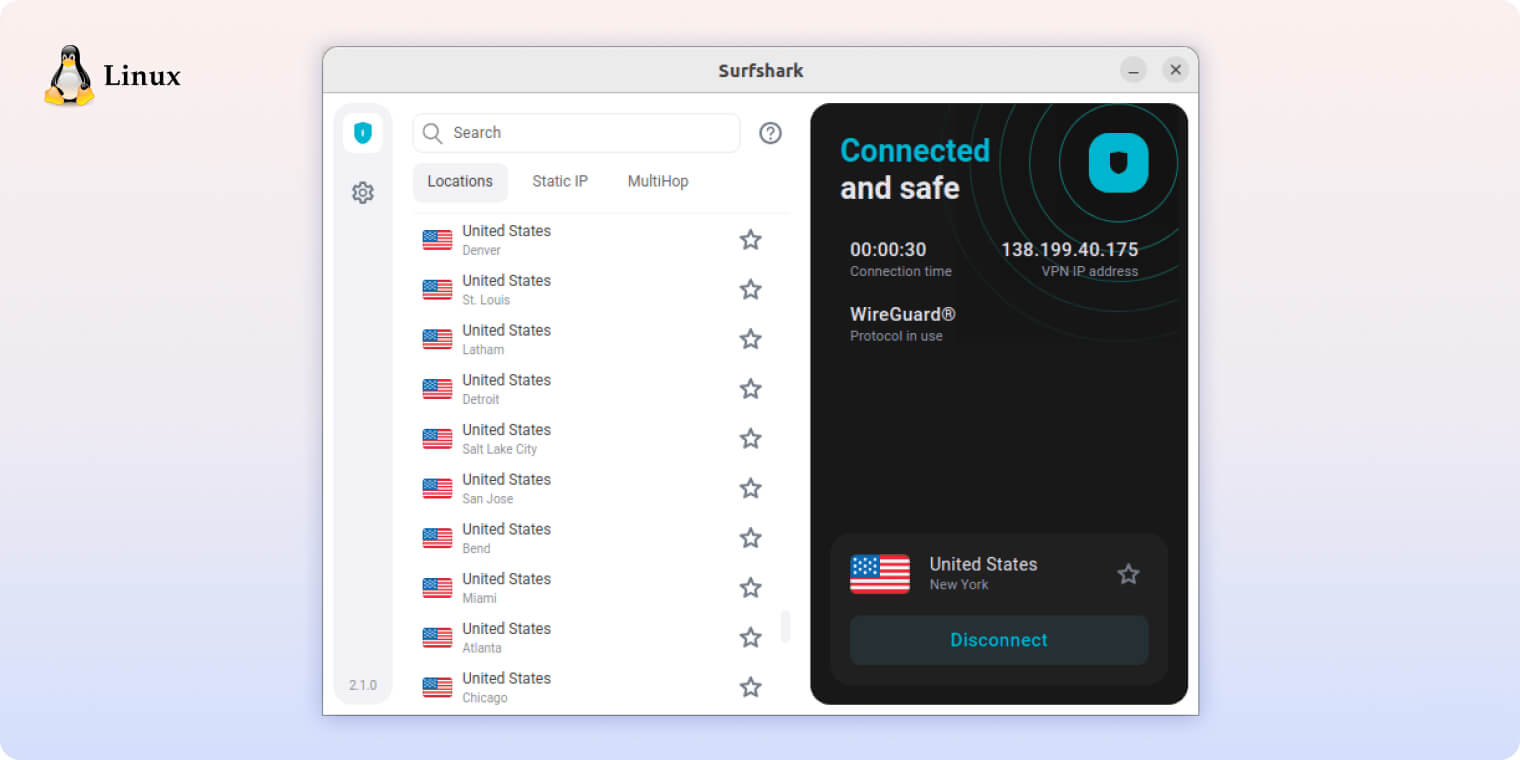
Very few VPNs offer a full GUI for Linux. Surfshark previously only had a command-line client, so it’s a big improvement that it now provides a user-friendly visual interface for Linux users.
Torrenting
Ranked #8 out of 45 VPNs for Torrenting
Surfshark is generally good for torrenting: P2P traffic is allowed on all servers, download speeds are fast, and its privacy policy and kill switch help keep your activity hidden from your ISP. However, it lacks port forwarding, some rival VPNs are faster for torrenting, and its kill switch must be turned on manually.
| Torrenting Attribute | Surfshark |
|---|---|
| Permits P2P Traffic | Yes |
| Average Download Bitrate | 8.7MiB/s (13% loss) |
| Countries with P2P Servers | 100 |
| Port Forwarding | No |
| Kill Switch | Yes |
| Logging Policy | No Identifiable Data |
All Surfshark servers allow P2P activity. We tested it with popular torrent clients like qBittorrent, uTorrent, and Deluge.
Our torrenting speed tests recorded an average download bitrate of 8.7MiB/s. This is more than fast enough for quick downloads, but some VPNs are faster: PIA and ExpressVPN reached 9.6MiB/s and 9.8MiB/s, respectively.
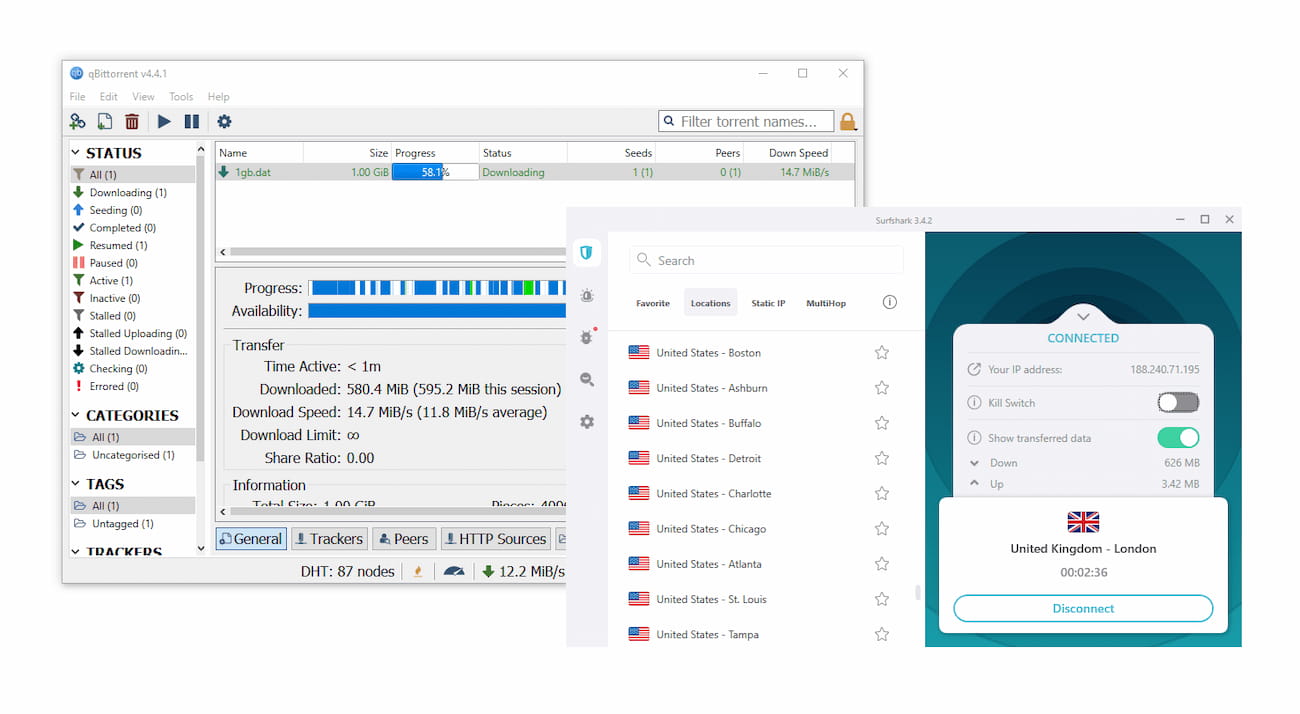
We tested Surfshark on torrent clients like qBitorrent.
Even if it’s not the absolute fastest P2P VPN, Surfshark is definitely safe for torrenting. Its privacy policy, AES-256 encryption, and first-party DNS servers ensure your torrenting activity is hidden from your ISP and copyright enforcement agencies.
This is only true, however, if you enable Surfshark’s kill switch in the settings menu. Since the kill switch is not turned on by default, we strongly recommend activating it before you start torrenting.

Surfshark’s kill switch has to be toggled on manually.
Overall, Surfshark is safe and capable for P2P file-sharing. But if you torrent frequently, you may prefer PIA, which is faster and better optimized for high-volume torrenting.
EXPERT ADVICE: Surfshark has servers optimized for P2P activity, but they aren’t clearly labeled. To find them, type “P2P” into the server search bar and you’ll see a list of P2P-optimized locations.
Device Compatibility
Surfshark is compatible with all major devices and platforms, and there’s no limit on how many devices you can use at the same time. It has dedicated apps for desktop and mobile, apps for Apple TV, Fire TV Stick, and Android TV, plus Smart DNS for devices that don’t support VPN apps. However, it does not offer a dedicated router app, which makes whole-network protection more difficult to set up.
| Windows | Yes |
|---|---|
| Mac | Yes |
| iOS | Yes |
| Android | Yes |
| Linux | Yes |
| Amazon Fire TV | Yes |
| Android TV | Yes |
| Apple TV | Yes |
| Router | Manual Setup Only |
| Chrome | Yes |
Simultaneous Connections: Unlimited
Surfshark does not limit the number of devices you can install its apps on.
We installed Surfshark on all our test devices and connected them simultaneously to Surfshark servers without any problems. The company also doesn’t threaten to terminate your account for sharing it with family members.
This is a major advantage, as most VPNs limit you to around five simultaneous connections.
Surfshark’s apps are very similar across platforms, though some features are only available on certain systems. Here’s how they compare:
| Platform | Bypasser | CleanWeb | Kill Switch | Multi-Hop | No Borders | Rotating IP | Static IP |
|---|---|---|---|---|---|---|---|
| Windows | ✓ | ✓ | ✓ | ✓ | ✓ | ✓ | ✓ |
| macOS | ✗ | ✓ | ✓ | ✓ | ✓ | ✓ | ✓ |
| Android | ✓ | ✓ | ✓ | ✓ | ✗ | ✗ | ✓ |
| iOS | ✗ | ✓ | ✓ | ✓ | ✓ | ✓ | ✓ |
| Linux | ✗ | ✓ | ✓ | ✓ | ✗ | ✗ | ✓ |
Smart DNS & Games Consoles
Smart DNS is not the same as a VPN. It’s an unencrypted proxy that changes your DNS address to another location, which allows you to access geo-restricted streaming and gaming content without changing your IP address.
This way, you can use Surfshark on your game consoles, too.
You can also access blocked content without using a VPN by installing Surfshark on your router manually. However, it does not have a dedicated app for routers like some competing VPN services, which makes installation much more difficult.
Browser Extensions
Surfshark’s Chrome, Firefox, and Edge browser extensions change your IP address and encrypt your browser traffic, but not all of your device’s internet traffic.
Some useful extra settings include an ad and pop-up blocker, a website safety warning, and a data breach alert. There is also a bypass option that allows you to select websites that avoid the VPN tunnel and the ad blocker, which is a nice touch.
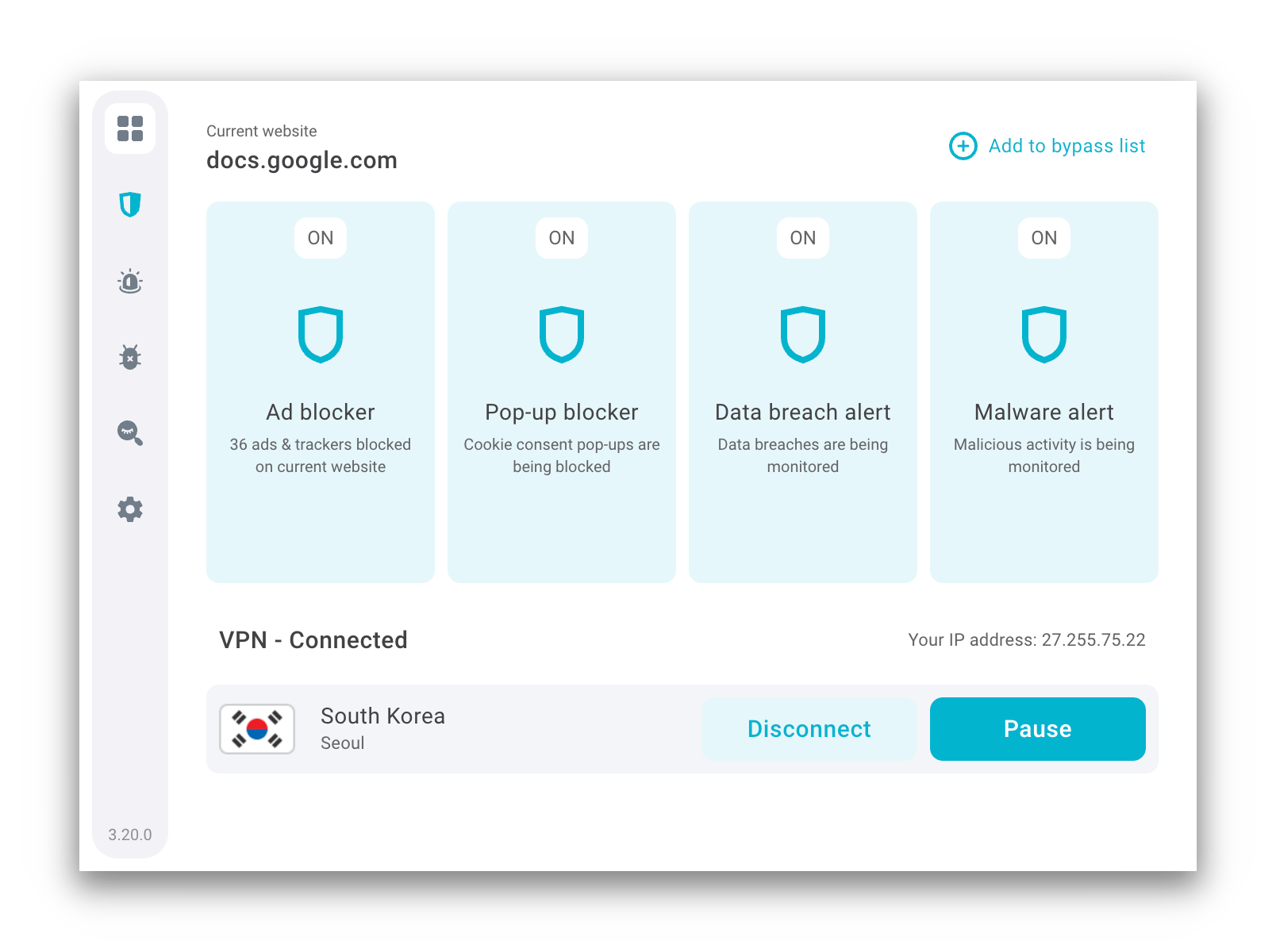
Surfshark’s browser extensions include additional features, like an ad blocker.
These extensions are not free to install like CyberGhost’s browser extensions — you have to be a paid subscriber to use them. However, they are fully encrypted VPN extensions and have been independently audited by Cure53.
Additional Features
Surfshark is an innovative VPN service known for its extensive range of additional features. It includes dedicated and rotating IP addresses, multi-hop servers, split tunneling, and an ad blocker. Surfshark also offers 24/7 live chat support and is one of the few VPNs that comes with a GPS spoofing feature. However, it falls short in bypassing censorship due to its limited obfuscation capabilities.
| Additional Feature | Surfshark |
|---|---|
| Split Tunneling | Yes |
| VPN Obfuscation | Yes |
| Multi-Hop Servers | Yes |
| Dedicated IP | Yes |
| Ad Blocker | Yes |
Double VPN, Rotating IP & Diskless Servers
Surfshark has excellent security standards, and it also offers an array of advanced security features that most VPN services can’t match.
The first additional feature is Multi-Hop, which routes your traffic through two VPN servers. Though it’s not always necessary, this means double protection.
There’s also a Rotating IP option, which is unusual. This feature changes your public IP address every 5–10 minutes without you having to switch servers.
IP rotation isn’t necessary for online protection, and some other VPNs like HMA and AtlasVPN offer similar features. However, it might appeal to the most privacy-conscious users.
Android users can also use Surfshark’s GPS Spoofing feature, which matches your GPS location to your chosen server. This is a very rare feature that helps bypass geo-blocks set by mobile apps, and it’s something we’d like to see rolled out across all of Surfshark’s apps. It is particularly useful if you want to stream blackout NHL games on Android.
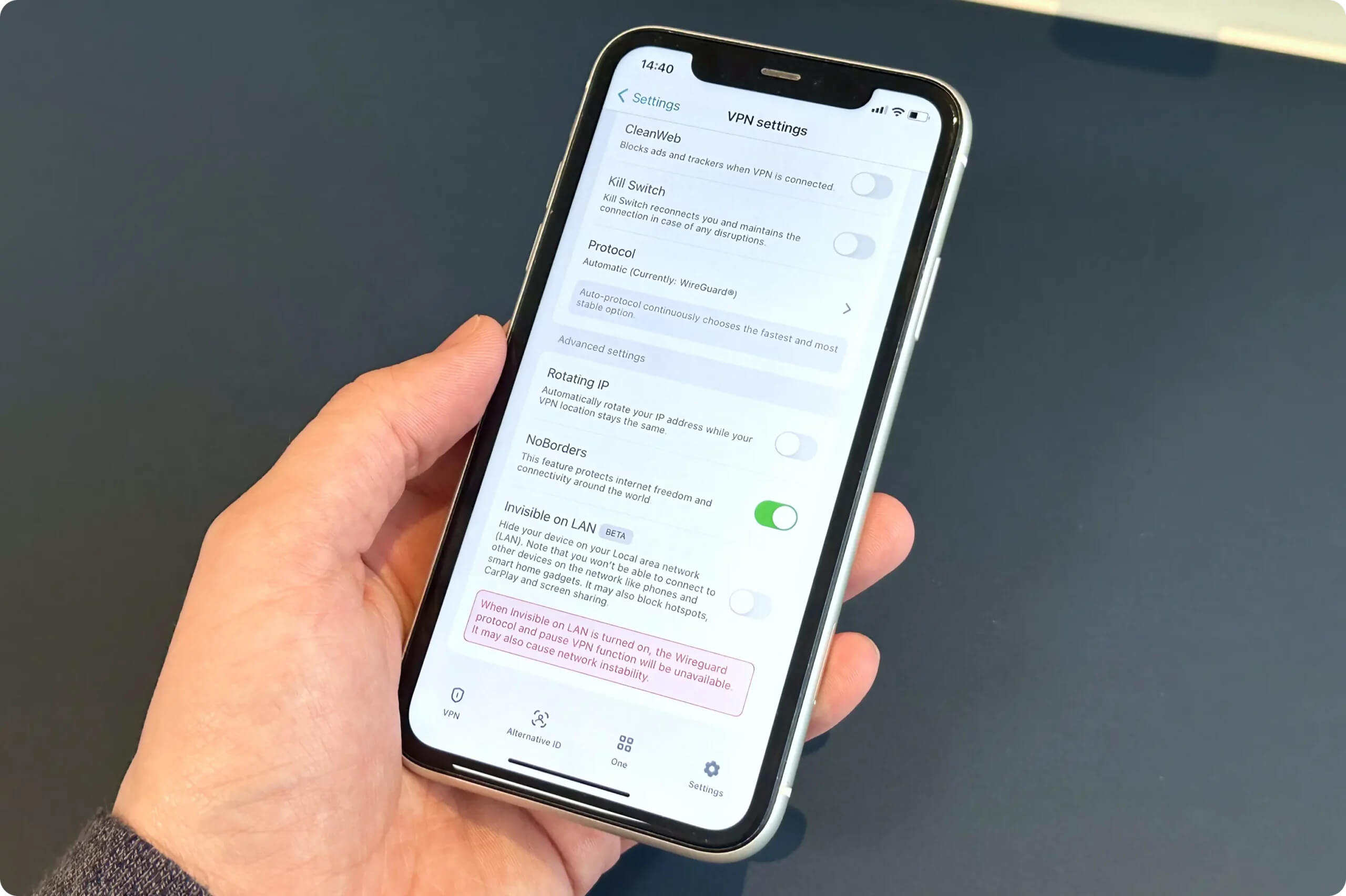
The most substantial security feature is Surfshark’s diskless server network, or RAM-only network. This means that your user data is never stored on physical servers that can be seized and examined.
For such a low asking price, the extent of Surfshark’s security offering is truly impressive. VPNs with the same advanced features usually cost two or three times more, like Astrill.
Does Surfshark Block Ads?
Surfshark has an ad blocker called CleanWeb. Our tests show that CleanWeb blocks 77% of all ads and trackers on the web. This ranks it 10th in our list of the best VPN ad blockers.
We used CleanWeb to block ads on popular sites like Spotify and Twitch, but it didn’t work for websites like Google and YouTube.
Bad for Unblocking Websites in China
Surfshark does not work well in China. We’ve been testing it using our Shanghai server every week for a year and found that it only bypasses Chinese website blocks 35% of the time.
This is a big improvement from the 18% success rate in 2023, but it’s still not effective enough for us to recommend.
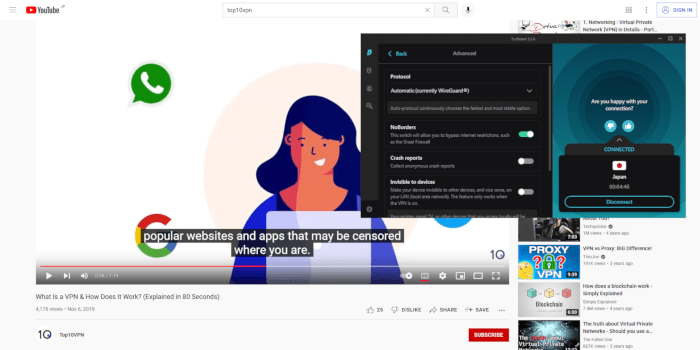
We accessed YouTube from China using Surfshark 35% of the time.
These tests were performed using Surfshark’s NoBorders mode, which is an obfuscation tool that is automatically enabled when connecting from China.
However, Surfshark is one of the few top-tier VPNs that has not yet been banned in Russia, so you can use it to bypass Russian censorship. Likewise, it can also be used in Turkey, Iran, and the UAE.
EXPERT ADVICE: If you need a VPN for China, we recommend using Astrill VPN. Our tests show that it gets around the Great Firewall 100% of the time.
Fast Customer Support, but Chatbot Is Unhelpful
Unlike VPNs such as ExpressVPN, Atlas VPN, and Proton VPN, you don’t need a Surfshark account to contact live chat support. We like that it’s accessible to everyone.
However, we aren’t pleased that Surfshark has introduced a chatbot for its 24/7 live chat. Chatbots can give basic information, but they often feel more like a barrier than a genuinely useful tool. It also communicates in English only.
That said, you can reach a human support agent quickly by asking the bot to “get me a human,” and they can respond in multiple languages.
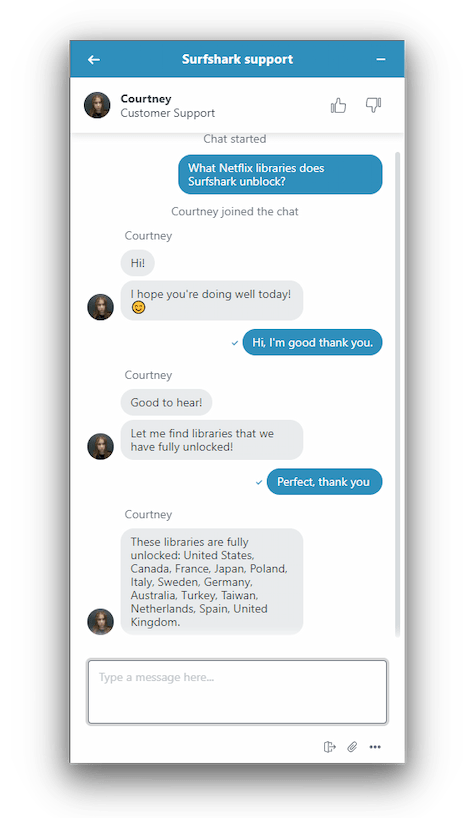
Surfshark offers quick live chat support.
We’ve been contacting the Surfshark support team for years, and the agents have always been polite and very quick to reply. They are particularly useful for recommending servers for unblocking streaming sites.
However, we find they sometimes lack technical knowledge. For more complex questions, we suggest using Surfshark’s support email.
The Surfshark website contains a lot of useful information in a well-organized manner, including visual installation guides, FAQs, and a ticket support system.
Surfshark Key Data
| Attribute | Surfshark | Typical VPN |
|---|---|---|
| Owner | Cyberspace | Independent |
| Launch Date | 2018 | 2015 |
| Local Download Speed | 96Mbps (4% loss) | 89Mbps (11% loss) |
| International Download Speed | 83Mbps (17% loss) | 80Mbps (20% loss) |
| Countries with Servers | 100 | 40 |
| Privacy Policy | No Identifiable Data | Identifiable Data |
| Simultaneous Connections | Unlimited | 10 |
| Netflix Libraries | 9 | 3 |
| Torrenting | Yes | Yes |
| Works In China? | Sometimes | No |
| Cheapest Price | 1.99/mo over 27 months | $3.87/mo over 24 months |
| Customer Support | 24/7 Live Chat | |
| Apps & Extensions |
          |
|
Price
Price Plans
| 1 month | $15.45 |
|---|---|
| 15 months | $47.85 ($3.19/mo) |
| 27 months | $53.73 ($1.99/mo) |
Free Trial
| Money-Back Guarantee | 30 days |
|---|---|
| Free Trial | 7 days (mobile & Mac) |
| 100% Free Plan | No |