A Virtual Private Network (VPN) is software that creates an encrypted connection between your device and a remote server, hiding your real location from the websites and applications you use. This allows you to bypass geo-restrictions, hide your browsing activity from ISPs, and stop bad actors from intercepting your data on compromised Wi-Fi networks.
VPN software works by encrypting your internet traffic and routing it through a remote server before it reaches the website, service, or application you want to use.
There are several types of virtual private networks, but by far the most common are personal VPNs, which anyone can install and use on their own devices.
In this beginner’s guide to VPNs, we’ll explain what a VPN is, how it works, the different types of VPN configurations, and the main benefits and limitations of using a personal VPN.
How Does a VPN Work?
A VPN works by creating an encrypted connection between your device and a remote VPN server. This secure connection is called the VPN tunnel.
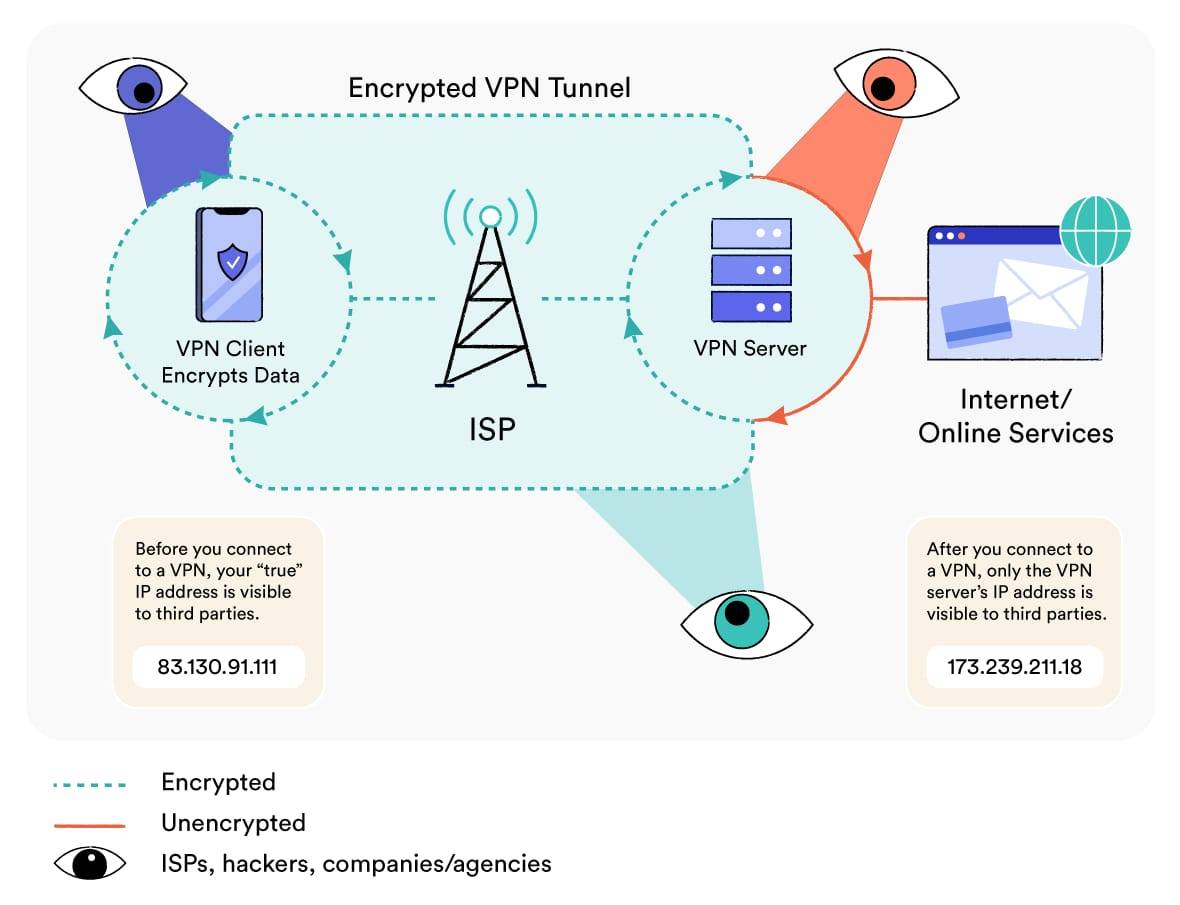
Once connected, all the data leaving your device is sent through the VPN tunnel to the VPN server. The VPN server then forwards it to the website you’re visiting, the application you’re using, or the company network you’re accessing remotely.
Data from the website or application then travels back to your device along the same route. It is first sent to the VPN server, which then passes it through the VPN tunnel to your device.
There are five key stages to this process:
1. Handshake & Authentication
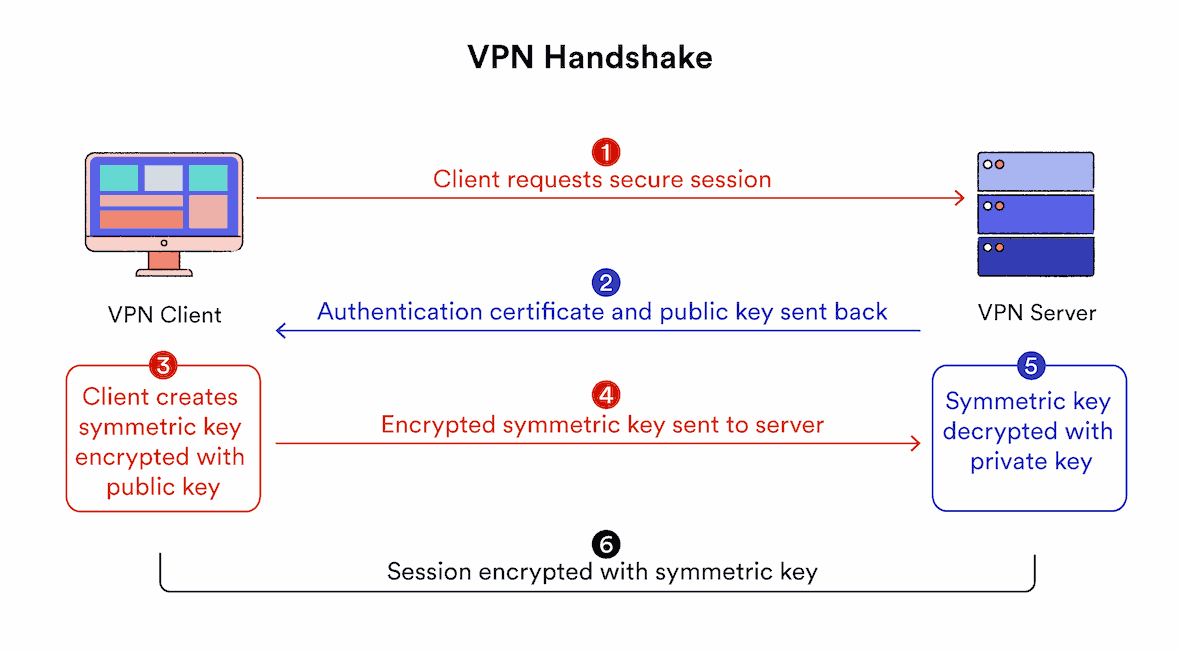
The VPN software on your device and the VPN server first authenticate each other. This is known as the VPN handshake.
During the handshake, the VPN client starts a connection to the VPN server, indicating that it wants to create a secure tunnel. The two computers then verify their identities using a password, digital certificate, or another authentication method.
Once authentication is complete, this connection is used to securely exchange an encryption “key” between the client and server. This key is used to encrypt and decrypt data at both ends of the VPN tunnel for the entire browsing session.
EXPERT ADVICE: For fast and secure VPN handshakes, look for VPN services that use the RSA-2048 or RSA-4096 algorithm (not RSA-1024). For extra protection, we also recommend VPN protocols that support Perfect Forward Secrecy.
2. Encryption
With the connection to the VPN server established, the VPN client on your device uses the agreed-upon key and an encryption cipher to encrypt all your internet activity.
In simple terms, this means all the plain-text data from your web traffic is turned into strings of letters and numbers that only someone with the correct decryption key can read.
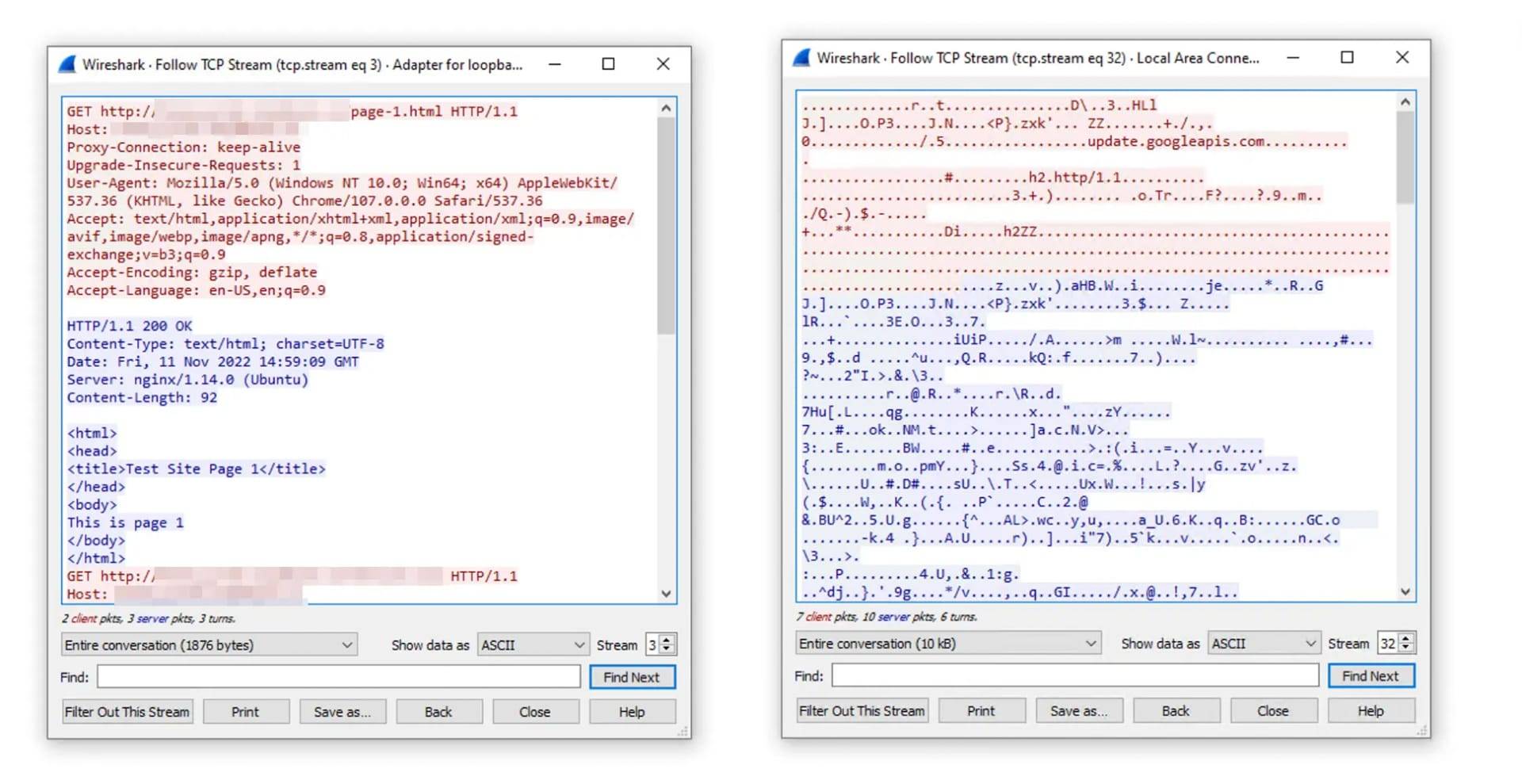
Web traffic before and after connecting to a VPN with AES-256 encryption.
3. Encapsulation
Your encrypted traffic is then wrapped in an extra layer of unencrypted data that contains information on how to route it to the VPN server. This process is called encapsulation and is handled by dedicated VPN tunneling protocols.
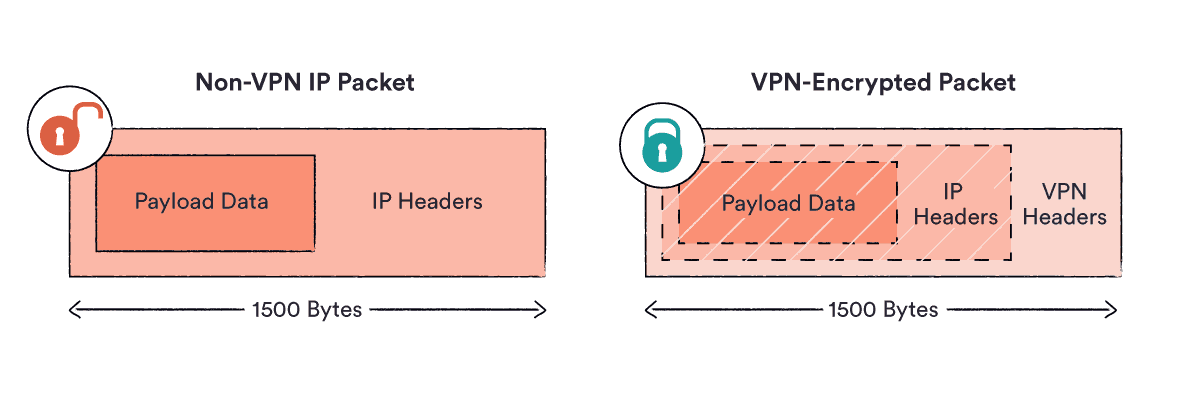
It’s like putting an envelope with a letter inside another envelope with a different address on it. Your actual message is completely hidden from the outside world.
Your VPN client then gives the encapsulated traffic to your ISP, which sends it to the VPN server. Because of the encryption, the only thing the ISP can see is the VPN server’s IP address.
4. Decryption, Forwarding, and Re-Encryption
When the data reaches the VPN server, the outer encapsulation layer is removed, and the original data is decrypted using the encryption key.
This is like opening the outer envelope to reveal the original message inside, giving the VPN server access to the true destination of your connection request.
The server then forwards your request to the website, service, or application you want to reach.
When the web server responds, it sends the data back to the VPN server, where it is encrypted again and sent back through the VPN tunnel until it reaches your device.
The VPN client software on your device then decrypts the data so it can display correctly on your screen.
5. Hash Authentication
As a final protection, the VPN service also uses Secure Hash Algorithms (SHA) to verify the integrity of transmitted data and client-server connections. These checks ensure that no information has been changed in transit between the source and destination.
If the hash value the client generates is different from the hash value the server generated, it means the message has been tampered with and the data is rejected. If the values match, the data is accepted.
NOTE: SHA hash authentication is crucial for preventing man-in-the-middle attacks.
VPN Protocols & Encryption Ciphers
This process can use different protocols and encryption ciphers, depending on the VPN service and how it is configured.
The VPN protocol controls how the VPN tunnel is created, while the encryption cipher is used to encrypt the data that travels through that tunnel.
Depending on the protocol, a VPN can have different speeds, features, and potential vulnerabilities. Most services let you choose which protocol to use in the app settings.
Here’s a quick overview of the most common VPN protocols:
- OpenVPN: Open-source, secure, and compatible with almost all VPN-capable devices.
- WireGuard: Very fast, safe, and data-efficient.
- IKEv2/IPsec: Excellent for mobile VPN users, but may be compromised by the NSA.
- SoftEther: Great for bypassing censorship, but not supported by many VPN services.
- L2TP/IPsec: A slower protocol that is also suspected of being hacked by the NSA.
- SSTP: Deals with firewalls well, but may be vulnerable to man-in-the-middle attacks.
- PPTP: Outdated, insecure, and should be avoided.
The encryption cipher is the algorithm (a set of rules) used to encrypt and decrypt data.
Ciphers are usually paired with a specific key length. In general, the longer the key, the more secure the encryption. For example, AES-256 is considered more secure than AES-128. Where possible, we recommend using a VPN with AES or ChaCha20 encryption.
Four Main Types of VPN Configurations
There are different types of VPN depending on the kind of connection a user needs.
Personal VPN services are designed for everyday internet users who want better online privacy, security, and access. For this reason, they are sometimes called consumer VPNs.
By contrast, remote access VPNs, mobile VPNs, and site-to-site VPNs are all types of business VPN. They are designed to give remote employees secure access to internal company resources.
Below is a quick overview of the four main types of virtual private networks and how they differ:
1. Personal VPN Services
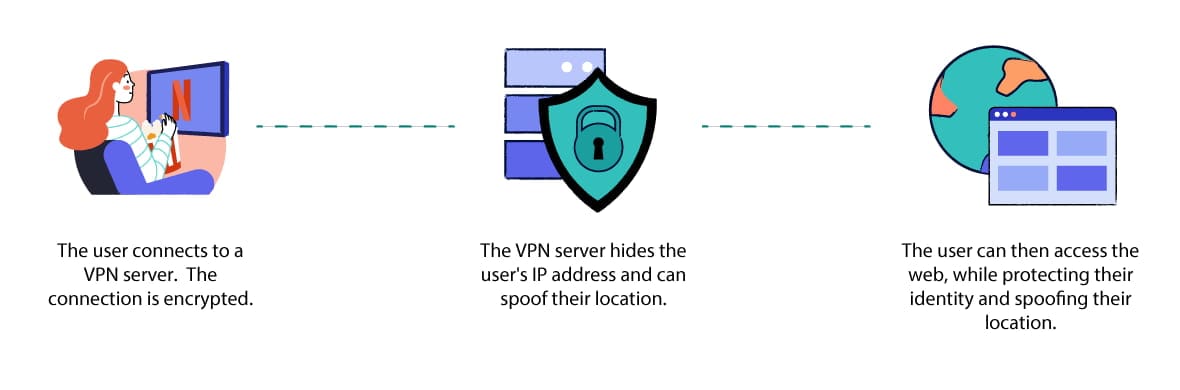
A personal VPN service hides your IP address and browsing history while you use the internet in your free time.
A personal VPN service gives individual users encrypted access to a remote VPN server owned by the VPN provider.
It lets users create a secure connection to servers in many different locations, which they can then use to protect their identity, spoof their geographic location, and avoid surveillance while browsing the internet.
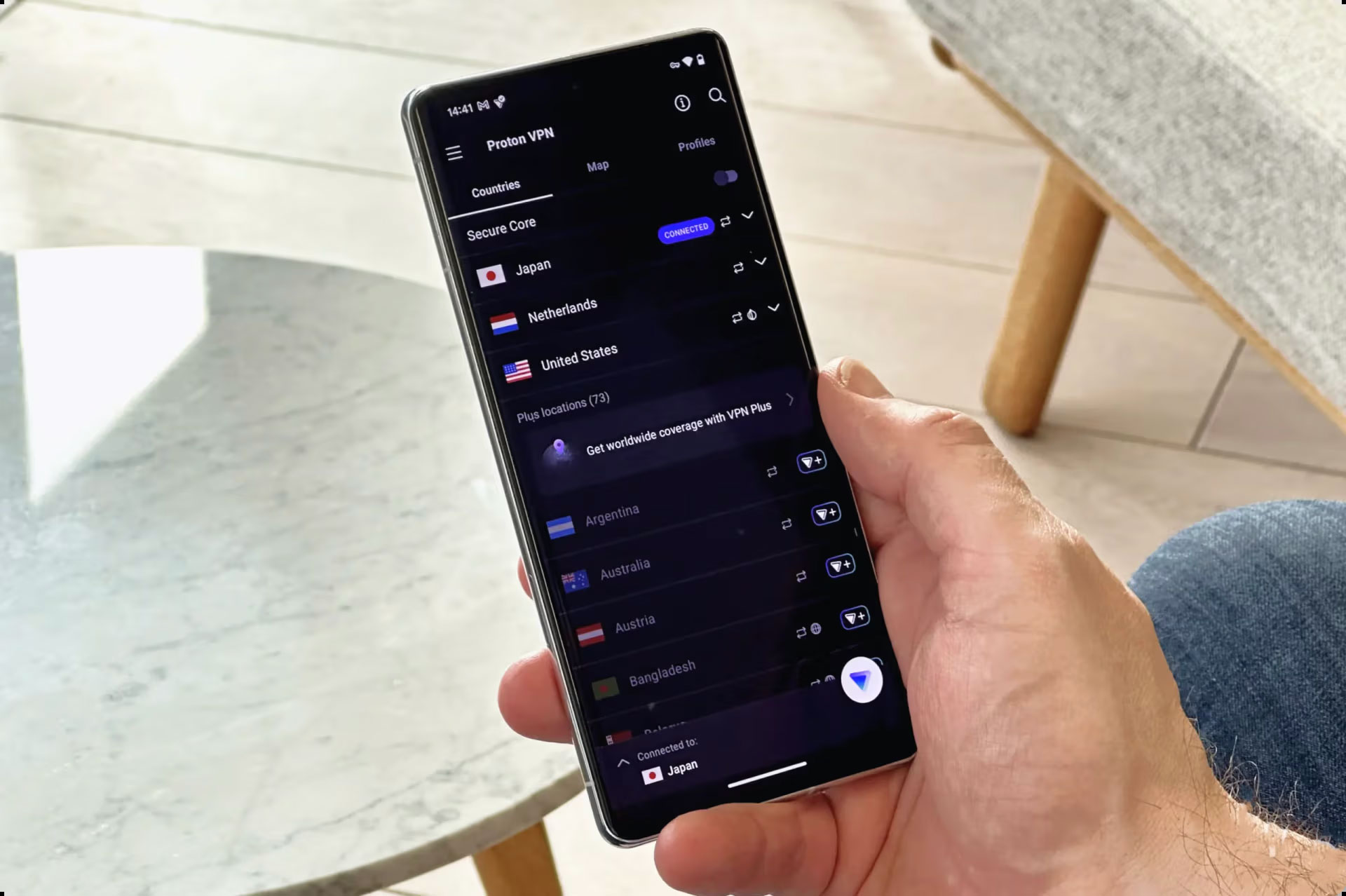
Using Proton VPN, a personal VPN service, on an Android phone.
They can be used on most devices, including iOS and Android smartphones, macOS and Windows computers, and even installed directly on your home Wi-Fi router.
Personal VPNs are the most common type of VPN service, and they are also the type of VPN we focus on here.
2. Remote Access VPNs
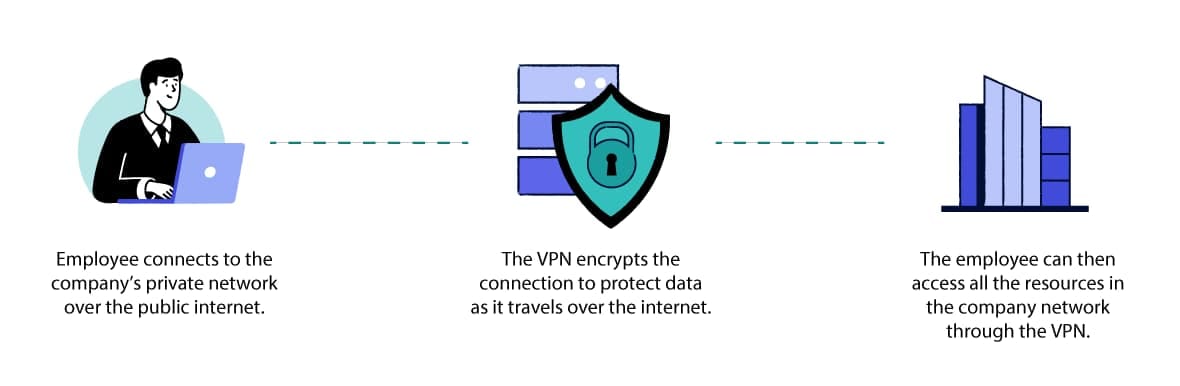
Companies use remote access VPNs to keep important information private.
Remote access VPNs give employees encrypted access to a company’s internal network while they work remotely. They are the most common type of business VPN.
Unlike personal VPN services, remote access VPNs are not designed for users who just want to access public online services and applications.
Instead, their purpose is to allow employees to securely access company resources, files, and applications from any location, and to ensure that any company data transmitted is protected from unauthorized access or interception.
Popular examples of remote access VPNs include Access Server by OpenVPN and Cisco AnyConnect.
3. Mobile VPNs
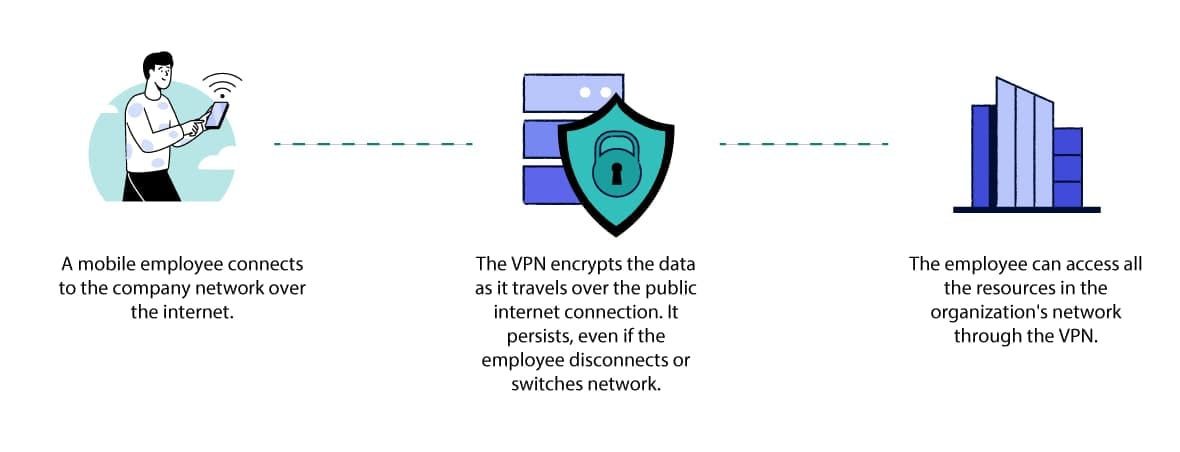
A mobile VPN connection persists even when there’s poor signal.
A mobile VPN is similar to a remote access VPN in that it securely connects remote employees to a company network.
However, while remote access VPNs are designed for users working from a fixed location, mobile VPNs are designed for users who frequently switch between cellular and Wi-Fi networks or whose connection is likely to drop from time to time.
A mobile VPN is built to stay connected despite these interruptions and instability. They are particularly useful for mobile workers, such as firefighters or police officers.
Importantly, mobile VPNs are compatible with any device and any network connection. They are not only for smartphone users.
4. Site-to-Site VPNs
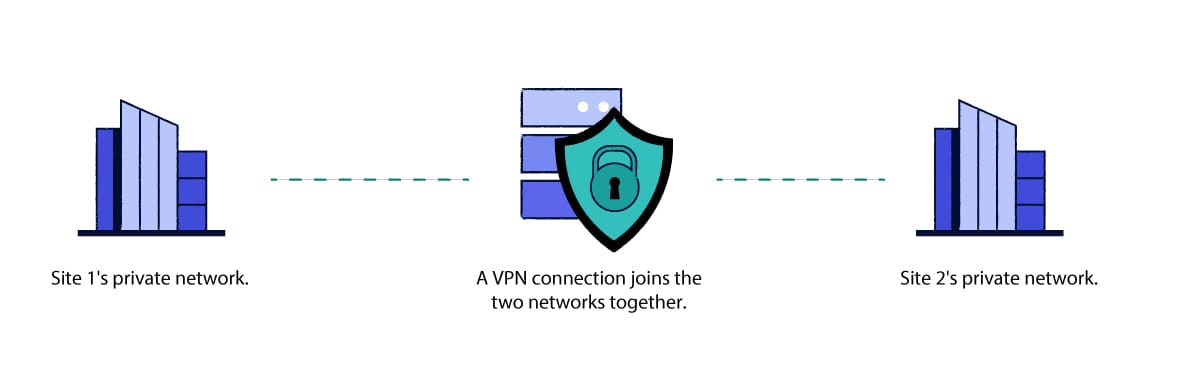
Companies might use site-to-site VPNs if they have offices in different locations.
Site-to-site VPNs are used to securely link a single company network across multiple offices or premises in different physical locations.
They differ from other types of business VPN because they are designed to connect two or more networks together, rather than connecting an individual employee to the office network.
Pros and Cons of Personal VPNs
As mentioned above, at Top10VPN we focus mainly on testing and reviewing personal VPNs. There is still a lot of false or misleading information about what they can and cannot do.
This misinformation makes it harder for beginners to know whether they really need a VPN.
So let’s clarify a few key points. A personal VPN has two primary benefits:
- It hides your IP address and geographic location from the websites, services, and applications you use. Without this information, it becomes much harder to link your online activity to your identity, which in turn makes it more difficult to track, profile, or block you.
- It hides your activity from your ISP or network administrator. Encrypting your data transfers makes it extremely difficult for your ISP, mobile carrier, Wi-Fi administrator, or eavesdroppers on a public Wi-Fi network to see which websites you visit, which files you upload or download, or any personal details you enter into HTTP websites.
Thanks to these two functions, a VPN can be used for various purposes related to better internet privacy, security, and access.
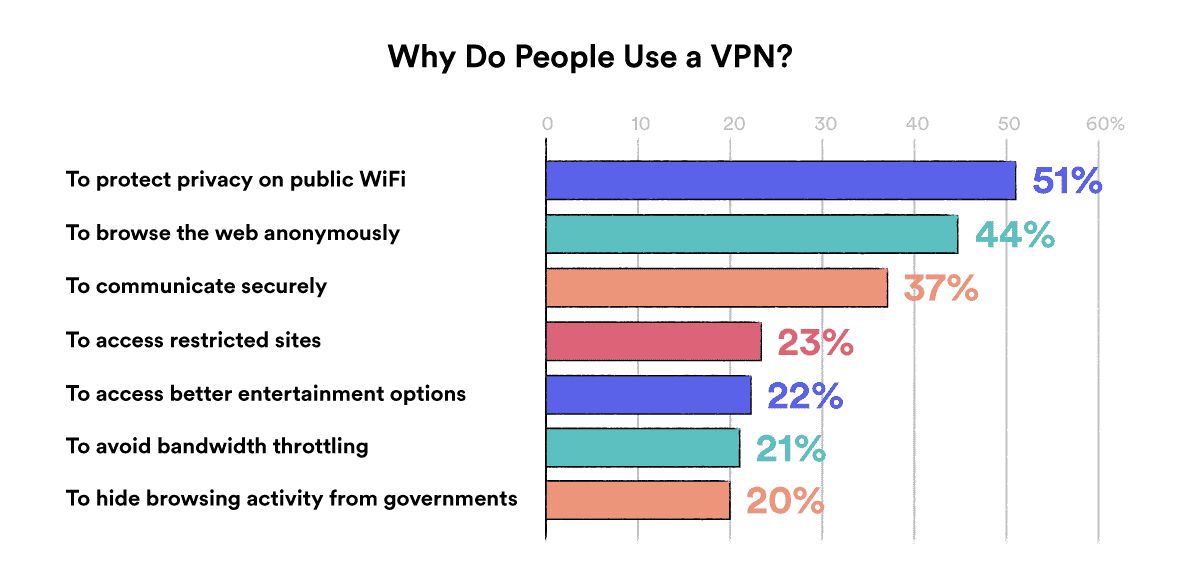
Here are the most popular reasons people use a VPN, based on a survey we conducted in collaboration with GlobalWebIndex:
And the table below summarizes everything you can and can’t do with a VPN:
| What you can do with a VPN | What you cannot do with a VPN |
|---|---|
| Protect yourself from traffic interception and Man-in-the-Middle attacks when using unsecured public WiFi networks. | Protect yourself from all forms of cyberattack, particularly those that trick you into downloading malware or disclosing personal information. |
| Spoof your location in order to unblock geo-restricted movies and TV shows, video games, or sport events that are not available in your geographic region. | Hide your physical location from websites and applications that use WiFi Location Tracking. Most VPNs can’t spoof your device’s GPS location data, either. |
| Make it harder for ISPs, advertisers, schools, employers, and government agencies to monitor and record your browsing activity. | A VPN will not stop a determined entity from tracking you via cookies, fingerprinting, or behavior profiling, for example. |
| Prevent your ISP from throttling your connection while streaming, gaming and torrenting. | Watch Netflix, HBO Max, or any other streaming service for free. |
| Access websites and material that’s censored by the government, or unblock websites at school and work. | Hide your browsing activity from employers and school WiFi admins that use screen monitoring software. |
| Bypass IP-based website bans. | Prevent your ISP from knowing your real IP address and location. |
| Avoid location-based price discrimination while shopping online. | Avoid price discrimination tactics that rely on tracking cookies or other forms of profiling based on browsing behavior. |
| Give remote employees reliable and secure access to sensitive files and resources on the company’s internal network. | Bypass email- or account-based website bans. |
| Hide how much data you are consuming from your ISP or cell phone carrier. A VPN will actually increase how much data you use. |
Summary
The post explains what a VPN is, how it technically works (tunneling, encryption, authentication), outlines main VPN protocols and four configuration types, and clarifies the real benefits and limitations of personal VPNs for privacy, security, and access.