
Psiphon: Free Proxy Outperforms the Paid VPN—But Both Fall Short
 Ranked #42 out of 45 VPNs
- Pros
- Free apps don’t require email address or payment details
- Open source code increases transparency
- Unblocks BBC iPlayer
- Cons
- No apps for Linux or routers
- VPN mode uses unsafe L2TP/IPSec protocol
- Proxy mode doesn’t encrypt traffic
- Extremely slow speeds
- macOS app requires M1 chip
- Pros
- Open source code increases transparency
- Cons
- No server choice with VPN mode on Windows
- No apps for Linux or routers
- macOS app requires M1 chip
- VPN mode uses unsafe L2TP/IPSec protocol
- Proxy mode doesn’t encrypt traffic
- Extremely slow speeds
Psiphon is a free censorship-circumvention service that’s often praised by internet freedom advocates such as Access Now.
However, our testing found Psiphon to be a poor VPN and proxy in almost every respect. It logs your IP address and browsing activity, fails to unblock censored websites in China, delivers very slow speeds, leaks DNS requests, and lacks a kill switch.
It includes two tools: a circumvention proxy and a VPN mode. Confusingly, the free proxy is marginally better than the VPN in some categories.
Psiphon Free Proxy lets you choose servers in 21 countries on Android, but it does not encrypt your web traffic, so it won’t hide your browsing history. Psiphon also monitors the domains you visit and stores your IP address for up to 90 days, and it shares aggregated user data with advertisers and sponsors.
In contrast, Psiphon VPN doesn’t let you choose a server location. You’re assigned one at random, most likely in Singapore.
Psiphon Free Proxy has poor speeds that rarely exceed 4 Mbps on a local connection. It’s too slow for streaming or online gaming—though it may be sufficient for loading basic web pages in some regions.
To make things more confusing, there are two separate apps on the Google Play Store: Psiphon and Psiphon Pro. Neither mobile app includes a VPN mode; both use Psiphon’s unsafe Free Proxy service.
Despite its reputation, we do not recommend Psiphon for privacy or security. If you need a free VPN in a highly censored region, we recommend Windscribe Free instead.
EXPERT ADVICE: There are fake apps impersonating Psiphon that contain spyware and malware. To avoid this risk, we suggest steering clear of this service altogether.
Privacy
We can’t recommend any VPN with a logging policy like Psiphon’s. It records your browsing activity, bandwidth usage, connection timestamps, and IP address. For a tool meant for use in highly censored countries, this poses potentially serious risks.
| Originating IP Address | Yes |
|---|---|
| Browsing Activity | Yes |
| Individual Connection Timestamps | Yes |
| Date of Last Connection | Yes |
| VPN Server IP | Yes |
| Device Information | No |
| Individual Bandwidth Usage | Yes |
| Account Information | Yes |
You can read Psiphon’s full privacy policy on its website.
Psiphon’s logging policy is intrusive. It collects detailed activity and connection logs, as explained in its privacy policy.
Psiphon monitors the domain names (websites) you visit while connected, though not full URLs. It also saves your IP address to determine your location and keeps that data for an unspecified period.
At least Psiphon doesn’t require payment information or an email address to use the free app, which is a plus.

Psiphon’s privacy policy is unnecessarily intrusive.
All the data Psiphon collects is deleted after “at most” 90 days, which is longer than we’d like. Ideally, it wouldn’t be recorded at all, or it would be deleted within 30 days, like Hide.me.
Psiphon also shares user information with advertisers and sponsors. They can see, for example, how often their sites are visited through Psiphon and from which countries. These metrics are aggregated by date, sponsor, and region.
Psiphon states that it will not share detailed or “potentially user-identifying information” with partners or other third parties, but we still don’t recommend it for privacy. With so many logs, Psiphon cannot be trusted to keep you private or anonymous.
In fact, Psiphon clearly states that its software should not be considered a privacy tool, and therefore we do not recommend it as one. Here are some privacy-friendly, no-logs VPNs you should consider instead.
EXPERT ADVICE: Psiphon is a poor choice for privacy. If you want a safe VPN that won’t log your IP address or web traffic, read our PIA review instead.
Streaming
Psiphon isn’t designed for streaming, so it’s not surprising that it falls short. The Psiphon VPN is almost useless for unblocking streaming services because you can’t choose a server in a specific country. However, using the free Psiphon Proxy, we were able to access BBC iPlayer, Channel 4, Amazon Prime Video, and HBO Max. That’s decent, but the speeds are so slow that Full HD videos buffer constantly.
| Streaming Service | Works with Psiphon Proxy (Free) | Works with Psiphon VPN |
|---|---|---|
| BBC iPlayer (UK) | Yes | No |
| DAZN (Canada) | No | No |
| Disney+ (UK) | No | No |
| Hulu (US) | No | No |
| ITVX (UK) | No | No |
| HBO Max (US) | Yes | Yes |
| Netflix (US) | No | No |
| Netflix (UK) | No | No |
| Prime Video (US) | No | Yes |
| Sky Go (UK) | No | No |
Psiphon isn’t a reliable VPN for streaming. The VPN didn’t work with Netflix US, DAZN, or Disney+ in our tests.
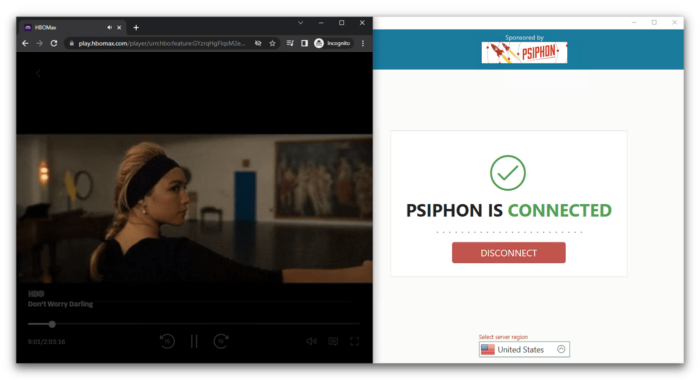
We unblocked Don’t Worry Darling on HBO Max with Psiphon’s proxy service, but the video was low quality and kept buffering.
We also unblocked BBC iPlayer with Psiphon Proxy Free, but the video took a long time to load because of slow speeds.
To be fair, Psiphon wasn’t designed to bypass streaming geo-blocks. Still, we expect a top anti-censorship tool to handle this, as we saw in our tests with ExpressVPN.
Speed
Psiphon is the slowest service we’ve tested. Psiphon Free Proxy limits speeds to 2Mbps, which is too low for most web activities. Even with the paid SpeedBoost on Windows, our speeds were heavily constrained by Psiphon’s automatic server selection, which often doesn’t match your physical location.
To evaluate Psiphon VPN’s speeds, we purchased the SpeedBoost upgrade for $3.00 per month. We then measured performance by comparing our internet speeds before and after connecting to a VPN server.
Here’s how Psiphon SpeedBoost performed on a 100Mbps connection:
| No VPN (New York) | US (New York) | Canada (Toronto) | UK (London) | Germany (Berlin) | Japan (Tokyo) | |
|---|---|---|---|---|---|---|
| Server Location |  |
|
 |
 |
 |
 |
| Download Speed | 100Mbps | 39Mbps | 3Mbps | 3Mbps | 0Mbps | 2Mbps |
| Upload Speed | 100Mbps | 4Mbps | 1Mbps | 3Mbps | 1Mbps | 2Mbps |
| Ping | 1ms | 476ms | 322ms | 444ms | 434ms | 1469ms |
| Distance | 0mi | 5mi | 300mi | 3,500mi | 4,000mi | 6,700mi |
With SpeedBoost, we registered awful 61% speed loss on local connections. These service is incredibly slow, especially considering the price of a monthly subscription.
Psiphon simply isn’t intended to be used for HD streaming, torrenting, or gaming. It’s much too slow for these activities.
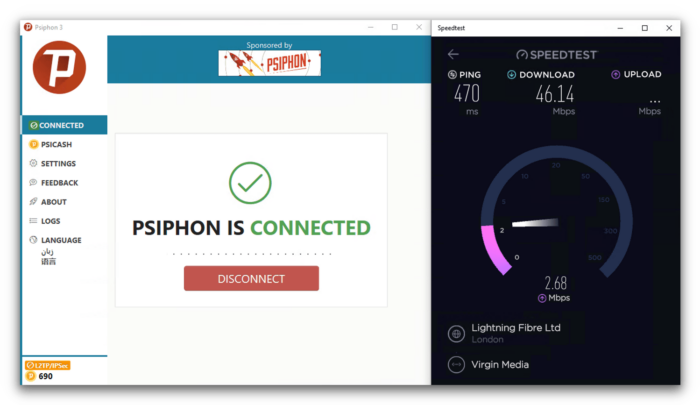
In our speed tests, we couldn’t choose a country-specific server in VPN mode.
Unfortunately, we couldn’t run our usual tests with Psiphon VPN because it doesn’t allow selecting a server by country. You’re randomly assigned a server, often in Singapore, even if you’re on a different continent.
Psiphon Free Proxy Speed Tests
Psiphon Free is extremely slow, even for a free proxy. In our tests, we recorded a 95% speed loss when connected to a nearby server in the US.
Based on these results, it’s clear that Psiphon throttles its free proxy servers.
These are the slowest speeds among the 61 VPN services we’ve reviewed. Put simply, Psiphon Free Proxy is too slow for most uses.
| No VPN (New York) | US (New York) | Canada (Toronto) | UK (London) | Germany (Berlin) | Japan (Tokyo) | |
|---|---|---|---|---|---|---|
| Server Location |  |
|
 |
 |
 |
 |
| Download Speed | 100Mbps | 5Mbps | 3Mbps | 3Mbps | 0Mbps | 2Mbps |
| Upload Speed | 100Mbps | 1Mbps | 1Mbps | 3Mbps | 1Mbps | 2Mbps |
| Ping | 1ms | 433ms | 322ms | 444ms | 434ms | 1469ms |
| Distance | 0mi | 5mi | 300mi | 3,500mi | 4,000mi | 6,700mi |
There are free VPNs like PrivadoVPN Free and Proton VPN Free that have recorded speeds more than 10 times faster than Psiphon in our tests.
Security
The VPN uses AES-256 encryption, but Psiphon shouldn’t be relied on for security. It uses the outdated L2TP/IPSec protocol, none of its apps include a kill switch, and it leaks data through WebRTC. Worse, its proxy mode doesn’t encrypt web traffic at all. We also observed DNS leaks with both its paid and free tiers, in both VPN and proxy modes.
| Independent Audit | Yes |
|---|---|
| VPN Kill Switch | No |
| Leak Protection | No |
Psiphon VPN uses only L2TP/IPSec instead of our preferred OpenVPN protocol. It’s reasonably secure with AES 256-bit encryption, but it’s unnecessarily weaker than many competitors.
Importantly, unlike the VPN app, Psiphon’s proxy service does not encrypt your internet traffic.
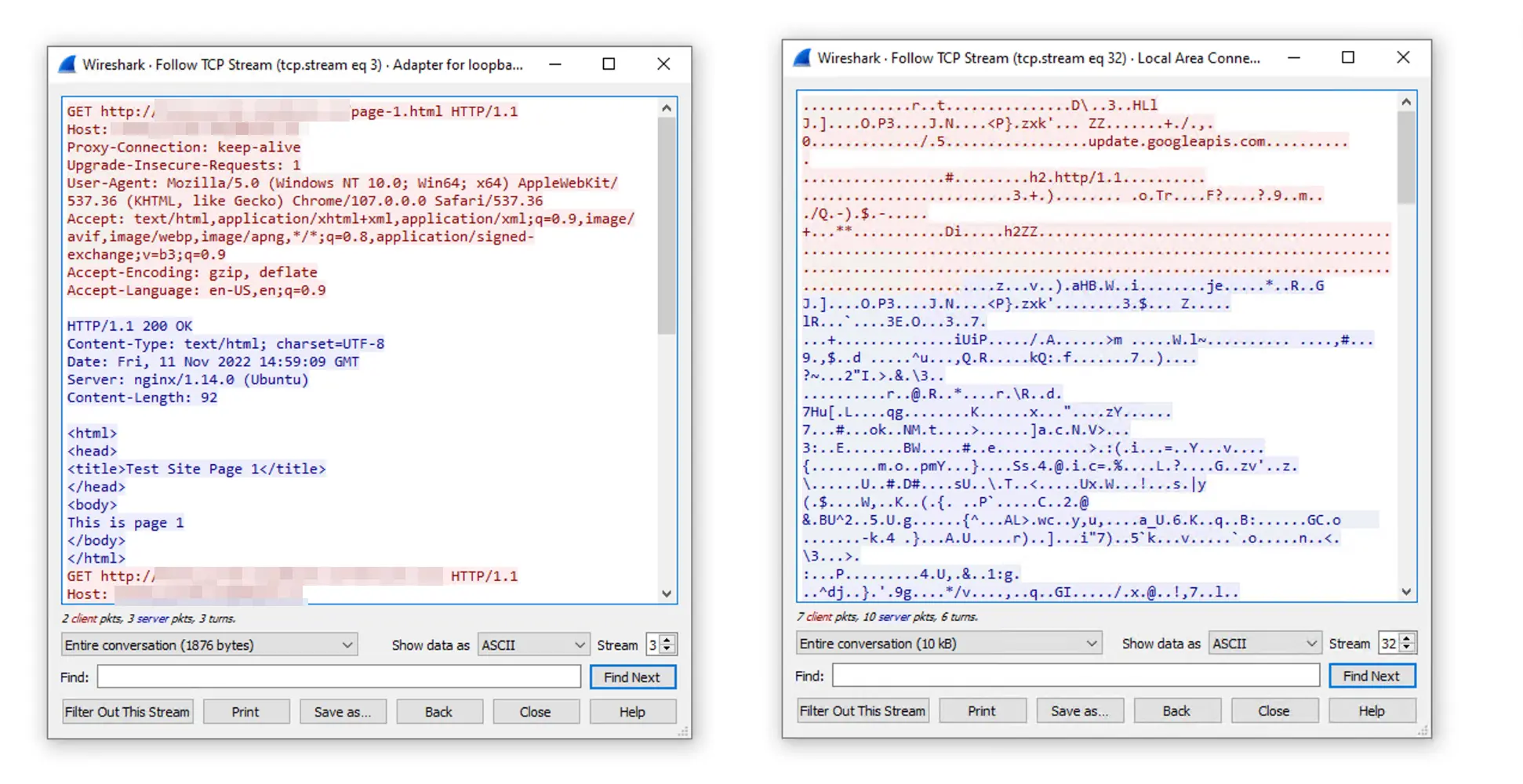
Using Wireshark, we tested whether Psiphon’s proxy (image on the left) and VPN (image on the right) properly encrypted traffic.
Psiphon’s proxies use SSH, SSH+ (obfuscated), and HTTP configurations. Because Psiphon’s primary goal is to bypass censorship via the SSH+ proxy, its apps offer few advanced privacy settings.
There is no VPN kill switch, which would otherwise prevent your IP address from being exposed if the connection drops.
Security Flaws & Independent Audit
While Cure53’s 2017 security audit of Psiphon reported “no noteworthy security risks,” our tests still found several leaks affecting both the VPN and the proxy service.
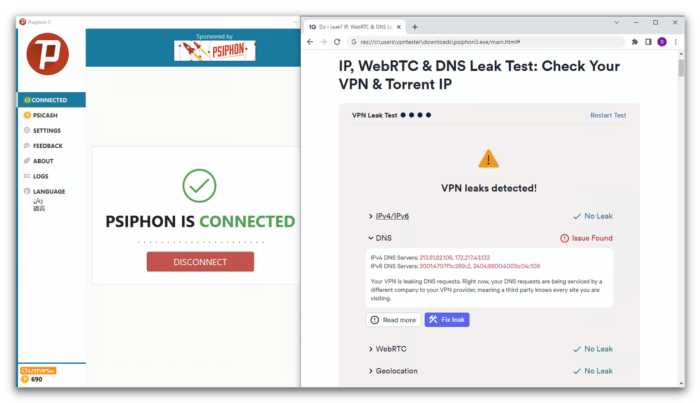
In our tests, Psiphon VPN leaked DNS requests.
Our testing of the Windows app revealed DNS leaks, and we previously observed WebRTC leaks as well. Without a kill switch, these leaks can leave your personal data exposed to third parties.
The screenshot below shows that Psiphon’s proxy also leaked DNS, WebRTC, and geolocation data during our testing.
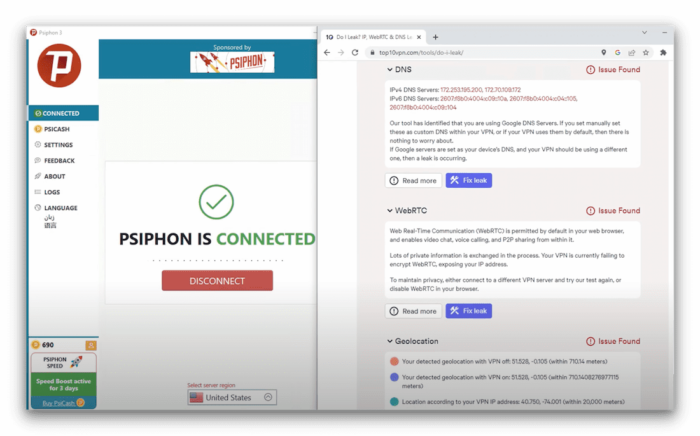
Psiphon also leaked DNS requests and more in proxy mode.
Only 16% of the 90 most popular free VPNs we’ve tested leak DNS requests, including Psiphon. There are far more secure and private free VPNs available, and even affordable no-logs options like PrivateVPN.
In 2019, a follow-up audit of Psiphon’s apps by Cure53 had “mixed” results, with particular criticism of the Windows app,
Noting that several parts of the application felt heavily outdated.
In 2021, Psiphon engaged another auditor, 7ASecurity, which provided a more positive assessment.
No Viruses, but Lots of Trackers and Permissions
Using VirusTotal, we scanned Psiphon’s app and found no malware or viruses.
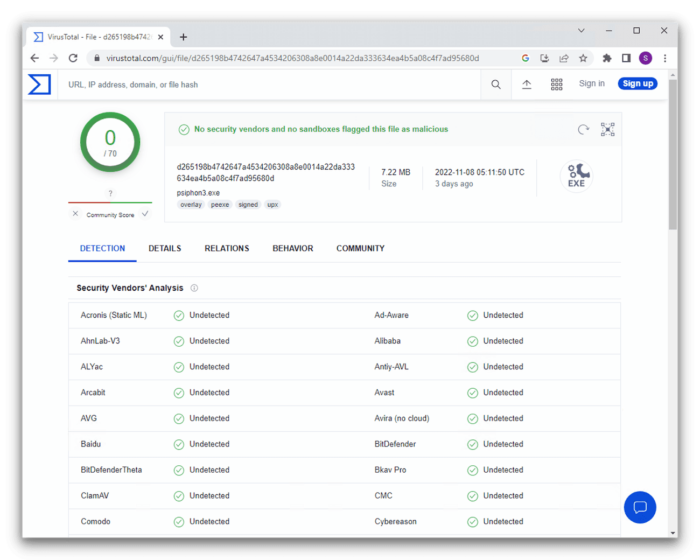
Virustotal found no anomalous software in the Psiphon App, which is a direct download.
However, we found more than 20 intrusive permissions and trackers in the Psiphon Pro Android app. Combined with Psiphon’s invasive privacy policy, we cannot recommend this VPN and proxy service.
Server Locations
Psiphon offers a decent number of server locations on mobile, but the global coverage is weak. Users in Africa, Central or South America, and Oceania have no options at all. And on desktop, you can’t even choose which server you connect to.
| Continent | Psiphon Proxy (Free) Countries with Servers |
Psiphon VPN Countries with Servers |
|---|---|---|
| Europe | 18 | 18 |
| North America | 2 | 2 |
| Asia | 1 | 1 |
| South America | 0 | 0 |
| Africa | 0 | 0 |
| Oceania | 0 | 0 |
The number of Psiphon VPN servers used to depend on the app you were using. In the past, the proxy and VPN offered different country counts across Windows, macOS, iOS, and Android.
Now, in 2025, the proxy and VPN have servers in 21 countries. However, if you want to use Psiphon’s VPN service, you can’t choose which server to connect to. The app selects one for you, and it might not be a convenient location.
Most of Psiphon’s VPN servers are in Europe and North America, covering popular locations like the US, Canada, the UK, and France. There’s only one server in the Asia-Pacific region: Japan.
Psiphon has no servers in South America, Africa, or Australia, and you can’t select specific cities in any country. If you need access to content from a particular country, make sure Psiphon has a server there.
Normally, being far from a VPN server would slow down your connection, but since speeds are capped at 2 Mbps on the basic plan, it won’t make much difference whether you connect nearby or not—Psiphon will still be slow.
Psiphon doesn’t disclose how many servers it operates or whether it owns them or rents them from third parties.
User Experience
Psiphon isn’t a particularly attractive app, but it’s simple enough to use. Our main criticism is that, with so many niche proxy features, it would benefit from more explainer text and clearer language. Overall, we wouldn’t choose Psiphon over other VPNs. There are many alternatives that are easier to navigate and offer more useful features.
The Psiphon apps are quick and easy to download and set up. They require no registration or email address.Once installed, the apps are straightforward to use but include a few annoying quirks that could trip you up if you don’t know to look for them.
Each time you connect to the proxy or VPN, a new window opens showing your new IP address alongside online ads. We’d much prefer the new IP address to be displayed within the app.
Psiphon’s apps are available in over 40 languages (although not every language is offered on both mobile and desktop).
The Android app includes multiple Asian and African languages (including Korean, Mandarin, Vietnamese, Oromo, Swahili, and Shona), as well as Arabic, Turkish, Russian, Hindi, English, Portuguese, Spanish, and many more.
For non-English speakers—especially those who don’t speak any European languages—Psiphon may be the only VPN available in your native language.
Psiphon on Desktop
The Windows app defaults to proxy mode, as this is Psiphon’s main anti-censorship tool. If you want to use the VPN you’ll need to go to Settings > Transport Mode > tick the L2TP/IPSec box > Apply Changes.
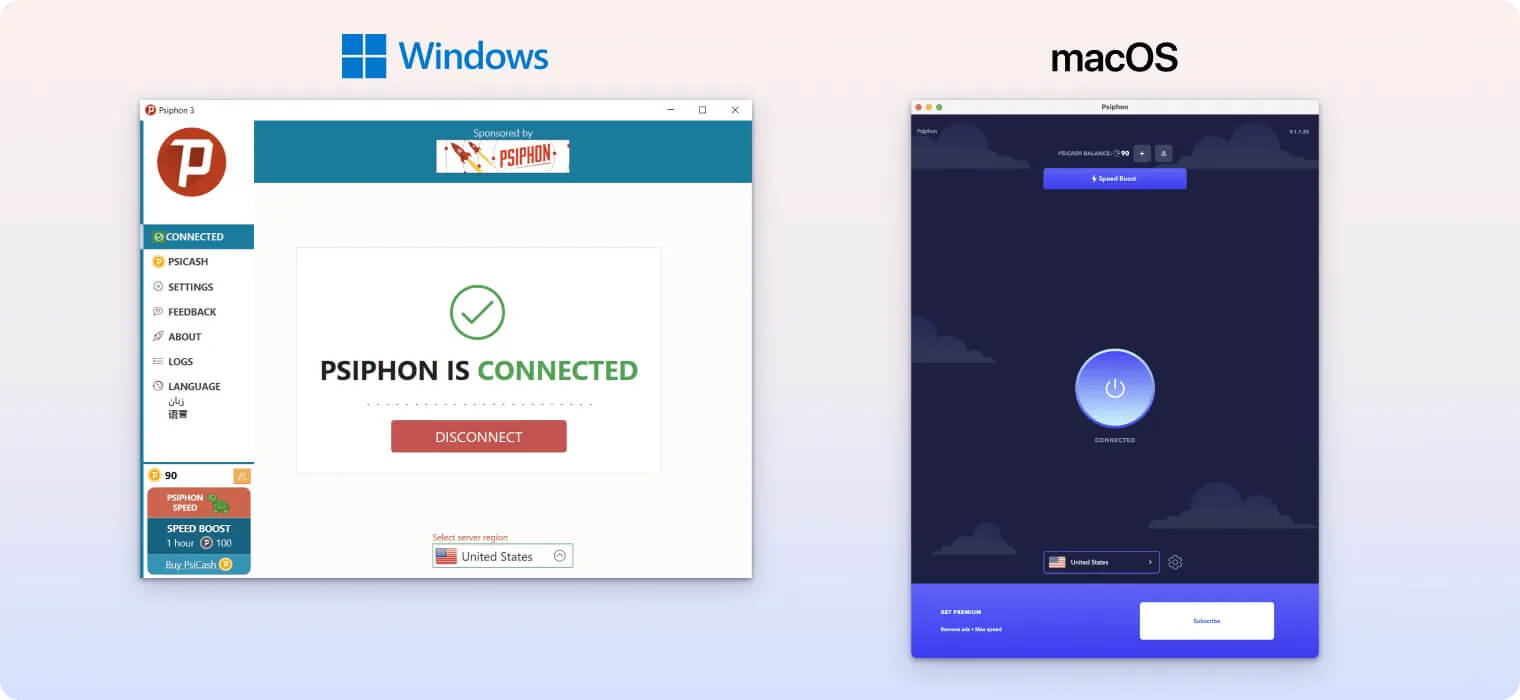
During testing, we found repeatedly needing to click “Apply Changes” when switching between proxy and VPN modes frustrating. However, this becomes a non-issue if you consistently use one mode for regular browsing.
Psiphon on Mobile
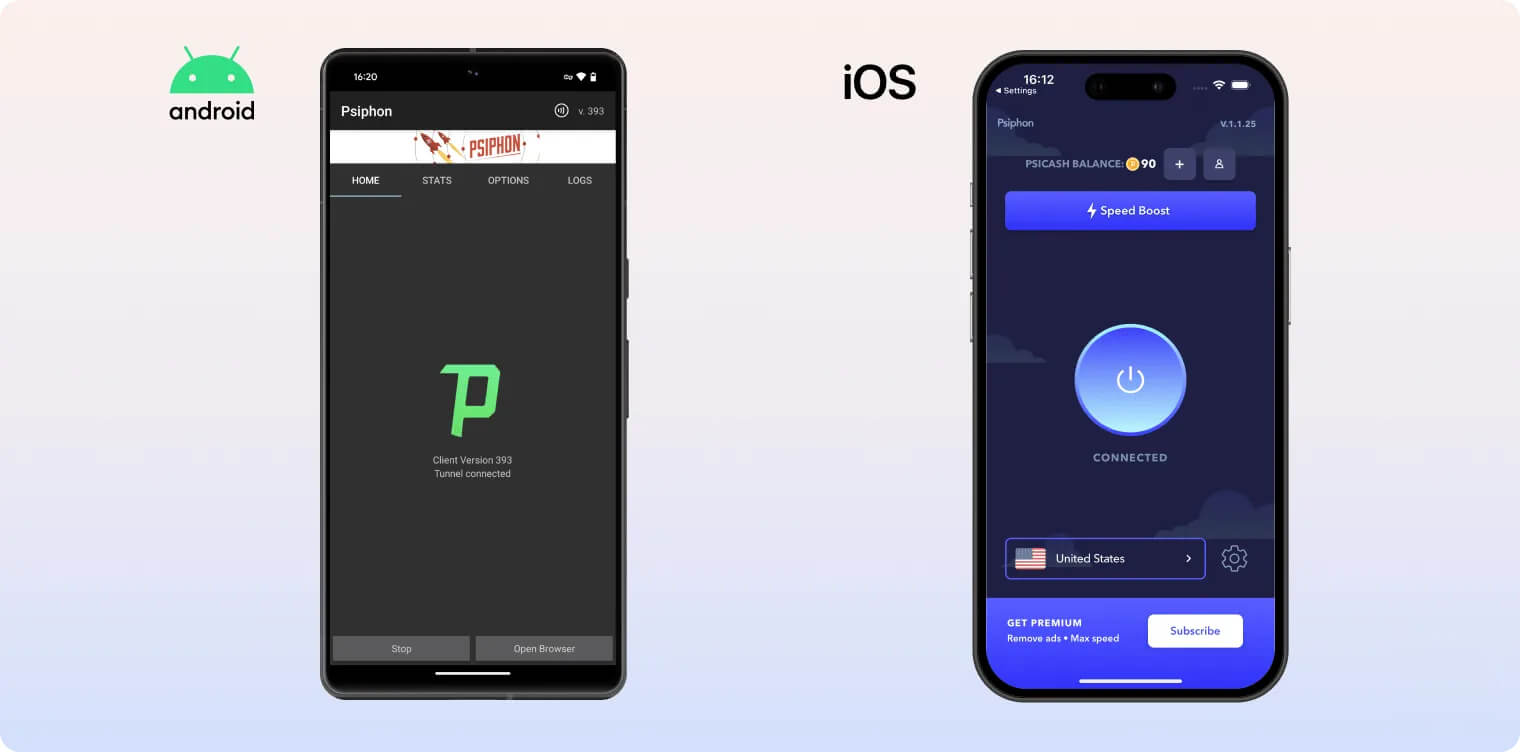
For Android, ensure ‘Tunnel Whole Device’ is enabled to activate the VPN. On iOS, use the main Psiphon app rather than ‘Psiphon Browser for iOS,’ as it functions solely as a proxy.
Psiphon Pro offers straightforward functionality. After installation, you can freely switch between servers via the Options menu and connect with a single tap on Start.
The app’s design feels outdated, lacking features like a day/night mode, while frequent ads—both within the app and after connecting to a server—can disrupt the user experience.
Torrenting
Psiphon VPN completely blocks all P2P traffic. While Psiphon Free Proxy offers surprisingly fast torrenting speeds, its main problems are logging practices, security flaws, and missing features. The proxy tracks your activity and leaks data, lacking the privacy and security needed for safe torrenting.
| Torrenting Attribute | Psiphon Proxy (Free) | Psiphon VPN |
|---|---|---|
| Permits P2P Traffic | Yes | No |
| Average Download Bitrate | 9.9MiB/s (1% loss) | N/A |
| Countries with P2P Servers | 21 | 0 |
| Port Forwarding | No | No |
| Kill Switch | No | No |
| Logging Policy | Excessive Logs | Excessive Logs |
Psiphon isn’t recommended for torrenting. The VPN blocks all P2P traffic, making it a subpar choice for this purpose. A reliable VPN should provide dedicated P2P-optimized servers and maintain consistently fast download speeds.
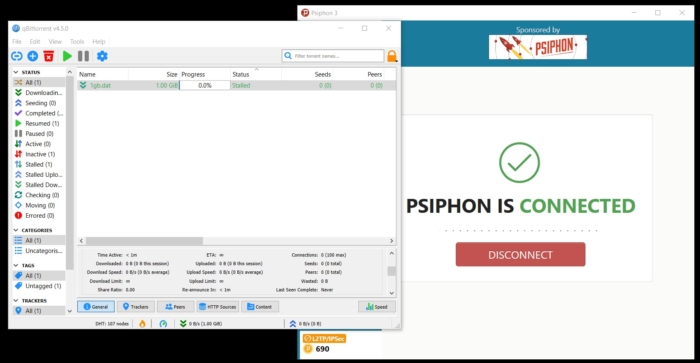
All P2P traffic is blocked on a Psiphon VPN connection.
Psiphon’s proxy service, however, does not block P2P traffic and achieves a fast average bitrate of 9.9 MiB/s. Unfortunately, the proxy lacks essential features needed to protect your IP address during torrenting. It does not have a kill switch or port forwarding and consistently leaks DNS and WebRTC requests.
Therefore, despite the fast download speeds, the proxy service’s limitations make it an insufficiently secure choice for torrenting.
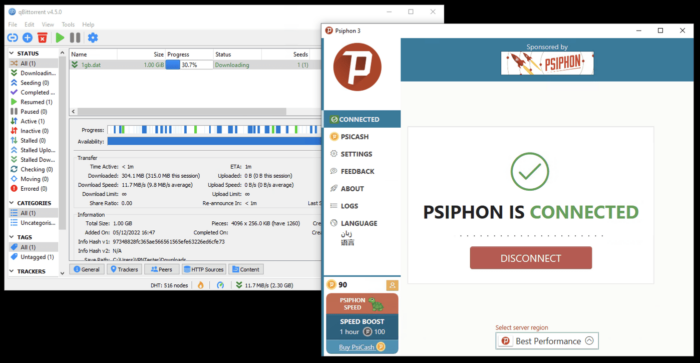
We conducted multiple tests with Psiphon Free’s proxy service using qBittorrent.
Psiphon’s privacy policy raises serious concerns, as it actively logs users’ browsing activity, original IP addresses, and connection timestamps—data that could easily identify individuals if exposed.
The service fails to ensure safety or anonymity for torrenting due to critical flaws like DNS/WebRTC leaks and the absence of a kill switch or port forwarding. By contrast, our recommended VPNs for torrenting combine high speeds with essential safeguards: leak protection, verified no-logs policies, and functional kill switches.
Platforms like Astrill VPN, for instance, reliably mask your IP address during torrenting, protecting your identity from both ISPs and peers.
Device Compatibility
Psiphon has apps for Windows, Apple Silicon Macs, iOS, and Android. The apps can be downloaded from Psiphon’s website, the App Store, Google Play Store, or can be emailed to you if you live in a country that prohibits access to the site.
| Windows | Yes |
|---|---|
| Mac | Yes |
| iOS | Yes |
| Android | Yes |
| Linux | No |
| Amazon Fire TV | No |
| Android TV | No |
| Apple TV | No |
| Router | No |
| Chrome | No |
Simultaneous Connections: Unlimited
Psiphon is very limited in its device compatibility. To compare, NordVPN also has native apps on Linux, routers, and is also compatible with Apple TV, Smart TV, Amazon Fire TV, gaming consoles, and more.
Here’s a summary of the main differences between Psiphon’s applications:
| Feature | Android | iOS | Windows | macOS |
|---|---|---|---|---|
| Native App | ✓ | ✓ | ✓ | ✓ |
| Kill Switch | ✗ | ✗ | ✗ | ✗ |
| OpenVPN | ✗ | ✗ | ✗ | ✗ |
| L2TP/IPSec | ✗ | ✗ | ✓ | ✓ |
| Split Tunneling | ✓ | ✗ | ✓ | ✗ |
While some setup guides exist for Psiphon, they lack comprehensive coverage.
Exercise caution when downloading Psiphon, as unofficial app stores have distributed fake versions containing spyware. The official provider offers verification guidelines to confirm your download’s authenticity.
Router Installation Limitations:
Psiphon VPN cannot be installed directly on routers, preventing whole-home network protection for devices like gaming consoles and streaming boxes. Even if installation were possible, the service’s 2Mbps speed limit would prove insufficient for such demanding connectivity needs.
Additional Features
Psiphon’s free and paid versions offer a limited set of technical features. While the VPN provides split tunneling and SOCKS proxy support, it lacks other advanced capabilities. The service’s obfuscation struggles in China, and it’s missing key functionalities like live chat support, double VPN connections, ad/tracker blocking, dedicated IP addresses, and GPS spoofing.
| Additional Feature | Psiphon Proxy (Free) | Psiphon VPN |
|---|---|---|
| Split Tunneling | No | Yes |
| VPN Obfuscation | No | Yes |
| Multi-Hop Servers | No | No |
| Dedicated IP | No | No |
| Ad Blocker | No | No |
Psiphon’s Confusing Split Tunneling Feature
Psiphon offers split tunneling on Windows and Android, but its implementation is cumbersome. On Windows, users can only exclude websites from the VPN tunnel via an option labeled “Don’t proxy websites within your home country.” This limits flexibility compared to typical split tunneling tools, which allow selecting specific apps or websites to exclude.
Android users face similar issues, with a binary “Tunnel whole device” toggle instead of granular app-based controls. These restrictive settings render Psiphon’s split tunneling functionally impractical for most use cases.
Unreliable SOCKS5 Proxy Servers
While Psiphon includes SOCKS5 proxy servers, they lack essential encryption for secure browsing. This oversight exposes users’ real IP addresses to visited websites, making the proxies unsuitable for privacy-focused activities.
Limited Effectiveness Against Censorship
Psiphon markets itself as a tool to bypass strict censorship, yet its performance in heavily restricted regions is inconsistent. As of 2025, the service fails to connect within China entirely—a significant drawback given its prior reliability there. The lack of traffic encryption further compounds risks, enabling ISPs to monitor user activity in countries like Russia and Iran where partial access remains possible.
This combination of weak encryption, outdated split tunneling, and deteriorating China accessibility severely undermines Psiphon’s value proposition for privacy-conscious users.
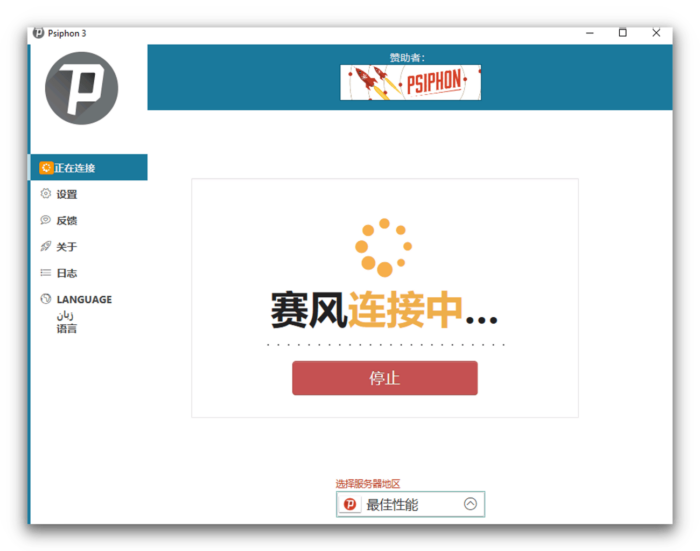
In multiple tests, Psiphon 3 failed to bypass the Great Firewall of China.
Psiphon warns users that its VPN configuration (L2TP or Transport Mode) isn’t effective at bypassing censorship. Testing confirms Psiphon VPN doesn’t work in China.
For a free VPN that works there and protects your data, Windscribe Free is a much more reliable choice.
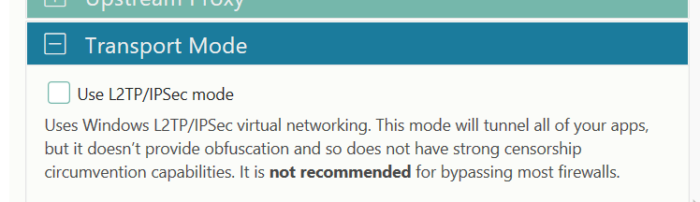
You can find Psiphon’s VPN/Transport Mode in settings.
Psiphon’s proxy servers provide additional obfuscation (SSH+) to bypass online filters in restrictive regions. While these SSH proxies encrypt browser traffic, other applications remain unprotected, leaving non-browser activity vulnerable.
The service offers a practical solution for downloading VPN software in countries where VPN websites are blocked. Users in places like Iran, for example, can email [email protected] to automatically receive download links, bypassing government restrictions—a unique feature not commonly found in similar tools.
Despite this functionality, Psiphon isn’t ideal for users in heavily censored countries. Relying on a proxy instead of a full VPN may expose online activity to monitoring, particularly by government agencies. Additionally, customer support options are limited, with no live chat and inconsistent email responsiveness.
Poor Customer Support
Psiphon’s customer support is quite limited, even for paying customers. The lack of live chat support is disappointing.
The Psiphon website offers FAQs covering basic troubleshooting, app compatibility, and other potential issues, though this resource isn’t extensive. A user guide provides instructions for Windows and Android apps.
Contacting Psiphon’s support team is only possible via the email address listed on the website. While we received thorough email responses in the past, recent inquiries have gone unanswered.
For a VPN with significant complexities and features – used for the vital task of bypassing government web filters – Psiphon must offer better customer support.
We’d like to see Psiphon add instructional walkthroughs like Surfshark, or implement live chat similar to NordVPN’s excellent feature. Even a ticketed support system would be preferable to unreliable email responses.
Psiphon Proxy Key Data
| Attribute | Psiphon Proxy | Typical Free VPN |
|---|---|---|
| Owner | Psiphon, Inc. | Independent |
| Launch Date | 2006 | 2015 |
| Safe to Use | No | No |
| Data Cap | Unlimited | 10GB per month |
| Payment Details Required | No | No |
| Account Required | No | Yes |
| Contains Ads | Yes | Yes |
| Local Download Speed | 5Mbps (95% loss) | 61Mbps (39% loss) |
| International Download Speed | 2Mbps (98% loss) | 55Mbps (45% loss) |
| Countries with Servers | 21 | 4 |
| Privacy Policy | Excessive Logs | Identifiable Data |
| Simultaneous Connections | Unlimited | 1 |
| Manually Select Server Location | No | Yes |
| Netflix Libraries | 0 | 0 |
| Torrenting | Yes | No |
| Works In China? | Sometimes | No |
| Customer Support | Email & Online Resources Only | Online Resources |
| Apps & Extensions |
          |
|
Psiphon VPN Key Data
| Attribute | Psiphon VPN | Typical VPN |
|---|---|---|
| Local Download Speed | 39Mbps (61% loss) | 89Mbps (11% loss) |
| International Download Speed | 2Mbps (98% loss) | 80Mbps (20% loss) |
| Countries with Servers | 21 | 40 |
| Privacy Policy | Excessive Logs | Identifiable Data |
| Simultaneous Connections | Unlimited | 10 |
| Netflix Libraries | 0 | 3 |
| Torrenting | No | Yes |
| Works In China? | Sometimes | No |
| Cheapest Price | 3.00/mo over 1 months | $3.87/mo over 24 months |
| Customer Support | Email & Online Resources Only | |
| Apps & Extensions |
|
|
Price
Price Plans
| Length | PsiCash |
|---|---|
| 1 month | $3.00 |
| 12 months | $99.96 ($8.33/mo) |
Free Trial
| Money-Back Guarantee | No |
|---|---|
| Free Trial | No |
| 100% Free Plan | Yes |
| Data Cap | Unlimited |