
Kaspersky VPN: Fast Speeds, Troubling Privacy, and Limited Streaming
Kaspersky VPN offers impressive speeds, but it isn’t secure enough to trust with your personal data. We can’t recommend it due to its ties to Russian authorities, intrusive activity logging, and limited streaming performance.
- Pros
- ChaCha20 & AES-256 encryption
- User-friendly apps
- Cons
- 200MB daily data cap
- Doesn't let you choose server location
- Excessive logging
- Based in privacy-unfriendly Russia
- Pros
- Excellent local and global speeds
- Unblocks BBC iPlayer, Disney+ & HBO Max
- ChaCha20 & AES-256 encryption
- Easy to use applications
- Cons
- Excessive logging
- Based in privacy-unfriendly Russia
- Poor customer service
- No Firestick application & no Smart DNS
- Fails to bypass web censorship
Kaspersky is best known for its antivirus software, but it also offers a VPN that’s available in a cybersecurity bundle or as a standalone subscription.
Kaspersky is a controversial company due to alleged cooperation with the Russian state. Its products have been banned on US, Canadian, and UK government devices over surveillance concerns.
It’s important to note that Kaspersky VPN Secure Connection (Kaspersky VPN) isn’t fully operated by Kaspersky. The service is a white-label version of Hotspot Shield, meaning it uses Hotspot Shield’s server network, protocols, and technology.
For this Kaspersky VPN review, we examined the free and paid versions, focusing on privacy and security features, speed performance, and unblocking capabilities.
Privacy
Kaspersky’s intrusive logging policy and Russian jurisdiction make it a poor choice for privacy. The VPN records your real IP address, bandwidth usage, timestamps, and even the websites you visit. The service has also directly cooperated with the Russian state, which means you could be vulnerable to government surveillance.
| Originating IP Address | Yes |
|---|---|
| Browsing Activity | Yes |
| Individual Connection Timestamps | Yes |
| Date of Last Connection | Yes |
| VPN Server IP | No |
| Device Information | Yes |
| Individual Bandwidth Usage | Yes |
| Account Information | Yes |
You can read Kaspersky VPN’s full privacy policy on its website.
Kaspersky VPN’s privacy policy is confusing. Like many large tech companies, it has multiple privacy policies for its VPN service—separate ones for different operating systems and regions. However, these policies do not clearly explain what data the VPN collects.
This is partly because Kaspersky VPN is a white-label version of Hotspot Shield. It uses the same server network, protocols, and software, so Hotspot Shield ultimately processes Kaspersky VPN’s activity and usage data.
Hotspot Shield’s parent company, Pango, was acquired by Aura in 2020. Both companies are based in the United States, which means your data could fall under US surveillance laws.
In short, Kaspersky VPN Secure Connection’s logging practices are effectively a combination of Kaspersky VPN’s and Hotspot Shield’s.
Together, Hotspot Shield and Kaspersky VPN log a significant amount of information. Critically, they collect your real IP address, the websites you visit, timestamps, and the VPN server location. While your IP address is deleted after each session, we would prefer that it not be collected at all.
Combined with Kaspersky’s Russian jurisdiction, this level of data collection is very concerning.
Russian Headquarters & Jurisdiction
Kaspersky VPN Secure Connection is owned by Kaspersky Lab, which is headquartered in Russia.
Russia is a highly privacy-hostile jurisdiction for VPNs. It restricts a free and open internet and may require VPN providers to log and share activity or connection data.
The company’s founder, Eugene Kaspersky, has also faced scrutiny for alleged ties to the Russian government.
For these reasons, the details of Kaspersky VPN’s privacy policy matter. Any retained data could be subject to government surveillance in Russia. If you care about online privacy, we recommend avoiding this VPN.
Streaming
Kaspersky VPN Secure Connection is a solid option for unblocking streaming services. It has improved in recent years and can now access platforms like BBC iPlayer, ITVX, Max, and Disney+. However, it failed to unblock Hulu and several Netflix libraries in our tests, including US Netflix.
| Streaming Service | Works with Kaspersky VPN (Free) | Works with Kaspersky VPN |
|---|---|---|
| BBC iPlayer (UK) | No | Yes |
| DAZN (Canada) | No | No |
| Disney+ (UK) | No | Yes |
| Hulu (US) | No | No |
| ITVX (UK) | No | Yes |
| HBO Max (US) | No | Yes |
| Netflix (US) | No | No |
| Netflix (UK) | No | No |
| Prime Video (US) | No | Yes |
| Sky Go (UK) | No | No |
Unblocks Some Streaming Services
Considering Kaspersky VPN Secure Connection uses Hotspot Shield’s server network, it’s disappointing that it doesn’t unblock as many streaming services as Hotspot Shield.
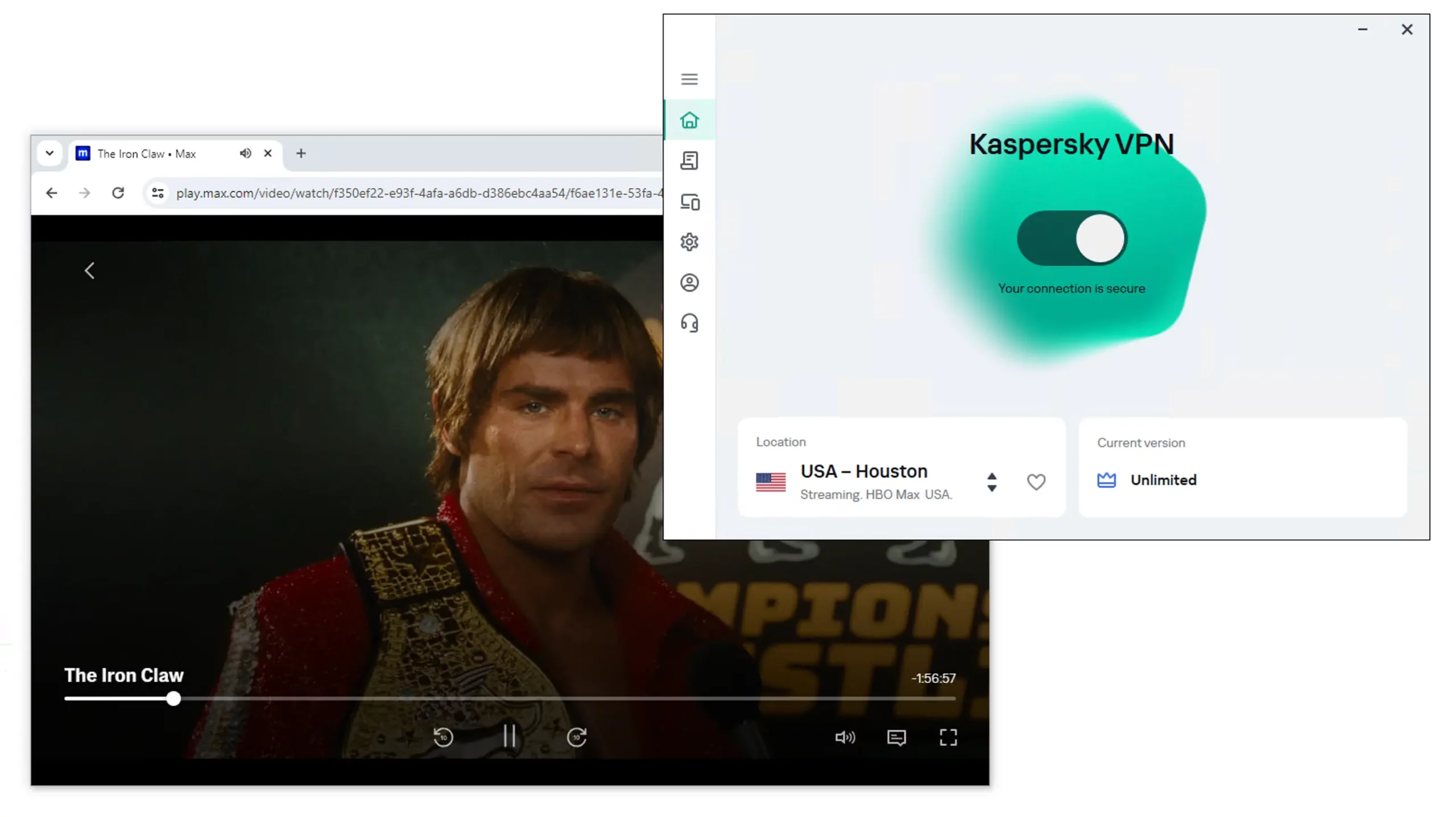
We used Kaspersky VPN to stream The Iron Claw on HBO Max.
In our most recent streaming tests, the premium VPN unblocked popular platforms like Max, Disney+, Amazon Prime Video, and BBC iPlayer. It also offers streaming servers tailored for specific services.
However, we couldn’t stream Hulu or any Netflix regions with Kaspersky VPN. It used to work occasionally with US Netflix, but it has been unreliable lately.
Kaspersky’s Free VPN Doesn’t Unblock Streaming Services
We don’t recommend using Kaspersky Free for streaming. Unfortunately, it can’t unblock any streaming services.
This is mainly because Kaspersky Free doesn’t let you choose a server location—you’re always assigned a local server.
Even if you did manage to unblock something, the free VPN’s 200MB data cap would only last a couple of hours.
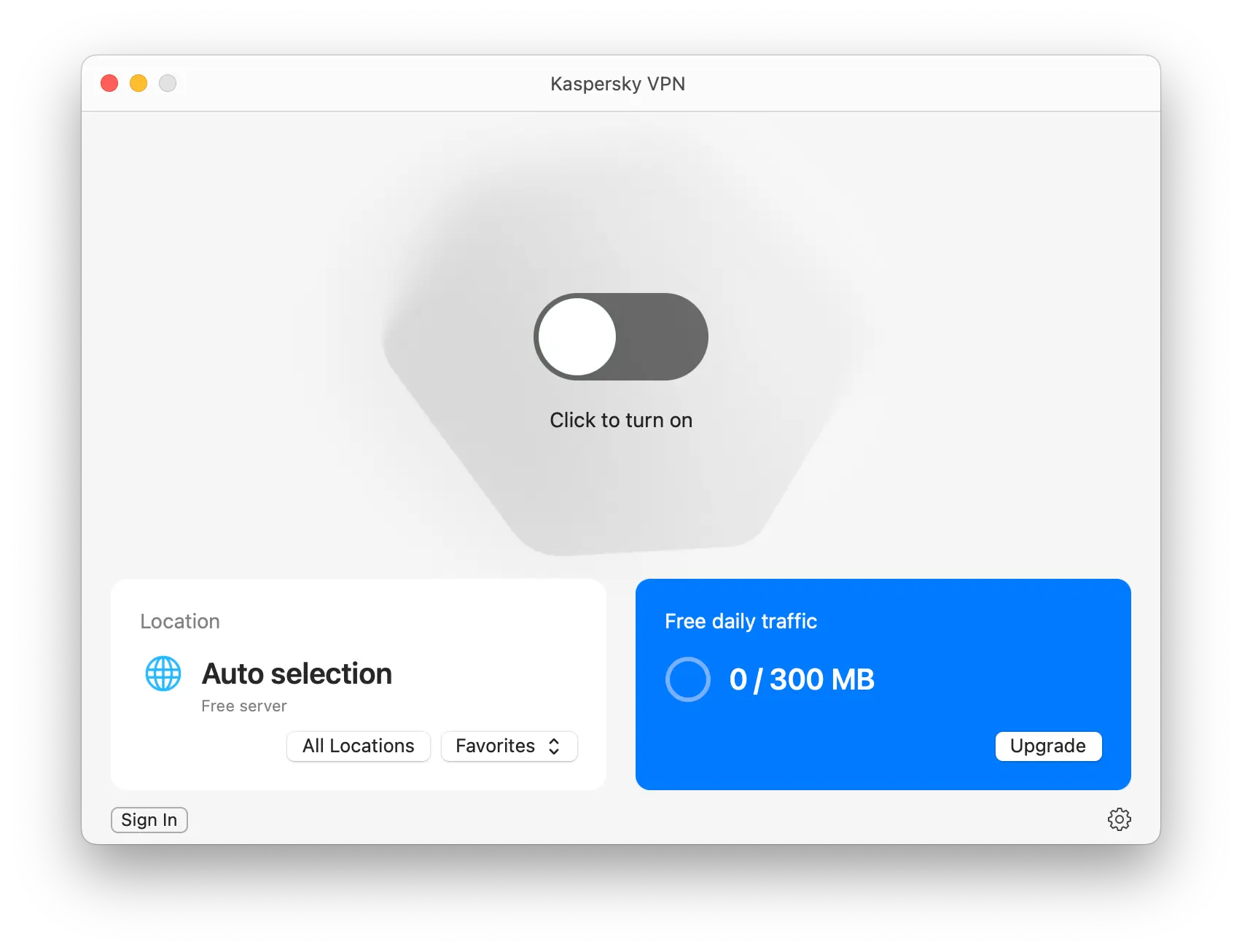
Kaspersky VPN Free doesn’t let you choose a server location and has a restrictive daily data cap.
There are much better free VPNs for streaming, like Windscribe Free and PrivadoVPN, which offer 10GB of free data per month.
Speed
Kaspersky VPN exceeded our expectations in speed tests. This is largely due to its use of Hotspot Shield’s server network and Hydra connection protocol. Our tests show it’s an extremely fast VPN with minimal slowdown over both short and long distances.
We used Kaspersky VPN to stream The Iron Claw on HBO Max.
| No VPN (New York) | US (New York) | Canada (Toronto) | US (Los Angeles) | UK (London) | Germany (Berlin) | Brazil (São Paulo) | Japan (Tokyo) | South Africa (Johannesburg) | Australia (Sydney) | |
|---|---|---|---|---|---|---|---|---|---|---|
| Server Location |  |
|
 |
|
 |
 |
 |
 |
 |
 |
| Download Speed | 100Mbps | 93Mbps | 98Mbps | 99Mbps | 99Mbps | 65Mbps | 89Mbps | 98Mbps | 81Mbps | 98Mbps |
| Upload Speed | 100Mbps | 89Mbps | 87Mbps | 93Mbps | 80Mbps | 84Mbps | 39Mbps | 70Mbps | 36Mbps | 25Mbps |
| Ping | 1ms | 6ms | 15ms | 85ms | 76ms | 86ms | 271ms | 144ms | 345ms | 202ms |
| Distance | 0mi | 5mi | 300mi | 2,500mi | 3,500mi | 4,000mi | 4,800mi | 6,700mi | 8,000mi | 9,900mi |
We experienced a 7% speed reduction when connecting to nearby servers. While that’s not quite on par with the fastest VPNs, it’s still an impressive result.
Kaspersky’s speeds are fast enough for data-intensive tasks, including online gaming, torrenting, and 4K streaming.
Connections were very stable and never dropped during our tests. International speeds are exceptional, even compared to top VPNs like ExpressVPN and Private Internet Access.
This is because Kaspersky VPN uses Hotspot Shield’s servers, software, and protocols, including Hydra, its protocol designed for fast download speeds.
To illustrate this, we’ve compared Kaspersky’s international speeds to the best VPNs in the chart below:
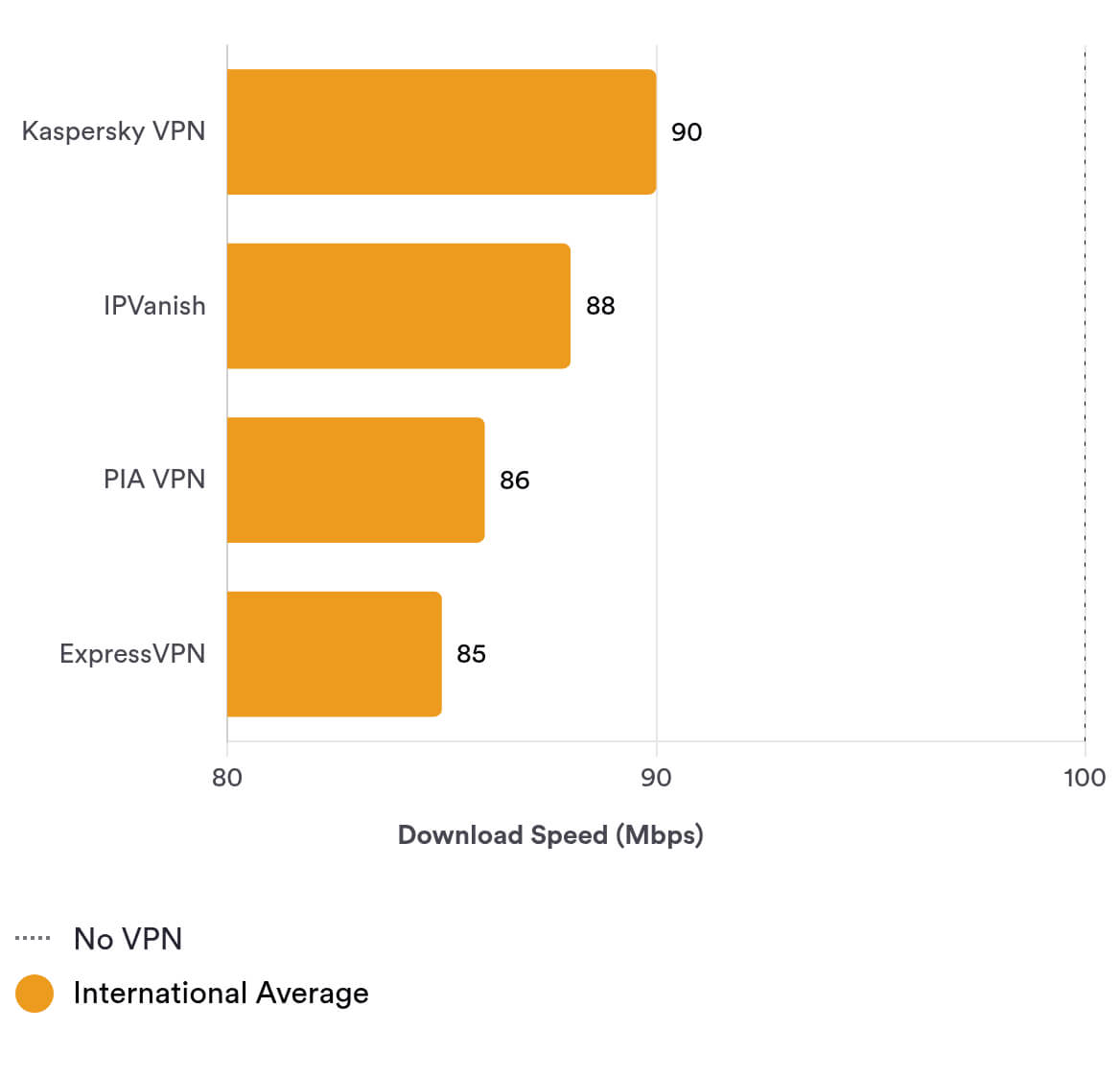
The VPN uses Hotspot Shield’s very fast Hydra protocol, which helps explain the impressive speeds above.
However, Kaspersky VPN’s latency (ping) increases over longer distances and doesn’t match Hotspot Shield’s low ping times. If you’re an online gamer, you should avoid this service unless you connect to a nearby VPN server.
Security
Kaspersky VPN’s security standards and technical features have significantly improved over time. We like its first-party DNS servers, which prevent third parties from viewing your online activity. It includes WireGuard and Hydra protocols, as well as secure AES-128 and ChaCha20 encryption ciphers. However, our kill switch tests revealed it might leak your IP when changing servers, and it failed to hide our HTML5 geolocation data.
| Independent Audit | No |
|---|---|
| VPN Kill Switch | Yes |
| Leak Protection | Yes |
Safe Encryption & Security Protocols
Kaspersky VPN offers two VPN protocols on desktop and mobile: WireGuard and Hydra.
OpenVPN isn’t available in its apps, but you can still use OpenVPN servers through manual router configuration. It’s unclear why Kaspersky VPN didn’t add OpenVPN to its apps, as it would have been a useful option.
WireGuard is a trustworthy, open-source protocol widely used by top VPNs. It offers strong ChaCha20 encryption and uses minimal data, which is helpful on mobile.
Hydra is a proprietary protocol developed by Hotspot Shield for fast speeds. It’s based on TLS 1.2, uses 128-bit AES encryption, 2048-bit RSA certificates for server authentication, and includes perfect forward secrecy (PFS). Its main downside is that it’s closed-source, so independent security audits aren’t possible.
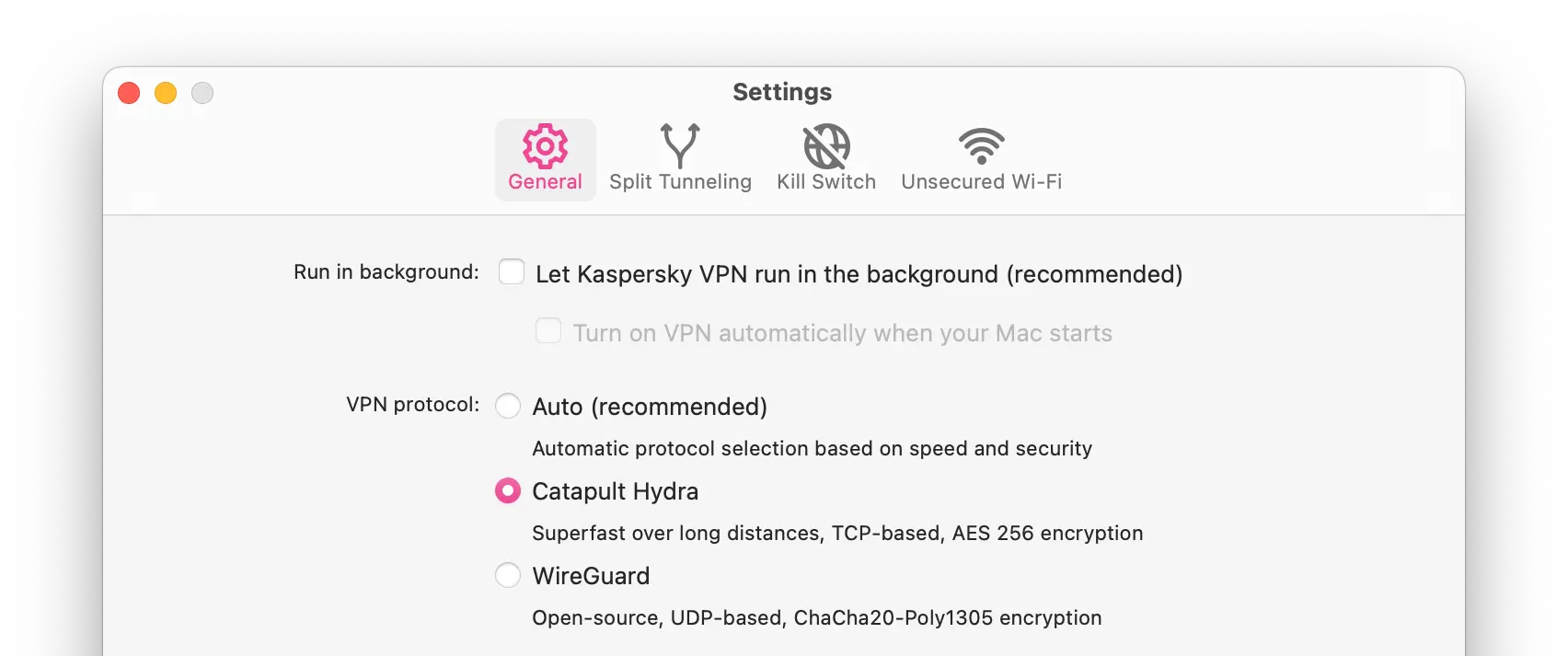
Kaspersky VPN has two protocol options — one open-source and one proprietary.
The protocol’s main drawback is its closed-source code base, which means independent security experts can’t audit it.
Hotspot Shield says third-party experts have audited the code, but we expect VPNs to publish audit results so they can be verified.
Subpar Kill Switch
A VPN kill switch is the most important security feature a VPN can have. It prevents your real IP address from leaking if your internet connection suddenly drops or you switch VPN servers.
Surprisingly, Kaspersky VPN offers a kill switch on Windows, macOS, iOS, and Android. Since it’s built on Hotspot Shield software, which lacks a macOS kill switch, this raises concerns about its effectiveness.
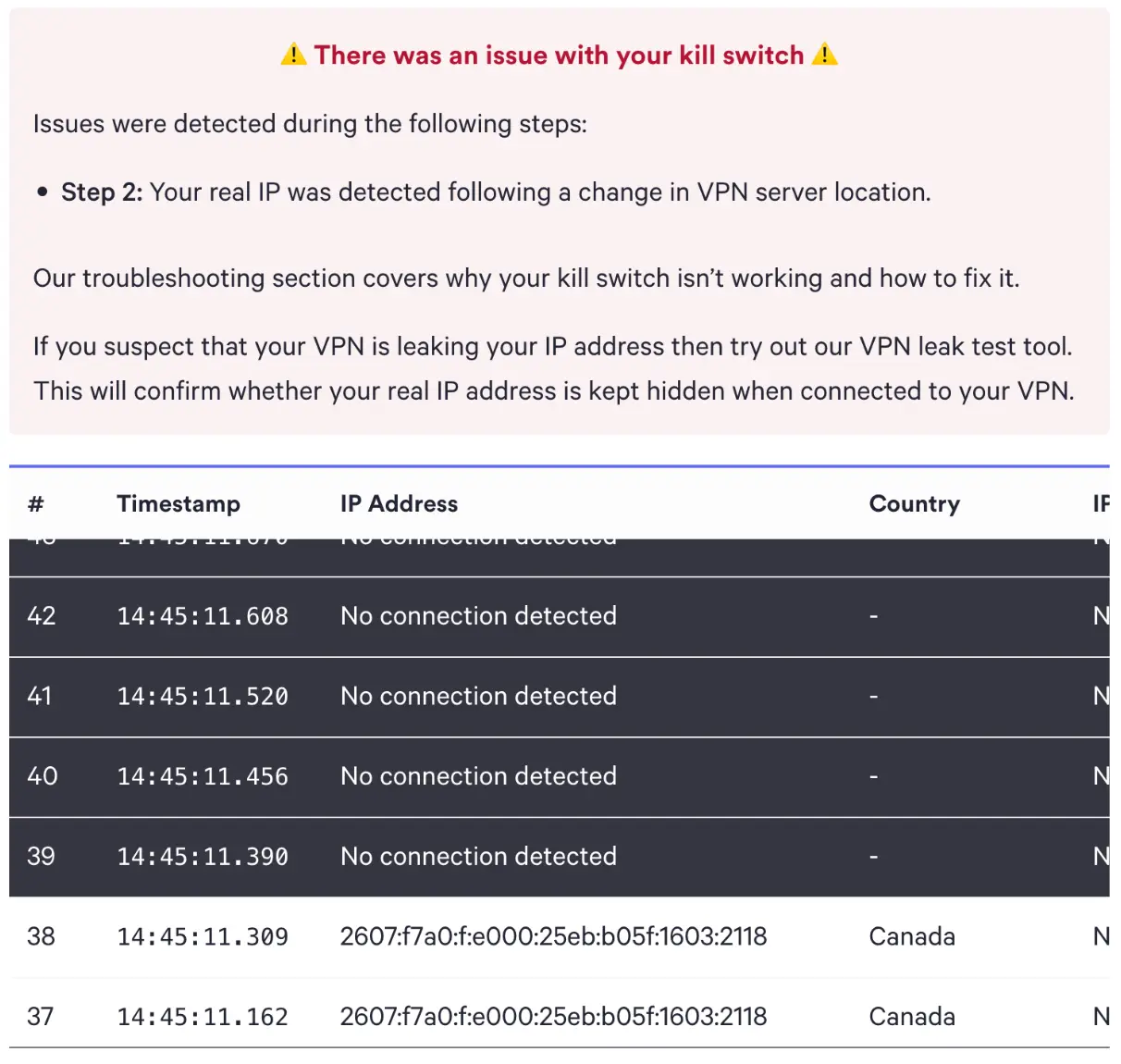
Kaspersky VPN’s faulty kill switch leaked our real IP address on macOS.
In our tests, we found mixed results. Kaspersky VPN’s kill switch doesn’t leak your IP when the internet disconnects, but it does expose your real IP if you switch to a different VPN server without turning the VPN off first.
We’ve seen other VPNs with the same issue, but they typically include an in-app warning to alert users that their IP address could be exposed if they don’t disconnect before changing servers.
Geolocation Leaks Detected
We ran Kaspersky VPN through IP, WebRTC, and DNS leak tests. Unfortunately, the service failed to mask our HTML5 geolocation data. This means websites like Netflix may still detect your true location, even when you’re connected to a VPN server.
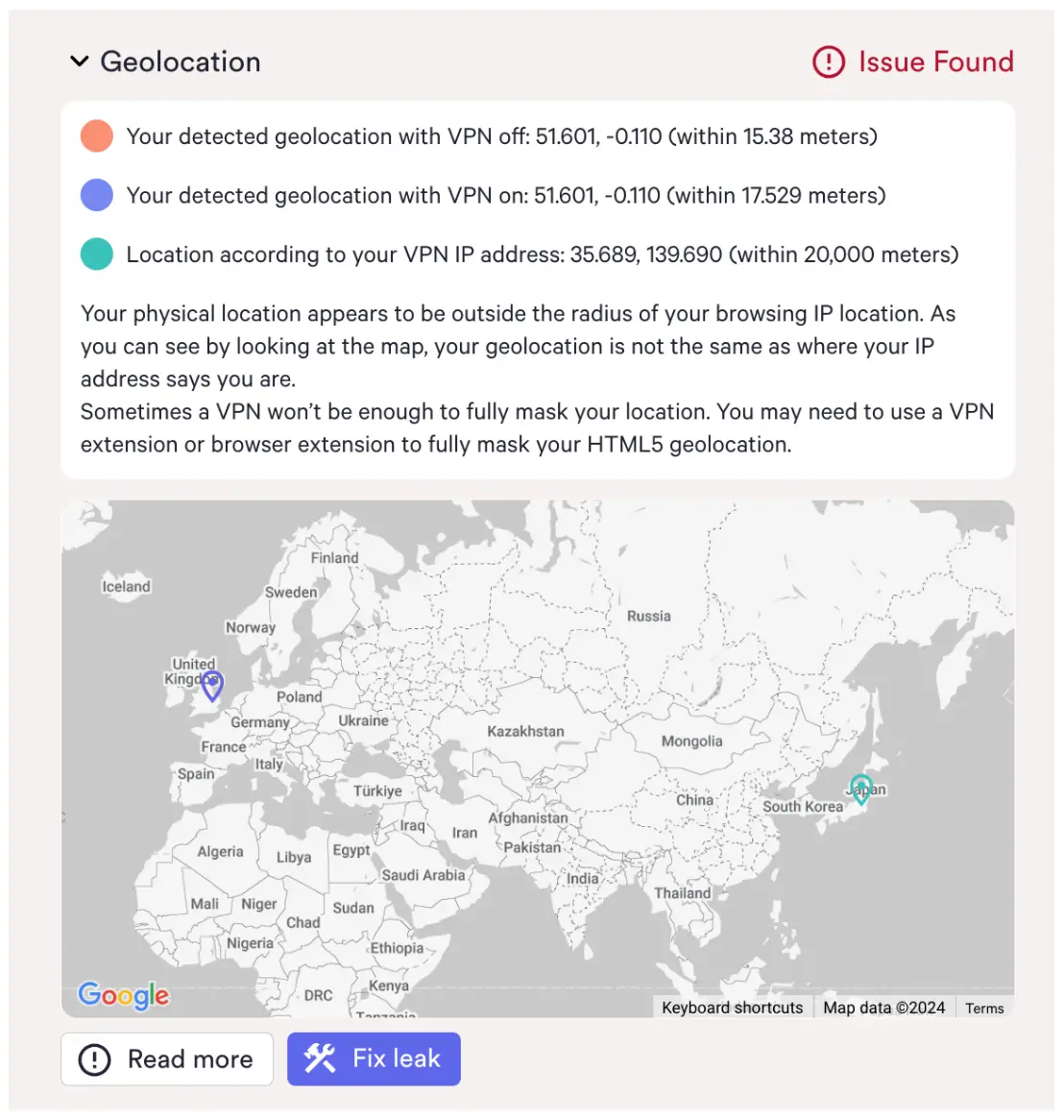
We detected geolocation leaks with Kaspersky VPN.
If you use a VPN to unblock services and websites, this means Kaspersky may be less reliable than VPNs that don’t leak geolocation data. Some VPNs also offer browser extensions to fix these leaks, but Kaspersky VPN does not.
Technical Features We’d Like to See
Kaspersky VPN is missing some key features that would make the service even more secure, including:
- Always-on kill switch to block all network traffic, even when switching VPN servers while a connection is active.
- OpenVPN support to offer users an open-source, safe VPN tunneling protocol.
Server Locations
Kaspersky VPN operates over 2,000 servers in 72 countries, which is fewer than many top VPNs. Its coverage is strong in Europe, Asia, and North America, but it’s limited in Africa, with servers only in Egypt and South Africa.
| Continent | Kaspersky VPN (Free) Countries with Servers |
Kaspersky VPN Countries with Servers |
|---|---|---|
| Europe | 37 | 37 |
| Asia | 20 | 20 |
| North America | 6 | 6 |
| South America | 5 | 5 |
| Africa | 2 | 2 |
| Oceania | 2 | 2 |
After some investigation, we’ve identified that although Kaspersky VPN uses Hotspot Shield’s technologies, it operates a distinct server network.
Its server network across Europe and North America is quite extensive. In fact, you can choose a Kaspersky VPN server in most European countries, including the UK, France, Germany, Poland, Norway, and more.
There are also many Asian server locations to choose from, including Hong Kong, Japan, India, and South Korea.
However, if you want to connect to servers outside these regions, you may be disappointed. Africa has very limited options—only two locations: Egypt and South Africa. South America also has just five server locations.
Given Kaspersky’s Russian ties, it’s not surprising there is a server available in Russia. This is uncommon following Russia’s laws surrounding VPNs.
Kaspersky VPN Free Doesn’t Allow You to Choose Server Location
Unlike the paid version, the free version of Kaspersky doesn’t let you pick a server location. In our tests, the VPN automatically connected us to the nearest server, making it unsuitable for unblocking streaming services from other countries.
This isn’t unusual for a free VPN. Most come with significant drawbacks, such as smaller server networks and data caps of around 10GB per month.
User Experience
Kaspersky VPN is super easy to use. You just need to toggle on to connect to a server, as the app automatically chooses the fastest server. This makes the VPN great for beginners, but it’s missing quite a few features.
Kaspersky VPN couldn’t be easier to use. To install the VPN, simply sign up to the service and install the app from My Kaspersky.
After subscribing, we had an issue linking our device to the paid subscription, but once we got in touch with customer support via email, this was sorted quickly and efficiently.
Here’s a more detailed look at the interface of each Kaspersky VPN application:
Desktop & Laptop (Windows & macOS)
Kaspersky’s desktop apps are minimalistic and easy to use. From the homepage you can see your subscription tier (free or unlimited), select a server location, and turn on the VPN.
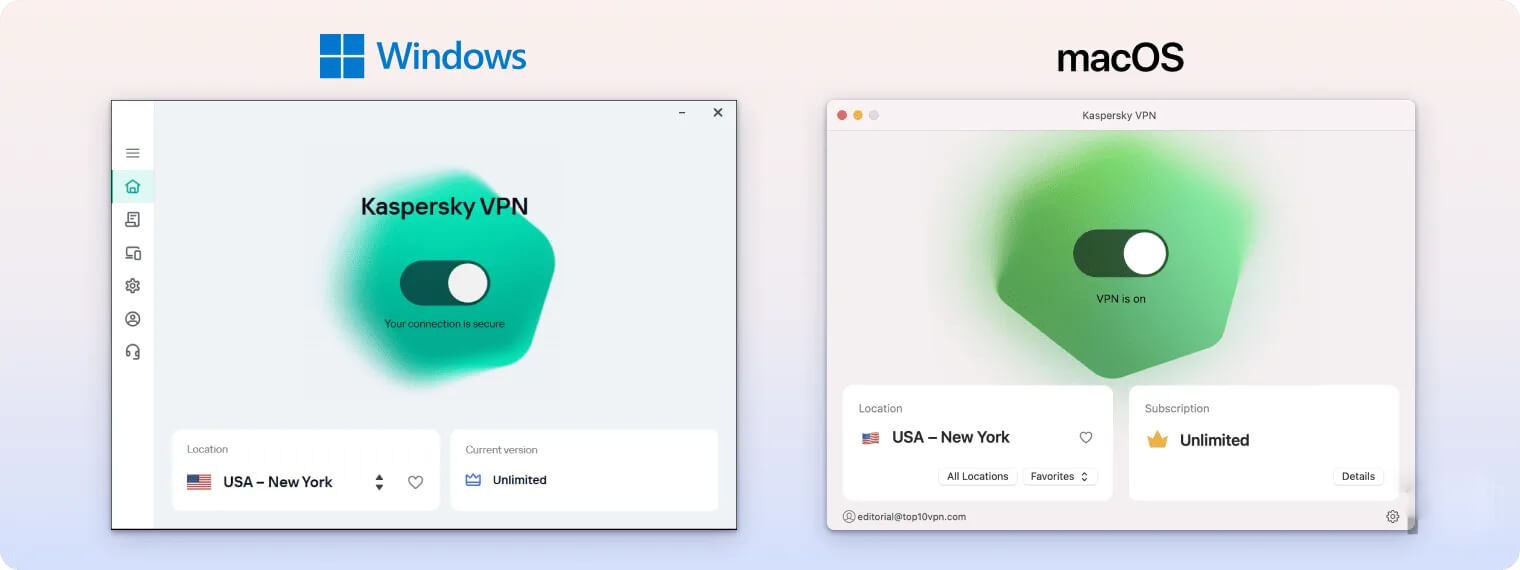
Kaspersky VPN’s server navigation is a mixed bag, though. We’re disappointed to see the server list isn’t sorted into separate continents, like it is with other VPNs, but you can search for specific countries in the search bar.
The biggest difference between the Windows and macOS clients is that Windows gives you access to dedicated servers for streaming, gaming, and torrenting in separate tabs. Kaspersky VPN on macOS doesn’t feature these dedicated servers.
Both desktop clients offer double VPN servers, where you can choose entry and exit servers, which isn’t common with VPNs. You can also add your favorite servers to a separate tab on both clients.
Ideally, we would like to see a bit more information about the VPN connection (e.g. the protocol and VPN server location). If you connect using the default settings and servers, you can’t actually see your new location or active protocol.
The three main features available on desktop apps are split tunneling, kill switch, and unsecured WiFi. These are all turned off by default, but we would prefer the kill switch to be automatically enabled.
Mobile (iPhone & Android)
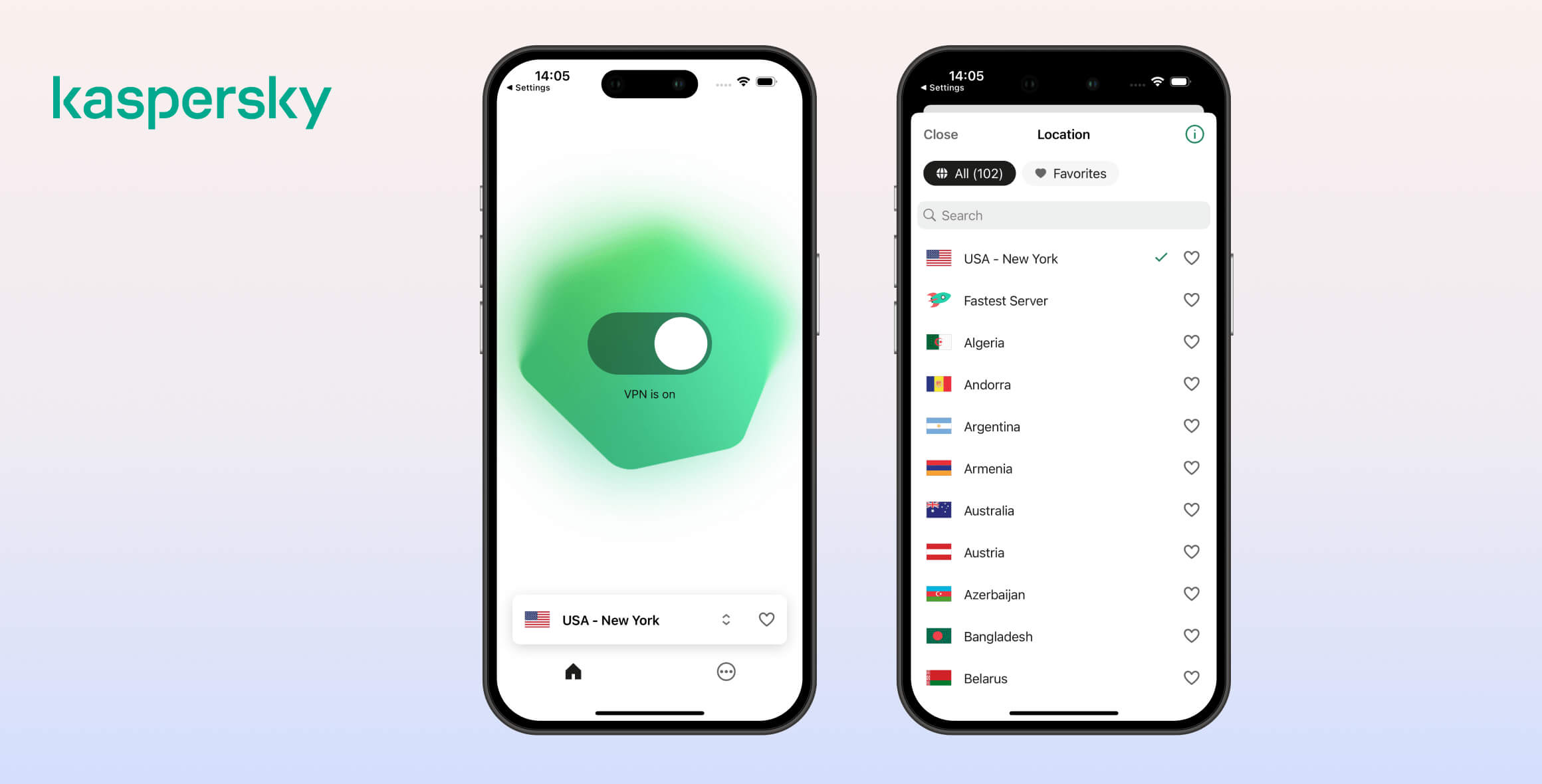
Kaspersky’s mobile apps are even more stripped back than their desktop counterparts. The homepage simply shows a toggle switch (to turn on and off your VPN), your current server, and a favorites button to save the server location.
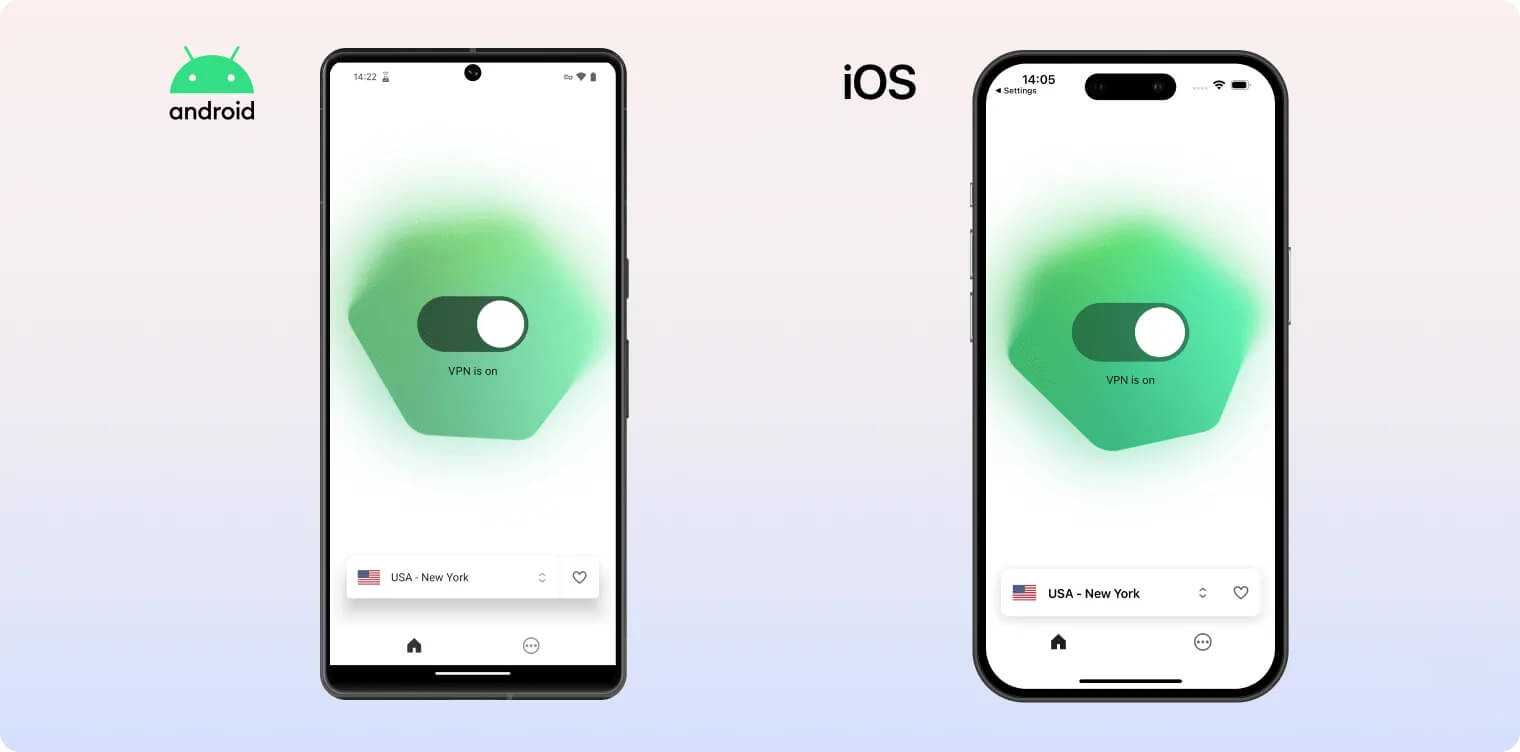
Both Android and iOS use the same server list with a search bar and a Favorites tab. As with the desktop apps, the servers aren’t grouped by continent, which is a minor downside.
The mobile apps also don’t include the dedicated streaming, gaming, or torrenting servers available on Windows. Double VPN servers are missing on mobile as well.
On Android, you get basic VPN features: a kill switch, split tunneling, and connection rules for unfamiliar Wi‑Fi networks. We’d prefer the kill switch to be enabled by default on mobile devices, too.
Disappointingly, the iOS app is even more limited. You only get a kill switch, which is a truly bare-bones experience compared to other VPNs like Surfshark, which include geo-spoofing, an ad blocker, double VPN, obfuscation, IP rotation, and more.
Kaspersky’s mobile apps are simpler than the desktop versions. The home screen shows a toggle to turn the VPN on or off, your current server, and a Favorites button for saving server locations.
Torrenting
Kaspersky VPN logs too much sensitive data for us to recommend it to people who torrent. Although it allows P2P traffic on all its servers and includes a kill switch, the company’s intrusive logging practices are a major concern.
| Torrenting Attribute | Kaspersky VPN (Free) | Kaspersky VPN |
|---|---|---|
| Permits P2P Traffic | Yes | Yes |
| Average Download Bitrate | 2.2MiB/s (78% loss) | 9.9MiB/s (1% loss) |
| Countries with P2P Servers | 72 | 72 |
| Port Forwarding | No | No |
| Kill Switch | Yes | Yes |
| Logging Policy | Identifiable Data | Identifiable Data |
Kaspersky VPN allows P2P traffic on all its 2,000+ servers.
When we tested the VPN for torrenting, we recorded very fast torrent speeds, found no IP or DNS leaks, and verified the kill switch works effectively.
However, despite the positives we’ve identified above, we still wouldn’t recommend using Kaspersky VPN for torrenting. This is because we’re concerned with its intrusive logging policy and lack of port forwarding.
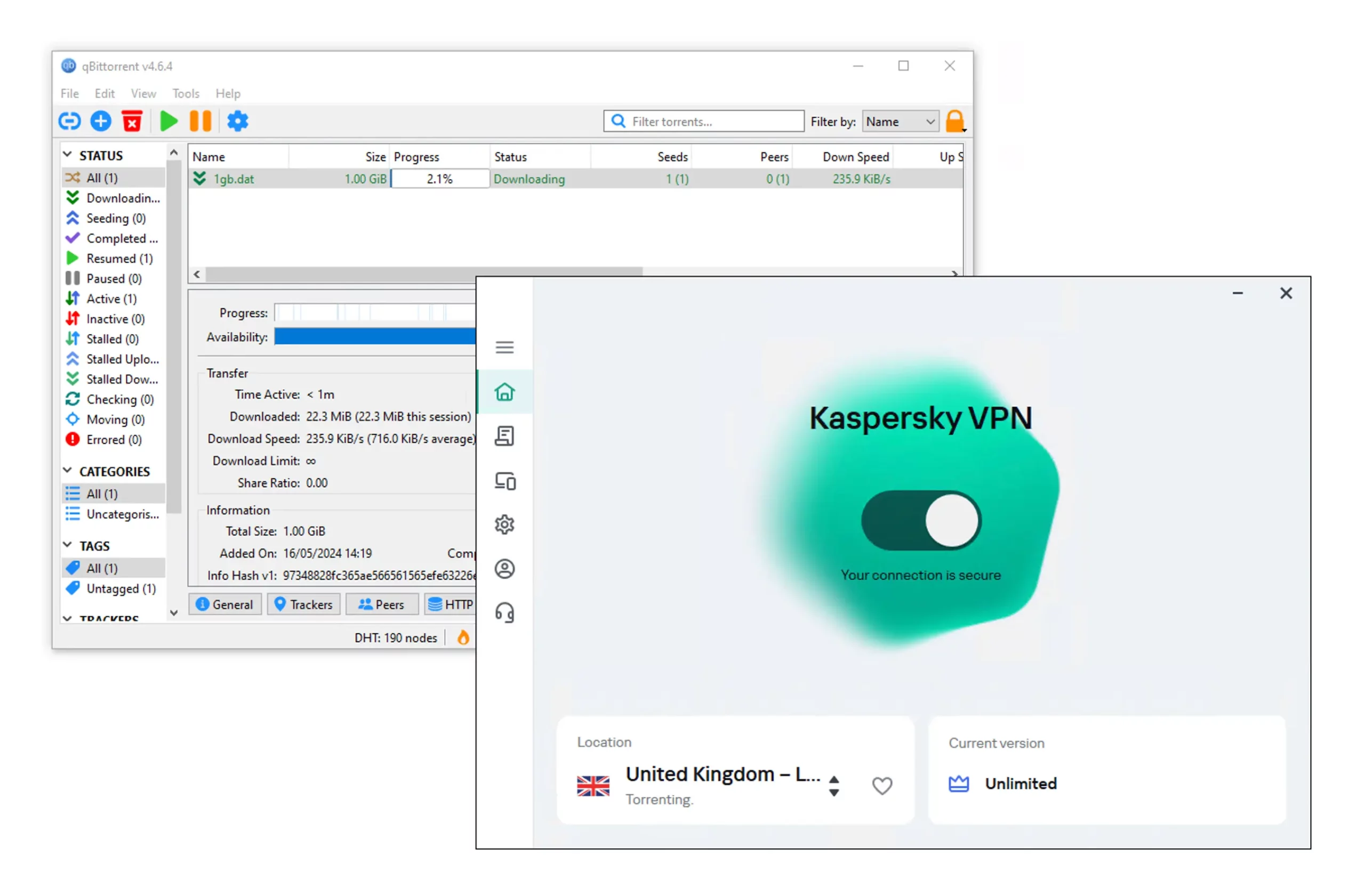
Kaspersky VPN is not good for downloading torrent files.
Kaspersky VPN is too risky of a VPN to use for torrenting, especially when there are strict no-logs alternatives like PIA and ExpressVPN instead.
Device Compatibility
Kaspersky VPN’s device compatibility is relatively limited. The company offers native apps for iOS, Mac, Android, and Windows. You can also set up Kaspersky VPN on a compatible router manually, but there’s no dedicated router app. There’s no Fire TV Stick app, no browser extension, no Smart DNS tool, and no Linux GUI, either.
| Windows | Yes |
|---|---|
| Mac | Yes |
| iOS | Yes |
| Android | Yes |
| Linux | No |
| Amazon Fire TV | No |
| Android TV | No |
| Apple TV | No |
| Router | Manual Setup Only |
| Chrome | No |
Simultaneous Connections: 5
Kaspersky has custom apps for Windows, Mac, iOS, and Android. You can also install Kaspersky on your router manually, though the setup is complicated.
Games Consoles & Streaming Devices
Kaspersky VPN doesn’t publish a clear list of compatible routers, but its installation guide indicates support for certain models from Asus, Keenetic, Netgear, and TP-Link.
In addition, Kaspersky doesn’t offer OpenVPN in its apps, but it does support OpenVPN on compatible routers.
Additional Features
Kaspersky’s free and paid VPN plans have a notable lack of technical features. Its best feature is the fully customizable multi-hop, which lets you choose both entry and exit servers. Beyond that, it only offers split tunneling and Wi-Fi connection rules to protect you on public networks. Kaspersky also lacks instant live chat customer support. The VPN is a poor choice for bypassing censorship, as it has no obfuscation tools and even advises users in highly censored regions to cancel their subscriptions.
| Additional Feature | Kaspersky VPN (Free) | Kaspersky VPN |
|---|---|---|
| Split Tunneling | No | Yes |
| VPN Obfuscation | No | No |
| Multi-Hop Servers | No | Yes |
| Dedicated IP | No | No |
| Ad Blocker | No | Yes |
Customizable Double VPN
Kaspersky offers a Double VPN feature that routes your traffic through two different VPN servers.
You can manually choose both the entry and exit countries, which is a rare option. Still, similar functionality is available in safer, more secure services like Hide.me, Surfshark, and Proton VPN.
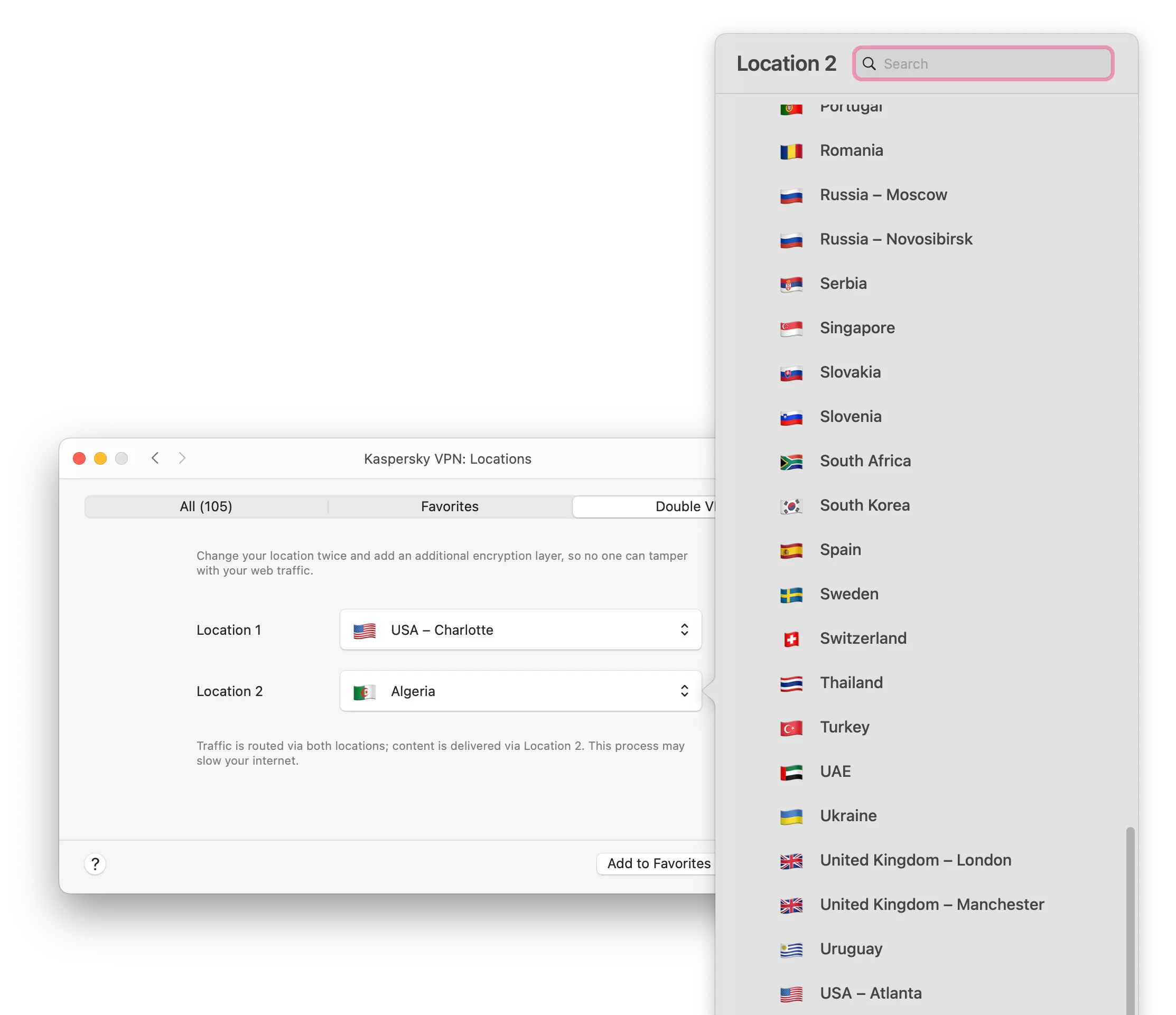
Kaspersky VPN offers fully-customizable double VPN connections.
No Live Chat Support
Kaspersky VPN’s customer support is run by Kaspersky Cybersecurity, not Hotspot Shield. As a result, it lacks the instant, focused help offered by many smaller, dedicated VPN providers. It includes FAQs and a ticket system, but no live chat.
Our experience with Kaspersky VPN’s support was disappointing. It simply isn’t on par with leading VPN services.
The biggest drawback is the absence of live chat. Instead, you must rely on online resources or a slow ticketing system.
The VPN’s online resources are comprehensive but hard to find and navigate, largely because Kaspersky offers so many different products and services.
In many cases, we found Kaspersky’s guides more confusing than helpful.
If you submit a ticket, responses typically take at least a day. On one occasion, we were even told to call an operator instead.
Can’t Bypass Online Censorship
Kaspersky VPN is a poor option for bypassing web censorship. It does not work in China or Turkey, and it strongly discourages use in highly censored regions. In fact, the service asks users in China, Pakistan, Iran, Oman, Qatar, and Saudi Arabia to cancel their subscriptions.
According to our tests using a remote desktop in Shanghai, Kaspersky has never worked in China.
This isn’t surprising, as the VPN lacks any obfuscation technology. On desktop and mobile, it only offers the WireGuard and Hydra protocols—neither is designed to defeat sophisticated firewalls.
Hotspot Shield, which shares a server network and software with Kaspersky VPN, also struggles with web censorship and has performed poorly in China for months.
Kaspersky VPN Key Data
| Attribute | Kaspersky VPN | Typical Free VPN |
|---|---|---|
| Owner | Kaspersky Lab | Independent |
| Launch Date | 2009 | 2015 |
| Safe to Use | No | No |
| Data Cap | 200MB per day | 10GB per month |
| Payment Details Required | No | No |
| Account Required | Yes | Yes |
| Contains Ads | No | Yes |
| Local Download Speed | 93Mbps (7% loss) | 61Mbps (39% loss) |
| International Download Speed | N/A | 55Mbps (45% loss) |
| Countries with Servers | 72 | 4 |
| Privacy Policy | Identifiable Data | Identifiable Data |
| Simultaneous Connections | Unlimited | 1 |
| Manually Select Server Location | No | Yes |
| Netflix Libraries | 0 | 0 |
| Torrenting | Yes | No |
| Works In China? | No | No |
| Customer Support | Telephone, Email & Online Resources | Online Resources |
| Apps & Extensions |
          |
|
Kaspersky VPN Key Data
| Attribute | Kaspersky VPN | Typical VPN |
|---|---|---|
| Local Download Speed | 93Mbps (7% loss) | 89Mbps (11% loss) |
| International Download Speed | 90Mbps (10% loss) | 80Mbps (20% loss) |
| Countries with Servers | 72 | 40 |
| Privacy Policy | Identifiable Data | Identifiable Data |
| Simultaneous Connections | 5 | 10 |
| Netflix Libraries | 0 | 3 |
| Torrenting | Yes | Yes |
| Works In China? | No | No |
| Cheapest Price | 2.71/mo over 24 months | $3.87/mo over 24 months |
| Customer Support | Telephone, Email & Online Resources | |
| Apps & Extensions |
|
|
Price
Price Plans
| Length | 5 Devices | 10 Devices |
|---|---|---|
| 1 month | $6.99 | |
| 12 months | $33.96 ($2.83/mo) | $59.88 ($4.99/mo) |
| 2 years | $65.04 ($2.71/mo) |
Free Trial
| Money-Back Guarantee | 30 days |
|---|---|
| Free Trial | No |
| 100% Free Plan | Yes |
| Data Cap | 200MB per day |