
TunnelBear: Charming Design, Middling Performance
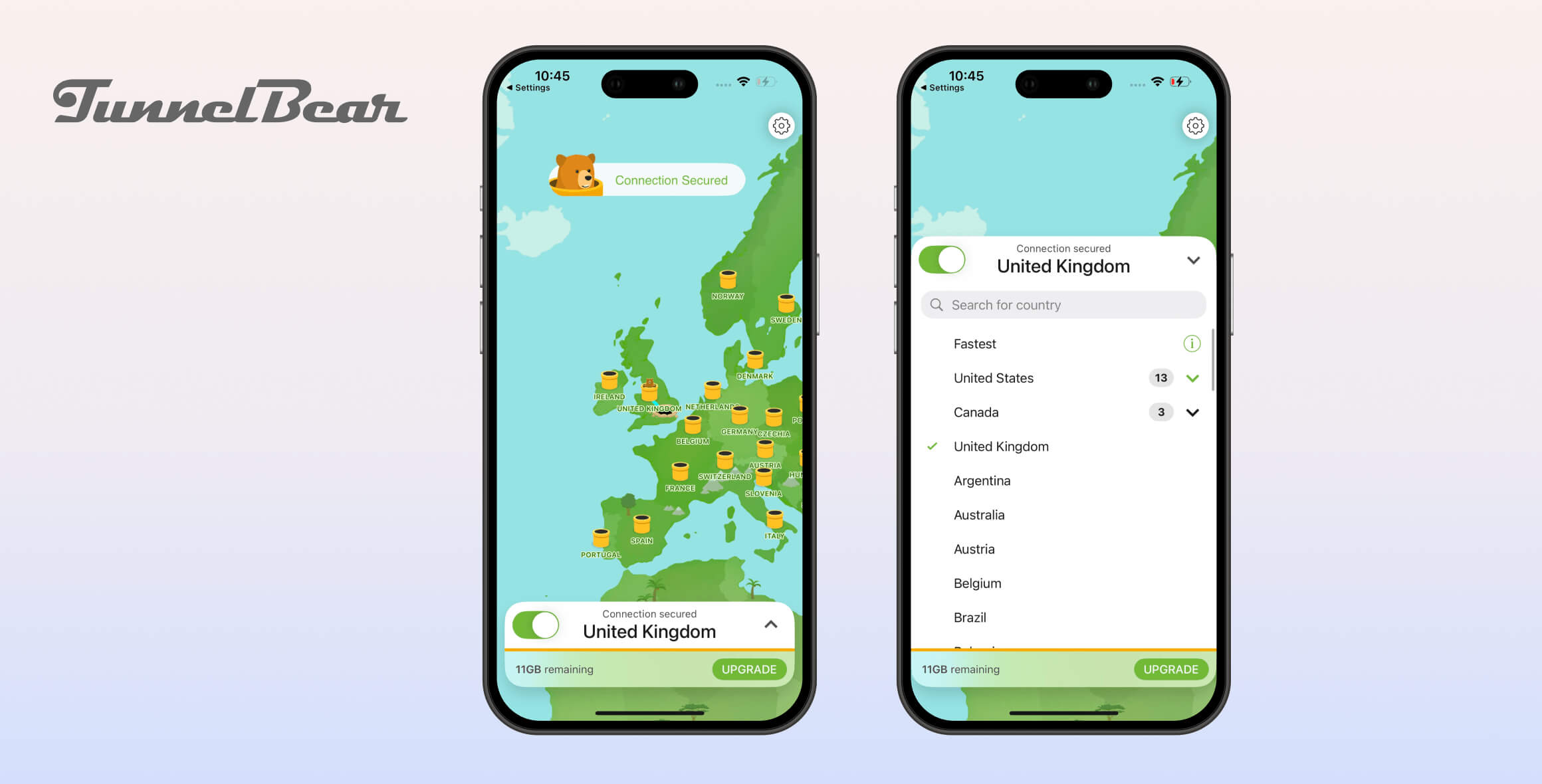
TunnelBear has never impressed us compared to other VPNs. We like its design and UX, but the core performance is lacking. It isn’t bad, yet in most areas TunnelBear is only average. We appreciate the free version as a safe, no-cost way to protect your privacy, but its data allowance is very limited.
- Pros
- Same server network as paid version
- Trustworthy free service
- Streams HBO Max, BBC iPlayer & Channel 4
- Secure encryption
- Cons
- Limited to 2GB per month
- Unable to access US Netflix, Hulu & Prime Video
- Not suitable for torrenting
- Pros
- Fast connection speeds
- Unblocks US Netflix & HBO Max
- No identifiable data logged
- User-friendly apps
- Independent audits
- Private DNS servers
- Cons
- Canadian jurisdiction (Five Eyes)
- Leaks your geolocation
- Not recommended for torrenting
- No money-back guarantee
- Can’t install on router
- No live chat support
TunnelBear is a popular VPN service that’s owned by McAfee. It has both a free and a premium version, which offer similar features — though the free VPN is restricted to just 2GB of data per month.
In this TunnelBear review, we’ve put both the free and paid versions through our rigorous VPN testing process to highlight the VPN’s strengths and weaknesses.
While the premium subscription is better overall, TunnelBear’s free VPN remains one of the top-rated free VPNs we’ve tested.
Alternatives to TunnelBear
If TunnelBear doesn’t meet your needs, here are some better alternatives to consider:
- Surfshark: A beginner-friendly VPN with more than double the server locations of TunnelBear. It unblocks 9 Netflix regions, HBO Max, and BBC iPlayer, and includes features like double VPN, Smart DNS, static IPs, and a tracker blocker.
- CyberGhost: Offers dedicated streaming servers and Smart DNS to unblock US Netflix and other major platforms. It supports a wider range of devices—including routers, Amazon Fire TV, Roku, and game consoles—making it more versatile than TunnelBear.
- ProtonVPN: A secure, fast free VPN with unlimited data and strong privacy protections, including AES-256 encryption and a kill switch. However, you can’t choose a specific free server location, and it blocks P2P traffic.
Privacy
TunnelBear collects your account details and device information, which is standard for most VPN services. It also logs how much bandwidth you use every month, which is deleted monthly. We’re disappointed to see that TunnelBear has previously worked with US authorities to confirm an individual’s account details, though it didn’t hand over any other identifiable data.
| Originating IP Address | No |
|---|---|
| Browsing Activity | No |
| Individual Connection Timestamps | No |
| Date of Last Connection | No |
| VPN Server IP | No |
| Device Information | Yes |
| Individual Bandwidth Usage | Yes |
| Account Information | Yes |
You can read TunnelBear’s full privacy policy on its website.
TunnelBear collects limited information to maintain its service: your email address, device details (OS version and app version), whether you were active in the previous month, and total data used (deleted at the end of each month).
This level of data collection is fairly standard for VPNs and can be justified, but it prevents TunnelBear from being a top-tier no-logs provider like PIA or Perfect Privacy.
TunnelBear is based in Canada, which is not ideal for user privacy. However, its logging policy means it cannot provide users’ IP addresses or browsing history, even if compelled.
TunnelBear operates its own zero-log DNS servers and does not record the websites you visit. This also ensures your ISP cannot monitor your browsing activity.
Who Owns TunnelBear?
TunnelBear was founded in 2011 by Daniel Kaldor and Ryan Dochuk. In 2018, it was acquired by the antivirus company McAfee.
The VPN still operates as a separate team within McAfee, and the same employees continued to work on the product after the acquisition.
McAfee was previously owned by Intel, but in March 2022 it was sold to several private equity firms, including Advent International and Permira.
Cooperation with Authorities to Confirm a User
In 2020, TunnelBear cooperated with U.S. authorities by confirming a user’s account via their email address. Crucially, no additional identifiable information was provided.
While it’s reassuring that TunnelBear did not share activity or connection logs, the incident underscores the drawbacks of its Canadian jurisdiction.
TunnelBear used to publish an annual transparency report detailing government requests for user data. Since the incident, it has not released further transparency reports.
As a result, it’s unclear whether the company has received additional requests for user data or confirmed more user accounts.
Subject to Canadian & US Data Laws
TunnelBear’s headquarters are in Toronto, and its current ownership also makes it subject to U.S. data laws.
Both the U.S. and Canada are core members of the Five Eyes intelligence-sharing alliance, which enables participating countries to collect and share surveillance data.
Both jurisdictions also pursue minor copyright cases, which matters if you plan to use a VPN for torrenting.
Although TunnelBear can be subpoenaed by Canadian and U.S. authorities, its logging policy helps prevent your IP address and browsing history from being exposed.
TunnelBear Is Not Completely Private
In short, we trust TunnelBear to protect your activity logs and IP address, but you should not rely on it if you need to hide your VPN usage from authorities.
Its privacy policy is better than average. TunnelBear does not keep activity logs or identifying data, but it is not a true zero-logs VPN. Its Canadian jurisdiction, corporate ownership, and lack of a warrant canary count against it.
If you need maximum privacy, consider a strict no-logs VPN that has never confirmed a user’s identity, such as Private Internet Access (PIA).
Streaming
TunnelBear is not a strong VPN for streaming. The paid version can unblock some popular platforms, including U.S. Netflix, HBO Max, and Disney+, but it fails to access other Netflix libraries or Amazon Prime Video. The free version of TunnelBear failed to unblock most geo-restricted streaming services outside the UK.
| Streaming Service | Works with TunnelBear (Free) | Works with TunnelBear |
|---|---|---|
| BBC iPlayer (UK) | Yes | Yes |
| DAZN (Canada) | No | No |
| Disney+ (UK) | No | Yes |
| Hulu (US) | No | No |
| ITVX (UK) | Yes | Yes |
| HBO Max (US) | Yes | Yes |
| Netflix (US) | No | Yes |
| Netflix (UK) | No | No |
| Prime Video (US) | No | No |
| Sky Go (UK) | No | No |
TunnelBear is a mixed bag for streaming. Its paid plan can unblock region-restricted content on US Netflix, HBO Max, and BBC iPlayer.
However, the free version only unblocks a couple of UK services and Max. Other free VPNs are better at bypassing geo-restrictions — try Windscribe or PrivadoVPN instead.
Tested: TunnelBear Unblocks US Netflix
In our tests, TunnelBear unblocked American Netflix on nine of its 13 US servers. Most servers worked, but you may need to switch between a few if one doesn’t.
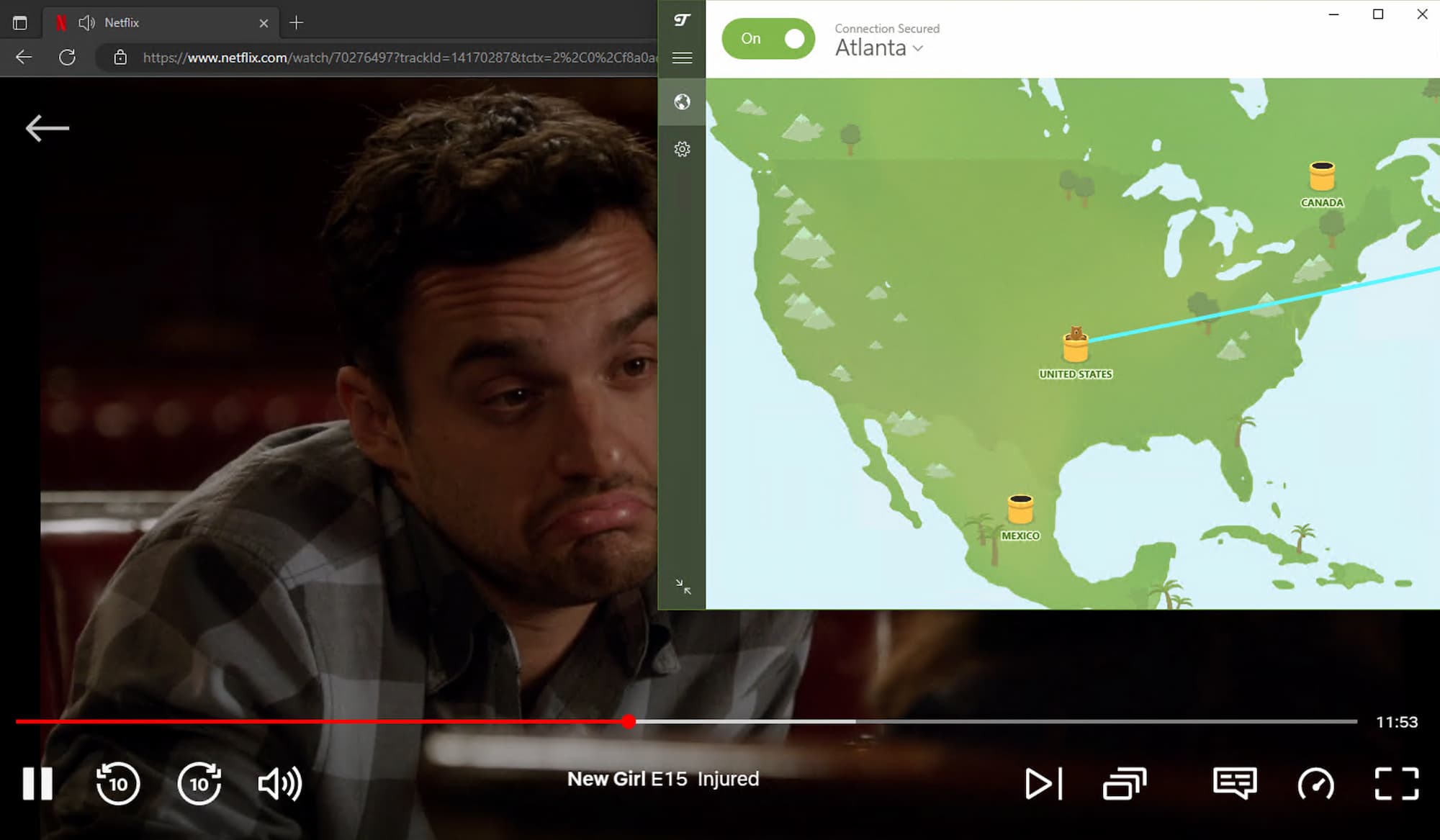
TunnelBear’s paid version worked reliably with US Netflix in our streaming tests.
These TunnelBear server locations were immediately blocked by Netflix: Dallas, New York, San Jose, and Seattle. We couldn’t even log in with these IP addresses.
TunnelBear Unblocks Disney+ & HBO Max
TunnelBear also worked with several other US streaming platforms. We streamed geo-restricted content on Disney+, HBO Max, and YouTube.
However, we couldn’t stream Amazon Prime Video — TunnelBear was detected and blocked on multiple US servers.

We used a Miami server to watch The Mandalorian with TunnelBear VPN.
TunnelBear Free Doesn’t Unblock US Streaming Platforms
In our tests, TunnelBear Free didn’t perform as well as the paid version, which is expected.
The free plan was blocked by most US streaming services, including US Netflix, Disney+, and Hulu. However, it still works with HBO Max.
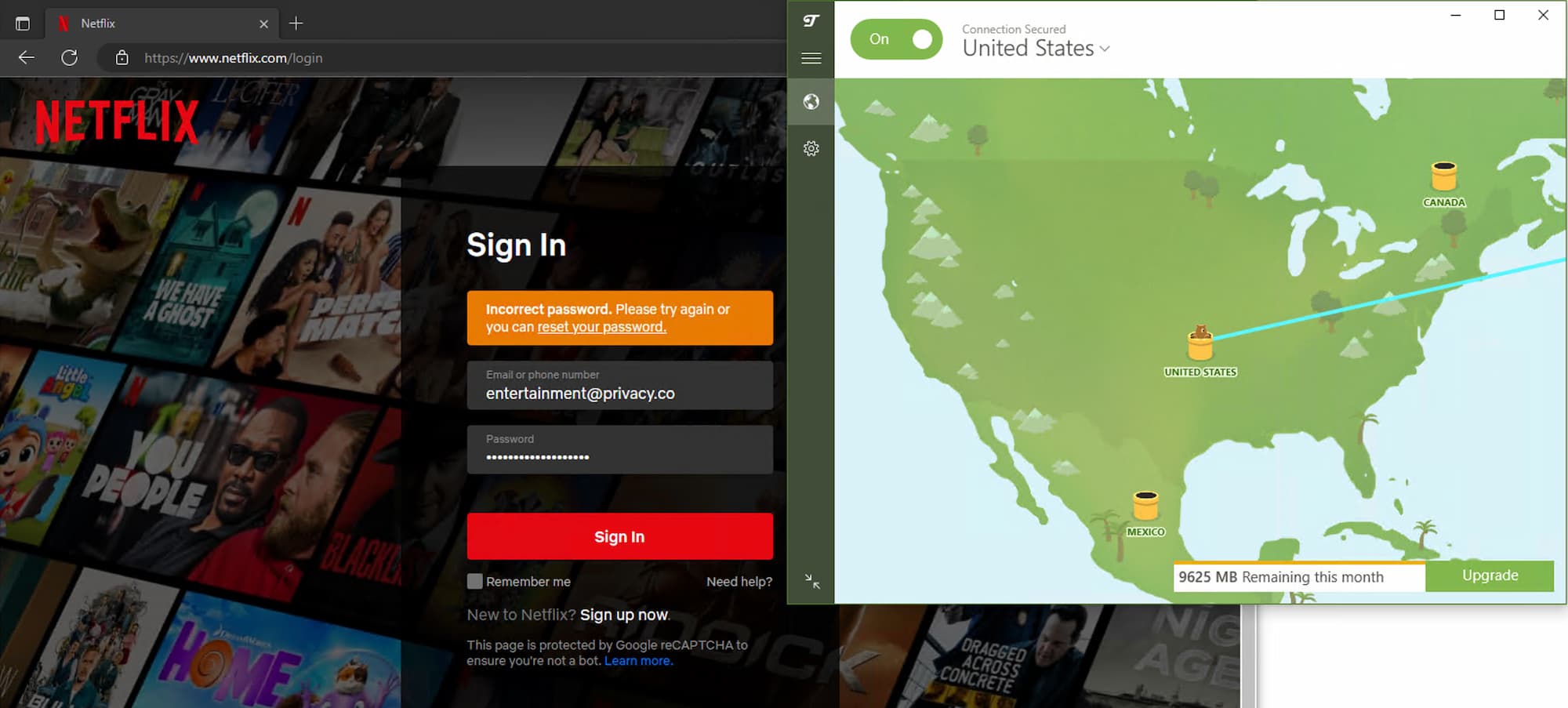
When connected to TunnelBear Free’s US server, we were blocked from logging into Netflix.
It does work well with UK services, including BBC iPlayer, All 4, and ITVX.
The biggest drawback is the 2GB monthly data cap on TunnelBear Free, which won’t let you stream for long.
Speed
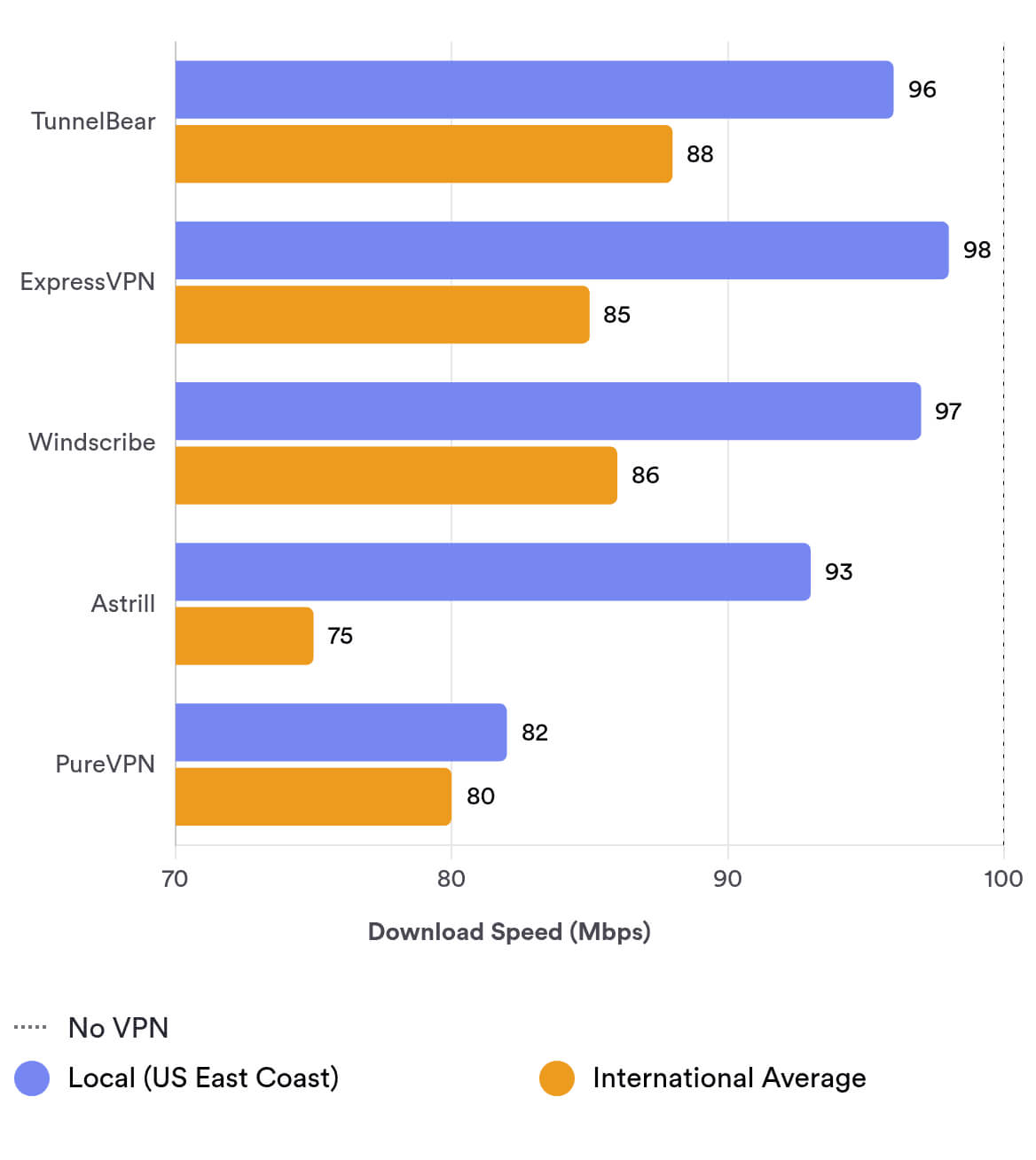
TunnelBear is consistently fast on both local and international servers. Our data shows a local download speed of 96 Mbps, a modest 4% drop, making it an above-average performer and earning a strong 9.3 in our speed evaluation. We’re also impressed that the free version is just as fast as the paid one.
Using a 100 Mbps internet connection to measure VPN performance, we tested TunnelBear Premium across servers on six continents. Here are the results:
| No VPN (New York) | US (New York) | Canada (Toronto) | US (Los Angeles) | UK (London) | Germany (Berlin) | Brazil (São Paulo) | Japan (Tokyo) | South Africa (Johannesburg) | Australia (Sydney) | |
|---|---|---|---|---|---|---|---|---|---|---|
| Server Location |  |
|
 |
|
 |
 |
 |
 |
 |
 |
| Download Speed | 100Mbps | 96Mbps | 95Mbps | 90Mbps | 87Mbps | 87Mbps | 92Mbps | 82Mbps | 91Mbps | 81Mbps |
| Upload Speed | 100Mbps | 92Mbps | 93Mbps | 85Mbps | 95Mbps | 74Mbps | 32Mbps | 69Mbps | 86Mbps | 75Mbps |
| Ping | 1ms | 6ms | 24ms | 73ms | 87ms | 91ms | 113ms | 426ms | 237ms | 214ms |
| Distance | 0mi | 5mi | 300mi | 2,500mi | 3,500mi | 4,000mi | 4,800mi | 6,700mi | 8,000mi | 9,900mi |
As you can see, TunnelBear’s speeds are impressive on local connections, dropping only to 96 Mbps. You can expect similar results when connecting to nearby servers wherever you are.
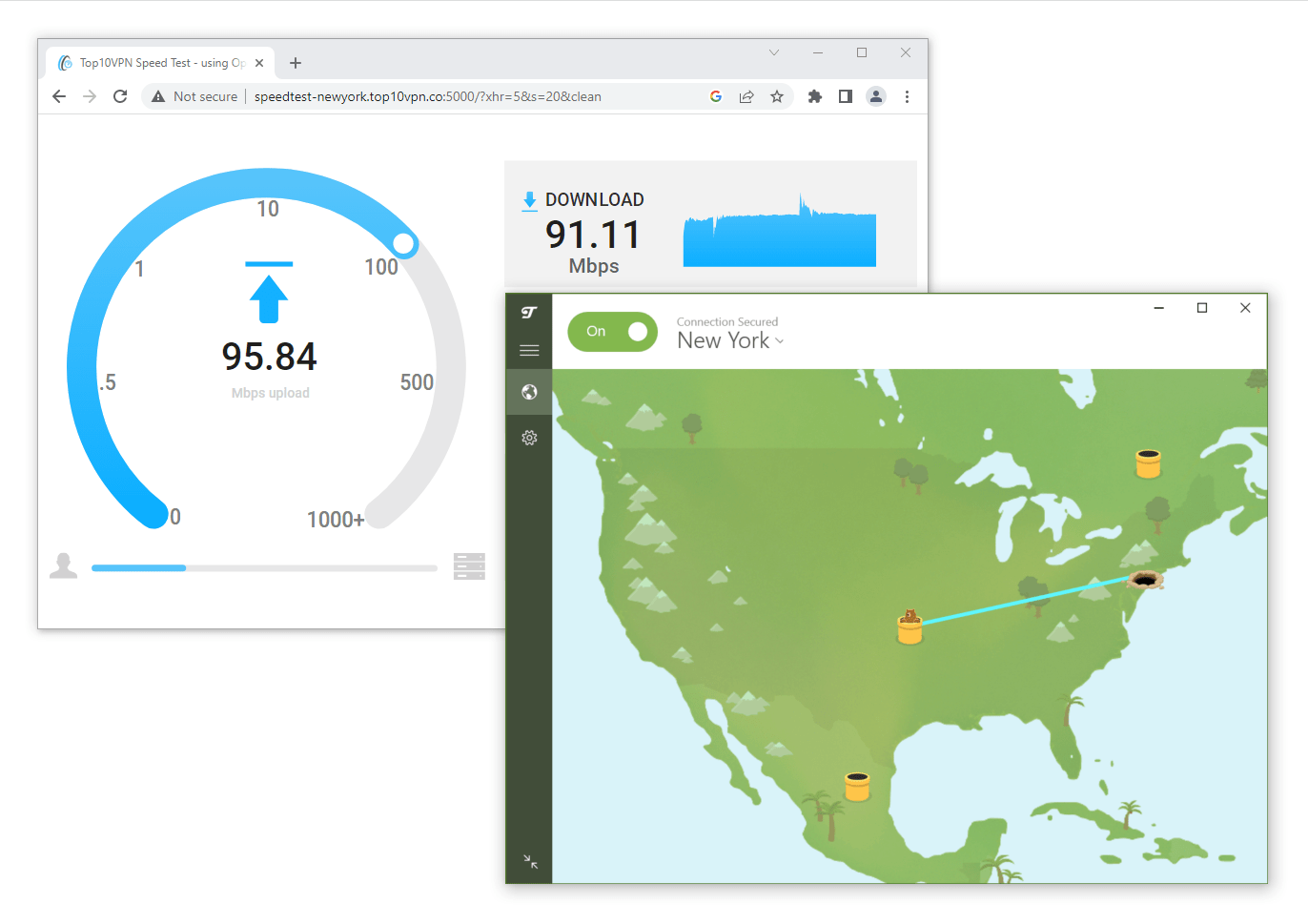
We tested TunnelBear on our unbiased speed test tool.
TunnelBear’s international speeds are also strong. We recorded an average of 88 Mbps when connecting to overseas servers.
These speeds are more than enough for browsing, streaming full HD 1080p video, and mobile gaming.
You can compare TunnelBear’s local and international speeds to other leading VPNs in the bar chart below:
TunnelBear Free Speed Tests
TunnelBear Free is very fast for a free VPN. Connected to the nearest server in New York, we measured a local speed loss of just 4%—identical to the paid version.
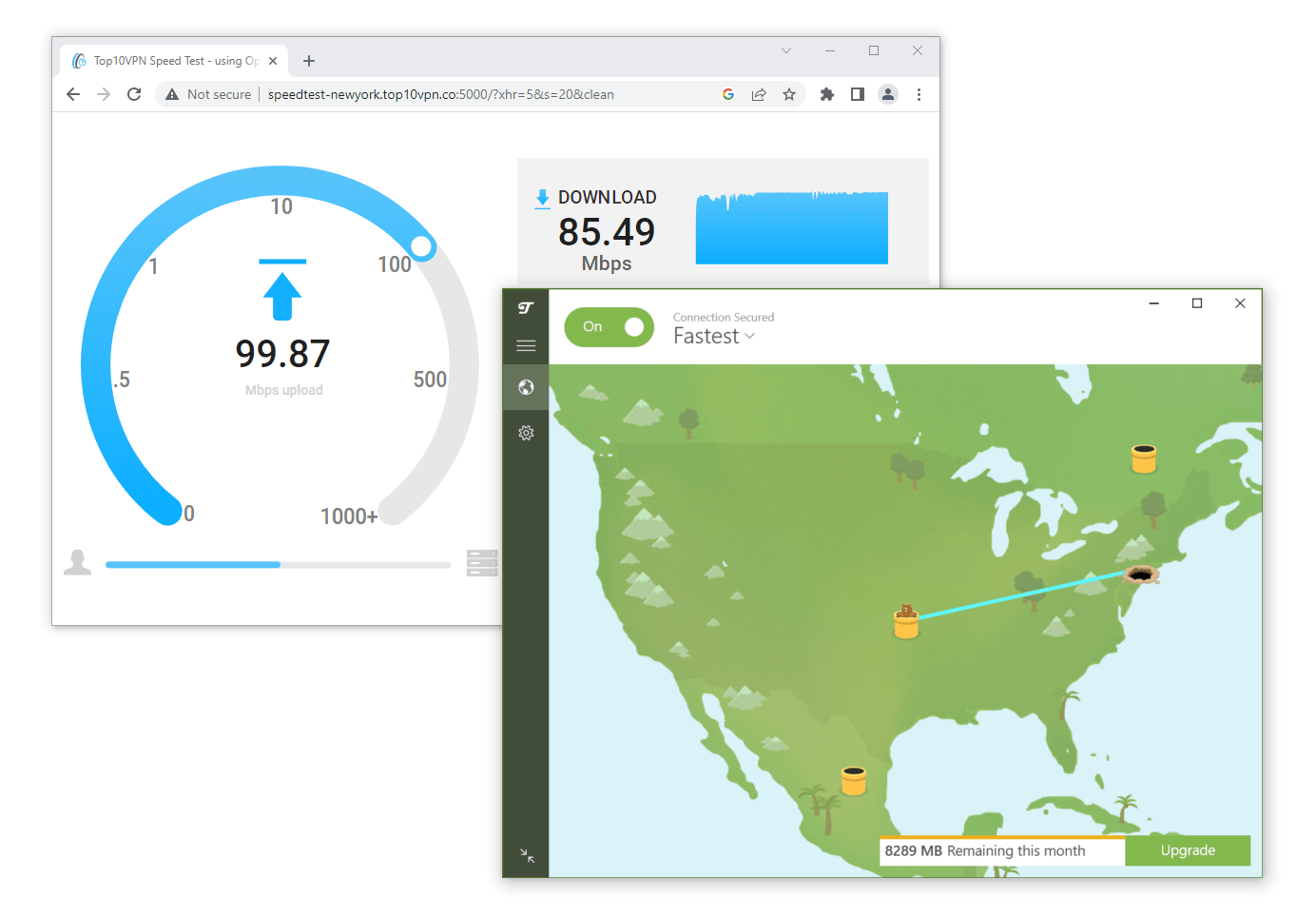
TunnelBear Free performs only slightly worse than its paid counterpart in speed tests.
It’s similarly good for long-distance connections. For example, our normal internet speed dropped by only 26% when connecting to Australia—about 10,000 miles away.
A major advantage of TunnelBear Free is that you get access to its entire paid server network, which is extremely rare for a free VPN.
Low Ping for Lag-Free Gaming
Both TunnelBear’s paid and free apps are ideal for mobile gaming. They performed exceptionally well in our ping tests—even beating ExpressVPN, our top-rated VPN for gaming.
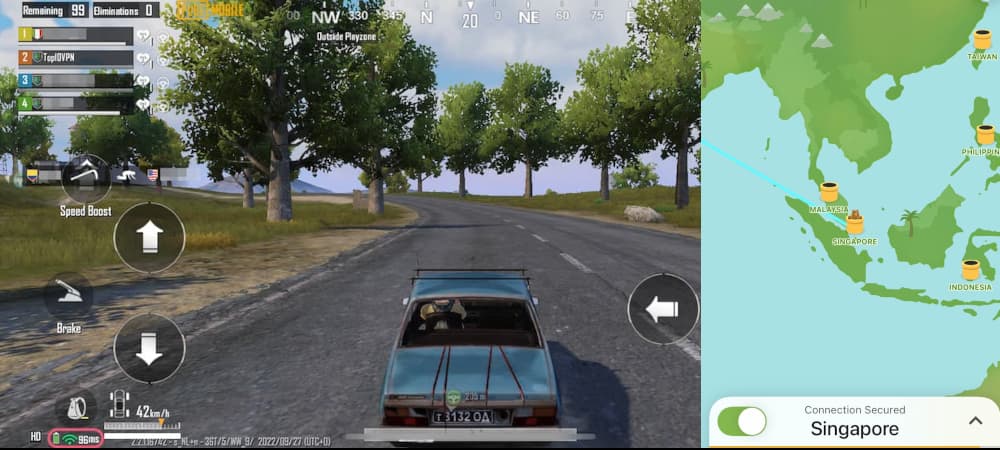
TunnelBear VPN Free excelled in our ping tests.
While connected to a local VPN server, we recorded consistent ping times below 6 ms, which is excellent for a free service.
That said, we did experience occasional disconnects from the TunnelBear server during mobile gaming, which could be improved.
Although its speeds are excellent, TunnelBear Free only offers 2 GB of monthly data, which isn’t enough for regular gaming.
Security
TunnelBear is safe, but not flawless. It offers private DNS servers, secure AES-256 encryption, WireGuard protocols, and an effective kill switch. However, our physical location was exposed in our tests, and it doesn’t operate diskless servers.
| Independent Audit | Yes |
|---|---|
| VPN Kill Switch | Yes |
| Leak Protection | Yes |
Despite its playful design, TunnelBear takes security seriously. This is a secure VPN—for the most part.
Both the free and paid versions use the AES-256 cipher on Windows, macOS, iOS, and Android.
OpenVPN is used by default, and WireGuard, IPSec, and IKEv2 are also available on iOS and Windows.
Both WireGuard and OpenVPN are secure and reliable VPN protocols, though WireGuard is the current industry standard and our preferred option.
Worrying HTML5 Geolocation leaks
IP and DNS leaks can expose personal information like your IP address, physical location, and browsing activity.
Using our IP and DNS leak test tool, TunnelBear passed our IPv4/IPv6 leak tests, DNS leak test, and WebRTC test, but it failed to mask our geolocation.
We’re extremely disappointed that even when using TunnelBear’s browser extension, our HTML5 geolocation was exposed. All top-tier VPNs include leak protection or geolocation spoofing in their extensions and apps to prevent this.
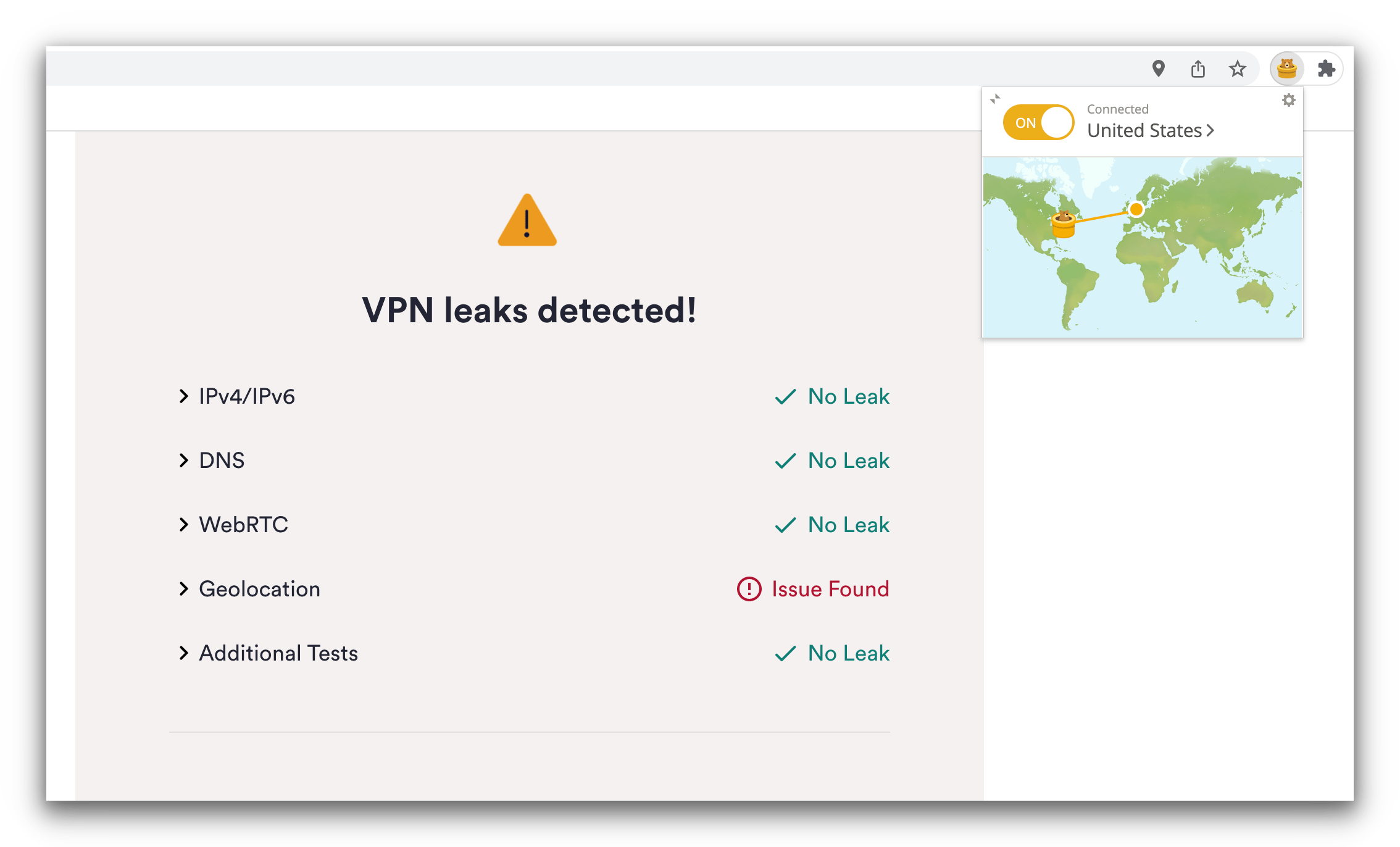
TunnelBear should not leak geolocation details.
Leaking HTML5 geolocation information is concerning, but it’s not as severe as leaking your IP address or DNS requests. In the worst case, it means users will be blocked by more streaming services and may struggle in regions with online censorship.
Ultimately, any kind of information leak disqualifies TunnelBear from being a top-tier VPN.
However, it’s not beyond repair, as you can deny permission for websites to collect your HTML5 geolocation.
EXPERT ADVICE:
HTML5 geolocation is permission-based, meaning each website must request access via a pop-up. You can simply deny permission. Doing so will prevent TunnelBear from exposing your HTML5 geolocation.
TunnelBear Owns its Bare-Metal Servers
All TunnelBear servers are physical (bare-metal), not virtual. They are located where they claim to be.
Furthermore, TunnelBear owns its entire server network, including private DNS servers, so no third parties are involved in maintaining its servers.
Controlling your server infrastructure helps prevent security incidents. The NordVPN breach showed that relying on third-party data centers can pose significant risks.
A report by the Center for Democracy & Technology noted that each TunnelBear server uses full-disk encryption, malware scanning, and intrusion protection software.
Few VPNs own their entire server network—let alone an all bare-metal network in correct locations—which helps TunnelBear stand out among other mid-tier VPNs.
Effective VigilantBear (Kill Switch)
TunnelBear’s VPN kill switch is called “VigilantBear.” It blocks web traffic if the VPN connection gets disrupted. This prevents your true IP address from being exposed, and is an essential feature of any top-tier VPN.
TunnelBear’s VPN kill switch is called “VigilantBear.” It blocks web traffic if the VPN connection is disrupted. This prevents your true IP address from being exposed and is essential for any top-tier VPN.
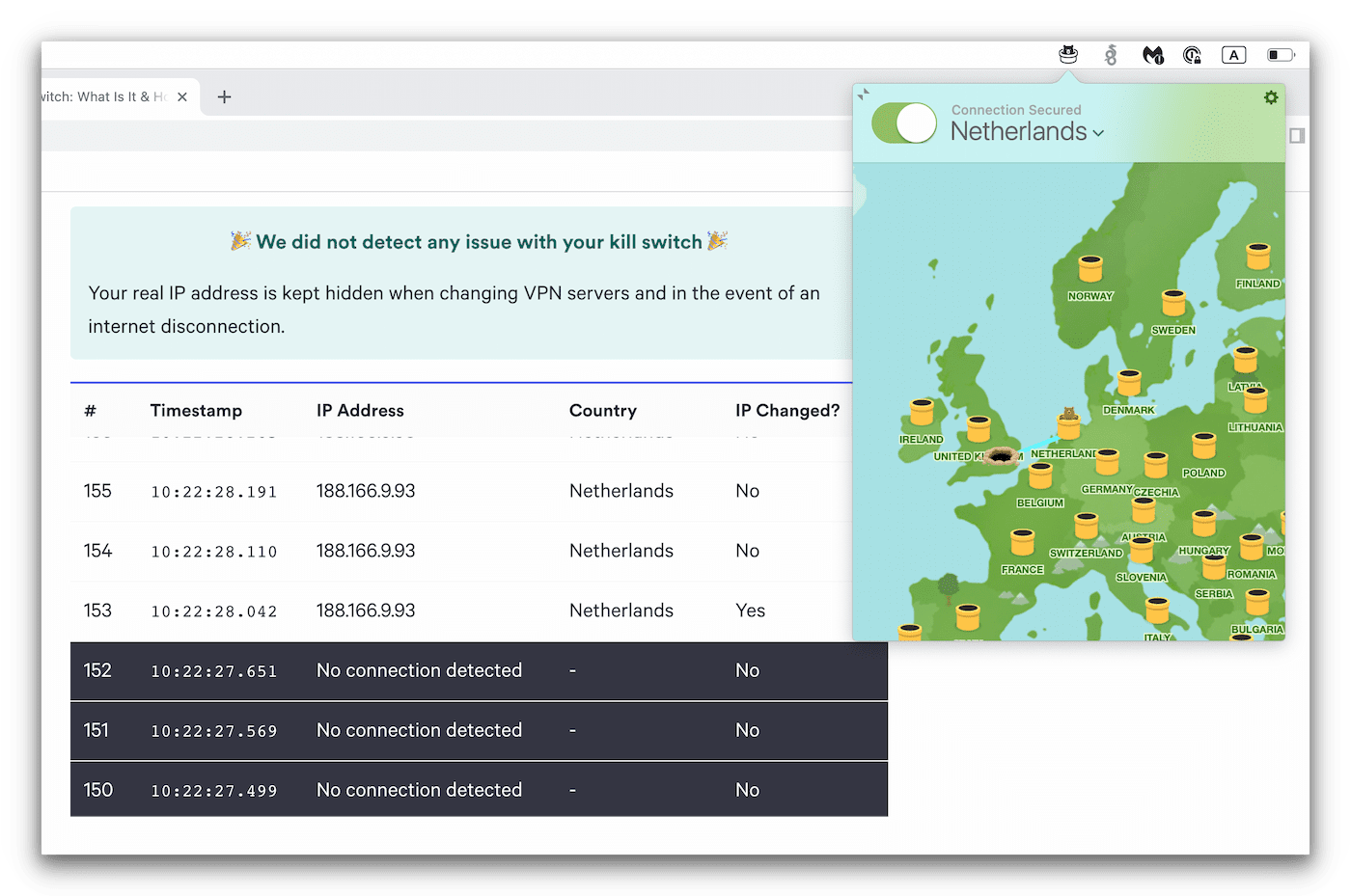
TunnelBear passed our kill switch test on macOS.
VigilantBear is available on Windows, macOS, and Android, but not on iOS.
This is common due to Apple’s guidelines, but it’s still disappointing, as it’s not impossible—VPNs like PIA and NordVPN offer a kill switch on iOS.
Regular Security Audits Keep TunnelBear Safe
To demonstrate its commitment to transparency and user safety, TunnelBear has undergone multiple independent security audits.
TunnelBear commissioned cybersecurity firm Cure53 to conduct five yearly audits since 2017. These reviews examined TunnelBear’s apps, code, and infrastructure.
In 2019, Cure53 discovered 12 vulnerabilities of varying severity and helped TunnelBear fix them and strengthen its security. The audit concluded that TunnelBear is “a clear frontrunner among its VPN competitors when it comes to security.”
In 2020, there were “two low, two medium, and one high-risk vulnerability.” TunnelBear said it fixed the high-risk issue immediately.
In 2021, Cure53 found four low, nine medium, three high, and three critical vulnerabilities—many more than the year before.
Importantly, the critical issues were in TunnelBear’s admin platform. They could have let attackers hijack admin accounts to “create a new administrator and thereby fully access both the TunnelBear and PolarBear admin portal.”
Cure53 also found one unresolved low-risk vulnerability previously reported in 2018 that was still present in 2021.
While it’s commendable that TunnelBear commissions regular audits and fixes most issues quickly, we’re concerned that Cure53 continues to find more critical, high-risk, and medium-risk vulnerabilities each year.
Missing Technical Features We’d Like to See
TunnelBear lacks some security features we expect from premium VPN services. Here are features we’d like added:
- Kill switch on iOS.
- Effective leak protection and fixes on geolocation leaks.
- Open-source software code to improve transparency and allow users to analyze TunnelBear’s security.
Server Locations
TunnelBear has expanded its network to 5,000 servers in 47 countries, but it still trails the best VPNs like Private Internet Access and IPVanish in total servers and geographic spread. It has also introduced city-level options, but locations are heavily concentrated in North America. Its free service includes access to all paid server locations, which is excellent.
| Continent | TunnelBear (Free) Countries with Servers |
TunnelBear Countries with Servers |
|---|---|---|
| Europe | 27 | 27 |
| Asia | 7 | 7 |
| South America | 5 | 5 |
| North America | 3 | 3 |
| Africa | 3 | 3 |
| Oceania | 2 | 2 |
TunnelBear’s server network is smaller than many competitors, though it’s still adequate for most users. Ultimately, if you want a large number of locations, we don’t recommend it.
For years, TunnelBear didn’t disclose its server count, but it eventually revealed it runs 5,000 servers across 47 countries—a solid network size.
It’s also the only top-tier free VPN that lets you access the same number of countries as the paid version. It’s the best free VPN for Singapore and the only free VPN offering Indonesian IP addresses.
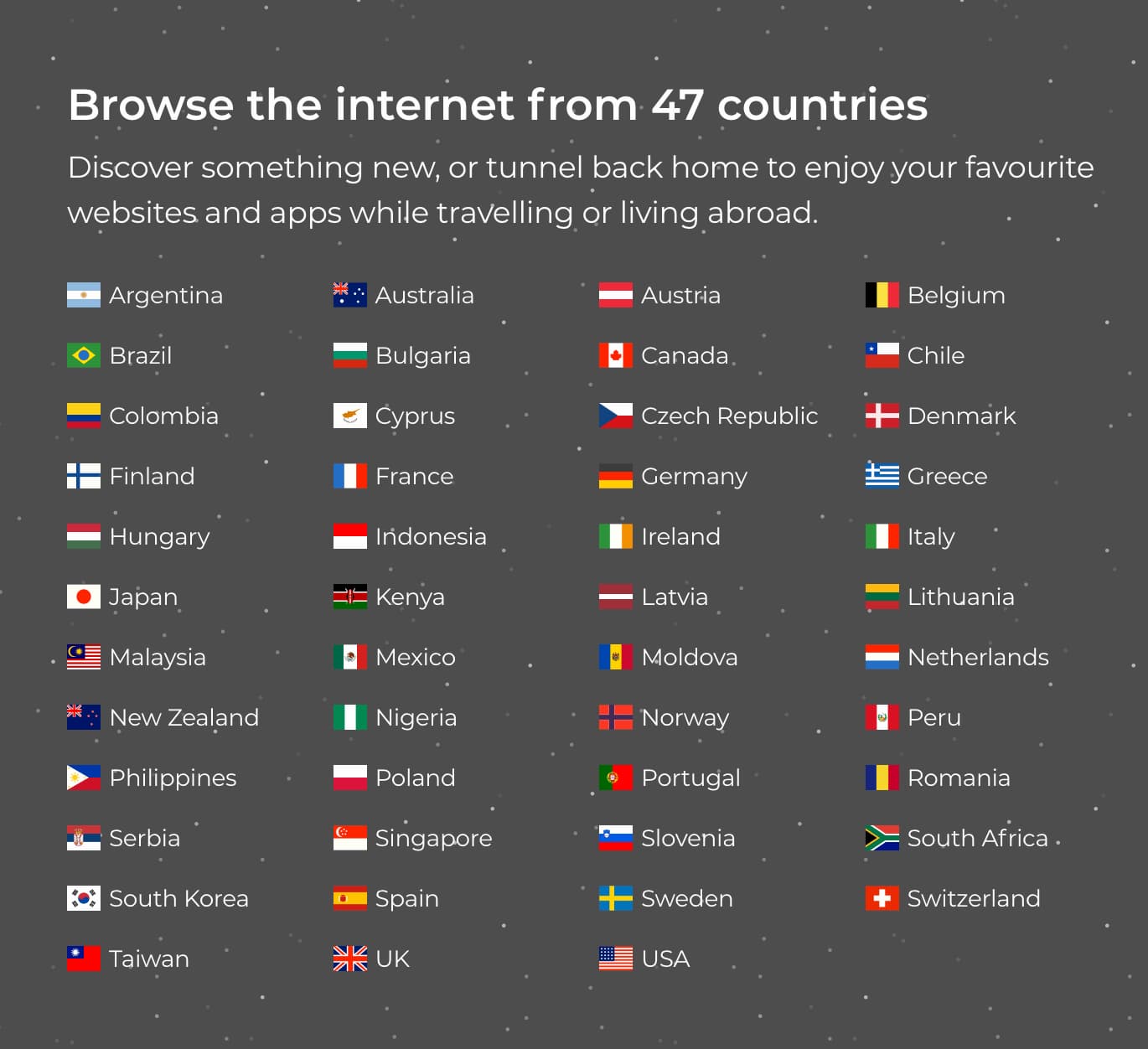
TunnelBear has servers in 47 countries, almost as many as IPVanish.
However, the free version gives you access to only one server per country, which can lead to congestion and slower speeds.
TunnelBear removed its India servers after the country enacted a law requiring VPNs to log user data, and it removed its Ukraine server following the Russian invasion. We appreciate this decision, as it shows the VPN won’t share activity logs with authorities and can quickly adapt to new laws while protecting user privacy.
If you want a wide range of server locations, we don’t recommend TunnelBear. It’s not bad, but we’ve tested top VPNs with servers in over 100 countries. For example, Private Internet Access has servers in 91 countries.
City-Level Servers in the US & Canada
TunnelBear offers city-level options in the US and Canada only. By comparison, ExpressVPN provides city choices in 11 countries.
These city-level servers are an improvement, as TunnelBear previously offered no city options. However, a large country like Australia would also benefit from city-level choices.
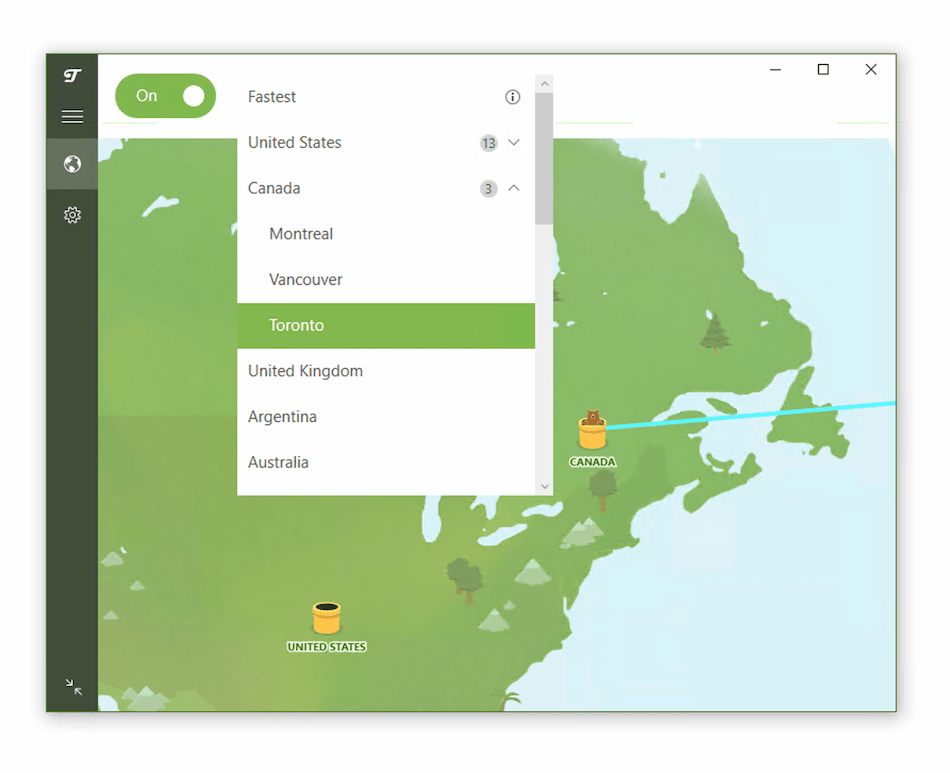
TunnelBear has three city-level servers in Canada and 13 in the US.
User Experience
TunnelBear’s design is delightful, and the apps are simple to use. They aren’t very advanced, which is good for usability but limiting for experts. TunnelBear’s iOS app is especially lacking in features.
Installation & Setup
Across all our test devices, installing and setting up TunnelBear is quick and user-friendly.
Download the app, create a free account with your email and password, and verify your email address.
Once verified, you can start using TunnelBear’s free version right away, making it an excellent option for VPN beginners.
Interface & Ease of Use
TunnelBear features a playful, beginner-friendly interface across all platforms, making it simple to connect to the fastest available server with a single click.
On desktop, the Windows app stands out by allowing protocol switching between WireGuard, OpenVPN, and IKEv2, along with advanced settings like GhostBear (obfuscation), VigilantBear (a kill switch), and Trusted Networks. In contrast, the macOS app lacks protocol switching, which is a disappointing limitation for more experienced users.

The mobile apps for iPhone and Android are similarly easy to navigate and maintain consistent designs. However, the iPhone app offers protocol switching and customization options like changing the app icon, while the Android app lacks these features but includes GhostBear for bypassing firewalls.
While the apps are user-friendly and reliable, the feature differences between platforms may frustrate users seeking a more unified experience.
Day-to-Day Experience
TunnelBear is an excellent choice for beginners or casual users who value simplicity and ease of use. The apps are visually appealing, reliable, and intuitive, allowing users to connect to a VPN server in seconds without hassle.
However, the lack of protocol switching on certain platforms (macOS and Android) and the absence of advanced customization options may deter experienced users who want more control over their connections.
Torrenting
Both TunnelBear Free and Premium perform poorly for torrenting. The VPN says it allows torrenting on its servers, but our downloads with the paid version were either stalled or very slow, despite otherwise fast speeds. Interestingly, we reached 4.2 MiB/s while torrenting with TunnelBear Free, though its 2 GB data allowance limited how much we could download. Its jurisdiction in Canada has strict copyright laws, and its apps include an essential kill switch but no port forwarding.
| Torrenting Attribute | TunnelBear (Free) | TunnelBear |
|---|---|---|
| Permits P2P Traffic | Yes | Yes |
| Average Download Bitrate | 4.2MiB/s (58% loss) | 2.8MiB/s (72% loss) |
| Countries with P2P Servers | 47 | 47 |
| Port Forwarding | No | No |
| Kill Switch | Yes | Yes |
| Logging Policy | No Identifiable Data | No Identifiable Data |
TunnelBear is an extremely unreliable VPN for torrenting. We tested both the paid and free versions with qBittorrent across servers in seven countries (as recommended by TunnelBear).
In nearly every test, downloads either stalled or were slower than the average VPN.
TunnelBear averaged just 2.8 MiB/s, which is poor compared to IPVanish at 9.9 MiB/s and ExpressVPN at 9.8 MiB/s.
Although TunnelBear says torrenting is allowed on all servers, we suspect torrent traffic may be throttled or blocked on some locations. In an email, TunnelBear confirmed that certain servers “may have stricter ports for security reasons.”
Only one server and settings combination worked reliably for torrenting: a server in Sweden using the OpenVPN protocol, with VigilantBear disabled (though we recommend keeping a kill switch on whenever you torrent).
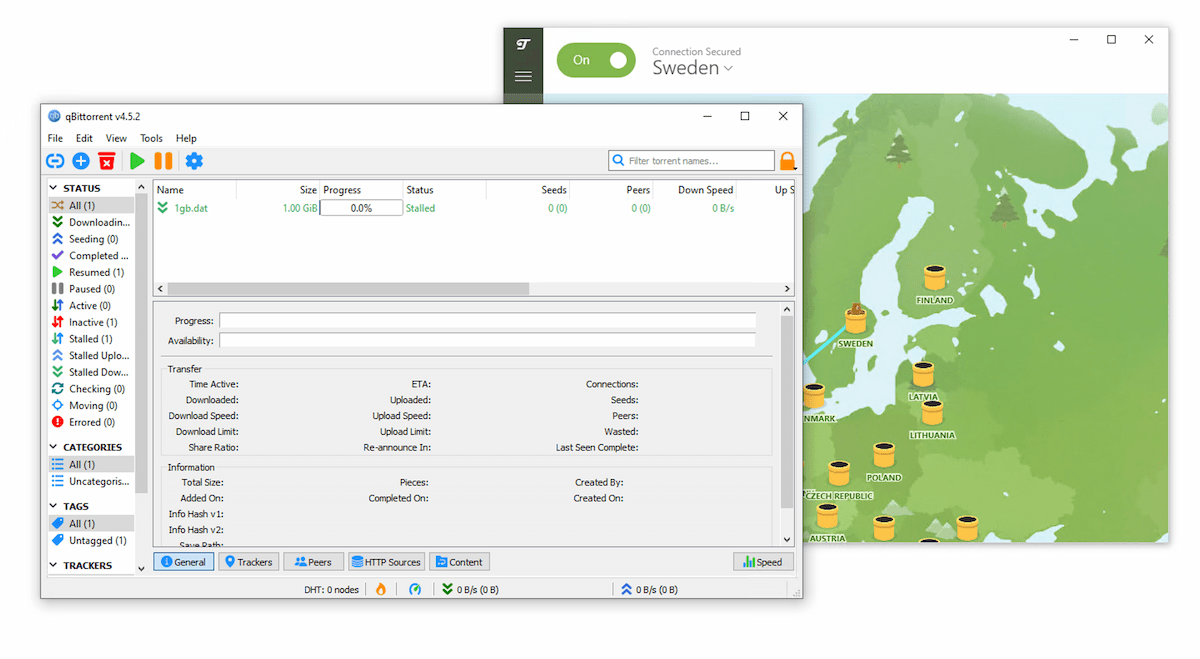
We often weren’t able to download our test file while connected to TunnelBear servers.
Unlike most VPNs, where the paid plan is faster, TunnelBear Free was actually 1.4 MiB/s faster for torrenting than the paid version. However, its 2GB/month data cap severely limits downloads.
To make matters worse, TunnelBear doesn’t support port forwarding on any server, which would otherwise improve upload speeds for seeding.
If you’re looking for a VPN—free or paid—for torrenting, we strongly recommend PIA or Windscribe Free instead.
Device Compatibility
TunnelBear offers solid apps for major desktop and mobile platforms, but you can’t install it on a router. There are no apps for streaming devices like Fire TV Stick, either. This means TunnelBear isn’t a good option if you want a VPN on your smart TV or game consoles.
| Windows | Yes |
|---|---|
| Mac | Yes |
| iOS | Yes |
| Android | Yes |
| Linux | Yes |
| Amazon Fire TV | No |
| Android TV | No |
| Apple TV | No |
| Router | No |
| Chrome | Yes |
Simultaneous Connections: 5
TunnelBear offers native VPN apps for Windows, macOS, iOS, and Android. You can also install it manually on Linux.
Both the free and paid versions let you connect up to five devices at the same time on one subscription, which is standard for VPNs.
No Router or Games Console Support & No Fire TV Stick App
You can’t install TunnelBear on a router. There are also no apps for Amazon Fire TV Stick or Android TV, and no Smart DNS tool.
This means you can’t use TunnelBear on game consoles, Apple TV, Roku, or most Smart TVs. This limited compatibility conflicts with its user-friendly image.
For PlayStation and Xbox, we recommend plug-and-play options like ExpressVPN’s MediaStreamer or Surfshark’s Smart DNS.
Browser Extensions
TunnelBear’s browser add-ons are easy to install and don’t require manual setup.
There used to be an Opera extension, but it was removed. While Opera can technically run Chrome extensions, TunnelBear’s didn’t work in our tests.
Keep in mind that browser extensions only encrypt traffic from your browser, while the full VPN app encrypts all traffic to and from your device.
It’s disappointing that TunnelBear’s extensions don’t include extras like an ad blocker. However, the company offers a separate ad-blocker extension called Blocker.
Additional Features
TunnelBear includes useful tools like obfuscation to bypass censorship, split tunneling (SplitBear on Android), and a reliable ad blocker. However, it lacks some advanced options such as multi-hop servers, live chat support, dedicated IPs, and a GPS spoofer.
| Additional Feature | TunnelBear (Free) | TunnelBear |
|---|---|---|
| Split Tunneling | No | Yes |
| VPN Obfuscation | No | Yes |
| Multi-Hop Servers | No | No |
| Dedicated IP | No | No |
| Ad Blocker | No | Yes |
| Password Manager | No | Yes |
Additional Security Features
A useful feature is TunnelBear’s GhostBear protocol. It’s designed to disguise your VPN traffic as normal HTTPS traffic, making it harder for governments, businesses, and ISPs to detect or block your connection. It may slow your speeds, though.
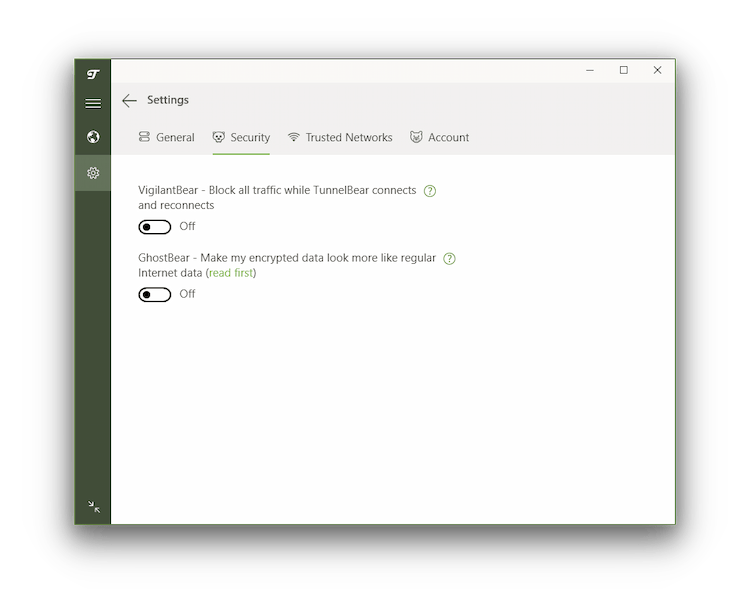
TunnelBear’s additional features are easy to navigate.
There’s also RememBear (a password manager) and SplitBear (split tunneling) for Android.
No 24/7 Live Chat Support
TunnelBear doesn’t offer live chat support. There used to be an automated chatbot, but we haven’t been able to access it in 2025.
The best way to contact customer support is by email through an online form. You don’t need a paid plan to use it, but you do need a TunnelBear account. The good news is you can create a free account and use that to reach support.
For a VPN aimed at beginners, the lack of immediate support to answer questions is disappointing.
Many premium VPNs, like ExpressVPN, offer 24/7 live chat to help troubleshoot user issues.
TunnelBear Key Data
| Attribute | TunnelBear | Typical Free VPN |
|---|---|---|
| Owner | McAfee | Independent |
| Launch Date | 2011 | 2015 |
| Safe to Use | Yes | No |
| Data Cap | 2GB per month | 10GB per month |
| Payment Details Required | No | No |
| Account Required | Yes | Yes |
| Contains Ads | No | Yes |
| Local Download Speed | 96Mbps (4% loss) | 61Mbps (39% loss) |
| International Download Speed | 85Mbps (15% loss) | 55Mbps (45% loss) |
| Countries with Servers | 47 | 4 |
| Privacy Policy | No Identifiable Data | Identifiable Data |
| Simultaneous Connections | 5 | 1 |
| Manually Select Server Location | No | Yes |
| Netflix Libraries | 0 | 0 |
| Torrenting | Yes | No |
| Works In China? | Sometimes | No |
| Customer Support | Email & Online Resources Only | Online Resources |
| Apps & Extensions |
          |
|
TunnelBear Key Data
| Attribute | TunnelBear | Typical VPN |
|---|---|---|
| Local Download Speed | 96Mbps (4% loss) | 89Mbps (11% loss) |
| International Download Speed | 88Mbps (12% loss) | 80Mbps (20% loss) |
| Countries with Servers | 47 | 40 |
| Privacy Policy | No Identifiable Data | Identifiable Data |
| Simultaneous Connections | 5 | 10 |
| Netflix Libraries | 2 | 3 |
| Torrenting | Yes | Yes |
| Works In China? | Sometimes | No |
| Cheapest Price | 3.33/mo over 36 months | $3.87/mo over 24 months |
| Customer Support | Email & Online Resources Only | |
| Apps & Extensions |
|
|
Price
Price Plans
| 1 month | $9.99 |
|---|---|
| 12 months | $59.88 ($4.99/mo) |
| 3 years | $119.88 ($3.33/mo) |
Free Trial
| Money-Back Guarantee | No |
|---|---|
| Free Trial | No |
| 100% Free Plan | Yes |
| Data Cap | 2GB per month |