
Bitdefender VPN: Speedy Hydra Tech, But Excessive Data Collection
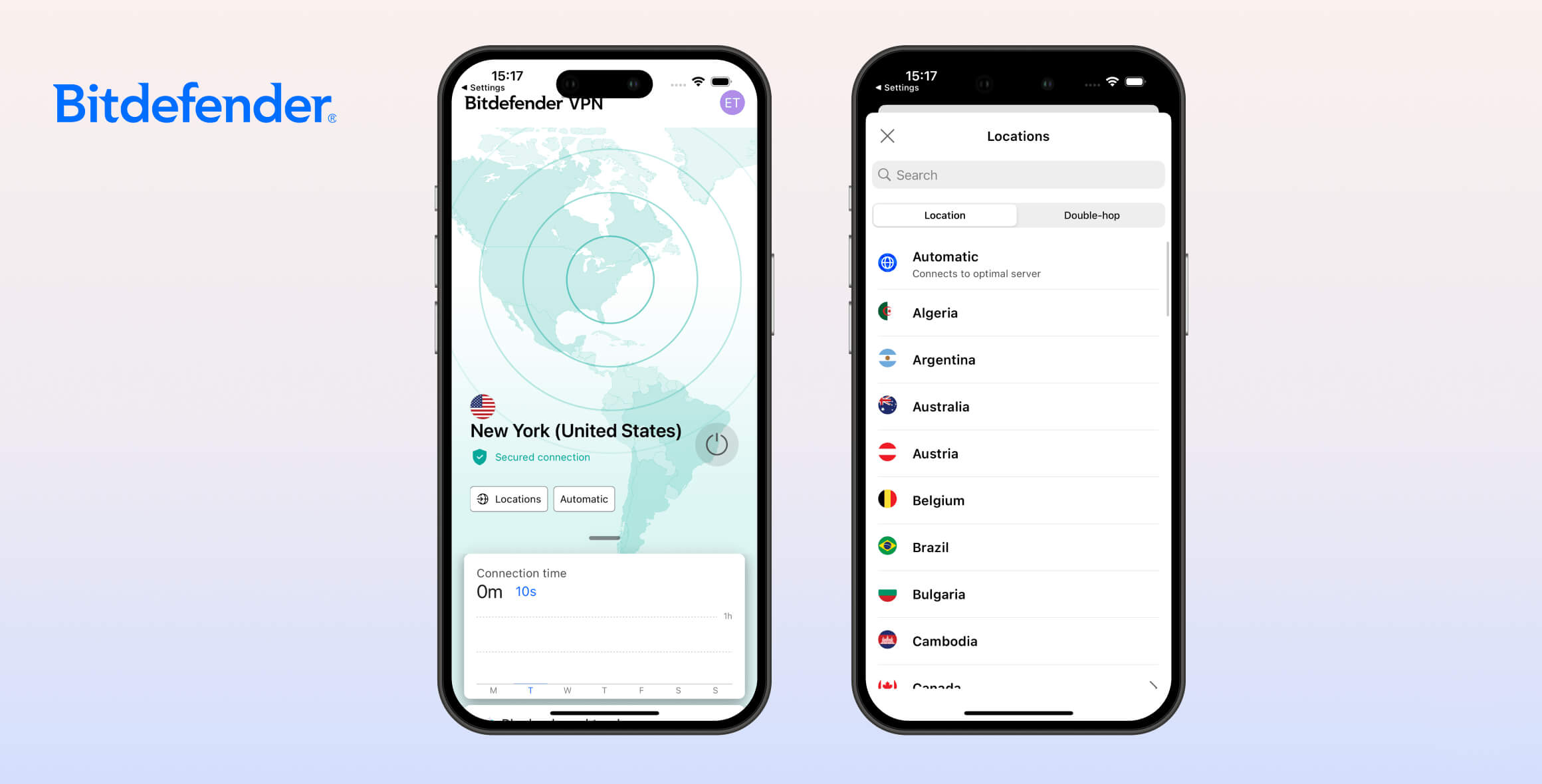
We don’t recommend using Bitdefender VPN, even if you get it through an antivirus bundle. Although it’s fast, it temporarily logs your IP address and its kill switch is unreliable. It fails to unblock most streaming platforms, including Netflix, and it isn’t safe for torrenting due to its privacy shortcomings.
- Pros
- Very fast speeds
- Unblocks BBC iPlayer
- Allows torrenting
- Simple app design
- Cons
- Fails to unblock streaming services like Netflix & Disney+
- Small server network
- Faulty kill switch
- No Firestick app, no Smart DNS & no router support
Bitdefender is best known for its antivirus software, but it also offers a VPN, available either as part of a cybersecurity suite or as a standalone subscription.
Bitdefender VPN isn’t fully operated by Bitdefender. It’s a white-label version of Hotspot Shield, which means it uses Hotspot Shield’s server network, protocols, and underlying technology.
We tested every aspect of the service, including its privacy and security settings, speed performance, and ability to unblock websites and streaming platforms.
As our review shows, Bitdefender VPN can’t match our top-rated VPNs. Despite its fast speeds, it falls short on privacy, lacks a robust server network, and doesn’t work with popular streaming services.
Put simply, there are far better and more affordable VPNs on the market.
Privacy
Ranked #17 out of 45 VPNs for Privacy
Bitdefender VPN logs too much identifiable data for us to recommend it for privacy. Because it’s a white-label version of Aura’s VPN products, its privacy policy is unusually complex. If privacy is a priority, we suggest avoiding this VPN.
| Originating IP Address | Yes |
|---|---|
| Browsing Activity | Yes |
| Individual Connection Timestamps | Yes |
| Date of Last Connection | No |
| VPN Server IP | No |
| Device Information | Yes |
| Individual Bandwidth Usage | Yes |
| Account Information | No |
You can read Bitdefender’s full privacy policy on its website.
Like other white-label VPNs, Bitdefender VPN’s privacy policy is confusing.
Bitdefender’s “home solutions privacy policy” includes a short, three-paragraph section about the VPN’s data collection.
It states that the VPN collects your real IP address, which is the most sensitive data a VPN can log. Not only is it personally identifiable, but Bitdefender doesn’t clarify when this data is deleted.
Importantly, Bitdefender VPN uses Aura’s server network, protocols, and software, so all VPN-related data is collected and processed by Aura.
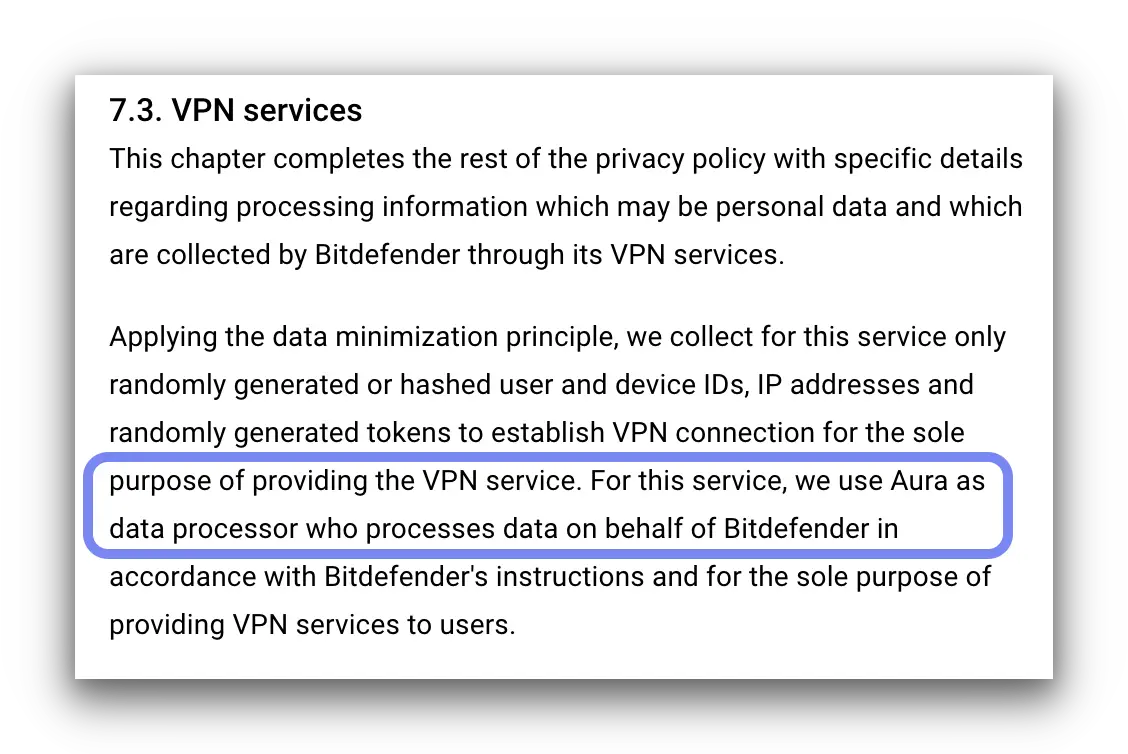
Aura is listed as the data processor for Bitdefender VPN.
As a result, Bitdefender VPN users are covered by a combination of Bitdefender’s and Aura’s privacy policies. Unfortunately, both allow significant collection of personally identifiable data.
Romania & US Jurisdiction
Bitdefender is based in Romania, which is subject to EU data retention rules and data-sharing agreements.
To make matters worse, Aura is based in the US, a jurisdiction widely regarded as poor for data privacy.
This combination of jurisdictions, along with a complicated privacy policy and excessive logging, makes Bitdefender VPN a poor choice for privacy.
Streaming
Ranked #31 out of 45 VPNs for Streaming
Bitdefender is fast enough for HD streaming, but it cannot reliably unblock platforms like Netflix, Disney+, or HBO Max. In our hands-on tests, it did unblock some UK services, such as BBC iPlayer and ITVX, but there are far better streaming VPNs for the same price.
| Streaming Service | Works with Bitdefender VPN |
|---|---|
| BBC iPlayer (UK) | Yes |
| DAZN (Canada) | No |
| Disney+ (UK) | No |
| Hulu (US) | No |
| ITVX (UK) | Yes |
| HBO Max (US) | No |
| Netflix (US) | No |
| Netflix (UK) | No |
| Prime Video (US) | No |
| Sky Go (UK) | No |
Bitdefender claims its VPN can “unlock media from all over the world.” In our experience, this is not true. Bitdefender is, in fact, a poor VPN for streaming.
In our tests, Bitdefender VPN didn’t work with Netflix on any server, including the UK and US. It also failed to unblock HBO Max and Amazon Prime Video.
Based on our regular testing, Bitdefender can’t compete with the best Netflix and HBO Max VPNs.
Like most VPNs, Bitdefender VPN can unblock YouTube videos, which is useful if the site is blocked on your network at school or work.
Unblocks BBC iPlayer & ITVX
Surprisingly, we were able to access free UK platforms like BBC iPlayer and All4 using the UK server.
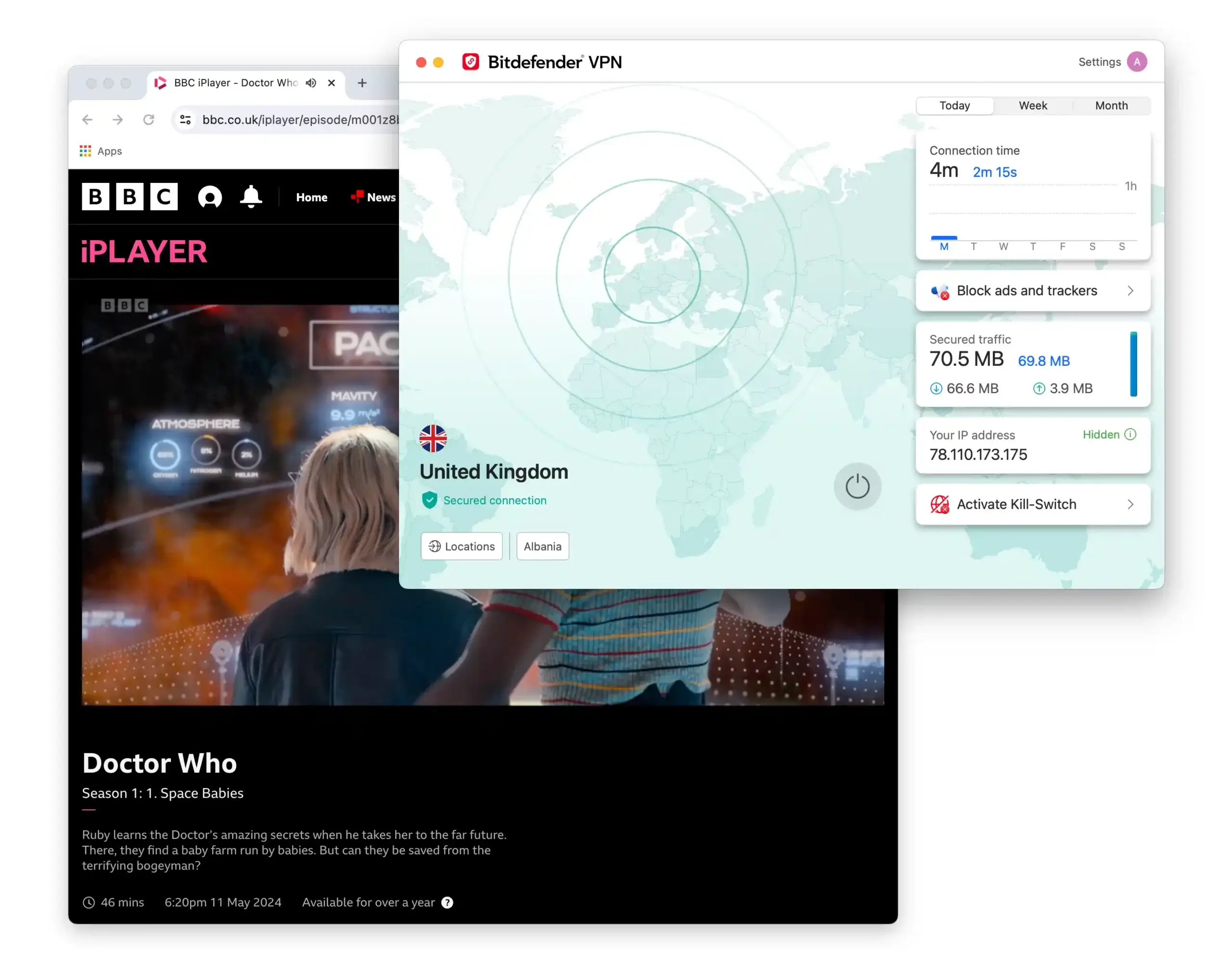
We watched Doctor Who on BBC iPlayer using Bitdefender VPN’s UK server.
Its download speeds are fast enough for HD streaming. However, it doesn’t offer dedicated streaming servers or any special tools to bypass geo-restrictions.
Overall, we do not recommend this VPN for streaming.
Speed
Ranked #10 out of 45 VPNs for Speed
Bitdefender is extremely fast on both nearby and distant servers. We measured an average international speed loss of just 3%. These impressive speeds come from using the same technology as Hotspot Shield (the fastest VPN we’ve tested).
Here are the speeds we recorded while using Bitdefender VPN:
| No VPN (New York) | US (New York) | Canada (Toronto) | US (Los Angeles) | UK (London) | Germany (Berlin) | Brazil (São Paulo) | Japan (Tokyo) | South Africa (Johannesburg) | Australia (Sydney) | |
|---|---|---|---|---|---|---|---|---|---|---|
| Server Location |  |
|
 |
|
 |
 |
 |
 |
 |
 |
| Download Speed | 100Mbps | 93Mbps | 98Mbps | 97Mbps | 96Mbps | 97Mbps | 97Mbps | 98Mbps | 99Mbps | 95Mbps |
| Upload Speed | 100Mbps | 87Mbps | 95Mbps | 65Mbps | 56Mbps | 50Mbps | 27Mbps | 30Mbps | 54Mbps | 21Mbps |
| Ping | 1ms | 6ms | 15ms | 73ms | 73ms | 84ms | 114ms | 144ms | 249ms | 208ms |
| Distance | 0mi | 5mi | 300mi | 2,500mi | 3,500mi | 4,000mi | 4,800mi | 6,700mi | 8,000mi | 9,900mi |
As the data shows, Bitdefender is fast in every location. We were especially impressed with its international speeds of 97Mbps, which outperform even top VPNs like ExpressVPN and NordVPN.
Bitdefender reaches these speeds because it uses Hotspot Shield’s proprietary Hydra protocol.
Bitdefender isn’t the only antivirus company doing this. In our McAfee VPN review, we explain how its service also uses a Hotspot Shield white-label.
Security
Ranked #31 out of 45 VPNs for Security
Bitdefender VPN uses secure protocols and encryption, but it lacks several advanced features found in top-tier VPNs. It doesn’t offer multi-hop servers, DNS leak protection toggles, or open-source apps. Its kill switch is also faulty and can expose your real IP address when you switch servers.
| Independent Audit | No |
|---|---|
| VPN Kill Switch | Yes |
| Leak Protection | Yes |
Bitdefender VPN includes a decent set of technical features, such as a kill switch, ad blocker, a public Wi-Fi setting, and more.
It has improved in recent years, but it still struggles with basics. In our testing, the kill switch leaked our IP address when we switched servers without disconnecting first.
Overall, it still needs key improvements. Until then, we can’t call Bitdefender VPN a fully secure service.
No IP, WebRTC or DNS Leaks
In our most recent tests, we were pleased to find that Bitdefender VPN no longer leaks DNS requests. In fact, we detected no leaks at all.
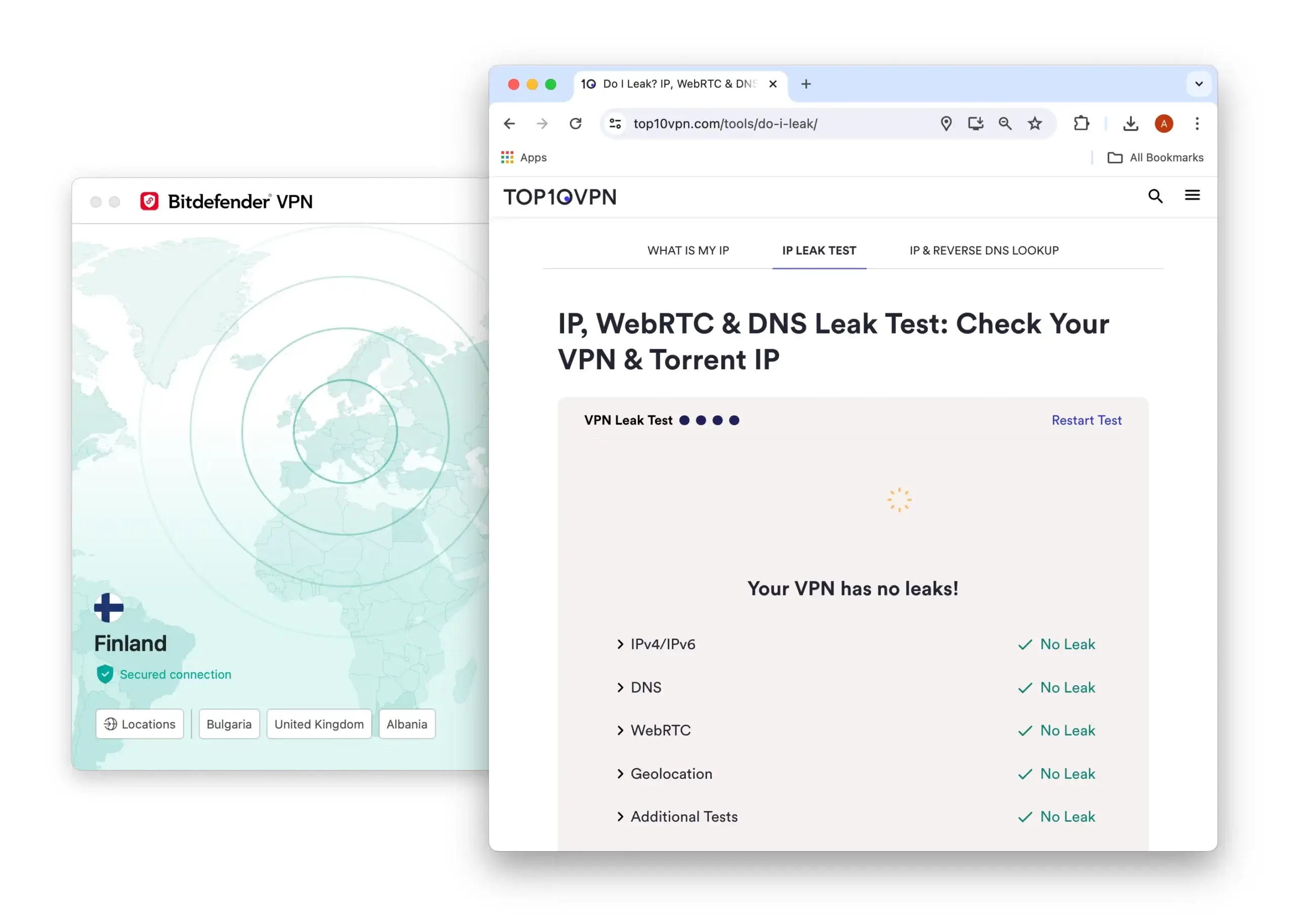
With Bitdefender VPN, we detected no IP, DNS, WebRTC, or geolocation leaks.
Safe & Open-Source Protocols
Bitdefender VPN supports top protocols: OpenVPN and WireGuard. We prefer WireGuard for its excellent speeds, low data usage, and modern encryption.
As a rebranded version of Hotspot Shield, Bitdefender VPN also offers Hydra, a proprietary protocol that’s extremely fast.
Failed Our Kill Switch Test
Disappointingly, Bitdefender VPN’s kill switch leaked our real IP address when changing servers without disconnecting.
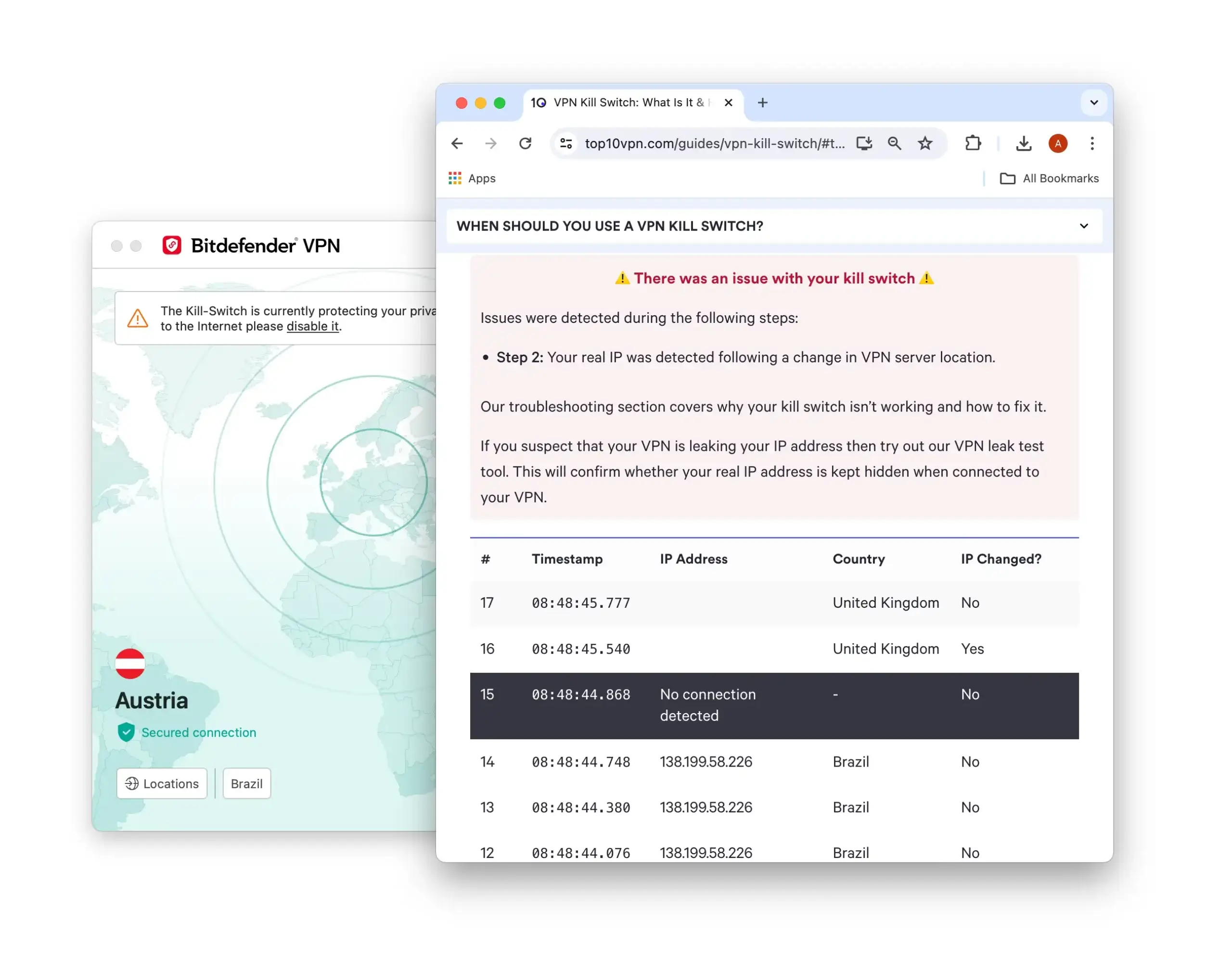
Bitdefender is not a secure VPN as it has a faulty kill switch.
This is common among lower-tier VPNs, but we expect vendors to fix the issue or at least warn users to disconnect before switching servers.
Security Features We’d Like to See
Bitdefender VPN has improved since our last review. It no longer leaks DNS requests and offers more technical features. Still, it’s missing:
- A kill switch that protects your IP address when switching servers, not just when the internet connection drops.
- An independent security audit to verify the server infrastructure and code.
Server Locations
Ranked #13 out of 45 VPNs for Server Locations
Bitdefender operates a relatively small network of 1,300+ servers in 53 countries. Servers are located in Europe, North America, Asia, and South America.
| Continent | Bitdefender Countries with Servers |
|---|---|
| Europe | 28 |
| Asia | 15 |
| North America | 3 |
| South America | 3 |
| Africa | 2 |
| Oceania | 2 |
Bitdefender’s server list spans 53 countries, with most locations in Europe and North America.
To its credit, the VPN’s city-level options in North America help bypass US sports blackouts.
Here’s a list of Bitdefender’s city-level servers in the US, Canada, and the UK:
- US: Atlanta, Charlotte, Chicago, Dallas, Denver, Houston, Los Angeles, Miami, New York, Newark, Phoenix, Portland, San Jose, Seattle, Washington
- Canada: Montreal, Toronto, Vancouver
- UK: London, Manchester
There are fewer options in Asia, but you’ll still find a decent selection, including Hong Kong, Indonesia, Japan, and Singapore.
Disappointingly, there are only three server locations in South America. In Africa, there are only two.
Overall, Bitdefender VPN’s coverage is decent, but it’s far less extensive than top VPNs. For example, CyberGhost covers 100 countries and offers city-level choices in the US, UK, and eight other countries.
User Experience
Ranked #34 out of 45 VPNs for User Experience
Bitdefender’s apps are easy to use, mainly because they are simple. However, you must log into the broader suite to open the VPN, which feels unnecessary and confusing.
Some VPNs are easy to use thanks to strong design, while others are easy because they have few features. Bitdefender VPN falls into the latter category.
That doesn’t mean the design is bad — we found it straightforward — but its limited functionality isn’t impressive.
Android & iOS Applications
The mobile apps use a simple layout. The VPN is easy to find, located within one of five tabs at the bottom of the screen.
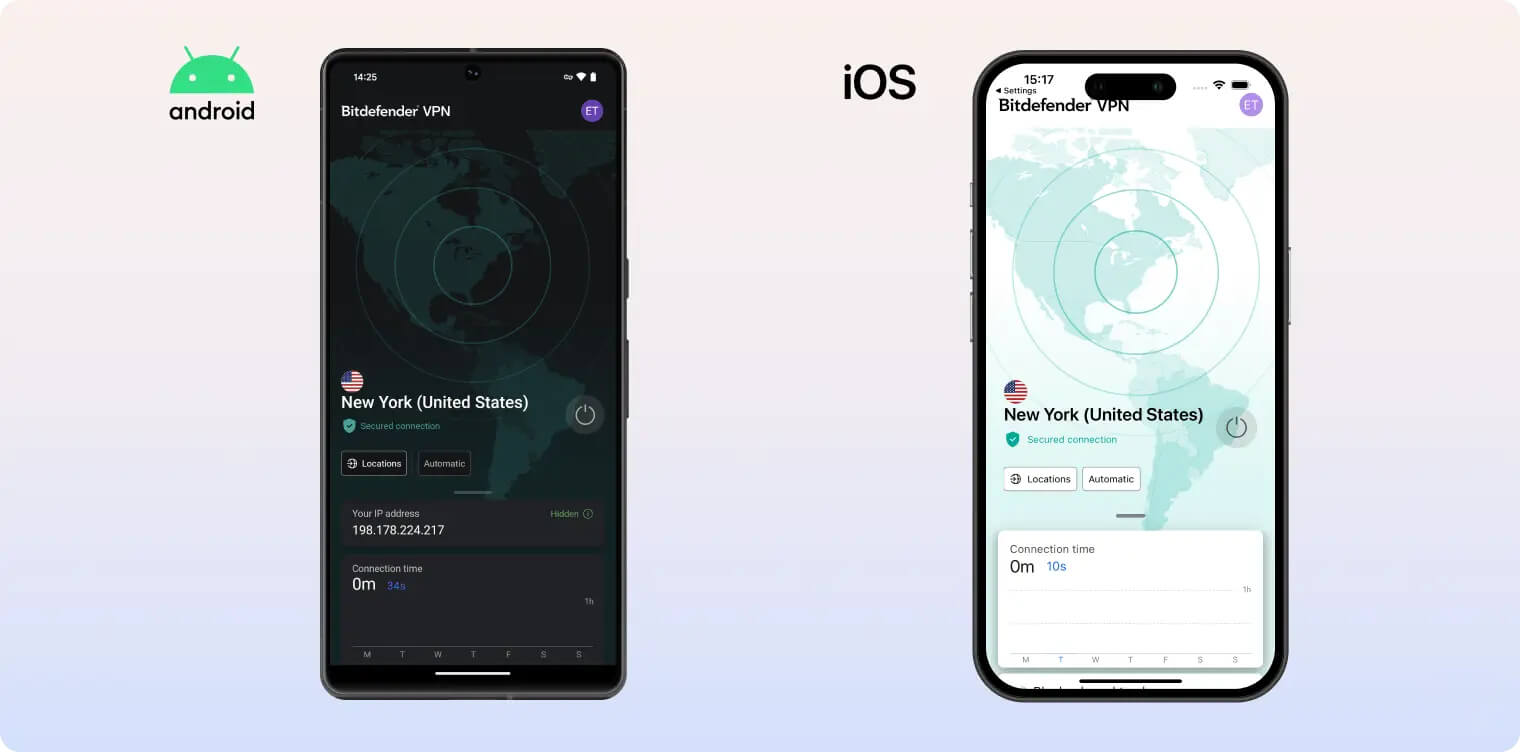
There’s a central Connect button and an easy-to-find server selector.
Servers are listed alphabetically by country. Since there aren’t many locations, it’s easy to find what you need.
There’s also a connection timer and a data meter if you’re using the free version.
That’s the extent of the VPN’s functionality. You can use the antivirus and security tools in the other tabs, but there are no additional VPN settings.
Windows & macOS Applications
The Mac and PC versions require Bitdefender Total Security to be installed. You can launch the VPN on its own, but if you don’t plan to use Bitdefender’s other features, the Total Security app feels like bloatware.
The VPN app itself is even simpler than the mobile version. It has an easy-to-navigate server list, which we like.
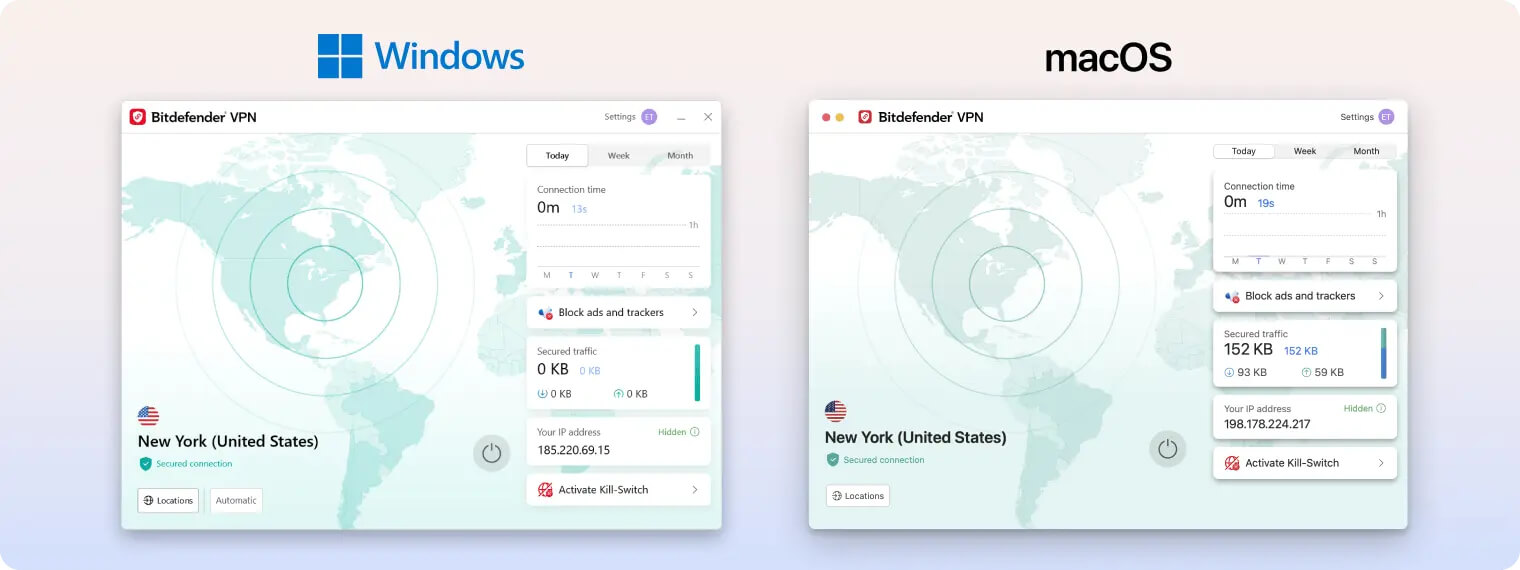
The settings menu is easy to find, but sparse. The option to auto-connect on unsecured Wi-Fi is useful.
However, many features we expect from a top-tier VPN are missing. We would absolutely expect a reliable kill switch, for example.
Torrenting
Ranked #31 out of 45 VPNs for Torrenting
Bitdefender VPN’s torrent speeds are fast, but its kill switch is faulty and it logs too much sensitive information. The service isn’t private enough, so we strongly advise against using it for torrenting.
| Torrenting Attribute | Bitdefender VPN |
|---|---|
| Permits P2P Traffic | Yes |
| Average Download Bitrate | 7.6MiB/s (24% loss) |
| Countries with P2P Servers | 53 |
| Port Forwarding | No |
| Kill Switch | Yes |
| Logging Policy | Identifiable Data |
Bitdefender is not a good choice for torrenting. It allows P2P on all servers and offers an auto-connect feature when you open a torrent client, but we still don’t trust it for torrenting.
The kill switch can leak your IP address, and the service logs too much identifiable information for comfort.
If you’re serious about torrenting, we recommend privacy-focused VPNs like ExpressVPN or Proton VPN instead.
Device Compatibility
Bitdefender is available on the four most popular platforms: Windows, macOS, iOS, and Android. Unfortunately, it doesn’t support routers and has no browser extensions, making it a weak option compared to other top VPNs.
| Windows | Yes |
|---|---|
| Mac | Yes |
| iOS | Yes |
| Android | Yes |
| Linux | No |
| Amazon Fire TV | No |
| Android TV | No |
| Apple TV | No |
| Router | No |
| Chrome | No |
Simultaneous Connections: 10
Bitdefender offers dedicated VPN apps for Windows, Android, macOS, and iOS. Beyond these major platforms, device support is limited.
There’s no Smart DNS and no router support, so you can’t use Bitdefender VPN on Apple TV or game consoles. There’s also no Android TV or Fire TV Stick app.
To make matters worse, there are no browser extensions, which many VPN users rely on.
Additional Features
Bitdefender includes some essential extras: an effective ad and tracker blocker, split tunneling, a public Wi-Fi setting, and 24/7 live chat support. These are common among VPNs, though, and we’d like to see more unique features like VPN obfuscation, dedicated IPs, GPS spoofing, and proxy configurations.
| Additional Feature | Bitdefender VPN |
|---|---|
| Split Tunneling | Yes |
| VPN Obfuscation | No |
| Multi-Hop Servers | No |
| Dedicated IP | No |
| Ad Blocker | Yes |
| Tracker Blocker | Yes |
Great Ad & Tracker Blocker
As an antivirus company, it’s no surprise that Bitdefender’s ad and tracker blocker performs well in our tests. It blocked over 90% of intrusive ads and trackers, better than some top-tier VPNs.
However, a dedicated browser extension like uBlock Origin can deliver even stronger results.
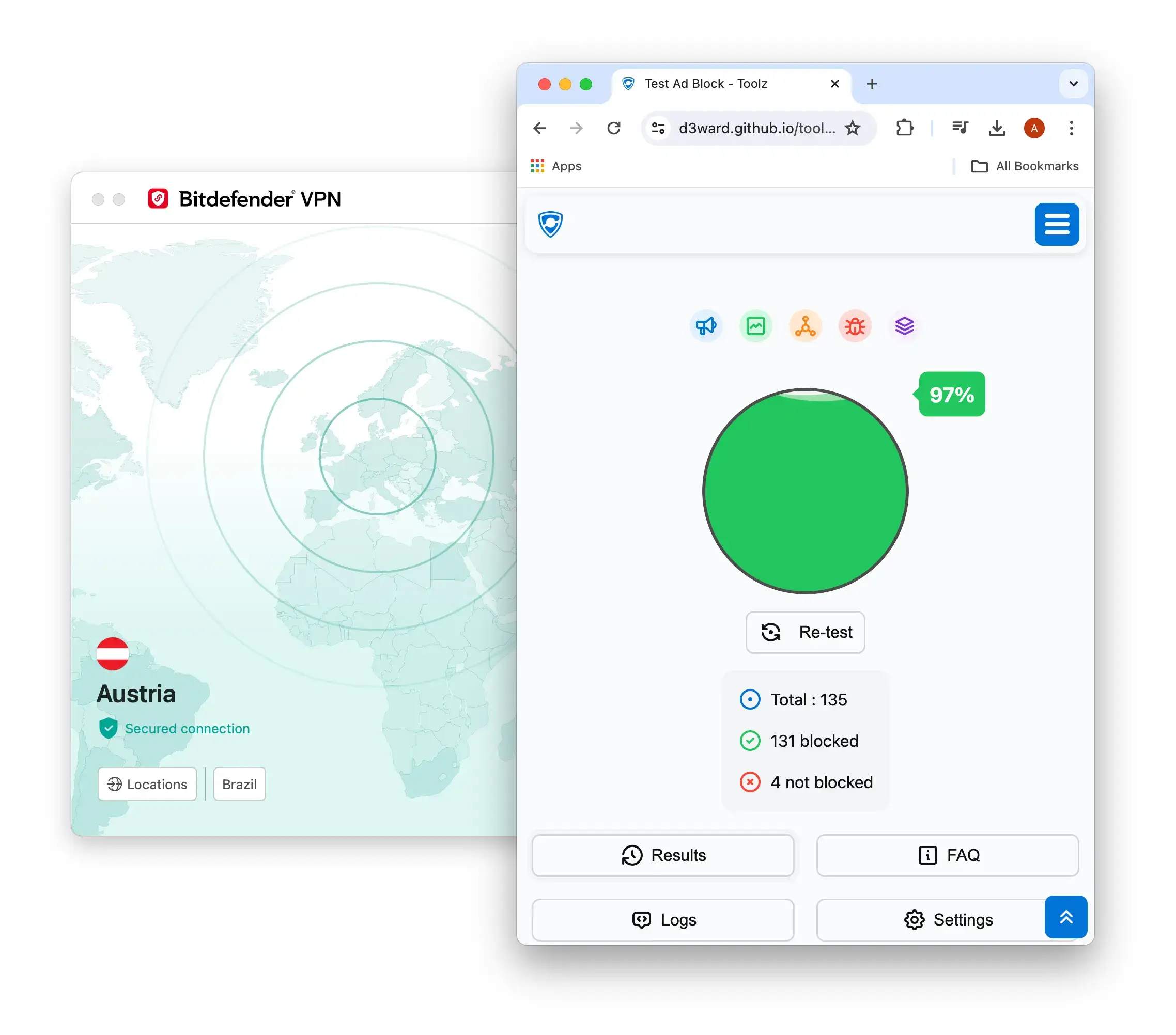
You can enable Bitdefender VPN’s ad and tracker blocker in the app’s settings.
Bitdefender VPN Key Data
| Attribute | Bitdefender VPN | Typical VPN |
|---|---|---|
| Owner | Bitdefender | Independent |
| Launch Date | 2001 | 2015 |
| Local Download Speed | 93Mbps (7% loss) | 89Mbps (11% loss) |
| International Download Speed | 97Mbps (3% loss) | 80Mbps (20% loss) |
| Countries with Servers | 53 | 40 |
| Privacy Policy | Identifiable Data | Identifiable Data |
| Simultaneous Connections | 10 | 10 |
| Netflix Libraries | 0 | 3 |
| Torrenting | Yes | Yes |
| Works In China? | No | No |
| Cheapest Price | 3.33/mo over 12 months | $3.87/mo over 24 months |
| Customer Support | Live Chat, Email & Online Resources | |
| Apps & Extensions |
          |
|
Price
Price Plans
| 1 month | $6.99 |
|---|---|
| 12 months | $39.96 ($3.33/mo) |
Free Trial
| Money-Back Guarantee | 30 days |
|---|---|
| Free Trial | 7 Days |
| 100% Free Plan | No |