
Perfect Privacy: Strong No-Logs Security, But Poor Streaming, Slow Growth, and Clunky Apps
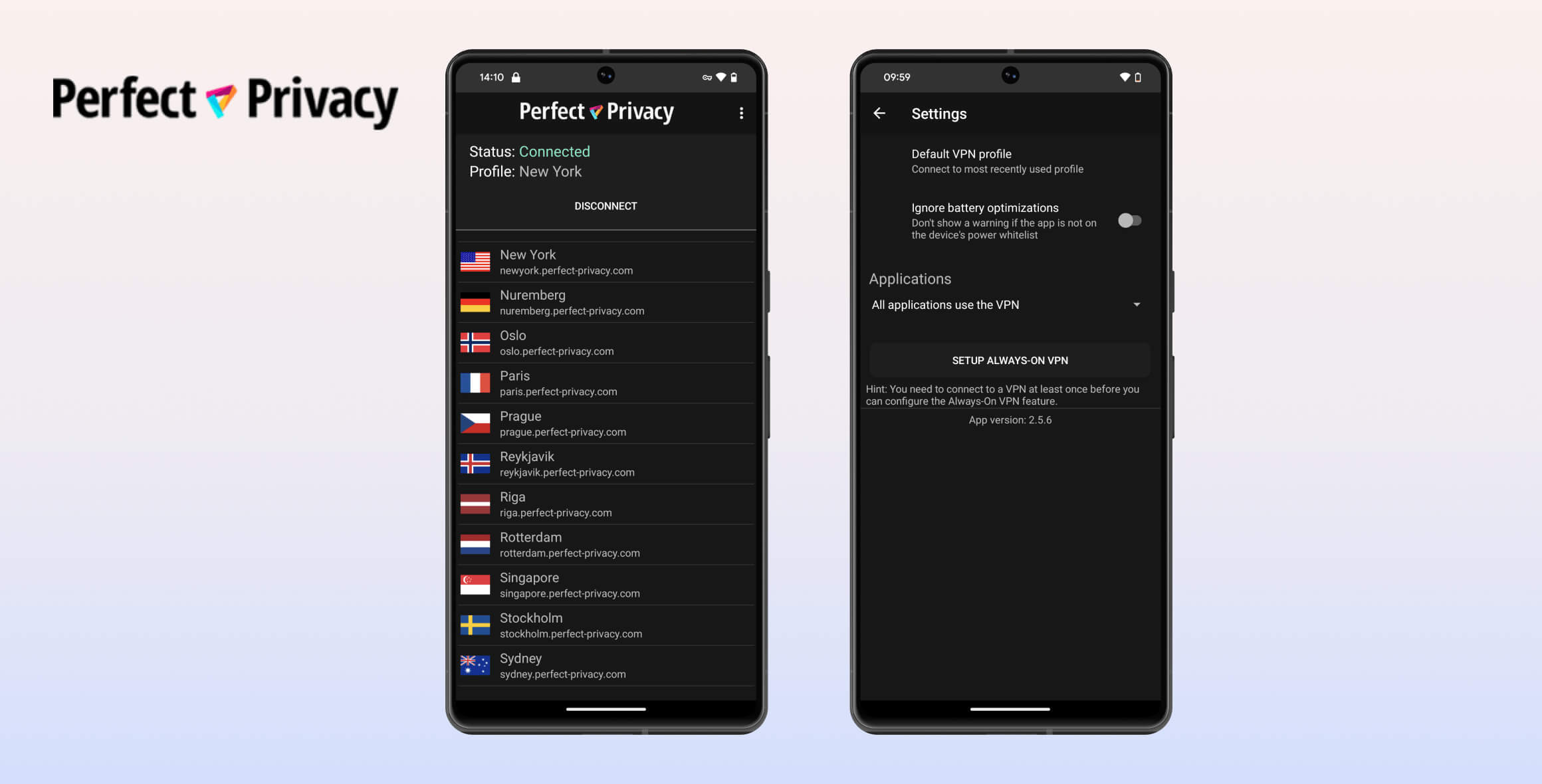
Perfect Privacy is underwhelming. It’s not inherently bad, but it falls short in nearly every test category. Its main strengths lie in privacy and security, backed by an audited no-logs policy, a reliable kill switch, and secure OpenVPN encryption. However, its inability to bypass streaming platforms, lack of an iOS app, and tiny server network make it impractical for most users.
- Pros
- Trustworthy no-logs policy
- Tons of extra features
- Strong encryption & no IP or DNS leaks
- Supports torrenting on nearly all VPN servers
- Cons
- No apps for iPhone & iPad
- Slow international speeds
- Doesn’t work with Netflix, Disney+ or BBC iPlayer
- Small VPN server network (23 countries)
- Pricey, even on longer plans
During weeks of testing across home, office, and public Wi-Fi environments, we encountered persistent issues.
For its premium pricing, Perfect Privacy delivers mediocre value. While unique features like NeuroRouting and multi-hop VPNs exist, the service neglects foundational improvements.
Key missing elements include intuitive apps for all major platforms (especially iOS), a broader server network, reliable streaming unblocking, and consistent low-latency speeds.
The outdated client interface—with its clashing purple, red, and green color scheme resembling retro carpeting—has seen minimal updates compared to competitors.
Alternatives to Perfect Privacy
- Surfshark: Offers customizable multi-hop routing, GPS spoofing, 7,100+ servers across 100 countries, and consistent streaming access.
- Private Internet Access (PIA): Budget-friendly option with 18,651 servers, proven no-logs policy, and strong streaming performance for Netflix and Prime Video.
Privacy
Ranked #14 out of 45 VPNs for Privacy
Perfect Privacy is a verified no-logs provider, confirmed during a 2016 Dutch server seizure. It uses diskless infrastructure and accepts Bitcoin payments. However, its 2023 shift from Switzerland to Germany (a 14-Eyes alliance member) raises jurisdiction concerns.
| Originating IP Address | No |
|---|---|
| Browsing Activity | No |
| Individual Connection Timestamps | No |
| Date of Last Connection | No |
| VPN Server IP | No |
| Device Information | No |
| Individual Bandwidth Usage | No |
| Account Information | Yes |
You can read Perfect Privacy’s full privacy policy on its website.
Perfect Privacy is one of the few genuine no-logs VPNs we’ve reviewed. It doesn’t record browsing history, IP addresses, VPN connection timestamps, or individual bandwidth usage.
This claim was put to the test in 2016 when Dutch authorities seized two of Perfect Privacy’s servers in Rotterdam.
No customer data was exposed during the incident.
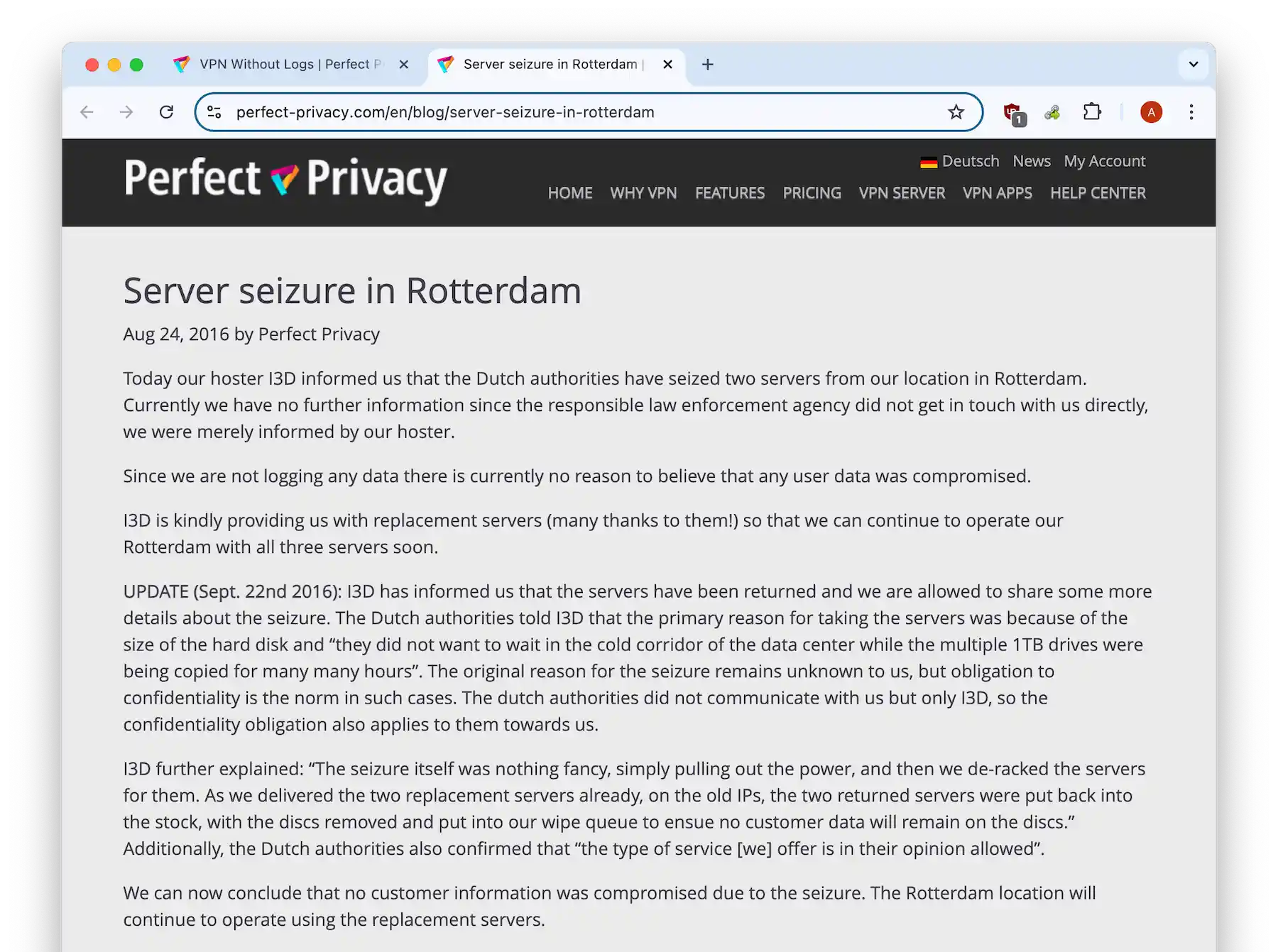
Perfect Privacy confirmed no user data was compromised during the server seizure.
The only information Perfect Privacy stores is usernames, passwords, and email addresses. Almost every VPN requires this to set up accounts (Mullvad and IVPN are rare exceptions).
For transparency, the VPN publishes a monthly warrant canary stating whether it has received any court orders, warrants, or requests for backdoors.
There’s still room to improve. We’d like to see Perfect Privacy commission an independent audit to verify its no-logs policy in 2025.
Diskless Servers
We appreciate that Perfect Privacy runs an entirely diskless server network, which prevents intruders from stealing hard drives full of data.
Diskless servers don’t have their own hard drives. Instead, software and settings are loaded from another system at startup.
This design improves privacy and security because no data remains on the server when it’s powered off.
In short, if a server is seized, any data in memory is lost when the server is removed from power.
German Jurisdiction
In 2023, Perfect Privacy changed its jurisdiction from Switzerland to Germany — a shift disclosed quietly on the service’s German-language forum, with limited communication to its English-speaking users.
Outside the forum, the change appeared only in updates to the privacy policy and the company information page (the “imprint”).
From a privacy perspective, this is noteworthy. Switzerland is known for strong data protection laws and sits outside intelligence-sharing alliances like the 14 Eyes.
Germany, by contrast, is a 14 Eyes member and can coordinate on surveillance and intelligence requests.
While Germany also has robust data laws and does not mandate user data retention, Perfect Privacy could face increased pressure for data requests in the future.
Streaming
Ranked #38 out of 45 VPNs for Streaming
Perfect Privacy failed to unblock Netflix, BBC iPlayer, Disney+, and others during testing. Occasional access to Max was inconsistent, compounded by frequent CAPTCHA prompts and server maintenance downtimes. With only 46 servers, outages disproportionately affect usability. TrackStop filtering sometimes erroneously blocked legitimate sites like BBC iPlayer.
| Streaming Service | Works with Perfect Privacy |
|---|---|
| BBC iPlayer (UK) | No |
| DAZN (Canada) | No |
| Disney+ (UK) | No |
| Hulu (US) | No |
| ITVX (UK) | No |
| HBO Max (US) | Yes |
| Netflix (US) | No |
| Netflix (UK) | No |
| Prime Video (US) | No |
| Sky Go (UK) | No |
Given how popular streaming is, we’re disappointed by Perfect Privacy’s poor performance.
To its credit, the VPN doesn’t claim to work with streaming services that block VPNs, such as Netflix and Disney+.
Still, over the past seven years, we’ve only seen it consistently access one service: Max — and even that was unreliable.
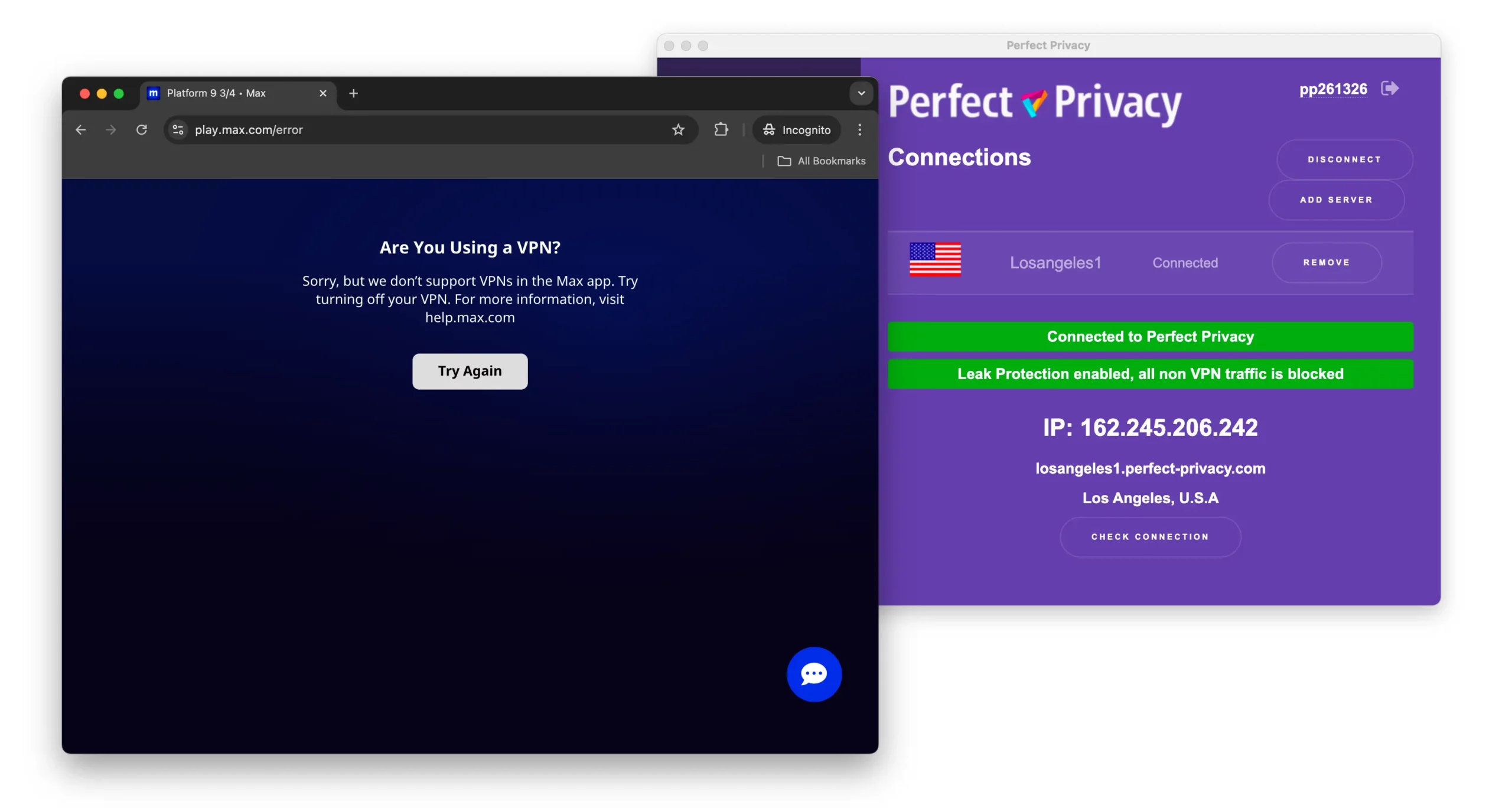
In our testing, Perfect Privacy was often detected and blocked by Max.
We also encountered more CAPTCHAs than usual on Google and Max, plus frequent connection failures.
The most frustrating moments were when a specific VPN server failed to connect and the only other server in that country was down for maintenance.
At the time of writing, 15% of Perfect Privacy’s servers were under maintenance in key regions like the US and Germany.
This wouldn’t be as serious with a large network like PIA’s, but Perfect Privacy has only 46 servers.
TrackStop (its domain filter for ads, trackers, malware, and harmful content) sometimes blocked access to BBC iPlayer’s homepage on desktop.
Overall, streaming with Perfect Privacy was frustrating. We wouldn’t choose it for this purpose.
We’d opt for a reliable service like ExpressVPN or NordVPN, which have much larger server networks and consistently work with Netflix, Prime Video, and Disney+.
Speed
Ranked #35 out of 45 VPNs for Speed
Speed losses averaged 12% on local servers but spiked to 35% on international connections (e.g., Germany). Gaming and HD streaming suffered from lag and buffering. WireGuard protocol adoption could mitigate these issues.
| No VPN (New York) | US (New York) | Canada (Toronto) | US (Los Angeles) | UK (London) | Germany (Berlin) | Japan (Tokyo) | Australia (Sydney) | |
|---|---|---|---|---|---|---|---|---|
| Server Location |  |
|
 |
|
 |
 |
 |
 |
| Download Speed | 100Mbps | 88Mbps | 92Mbps | 86Mbps | 86Mbps | 65Mbps | 77Mbps | 75Mbps |
| Upload Speed | 100Mbps | 86Mbps | 87Mbps | 87Mbps | 88Mbps | 50Mbps | 85Mbps | 85Mbps |
| Ping | 1ms | 22ms | 19ms | 74ms | 74ms | 90ms | 143ms | 209ms |
| Distance | 0mi | 5mi | 300mi | 2,500mi | 3,500mi | 4,000mi | 6,700mi | 9,900mi |
As the data shows, Perfect Privacy’s speeds are inconsistent across its network. Overall, it ranks 44th out of 61 VPNs for speed.
On a nearby New York server, speeds dropped by 12%. For comparison, the fastest VPN we’ve tested (Hotspot Shield) dropped just 1% on a local connection.
Its fastest location was Canada, ranking 25th — still underwhelming, especially for a premium-priced service.
The slowest was Germany, with a 35% drop in download speed. Some slowdown is expected over long distances, but this is well above average.
In our experience, these speeds led to slower page loads and blurry YouTube playback.
With a small network and uneven performance, Perfect Privacy is also a weak choice for gaming. High latency caused stutter and lag in fast-paced games like CS:GO.
Use the chart below to see how Perfect Privacy’s local and international speeds compare to top-rated VPNs:
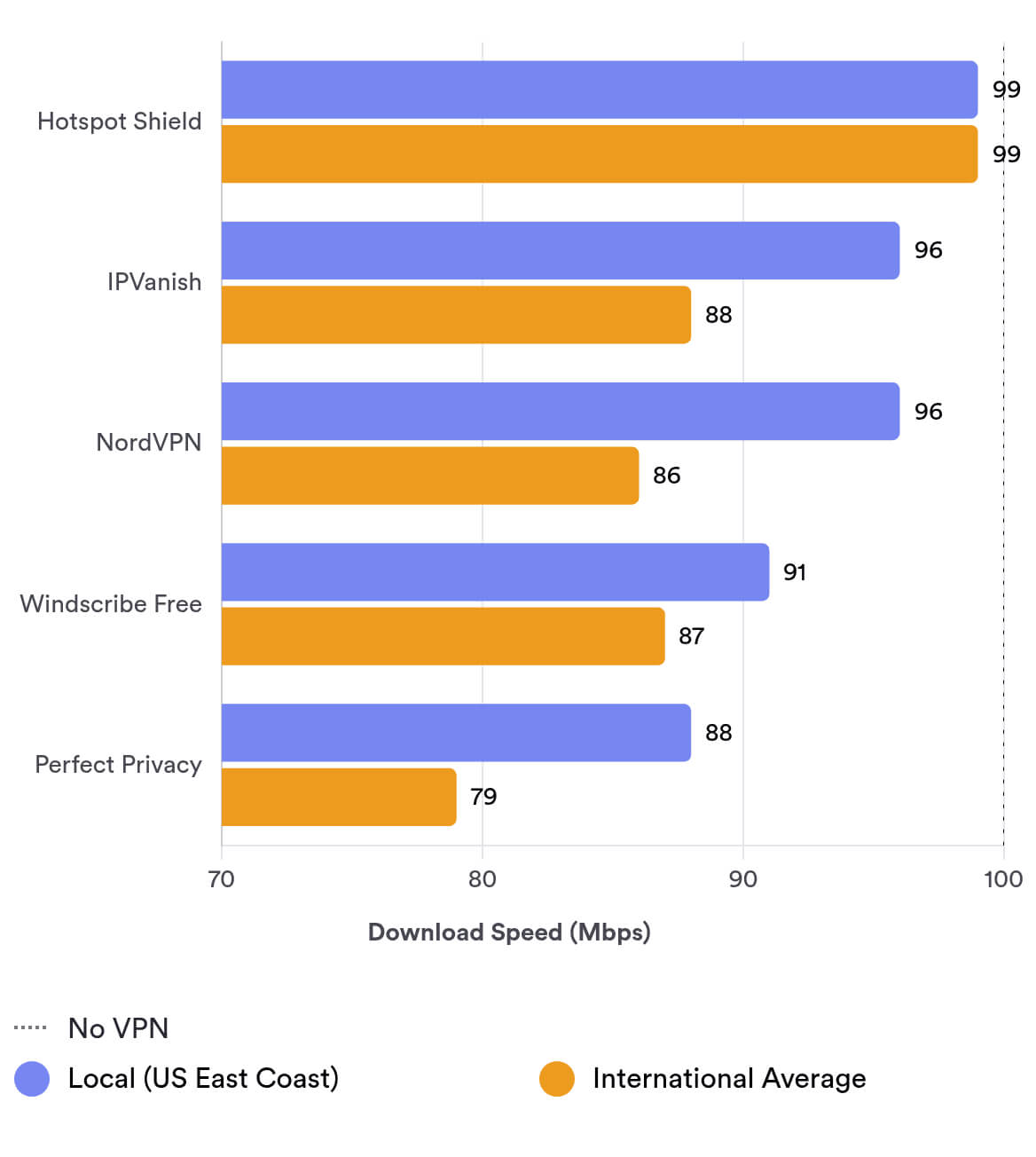
As the chart shows, Perfect Privacy can’t compete with the fastest VPNs we’ve tested. It even lags behind some free VPNs, which are typically slower than their paid versions, like Windscribe Free.
To improve speeds, we’d like to see Perfect Privacy implement WireGuard, the fastest protocol we’ve tested, instead of relying solely on OpenVPN.
We’d also welcome more servers and countries to reduce congestion.
Security
Ranked #15 out of 45 VPNs for Security
Strengths include AES-256 encryption, DNS/IPv6 leak protection, and a customizable kill switch. Missing an independent audit and WireGuard support prevents a higher score.
| Independent Audit | No |
|---|---|
| VPN Kill Switch | Yes |
| Leak Protection | Yes |
Perfect Privacy is one of the most configurable VPNs we’ve tested; it does the basics well and offers many advanced options for power users.
Encryption & Tunneling Protocols
Using Wireshark (a packet analyzer), we inspected Perfect Privacy’s OpenVPN traffic to assess its encryption strength. The VPN successfully obfuscated our traffic, preventing our ISP from seeing browsing activity.
By default, Perfect Privacy uses OpenVPN with AES-256 encryption, which is very secure. OpenVPN has been open-source for decades and heavily scrutinized for vulnerabilities.
You can switch to AES-128, but there’s little reason to downgrade from the default.
We’re disappointed that Perfect Privacy still hasn’t added WireGuard. It’s the fastest protocol we’ve tested and uses less data, which is helpful when roaming between networks.
Effective Kill Switch
We appreciate Perfect Privacy’s customizable kill switch, which blocks internet traffic if the VPN disconnects unexpectedly.
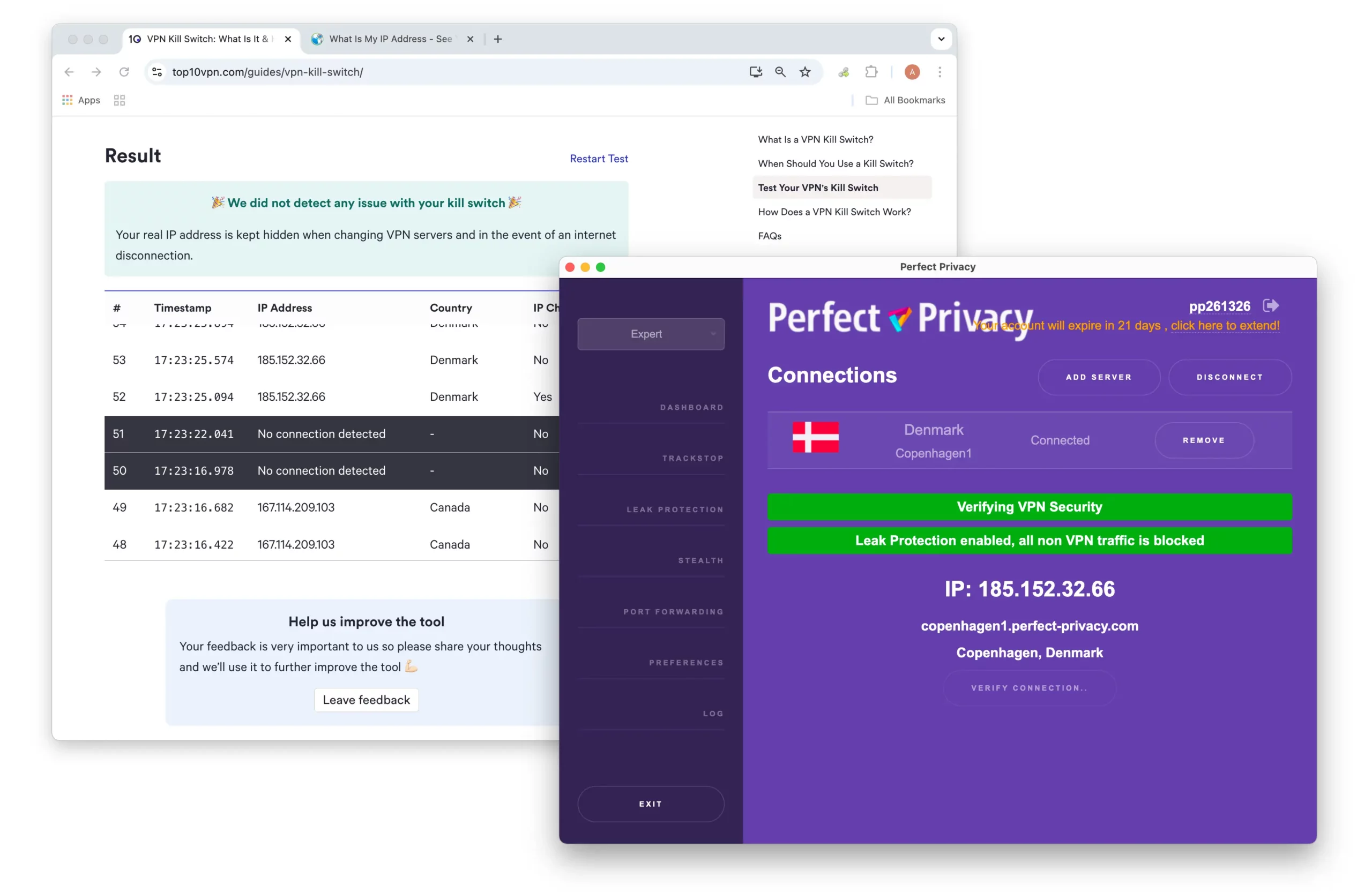
Perfect Privacy passed our kill switch test, meaning it didn’t leak our real IP address when we switched servers or disconnected from the internet.
Most users won’t need granular control. The default Tunnel mode disables internet traffic only when the VPN has an active connection.
Program mode is active whenever the VPN app is open, even if you’re not connected. We recommend this mode, as it matches what most VPNs offer.
Permanent mode works even when Perfect Privacy isn’t running. It’s best for users with maximum privacy needs and isn’t necessary for most people.
Leak Protection
Perfect Privacy includes DNS leak protection and supports IPv6 traffic, which is uncommon but very welcome.
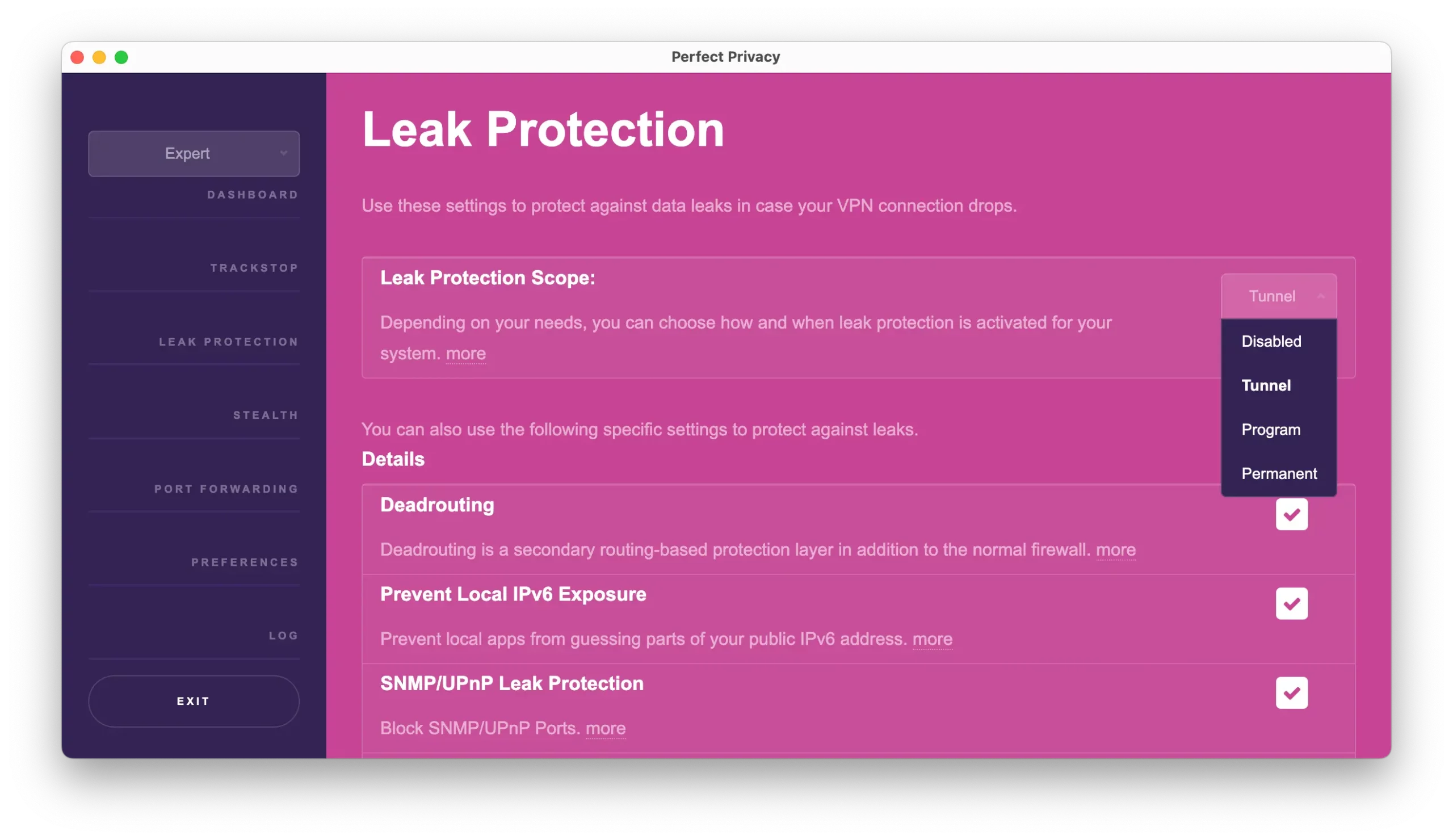
There are loads of options with Perfect Privacy’s kill switch and leak protection.
Server Locations
Ranked #32 out of 45 VPNs for Server Locations
Only 46 physical servers across 23 countries, down from 57 servers in 2018. No virtual servers limit expansion. Competitors like NordVPN offer 10x more locations.
| Continent | Countries with Servers |
|---|---|
| Europe | 17 |
| Asia | 3 |
| North America | 2 |
| Oceania | 1 |
| South America | 0 |
| Africa | 0 |
When we first reviewed Perfect Privacy in 2018, its network was small, covering just 26 countries.
Since then, it hasn’t grown — it has shrunk from 26 to 23 countries and from 57 to 46 servers.
By comparison, Proton VPN expanded from 33 to 126 countries, and from 420 to 15,370 servers in the same period.
Perfect Privacy’s focus on physical servers (it avoids virtual locations entirely) likely limits expansion.
Physical servers can deliver more predictable performance, but most VPNs combine physical and virtual servers to broaden coverage.
Relying only on physical servers hinders growth, since each location requires a local data center, which adds cost and complexity.
Overall, we think the benefits of selectively using virtual servers outweigh the downsides — especially for a provider with only 23 countries covered.
Competitors like ExpressVPN and NordVPN cover roughly five times as many countries (109 and 127, respectively).
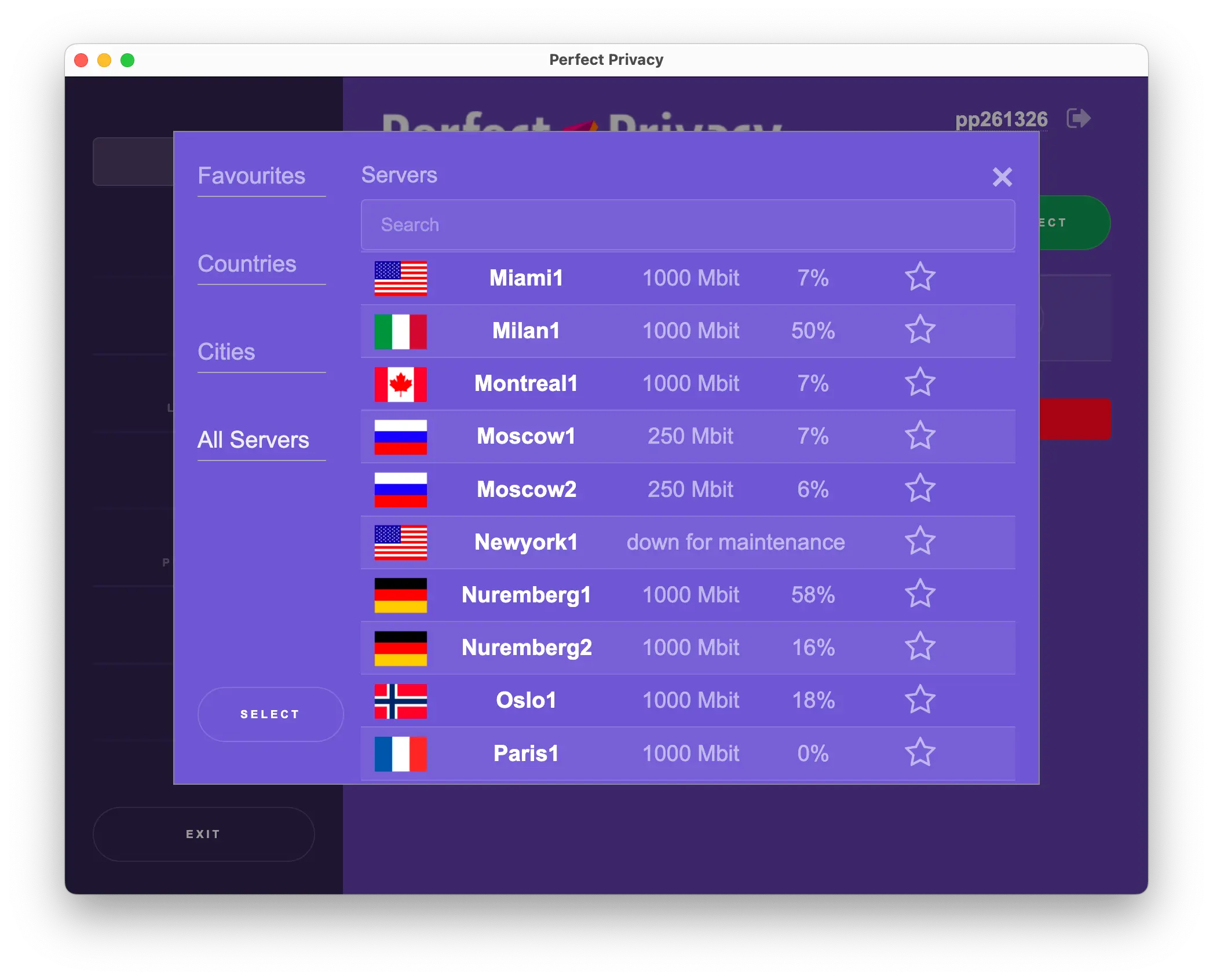
We used Perfect Privacy’s ‘All Servers’ tab most often.
City-level Servers
The benefit of physical servers is that their locations are precise. In the “All Servers” tab, Perfect Privacy lists each city where a server is hosted.
This is helpful if you want a server in your city.
However, given the limited network, only a few countries have multiple city options.
Countries with multiple city-level servers:
- Germany (Berlin, Erfurt, Frankfurt, and Hamburg)
- Switzerland (Basel and Zurich)
- United States (London and Manchester)
- United States (Los Angeles, Miami, and New York)
User Experience
Ranked #35 out of 45 VPNs for User Experience
Installers triggered OS security warnings, requiring manual overrides. The iOS app remains absent, forcing manual profile setups. The cluttered, scroll-heavy interface complicates navigation, and quadruple-hop VPN connections caused slowdowns (3-minute setup times, 4-minute page loads).
Installation & Setup
Our team found the desktop apps difficult and time-consuming to install. The installer was flagged by built-in antivirus tools on Windows and macOS.
We had to manually allow the app through Windows Firewall and accept risk prompts on macOS. This was unnecessarily frustrating and uncommon among VPNs.
The lack of a dedicated iOS app in 2025 is surprising. You must manually install a VPN profile via iOS settings, which is intimidating for beginners.
Perfect Privacy says it doesn’t offer an iOS app because Apple doesn’t allow TrackStop. We’d rather have an iOS app without TrackStop than no app at all.
Interface & Ease of Use
Perfect Privacy’s apps are now more consistent across desktop platforms, which is progress.
However, recent improvements haven’t gone far enough.
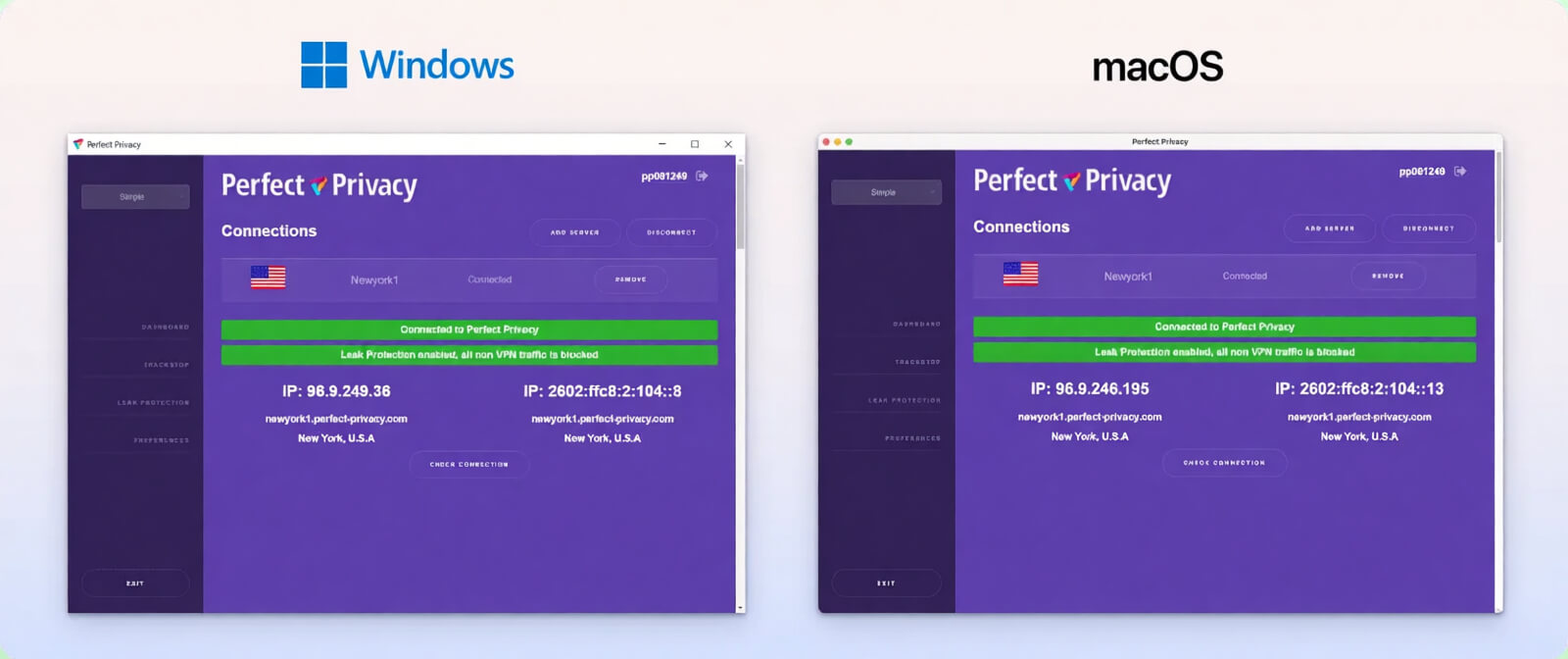
Starting a connection is needlessly complex. You can’t simply click a location to connect; you must add it to the home screen first.
The VPN designed this flow to support custom multi-hop connections from the home screen, but it feels like a workaround rather than a thoughtful solution.
Most VPNs put settings behind tabs in a separate window.
Perfect Privacy instead stacks everything on one long, scrollable page, using colors to separate features. A sidebar helps you jump to sections like TrackStop, Stealth, and Port Forwarding.
We haven’t seen other VPNs use a scrollable home screen, and we’d prefer a cleaner, tabbed layout.
The app offers Simple, Advanced, and Expert views, which change how many options you can configure. For example, Simple lets you choose protocols, while Expert adds options like switching between AES-128 and AES-256.
In theory, this tiered approach helps beginners. In practice, the app remains too complex for novices.
Day-to-Day Experience
Perfect Privacy is high maintenance. Navigating the app takes longer than competitors, and we often created multi-hop connections by accident due to the confusing home screen.
The design looks dated and overly colorful — a mix of purple, blue, red, and green — and lacks the polish of NordVPN or ExpressVPN.
The absence of an iOS app also hurts on-the-go usability. Instead of tapping connect, you must install a profile beforehand.
Overall, using Perfect Privacy requires extra time and attention. There’s too much tweaking, double-checking, scrolling, and manual server management.
Torrenting
Ranked #15 out of 45 VPNs for Torrenting
Supports P2P on 24 servers (excluding US/France) with port forwarding. Speeds averaged 8.3 MiB/s (17% loss vs. baseline).
| Torrenting Attribute | Perfect Privacy |
|---|---|
| Permits P2P Traffic | Yes |
| Average Download Bitrate | 8.3MiB/s (17% loss) |
| Countries with P2P Servers | 24 |
| Port Forwarding | No |
| Kill Switch | Yes |
| Logging Policy | No Logs |
In our P2P tests, we saw a minor drop in download speeds with Perfect Privacy. Without a VPN, a 20GB file took 32 minutes to download. On a nearby Perfect Privacy server, it took 41 minutes.
That’s a good result but not as fast as top torrenting VPNs that show little to no loss.
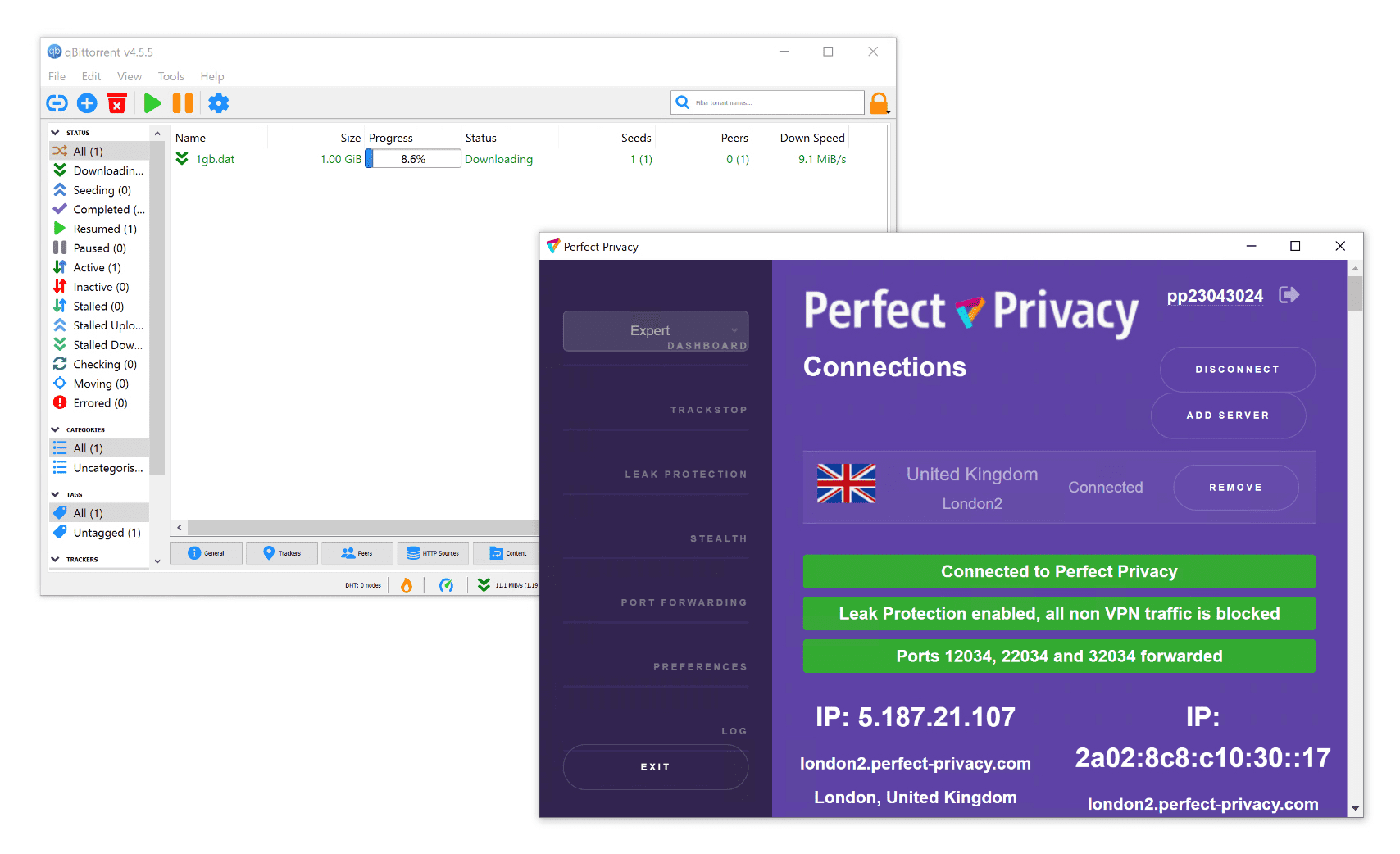
We used port forwarding to maximize Perfect Privacy’s P2P speeds.
Torrenting isn’t allowed on all servers. To avoid DMCA requests, Perfect Privacy blocks BitTorrent traffic on servers in the US and France.
US users may see slower P2P speeds, as their closest P2P-enabled location is likely Canada.
Port Forwarding Tool
Previously, automatic port forwarding was limited to Windows. That’s now been fixed.
You can enable automatic or manual port forwarding in both desktop apps. To access it, switch to Advanced or Expert view in the top-left of the dashboard.
In testing, setup was easy and improved file-sharing speeds immediately.
We’re impressed Perfect Privacy offers this when some top VPNs, including NordVPN, still do not.
Device Compatibility
Perfect Privacy has apps for Windows, Mac, Android, and Linux. Although it doesn’t have an app for iOS, you can install Perfect Privacy on a router to cover every device on your local network.
| Windows | Yes |
|---|---|
| Mac | Yes |
| iOS | Manual Setup Only |
| Android | Yes |
| Linux | Yes |
| Amazon Fire TV | Yes |
| Android TV | No |
| Apple TV | No |
| Router | Manual Setup Only |
| Chrome | No |
Simultaneous Connections: Unlimited
Perfect Privacy supports most popular platforms, including Windows, macOS, Android, Linux, and Fire TV.
However, it still lacks a true iOS app.
On the plus side, it supports OpenWrt, Tomato, Asus, DD-WRT, and pfSense routers, with detailed setup guides on the website.
Unlimited Simultaneous Connections
You can use Perfect Privacy on an unlimited number of devices. That’s rare — most VPNs cap connections at five or so.
Additional Features
Perfect Privacy includes a wide range of additional features. Most notably, its unique NeuroRouting feature, which redirects your web traffic through as many VPN servers as possible. It also has an ad blocker, Tor over VPN support, and an anti-censorship protocol.
| Additional Feature | Perfect Privacy |
|---|---|
| Split Tunneling | Yes |
| VPN Obfuscation | Yes |
| Multi-Hop Servers | Yes |
| Dedicated IP | No |
| Ad Blocker | Yes |
| Tor over VPN Servers | Yes |
Split Tunneling
Split tunneling is available on Android, though it’s not clearly labeled.
In settings, you can route all apps through the VPN, include only selected apps, or exclude selected apps.
This level of control exceeds what most VPNs offer, but we’d like to see clearer labeling and broader platform support, especially on Windows and macOS.
NeuroRouting
Perfect Privacy’s flagship “NeuroRouting” feature continually analyzes your traffic and routes it through the fastest path.
It keeps data encrypted for as long as possible by exiting at a server near your destination website. On longer routes, it may hop through multiple servers automatically.
A shorter exit path reduces exposure and makes tracking harder. It’s not designed to speed up your connection.
We can’t independently verify its inner workings, but it’s a welcome security option. It’s not ideal for torrenting or when you need a specific exit location, so disable it in those cases.
Multi-Hop VPN Servers
Perfect Privacy supports up to four hops in a single connection. You can fully customize the chain — a rare level of flexibility that only a few major VPNs (like Hide.me and Surfshark) match.
In practice, quadruple-hop was impractical. Our speeds dropped dramatically, similar to Tor’s three-hop routing.
Setting up four hops took around 3 minutes, longer than any VPN we’ve tested. For comparison, Surfshark’s double-hop takes up to 20 seconds, and Tor usually under a minute.
We also saw occasional connection failures, indicating the feature could be refined.
A basic Google search took about 2 minutes to load. Complex pages, such as IP test tools, took around 4 minutes or sometimes failed after 7 minutes.
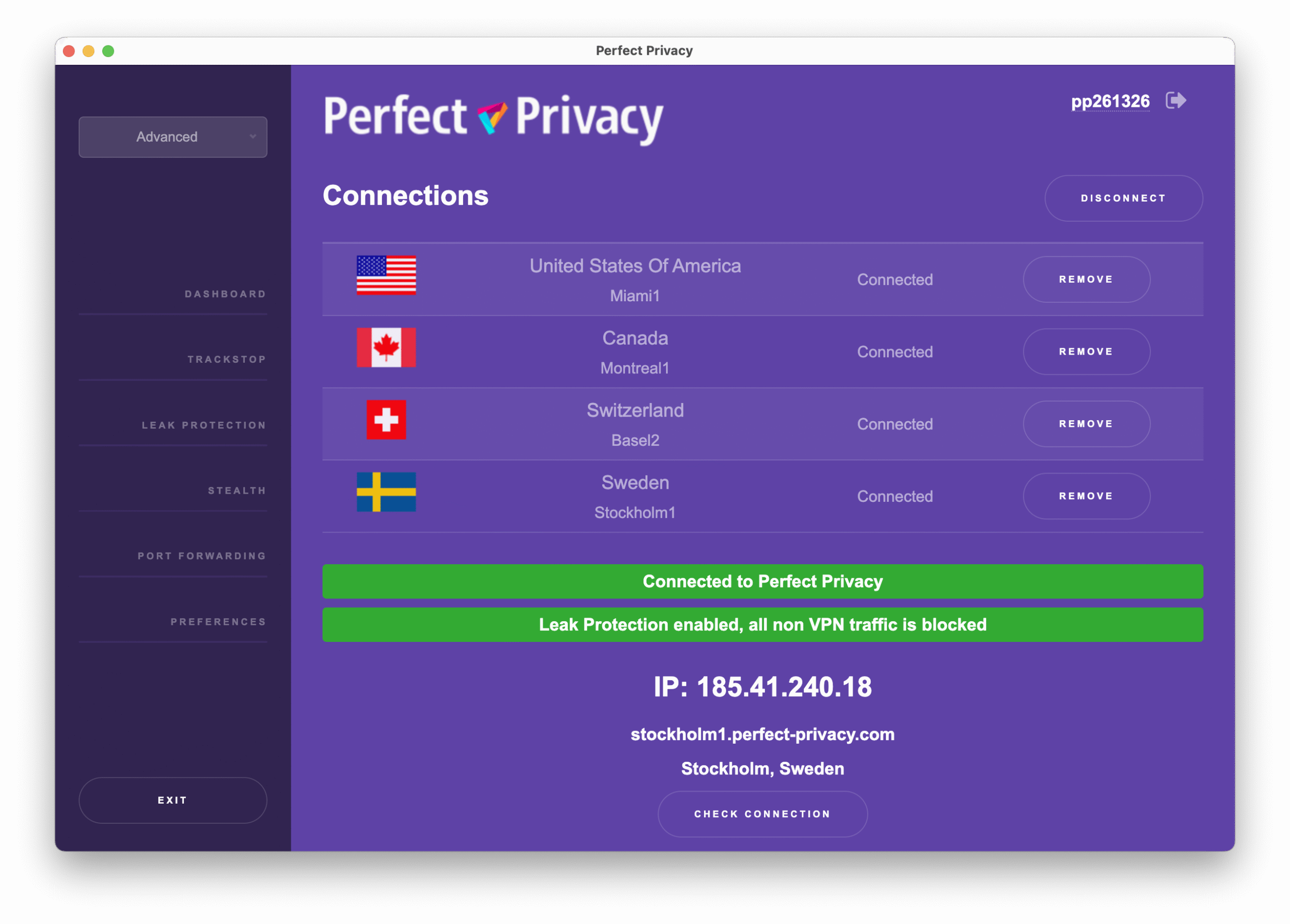
We tried out a quadruple VPN connection in our hands-on testing.
Unlike Surfshark and Hide.me, which clearly label entry and exit nodes, Perfect Privacy simply lets you add up to four servers without indicating which provides the final IP.
In our tests, servers connected top-down, and the final IP came from the last country in the list.
To change the order, we had to remove and re-add servers. Drag-and-drop ordering would be better.
Repeatedly connecting and disconnecting multi-hop chains also caused the macOS app to stop responding during testing.
In short, a quadruple VPN sounds impressive but isn’t practical for everyday use.
Ad & Tracker Blocker
Perfect Privacy’s TrackStop blocks trackers, some malware, phishing sites, and more. You enable it from your account on the website, not in the app.
TrackStop was mixed in testing. The “fake news,” social media, and ad filters worked as intended, but the child protection filter still allowed access to several gambling sites.
The Android app lacks multi-hop and a kill switch, but TrackStop filters apply once enabled on the website.
Perfect Privacy Key Data
| Attribute | Perfect Privacy | Typical VPN |
|---|---|---|
| Owner | CyberDock IT Solutions GmbH | Independent |
| Launch Date | 2008 | 2015 |
| Local Download Speed | 88Mbps (12% loss) | 89Mbps (11% loss) |
| International Download Speed | 79Mbps (21% loss) | 80Mbps (20% loss) |
| Countries with Servers | 23 | 40 |
| Privacy Policy | No Logs | Identifiable Data |
| Simultaneous Connections | Unlimited | 10 |
| Netflix Libraries | 0 | 3 |
| Torrenting | Yes | Yes |
| Works In China? | Sometimes | No |
| Cheapest Price | 8.95/mo over 24 months | $3.87/mo over 24 months |
| Customer Support | Email Support | |
| Apps & Extensions |
          |
|
Price
Price Plans
| 1 month | $12.99 |
|---|---|
| 12 months | $119.88 ($9.99/mo) |
| 2 years | $214.80 ($8.95/mo) |
Free Trial
| Money-Back Guarantee | 7 days |
|---|---|
| Free Trial | No |
| 100% Free Plan | No |