In today’s tracking-heavy internet, your IP address is one of the most important pieces of data about you. It identifies your connection, reveals your approximate location, and is used by ISPs, advertisers, and sometimes attackers to profile or target you. Learning how to hide your IP address is a foundational step toward modern online privacy and security.
What Is an IP Address (and What Can It Reveal)?
An IP (Internet Protocol) address is a numeric label assigned to your device or network whenever it connects to the internet. It’s like a mailing address for your connection: without it, websites and services wouldn’t know where to send data back.
Public vs. Private IP
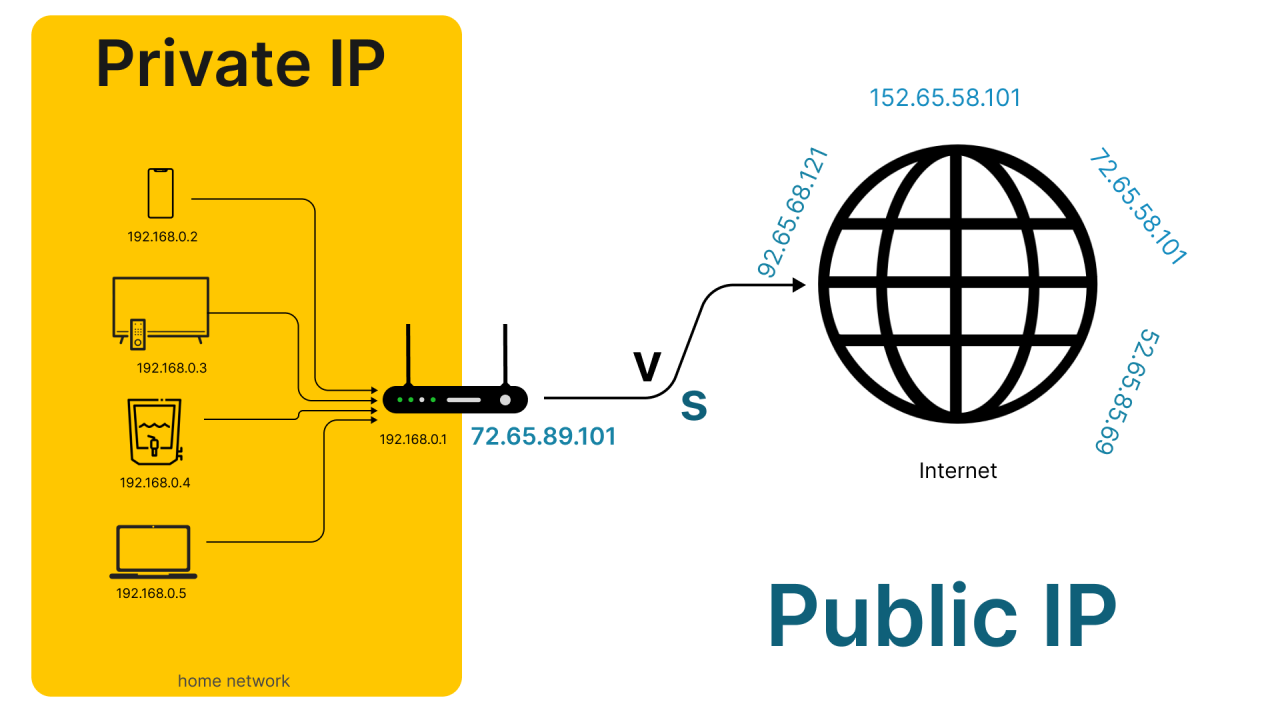
An IP address is a unique number that identifies a device or network when it connects to the internet or a local network. It allows data to be sent to and from the correct destination.
There are two main types:
| Type of IP address | Who assigns it | Where it’s used / visible | What it can reveal / is used for | Example |
|---|---|---|---|---|
| Public IP address | Your ISP, assigned to your internet connection (usually your router) | Visible to websites, apps, and online services you use | Lets outsiders infer your ISP, country, region, city, and sometimes ZIP/postal code | e.g., 203.0.113.5 |
| Private IP address | Your router, assigned to devices in your home or office | Used only inside your local network; not visible to the wider internet | Used for internal communication between devices on the same local network | e.g., 192.168.1.10 |
What Others Can Infer from Your IP
Although your IP doesn’t directly disclose your name or street address, it is enough to start building a profile around you:
- Geographic location (country, region, city, sometimes ZIP/postal code).
- Your ISP and sometimes network type (home Wi‑Fi, mobile, public hotspot).
- Online behavior, by logging your IP across multiple sessions and sites.
With additional data (account logins, leaked databases, social media posts, or ISP cooperation), this network‑level identifier can be linked back to your real identity.
Why You Might Want to Hide Your IP Address
Hiding or masking your IP address is not about “having something to hide.” It’s about limiting unnecessary exposure and regaining control over how you’re tracked, profiled, or attacked online. Key reasons include:
1. Stop ISPs and Platforms from Tracking You
Your internet service provider can see which domains you visit, when you visit them, and may be required by law in some regions to retain this metadata. Some ISPs have sold or shared this data with advertisers. Search engines and large platforms (Google, Microsoft, Yahoo!, social networks) also log your IP and combine it with cookies, account logins, and device fingerprints to build detailed behavioral profiles that power targeted advertising.
Masking your IP helps decouple your searches and browsing from your physical connection and home/office identity.
2. Reduce Profiling and Targeted Ads
Ad networks and analytics tools often track you by IP even when you clear cookies or use “incognito mode.” They can infer your interests, habits, and routines, then serve personalized ads or sell the insights.
By hiding your IP, you make it harder to:
- Link visits across different websites.
- Tie behavioral profiles to a particular household or connection.
- Build long‑term records tied to your location and ISP.
3. Protect Against Hackers, DDoS and Doxxing
If an attacker has your real IP address, they can:
- Launch DoS/DDoS attacks to knock your connection offline.
- Probe your network for vulnerable devices and exposed services.
- Narrow your physical location, which can feed into doxxing or harassment.
Masking your IP with a VPN, Tor, or a well‑configured proxy makes it much harder to link your online actions to your home or office network.
4. Bypass Geo‑Restrictions and Censorship
Governments, ISPs, schools, and workplaces often restrict access to certain sites or content:
- Censorship of news and social platforms.
- Regional blocks on streaming services or video platforms.
- Network‑based blocking in offices, campuses, or public Wi‑Fi. By connecting through an IP in a different region, you can appear to be browsing from another country, sometimes bypassing these restrictions. This can be crucial for journalists, researchers, and travelers who need open access to information.
Important: Circumventing geo‑blocks can violate terms of service and, in some countries, local law. Always check and respect the legal and contractual rules that apply to you.
5. Keep Sensitive Research and Work Activity Private
Professions like law enforcement, investigative journalism, cybersecurity, finance, and healthcare often involve researching topics that should not be trivially linkable to a specific person or office.
Masking IP addresses is now a basic operational security measure for many teams, often combined with internal VPNs, zero‑trust architectures, and proxy rotation.
Is It Legal to Hide Your IP Address?
The tools themselves (VPNs, proxies, Tor) are generally legal—what matters is how and where you use them.
United States
Using VPNs, proxies, or Tor to enhance privacy and security is legal. Many companies rely on VPNs for remote access and data protection.
What remains illegal is using these tools for crimes such as fraud, hacking, or distributing illegal content. The tool doesn’t exempt you from the law.
European Union
The EU’s GDPR enshrines privacy as a fundamental right. Using IP‑masking tools is legal, but:
- Violating service terms (e.g., geo‑unblocking, aggressive scraping) can result in bans or civil claims.
China, Russia, and Some Middle Eastern Countries
- China & Russia: Heavily restrict or regulate VPN use; many foreign VPNs are blocked or must comply with state controls. Using unauthorized tools can be illegal.
- UAE, Saudi Arabia and others: VPNs are technically allowed, but using them to access blocked services or break local laws can lead to heavy fines or worse.
Where you’re located and what you do with these tools determines your actual legal risk.
5 Proven Methods to Hide or Change Your IP Address
Different tools hide your IP address in different ways. Below are the most widely used options and how they compare.
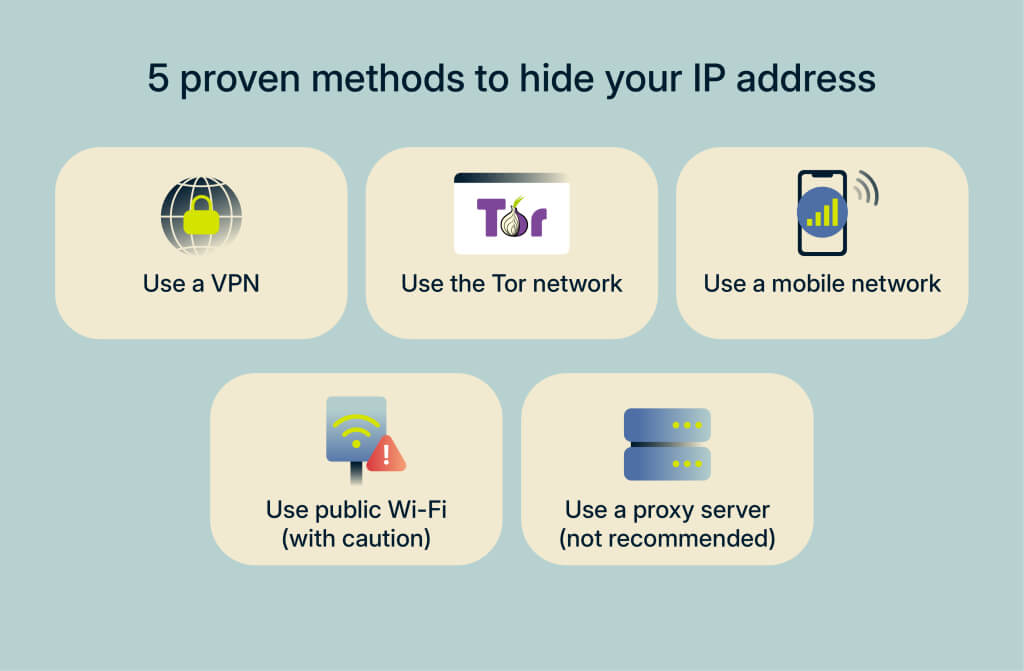
1. Use a VPN (Virtual Private Network) — Best Overall
How it works
A VPN creates an encrypted “tunnel” between your device and a VPN server. All your traffic passes through this tunnel:
- Your device encrypts data and sends it to the VPN server.
- The VPN server decrypts the data and forwards it to the destination website.
- To the website, your traffic appears to come from the VPN server’s IP, not your own.
Your ISP can see you’re connected to a VPN server but not what websites or services you access through it.
Pros – Hides your real IP and replaces it with the VPN server’s IP.
- Encrypts all traffic leaving your device (great for public Wi‑Fi).
- Bypasses many forms of geo‑blocking and censorship.
- Protects against basic ISP tracking and many ad trackers.
- Easier to use than Tor; modern apps offer one‑click “connect.”
Cons – Can reduce connection speed, especially with distant or overloaded servers.
- Some providers log IPs or usage; a bad VPN can be worse than none.
- Premium services require a subscription; free VPNs often come with heavy trade‑offs (logging, ads, limited bandwidth).
- Your VPN provider becomes a powerful trust anchor—if it logs or leaks, your privacy is at risk.
2. Use the Tor Network — Built for Strong Anonymity
How it works
Tor (The Onion Router) routes your traffic through at least three volunteer‑operated relays and encrypts it multiple times. Each relay only knows the previous and next hop, not the full path:
- Entry node sees your real IP but not your destination.
- Middle node passes traffic along without knowing who or where.
- Exit node sees the destination site but not your real IP.
Websites see the IP address of the Tor exit node, not your own.
Pros
- Excellent for anonymity; no single relay can fully deanonymize you.
- Free and open source.
- Clears cookies and history at the end of sessions (Tor Browser).
Cons
- Typically very slow due to multi‑hop routing and limited capacity.
- Some sites and services block Tor exit nodes outright.
- Malicious exit nodes can potentially view or modify unencrypted traffic (non‑HTTPS sites).
- ISPs and governments can detect Tor usage and may flag or throttle it in some regions.
Use Tor when anonymity matters more than performance or convenience—for example, sensitive research, whistleblowing, or journalism in hostile environments.
3. Use a Proxy Server — Lightweight and Targeted
How it works
A proxy sits between your device and the internet. Requests go to the proxy, which forwards them to the target site using its own IP. The site sees the proxy’s IP instead of yours. Common types include:
- HTTP/HTTPS proxies for web traffic.
- SOCKS proxies for broader protocols (e.g., torrents, certain apps).
- Web-based proxies embedded in a webpage where you enter the target URL.
Pros – Hides your IP from specific websites or apps.
- Useful for web scraping, automation, or managing multiple accounts at scale.
- Often free or cheaper than full VPNs.
- Can offer caching, slightly speeding up repeated requests.
Cons – Most proxies do not encrypt your traffic; your ISP and others can still see content and destinations.
- Operators can log and sell your data, or perform man‑in‑the‑middle attacks, especially if they terminate HTTPS.
- Not all apps respect OS‑level proxy settings.
- Many free proxies are unreliable, overloaded, or outright malicious.
For serious privacy, proxies should be combined with HTTPS and used only from trusted providers, often as part of a broader stack (e.g., managed rotating proxies for corporate scraping).
4. Switch Networks: Mobile Data or Public Wi‑Fi
Mobile network
Turning off Wi‑Fi and using mobile data gives you a new IP from your cell carrier, which hides your home or office IP for that session.
Public Wi‑Fi
Connecting at a café, airport, or hotel assigns your device the network’s IP instead of your home IP.
Pros
- Fast, simple way to change your apparent IP.
- Doesn’t require any special apps or configuration.
Cons
- No encryption by default; other users or rogue hotspots can intercept data.
- Still traceable back to a physical venue or carrier account.
- Not a reliable or sustainable privacy solution.
These methods are “quick and dirty” ways to change IP, but should be paired with a VPN for any sensitive activity.
5. Use Corporate or Cloud VPN/Proxy Solutions (Advanced / Business Use)
Organizations often combine:
- Corporate VPNs to force all staff traffic through secure gateways.
- Proxy fleets and IP rotation to collect geo‑targeted data without bans.
- Zero‑trust models where each access is verified, not just IP‑based.
These solutions don’t just hide IPs; they enforce policy, audit access, and protect sensitive internal systems.
Which IP‑Hiding Method Is Best for You?
Different use cases call for different tools. Summary:
| Goal / Scenario | Recommended Tool(s) |
|---|---|
| Everyday privacy, streaming, public Wi‑Fi | VPN (paid, reputable, no‑logs) |
| High‑risk anonymity (journalists, activists) | Tor (optionally VPN ➜ Tor chain) |
| Web scraping, automation, multi‑account ops | Residential/datacenter proxies + VPN |
| One‑off IP change (low risk) | Mobile data or public Wi‑Fi + HTTPS |
| Corporate remote access & compliance | Corporate VPN + access controls |
For most home users, a trustworthy VPN is the best balance of security, ease of use, and performance.
Step‑by‑Step: How to Hide Your IP with a VPN
The exact UI differs by provider, but the workflow is similar across platforms.
1. Choose a Trustworthy VPN
Look for: – Strong encryption (e.g., AES‑256).
- Strict, audited no‑logs policy (no storage of your real IP or activity).
- Kill switch to cut internet if the VPN drops, preventing IP leaks.
- DNS and IPv6 leak protection.
- Split tunneling if you want only some apps to use the VPN.
- Good performance (fast, stable servers, modern protocols like WireGuard or Lightway).
- Transparent privacy policy and long‑standing reputation.
Avoid suspiciously “free” VPNs that may log, inject ads, or sell data.
2. Install and Log In
On all platforms, the high‑level steps are:
- Sign up for a plan on the provider’s website.
- Download the app for your OS (Windows, macOS, iOS, Android, Linux, router).
- Install the app and sign in with your credentials or activation code.
3. Connect to a VPN Server
Once logged in:
- Click or tap the main Connect / Quick Connect button.
- Optionally pick a server location (e.g., nearest for speed, specific country for content).
- Wait for confirmation that you’re connected.
Now, all traffic from your device (unless split tunneling is configured) flows through the VPN, and sites will see the VPN server’s IP instead of your own.
4. Verify Your New IP Address
To confirm everything works:
- Visit an IP checker site in your browser.
- Confirm that:
- The IP shown is different from your home IP.
- The country/region matches your chosen VPN location.
If this checks out, you’ve successfully hidden your IP address for that device.
What IP Masking Does Not Protect You From
Hiding your IP address is vital, but it’s not a magic invisibility cloak. Even with a VPN or Tor, you can still be tracked or identified through other means:
- Cookies and logins: If you’re logged into Google, Facebook, or other accounts, your activity is still associated with those accounts.
- Browser fingerprinting: Sites collect details like browser version, fonts, screen size, extensions, and language to create a unique fingerprint—independent of IP.
- Metadata and timing attacks: Correlating when you go online, how long you stay, which services you hit, and public actions (like posting on social media) can link behavior to you even with different IPs.
To strengthen privacy further, combine IP masking with:
- Privacy‑centric browsers and extensions that block trackers and limit fingerprinting.
- Good account hygiene (separate identities for sensitive activities).
- Encrypted messaging and email for sensitive communication.
When Hiding Your IP Address Is Smart—and When It Isn’t
Smart and Justified Uses
- Protecting personal privacy from ISPs, platforms, and advertisers.
- Securing remote work and sensitive business data.
- Accessing information safely from restrictive environments.
- Preventing targeted attacks, harassment, or doxxing.
Questionable or Risky Uses
- Bypassing licensing and geo‑restrictions for copyrighted content (may violate ToS).
- Large‑scale scraping or automation that ignores a site’s robots.txt or explicit bans.
- Any form of fraud, hacking, or abuse, regardless of tool used.
Ethically, the same rule applies as in the offline world: use privacy tools to protect yourself and your users—not to harm others or break the law.
Recap: Building a Practical IP Privacy Strategy
- Understand what your IP reveals:Approximate location, ISP, and a strong handle for profiling your behavior.
- Choose the right tool for your needs:
- Everyday privacy, streaming, and public Wi‑Fi → reputable paid VPN.
- High‑risk anonymity (journalists, activists) → Tor (optionally over a VPN).
- Automation/scraping/multi‑account work → vetted proxy infrastructure + VPN.
- One‑off IP change → mobile data or public Wi‑Fi (ideally still with a VPN).
- Set up a VPN correctly: Install the app on all your main devices, enable the kill switch, and check for DNS/IPv6 leaks. Then verify your new IP on an IP‑checker site each time you connect.
- Know the limits: Hiding your IP doesn’t stop cookies, browser fingerprinting, or logged‑in accounts from tracking you, so combine IP masking with tracker‑blocking browsers and good account hygiene.
- Stay on the right side of the law: In most countries, using VPNs, Tor, or proxies is legal, but using them to violate local laws or service terms (e.g., piracy, abusive scraping, banned content) can still get you into trouble.
Taking these steps won’t make you completely invisible, but they will make it significantly harder for ISPs, advertisers, and opportunistic attackers to tie your online activity to your real‑world identity.
FAQ: Common Questions About Hiding Your IP Address
Can I hide my IP address without a VPN?
Yes, but with trade‑offs. Alternatives include Tor, proxies, mobile data, and public Wi‑Fi, all of which can change or mask your IP. However, only VPNs (and Tor) both hide your IP and encrypt your traffic in a way that’s practical for everyday use.
Is hiding your IP address legal?
In most regions (US, EU and many others), using a VPN, Tor, or proxies is legal for privacy and security purposes. In some countries (e.g., China, Russia, parts of the Middle East), unapproved VPNs and anonymity tools are restricted or regulated, and using them to access blocked services can be punished. Always check local laws first.
Does incognito or private browsing hide my IP?
No. “Incognito” only stops your browser from saving history and cookies locally; your ISP, employer, visited websites, and trackers still see your real IP. To actually hide or change your IP, you need a VPN, Tor, a proxy, or a different network.
Can websites still track me if my IP is hidden?
Often, yes—at least partially. Sites can track you via:
- Cookies and account logins
- Browser/device fingerprinting
- Third‑party trackers and pixels
IP masking removes a major identifier, but you should also use tracker‑blocking tools and avoid mixing sensitive activities with personal accounts.
Will a VPN make me completely anonymous?
No tool can guarantee complete anonymity. A good VPN greatly raises the bar for tracking by hiding your IP and encrypting traffic, but metadata, account logins, and real‑world behavior can still reveal who you are, especially to powerful adversaries.
Final Thoughts: Treat Your IP as Sensitive Data
Your IP address is more than just a technical detail—it’s a persistent identifier tied to your location, your ISP, and a huge part of your online life. Masking it isn’t only for “power users” or people with something to hide; it’s a sensible baseline for anyone who wants control over how they’re tracked, profiled, or targeted.
If you do nothing else, set up a reputable, no‑logs VPN on your main devices and use it by default, especially on public Wi‑Fi or when researching sensitive topics. From there, layer on privacy‑friendly browsers, careful account use, and an understanding of your local laws.
You can’t remove every trace of yourself from the internet—but by hiding your IP address, you can stop handing out one of the strongest clues about who and where you are every time you go online.